Internet components

     James Nash
       Year 11
CPU
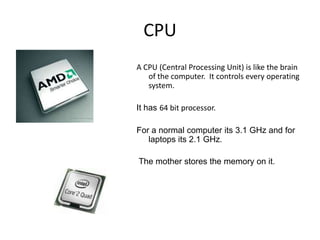
A CPU (Central Processing Unit) is like the brain
   of the computer. It controls every operating
   system.

It has 64 bit processor.

For a normal computer its 3.1 GHz and for
   laptops its 2.1 GHz.

The mother stores the memory on it.
Memory
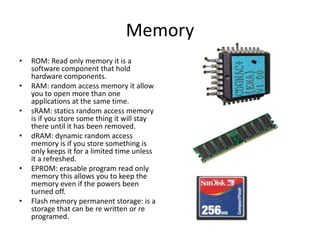
•   ROM: Read only memory it is a
    software component that hold
    hardware components.
•   RAM: random access memory it allow
    you to open more than one
    applications at the same time.
•   sRAM: statics random access memory
    is if you store some thing it will stay
    there until it has been removed.
•   dRAM: dynamic random access
    memory is if you store something is
    only keeps it for a limited time unless
    it a refreshed.
•   EPROM: erasable program read only
    memory this allows you to keep the
    memory even if the powers been
    turned off.
•   Flash memory permanent storage: is a
    storage that can be re written or re
    programed.
Adapter cards
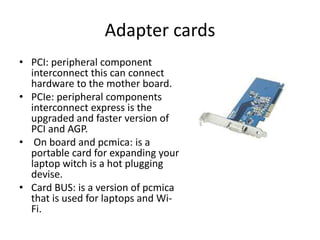
• PCI: peripheral component
  interconnect this can connect
  hardware to the mother board.
• PCIe: peripheral components
  interconnect express is the
  upgraded and faster version of
  PCI and AGP.
• On board and pcmica: is a
  portable card for expanding your
  laptop witch is a hot plugging
  devise.
• Card BUS: is a version of pcmica
  that is used for laptops and Wi-
  Fi.
BUS types
• Buses are something that moves data around
  the mother board. There is three types of bus
  control bus, address bus and data bus. Thiess
  busses are in a system bus.
Storage devises
• PATA: is a interface component for storage devises.
• SATA: is a newer faster version of PATA and it allows
  hot swapping.
• SCSI: it’s a small computer system interface. Its for
  connection peripherals and allows 8 and 16 bit devises
  on a single bus.
• Solid state: is a new hard drive that uses integrated
  circuits for memory.
• Partitioning: splitting up a hard drive in to multiple
  segments.
• Formatting: setting the hard drive for a set file format
  like FAT32 and NTFS.
Input and output devices
• Input devices are devices that feeds
  information in to the computer. Things like
  keyboards, mice, microphones and touchpads.
• Outputs are devices that feed information out
  from the computer. Things like monitors,
  earphones, speakers and printer.
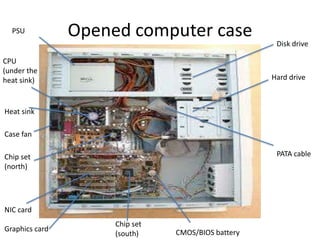
PSU           Opened computer case
                                                     Disk drive

CPU
(under the
heat sink)                                          Hard drive


Heat sink

Case fan

Chip set                                             PATA cable
(north)


NIC card
                     Chip set
Graphics card                   CMOS/BIOS battery
                     (south)

Jame's Internal Components

  • 1.
    Internet components James Nash Year 11
  • 2.
    CPU A CPU (CentralProcessing Unit) is like the brain of the computer. It controls every operating system. It has 64 bit processor. For a normal computer its 3.1 GHz and for laptops its 2.1 GHz. The mother stores the memory on it.
  • 3.
    Memory • ROM: Read only memory it is a software component that hold hardware components. • RAM: random access memory it allow you to open more than one applications at the same time. • sRAM: statics random access memory is if you store some thing it will stay there until it has been removed. • dRAM: dynamic random access memory is if you store something is only keeps it for a limited time unless it a refreshed. • EPROM: erasable program read only memory this allows you to keep the memory even if the powers been turned off. • Flash memory permanent storage: is a storage that can be re written or re programed.
  • 4.
    Adapter cards • PCI:peripheral component interconnect this can connect hardware to the mother board. • PCIe: peripheral components interconnect express is the upgraded and faster version of PCI and AGP. • On board and pcmica: is a portable card for expanding your laptop witch is a hot plugging devise. • Card BUS: is a version of pcmica that is used for laptops and Wi- Fi.
  • 5.
    BUS types • Busesare something that moves data around the mother board. There is three types of bus control bus, address bus and data bus. Thiess busses are in a system bus.
  • 6.
    Storage devises • PATA:is a interface component for storage devises. • SATA: is a newer faster version of PATA and it allows hot swapping. • SCSI: it’s a small computer system interface. Its for connection peripherals and allows 8 and 16 bit devises on a single bus. • Solid state: is a new hard drive that uses integrated circuits for memory. • Partitioning: splitting up a hard drive in to multiple segments. • Formatting: setting the hard drive for a set file format like FAT32 and NTFS.
  • 7.
    Input and outputdevices • Input devices are devices that feeds information in to the computer. Things like keyboards, mice, microphones and touchpads. • Outputs are devices that feed information out from the computer. Things like monitors, earphones, speakers and printer.
  • 8.
    PSU Opened computer case Disk drive CPU (under the heat sink) Hard drive Heat sink Case fan Chip set PATA cable (north) NIC card Chip set Graphics card CMOS/BIOS battery (south)