+
Introduction to Computer
Hardware
Exploring Computer
Science – Unit 1
+
Vocabulary
 Processor
 Memory (RAM)
 Operating System
 Hard Drive (storage)
 Optical Drive
 Monitor or Screen Size
 Cards (Video, Sound)
 Laptop or Desktop
 Ports
 MAC vs. PC
+
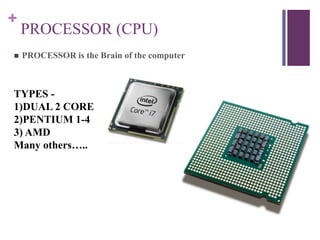
PROCESSOR (CPU)
 PROCESSOR is the Brain of the computer
TYPES -
1)DUAL 2 CORE
2)PENTIUM 1-4
3) AMD
Many others…..
+
Memory (RAM)
 RAM stands for Random Access Memory
 TWO types of it STATIC and DYNAMIC
 Computing devices use RAM (random access memory) to provide the processor with
quick access to the operating system, applications and needed data.
+
Operating System
 The operating system (OS) is the most important program that
runs on a computer. Every general-purpose computer must
have an operating system to run other programs and
applications. Computer operating systems perform basic tasks,
such as recognizing input from the keyboard, sending output to
the display screen, keeping track of files and directories on the
disk, and controlling peripheral devices such as printers.
+
Hard Drive
 A hard disk drive (HDD), hard disk, hard drive or fixed disk
is a data storage device used for storing and retrieving digital
information using one or more rigid rapidly rotating disks
(platters) coated with magnetic material.
+
Optical Drive
 In computing, an optical disc drive (ODD) is a disk drive that
uses laser light or electromagnetic waves within or near the
visible light spectrum as part of the process of reading or
writing data to or from optical discs. Some drives can only read
from certain discs, but recent drives can both read and record,
also called burners or writers. Compact discs, DVDs, and Blu-
ray discs are common types of optical media which can be read
and recorded by such drives.
+
Monitor (Display) Size
 On 2D displays, such as computer monitors and TVs, the display
size (or viewable image size or VIS) is the physical size of the area
where pictures and videos are displayed. The size of a screen is
usually described by the length of its diagonal, which is the distance
between opposite corners, usually in inches.
+
CARDS
 VIDEO CARDS
 SOUND CARDS
 NETWORK INTERFACE CARDS
+
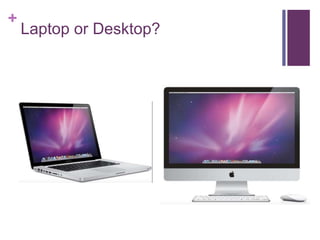
Laptop or Desktop?
+
PORTS
+
MAC vs. PC

Computer Hardware

  • 1.
  • 2.
    + Vocabulary  Processor  Memory(RAM)  Operating System  Hard Drive (storage)  Optical Drive  Monitor or Screen Size  Cards (Video, Sound)  Laptop or Desktop  Ports  MAC vs. PC
  • 3.
    + PROCESSOR (CPU)  PROCESSORis the Brain of the computer TYPES - 1)DUAL 2 CORE 2)PENTIUM 1-4 3) AMD Many others…..
  • 4.
    + Memory (RAM)  RAMstands for Random Access Memory  TWO types of it STATIC and DYNAMIC  Computing devices use RAM (random access memory) to provide the processor with quick access to the operating system, applications and needed data.
  • 5.
    + Operating System  Theoperating system (OS) is the most important program that runs on a computer. Every general-purpose computer must have an operating system to run other programs and applications. Computer operating systems perform basic tasks, such as recognizing input from the keyboard, sending output to the display screen, keeping track of files and directories on the disk, and controlling peripheral devices such as printers.
  • 6.
    + Hard Drive  Ahard disk drive (HDD), hard disk, hard drive or fixed disk is a data storage device used for storing and retrieving digital information using one or more rigid rapidly rotating disks (platters) coated with magnetic material.
  • 7.
    + Optical Drive  Incomputing, an optical disc drive (ODD) is a disk drive that uses laser light or electromagnetic waves within or near the visible light spectrum as part of the process of reading or writing data to or from optical discs. Some drives can only read from certain discs, but recent drives can both read and record, also called burners or writers. Compact discs, DVDs, and Blu- ray discs are common types of optical media which can be read and recorded by such drives.
  • 8.
    + Monitor (Display) Size On 2D displays, such as computer monitors and TVs, the display size (or viewable image size or VIS) is the physical size of the area where pictures and videos are displayed. The size of a screen is usually described by the length of its diagonal, which is the distance between opposite corners, usually in inches.
  • 9.
    + CARDS  VIDEO CARDS SOUND CARDS  NETWORK INTERFACE CARDS
  • 10.
  • 11.
  • 12.