Health Care Workflow Process
Improvement
Process Redesign
Lecture b
This material (Comp 10 Unit 6) was developed by Duke University, funded by the Department of Health and
Human Services, Office of the National Coordinator for Health Information Technology under Award
Number IU24OC000024. This material was updated by Normandale Community College, funded under
Award Number 90WT0003.
This work is licensed under the Creative Commons Attribution-NonCommercial-ShareAlike 4.0 International
License. To view a copy of this license, visit http://creativecommons.org/licenses/by-nc-sa/4.0/
Process Redesign
Learning Objectives
• Describe how information technology can
be used to increase the efficiency of
workflow in health care settings
• Identify aspects of clinical workflow that
are improved by EHR
2
Human-Centered Design (HCD)
• HCD is an approach to systems design
and development that aims to make
interactive systems more usable by
focusing on the use of the system and
applying human factors/ ergonomics and
usability knowledge and techniques. (ISO,
2010)
3
Big D and Little d
• For large software systems such as electronic
health records, we distinguish two types of
design:
– D– design of the software itself
– d – configuration of the system to make it work for a
particular clinic’s processes
• Decisions about how electronic health record
software is used in the clinic workflow heavily
impacts how clinic providers and staff interact
with the system.
4
Human-Centered Design Principles
ISO 9241-210
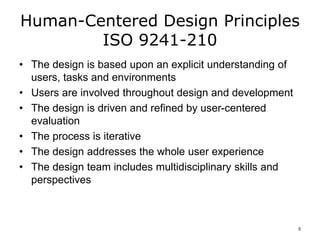
• The design is based upon an explicit understanding of
users, tasks and environments
• Users are involved throughout design and development
• The design is driven and refined by user-centered
evaluation
• The process is iterative
• The design addresses the whole user experience
• The design team includes multidisciplinary skills and
perspectives
5
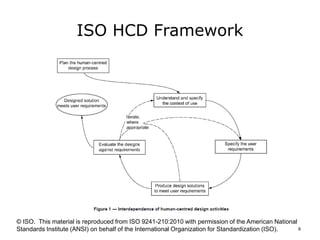
ISO HCD Framework
© ISO. This material is reproduced from ISO 9241-210:2010 with permission of the American National
Standards Institute (ANSI) on behalf of the International Organization for Standardization (ISO). 6
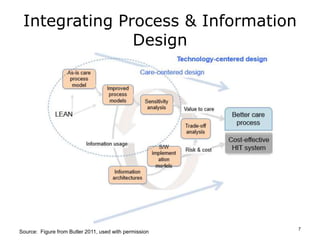
Integrating Process & Information
Design
Source: Figure from Butler 2011, used with permission
7
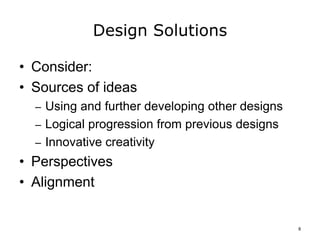
Design Solutions
• Consider:
• Sources of ideas
– Using and further developing other designs
– Logical progression from previous designs
– Innovative creativity
• Perspectives
• Alignment
8
Design Methods
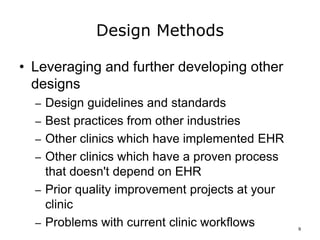
• Leveraging and further developing other
designs
– Design guidelines and standards
– Best practices from other industries
– Other clinics which have implemented EHR
– Other clinics which have a proven process
that doesn't depend on EHR
– Prior quality improvement projects at your
clinic
– Problems with current clinic workflows 9
Design Methods - 2
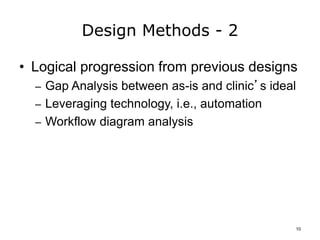
• Logical progression from previous designs
– Gap Analysis between as-is and clinic’s ideal
– Leveraging technology, i.e., automation
– Workflow diagram analysis
10
Design Methods - 3
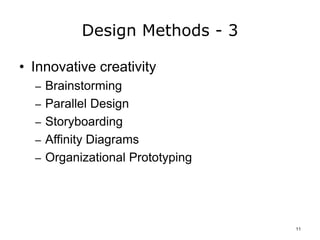
• Innovative creativity
– Brainstorming
– Parallel Design
– Storyboarding
– Affinity Diagrams
– Organizational Prototyping
11
Design Perspectives
• Patient
• Clinic providers and staff
12
Design Alignment
• Organizational structures
– i.e., Roles, responsibilities, authority
• Available talent
• Physical layout
• Information flow
• Information use
• Regulatory requirements
– Accreditation and “Meaningful Use”
13
Three Key Considerations
• Key considerations in process redesign:
• Clinical decision support
• Other Meaningful Use objectives
• Physical layout
• System interfaces
14
Impact of CDSS on Workflow
• Information must be available when providers
and staff need it
– i.e., At the point of decision making
o Are they logged into the system?
o Do they need to be or will they be in front of a computer to
get the alert?
o Do they need to be with the patient?
o Do they have what they need to act on the alert?
• Decision must be supported
– Representation
– Information
• Right place, right time, right resources 15
Impact of Physical Location on
Workflow
• Location of computers
• Other office hardware
• Office layout:
– Patient, provider and staff flow
– Traffic congestion
– Number of steps
– Standing or sitting
16
Impact of System Interfaces on
Workflow
• Common interfaces
– Practice Management System for billing
– Local lab systems
– Imaging
– Local hospital
– Local Health Information Exchange
• Interfaces impact what information will be
available electronically and when
17
Review of New Process
• Providers and Staff look for:
– Points of failure
– Potential confusion
– Bottlenecks
• Design Team considerations
• Technology Vendor’s determinations:
– Technology Leveraged
– Pot holes
18
Process Redesign
Summary – Lecture b
• Human-Centered Process Design
• Impact on workflow of:
– Clinical decision support
– Physical layout
– System interfaces
19
Process Redesign
References – Lecture b
References
Butler, K., Bahrami ,A., Esposito, C,, Hebron, A. (2000). Conceptual models for coordinating the
design of user work with the design of information systems. . Data & Knowledge Engineering,
33(2), 191-198.
Butler A. (2011, May). Human Center for Design & Engineering, University of Washington, MATH
Method & Tools for Evidence-based Health IT, Presentation at Duke University, Durham, NC.
ISO 9241-210:2010(E) Ergonomics of human–system interaction —Part 210:Human-centred design
for interactive systems. Retrieved from
http://www.iso.org/iso/iso_catalogue/catalogue_ics/catalogue_detail_ics.htm?csnumber=52075
Mansar, S. L., & Reijers, H. A. (2005). Best practices in business process redesign: validation of a
redesign framework. Computers in Industry, 56, 457-471. Retrieved from
http://www.win.tue.nl/~hreijers/H.A.%20Reijers%20Bestanden/Mansar_2005_Computers-in-
Industry.pdf
Images
Slide 6: ISO HCD Framework. ISO 9241-210:2010(E) Ergonomics of human–system interaction —
Part 210:Human-centred design for interactive systems. Retrieved from
http://www.iso.org/iso/iso_catalogue/catalogue_ics/catalogue_detail_ics.htm?csnumber=52075
Slide 7: Integrating Process and information. Image used with permission. Butler et al. (2000)
20
Process Redesign
Lecture b
This material was developed by Duke
University, funded by the Department of
Health and Human Services, Office of the
National Coordinator for Health Information
Technology under Award Number
IU24OC000024. This material was updated
by Normandale Community College, funded
under Award Number 90WT0003.
21

Comp10 unit6b lecture_slides

  • 1.
    Health Care WorkflowProcess Improvement Process Redesign Lecture b This material (Comp 10 Unit 6) was developed by Duke University, funded by the Department of Health and Human Services, Office of the National Coordinator for Health Information Technology under Award Number IU24OC000024. This material was updated by Normandale Community College, funded under Award Number 90WT0003. This work is licensed under the Creative Commons Attribution-NonCommercial-ShareAlike 4.0 International License. To view a copy of this license, visit http://creativecommons.org/licenses/by-nc-sa/4.0/
  • 2.
    Process Redesign Learning Objectives •Describe how information technology can be used to increase the efficiency of workflow in health care settings • Identify aspects of clinical workflow that are improved by EHR 2
  • 3.
    Human-Centered Design (HCD) •HCD is an approach to systems design and development that aims to make interactive systems more usable by focusing on the use of the system and applying human factors/ ergonomics and usability knowledge and techniques. (ISO, 2010) 3
  • 4.
    Big D andLittle d • For large software systems such as electronic health records, we distinguish two types of design: – D– design of the software itself – d – configuration of the system to make it work for a particular clinic’s processes • Decisions about how electronic health record software is used in the clinic workflow heavily impacts how clinic providers and staff interact with the system. 4
  • 5.
    Human-Centered Design Principles ISO9241-210 • The design is based upon an explicit understanding of users, tasks and environments • Users are involved throughout design and development • The design is driven and refined by user-centered evaluation • The process is iterative • The design addresses the whole user experience • The design team includes multidisciplinary skills and perspectives 5
  • 6.
    ISO HCD Framework ©ISO. This material is reproduced from ISO 9241-210:2010 with permission of the American National Standards Institute (ANSI) on behalf of the International Organization for Standardization (ISO). 6
  • 7.
    Integrating Process &Information Design Source: Figure from Butler 2011, used with permission 7
  • 8.
    Design Solutions • Consider: •Sources of ideas – Using and further developing other designs – Logical progression from previous designs – Innovative creativity • Perspectives • Alignment 8
  • 9.
    Design Methods • Leveragingand further developing other designs – Design guidelines and standards – Best practices from other industries – Other clinics which have implemented EHR – Other clinics which have a proven process that doesn't depend on EHR – Prior quality improvement projects at your clinic – Problems with current clinic workflows 9
  • 10.
    Design Methods -2 • Logical progression from previous designs – Gap Analysis between as-is and clinic’s ideal – Leveraging technology, i.e., automation – Workflow diagram analysis 10
  • 11.
    Design Methods -3 • Innovative creativity – Brainstorming – Parallel Design – Storyboarding – Affinity Diagrams – Organizational Prototyping 11
  • 12.
    Design Perspectives • Patient •Clinic providers and staff 12
  • 13.
    Design Alignment • Organizationalstructures – i.e., Roles, responsibilities, authority • Available talent • Physical layout • Information flow • Information use • Regulatory requirements – Accreditation and “Meaningful Use” 13
  • 14.
    Three Key Considerations •Key considerations in process redesign: • Clinical decision support • Other Meaningful Use objectives • Physical layout • System interfaces 14
  • 15.
    Impact of CDSSon Workflow • Information must be available when providers and staff need it – i.e., At the point of decision making o Are they logged into the system? o Do they need to be or will they be in front of a computer to get the alert? o Do they need to be with the patient? o Do they have what they need to act on the alert? • Decision must be supported – Representation – Information • Right place, right time, right resources 15
  • 16.
    Impact of PhysicalLocation on Workflow • Location of computers • Other office hardware • Office layout: – Patient, provider and staff flow – Traffic congestion – Number of steps – Standing or sitting 16
  • 17.
    Impact of SystemInterfaces on Workflow • Common interfaces – Practice Management System for billing – Local lab systems – Imaging – Local hospital – Local Health Information Exchange • Interfaces impact what information will be available electronically and when 17
  • 18.
    Review of NewProcess • Providers and Staff look for: – Points of failure – Potential confusion – Bottlenecks • Design Team considerations • Technology Vendor’s determinations: – Technology Leveraged – Pot holes 18
  • 19.
    Process Redesign Summary –Lecture b • Human-Centered Process Design • Impact on workflow of: – Clinical decision support – Physical layout – System interfaces 19
  • 20.
    Process Redesign References –Lecture b References Butler, K., Bahrami ,A., Esposito, C,, Hebron, A. (2000). Conceptual models for coordinating the design of user work with the design of information systems. . Data & Knowledge Engineering, 33(2), 191-198. Butler A. (2011, May). Human Center for Design & Engineering, University of Washington, MATH Method & Tools for Evidence-based Health IT, Presentation at Duke University, Durham, NC. ISO 9241-210:2010(E) Ergonomics of human–system interaction —Part 210:Human-centred design for interactive systems. Retrieved from http://www.iso.org/iso/iso_catalogue/catalogue_ics/catalogue_detail_ics.htm?csnumber=52075 Mansar, S. L., & Reijers, H. A. (2005). Best practices in business process redesign: validation of a redesign framework. Computers in Industry, 56, 457-471. Retrieved from http://www.win.tue.nl/~hreijers/H.A.%20Reijers%20Bestanden/Mansar_2005_Computers-in- Industry.pdf Images Slide 6: ISO HCD Framework. ISO 9241-210:2010(E) Ergonomics of human–system interaction — Part 210:Human-centred design for interactive systems. Retrieved from http://www.iso.org/iso/iso_catalogue/catalogue_ics/catalogue_detail_ics.htm?csnumber=52075 Slide 7: Integrating Process and information. Image used with permission. Butler et al. (2000) 20
  • 21.
    Process Redesign Lecture b Thismaterial was developed by Duke University, funded by the Department of Health and Human Services, Office of the National Coordinator for Health Information Technology under Award Number IU24OC000024. This material was updated by Normandale Community College, funded under Award Number 90WT0003. 21

Editor's Notes

  • #2 Welcome to Health Care Workflow Process Improvement, Process Redesign, lecture b.
  • #3 The objectives for this lecture are to: Describe how information technology can be used to increase the efficiency of workflow in health care settings, and Identify aspects of clinical workflow that are improved by EHR .
  • #4 Human-Centered Design (HCD) is an approach to systems design and development that aims to make interactive systems more usable by focusing on the use of the system and applying human factors/ergonomics and usability knowledge and technique. The International Organization for Standardization (ISO) has an international standard that lays out a framework for Human Centered Design, ISO 9241-210:2010(E) Human-Centered Design for interactive systems (ISO, 2010). While Human-Centered Design is usually applied to the development of computer software or machines with which humans interact, we apply it here to the design and implementation of process changes.
  • #5 For large software systems such as electronic health records, we distinguish two types of design: D – design of the software itself and d – configuration of the system to make it work for a particular clinic. Human-Centered Design is usually applied to the development of computer software or machines with which humans interact. Decisions about how electronic health record software is used in the workflow of clinic providers and staff, often done as part of implementation, heavily impacts how clinic providers and staff interact with the system. Thus, we apply Human-Centered Design here to the design and implementation of process changes, i.e., little d. In fact, ISO 9241-210 emphasizes that Human-Centered Design activities “are applicable … at any stage in the development of a system.” (ISO, 2010)
  • #6 The principles of Human-Centered Design are outlined in ISO 9241-210. They are: The design is based upon an explicit understanding of users, tasks and environments, Users are involved throughout design and development, The design is driven and refined by user-centered evaluation, The process is iterative, The design addresses the whole user experience including an appropriate balance between human and machine, and The design team includes multidisciplinary skills and perspectives. (ISO, 2010) Importantly, initial knowledge acquisition and design can never capture ALL of what users need. The iterative approach is necessary for systems and humans to work well together.
  • #7 ISO 9241-210:2010(E) Ergonomics of human–system interaction —Part 210: Human-centered design for interactive systems outlines a framework for Human-Centered Design for interactive systems. Electronic Health Records are interactive systems. The ISO Human-Centered Design framework includes planning, understanding context of use, specifying user requirements, producing design solutions, and evaluation to see whether or not the design solution meets the needs of the user. Understanding the context of use occurs during the knowledge acquisition phase. Specifying the user requirements occurs during both the knowledge acquisition and the process analysis phase. Design solutions are produced in process redesign and evaluated after they are implemented (evaluation is covered in a future unit). Importantly, the ISO HCD framework emphasizes the iterative nature of design. Most recently, there has been considerable work at integrating information and workflow needs in design. (Butler, 2000) The diagram on the slide is “© ISO.  This material is reproduced from ISO 9241-210:2010 with permission of the American National Standards Institute (ANSI) on behalf of the International Organization for Standardization (ISO).  No part of this material may be copied or reproduced in any form, electronic retrieval system or otherwise or made available on the Internet, a public network, by satellite or otherwise without the prior written consent of ANSI.  Copies of this standard may be purchased from ANSI, 25 West 43rd Street, New York, NY 10036, (212) 642-4900, http://webstore.ansi.org”
  • #8 In Unit 3 we covered diagrams for both information and process design. For information design, we covered entity-relationship diagrams and UML class diagrams. For process design, we covered UML activity diagrams and Flow charts. We discussed data flow diagrams. However, none of these methods represents the inter-relationship between the work process and the information needed for the process tasks and decisions. Dr. Keith Butler of the Human Center for Design & Engineering, University of Washington and his research team (Butler, 2011) developed a framework and tools for representing the inter-relationship between the work process and the information needed for the process tasks and decisions. (Butler, 2000, 2011) The main idea of his work and the associated MATH tool is presented in the slide. In his framework, the information design (bottom trajectory) and the process design (top trajectory) are conducted within the same modeling tool and are done iteratively so that each informs the other. Though the tool is not yet available for widespread implementation, the concepts can be employed and applied to everyday process redesign situations, i.e., considering the information needed for process tasks and decisions along with work on the process.
  • #9 After a problem or opportunity for improving a process has been identified, the next step is to generate candidates for the redesigned process. These ideas for process redesign can come from different places, including: Researching what other organizations have done to solve similar problems and using and further developing their designs, logical progression from previous designs – for example, the redesign strategies presented by Mansar and Reijers, and innovative creativity. When proposing or evaluating candidate process redesigns, it is helpful to think through each of these three sources of ideas to make sure that all avenues have been investigated. It is important to examine processes and design options from different perspectives, e.g., patients, caregivers, providers, staff, external organizations, as well as to assess alignment with regulations and organizational goals.
  • #10 Researching what others have done and leveraging their designs is a great place to start. Examples of sources of information include: Design guidelines and standards (available from AHRQ), Best practices from other industries (strategies synthesized by Mansar and Reijers, 2005), Other clinics which have implemented EHR – case studies and examples available from AHRQ, Other clinics which have a proven process that doesn‘t depend on EHR, Prior quality improvement projects at your clinic, and Problems with current clinic workflows – i.e., just ask clinic providers, staff, and patients what’s not working well.
  • #11 Another great place to start is with a previous design and implement a logical progression, i.e., an incremental improvement, from that design. Ideas for progressing from a previous design include: performing a Gap Analysis between the as-is state and the clinic’s ideal design, leveraging technology, i.e., greater use of automation, and performing a workflow diagram analysis, i.e., using the process diagrams to look for redundant work, unnecessary steps, delays, and overly complex areas of the process.
  • #12 It is not a good idea to rely on creativity alone because doing so overlooks what others have already identified, tested and solved. However, when used in conjunction with the previously mentioned sources of ideas, methods such as brainstorming, parallel design and comparison, storyboarding, affinity diagrams, and organizational prototyping can yield new ideas. Inclusive activities like these are great ways to engage practice providers and staff in understanding the complexities of processes and the constraints under which the clinic works, as well as leverage provider and staff creativity to improve operations and patient care.
  • #13 Two key perspectives that should be considered in clinic process redesign are the patient’s perspective and the clinic provider’s and staff’s perspectives. Simply put, the patient’s experience with a process is often very different than that of staff and providers. Optimizing clinic processes for one may degrade the experience for the other. The solution is to walk or talk-through processes from a patient’s perspective as well as from clinic providers and staff’s perspectives. You will find that the patient’s path through the clinic crosses or touches more than one clinic process. Process redesign will often be a compromise between what is patient friendly and what is optimum for clinic providers and staff.
  • #14 Process designs should also be evaluated for alignment with the following six aspects. Often these important aspects are overlooked when analysts and clinic providers and staff are concentrating on tasks and sequence of process steps. Organizational structures, i.e., roles, responsibilities, authority can be assessed by asking providers and staff questions like, “Who will perform this task?” “Is it within their scope of practice or training?” “Who needs to approve, review or sign-off?” Available talent can be assessed by asking “Who will perform this task?”, “is this a good match for their abilities?” Physical layout can be assessed by physically walking through processes to see if the traffic paths are likely to cause congestion, raise privacy concerns, or have extra steps. Information flow can be assessed by physically walking through information paths to see if the needed information is available, and if the representation by the information systems adequately supports the task. Information use can be assessed by assessing each task to see if the needed information is available, and if the representation by the information systems adequately supports the task. Regulatory requirements, such as “Meaningful Use” and accreditation have required reporting which may vary by specialty area and by state. Regulatory requirements can be assessed by asking clinic leadership what regulations apply to the clinic and by a gap analysis between the requirements and the proposed process.
  • #15 There are some key aspects of health care that should impact process redesign in health care settings. These should be taken into account in any health care process redesign and include: Clinical decision support (CDS) and the clinical decision support systems (CDSS). CDS impacts the sequence and timing of tasks in the clinic setting. Other Meaningful Use objectives – these are covered in detail in lecture d Physical layout of the facility – layout impacts how long it takes to complete tasks, e.g., walking to the other side of the building and back to retrieve supplies versus having them handy. System interfaces also impact processes because they enable the receipt of data electronically, and population of data directly into the EHR where it can trigger alerts, for example an alert for a provider to review an out of range lab value that has just been received for a patient.
  • #16 Clinical Decision Support impacts workflow and vice versa. Information must be available when providers and staff need it, i.e., at the point of decision making. Questions to address include: Are the staff logged into the system? Do they need to be or will they be in front of a computer to get the alert? Do they need to be with the patient to effectively resolve the alert? Do they have what they need to act on the alert? Representation and information must support decision making. It is important that the information be at the right place at the right time with the right resources available for efficient care. The workflow, physical layout and information flow need to come together. From a human-centered design perspective, the data flow and workflow should be planned and assessed from the perspective of both the patient and the clinic providers and staff, i.e., what tasks or decisions need to be done or made based on data received electronically, and how should that data be displayed and brought to the individual’s attention? Do the individual’s have everything needed to act on the information? These things are the context of system and information use and should be used in specifying the requirements for the process. Prototypes should be produced and evaluated in an iterative fashion.
  • #17 As we already know, the physical layout of office space impacts the workflow. For example, are computers at the nurse’s station, in the exam rooms, or in the hall? Or, do providers carry mobile computers – do they need table space and a place to plug in or recharge the battery? Is power available where needed and are there extra power supplies such as batteries and chargers for laptops and other mobile devices? It is also important to address whether office hardware such as chairs, desks, and table top space for computers is available and sufficient. Office lay-out should address the patient, provider and staff flow since all of these have the potential for traffic congestion. In addition, it is important to address the number of steps required for each activity, whether tasks will be done standing or sitting, and if sitting, whether there is sufficient room for chairs and floor pads. While some aspects of physical layout can be changed, e.g., placement of furniture and equipment, others, e.g., location of the nurses station, patient waiting room, or provider offices can not be changed easily. These will need to be taken into account in process redesign. Possible workflows that minimize the impact of less than optimal physical layout should be considered and evaluated.
  • #18 Interfaces with other health information systems and organizations impact what information will be available electronically and when. This, in turn, impacts the workflow. Common interfaces include: Practice Management System for billing, Local lab systems, Imaging, Local hospital, and Local Health Information Exchange (HIE). From a human-centered design perspective, the data flow and workflow should be planned and assessed from the perspective of both the patient and the clinic providers and staff, i.e., what tasks or decisions need to be done or made based on data received electronically, and how should that data be displayed and brought to the individual’s attention? Do the individuals have everything needed to act on the information? These things are the context of system and information use and should be used in specifying the requirements for the process. Prototypes should be produced and evaluated in an iterative fashion.
  • #19 Once a process redesign is available, review from multiple perspectives is helpful. Providers and Staff look for points of failure, potential confusion, and bottlenecks. The Design Team should determine if this is what the team meant to design or communicate? The technology vendor should assess whether or not the technology (EHR) is leveraged appropriately. Will it do everything assumed in the design? The technology vendor should also determine if customization is required or if there are common places where other clinics have had trouble that should be assessed. Prototypes should be produced and evaluated in an iterative fashion.
  • #20 This concludes Lecture b of Process Redesign. In this lecture, we have covered the Human-Centered Process Design and its impact on the workflow of clinical decision support, physical layout, and system interfaces.
  • #21 No audio.
  • #22 No audio