IT Security Best Practices
July 25, 2013
Community IT Innovators Webinar Series
Presenters:
Steve Longenecker
Mark Kraemer
Webinar Tips
• Ask questions
Post questions via chat
• Interact
Respond to polls during webinar
• Focus
Avoid multitasking. You may just miss the best part of the
presentation
• Webinar PowerPoint & Recording
PowerPoint and recording links will be shared after the webinar
About Community IT
Community IT Innovators partners with nonprofits to help them solve their
strategic & day-to-day IT challenges.
Strategic
Proactive approach so you can make IT decisions that support your
mission and grow with you
Collaborative
Team of over 40 staff who empower you to make informed IT choices
Invested
We are committed to supporting your mission, and take care of your IT
network as if it were our own
Nonprofit focus
Worked with over 900 nonprofits since 1993
Presenters
Steve Longenecker, Project Manager
slongenecker@communityit.com
Mark Kraemer, Network Administrator
mkraemer@communityit.com
Agenda
• The Big Picture
• Organizational Philosophy/Attitude
• Organizational Structures
• Security Technology
• End User Responsibility
• IT Security Stories
• Questions
The Big Picture
What are we hoping for when we say
we want our network to be secure?
• No interruptions to operations?
• No data loss?
• No inappropriate use of IT resources?
We are focused on the traditional view in
this webinar. For our purposes today:
IT Security means preventing unauthorized
access, misuse, modification or denial of IT
resources.(credit to Wikipedia)
What are your organization’s biggest IT
security challenges?
Poll question
Denial of Service attack prevents access to our
organization’s website for six hours.
Malware causes half my desktops to participate in a
“bot army.”
Interns are reading the personnel files of veteran staff
members.
The office manager is using your organization’s fantastic
Internet connection to download copyrighted movies
so he can burn them to DVD and watch them at home.
Examples
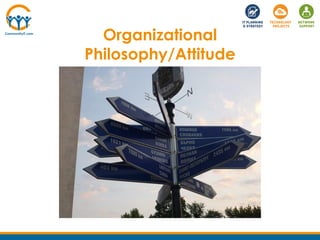
Organizational
Philosophy/Attitude
What is your organizational
balance between security,
accessibility and cost?
• What is your mission?
• Who do you serve?
• What types of data do you have?
• How many users?
• What does your existing security
infrastructure look like?
Assessing your organization’s risk
• Where do your users do most of their
work?
• Do they use their own devices?
• Do they need remote access to your
systems?
What are your accessibility
requirements?
• What is required by law or credentialing
organizations?
• What is the state of your current network?
• What is your IT budget?
What is the cost of security?
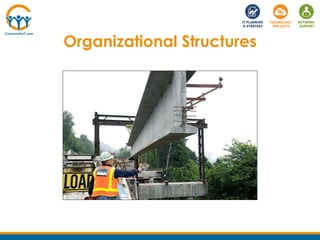
Organizational Structures
• Does your organization think about
security?
• Are user accountable for their actions?
• Do stakeholders understand what security
breaches can mean for the mission?
Security Culture
• Office Manager?
• HR person?
• CFO?
Someone needs to “own” security
Who is responsible for IT Security in your
organization?
Poll question
• Appropriate Use Policy.
• Password Policy.
• BYOD and BYOA Policies.
You Need Policies for End Users
• Patching Policy.
• Data Retention Policies
• Identity and Access management.
You Need Policies for the IT Dept
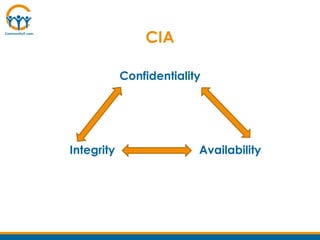
Confidentiality
CIA
Integrity Availability
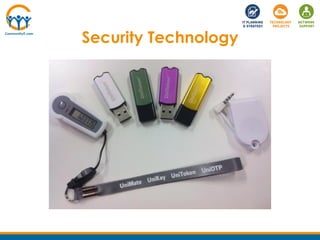
Security Technology
• Patch Tuesday.
• Third Party Patching.
• How to patch? Day or Night? Force
Reboots?
• Alerts/Triggers on Monitors.
Centralized Patching/Monitoring
• NTFS Permissions.
• UAC.
• Event logs.
• Host Level Firewalls.
• Password Enforcement Group Policy.
• Screen Saver Lock Group Policy.
Windows Security Tools
• Community IT recommends Fortigates.
• Limit Outgoing Traffic.
• Limit Incoming Traffic’s Source Address
when Appropriate.
• Can provide VPN remote access.
• Replace every 5 years.
• Size appropriately.
• Maintain your firewall (update firmware,
backup, maintain support contract, remove
policies when no longer in use).
Firewalls
• Hosted is preferred.
• Mail Continuity service can be included.
• Postini was great.
• Community IT offers McAfee SaaS Email
Protection and Continuity to its clients.
Email Filters
• You must have it. You must maintain it.
• An enterprise solution is needed (includes
centralized management).
• Cloud-based is preferred so that traveling
laptops have access to updated definitions
whenever they are online.
• No solution is immune to the zero-day threat.
• Community IT offers Vipre Antivirus to its clients.
• AV software is no substitute for careful end user
behavior
Desktop/Server Antivirus Software
• Popular in school and lab scenarios.
• Doesn’t have to restrict access to content
areas.
• No substitute for good end user habits.
Internet Content Filtering
• Not something our clients are doing at
the enterprise level.
• Overhead – password/recovery system
needed.
• Can be circumvented.
File/Disk Encryption
• Hosted services are coming online, very
much a work in progress.
• Allows focus on maintaining a single
complex frequently changed password.
• Builds corporate ownership of distributed
hosted services.
Single Sign-On
• Two separate authentication systems
must be navigated to gain access –
famous example is the ATM machine.
• Google offers 2-factor authentication to
Gmail (and other Google apps).
• Key fobs replaced by “soft tokens” on
mobile phones.
Two Factor Authentication
• Mobile devices have become a
significant data leakage/loss
opportunity.
• Can conflict with BYOD expectations.
• On Community IT’s service offering road
map.
Mobile Device Management
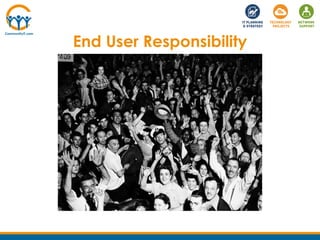
End User Responsibility
• Safe email habits
• Safe password habits
• Safe browsing habits
• Safe social media habits
• Healthy skepticism of potential social
engineering attacks
Which of these practices does your staff
need to improve on the most?
Poll question
IT Security Stories
• Simple passwords.
• Domain Admin privileges.
• Virus Impacts
• Sharing of copyrighted material.
Questions?
Upcoming Webinar
August 29
Office 365 for Nonprofits
Presenter
Johanny Torrico
Next Steps
Connect with us
Provide feedback
Short survey after you exit the webinar. Be sure to include any
questions that were not answered.
Missed anything?
Link to slides & recording will be emailed to you.

Community IT Innovators - IT Security Best Practices

  • 1.
    IT Security BestPractices July 25, 2013 Community IT Innovators Webinar Series Presenters: Steve Longenecker Mark Kraemer
  • 2.
    Webinar Tips • Askquestions Post questions via chat • Interact Respond to polls during webinar • Focus Avoid multitasking. You may just miss the best part of the presentation • Webinar PowerPoint & Recording PowerPoint and recording links will be shared after the webinar
  • 3.
    About Community IT CommunityIT Innovators partners with nonprofits to help them solve their strategic & day-to-day IT challenges. Strategic Proactive approach so you can make IT decisions that support your mission and grow with you Collaborative Team of over 40 staff who empower you to make informed IT choices Invested We are committed to supporting your mission, and take care of your IT network as if it were our own Nonprofit focus Worked with over 900 nonprofits since 1993
  • 4.
    Presenters Steve Longenecker, ProjectManager slongenecker@communityit.com Mark Kraemer, Network Administrator mkraemer@communityit.com
  • 5.
    Agenda • The BigPicture • Organizational Philosophy/Attitude • Organizational Structures • Security Technology • End User Responsibility • IT Security Stories • Questions
  • 6.
  • 7.
    What are wehoping for when we say we want our network to be secure? • No interruptions to operations? • No data loss? • No inappropriate use of IT resources?
  • 8.
    We are focusedon the traditional view in this webinar. For our purposes today: IT Security means preventing unauthorized access, misuse, modification or denial of IT resources.(credit to Wikipedia)
  • 9.
    What are yourorganization’s biggest IT security challenges? Poll question
  • 10.
    Denial of Serviceattack prevents access to our organization’s website for six hours. Malware causes half my desktops to participate in a “bot army.” Interns are reading the personnel files of veteran staff members. The office manager is using your organization’s fantastic Internet connection to download copyrighted movies so he can burn them to DVD and watch them at home. Examples
  • 11.
  • 12.
    What is yourorganizational balance between security, accessibility and cost?
  • 13.
    • What isyour mission? • Who do you serve? • What types of data do you have? • How many users? • What does your existing security infrastructure look like? Assessing your organization’s risk
  • 14.
    • Where doyour users do most of their work? • Do they use their own devices? • Do they need remote access to your systems? What are your accessibility requirements?
  • 15.
    • What isrequired by law or credentialing organizations? • What is the state of your current network? • What is your IT budget? What is the cost of security?
  • 16.
  • 17.
    • Does yourorganization think about security? • Are user accountable for their actions? • Do stakeholders understand what security breaches can mean for the mission? Security Culture
  • 18.
    • Office Manager? •HR person? • CFO? Someone needs to “own” security
  • 19.
    Who is responsiblefor IT Security in your organization? Poll question
  • 20.
    • Appropriate UsePolicy. • Password Policy. • BYOD and BYOA Policies. You Need Policies for End Users
  • 21.
    • Patching Policy. •Data Retention Policies • Identity and Access management. You Need Policies for the IT Dept
  • 22.
  • 23.
  • 24.
    • Patch Tuesday. •Third Party Patching. • How to patch? Day or Night? Force Reboots? • Alerts/Triggers on Monitors. Centralized Patching/Monitoring
  • 25.
    • NTFS Permissions. •UAC. • Event logs. • Host Level Firewalls. • Password Enforcement Group Policy. • Screen Saver Lock Group Policy. Windows Security Tools
  • 26.
    • Community ITrecommends Fortigates. • Limit Outgoing Traffic. • Limit Incoming Traffic’s Source Address when Appropriate. • Can provide VPN remote access. • Replace every 5 years. • Size appropriately. • Maintain your firewall (update firmware, backup, maintain support contract, remove policies when no longer in use). Firewalls
  • 27.
    • Hosted ispreferred. • Mail Continuity service can be included. • Postini was great. • Community IT offers McAfee SaaS Email Protection and Continuity to its clients. Email Filters
  • 28.
    • You musthave it. You must maintain it. • An enterprise solution is needed (includes centralized management). • Cloud-based is preferred so that traveling laptops have access to updated definitions whenever they are online. • No solution is immune to the zero-day threat. • Community IT offers Vipre Antivirus to its clients. • AV software is no substitute for careful end user behavior Desktop/Server Antivirus Software
  • 29.
    • Popular inschool and lab scenarios. • Doesn’t have to restrict access to content areas. • No substitute for good end user habits. Internet Content Filtering
  • 30.
    • Not somethingour clients are doing at the enterprise level. • Overhead – password/recovery system needed. • Can be circumvented. File/Disk Encryption
  • 31.
    • Hosted servicesare coming online, very much a work in progress. • Allows focus on maintaining a single complex frequently changed password. • Builds corporate ownership of distributed hosted services. Single Sign-On
  • 32.
    • Two separateauthentication systems must be navigated to gain access – famous example is the ATM machine. • Google offers 2-factor authentication to Gmail (and other Google apps). • Key fobs replaced by “soft tokens” on mobile phones. Two Factor Authentication
  • 33.
    • Mobile deviceshave become a significant data leakage/loss opportunity. • Can conflict with BYOD expectations. • On Community IT’s service offering road map. Mobile Device Management
  • 34.
  • 35.
    • Safe emailhabits • Safe password habits • Safe browsing habits • Safe social media habits • Healthy skepticism of potential social engineering attacks
  • 36.
    Which of thesepractices does your staff need to improve on the most? Poll question
  • 37.
  • 38.
    • Simple passwords. •Domain Admin privileges. • Virus Impacts • Sharing of copyrighted material.
  • 39.
  • 40.
    Upcoming Webinar August 29 Office365 for Nonprofits Presenter Johanny Torrico
  • 41.
    Next Steps Connect withus Provide feedback Short survey after you exit the webinar. Be sure to include any questions that were not answered. Missed anything? Link to slides & recording will be emailed to you.