Platform Security BriefingRamnish SinghPMP, CISSP, Microsoft Certified Architect (Infrastructure)MCITP (Windows 2008),MCTS (Windows Server,Vista, Exchange), MCSE (Windows 2003, 2000, NT), MCTCisco Certified Design Professional, Cisco Certified Network Professional, Sun CSAIT Advisor |  Microsoft CorporationBlog Address (optional) | Email (optional)
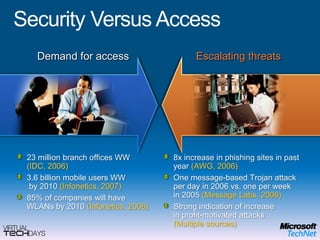
Security Versus AccessDemand for accessEscalating threats23 million branch offices WW(IDC, 2006)3.6 billion mobile users WW by 2010 (Infonetics, 2007)85% of companies will have WLANs by 2010 (Infonetics, 2006)8x increase in phishing sites in past year (AWG, 2006)One message-based Trojan attack per day in 2006 vs. one per week in 2005 (Message Labs, 2006)Strong indication of increase in profit-motivated attacks (Multiple sources)
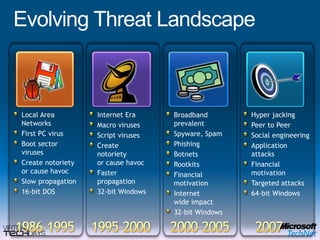
Evolving Threat LandscapeLocal Area NetworksFirst PC virusBoot sector virusesCreate notorietyor cause havocSlow propagation16-bit DOSInternet EraMacro virusesScript virusesCreate notorietyor cause havocFaster propagation32-bit WindowsHyper jackingPeer to PeerSocial engineeringApplication attacksFinancial motivationTargeted attacks64-bit WindowsBroadbandprevalentSpyware, SpamPhishingBotnetsRootkitsFinancial motivationInternet wide impact32-bit Windows1986–19951995–20002000–20052007
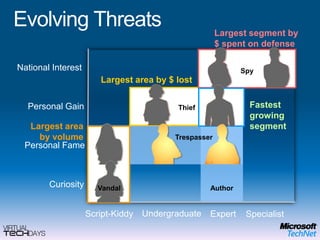
National InterestPersonal GainPersonal FameCuriosityLargest segment by $ spent on defenseSpyLargest area by $ lostFastest growing segmentThiefLargest area by volumeTrespasserAuthorVandalUndergraduateScript-KiddyExpertSpecialistEvolving Threats
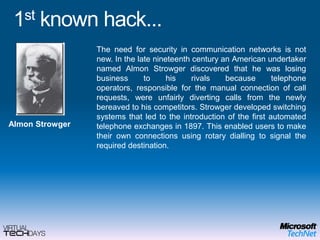
1st known hack...The need for security in communication networks is not new. In the late nineteenth century an American undertaker named AlmonStrowger discovered that he was losing business to his rivals because telephone operators, responsible for the manual connection of call requests, were unfairly diverting calls from the newly bereaved to his competitors. Strowger developed switching systems that led to the introduction of the first automated telephone exchanges in 1897. This enabled users to make their own connections using rotary dialling to signal the required destination.AlmonStrowger
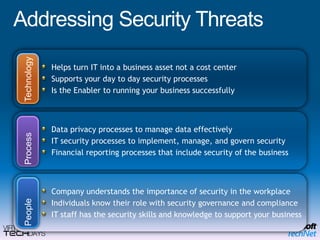
Addressing Security ThreatsHelps turn IT into a business asset not a cost center Supports your day to day security processes Is the Enabler to running your business successfullyTechnologyData privacy processes to manage data effectivelyIT security processes to implement, manage, and govern securityFinancial reporting processes that include security of the businessProcessCompany understands the importance of security in the workplaceIndividuals know their role with security governance and complianceIT staff has the security skills and knowledge to support your business People
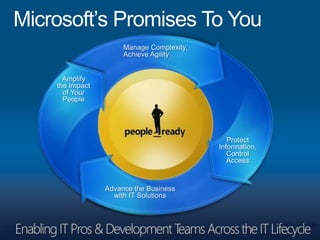
Microsoft’s Promises To YouManage Complexity,Achieve AgilityAmplifythe Impactof YourPeopleProtectInformation,ControlAccessAdvance the Businesswith IT Solutions
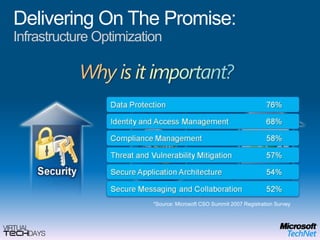
Delivering On The Promise:Infrastructure Optimization*Source: Microsoft CSO Summit 2007 Registration Survey
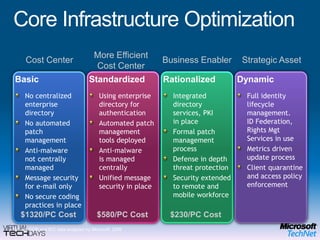
Core Infrastructure OptimizationMore Efficient Cost CenterCost Center Strategic AssetBusiness EnablerBasicNo centralized enterprise directoryNo automated patch managementAnti-malwarenot centrally managedMessage security for e-mail onlyNo secure coding practices in placeStandardizedUsing enterprise directory for authenticationAutomated patch management tools deployedAnti-malwareis managed centrallyUnified message security in placeRationalizedIntegrated directory services, PKIin placeFormal patch management processDefense in depth threat protectionSecurity extended to remote and mobile workforceDynamicFull identity lifecycle management.ID Federation,Rights Mgt Services in useMetrics driven update processClient quarantine and access policy enforcement$1320/PC Cost$580/PC Cost$230/PC CostSource:GCR and IDC data analyzed by Microsoft, 2006
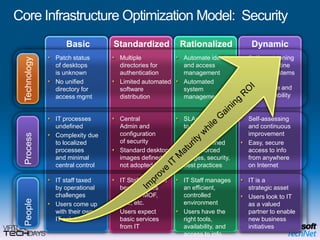
Core Infrastructure Optimization Model:  SecurityBasicStandardizedRationalizedDynamicTechnologySelf provisioning and quarantine capable systems ensure compliance and high availability Automate identity and access managementAutomatedsystem management Multiple directories for authenticationLimited automated software distributionPatch statusof desktopsis unknownNo unified directory for access mgmtSelf-assessing and continuous improvementEasy, secure access to info from anywhereon InternetSLAs are linkedto business objectivesClearly defined and enforced images, security, best practicesCentralAdmin and configurationof securityStandard desktop images defined,not adopted by allIT processes undefinedComplexity dueto localized processesand minimal central controlProcessImprove IT Maturity while Gaining ROIIT is astrategic assetUsers look to ITas a valued partner to enable new business initiativesIT Staff manages an efficient,controlled environmentUsers have the right tools,availability, and access to infoIT Staff trained in best practices such as MOF,ITIL, etc.Users expect basic services from ITIT staff taxed by operational challengesUsers come up with their ownIT solutionsPeople
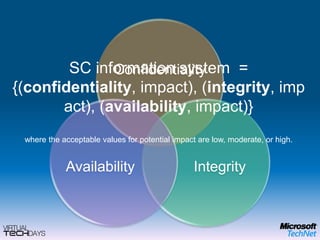
SC information system  = {(confidentiality, impact), (integrity, impact), (availability, impact)}where the acceptable values for potential impact are low, moderate, or high.
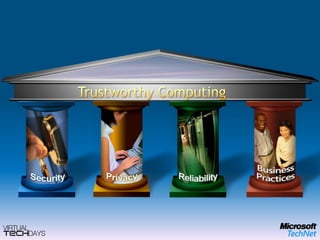
Trustworthy Computing
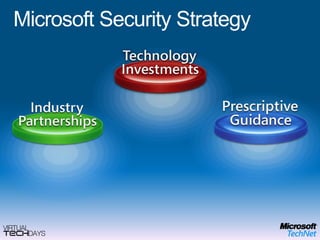
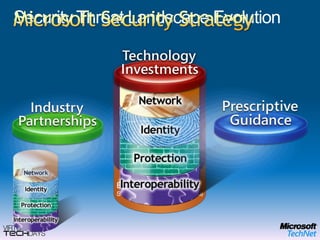
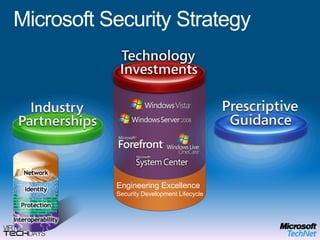
Microsoft Security Strategy
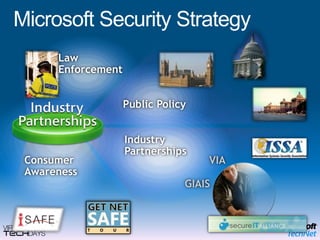
LawEnforcementPublic PolicyVIAGIAISMicrosoft Security StrategyIndustryPartnershipsConsumerAwareness
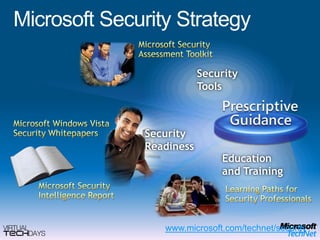
Microsoft SecurityAssessment ToolkitSecurityToolsMicrosoft Windows VistaSecurity WhitepapersSecurityReadinessEducationand TrainingMicrosoft SecurityIntelligence ReportLearning Paths forSecurity Professionalswww.microsoft.com/technet/securityMicrosoft Security Strategy
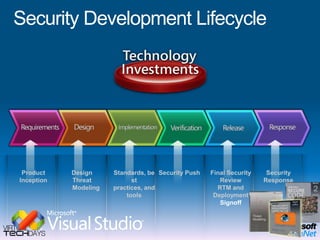
Security Development LifecycleDesignThreat ModelingStandards, best practices, and toolsSecurity PushFinal Security Review RTM and DeploymentSignoffSecurity ResponseProduct Inception
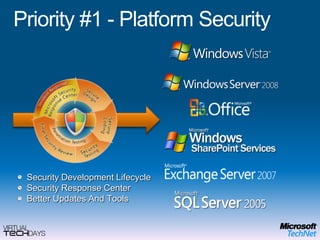
Priority #1 - Platform SecuritySecurity Development LifecycleSecurity Response CenterBetter Updates And Tools
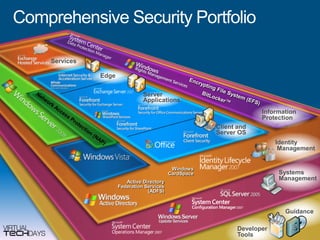
Comprehensive Security PortfolioServicesEdgeEncrypting File System (EFS)Server ApplicationsBitLocker™Information  ProtectionNetwork Access Protection (NAP)Client and Server OSIdentityManagementWindowsCardSpaceSystemsManagementActive Directory Federation Services (ADFS)GuidanceDeveloper Tools
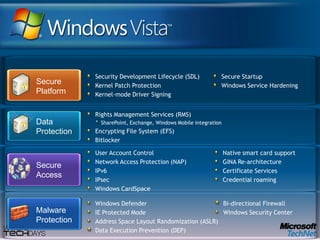
Security Development Lifecycle (SDL)Kernel Patch ProtectionKernel-mode Driver SigningSecure StartupWindows Service HardeningSecure PlatformRights Management Services (RMS) SharePoint, Exchange, Windows Mobile integrationEncrypting File System (EFS)BitlockerSecure AccessUser Account ControlNetwork Access Protection (NAP)IPv6IPsecWindows CardSpaceNative smart card supportGINA Re-architectureCertificate ServicesCredential roamingWindows DefenderIE Protected ModeAddress Space Layout Randomization (ASLR)Data Execution Prevention (DEP) Bi-directional FirewallWindows Security CenterData ProtectionMalwareProtection
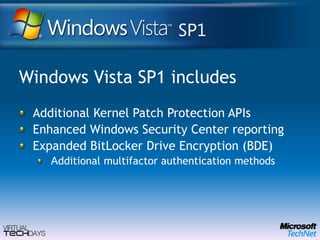
Windows Vista SP1 includesAdditional Kernel Patch Protection APIsEnhanced Windows Security Center reportingExpanded BitLocker Drive Encryption (BDE) Additional multifactor authentication methods
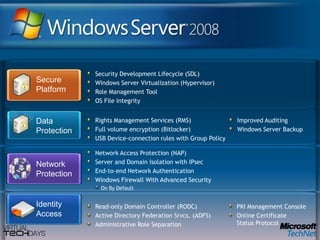
Security Development Lifecycle (SDL)Windows Server Virtualization (Hypervisor)Role Management ToolOS File IntegritySecure PlatformNetwork ProtectionNetwork Access Protection (NAP)Server and Domain Isolation with IPsecEnd-to-end Network AuthenticationWindows Firewall With Advanced Security On By DefaultIdentityAccessRights Management Services (RMS) Full volume encryption (Bitlocker)USB Device-connection rules with Group PolicyImproved AuditingWindows Server BackupData ProtectionRead-only Domain Controller (RODC)Active Directory Federation Srvcs. (ADFS)Administrative Role SeparationPKI Management ConsoleOnline CertificateStatus Protocol
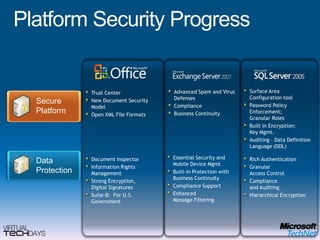
Secure PlatformSurface Area Configuration toolPassword Policy Enforcement; Granular RolesBuilt in Encryption;Key Mgmt.Auditing – Data Definition Language (DDL)Advanced Spam and Virus DefensesComplianceBusiness ContinuityTrust CenterNew Document Security ModelOpen XML File FormatsRich AuthenticationGranularAccess ControlComplianceand Auditing Hierarchical EncryptionDocument InspectorInformation Rights ManagementStrong Encryption,Digital SignaturesSuite-B:  For U.S. Government Data ProtectionPlatform Security ProgressEssential Security and Mobile Device MgmtBuilt-in Protection with Business ContinuityCompliance SupportEnhancedMessage Filtering
Security Threat Landscape EvolutionMicrosoft Security StrategyEngineering ExcellenceSecurity Development LifecycleEngineering ExcellenceSecurity Development Lifecycle
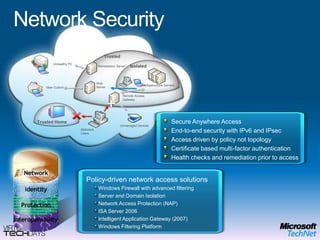
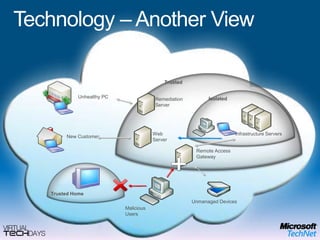
TrustedUnhealthy PCIsolatedRemediation ServerWeb ServerInfrastructure ServersNew CustomerRemote Access GatewayTrusted HomeUnmanaged DevicesMaliciousUsersNetwork SecuritySecure Anywhere AccessEnd-to-end security with IPv6 and IPsecAccess driven by policy not topologyCertificate based multi-factor authenticationHealth checks and remediation prior to accessPolicy-driven network access solutionsWindows Firewall with advanced filteringServer and Domain IsolationNetwork Access Protection (NAP)ISA Server 2006Intelligent Application Gateway (2007)Windows Filtering Platform
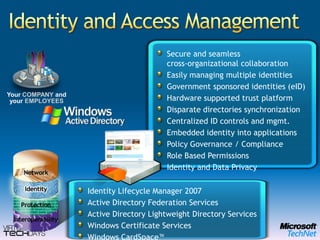
Identity and Access ManagementYour COMPANYandyour EMPLOYEESSecure and seamlesscross-organizational collaborationEasily managing multiple identitiesGovernment sponsored identities (eID)Hardware supported trust platformDisparate directories synchronizationCentralized ID controls and mgmt.Embedded identity into applicationsPolicy Governance / ComplianceRole Based PermissionsIdentity and Data PrivacyIdentity Lifecycle Manager 2007Active Directory Federation ServicesActive Directory Lightweight Directory ServicesWindows Certificate Services Windows CardSpace™
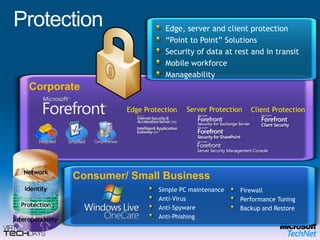
Edge, server and client protection“Point to Point” SolutionsSecurity of data at rest and in transitMobile workforceManageabilityCorporateClient ProtectionServer Protection Consumer/ Small BusinessSimple PC maintenanceAnti-Virus Anti-SpywareAnti-PhishingFirewallPerformance TuningBackup and RestoreEdge Protection Protection
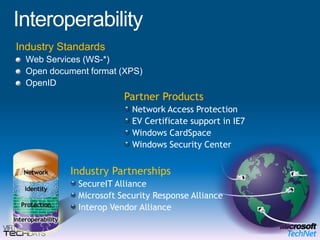
InteroperabilityIndustry StandardsWeb Services (WS-*)Open document format (XPS)OpenIDPartner ProductsNetwork Access ProtectionEV Certificate support in IE7 Windows CardSpaceWindows Security CenterIndustry PartnershipsSecureIT AllianceMicrosoft SecurityResponse Alliance Interop Vendor Alliance
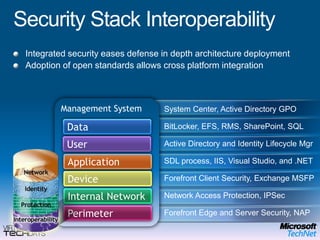
Security Stack InteroperabilityIntegrated security eases defense in depth architecture deploymentAdoption of open standards allows cross platform integrationManagement SystemSystem Center, Active Directory GPODataBitLocker, EFS, RMS, SharePoint, SQLUserActive Directory and Identity Lifecycle MgrApplicationSDL process, IIS, Visual Studio, and .NETDeviceForefront Client Security, Exchange MSFPInternal NetworkNetwork Access Protection, IPSecPerimeterForefront Edge and Server Security, NAP
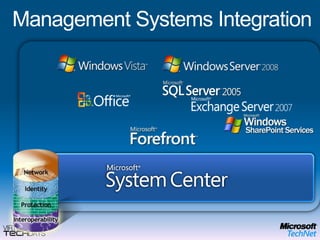
Management Systems Integration
Engineering ExcellenceSecurity Development LifecycleMicrosoft Security Strategy
Some hard questions…WhoWhyWhatWhenWhereHow
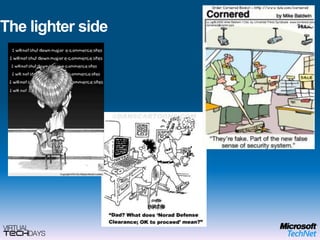
The lighter side
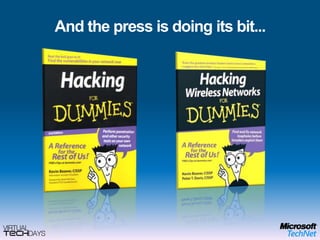
And the press is doing its bit...
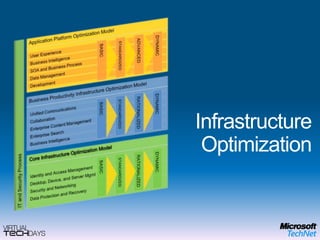
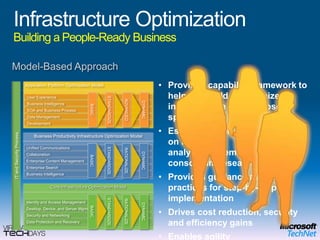
User ExperienceApplication Platform Optimization ModelDevelopmentBASICADVANCEDDYNAMICSTANDARDIZEDInfrastructure OptimizationSOA and Business ProcessData ManagementBusiness IntelligenceBusiness Productivity Infrastructure Optimization ModelUnified CommunicationsCollaborationIT and Security ProcessEnterprise Content ManagementBASICRATIONALIZEDDYNAMICSTANDARDIZEDEnterprise SearchBusiness IntelligenceCore Infrastructure Optimization ModelIdentity and Access ManagementDesktop, Device, and Server MgmtBASICRATIONALIZEDDYNAMICSTANDARDIZEDSecurity and NetworkingData Protection and Recovery
Infrastructure OptimizationBuilding a People-Ready BusinessModel-Based ApproachUser ExperienceProvides capability framework to help you build an optimized infrastructure (not Microsoft-specific)
Establishes a foundation based on industry analyst, academic, and consortium research
Provides guidance and best practices for step-by-step implementation
Drives cost reduction, security and efficiency gains
Enables agilityApplication Platform Optimization ModelSTANDARDIZEDBASICADVANCEDDYNAMICDevelopmentSOA and Business ProcessData ManagementBusiness IntelligenceBusiness Productivity Infrastructure Optimization ModelUnified CommunicationsCollaborationIT and Security ProcessSTANDARDIZEDBASICDYNAMICRATIONALIZEDEnterprise Content ManagementEnterprise SearchBusiness IntelligenceCore Infrastructure Optimization ModelIdentity and Access ManagementDesktop, Device, and Server MgmtBASICSTANDARDIZEDDYNAMICRATIONALIZEDSecurity and NetworkingData Protection and Recovery
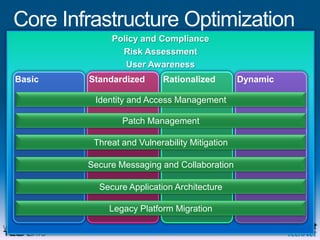
Core Infrastructure OptimizationPolicy and ComplianceRisk AssessmentUser AwarenessBasicStandardizedRationalizedDynamicIdentity and Access ManagementPatch ManagementThreat and Vulnerability MitigationSecure Messaging and CollaborationSecure Application ArchitectureLegacy Platform Migration
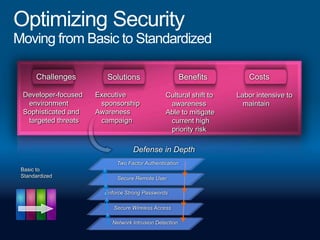
SolutionsBenefitsCostsChallengesTwo Factor AuthenticationSecure Remote UserBasic to StandardizedEnforce Strong PasswordsSecure Wireless AccessNetwork Intrusion DetectionOptimizing SecurityMoving from Basic to StandardizedDeveloper-focused environmentSophisticated and targeted threatsExecutive sponsorshipAwareness campaignCultural shift to awarenessAble to mitigate current high priority riskLabor intensive to maintainDefense in Depth
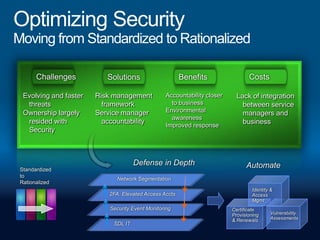
SolutionsBenefitsCostsChallengesStandardized to RationalizedNetwork SegmentationIdentity &Access Mgmt2FA: Elevated Access AcctsSecurity Event MonitoringCertificateProvisioning& RenewalsVulnerabilityAssessmentsSDL ITOptimizing SecurityMoving from Standardized to RationalizedEvolving and faster threatsOwnership largely resided with SecurityRisk management frameworkService manager accountabilityAccountability closer to businessEnvironmental awarenessImproved responseLack of integration between service managers and businessDefense in DepthAutomate
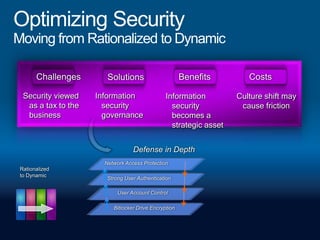
SolutionsBenefitsCostsChallengesNetwork Access ProtectionRationalized to DynamicStrong User AuthenticationUser Account ControlBitlocker Drive EncryptionOptimizing SecurityMoving from Rationalized to DynamicSecurity viewed as a tax to the businessInformation security governanceInformation security becomes a strategic assetCulture shift may cause frictionDefense in Depth
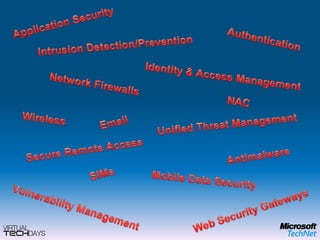
Application SecurityAuthenticationIntrusion Detection/PreventionIdentity & Access ManagementNetwork FirewallsNACWirelessEmailUnified Threat ManagementSecure Remote AccessAntimalwareSIMsMobile Data SecurityVulnerability ManagementWeb Security Gateways
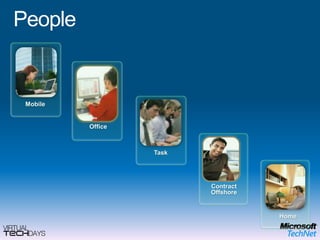
PeopleMobileMobileOfficeTaskOfficeContractTaskHomeContract OffshoreHome
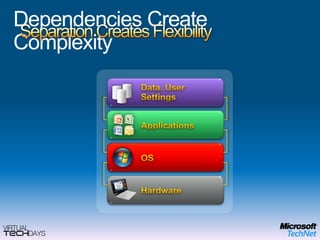
Separation Creates FlexibilityData, User SettingsApplicationsOSHardwareDependencies Create Complexity
Mobile
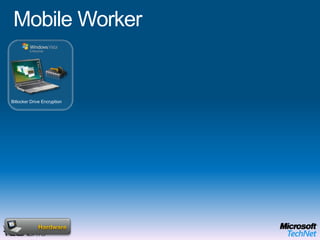
Microsoft Enterprise Desktop Virtualization (MED-V)End User BenefitsOffline UseFlexible ConfigurationsRich user experience IT Benefits Protection of the local dataEasy to migrate userMitigation of application compatibility issuesMobile WorkerBitlocker Drive EncryptionOPERATING SYSTEMHardware
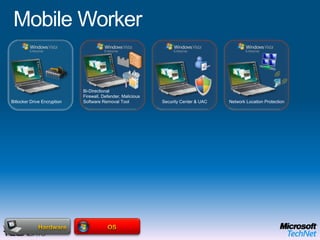
Mobile WorkerBi-Directional Firewall, Defender, Malicious Software Removal ToolBitlocker Drive EncryptionSecurity Center & UACNetwork Location ProtectionOSMicrosoft Enterprise Desktop Virtualization (MED-V)OPERATING SYSTEMHardwareEnd User BenefitsOffline UseFlexible ConfigurationsRich user experience IT Benefits Protection of the local dataEasy to migrate userMitigation of application compatibility issues
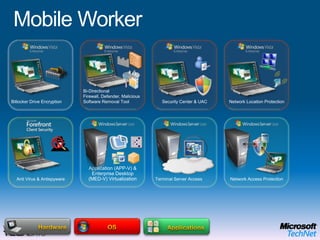
Mobile WorkerTerminal Server AccessRMS Protected DocumentsBi-Directional Firewall, Defender, Malicious Software Removal ToolBitlocker Drive EncryptionSecurity Center & UACNetwork Location ProtectionApplicationsAnti Virus & AntispywareNetwork Access ProtectionOSApplication (APP-V) & Enterprise Desktop    (MED-V) Virtualization Group Policy and AGPM Folder RedirectionOffline FilesHardwareEnd User BenefitsOffline UseFlexible ConfigurationsRich user experience IT Benefits Protection of the local dataEasy to migrate userMitigation of application compatibility issues
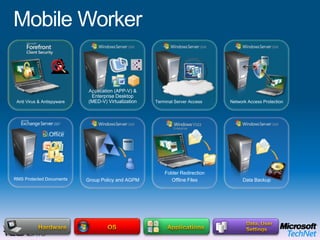
Mobile WorkerTerminal Server AccessRMS Protected DocumentsNetwork Access ProtectionData, User SettingsApplicationsAnti Virus & AntispywareFolder RedirectionOffline FilesGroup Policy and AGPM Data BackupOSApplication (APP-V) & Enterprise Desktop    (MED-V) Virtualization HardwareEnd User BenefitsOffline UseFlexible ConfigurationsRich user experience IT Benefits Protection of the local dataEasy to migrate userMitigation of application compatibility issues
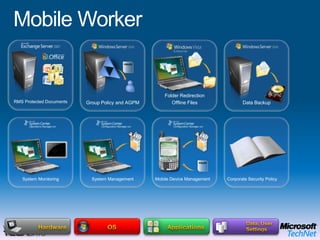
Mobile WorkerRMS Protected DocumentsData, User SettingsApplicationsFolder RedirectionOffline FilesGroup Policy and AGPM Data BackupSystem MonitoringSystem ManagementMobile Device ManagementCorporate Security PolicyOSHardwareEnd User BenefitsOffline UseFlexible ConfigurationsRich user experience IT Benefits Protection of the local dataEasy to migrate userMitigation of application compatibility issues
Office
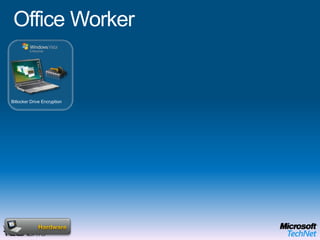
Microsoft Enterprise Desktop Virtualization (MED-V)End User BenefitsOffline UseFlexible ConfigurationsRich user experience IT Benefits Protection of the local dataEasy to migrate userMitigation of application compatibility issuesOffice WorkerBitlocker Drive EncryptionOPERATING SYSTEMHardware
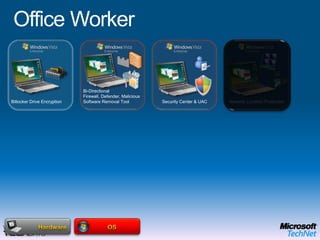
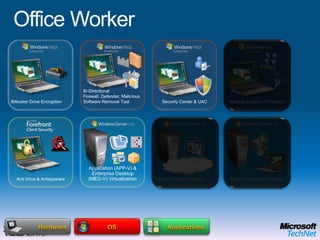
Office WorkerBi-Directional Firewall, Defender, Malicious Software Removal ToolBitlocker Drive EncryptionSecurity Center & UACNetwork Location ProtectionOSMicrosoft Enterprise Desktop Virtualization (MED-V)OPERATING SYSTEMHardwareEnd User BenefitsOffline UseFlexible ConfigurationsRich user experience IT Benefits Protection of the local dataEasy to migrate userMitigation of application compatibility issues
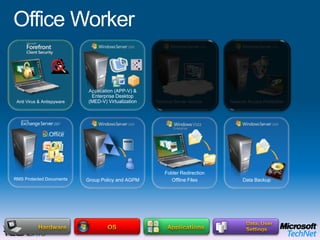
Office WorkerTerminal Server AccessRMS Protected DocumentsBi-Directional Firewall, Defender, Malicious Software Removal ToolBitlocker Drive EncryptionSecurity Center & UACNetwork Location ProtectionApplicationsAnti Virus & AntispywareNetwork Access ProtectionOSApplication (APP-V) & Enterprise Desktop    (MED-V) Virtualization HardwareEnd User BenefitsOffline UseFlexible ConfigurationsRich user experience IT Benefits Protection of the local dataEasy to migrate userMitigation of application compatibility issues
Office WorkerTerminal Server AccessRMS Protected DocumentsNetwork Access ProtectionData, User SettingsApplicationsAnti Virus & AntispywareFolder RedirectionOffline FilesGroup Policy and AGPM Data BackupOSApplication (APP-V) & Enterprise Desktop    (MED-V) Virtualization HardwareEnd User BenefitsOffline UseFlexible ConfigurationsRich user experience IT Benefits Protection of the local dataEasy to migrate userMitigation of application compatibility issues
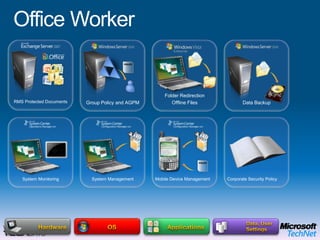
Office WorkerRMS Protected DocumentsData, User SettingsApplicationsFolder RedirectionOffline FilesGroup Policy and AGPM Data BackupSystem MonitoringSystem ManagementMobile Device ManagementCorporate Security PolicyOSHardwareEnd User BenefitsOffline UseFlexible ConfigurationsRich user experience IT Benefits Protection of the local dataEasy to migrate userMitigation of application compatibility issues
Task
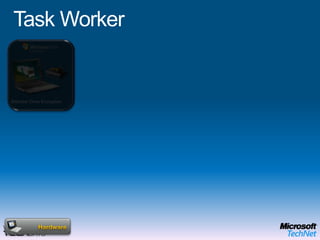
Microsoft Enterprise Desktop Virtualization (MED-V)End User BenefitsOffline UseFlexible ConfigurationsRich user experience IT Benefits Protection of the local dataEasy to migrate userMitigation of application compatibility issuesTask WorkerBitlocker Drive EncryptionOPERATING SYSTEMHardware
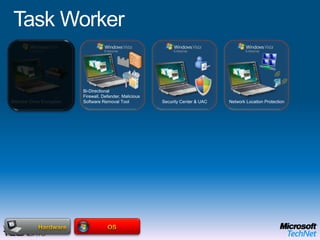
Task WorkerBi-Directional Firewall, Defender, Malicious Software Removal ToolBitlocker Drive EncryptionSecurity Center & UACNetwork Location ProtectionOSMicrosoft Enterprise Desktop Virtualization (MED-V)OPERATING SYSTEMHardwareEnd User BenefitsOffline UseFlexible ConfigurationsRich user experience IT Benefits Protection of the local dataEasy to migrate userMitigation of application compatibility issues
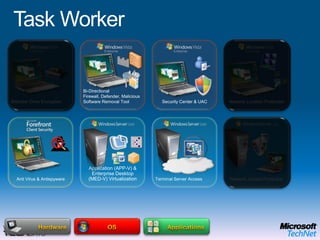
Task WorkerTerminal Server AccessRMS Protected DocumentsBi-Directional Firewall, Defender, Malicious Software Removal ToolBitlocker Drive EncryptionSecurity Center & UACNetwork Location ProtectionApplicationsAnti Virus & AntispywareNetwork Access ProtectionOSApplication (APP-V) & Enterprise Desktop    (MED-V) Virtualization Group Policy and AGPM Folder RedirectionOffline FilesHardwareEnd User BenefitsOffline UseFlexible ConfigurationsRich user experience IT Benefits Protection of the local dataEasy to migrate userMitigation of application compatibility issues
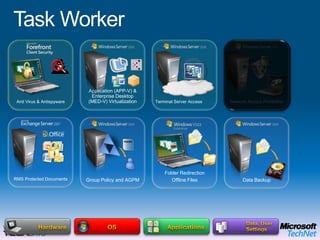
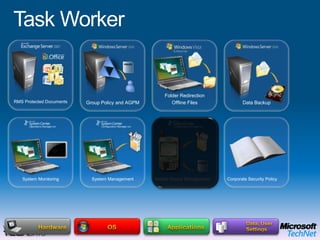
Task WorkerTerminal Server AccessRMS Protected DocumentsNetwork Access ProtectionData, User SettingsApplicationsAnti Virus & AntispywareFolder RedirectionOffline FilesGroup Policy and AGPM Data BackupOSApplication (APP-V) & Enterprise Desktop    (MED-V) Virtualization HardwareEnd User BenefitsOffline UseFlexible ConfigurationsRich user experience IT Benefits Protection of the local dataEasy to migrate userMitigation of application compatibility issues
Task WorkerRMS Protected DocumentsData, User SettingsApplicationsFolder RedirectionOffline FilesGroup Policy and AGPM Data BackupSystem MonitoringSystem ManagementMobile Device ManagementCorporate Security PolicyOSHardwareEnd User BenefitsOffline UseFlexible ConfigurationsRich user experience IT Benefits Protection of the local dataEasy to migrate userMitigation of application compatibility issues
Contract / Offshore
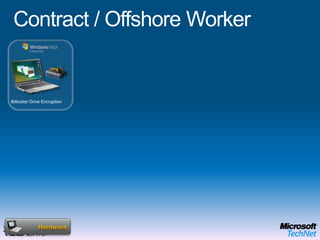
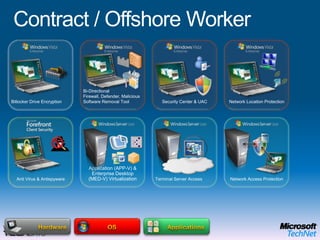
Microsoft Enterprise Desktop Virtualization (MED-V)End User BenefitsOffline UseFlexible ConfigurationsRich user experience IT Benefits Protection of the local dataEasy to migrate userMitigation of application compatibility issuesContract / Offshore WorkerBitlocker Drive EncryptionOPERATING SYSTEMHardware
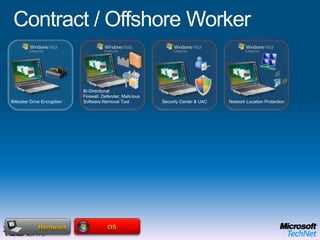
Bi-Directional Firewall, Defender, Malicious Software Removal ToolNetwork Location ProtectionBitlocker Drive EncryptionSecurity Center & UACOSMicrosoft Enterprise Desktop Virtualization (MED-V)Contract / Offshore WorkerOPERATING SYSTEMHardwareEnd User BenefitsOffline UseFlexible ConfigurationsRich user experience IT Benefits Protection of the local dataEasy to migrate userMitigation of application compatibility issues
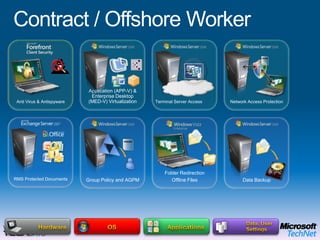
Contract / Offshore WorkerTerminal Server AccessRMS Protected DocumentsBi-Directional Firewall, Defender, Malicious Software Removal ToolBitlocker Drive EncryptionSecurity Center & UACNetwork Location ProtectionApplicationsAnti Virus & AntispywareNetwork Access ProtectionOSApplication (APP-V) & Enterprise Desktop    (MED-V) Virtualization HardwareEnd User BenefitsOffline UseFlexible ConfigurationsRich user experience IT Benefits Protection of the local dataEasy to migrate userMitigation of application compatibility issues
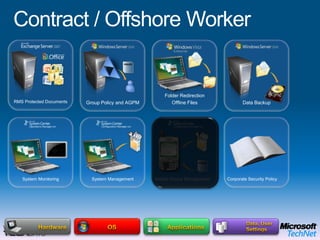
Contract / Offshore WorkerTerminal Server AccessRMS Protected DocumentsNetwork Access ProtectionData, User SettingsApplicationsAnti Virus & AntispywareFolder RedirectionOffline FilesGroup Policy and AGPM Data BackupOSApplication (APP-V) & Enterprise Desktop    (MED-V) Virtualization HardwareEnd User BenefitsOffline UseFlexible ConfigurationsRich user experience IT Benefits Protection of the local dataEasy to migrate userMitigation of application compatibility issues
Contract / Offshore WorkerRMS Protected DocumentsData, User SettingsApplicationsFolder RedirectionOffline FilesGroup Policy and AGPM Data BackupSystem MonitoringSystem ManagementMobile Device ManagementCorporate Security PolicyOSHardwareEnd User BenefitsOffline UseFlexible ConfigurationsRich user experience IT Benefits Protection of the local dataEasy to migrate userMitigation of application compatibility issues
Home
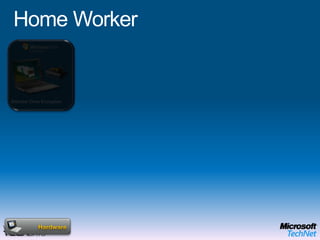
Microsoft Enterprise Desktop Virtualization (MED-V)End User BenefitsOffline UseFlexible ConfigurationsRich user experience IT Benefits Protection of the local dataEasy to migrate userMitigation of application compatibility issuesHome WorkerBitlocker Drive EncryptionOPERATING SYSTEMHardware
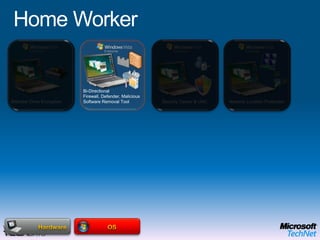
Home WorkerBi-Directional Firewall, Defender, Malicious Software Removal ToolBitlocker Drive EncryptionSecurity Center & UACNetwork Location ProtectionOSMicrosoft Enterprise Desktop Virtualization (MED-V)OPERATING SYSTEMHardwareEnd User BenefitsOffline UseFlexible ConfigurationsRich user experience IT Benefits Protection of the local dataEasy to migrate userMitigation of application compatibility issues
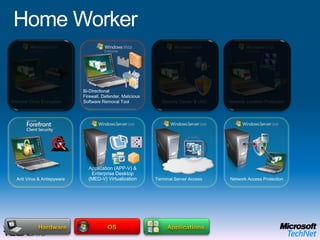
Home WorkerTerminal Server AccessRMS Protected DocumentsBi-Directional Firewall, Defender, Malicious Software Removal ToolBitlocker Drive EncryptionSecurity Center & UACNetwork Location ProtectionApplicationsAnti Virus & AntispywareNetwork Access ProtectionOSApplication (APP-V) & Enterprise Desktop    (MED-V) Virtualization HardwareEnd User BenefitsOffline UseFlexible ConfigurationsRich user experience IT Benefits Protection of the local dataEasy to migrate userMitigation of application compatibility issues
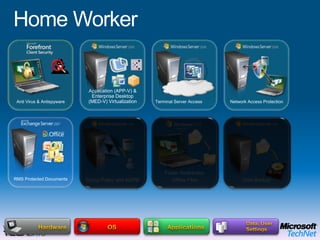
Home WorkerTerminal Server AccessRMS Protected DocumentsNetwork Access ProtectionData, User SettingsApplicationsAnti Virus & AntispywareFolder RedirectionOffline FilesGroup Policy and AGPM Data BackupOSApplication (APP-V) & Enterprise Desktop    (MED-V) Virtualization HardwareEnd User BenefitsOffline UseFlexible ConfigurationsRich user experience IT Benefits Protection of the local dataEasy to migrate userMitigation of application compatibility issues
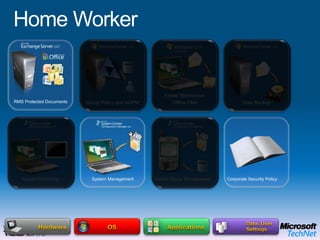
Home WorkerRMS Protected DocumentsData, User SettingsApplicationsFolder RedirectionOffline FilesGroup Policy and AGPM Data BackupSystem MonitoringSystem ManagementMobile Device ManagementCorporate Security PolicyOSHardwareEnd User BenefitsOffline UseFlexible ConfigurationsRich user experience IT Benefits Protection of the local dataEasy to migrate userMitigation of application compatibility issues
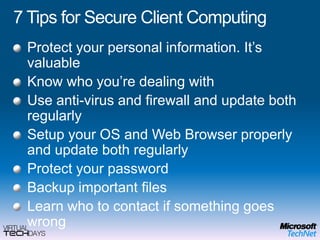
7 Tips for Secure Client ComputingProtect your personal information. It’s valuableKnow who you’re dealing withUse anti-virus and firewall and update both regularlySetup your OS and Web Browser properly and update both regularlyProtect your passwordBackup important filesLearn who to contact if something goes wrong
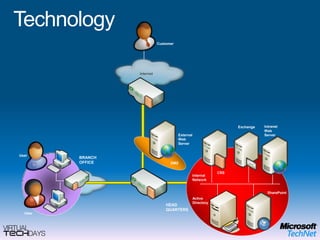
TechnologyInternetIntranet Web ServerExchangeExternal Web ServerUserBRANCH OFFICEDMZCSSInternal NetworkInternetSharePointActive DirectoryHEAD QUARTERSUserCustomer
Technology – Another ViewTrustedUnhealthy PCIsolatedRemediation ServerWeb ServerInfrastructure ServersNew CustomerRemote Access GatewayTrusted HomeUnmanaged DevicesMaliciousUsers
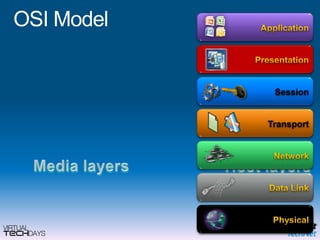
OSI ModelApplicationPresentationSessionTransportNetworkMedia layersHost layersData LinkPhysical
Head Office
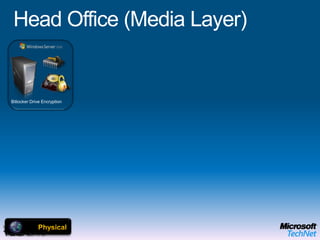
Head Office (Media Layer)Bitlocker Drive EncryptionMicrosoft Enterprise Desktop Virtualization (MED-V)OPERATING SYSTEMPhysicalEnd User BenefitsOffline UseFlexible ConfigurationsRich user experience IT Benefits Protection of the local dataEasy to migrate userMitigation of application compatibility issues
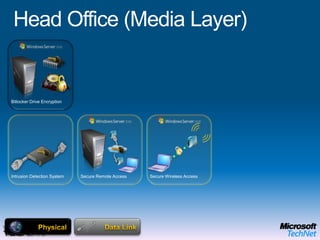
Head Office (Media Layer)Bitlocker Drive EncryptionSecure Wireless AccessSecure Remote AccessNetwork Access ProtectionIntrusion Detection SystemData LinkMicrosoft Enterprise Desktop Virtualization (MED-V)OPERATING SYSTEMPhysicalEnd User BenefitsOffline UseFlexible ConfigurationsRich user experience IT Benefits Protection of the local dataEasy to migrate userMitigation of application compatibility issues
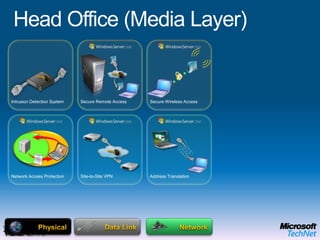
Head Office (Media Layer)Secure Wireless AccessNetwork Access ProtectionSecure Remote AccessSite-to-Site VPNAddress TranslationIntrusion Detection SystemNetworkData LinkMicrosoft Enterprise Desktop Virtualization (MED-V)OPERATING SYSTEMPhysicalEnd User BenefitsOffline UseFlexible ConfigurationsRich user experience IT Benefits Protection of the local dataEasy to migrate userMitigation of application compatibility issues
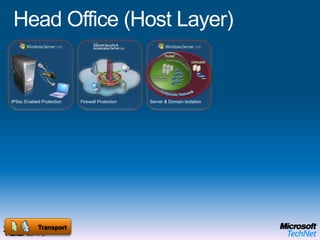
Head Office (Host Layer)IPSec Enabled ProtectionServer & Domain IsolationTransportFirewall ProtectionMicrosoft Enterprise Desktop Virtualization (MED-V)OPERATING SYSTEMEnd User BenefitsOffline UseFlexible ConfigurationsRich user experience IT Benefits Protection of the local dataEasy to migrate userMitigation of application compatibility issues
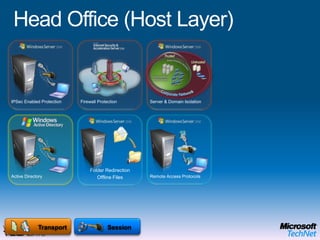
Head Office (Host Layer)IPSec Enabled ProtectionServer & Domain IsolationActive DirectoryRemote Access ProtocolsSessionTransportFirewall ProtectionFolder RedirectionOffline FilesMicrosoft Enterprise Desktop Virtualization (MED-V)OPERATING SYSTEMEnd User BenefitsOffline UseFlexible ConfigurationsRich user experience IT Benefits Protection of the local dataEasy to migrate userMitigation of application compatibility issues
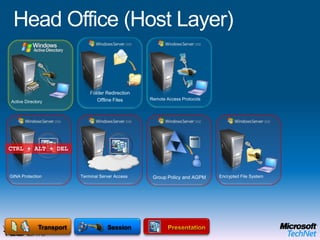
Head Office (Host Layer)GINA ProtectionGINA ProtectionTerminal Server AccessActive DirectoryRemote Access ProtocolsEncrypted File SystemPresentationSessionOPERATING SYSTEMTransportFolder RedirectionOffline FilesAnti Virus & AntispywareGroup Policy and AGPM CTRL + ALT + DELCTRL + ALT + DELMicrosoft Enterprise Desktop Virtualization (MED-V)OPERATING SYSTEMEnd User BenefitsOffline UseFlexible ConfigurationsRich user experience IT Benefits Protection of the local dataEasy to migrate userMitigation of application compatibility issues
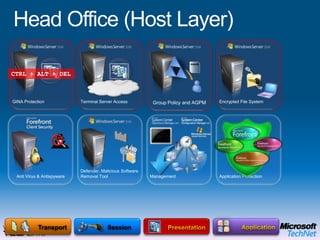
Head Office (Host Layer)ApplicationDefender, Malicious Software Removal ToolGINA ProtectionTerminal Server AccessEncrypted File SystemPresentationSessionTransportApplication ProtectionManagementAnti Virus & AntispywareGroup Policy and AGPM CTRL + ALT + DELApplication (APP-V) Virtualization Microsoft Enterprise Desktop Virtualization (MED-V)OPERATING SYSTEMEnd User BenefitsOffline UseFlexible ConfigurationsRich user experience IT Benefits Protection of the local dataEasy to migrate userMitigation of application compatibility issues
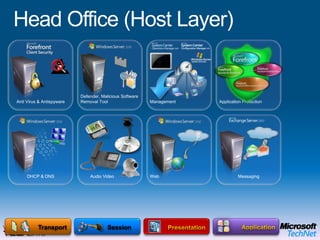
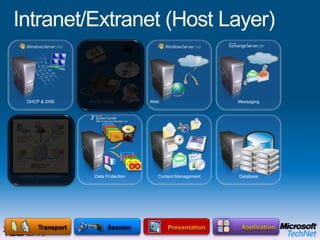
Head Office (Host Layer)ApplicationDefender, Malicious Software Removal ToolPresentationSessionTransportApplication ProtectionManagementWebDHCP & DNS        Audio VideoMessagingAnti Virus & AntispywareMicrosoft Enterprise Desktop Virtualization (MED-V)OPERATING SYSTEMEnd User BenefitsOffline UseFlexible ConfigurationsRich user experience IT Benefits Protection of the local dataEasy to migrate userMitigation of application compatibility issues
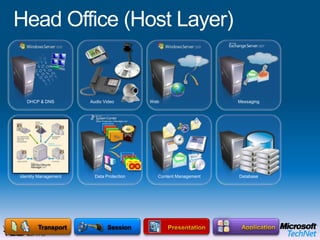
Head Office (Host Layer)ApplicationPresentationSessionTransportWeb        Audio VideoMessagingDHCP & DNSIdentity ManagementData ProtectionContent ManagementDatabaseMicrosoft Enterprise Desktop Virtualization (MED-V)OPERATING SYSTEMEnd User BenefitsOffline UseFlexible ConfigurationsRich user experience IT Benefits Protection of the local dataEasy to migrate userMitigation of application compatibility issues
Branch Office
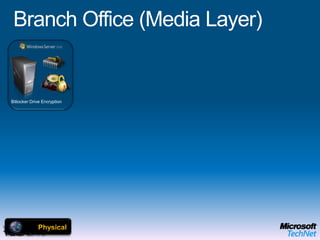
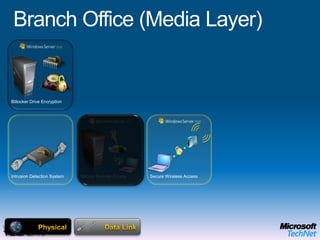
Branch Office (Media Layer)Bitlocker Drive EncryptionMicrosoft Enterprise Desktop Virtualization (MED-V)OPERATING SYSTEMPhysicalEnd User BenefitsOffline UseFlexible ConfigurationsRich user experience IT Benefits Protection of the local dataEasy to migrate userMitigation of application compatibility issues
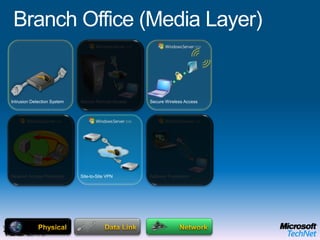
Branch Office (Media Layer)Bitlocker Drive EncryptionSecure Wireless AccessSecure Remote AccessNetwork Access ProtectionIntrusion Detection SystemData LinkMicrosoft Enterprise Desktop Virtualization (MED-V)OPERATING SYSTEMPhysicalEnd User BenefitsOffline UseFlexible ConfigurationsRich user experience IT Benefits Protection of the local dataEasy to migrate userMitigation of application compatibility issues
Branch Office (Media Layer)Secure Wireless AccessNetwork Access ProtectionSecure Remote AccessSite-to-Site VPNAddress TranslationIntrusion Detection SystemNetworkData LinkMicrosoft Enterprise Desktop Virtualization (MED-V)OPERATING SYSTEMPhysicalEnd User BenefitsOffline UseFlexible ConfigurationsRich user experience IT Benefits Protection of the local dataEasy to migrate userMitigation of application compatibility issues
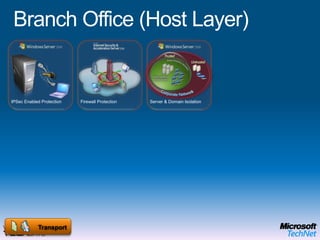
Branch Office (Host Layer)IPSec Enabled ProtectionServer & Domain IsolationTransportFirewall ProtectionMicrosoft Enterprise Desktop Virtualization (MED-V)OPERATING SYSTEMEnd User BenefitsOffline UseFlexible ConfigurationsRich user experience IT Benefits Protection of the local dataEasy to migrate userMitigation of application compatibility issues
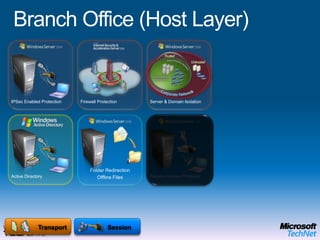
Branch Office (Host Layer)IPSec Enabled ProtectionServer & Domain IsolationActive DirectoryRemote Access ProtocolsSessionTransportFirewall ProtectionFolder RedirectionOffline FilesMicrosoft Enterprise Desktop Virtualization (MED-V)OPERATING SYSTEMEnd User BenefitsOffline UseFlexible ConfigurationsRich user experience IT Benefits Protection of the local dataEasy to migrate userMitigation of application compatibility issues
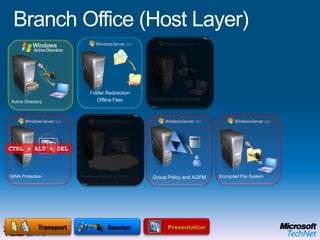
Branch Office (Host Layer)GINA ProtectionGINA ProtectionTerminal Server AccessActive DirectoryRemote Access ProtocolsEncrypted File SystemPresentationSessionOPERATING SYSTEMTransportFolder RedirectionOffline FilesAnti Virus & AntispywareGroup Policy and AGPM CTRL + ALT + DELCTRL + ALT + DELMicrosoft Enterprise Desktop Virtualization (MED-V)OPERATING SYSTEMEnd User BenefitsOffline UseFlexible ConfigurationsRich user experience IT Benefits Protection of the local dataEasy to migrate userMitigation of application compatibility issues
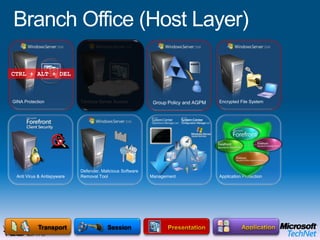
Branch Office (Host Layer)ApplicationDefender, Malicious Software Removal ToolGINA ProtectionTerminal Server AccessEncrypted File SystemPresentationSessionTransportApplication ProtectionManagementAnti Virus & AntispywareGroup Policy and AGPM CTRL + ALT + DELApplication (APP-V) Virtualization Microsoft Enterprise Desktop Virtualization (MED-V)OPERATING SYSTEMEnd User BenefitsOffline UseFlexible ConfigurationsRich user experience IT Benefits Protection of the local dataEasy to migrate userMitigation of application compatibility issues
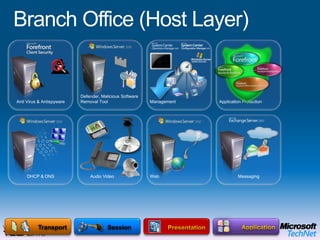
Branch Office (Host Layer)ApplicationDefender, Malicious Software Removal ToolPresentationSessionTransportApplication ProtectionManagementWebDHCP & DNS        Audio VideoMessagingAnti Virus & AntispywareMicrosoft Enterprise Desktop Virtualization (MED-V)OPERATING SYSTEMEnd User BenefitsOffline UseFlexible ConfigurationsRich user experience IT Benefits Protection of the local dataEasy to migrate userMitigation of application compatibility issues
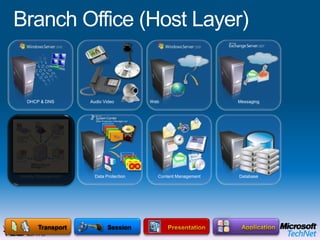
Branch Office (Host Layer)ApplicationPresentationSessionTransportWeb        Audio VideoMessagingDHCP & DNSIdentity ManagementData ProtectionContent ManagementDatabaseMicrosoft Enterprise Desktop Virtualization (MED-V)OPERATING SYSTEMEnd User BenefitsOffline UseFlexible ConfigurationsRich user experience IT Benefits Protection of the local dataEasy to migrate userMitigation of application compatibility issues
IntranetExtranet
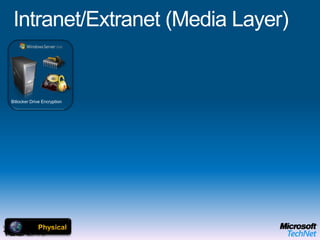
Intranet/Extranet (Media Layer)Bitlocker Drive EncryptionMicrosoft Enterprise Desktop Virtualization (MED-V)OPERATING SYSTEMPhysicalEnd User BenefitsOffline UseFlexible ConfigurationsRich user experience IT Benefits Protection of the local dataEasy to migrate userMitigation of application compatibility issues
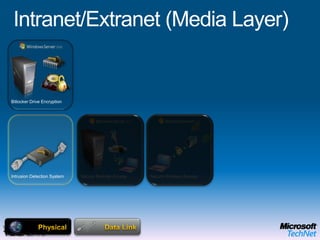
Intranet/Extranet (Media Layer)Bitlocker Drive EncryptionSecure Wireless AccessSecure Remote AccessNetwork Access ProtectionIntrusion Detection SystemData LinkMicrosoft Enterprise Desktop Virtualization (MED-V)OPERATING SYSTEMPhysicalEnd User BenefitsOffline UseFlexible ConfigurationsRich user experience IT Benefits Protection of the local dataEasy to migrate userMitigation of application compatibility issues
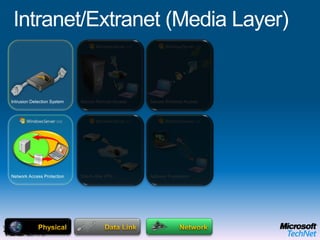
Intranet/Extranet (Media Layer)Secure Wireless AccessNetwork Access ProtectionSecure Remote AccessSite-to-Site VPNAddress TranslationIntrusion Detection SystemNetworkData LinkMicrosoft Enterprise Desktop Virtualization (MED-V)OPERATING SYSTEMPhysicalEnd User BenefitsOffline UseFlexible ConfigurationsRich user experience IT Benefits Protection of the local dataEasy to migrate userMitigation of application compatibility issues
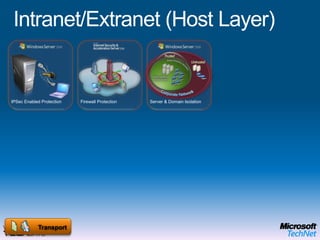
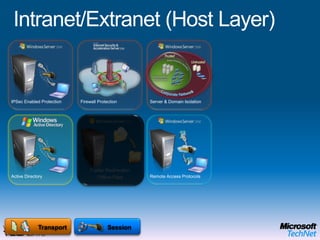
Intranet/Extranet (Host Layer)IPSec Enabled ProtectionServer & Domain IsolationTransportFirewall ProtectionMicrosoft Enterprise Desktop Virtualization (MED-V)OPERATING SYSTEMEnd User BenefitsOffline UseFlexible ConfigurationsRich user experience IT Benefits Protection of the local dataEasy to migrate userMitigation of application compatibility issues
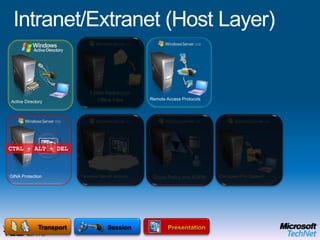
Intranet/Extranet (Host Layer)IPSec Enabled ProtectionServer & Domain IsolationActive DirectoryRemote Access ProtocolsSessionTransportFirewall ProtectionFolder RedirectionOffline FilesMicrosoft Enterprise Desktop Virtualization (MED-V)OPERATING SYSTEMEnd User BenefitsOffline UseFlexible ConfigurationsRich user experience IT Benefits Protection of the local dataEasy to migrate userMitigation of application compatibility issues
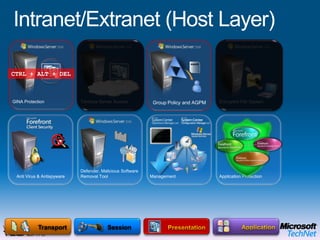
Intranet/Extranet (Host Layer)GINA ProtectionGINA ProtectionTerminal Server AccessActive DirectoryRemote Access ProtocolsEncrypted File SystemPresentationSessionOPERATING SYSTEMTransportFolder RedirectionOffline FilesAnti Virus & AntispywareGroup Policy and AGPM CTRL + ALT + DELCTRL + ALT + DELMicrosoft Enterprise Desktop Virtualization (MED-V)OPERATING SYSTEMEnd User BenefitsOffline UseFlexible ConfigurationsRich user experience IT Benefits Protection of the local dataEasy to migrate userMitigation of application compatibility issues
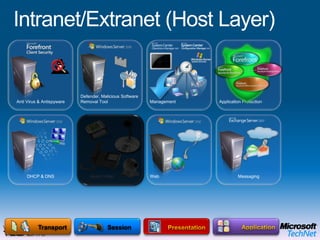
Intranet/Extranet (Host Layer)ApplicationDefender, Malicious Software Removal ToolGINA ProtectionTerminal Server AccessEncrypted File SystemPresentationSessionTransportApplication ProtectionManagementAnti Virus & AntispywareGroup Policy and AGPM CTRL + ALT + DELApplication (APP-V) Virtualization Microsoft Enterprise Desktop Virtualization (MED-V)OPERATING SYSTEMEnd User BenefitsOffline UseFlexible ConfigurationsRich user experience IT Benefits Protection of the local dataEasy to migrate userMitigation of application compatibility issues
Intranet/Extranet (Host Layer)ApplicationDefender, Malicious Software Removal ToolPresentationSessionTransportApplication ProtectionManagementWebDHCP & DNS        Audio VideoMessagingAnti Virus & AntispywareMicrosoft Enterprise Desktop Virtualization (MED-V)OPERATING SYSTEMEnd User BenefitsOffline UseFlexible ConfigurationsRich user experience IT Benefits Protection of the local dataEasy to migrate userMitigation of application compatibility issues
Intranet/Extranet (Host Layer)ApplicationPresentationSessionTransportWeb        Audio VideoMessagingDHCP & DNSIdentity ManagementData ProtectionContent ManagementDatabaseMicrosoft Enterprise Desktop Virtualization (MED-V)OPERATING SYSTEMEnd User BenefitsOffline UseFlexible ConfigurationsRich user experience IT Benefits Protection of the local dataEasy to migrate userMitigation of application compatibility issues
Remote Access
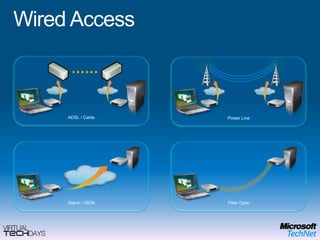
Wired AccessADSL / CablePower LineDial-in / ISDN Fiber Optic
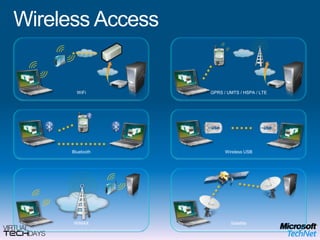
Wireless AccessWiFiGPRS / UMTS / HSPA / LTEWireless USBBluetoothWiMAXSatellite
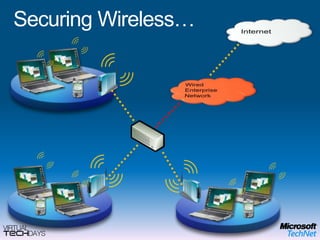
Securing Wireless…InternetWired Enterprise Network
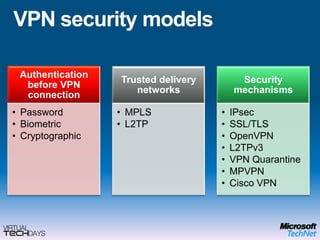
VPN security models
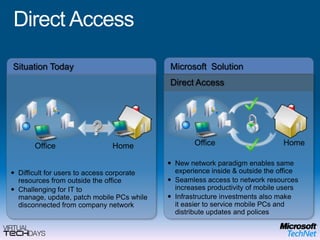
Direct AccessMicrosoft  SolutionSituation TodayDirect AccessOfficeHomeHomeOfficeNew network paradigm enables same experience inside & outside the office
Seamless access to network resources increases productivity of mobile users
Infrastructure investments also make it easier to service mobile PCs and distribute updates and polices
Difficult for users to access corporate resources from outside the office
Challenging for IT to manage, update, patch mobile PCs while disconnected from company networkProcess
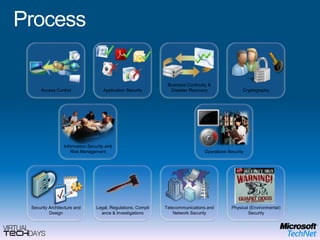
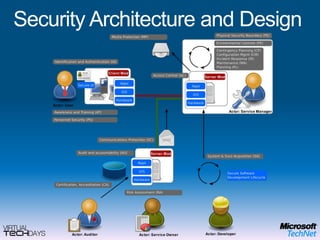
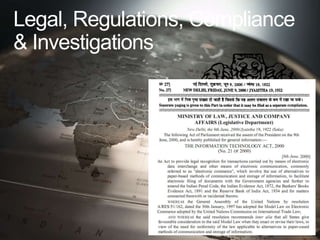
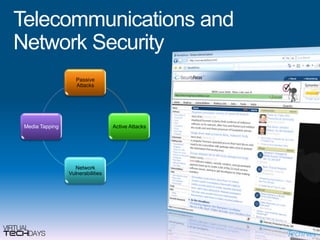
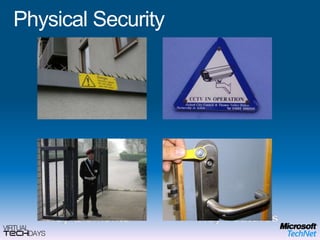
ProcessApplication Security CryptographyAccess Control Business Continuity & Disaster RecoveryInformation Security and Risk Management Operations Security Physical (Environmental) Security Security Architecture and Design Telecommunications and Network Security Legal, Regulations, Compliance & Investigations
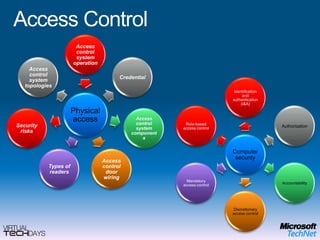
Access Control
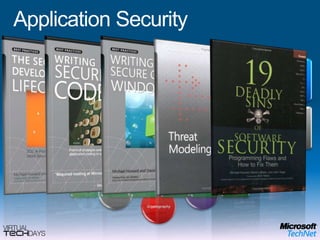
Application Security
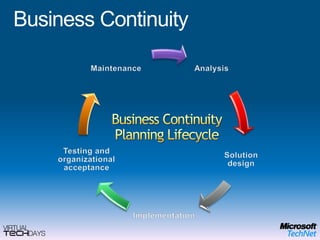
Business ContinuityBusiness Continuity Planning Lifecycle
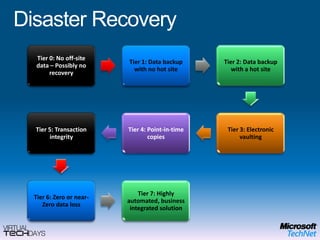
Disaster Recovery
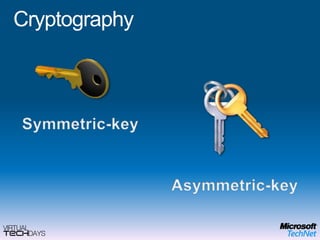
CryptographySymmetric-key Asymmetric-key
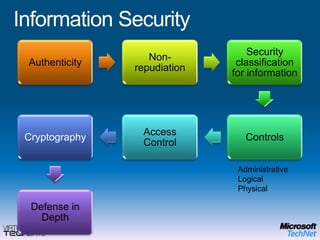
Information SecurityAdministrative Logical Physical
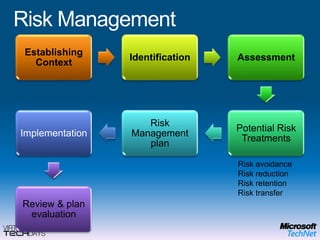
Risk ManagementRisk avoidanceRisk reductionRisk retentionRisk transfer

Ramnish Singh Platform Security Briefing

  • 1.
    Platform Security BriefingRamnishSinghPMP, CISSP, Microsoft Certified Architect (Infrastructure)MCITP (Windows 2008),MCTS (Windows Server,Vista, Exchange), MCSE (Windows 2003, 2000, NT), MCTCisco Certified Design Professional, Cisco Certified Network Professional, Sun CSAIT Advisor | Microsoft CorporationBlog Address (optional) | Email (optional)
  • 4.
    Security Versus AccessDemandfor accessEscalating threats23 million branch offices WW(IDC, 2006)3.6 billion mobile users WW by 2010 (Infonetics, 2007)85% of companies will have WLANs by 2010 (Infonetics, 2006)8x increase in phishing sites in past year (AWG, 2006)One message-based Trojan attack per day in 2006 vs. one per week in 2005 (Message Labs, 2006)Strong indication of increase in profit-motivated attacks (Multiple sources)
  • 5.
    Evolving Threat LandscapeLocalArea NetworksFirst PC virusBoot sector virusesCreate notorietyor cause havocSlow propagation16-bit DOSInternet EraMacro virusesScript virusesCreate notorietyor cause havocFaster propagation32-bit WindowsHyper jackingPeer to PeerSocial engineeringApplication attacksFinancial motivationTargeted attacks64-bit WindowsBroadbandprevalentSpyware, SpamPhishingBotnetsRootkitsFinancial motivationInternet wide impact32-bit Windows1986–19951995–20002000–20052007
  • 6.
    National InterestPersonal GainPersonalFameCuriosityLargest segment by $ spent on defenseSpyLargest area by $ lostFastest growing segmentThiefLargest area by volumeTrespasserAuthorVandalUndergraduateScript-KiddyExpertSpecialistEvolving Threats
  • 7.
    1st known hack...Theneed for security in communication networks is not new. In the late nineteenth century an American undertaker named AlmonStrowger discovered that he was losing business to his rivals because telephone operators, responsible for the manual connection of call requests, were unfairly diverting calls from the newly bereaved to his competitors. Strowger developed switching systems that led to the introduction of the first automated telephone exchanges in 1897. This enabled users to make their own connections using rotary dialling to signal the required destination.AlmonStrowger
  • 8.
    Addressing Security ThreatsHelpsturn IT into a business asset not a cost center Supports your day to day security processes Is the Enabler to running your business successfullyTechnologyData privacy processes to manage data effectivelyIT security processes to implement, manage, and govern securityFinancial reporting processes that include security of the businessProcessCompany understands the importance of security in the workplaceIndividuals know their role with security governance and complianceIT staff has the security skills and knowledge to support your business People
  • 9.
    Microsoft’s Promises ToYouManage Complexity,Achieve AgilityAmplifythe Impactof YourPeopleProtectInformation,ControlAccessAdvance the Businesswith IT Solutions
  • 10.
    Delivering On ThePromise:Infrastructure Optimization*Source: Microsoft CSO Summit 2007 Registration Survey
  • 11.
    Core Infrastructure OptimizationMoreEfficient Cost CenterCost Center Strategic AssetBusiness EnablerBasicNo centralized enterprise directoryNo automated patch managementAnti-malwarenot centrally managedMessage security for e-mail onlyNo secure coding practices in placeStandardizedUsing enterprise directory for authenticationAutomated patch management tools deployedAnti-malwareis managed centrallyUnified message security in placeRationalizedIntegrated directory services, PKIin placeFormal patch management processDefense in depth threat protectionSecurity extended to remote and mobile workforceDynamicFull identity lifecycle management.ID Federation,Rights Mgt Services in useMetrics driven update processClient quarantine and access policy enforcement$1320/PC Cost$580/PC Cost$230/PC CostSource:GCR and IDC data analyzed by Microsoft, 2006
  • 12.
    Core Infrastructure OptimizationModel: SecurityBasicStandardizedRationalizedDynamicTechnologySelf provisioning and quarantine capable systems ensure compliance and high availability Automate identity and access managementAutomatedsystem management Multiple directories for authenticationLimited automated software distributionPatch statusof desktopsis unknownNo unified directory for access mgmtSelf-assessing and continuous improvementEasy, secure access to info from anywhereon InternetSLAs are linkedto business objectivesClearly defined and enforced images, security, best practicesCentralAdmin and configurationof securityStandard desktop images defined,not adopted by allIT processes undefinedComplexity dueto localized processesand minimal central controlProcessImprove IT Maturity while Gaining ROIIT is astrategic assetUsers look to ITas a valued partner to enable new business initiativesIT Staff manages an efficient,controlled environmentUsers have the right tools,availability, and access to infoIT Staff trained in best practices such as MOF,ITIL, etc.Users expect basic services from ITIT staff taxed by operational challengesUsers come up with their ownIT solutionsPeople
  • 13.
    SC information system = {(confidentiality, impact), (integrity, impact), (availability, impact)}where the acceptable values for potential impact are low, moderate, or high.
  • 14.
  • 15.
  • 16.
    LawEnforcementPublic PolicyVIAGIAISMicrosoft SecurityStrategyIndustryPartnershipsConsumerAwareness
  • 17.
    Microsoft SecurityAssessment ToolkitSecurityToolsMicrosoftWindows VistaSecurity WhitepapersSecurityReadinessEducationand TrainingMicrosoft SecurityIntelligence ReportLearning Paths forSecurity Professionalswww.microsoft.com/technet/securityMicrosoft Security Strategy
  • 18.
    Security Development LifecycleDesignThreatModelingStandards, best practices, and toolsSecurity PushFinal Security Review RTM and DeploymentSignoffSecurity ResponseProduct Inception
  • 19.
    Priority #1 -Platform SecuritySecurity Development LifecycleSecurity Response CenterBetter Updates And Tools
  • 20.
    Comprehensive Security PortfolioServicesEdgeEncryptingFile System (EFS)Server ApplicationsBitLocker™Information ProtectionNetwork Access Protection (NAP)Client and Server OSIdentityManagementWindowsCardSpaceSystemsManagementActive Directory Federation Services (ADFS)GuidanceDeveloper Tools
  • 21.
    Security Development Lifecycle(SDL)Kernel Patch ProtectionKernel-mode Driver SigningSecure StartupWindows Service HardeningSecure PlatformRights Management Services (RMS) SharePoint, Exchange, Windows Mobile integrationEncrypting File System (EFS)BitlockerSecure AccessUser Account ControlNetwork Access Protection (NAP)IPv6IPsecWindows CardSpaceNative smart card supportGINA Re-architectureCertificate ServicesCredential roamingWindows DefenderIE Protected ModeAddress Space Layout Randomization (ASLR)Data Execution Prevention (DEP) Bi-directional FirewallWindows Security CenterData ProtectionMalwareProtection
  • 22.
    Windows Vista SP1includesAdditional Kernel Patch Protection APIsEnhanced Windows Security Center reportingExpanded BitLocker Drive Encryption (BDE) Additional multifactor authentication methods
  • 23.
    Security Development Lifecycle(SDL)Windows Server Virtualization (Hypervisor)Role Management ToolOS File IntegritySecure PlatformNetwork ProtectionNetwork Access Protection (NAP)Server and Domain Isolation with IPsecEnd-to-end Network AuthenticationWindows Firewall With Advanced Security On By DefaultIdentityAccessRights Management Services (RMS) Full volume encryption (Bitlocker)USB Device-connection rules with Group PolicyImproved AuditingWindows Server BackupData ProtectionRead-only Domain Controller (RODC)Active Directory Federation Srvcs. (ADFS)Administrative Role SeparationPKI Management ConsoleOnline CertificateStatus Protocol
  • 24.
    Secure PlatformSurface AreaConfiguration toolPassword Policy Enforcement; Granular RolesBuilt in Encryption;Key Mgmt.Auditing – Data Definition Language (DDL)Advanced Spam and Virus DefensesComplianceBusiness ContinuityTrust CenterNew Document Security ModelOpen XML File FormatsRich AuthenticationGranularAccess ControlComplianceand Auditing Hierarchical EncryptionDocument InspectorInformation Rights ManagementStrong Encryption,Digital SignaturesSuite-B: For U.S. Government Data ProtectionPlatform Security ProgressEssential Security and Mobile Device MgmtBuilt-in Protection with Business ContinuityCompliance SupportEnhancedMessage Filtering
  • 25.
    Security Threat LandscapeEvolutionMicrosoft Security StrategyEngineering ExcellenceSecurity Development LifecycleEngineering ExcellenceSecurity Development Lifecycle
  • 26.
    TrustedUnhealthy PCIsolatedRemediation ServerWebServerInfrastructure ServersNew CustomerRemote Access GatewayTrusted HomeUnmanaged DevicesMaliciousUsersNetwork SecuritySecure Anywhere AccessEnd-to-end security with IPv6 and IPsecAccess driven by policy not topologyCertificate based multi-factor authenticationHealth checks and remediation prior to accessPolicy-driven network access solutionsWindows Firewall with advanced filteringServer and Domain IsolationNetwork Access Protection (NAP)ISA Server 2006Intelligent Application Gateway (2007)Windows Filtering Platform
  • 27.
    Identity and AccessManagementYour COMPANYandyour EMPLOYEESSecure and seamlesscross-organizational collaborationEasily managing multiple identitiesGovernment sponsored identities (eID)Hardware supported trust platformDisparate directories synchronizationCentralized ID controls and mgmt.Embedded identity into applicationsPolicy Governance / ComplianceRole Based PermissionsIdentity and Data PrivacyIdentity Lifecycle Manager 2007Active Directory Federation ServicesActive Directory Lightweight Directory ServicesWindows Certificate Services Windows CardSpace™
  • 28.
    Edge, server andclient protection“Point to Point” SolutionsSecurity of data at rest and in transitMobile workforceManageabilityCorporateClient ProtectionServer Protection Consumer/ Small BusinessSimple PC maintenanceAnti-Virus Anti-SpywareAnti-PhishingFirewallPerformance TuningBackup and RestoreEdge Protection Protection
  • 29.
    InteroperabilityIndustry StandardsWeb Services(WS-*)Open document format (XPS)OpenIDPartner ProductsNetwork Access ProtectionEV Certificate support in IE7 Windows CardSpaceWindows Security CenterIndustry PartnershipsSecureIT AllianceMicrosoft SecurityResponse Alliance Interop Vendor Alliance
  • 30.
    Security Stack InteroperabilityIntegratedsecurity eases defense in depth architecture deploymentAdoption of open standards allows cross platform integrationManagement SystemSystem Center, Active Directory GPODataBitLocker, EFS, RMS, SharePoint, SQLUserActive Directory and Identity Lifecycle MgrApplicationSDL process, IIS, Visual Studio, and .NETDeviceForefront Client Security, Exchange MSFPInternal NetworkNetwork Access Protection, IPSecPerimeterForefront Edge and Server Security, NAP
  • 31.
  • 32.
    Engineering ExcellenceSecurity DevelopmentLifecycleMicrosoft Security Strategy
  • 33.
  • 34.
  • 35.
    And the pressis doing its bit...
  • 36.
    User ExperienceApplication PlatformOptimization ModelDevelopmentBASICADVANCEDDYNAMICSTANDARDIZEDInfrastructure OptimizationSOA and Business ProcessData ManagementBusiness IntelligenceBusiness Productivity Infrastructure Optimization ModelUnified CommunicationsCollaborationIT and Security ProcessEnterprise Content ManagementBASICRATIONALIZEDDYNAMICSTANDARDIZEDEnterprise SearchBusiness IntelligenceCore Infrastructure Optimization ModelIdentity and Access ManagementDesktop, Device, and Server MgmtBASICRATIONALIZEDDYNAMICSTANDARDIZEDSecurity and NetworkingData Protection and Recovery
  • 37.
    Infrastructure OptimizationBuilding aPeople-Ready BusinessModel-Based ApproachUser ExperienceProvides capability framework to help you build an optimized infrastructure (not Microsoft-specific)
  • 38.
    Establishes a foundationbased on industry analyst, academic, and consortium research
  • 39.
    Provides guidance andbest practices for step-by-step implementation
  • 40.
    Drives cost reduction,security and efficiency gains
  • 41.
    Enables agilityApplication Platform OptimizationModelSTANDARDIZEDBASICADVANCEDDYNAMICDevelopmentSOA and Business ProcessData ManagementBusiness IntelligenceBusiness Productivity Infrastructure Optimization ModelUnified CommunicationsCollaborationIT and Security ProcessSTANDARDIZEDBASICDYNAMICRATIONALIZEDEnterprise Content ManagementEnterprise SearchBusiness IntelligenceCore Infrastructure Optimization ModelIdentity and Access ManagementDesktop, Device, and Server MgmtBASICSTANDARDIZEDDYNAMICRATIONALIZEDSecurity and NetworkingData Protection and Recovery
  • 42.
    Core Infrastructure OptimizationPolicyand ComplianceRisk AssessmentUser AwarenessBasicStandardizedRationalizedDynamicIdentity and Access ManagementPatch ManagementThreat and Vulnerability MitigationSecure Messaging and CollaborationSecure Application ArchitectureLegacy Platform Migration
  • 43.
    SolutionsBenefitsCostsChallengesTwo Factor AuthenticationSecureRemote UserBasic to StandardizedEnforce Strong PasswordsSecure Wireless AccessNetwork Intrusion DetectionOptimizing SecurityMoving from Basic to StandardizedDeveloper-focused environmentSophisticated and targeted threatsExecutive sponsorshipAwareness campaignCultural shift to awarenessAble to mitigate current high priority riskLabor intensive to maintainDefense in Depth
  • 44.
    SolutionsBenefitsCostsChallengesStandardized to RationalizedNetworkSegmentationIdentity &Access Mgmt2FA: Elevated Access AcctsSecurity Event MonitoringCertificateProvisioning& RenewalsVulnerabilityAssessmentsSDL ITOptimizing SecurityMoving from Standardized to RationalizedEvolving and faster threatsOwnership largely resided with SecurityRisk management frameworkService manager accountabilityAccountability closer to businessEnvironmental awarenessImproved responseLack of integration between service managers and businessDefense in DepthAutomate
  • 45.
    SolutionsBenefitsCostsChallengesNetwork Access ProtectionRationalizedto DynamicStrong User AuthenticationUser Account ControlBitlocker Drive EncryptionOptimizing SecurityMoving from Rationalized to DynamicSecurity viewed as a tax to the businessInformation security governanceInformation security becomes a strategic assetCulture shift may cause frictionDefense in Depth
  • 46.
    Application SecurityAuthenticationIntrusion Detection/PreventionIdentity& Access ManagementNetwork FirewallsNACWirelessEmailUnified Threat ManagementSecure Remote AccessAntimalwareSIMsMobile Data SecurityVulnerability ManagementWeb Security Gateways
  • 47.
  • 48.
    Separation Creates FlexibilityData,User SettingsApplicationsOSHardwareDependencies Create Complexity
  • 49.
  • 50.
    Microsoft Enterprise DesktopVirtualization (MED-V)End User BenefitsOffline UseFlexible ConfigurationsRich user experience IT Benefits Protection of the local dataEasy to migrate userMitigation of application compatibility issuesMobile WorkerBitlocker Drive EncryptionOPERATING SYSTEMHardware
  • 51.
    Mobile WorkerBi-Directional Firewall,Defender, Malicious Software Removal ToolBitlocker Drive EncryptionSecurity Center & UACNetwork Location ProtectionOSMicrosoft Enterprise Desktop Virtualization (MED-V)OPERATING SYSTEMHardwareEnd User BenefitsOffline UseFlexible ConfigurationsRich user experience IT Benefits Protection of the local dataEasy to migrate userMitigation of application compatibility issues
  • 52.
    Mobile WorkerTerminal ServerAccessRMS Protected DocumentsBi-Directional Firewall, Defender, Malicious Software Removal ToolBitlocker Drive EncryptionSecurity Center & UACNetwork Location ProtectionApplicationsAnti Virus & AntispywareNetwork Access ProtectionOSApplication (APP-V) & Enterprise Desktop (MED-V) Virtualization Group Policy and AGPM Folder RedirectionOffline FilesHardwareEnd User BenefitsOffline UseFlexible ConfigurationsRich user experience IT Benefits Protection of the local dataEasy to migrate userMitigation of application compatibility issues
  • 53.
    Mobile WorkerTerminal ServerAccessRMS Protected DocumentsNetwork Access ProtectionData, User SettingsApplicationsAnti Virus & AntispywareFolder RedirectionOffline FilesGroup Policy and AGPM Data BackupOSApplication (APP-V) & Enterprise Desktop (MED-V) Virtualization HardwareEnd User BenefitsOffline UseFlexible ConfigurationsRich user experience IT Benefits Protection of the local dataEasy to migrate userMitigation of application compatibility issues
  • 54.
    Mobile WorkerRMS ProtectedDocumentsData, User SettingsApplicationsFolder RedirectionOffline FilesGroup Policy and AGPM Data BackupSystem MonitoringSystem ManagementMobile Device ManagementCorporate Security PolicyOSHardwareEnd User BenefitsOffline UseFlexible ConfigurationsRich user experience IT Benefits Protection of the local dataEasy to migrate userMitigation of application compatibility issues
  • 55.
  • 56.
    Microsoft Enterprise DesktopVirtualization (MED-V)End User BenefitsOffline UseFlexible ConfigurationsRich user experience IT Benefits Protection of the local dataEasy to migrate userMitigation of application compatibility issuesOffice WorkerBitlocker Drive EncryptionOPERATING SYSTEMHardware
  • 57.
    Office WorkerBi-Directional Firewall,Defender, Malicious Software Removal ToolBitlocker Drive EncryptionSecurity Center & UACNetwork Location ProtectionOSMicrosoft Enterprise Desktop Virtualization (MED-V)OPERATING SYSTEMHardwareEnd User BenefitsOffline UseFlexible ConfigurationsRich user experience IT Benefits Protection of the local dataEasy to migrate userMitigation of application compatibility issues
  • 58.
    Office WorkerTerminal ServerAccessRMS Protected DocumentsBi-Directional Firewall, Defender, Malicious Software Removal ToolBitlocker Drive EncryptionSecurity Center & UACNetwork Location ProtectionApplicationsAnti Virus & AntispywareNetwork Access ProtectionOSApplication (APP-V) & Enterprise Desktop (MED-V) Virtualization HardwareEnd User BenefitsOffline UseFlexible ConfigurationsRich user experience IT Benefits Protection of the local dataEasy to migrate userMitigation of application compatibility issues
  • 59.
    Office WorkerTerminal ServerAccessRMS Protected DocumentsNetwork Access ProtectionData, User SettingsApplicationsAnti Virus & AntispywareFolder RedirectionOffline FilesGroup Policy and AGPM Data BackupOSApplication (APP-V) & Enterprise Desktop (MED-V) Virtualization HardwareEnd User BenefitsOffline UseFlexible ConfigurationsRich user experience IT Benefits Protection of the local dataEasy to migrate userMitigation of application compatibility issues
  • 60.
    Office WorkerRMS ProtectedDocumentsData, User SettingsApplicationsFolder RedirectionOffline FilesGroup Policy and AGPM Data BackupSystem MonitoringSystem ManagementMobile Device ManagementCorporate Security PolicyOSHardwareEnd User BenefitsOffline UseFlexible ConfigurationsRich user experience IT Benefits Protection of the local dataEasy to migrate userMitigation of application compatibility issues
  • 61.
  • 62.
    Microsoft Enterprise DesktopVirtualization (MED-V)End User BenefitsOffline UseFlexible ConfigurationsRich user experience IT Benefits Protection of the local dataEasy to migrate userMitigation of application compatibility issuesTask WorkerBitlocker Drive EncryptionOPERATING SYSTEMHardware
  • 63.
    Task WorkerBi-Directional Firewall,Defender, Malicious Software Removal ToolBitlocker Drive EncryptionSecurity Center & UACNetwork Location ProtectionOSMicrosoft Enterprise Desktop Virtualization (MED-V)OPERATING SYSTEMHardwareEnd User BenefitsOffline UseFlexible ConfigurationsRich user experience IT Benefits Protection of the local dataEasy to migrate userMitigation of application compatibility issues
  • 64.
    Task WorkerTerminal ServerAccessRMS Protected DocumentsBi-Directional Firewall, Defender, Malicious Software Removal ToolBitlocker Drive EncryptionSecurity Center & UACNetwork Location ProtectionApplicationsAnti Virus & AntispywareNetwork Access ProtectionOSApplication (APP-V) & Enterprise Desktop (MED-V) Virtualization Group Policy and AGPM Folder RedirectionOffline FilesHardwareEnd User BenefitsOffline UseFlexible ConfigurationsRich user experience IT Benefits Protection of the local dataEasy to migrate userMitigation of application compatibility issues
  • 65.
    Task WorkerTerminal ServerAccessRMS Protected DocumentsNetwork Access ProtectionData, User SettingsApplicationsAnti Virus & AntispywareFolder RedirectionOffline FilesGroup Policy and AGPM Data BackupOSApplication (APP-V) & Enterprise Desktop (MED-V) Virtualization HardwareEnd User BenefitsOffline UseFlexible ConfigurationsRich user experience IT Benefits Protection of the local dataEasy to migrate userMitigation of application compatibility issues
  • 66.
    Task WorkerRMS ProtectedDocumentsData, User SettingsApplicationsFolder RedirectionOffline FilesGroup Policy and AGPM Data BackupSystem MonitoringSystem ManagementMobile Device ManagementCorporate Security PolicyOSHardwareEnd User BenefitsOffline UseFlexible ConfigurationsRich user experience IT Benefits Protection of the local dataEasy to migrate userMitigation of application compatibility issues
  • 67.
  • 68.
    Microsoft Enterprise DesktopVirtualization (MED-V)End User BenefitsOffline UseFlexible ConfigurationsRich user experience IT Benefits Protection of the local dataEasy to migrate userMitigation of application compatibility issuesContract / Offshore WorkerBitlocker Drive EncryptionOPERATING SYSTEMHardware
  • 69.
    Bi-Directional Firewall, Defender,Malicious Software Removal ToolNetwork Location ProtectionBitlocker Drive EncryptionSecurity Center & UACOSMicrosoft Enterprise Desktop Virtualization (MED-V)Contract / Offshore WorkerOPERATING SYSTEMHardwareEnd User BenefitsOffline UseFlexible ConfigurationsRich user experience IT Benefits Protection of the local dataEasy to migrate userMitigation of application compatibility issues
  • 70.
    Contract / OffshoreWorkerTerminal Server AccessRMS Protected DocumentsBi-Directional Firewall, Defender, Malicious Software Removal ToolBitlocker Drive EncryptionSecurity Center & UACNetwork Location ProtectionApplicationsAnti Virus & AntispywareNetwork Access ProtectionOSApplication (APP-V) & Enterprise Desktop (MED-V) Virtualization HardwareEnd User BenefitsOffline UseFlexible ConfigurationsRich user experience IT Benefits Protection of the local dataEasy to migrate userMitigation of application compatibility issues
  • 71.
    Contract / OffshoreWorkerTerminal Server AccessRMS Protected DocumentsNetwork Access ProtectionData, User SettingsApplicationsAnti Virus & AntispywareFolder RedirectionOffline FilesGroup Policy and AGPM Data BackupOSApplication (APP-V) & Enterprise Desktop (MED-V) Virtualization HardwareEnd User BenefitsOffline UseFlexible ConfigurationsRich user experience IT Benefits Protection of the local dataEasy to migrate userMitigation of application compatibility issues
  • 72.
    Contract / OffshoreWorkerRMS Protected DocumentsData, User SettingsApplicationsFolder RedirectionOffline FilesGroup Policy and AGPM Data BackupSystem MonitoringSystem ManagementMobile Device ManagementCorporate Security PolicyOSHardwareEnd User BenefitsOffline UseFlexible ConfigurationsRich user experience IT Benefits Protection of the local dataEasy to migrate userMitigation of application compatibility issues
  • 73.
  • 74.
    Microsoft Enterprise DesktopVirtualization (MED-V)End User BenefitsOffline UseFlexible ConfigurationsRich user experience IT Benefits Protection of the local dataEasy to migrate userMitigation of application compatibility issuesHome WorkerBitlocker Drive EncryptionOPERATING SYSTEMHardware
  • 75.
    Home WorkerBi-Directional Firewall,Defender, Malicious Software Removal ToolBitlocker Drive EncryptionSecurity Center & UACNetwork Location ProtectionOSMicrosoft Enterprise Desktop Virtualization (MED-V)OPERATING SYSTEMHardwareEnd User BenefitsOffline UseFlexible ConfigurationsRich user experience IT Benefits Protection of the local dataEasy to migrate userMitigation of application compatibility issues
  • 76.
    Home WorkerTerminal ServerAccessRMS Protected DocumentsBi-Directional Firewall, Defender, Malicious Software Removal ToolBitlocker Drive EncryptionSecurity Center & UACNetwork Location ProtectionApplicationsAnti Virus & AntispywareNetwork Access ProtectionOSApplication (APP-V) & Enterprise Desktop (MED-V) Virtualization HardwareEnd User BenefitsOffline UseFlexible ConfigurationsRich user experience IT Benefits Protection of the local dataEasy to migrate userMitigation of application compatibility issues
  • 77.
    Home WorkerTerminal ServerAccessRMS Protected DocumentsNetwork Access ProtectionData, User SettingsApplicationsAnti Virus & AntispywareFolder RedirectionOffline FilesGroup Policy and AGPM Data BackupOSApplication (APP-V) & Enterprise Desktop (MED-V) Virtualization HardwareEnd User BenefitsOffline UseFlexible ConfigurationsRich user experience IT Benefits Protection of the local dataEasy to migrate userMitigation of application compatibility issues
  • 78.
    Home WorkerRMS ProtectedDocumentsData, User SettingsApplicationsFolder RedirectionOffline FilesGroup Policy and AGPM Data BackupSystem MonitoringSystem ManagementMobile Device ManagementCorporate Security PolicyOSHardwareEnd User BenefitsOffline UseFlexible ConfigurationsRich user experience IT Benefits Protection of the local dataEasy to migrate userMitigation of application compatibility issues
  • 79.
    7 Tips forSecure Client ComputingProtect your personal information. It’s valuableKnow who you’re dealing withUse anti-virus and firewall and update both regularlySetup your OS and Web Browser properly and update both regularlyProtect your passwordBackup important filesLearn who to contact if something goes wrong
  • 80.
    TechnologyInternetIntranet Web ServerExchangeExternalWeb ServerUserBRANCH OFFICEDMZCSSInternal NetworkInternetSharePointActive DirectoryHEAD QUARTERSUserCustomer
  • 81.
    Technology – AnotherViewTrustedUnhealthy PCIsolatedRemediation ServerWeb ServerInfrastructure ServersNew CustomerRemote Access GatewayTrusted HomeUnmanaged DevicesMaliciousUsers
  • 82.
  • 83.
  • 84.
    Head Office (MediaLayer)Bitlocker Drive EncryptionMicrosoft Enterprise Desktop Virtualization (MED-V)OPERATING SYSTEMPhysicalEnd User BenefitsOffline UseFlexible ConfigurationsRich user experience IT Benefits Protection of the local dataEasy to migrate userMitigation of application compatibility issues
  • 85.
    Head Office (MediaLayer)Bitlocker Drive EncryptionSecure Wireless AccessSecure Remote AccessNetwork Access ProtectionIntrusion Detection SystemData LinkMicrosoft Enterprise Desktop Virtualization (MED-V)OPERATING SYSTEMPhysicalEnd User BenefitsOffline UseFlexible ConfigurationsRich user experience IT Benefits Protection of the local dataEasy to migrate userMitigation of application compatibility issues
  • 86.
    Head Office (MediaLayer)Secure Wireless AccessNetwork Access ProtectionSecure Remote AccessSite-to-Site VPNAddress TranslationIntrusion Detection SystemNetworkData LinkMicrosoft Enterprise Desktop Virtualization (MED-V)OPERATING SYSTEMPhysicalEnd User BenefitsOffline UseFlexible ConfigurationsRich user experience IT Benefits Protection of the local dataEasy to migrate userMitigation of application compatibility issues
  • 87.
    Head Office (HostLayer)IPSec Enabled ProtectionServer & Domain IsolationTransportFirewall ProtectionMicrosoft Enterprise Desktop Virtualization (MED-V)OPERATING SYSTEMEnd User BenefitsOffline UseFlexible ConfigurationsRich user experience IT Benefits Protection of the local dataEasy to migrate userMitigation of application compatibility issues
  • 88.
    Head Office (HostLayer)IPSec Enabled ProtectionServer & Domain IsolationActive DirectoryRemote Access ProtocolsSessionTransportFirewall ProtectionFolder RedirectionOffline FilesMicrosoft Enterprise Desktop Virtualization (MED-V)OPERATING SYSTEMEnd User BenefitsOffline UseFlexible ConfigurationsRich user experience IT Benefits Protection of the local dataEasy to migrate userMitigation of application compatibility issues
  • 89.
    Head Office (HostLayer)GINA ProtectionGINA ProtectionTerminal Server AccessActive DirectoryRemote Access ProtocolsEncrypted File SystemPresentationSessionOPERATING SYSTEMTransportFolder RedirectionOffline FilesAnti Virus & AntispywareGroup Policy and AGPM CTRL + ALT + DELCTRL + ALT + DELMicrosoft Enterprise Desktop Virtualization (MED-V)OPERATING SYSTEMEnd User BenefitsOffline UseFlexible ConfigurationsRich user experience IT Benefits Protection of the local dataEasy to migrate userMitigation of application compatibility issues
  • 90.
    Head Office (HostLayer)ApplicationDefender, Malicious Software Removal ToolGINA ProtectionTerminal Server AccessEncrypted File SystemPresentationSessionTransportApplication ProtectionManagementAnti Virus & AntispywareGroup Policy and AGPM CTRL + ALT + DELApplication (APP-V) Virtualization Microsoft Enterprise Desktop Virtualization (MED-V)OPERATING SYSTEMEnd User BenefitsOffline UseFlexible ConfigurationsRich user experience IT Benefits Protection of the local dataEasy to migrate userMitigation of application compatibility issues
  • 91.
    Head Office (HostLayer)ApplicationDefender, Malicious Software Removal ToolPresentationSessionTransportApplication ProtectionManagementWebDHCP & DNS Audio VideoMessagingAnti Virus & AntispywareMicrosoft Enterprise Desktop Virtualization (MED-V)OPERATING SYSTEMEnd User BenefitsOffline UseFlexible ConfigurationsRich user experience IT Benefits Protection of the local dataEasy to migrate userMitigation of application compatibility issues
  • 92.
    Head Office (HostLayer)ApplicationPresentationSessionTransportWeb Audio VideoMessagingDHCP & DNSIdentity ManagementData ProtectionContent ManagementDatabaseMicrosoft Enterprise Desktop Virtualization (MED-V)OPERATING SYSTEMEnd User BenefitsOffline UseFlexible ConfigurationsRich user experience IT Benefits Protection of the local dataEasy to migrate userMitigation of application compatibility issues
  • 93.
  • 94.
    Branch Office (MediaLayer)Bitlocker Drive EncryptionMicrosoft Enterprise Desktop Virtualization (MED-V)OPERATING SYSTEMPhysicalEnd User BenefitsOffline UseFlexible ConfigurationsRich user experience IT Benefits Protection of the local dataEasy to migrate userMitigation of application compatibility issues
  • 95.
    Branch Office (MediaLayer)Bitlocker Drive EncryptionSecure Wireless AccessSecure Remote AccessNetwork Access ProtectionIntrusion Detection SystemData LinkMicrosoft Enterprise Desktop Virtualization (MED-V)OPERATING SYSTEMPhysicalEnd User BenefitsOffline UseFlexible ConfigurationsRich user experience IT Benefits Protection of the local dataEasy to migrate userMitigation of application compatibility issues
  • 96.
    Branch Office (MediaLayer)Secure Wireless AccessNetwork Access ProtectionSecure Remote AccessSite-to-Site VPNAddress TranslationIntrusion Detection SystemNetworkData LinkMicrosoft Enterprise Desktop Virtualization (MED-V)OPERATING SYSTEMPhysicalEnd User BenefitsOffline UseFlexible ConfigurationsRich user experience IT Benefits Protection of the local dataEasy to migrate userMitigation of application compatibility issues
  • 97.
    Branch Office (HostLayer)IPSec Enabled ProtectionServer & Domain IsolationTransportFirewall ProtectionMicrosoft Enterprise Desktop Virtualization (MED-V)OPERATING SYSTEMEnd User BenefitsOffline UseFlexible ConfigurationsRich user experience IT Benefits Protection of the local dataEasy to migrate userMitigation of application compatibility issues
  • 98.
    Branch Office (HostLayer)IPSec Enabled ProtectionServer & Domain IsolationActive DirectoryRemote Access ProtocolsSessionTransportFirewall ProtectionFolder RedirectionOffline FilesMicrosoft Enterprise Desktop Virtualization (MED-V)OPERATING SYSTEMEnd User BenefitsOffline UseFlexible ConfigurationsRich user experience IT Benefits Protection of the local dataEasy to migrate userMitigation of application compatibility issues
  • 99.
    Branch Office (HostLayer)GINA ProtectionGINA ProtectionTerminal Server AccessActive DirectoryRemote Access ProtocolsEncrypted File SystemPresentationSessionOPERATING SYSTEMTransportFolder RedirectionOffline FilesAnti Virus & AntispywareGroup Policy and AGPM CTRL + ALT + DELCTRL + ALT + DELMicrosoft Enterprise Desktop Virtualization (MED-V)OPERATING SYSTEMEnd User BenefitsOffline UseFlexible ConfigurationsRich user experience IT Benefits Protection of the local dataEasy to migrate userMitigation of application compatibility issues
  • 100.
    Branch Office (HostLayer)ApplicationDefender, Malicious Software Removal ToolGINA ProtectionTerminal Server AccessEncrypted File SystemPresentationSessionTransportApplication ProtectionManagementAnti Virus & AntispywareGroup Policy and AGPM CTRL + ALT + DELApplication (APP-V) Virtualization Microsoft Enterprise Desktop Virtualization (MED-V)OPERATING SYSTEMEnd User BenefitsOffline UseFlexible ConfigurationsRich user experience IT Benefits Protection of the local dataEasy to migrate userMitigation of application compatibility issues
  • 101.
    Branch Office (HostLayer)ApplicationDefender, Malicious Software Removal ToolPresentationSessionTransportApplication ProtectionManagementWebDHCP & DNS Audio VideoMessagingAnti Virus & AntispywareMicrosoft Enterprise Desktop Virtualization (MED-V)OPERATING SYSTEMEnd User BenefitsOffline UseFlexible ConfigurationsRich user experience IT Benefits Protection of the local dataEasy to migrate userMitigation of application compatibility issues
  • 102.
    Branch Office (HostLayer)ApplicationPresentationSessionTransportWeb Audio VideoMessagingDHCP & DNSIdentity ManagementData ProtectionContent ManagementDatabaseMicrosoft Enterprise Desktop Virtualization (MED-V)OPERATING SYSTEMEnd User BenefitsOffline UseFlexible ConfigurationsRich user experience IT Benefits Protection of the local dataEasy to migrate userMitigation of application compatibility issues
  • 103.
  • 104.
    Intranet/Extranet (Media Layer)BitlockerDrive EncryptionMicrosoft Enterprise Desktop Virtualization (MED-V)OPERATING SYSTEMPhysicalEnd User BenefitsOffline UseFlexible ConfigurationsRich user experience IT Benefits Protection of the local dataEasy to migrate userMitigation of application compatibility issues
  • 105.
    Intranet/Extranet (Media Layer)BitlockerDrive EncryptionSecure Wireless AccessSecure Remote AccessNetwork Access ProtectionIntrusion Detection SystemData LinkMicrosoft Enterprise Desktop Virtualization (MED-V)OPERATING SYSTEMPhysicalEnd User BenefitsOffline UseFlexible ConfigurationsRich user experience IT Benefits Protection of the local dataEasy to migrate userMitigation of application compatibility issues
  • 106.
    Intranet/Extranet (Media Layer)SecureWireless AccessNetwork Access ProtectionSecure Remote AccessSite-to-Site VPNAddress TranslationIntrusion Detection SystemNetworkData LinkMicrosoft Enterprise Desktop Virtualization (MED-V)OPERATING SYSTEMPhysicalEnd User BenefitsOffline UseFlexible ConfigurationsRich user experience IT Benefits Protection of the local dataEasy to migrate userMitigation of application compatibility issues
  • 107.
    Intranet/Extranet (Host Layer)IPSecEnabled ProtectionServer & Domain IsolationTransportFirewall ProtectionMicrosoft Enterprise Desktop Virtualization (MED-V)OPERATING SYSTEMEnd User BenefitsOffline UseFlexible ConfigurationsRich user experience IT Benefits Protection of the local dataEasy to migrate userMitigation of application compatibility issues
  • 108.
    Intranet/Extranet (Host Layer)IPSecEnabled ProtectionServer & Domain IsolationActive DirectoryRemote Access ProtocolsSessionTransportFirewall ProtectionFolder RedirectionOffline FilesMicrosoft Enterprise Desktop Virtualization (MED-V)OPERATING SYSTEMEnd User BenefitsOffline UseFlexible ConfigurationsRich user experience IT Benefits Protection of the local dataEasy to migrate userMitigation of application compatibility issues
  • 109.
    Intranet/Extranet (Host Layer)GINAProtectionGINA ProtectionTerminal Server AccessActive DirectoryRemote Access ProtocolsEncrypted File SystemPresentationSessionOPERATING SYSTEMTransportFolder RedirectionOffline FilesAnti Virus & AntispywareGroup Policy and AGPM CTRL + ALT + DELCTRL + ALT + DELMicrosoft Enterprise Desktop Virtualization (MED-V)OPERATING SYSTEMEnd User BenefitsOffline UseFlexible ConfigurationsRich user experience IT Benefits Protection of the local dataEasy to migrate userMitigation of application compatibility issues
  • 110.
    Intranet/Extranet (Host Layer)ApplicationDefender,Malicious Software Removal ToolGINA ProtectionTerminal Server AccessEncrypted File SystemPresentationSessionTransportApplication ProtectionManagementAnti Virus & AntispywareGroup Policy and AGPM CTRL + ALT + DELApplication (APP-V) Virtualization Microsoft Enterprise Desktop Virtualization (MED-V)OPERATING SYSTEMEnd User BenefitsOffline UseFlexible ConfigurationsRich user experience IT Benefits Protection of the local dataEasy to migrate userMitigation of application compatibility issues
  • 111.
    Intranet/Extranet (Host Layer)ApplicationDefender,Malicious Software Removal ToolPresentationSessionTransportApplication ProtectionManagementWebDHCP & DNS Audio VideoMessagingAnti Virus & AntispywareMicrosoft Enterprise Desktop Virtualization (MED-V)OPERATING SYSTEMEnd User BenefitsOffline UseFlexible ConfigurationsRich user experience IT Benefits Protection of the local dataEasy to migrate userMitigation of application compatibility issues
  • 112.
    Intranet/Extranet (Host Layer)ApplicationPresentationSessionTransportWeb Audio VideoMessagingDHCP & DNSIdentity ManagementData ProtectionContent ManagementDatabaseMicrosoft Enterprise Desktop Virtualization (MED-V)OPERATING SYSTEMEnd User BenefitsOffline UseFlexible ConfigurationsRich user experience IT Benefits Protection of the local dataEasy to migrate userMitigation of application compatibility issues
  • 113.
  • 114.
    Wired AccessADSL /CablePower LineDial-in / ISDN Fiber Optic
  • 115.
    Wireless AccessWiFiGPRS /UMTS / HSPA / LTEWireless USBBluetoothWiMAXSatellite
  • 116.
  • 117.
  • 118.
    Direct AccessMicrosoft SolutionSituation TodayDirect AccessOfficeHomeHomeOfficeNew network paradigm enables same experience inside & outside the office
  • 119.
    Seamless access tonetwork resources increases productivity of mobile users
  • 120.
    Infrastructure investments alsomake it easier to service mobile PCs and distribute updates and polices
  • 121.
    Difficult for usersto access corporate resources from outside the office
  • 122.
    Challenging for ITto manage, update, patch mobile PCs while disconnected from company networkProcess
  • 123.
    ProcessApplication Security CryptographyAccessControl Business Continuity & Disaster RecoveryInformation Security and Risk Management Operations Security Physical (Environmental) Security Security Architecture and Design Telecommunications and Network Security Legal, Regulations, Compliance & Investigations
  • 124.
  • 125.
  • 126.
  • 127.
  • 128.
  • 129.
  • 130.
    Risk ManagementRisk avoidanceRiskreductionRisk retentionRisk transfer
  • 131.
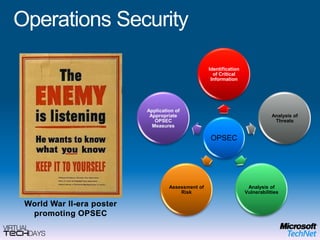
    Operations SecurityWorld WarII-era poster promoting OPSEC
  • 132.
  • 133.
  • 134.
  • 135.
  • 136.
    Security Guidance andResourcesMicrosoft Security Home Page: www.microsoft.com/securityMicrosoft Forefront: http://www.microsoft.com/forefront/default.mspxGeneral Information:Microsoft Live Safety Center: http://safety.live.comMicrosoft Security Response Center: www.microsoft.com/security/msrcSecurity Development Lifecycle: http://msdn.microsoft.com/security/sdlGet the Facts on Windows and Linux: www.microsoft.com/getthefactsAnti-Malware:Microsoft OneCare Live: https://beta.windowsonecare.comMicrosoft Defender: www.microsoft.com/athome/security/spyware/softwareSpyware Criteria: www.microsoft.com/athome/security/spyware/software/isvGuidance Centers:Security Guidance Centers: www.microsoft.com/security/guidanceSecurity Guidance for IT Professionals: www.microsoft.com/technet/securityThe Microsoft Security Developer Center: msdn.microsoft.com/securityThe Security at Home Consumer Site: www.microsoft.com/athome/security
  • 137.
  • 138.
    © 2009 MicrosoftCorporation. All rights reserved. Microsoft, Windows, Windows Vista and other product names are or may be registered trademarks and/or trademarks in the U.S. and/or other countries.The information herein is for informational purposes only and represents the current view of Microsoft Corporation as of the date of this presentation. Because Microsoft must respond to changing market conditions, it should not be interpreted to be a commitment on the part of Microsoft, and Microsoft cannot guarantee the accuracy of any information provided after the date of this presentation. MICROSOFT MAKES NO WARRANTIES, EXPRESS, IMPLIED OR STATUTORY, AS TO THE INFORMATION IN THIS PRESENTATION.

Editor's Notes

  • #7 LEAD: Who is responsible for driving the evolution of the threats that impact your business?It started with those that were curious and wanted personal fame in hacking into different systems and networks.Then, the motivation moved to those that found a sport in CyberTrespassing and those that look at financial gains from CyberThief. As more individuals made money, the group began to grow larger and larger.Now we are finding experts and specialist that focus on large hacking efforts gaining access to sensitive data that they can sell on the black market. We are also seeing CyberSpy Specialist with national interests at stake.<CLICK>Vandals are the largest group.<CLICK>We see Theives driving the largest area where money is lost<CLICK>The largest segment of spend is focused defending national interests.<CLICK>The fastest growing segment are the experts that are in the business of stealing your business assets.????? Customer QuestionsAre you seeing security threats evolve before the attacked technology is mainstreamed?Why do you think this is happening?
  • #19 LEAD: Engineering Excellence is focused upon providing fundamentally secure platforms for our customers. They should be secure by design, secure by default, and remain secure after deployment.???? Customer QuestionsWhat kind of security configuration management do you utilize to deploy servers? Desktops?Are you using Group Policy to keep your platforms secure after they are deployed?What is your platform patching strategy?