LOW COST SUPERCOMPUTING
USING LINUX CLUSTERS
Topics :

1.   Introduction
2.   Overview of Parallel Processing
3.   Conceptual Overview of Clusters
4.   Cluster Design
5.   Features & Benefits
6.   Application Areas
7.   References
1. INTRODUCTION
Introduction To Clusters

o Parallel processing, the method of having many small tasks solve
  one large problem, has emerged as a key enabling technology in
  modern computing .
o In past several years Parallel Processing is increasing for :
     High performance scientific computing
     General purpose applications
o It results in :
     High performance
     Low cost
     Sustain productivity
What is Clustering ?

Meaning :
o Clustering is a parallel or distributed system consisting of
  independent computers that corporate as a single system.
o Cluster offers a way to use a computer more productively in
  comparison to when number of machines working standalone.
2. OVERVIEW OF
PARALLEL PROCESSING
Introduction to Parallelism

o Parallel Processing refers to the concept of speeding-up the
  execution of the program by dividing the program into multiple
  fragments.
o Parallel Processing operates on two levels :
   a.   Hardware Parallelism
   b.   Software Parallelism
Parallel Processing Schemes

o There are different approaches to creating effective parallel
  computers , and all of them have different levels of effectiveness
  for different kind of problems.
o Some of the methods are :
      Symmetric Multiprocessing (SMP)
      Non-Uniform Memory Access (NUMA)
      Uniform Memory Access (UMA)
      Single Instruction Multiple Data (SIMD)
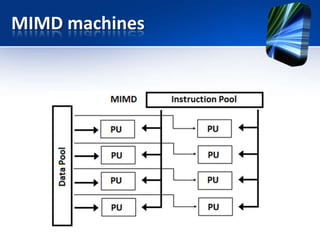
      Multiple Instruction Multiple Data (MIMD)
SMP machines
NUMA & UMA machines
SIMD machines
MIMD machines
3. CONCEPTUAL
OVERVIEW OF CLUSTERS
Brief History Of Clusters

o In the summer of 1994 Thomas Sterling and Don Becker working
  at CESDIS under sponsorship of the EES project, built a cluster of
  16 DX4 processors connected by channel bonded Ethernet .
o They called their machines Beowulf .
BEOWULF CLUSTER
4. CLUSTER DESIGN
Cluster Design

o Cluster design includes :
      Design Considerations
      Topology
      Cluster Style
      Hardware Specification
      Software Requirements
      Cluster Architecture
Design Issues

o Design Issues considers :
   1.   Size Scalability (physical & application)
   2.   Enhanced Availability (failure management)
   3.   Single System Image (SSI look-and-feel of same system)
   4.   Fast Communication (network & protocols)
   5.   Programmability (simple API if required)
Cluster Style


                       Cluster
                       Styles


         Homogeneous             Heterogeneous
Topology
o Currently used topologies in networking are :
      Ring
      Bus
      Star
      Line
      Mesh
      Tree etc.
o We are using star topology due to following reason :
    Failure of one node does not effect entire network
    Range provided by star topology is greater than that of bus topology
    Range can be extended by using routers
Hardware Specification

o Hardware configuration of cluster mainly consists of two
  components.
    Nodes or Workstations
 Interconnection Network
Hardware Requirements

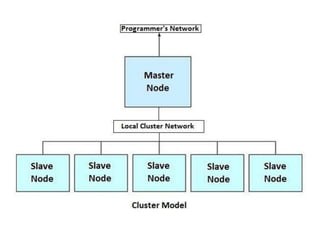
Hardware Requirement for MASTER NODE :
o Master mode is where the users of the system will log in.
o They submit their job processed by system and look at the result
  of their work.
o It requires :
      CPU capable system as master node with fast CPU
      Greater than 128 MB RAM
      8 GB HDD or more
      10 Mbps/ 100 Mbps Ethernet adapter.
Hardware Requirement for SLAVE NODE:
o Slave nodes are useful for computation only.
o For Slave node hard disk capacity need to be very large for
  better storage capacity.
o It requires,
  CPU based system with fast CPU
    32 MB or more memory modules
    4 GB HDD or more
    10 Mbps/ 100 Mbps Ethernet adapter.
Software Requirement

o The platform (O.S.) for developing cluster is very important
  because the throughput and performance of machine is totally
  depends upon how the platform manages the whole cluster.
o Some of the O.S that supports Clustering are,
      Linux
      Unix
      Windows 2000
      Windows NT
Why Linux ?

o    Linux is generally cheaper than other O.S and is frequently less
     problematic than many commercial systems.
o    Linux is chosen because :
    1.   It is a 32-bit multitasking Operating System.
    2.   It runs on hardware ranging from low-end 386 boxes to massive ultra-
         parallel machines.
    3.   Linux has a very strong networking support & also its efficient processing
         support.
    4.   The programming environments & development tools for parallel
         programming are more mature in Linux.
Cluster Architecture

o It covers :
    Network Interface Hardware
    Communication Software
    Cluster Middleware
5. FEATURES &
BENEFITS
Features & Benefits

o Data sharing across the interface
o Parallel processing of small tasks
o Easy server maintenance
6. APPLICATIONS
Applications

o   General high performance computing
o   Bulk disk servers
o   High performance web servers
o   Flight simulators
o   Alife
Clustering Examples

o It is used in :
 NASA uses Beowulf which was started in a project headed up by CESDIS
 NOAA uses several Clustering technologies in their project
 Google.com introduced largest ever LINUX cluster which powers their popular
  web search engine
7. REFERENCES
Book References :

o Red Hat Linux System & Network Administration
o Building Linux Clusters -David HM Spector (Oreilley Publications)
o Beginning Linux Programming - Wrox Publications
Web Reference :

 www.beowlf.org
 www.redhat.com/mirrors/LDP
 www.jics.utk.edu Parallel Computing Resources
 www.linux-mag.com/gallery.html Linux Magazine Open Source
THANK YOU

Clustering

  • 1.
  • 2.
    Topics : 1. Introduction 2. Overview of Parallel Processing 3. Conceptual Overview of Clusters 4. Cluster Design 5. Features & Benefits 6. Application Areas 7. References
  • 3.
  • 4.
    Introduction To Clusters oParallel processing, the method of having many small tasks solve one large problem, has emerged as a key enabling technology in modern computing . o In past several years Parallel Processing is increasing for :  High performance scientific computing  General purpose applications o It results in :  High performance  Low cost  Sustain productivity
  • 5.
    What is Clustering? Meaning : o Clustering is a parallel or distributed system consisting of independent computers that corporate as a single system. o Cluster offers a way to use a computer more productively in comparison to when number of machines working standalone.
  • 7.
  • 8.
    Introduction to Parallelism oParallel Processing refers to the concept of speeding-up the execution of the program by dividing the program into multiple fragments. o Parallel Processing operates on two levels : a. Hardware Parallelism b. Software Parallelism
  • 10.
    Parallel Processing Schemes oThere are different approaches to creating effective parallel computers , and all of them have different levels of effectiveness for different kind of problems. o Some of the methods are :  Symmetric Multiprocessing (SMP)  Non-Uniform Memory Access (NUMA)  Uniform Memory Access (UMA)  Single Instruction Multiple Data (SIMD)  Multiple Instruction Multiple Data (MIMD)
  • 11.
  • 12.
    NUMA & UMAmachines
  • 13.
  • 14.
  • 15.
  • 16.
    Brief History OfClusters o In the summer of 1994 Thomas Sterling and Don Becker working at CESDIS under sponsorship of the EES project, built a cluster of 16 DX4 processors connected by channel bonded Ethernet . o They called their machines Beowulf .
  • 17.
  • 20.
  • 21.
    Cluster Design o Clusterdesign includes :  Design Considerations  Topology  Cluster Style  Hardware Specification  Software Requirements  Cluster Architecture
  • 22.
    Design Issues o DesignIssues considers : 1. Size Scalability (physical & application) 2. Enhanced Availability (failure management) 3. Single System Image (SSI look-and-feel of same system) 4. Fast Communication (network & protocols) 5. Programmability (simple API if required)
  • 23.
    Cluster Style Cluster Styles Homogeneous Heterogeneous
  • 24.
    Topology o Currently usedtopologies in networking are :  Ring  Bus  Star  Line  Mesh  Tree etc. o We are using star topology due to following reason :  Failure of one node does not effect entire network  Range provided by star topology is greater than that of bus topology  Range can be extended by using routers
  • 25.
    Hardware Specification o Hardwareconfiguration of cluster mainly consists of two components.  Nodes or Workstations
  • 26.
  • 27.
    Hardware Requirements Hardware Requirementfor MASTER NODE : o Master mode is where the users of the system will log in.
  • 28.
    o They submittheir job processed by system and look at the result of their work. o It requires :  CPU capable system as master node with fast CPU  Greater than 128 MB RAM  8 GB HDD or more  10 Mbps/ 100 Mbps Ethernet adapter.
  • 29.
    Hardware Requirement forSLAVE NODE: o Slave nodes are useful for computation only. o For Slave node hard disk capacity need to be very large for better storage capacity. o It requires, CPU based system with fast CPU  32 MB or more memory modules  4 GB HDD or more  10 Mbps/ 100 Mbps Ethernet adapter.
  • 30.
    Software Requirement o Theplatform (O.S.) for developing cluster is very important because the throughput and performance of machine is totally depends upon how the platform manages the whole cluster. o Some of the O.S that supports Clustering are,  Linux  Unix  Windows 2000  Windows NT
  • 31.
    Why Linux ? o Linux is generally cheaper than other O.S and is frequently less problematic than many commercial systems. o Linux is chosen because : 1. It is a 32-bit multitasking Operating System. 2. It runs on hardware ranging from low-end 386 boxes to massive ultra- parallel machines. 3. Linux has a very strong networking support & also its efficient processing support. 4. The programming environments & development tools for parallel programming are more mature in Linux.
  • 32.
    Cluster Architecture o Itcovers :  Network Interface Hardware  Communication Software  Cluster Middleware
  • 34.
  • 35.
    Features & Benefits oData sharing across the interface o Parallel processing of small tasks o Easy server maintenance
  • 36.
  • 37.
    Applications o General high performance computing o Bulk disk servers o High performance web servers o Flight simulators o Alife
  • 38.
    Clustering Examples o Itis used in :  NASA uses Beowulf which was started in a project headed up by CESDIS  NOAA uses several Clustering technologies in their project  Google.com introduced largest ever LINUX cluster which powers their popular web search engine
  • 39.
  • 40.
    Book References : oRed Hat Linux System & Network Administration o Building Linux Clusters -David HM Spector (Oreilley Publications) o Beginning Linux Programming - Wrox Publications
  • 41.
    Web Reference : www.beowlf.org  www.redhat.com/mirrors/LDP  www.jics.utk.edu Parallel Computing Resources  www.linux-mag.com/gallery.html Linux Magazine Open Source
  • 42.