Clusters Paul Krzyzanowski [email_address] [email_address] Distributed Systems Except as otherwise noted, the content of this presentation is licensed under the Creative Commons Attribution 2.5 License.
Designing highly available systems Incorporate elements of fault-tolerant design Replication, TMR Fully fault tolerant system will offer non-stop availability You can’t achieve this! Problem : expensive!
Designing highly scalable systems SMP architecture Problem : performance gain as  f (# processors) is sublinear Contention for resources (bus, memory, devices) Also … the solution is expensive!
Clustering Achieve reliability and scalability by interconnecting multiple independent systems Cluster:   group of standard, autonomous servers configured so they appear on the network as a  single machine approach single system image
Ideally… Bunch of off-the shelf machines Interconnected on a high speed LAN Appear as one system to external users Processors are load-balanced May migrate May run on different systems All IPC mechanisms and file access available Fault tolerant Components may fail Machines may be taken down
we don’t get all that (yet) (at least not in one package)
Clustering types Supercomputing (HPC) Batch processing High availability (HA) Load balancing
High Performance Computing (HPC)
The evolution of supercomputers Target complex applications: Large amounts of data Lots of computation Parallelizable application Many custom efforts Typically Linux + message passing software + remote exec + remote monitoring
Clustering for performance Example: One popular effort Beowulf Initially built to address problems associated with large data sets in Earth and Space Science applications From Center of Excellence in Space Data & Information Sciences (CESDIS), division of University Space Research Association at the Goddard Space Flight Center
What makes it possible Commodity off-the-shelf computers are cost effective Publicly available software: Linux, GNU compilers & tools MPI (message passing interface) PVM (parallel virtual machine) Low cost, high speed networking Experience with parallel software Difficult: solutions tend to be custom
What can you run? Programs that do not require fine-grain communication Nodes are dedicated to the cluster Performance of nodes not subject to external factors Interconnect network isolated from external network Network load is determined only by application Global process ID provided Global signaling mechanism
Beowulf configuration Includes: BPROC: Beowulf distributed process space Start processes on other machines Global process ID, global signaling Network device drivers Channel bonding, scalable I/O File system  (file sharing is generally not critical) NFS root  unsynchronized synchronized periodically via  rsync
Programming tools: MPI Message Passing Interface API for sending/receiving messages Optimizations for shared memory & NUMA Group communication suppot Other features: Scalable file I/O Dynamic process management Synchronization (barriers) Combining results
Programming tools: PVM Software that emulates a general-purpose heterogeneous computing framework on interconnected computers Present a view of virtual processing elements Create tasks Use global task IDs Manage  groups  of tasks Basic message passing
Beowulf programming tools PVM and MPI libraries Distributed shared memory Page based: software-enforced ownership and consistency policy Cluster monitor Global  ps, top, uptime  tools Process management Batch system Write software to control synchronization and load balancing with MPI and/or PVM Preemptive distributed scheduling: not part of Beowulf (two packages:  Condor   and  Mosix )
Another example Rocks Cluster Distribution Based on CentOS Linux Mass installation is a core part of the system Mass re-installation for application-specific configurations Front-end central server + compute & storage nodes Rolls: collection of packages Base roll includes: PBS (portable batch system), PVM (parallel virtual machine), MPI (message passing interface), job launchers, …
Another example Microsoft HPC Server 2008 Windows Server 2008 + clustering package Systems Management Management Console: plug-in to System Center UI with support for Windows PowerShell RIS (Remote Installation Service) Networking MS-MPI (Message Passing Interface) ICS  (Internet Connection Sharing)  : NAT for cluster nodes Network Direct RDMA (Remote DMA) Job scheduler Storage: iSCSI SAN and SMB support Failover support
Batch Processing
Batch processing Common application: graphics rendering Maintain a queue of frames to be rendered Have a dispatcher to remotely exec process Virtually no IPC needed Coordinator dispatches jobs
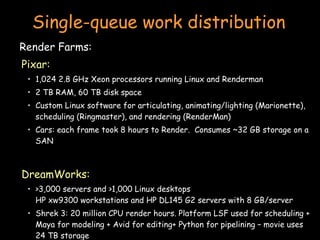
Single-queue work distribution Render Farms: Pixar: 1,024 2.8 GHz Xeon processors running Linux and Renderman 2 TB RAM, 60 TB disk space Custom Linux software for articulating, animating/lighting (Marionette), scheduling (Ringmaster), and rendering (RenderMan) Cars: each frame took 8 hours to Render.  Consumes ~32 GB storage on a SAN DreamWorks: >3,000 servers and >1,000 Linux desktops HP xw9300 workstations and HP DL145 G2 servers with 8 GB/server Shrek 3: 20 million CPU render hours. Platform LSF used for scheduling + Maya for modeling + Avid for editing+ Python for pipelining – movie uses 24 TB storage
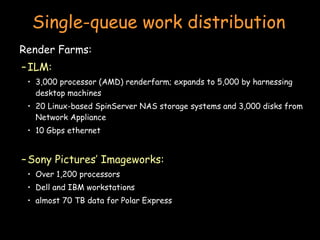
Single-queue work distribution Render Farms: ILM: 3,000 processor (AMD) renderfarm; expands to 5,000 by harnessing desktop machines 20 Linux-based SpinServer NAS storage systems and 3,000 disks from Network Appliance 10 Gbps ethernet Sony Pictures’ Imageworks: Over 1,200 processors Dell and IBM workstations almost 70 TB data for Polar Express
Batch Processing OpenPBS.org: Portable Batch System Developed by Veridian MRJ for NASA Commands Submit job scripts Submit interactive jobs Force a job to run List jobs Delete jobs Hold jobs
Grid Computing Characteristics Coordinate computing resources that are not subject to centralized control Not application-specific use general-purpose protocols for accessing resources, authenticating, discovery, … Some form of quality of service guarantee Capabilities Computational resources: starting, monitoring Storage access Network resources
Open Grid Services Architecture  (OGSA) Globus  Toolkit All grid resources are modeled as services Grid Resource Information Protocol (GRIP) Register resources; based on LDAP Grid Resource Access and Management Protocol (GRAM) Allocation & monitoring of resources; based on HTTP GridFTP Data access
Globus services Define service’s interface (GWSDL) Interface definition – extension of WSDL Implement service (Java) Define deployment parameters (WSDD) Make service available through Grid-enhanced web server Compile & Generate GAR file (Ant) Java build tool (apache project) – similar to make Deploy service with Ant Copy key files to public directory tree.
Load Balancing for the web
Functions of a load balancer Load balancing Failover Planned outage management
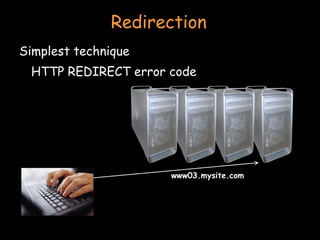
Redirection Simplest technique HTTP REDIRECT error code
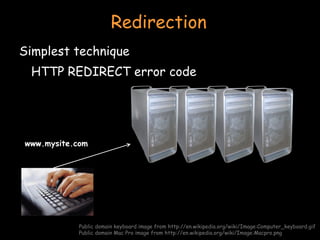
Redirection Simplest technique HTTP REDIRECT error code Public domain keyboard image from http://en.wikipedia.org/wiki/Image:Computer_keyboard.gif Public domain Mac Pro image from http://en.wikipedia.org/wiki/Image:Macpro.png www.mysite.com
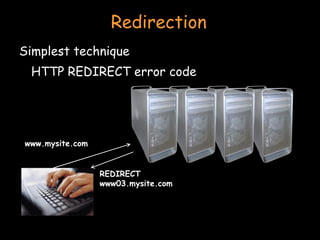
Redirection Simplest technique HTTP REDIRECT error code www.mysite.com REDIRECT www03.mysite.com
Redirection Simplest technique HTTP REDIRECT error code www03.mysite.com
Redirection Trivial to implement Successive requests automatically go to the same web server Important for sessions Visible to customer Some don’t like it Bookmarks will usually tag a specific site
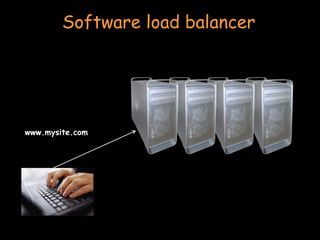
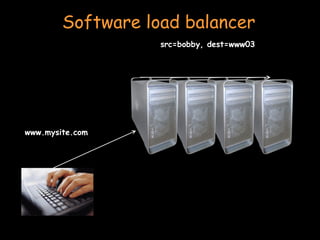
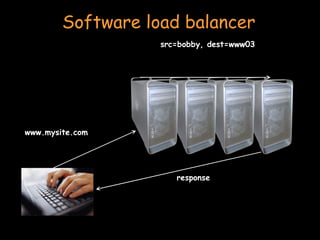
Software load balancer e.g.: IBM Interactive Network Dispatcher Software Forwards request via load balancing Leaves original source address Load balancer not in path of outgoing traffic (high bandwidth) Kernel extensions for routing TCP and UDP requests Each client accepts connections on its own address and dispatcher’s address Dispatcher changes MAC address of packets.
Software load balancer www.mysite.com
Software load balancer www.mysite.com src=bobby, dest=www03
Software load balancer www.mysite.com response src=bobby, dest=www03
Load balancing router Routers have been getting smarter Most support packet filtering Add load balancing Cisco LocalDirector, Altheon, F5 Big-IP
Load balancing router Assign one or more virtual addresses to physical address Incoming request gets mapped to physical address Special assignments can be made per port e.g. all FTP traffic goes to one machine Balancing decisions : Pick machine with least # TCP connections Factor in weights when selecting machines Pick machines round-robin Pick fastest connecting machine (SYN/ACK time)
Sessions Watch out for session state (e.g. servlets, asp) Cookie contains handle to session data Where do you store session data? App server (jrun, tomcat, IBM websphere, BEA weblogic) Database  (Websphere, weblogic) Replicate among app servers for fault tolerance  (weblogic) Migrate old/stale sessions to database  (weblogic) Database is slowest Load balancer may have to manage sessions Or have server direct request to appropriate app server
High Availability (HA)
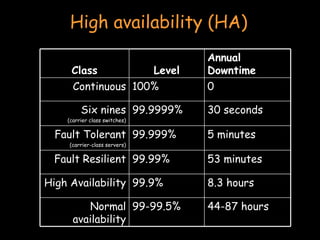
High availability (HA) Class Level Annual Downtime Continuous 100% 0 Six nines (carrier class switches) 99.9999% 30 seconds Fault Tolerant (carrier-class servers) 99.999% 5 minutes Fault Resilient 99.99% 53 minutes High Availability 99.9% 8.3 hours Normal availability 99-99.5% 44-87 hours
Clustering: high availability Fault tolerant design Stratus, NEC, Marathon technologies Applications run uninterrupted on a redundant subsystem NEC and Stratus has applications running in lockstep synchronization Two identical connected systems If one server fails, other takes over instantly Costly and inefficient But does what it was designed to do
Clustering: high availability Availability addressed by many: Sun, IBM, HP, Microsoft, SteelEye Lifekeeper, … If one server fails Fault is isolated to that node Workload spread over surviving nodes Allows scheduled maintenance without disruption Nodes may need to take over IP addresses
Example: Windows Server 2003 clustering Network load balancing Address web-server bottlenecks Component load balancing Scale middle-tier software (COM objects) Failover support for applications 8-node failover clusters Applications restarted on surviving node Shared disk configuration using SCSI or fibre channel Resource group : {disk drive, IP address, network name, service}  can be moved during failover
Example: Windows Server 2003 clustering Top tier: cluster abstractions Failover manager, resource monitor, cluster registry Middle tier: distributed operations Global status update, quorum (keeps track of who’s in charge), membership Bottom tier: OS and drivers Cluster disk driver, cluster network drivers IP address takeover
Clusters Architectural models
HA issues How do you detect failover? How long does it take to detect? How does a dead application move/restart? Where does it move to?
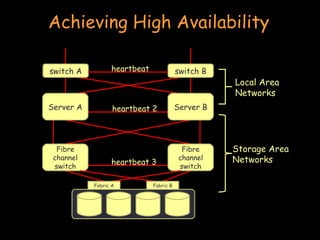
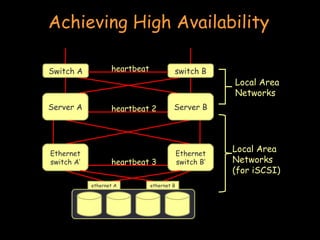
Heartbeat network Machines need to detect faulty systems “ ping” mechanism Need to distinguish system faults from network faults Useful to maintain  redundant networks Send a  periodic heartbeat  to test a machine’s liveness Watch out for  split-brain ! Ideally, use a network with a bounded response time Lucent RCC used a serial line interconnect Microsoft Cluster Server supports a dedicated  “private network” Two network cards connected with a pass-through cable or hub
Failover Configuration Models Active/Passive (N+M nodes) M dedicated failover node(s) for N active nodes Active/Active Failed workload goes to remaining nodes
Design options for failover Cold failover Application restart Warm failover Application checkpoints itself periodically Restart last checkpointed image May use writeahead log (tricky) Hot failover Application state is lockstep synchronized Very difficult, expensive (resources), prone to software faults
Design options for failover With either type of failover … Multi-directional failover Failed applications migrate to / restart on available systems Cascading failover If the backup system fails, application can be restarted on another surviving system
System support for HA Hot-pluggable devices Minimize downtime for component swapping Redundant devices Redundant power supplies Parity on memory Mirroring on disks (or RAID for HA) Switchover of failed components Diagnostics On-line serviceability
Shared resources (disk) Shared disk Allows multiple systems to share access to disk drives Works well if applications do not generate much disk I/O Disk access  must  be synchronized Synchronization via a  distributed lock manager  (DLM)
Shared resources (disk) Shared nothing No shared devices Each system has its own storage resources No need to deal with DLMs If a machine  A  needs resources on  B ,  A  sends a message to  B If  B  fails, storage requests have to be switched over to a live node
Cluster interconnects Traditional WANs and LANs may be slow as cluster interconnect Connecting server nodes, storage nodes, I/O channels, even memory pages Storage Area Network   (SAN) Fibre channel connectivity to external storage devices Any node can be configured to access any storage through a fibre channel switch System Area Network   (SAN) Switched interconnect to switch cluster resources Low-latency I/O without processor intervention Scalable switching fabric (Compaq, Tandem’s ServerNet) Microsoft Windows 2000 supports Winsock Direct for SAN communication
Achieving High Availability heartbeat 2 heartbeat 3 Server A Server B Fibre channel switch Fibre channel switch Fabric A Fabric B Storage Area Networks Local Area Networks switch B switch A heartbeat
Achieving High Availability heartbeat 2 heartbeat 3 Server A Server B Ethernet switch A’ Ethernet switch B’ ethernet A ethernet B Local Area Networks (for iSCSI) Local Area Networks switch B Switch A heartbeat
HA Storage: RAID Redundant Array of Independent (Inexpensive) Disks
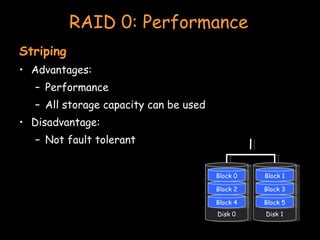
RAID 0: Performance Striping Advantages: Performance All storage capacity can be used Disadvantage: Not fault tolerant Disk 0 Block 4 Block 2 Block 0 Disk 1 Block 5 Block 3 Block 1
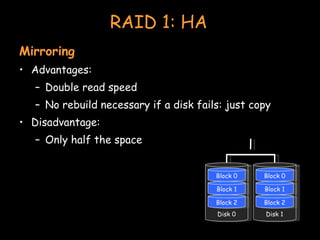
RAID 1: HA Mirroring Advantages: Double read speed No rebuild necessary if a disk fails: just copy Disadvantage: Only half the space Disk 0 Block 2 Block 1 Block 0 Disk 1 Block 2 Block 1 Block 0
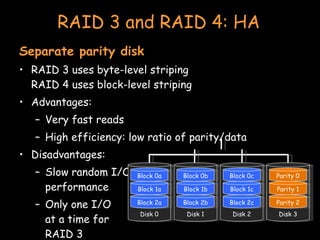
RAID 3 and RAID 4: HA Separate parity disk RAID 3 uses byte-level striping RAID 4 uses block-level striping Advantages: Very fast reads High efficiency: low ratio of parity/data Disadvantages: Slow random I/O performance Only one I/O at a time for RAID 3 Disk 3 Parity 2 Parity 1 Parity 0 Disk 2 Block 2c Block 1c Block 0c Disk 1 Block 2b Block 1b Block 0b Disk 0 Block 2a Block 1a Block 0a
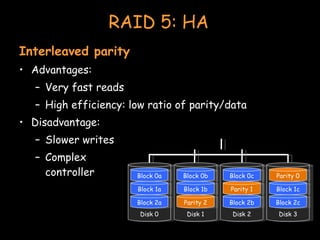
RAID 5: HA Interleaved parity Advantages: Very fast reads High efficiency: low ratio of parity/data Disadvantage: Slower writes Complex controller Disk 2 Block 2b Parity 1 Block 0c Disk 3 Block 2c Block 1c Parity 0 Disk 1 Parity 2 Block 1b Block 0b Disk 0 Block 2a Block 1a Block 0a
RAID 1+0 Combine mirroring and striping Striping across a set of disks Mirroring of the entire set onto another set
The end

Clusters (Distributed computing)

  • 1.
    Clusters Paul Krzyzanowski[email_address] [email_address] Distributed Systems Except as otherwise noted, the content of this presentation is licensed under the Creative Commons Attribution 2.5 License.
  • 2.
    Designing highly availablesystems Incorporate elements of fault-tolerant design Replication, TMR Fully fault tolerant system will offer non-stop availability You can’t achieve this! Problem : expensive!
  • 3.
    Designing highly scalablesystems SMP architecture Problem : performance gain as f (# processors) is sublinear Contention for resources (bus, memory, devices) Also … the solution is expensive!
  • 4.
    Clustering Achieve reliabilityand scalability by interconnecting multiple independent systems Cluster: group of standard, autonomous servers configured so they appear on the network as a single machine approach single system image
  • 5.
    Ideally… Bunch ofoff-the shelf machines Interconnected on a high speed LAN Appear as one system to external users Processors are load-balanced May migrate May run on different systems All IPC mechanisms and file access available Fault tolerant Components may fail Machines may be taken down
  • 6.
    we don’t getall that (yet) (at least not in one package)
  • 7.
    Clustering types Supercomputing(HPC) Batch processing High availability (HA) Load balancing
  • 8.
  • 9.
    The evolution ofsupercomputers Target complex applications: Large amounts of data Lots of computation Parallelizable application Many custom efforts Typically Linux + message passing software + remote exec + remote monitoring
  • 10.
    Clustering for performanceExample: One popular effort Beowulf Initially built to address problems associated with large data sets in Earth and Space Science applications From Center of Excellence in Space Data & Information Sciences (CESDIS), division of University Space Research Association at the Goddard Space Flight Center
  • 11.
    What makes itpossible Commodity off-the-shelf computers are cost effective Publicly available software: Linux, GNU compilers & tools MPI (message passing interface) PVM (parallel virtual machine) Low cost, high speed networking Experience with parallel software Difficult: solutions tend to be custom
  • 12.
    What can yourun? Programs that do not require fine-grain communication Nodes are dedicated to the cluster Performance of nodes not subject to external factors Interconnect network isolated from external network Network load is determined only by application Global process ID provided Global signaling mechanism
  • 13.
    Beowulf configuration Includes:BPROC: Beowulf distributed process space Start processes on other machines Global process ID, global signaling Network device drivers Channel bonding, scalable I/O File system (file sharing is generally not critical) NFS root unsynchronized synchronized periodically via rsync
  • 14.
    Programming tools: MPIMessage Passing Interface API for sending/receiving messages Optimizations for shared memory & NUMA Group communication suppot Other features: Scalable file I/O Dynamic process management Synchronization (barriers) Combining results
  • 15.
    Programming tools: PVMSoftware that emulates a general-purpose heterogeneous computing framework on interconnected computers Present a view of virtual processing elements Create tasks Use global task IDs Manage groups of tasks Basic message passing
  • 16.
    Beowulf programming toolsPVM and MPI libraries Distributed shared memory Page based: software-enforced ownership and consistency policy Cluster monitor Global ps, top, uptime tools Process management Batch system Write software to control synchronization and load balancing with MPI and/or PVM Preemptive distributed scheduling: not part of Beowulf (two packages: Condor and Mosix )
  • 17.
    Another example RocksCluster Distribution Based on CentOS Linux Mass installation is a core part of the system Mass re-installation for application-specific configurations Front-end central server + compute & storage nodes Rolls: collection of packages Base roll includes: PBS (portable batch system), PVM (parallel virtual machine), MPI (message passing interface), job launchers, …
  • 18.
    Another example MicrosoftHPC Server 2008 Windows Server 2008 + clustering package Systems Management Management Console: plug-in to System Center UI with support for Windows PowerShell RIS (Remote Installation Service) Networking MS-MPI (Message Passing Interface) ICS (Internet Connection Sharing) : NAT for cluster nodes Network Direct RDMA (Remote DMA) Job scheduler Storage: iSCSI SAN and SMB support Failover support
  • 19.
  • 20.
    Batch processing Commonapplication: graphics rendering Maintain a queue of frames to be rendered Have a dispatcher to remotely exec process Virtually no IPC needed Coordinator dispatches jobs
  • 21.
    Single-queue work distributionRender Farms: Pixar: 1,024 2.8 GHz Xeon processors running Linux and Renderman 2 TB RAM, 60 TB disk space Custom Linux software for articulating, animating/lighting (Marionette), scheduling (Ringmaster), and rendering (RenderMan) Cars: each frame took 8 hours to Render. Consumes ~32 GB storage on a SAN DreamWorks: >3,000 servers and >1,000 Linux desktops HP xw9300 workstations and HP DL145 G2 servers with 8 GB/server Shrek 3: 20 million CPU render hours. Platform LSF used for scheduling + Maya for modeling + Avid for editing+ Python for pipelining – movie uses 24 TB storage
  • 22.
    Single-queue work distributionRender Farms: ILM: 3,000 processor (AMD) renderfarm; expands to 5,000 by harnessing desktop machines 20 Linux-based SpinServer NAS storage systems and 3,000 disks from Network Appliance 10 Gbps ethernet Sony Pictures’ Imageworks: Over 1,200 processors Dell and IBM workstations almost 70 TB data for Polar Express
  • 23.
    Batch Processing OpenPBS.org:Portable Batch System Developed by Veridian MRJ for NASA Commands Submit job scripts Submit interactive jobs Force a job to run List jobs Delete jobs Hold jobs
  • 24.
    Grid Computing CharacteristicsCoordinate computing resources that are not subject to centralized control Not application-specific use general-purpose protocols for accessing resources, authenticating, discovery, … Some form of quality of service guarantee Capabilities Computational resources: starting, monitoring Storage access Network resources
  • 25.
    Open Grid ServicesArchitecture (OGSA) Globus Toolkit All grid resources are modeled as services Grid Resource Information Protocol (GRIP) Register resources; based on LDAP Grid Resource Access and Management Protocol (GRAM) Allocation & monitoring of resources; based on HTTP GridFTP Data access
  • 26.
    Globus services Defineservice’s interface (GWSDL) Interface definition – extension of WSDL Implement service (Java) Define deployment parameters (WSDD) Make service available through Grid-enhanced web server Compile & Generate GAR file (Ant) Java build tool (apache project) – similar to make Deploy service with Ant Copy key files to public directory tree.
  • 27.
  • 28.
    Functions of aload balancer Load balancing Failover Planned outage management
  • 29.
    Redirection Simplest techniqueHTTP REDIRECT error code
  • 30.
    Redirection Simplest techniqueHTTP REDIRECT error code Public domain keyboard image from http://en.wikipedia.org/wiki/Image:Computer_keyboard.gif Public domain Mac Pro image from http://en.wikipedia.org/wiki/Image:Macpro.png www.mysite.com
  • 31.
    Redirection Simplest techniqueHTTP REDIRECT error code www.mysite.com REDIRECT www03.mysite.com
  • 32.
    Redirection Simplest techniqueHTTP REDIRECT error code www03.mysite.com
  • 33.
    Redirection Trivial toimplement Successive requests automatically go to the same web server Important for sessions Visible to customer Some don’t like it Bookmarks will usually tag a specific site
  • 34.
    Software load balancere.g.: IBM Interactive Network Dispatcher Software Forwards request via load balancing Leaves original source address Load balancer not in path of outgoing traffic (high bandwidth) Kernel extensions for routing TCP and UDP requests Each client accepts connections on its own address and dispatcher’s address Dispatcher changes MAC address of packets.
  • 35.
    Software load balancerwww.mysite.com
  • 36.
    Software load balancerwww.mysite.com src=bobby, dest=www03
  • 37.
    Software load balancerwww.mysite.com response src=bobby, dest=www03
  • 38.
    Load balancing routerRouters have been getting smarter Most support packet filtering Add load balancing Cisco LocalDirector, Altheon, F5 Big-IP
  • 39.
    Load balancing routerAssign one or more virtual addresses to physical address Incoming request gets mapped to physical address Special assignments can be made per port e.g. all FTP traffic goes to one machine Balancing decisions : Pick machine with least # TCP connections Factor in weights when selecting machines Pick machines round-robin Pick fastest connecting machine (SYN/ACK time)
  • 40.
    Sessions Watch outfor session state (e.g. servlets, asp) Cookie contains handle to session data Where do you store session data? App server (jrun, tomcat, IBM websphere, BEA weblogic) Database (Websphere, weblogic) Replicate among app servers for fault tolerance (weblogic) Migrate old/stale sessions to database (weblogic) Database is slowest Load balancer may have to manage sessions Or have server direct request to appropriate app server
  • 41.
  • 42.
    High availability (HA)Class Level Annual Downtime Continuous 100% 0 Six nines (carrier class switches) 99.9999% 30 seconds Fault Tolerant (carrier-class servers) 99.999% 5 minutes Fault Resilient 99.99% 53 minutes High Availability 99.9% 8.3 hours Normal availability 99-99.5% 44-87 hours
  • 43.
    Clustering: high availabilityFault tolerant design Stratus, NEC, Marathon technologies Applications run uninterrupted on a redundant subsystem NEC and Stratus has applications running in lockstep synchronization Two identical connected systems If one server fails, other takes over instantly Costly and inefficient But does what it was designed to do
  • 44.
    Clustering: high availabilityAvailability addressed by many: Sun, IBM, HP, Microsoft, SteelEye Lifekeeper, … If one server fails Fault is isolated to that node Workload spread over surviving nodes Allows scheduled maintenance without disruption Nodes may need to take over IP addresses
  • 45.
    Example: Windows Server2003 clustering Network load balancing Address web-server bottlenecks Component load balancing Scale middle-tier software (COM objects) Failover support for applications 8-node failover clusters Applications restarted on surviving node Shared disk configuration using SCSI or fibre channel Resource group : {disk drive, IP address, network name, service} can be moved during failover
  • 46.
    Example: Windows Server2003 clustering Top tier: cluster abstractions Failover manager, resource monitor, cluster registry Middle tier: distributed operations Global status update, quorum (keeps track of who’s in charge), membership Bottom tier: OS and drivers Cluster disk driver, cluster network drivers IP address takeover
  • 47.
  • 48.
    HA issues Howdo you detect failover? How long does it take to detect? How does a dead application move/restart? Where does it move to?
  • 49.
    Heartbeat network Machinesneed to detect faulty systems “ ping” mechanism Need to distinguish system faults from network faults Useful to maintain redundant networks Send a periodic heartbeat to test a machine’s liveness Watch out for split-brain ! Ideally, use a network with a bounded response time Lucent RCC used a serial line interconnect Microsoft Cluster Server supports a dedicated “private network” Two network cards connected with a pass-through cable or hub
  • 50.
    Failover Configuration ModelsActive/Passive (N+M nodes) M dedicated failover node(s) for N active nodes Active/Active Failed workload goes to remaining nodes
  • 51.
    Design options forfailover Cold failover Application restart Warm failover Application checkpoints itself periodically Restart last checkpointed image May use writeahead log (tricky) Hot failover Application state is lockstep synchronized Very difficult, expensive (resources), prone to software faults
  • 52.
    Design options forfailover With either type of failover … Multi-directional failover Failed applications migrate to / restart on available systems Cascading failover If the backup system fails, application can be restarted on another surviving system
  • 53.
    System support forHA Hot-pluggable devices Minimize downtime for component swapping Redundant devices Redundant power supplies Parity on memory Mirroring on disks (or RAID for HA) Switchover of failed components Diagnostics On-line serviceability
  • 54.
    Shared resources (disk)Shared disk Allows multiple systems to share access to disk drives Works well if applications do not generate much disk I/O Disk access must be synchronized Synchronization via a distributed lock manager (DLM)
  • 55.
    Shared resources (disk)Shared nothing No shared devices Each system has its own storage resources No need to deal with DLMs If a machine A needs resources on B , A sends a message to B If B fails, storage requests have to be switched over to a live node
  • 56.
    Cluster interconnects TraditionalWANs and LANs may be slow as cluster interconnect Connecting server nodes, storage nodes, I/O channels, even memory pages Storage Area Network (SAN) Fibre channel connectivity to external storage devices Any node can be configured to access any storage through a fibre channel switch System Area Network (SAN) Switched interconnect to switch cluster resources Low-latency I/O without processor intervention Scalable switching fabric (Compaq, Tandem’s ServerNet) Microsoft Windows 2000 supports Winsock Direct for SAN communication
  • 57.
    Achieving High Availabilityheartbeat 2 heartbeat 3 Server A Server B Fibre channel switch Fibre channel switch Fabric A Fabric B Storage Area Networks Local Area Networks switch B switch A heartbeat
  • 58.
    Achieving High Availabilityheartbeat 2 heartbeat 3 Server A Server B Ethernet switch A’ Ethernet switch B’ ethernet A ethernet B Local Area Networks (for iSCSI) Local Area Networks switch B Switch A heartbeat
  • 59.
    HA Storage: RAIDRedundant Array of Independent (Inexpensive) Disks
  • 60.
    RAID 0: PerformanceStriping Advantages: Performance All storage capacity can be used Disadvantage: Not fault tolerant Disk 0 Block 4 Block 2 Block 0 Disk 1 Block 5 Block 3 Block 1
  • 61.
    RAID 1: HAMirroring Advantages: Double read speed No rebuild necessary if a disk fails: just copy Disadvantage: Only half the space Disk 0 Block 2 Block 1 Block 0 Disk 1 Block 2 Block 1 Block 0
  • 62.
    RAID 3 andRAID 4: HA Separate parity disk RAID 3 uses byte-level striping RAID 4 uses block-level striping Advantages: Very fast reads High efficiency: low ratio of parity/data Disadvantages: Slow random I/O performance Only one I/O at a time for RAID 3 Disk 3 Parity 2 Parity 1 Parity 0 Disk 2 Block 2c Block 1c Block 0c Disk 1 Block 2b Block 1b Block 0b Disk 0 Block 2a Block 1a Block 0a
  • 63.
    RAID 5: HAInterleaved parity Advantages: Very fast reads High efficiency: low ratio of parity/data Disadvantage: Slower writes Complex controller Disk 2 Block 2b Parity 1 Block 0c Disk 3 Block 2c Block 1c Parity 0 Disk 1 Parity 2 Block 1b Block 0b Disk 0 Block 2a Block 1a Block 0a
  • 64.
    RAID 1+0 Combinemirroring and striping Striping across a set of disks Mirroring of the entire set onto another set
  • 65.