Shri Ram College of Engineering and Management
Department of computer science & Engineering
Presentation On
Cloud Computing
Presented by
Kishan Kumar Rai
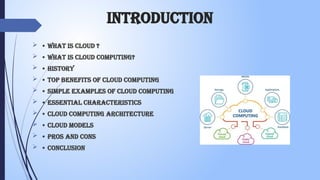
introduction
 • What is Cloud ?
 • What is Cloud Computing?
 • History
 • Top Benefits of Cloud Computing
 • Simple Examples of Cloud Computing
 • Essential Characteristics
 • Cloud Computing Architecture
 • Cloud Models
 • Pros and Cons
 • Conclusion
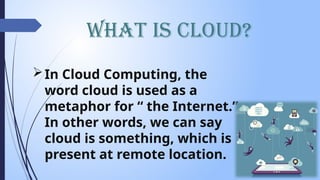
What is Cloud?
In Cloud Computing, the
word cloud is used as a
metaphor for “ the Internet.”
In other words, we can say
cloud is something, which is
present at remote location.
What is Cloud Computing?
 Simply put, cloud computing is the delivery of computing
services – servers, storage, databases, networking,
software, and analytics and more- over the Internet(Cloud).
 Cloud Computing consists of hardware and software
resources made available on the internet as they are
managed by the third party services. These services
typically provides access to advanced software applications,
high end networks of server computers.
"You don't generate your own electricity. “Why generate your own computing?”
–Jeff Bezos, Amazon.
History
 It was a gradual evolution that started in the 1950s with
mainframe computing
 After some time, around 1970, the concept of virtual machines
(VMs) was created.
 In 1999, Salesforce.com started delivering of applications to
users using a simple website.
 In 2002 Amazon provided First public cloud AWS (Amazon Web
Service) , providing services like storage, computation.
 In 2009, Google Apps also started to provide cloud computing
enterprise applications.
 In 2009, Microsoft launched Windows Azure, and companies like
Oracle and HP have all joined the game. This proves that today,
cloud computing has become mainstream.
Benefits of cloud computing
• Accessibility
• Productivity
• Scalability
• Access to automatic updates
• Business Continuity (Back up & Recovery)
• Pay structure
Common Cloud Characteristics
• On Demand Self Service
• Broad network access
• Multi-Tenancy (Resource Pooling)
• Rapid Elasticity
• Measured service
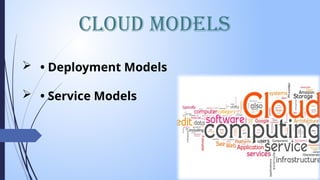
Cloud Models
 • Deployment Models
 • Service Models
 A cloud deployment model represents a
specific type of cloud environment,
primarily distinguished by ownership,
size, and access.
 There are three common cloud
deployment models:
 Public cloud
 Private cloud
 Hybrid cloud
Deployment Models
Deployment Models
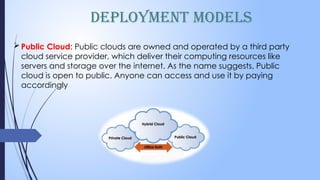
Public Cloud: Public clouds are owned and operated by a third party
cloud service provider, which deliver their computing resources like
servers and storage over the internet. As the name suggests, Public
cloud is open to public. Anyone can access and use it by paying
accordingly
Deployment Models
Private Cloud: The private cloud is defined as
computing services offered either over the Internet or
a private internal network and only to select users
instead of the general public. ... So private clouds
require the same staffing, management and
maintenance expenses as traditional datacenter
ownership
Hybrid Cloud: Hybrid cloud is a cloud computing
environment that uses a mix of on-premises, private
cloud and third-party, public cloud services with
Service Models
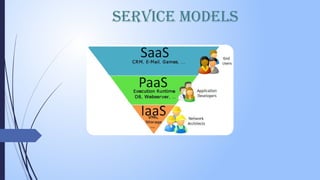
In the world of cloud computing, there are three
different approaches to cloud-based services:
 Infrastructure as a Service (IaaS)
 Platform as a Service (PaaS)
 Software as a Service (SaaS)
Service Models
Infrastructure as a service (IAAS): is a form of cloud computing that
provides virtualized computing resources over the internet.
Key features :
 Instead of purchasing hardware outright, users pay for IaaS on
demand.
 Infrastructure is scalable depending on processing and storage
needs.
 Saves enterprises the costs of buying and maintaining their
own hardware.
Service Models
Platform as a service (PaaS): is a cloud computing model in which a
third party provider delivers hardware and software tools usually
those needed for application development– to user over the
internet .
 Key features :
 PaaS provides a platform with tools to test, develop, and host
applications in the same environment.
 Enables organizations to focus on development without having to
worry about underlying infrastructure.
 Providers manage security, operating systems, server software, and
backups.
 Facilitates collaborative work even if teams work remotely
Service Models
Software as a service (SaaS): is a software distribution model in which a third
party provider hosts application and makes them available to customers over
the internet
Key features
 SaaS vendors provide users with software and applications on a
subscription model.
 Users do not have to manage, install, or upgrade software; SaaS
providers manage this.
 Data is secure in the cloud; equipment failure does not result in
loss of data.
 Use of resources can be scaled depending on service needs
Service Models
Pros and Cons
Pros:
 Reduced hardware equipment for end-users
 Improved performance
 Lower H/W and S/W maintenance
 Instant software updates
 Accessibility
 Metered services
 Less expensive
 Improved Disaster Recovery
Cons:
 Requires good internet speed with good bandwidth
 Security
 Limited control on Infrastructure
Conclusion
 Cloud computing has quickly become one of the most prominent
buzzwords in the IT world due to its revolutionary model of
computing as a utility. It promises increased flexibility, scalability,
and reliability, while promising decreased operational and
support costs
 Despite the potential gains achieved from the cloud computing,
the organizations are slow in accepting it due to security issues
and challenges associated with it. Security is one of the major
issues which hamper the growth of cloud. The idea of handing
over important data to another company is worrisome; such that
the consumers need to be vigilant in understanding the risks of
data breaches in this new environment.
Thank You

Cloud Computing FUNDAMENTAL TUTORIAL FOR YOU

  • 1.
    Shri Ram Collegeof Engineering and Management Department of computer science & Engineering Presentation On Cloud Computing Presented by Kishan Kumar Rai
  • 2.
    introduction  • Whatis Cloud ?  • What is Cloud Computing?  • History  • Top Benefits of Cloud Computing  • Simple Examples of Cloud Computing  • Essential Characteristics  • Cloud Computing Architecture  • Cloud Models  • Pros and Cons  • Conclusion
  • 3.
    What is Cloud? InCloud Computing, the word cloud is used as a metaphor for “ the Internet.” In other words, we can say cloud is something, which is present at remote location.
  • 4.
    What is CloudComputing?  Simply put, cloud computing is the delivery of computing services – servers, storage, databases, networking, software, and analytics and more- over the Internet(Cloud).  Cloud Computing consists of hardware and software resources made available on the internet as they are managed by the third party services. These services typically provides access to advanced software applications, high end networks of server computers. "You don't generate your own electricity. “Why generate your own computing?” –Jeff Bezos, Amazon.
  • 5.
    History  It wasa gradual evolution that started in the 1950s with mainframe computing  After some time, around 1970, the concept of virtual machines (VMs) was created.  In 1999, Salesforce.com started delivering of applications to users using a simple website.  In 2002 Amazon provided First public cloud AWS (Amazon Web Service) , providing services like storage, computation.  In 2009, Google Apps also started to provide cloud computing enterprise applications.  In 2009, Microsoft launched Windows Azure, and companies like Oracle and HP have all joined the game. This proves that today, cloud computing has become mainstream.
  • 6.
    Benefits of cloudcomputing • Accessibility • Productivity • Scalability • Access to automatic updates • Business Continuity (Back up & Recovery) • Pay structure
  • 7.
    Common Cloud Characteristics •On Demand Self Service • Broad network access • Multi-Tenancy (Resource Pooling) • Rapid Elasticity • Measured service
  • 8.
    Cloud Models  •Deployment Models  • Service Models
  • 9.
     A clouddeployment model represents a specific type of cloud environment, primarily distinguished by ownership, size, and access.  There are three common cloud deployment models:  Public cloud  Private cloud  Hybrid cloud Deployment Models
  • 10.
    Deployment Models Public Cloud:Public clouds are owned and operated by a third party cloud service provider, which deliver their computing resources like servers and storage over the internet. As the name suggests, Public cloud is open to public. Anyone can access and use it by paying accordingly
  • 11.
    Deployment Models Private Cloud:The private cloud is defined as computing services offered either over the Internet or a private internal network and only to select users instead of the general public. ... So private clouds require the same staffing, management and maintenance expenses as traditional datacenter ownership Hybrid Cloud: Hybrid cloud is a cloud computing environment that uses a mix of on-premises, private cloud and third-party, public cloud services with
  • 12.
    Service Models In theworld of cloud computing, there are three different approaches to cloud-based services:  Infrastructure as a Service (IaaS)  Platform as a Service (PaaS)  Software as a Service (SaaS)
  • 13.
    Service Models Infrastructure asa service (IAAS): is a form of cloud computing that provides virtualized computing resources over the internet. Key features :  Instead of purchasing hardware outright, users pay for IaaS on demand.  Infrastructure is scalable depending on processing and storage needs.  Saves enterprises the costs of buying and maintaining their own hardware.
  • 14.
    Service Models Platform asa service (PaaS): is a cloud computing model in which a third party provider delivers hardware and software tools usually those needed for application development– to user over the internet .  Key features :  PaaS provides a platform with tools to test, develop, and host applications in the same environment.  Enables organizations to focus on development without having to worry about underlying infrastructure.  Providers manage security, operating systems, server software, and backups.  Facilitates collaborative work even if teams work remotely
  • 15.
    Service Models Software asa service (SaaS): is a software distribution model in which a third party provider hosts application and makes them available to customers over the internet Key features  SaaS vendors provide users with software and applications on a subscription model.  Users do not have to manage, install, or upgrade software; SaaS providers manage this.  Data is secure in the cloud; equipment failure does not result in loss of data.  Use of resources can be scaled depending on service needs
  • 16.
  • 17.
    Pros and Cons Pros: Reduced hardware equipment for end-users  Improved performance  Lower H/W and S/W maintenance  Instant software updates  Accessibility  Metered services  Less expensive  Improved Disaster Recovery Cons:  Requires good internet speed with good bandwidth  Security  Limited control on Infrastructure
  • 18.
    Conclusion  Cloud computinghas quickly become one of the most prominent buzzwords in the IT world due to its revolutionary model of computing as a utility. It promises increased flexibility, scalability, and reliability, while promising decreased operational and support costs  Despite the potential gains achieved from the cloud computing, the organizations are slow in accepting it due to security issues and challenges associated with it. Security is one of the major issues which hamper the growth of cloud. The idea of handing over important data to another company is worrisome; such that the consumers need to be vigilant in understanding the risks of data breaches in this new environment.
  • 19.