A Program presentation
 What is Cloud ?
 Cloud Computing Concept.
 History of Cloud Computing.
 Characteristics of Cloud Computing.
 Why Cloud Computing required.
 Different Issues to Cloud Computing.
 Types of Cloud Computing deployment.
 Types of Cloud Computing Services.
 Different Applications.
 Future
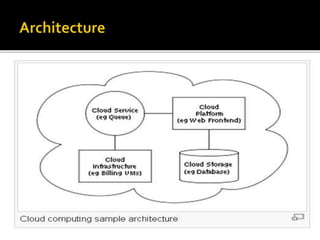
 Architecture of cloud computing.
 Advantage/ Disadvantage of Cloud Computing.
 Conclusion
 Cloud computing refers to the use and access of
multiple server-based computational resources via a
digital network (WAN), Internet connection using the
world wide web etc. Cloud users may access the
servers resources using a computer, notebook, ipad,
smart phone, or other device.
 The cloud is a new business model wrapped around
new technologies such as computer virtualization that
takes advantages of economies of scale and multi-
tenancy to reduce the cost of using information
technology resources.
 In cloud computing, application are provided and
managed by cloud server and data is also stored remotely
in the cloud configuration. Users do not download and
install applications on their own device or computer; all
processing and storage is maintained by the cloud servers.
The on-line services me be offered from a cloud provider
or by a private organization.
 The Cloud computing is in terms of computer, network
and its associated technology supports delivering
infrastructure such as computing application and storage
to customers on demand by any Service provider.
 Cloud computing is a natural evolution of the widespread
adoption of virtualization, service-oriented architecture ,
autonomic, and utility computing. Details are abstracted
from end-users, who no longer have need for expertise in
or control over, the technology infrastructure “in the
cloud” that support them.
 The actual term “cloud” borrow from telephony in that
telecommunication companies, who until the 1990 offered
primarily dedicated point to point data circuits, began
offering virtual private network (VPN) services with
comparable quality of service but at a much lower cost.
Measured Service
 Rapid Elasticity
On-Demand Self-Service
Ubiquitous Network Access
Resource Pooling
To reduce the IT operations and management
costs.
Cloud model of software architecture.
No Capital expenditure.
Can be access from any where.
Cloud computing may create a dependence on
the provider (Google, Amazon) and may make it
difficult to move to another platform.
Google itself admits that Google App Engine is
targeted at consumer applications, not
businesses.
There’s always the risk that the Cloud provider
may change business models or even go out of
business.
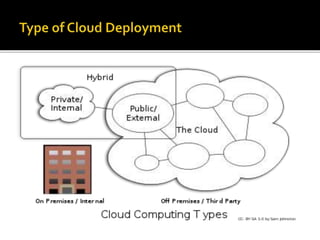
 Public Cloud
 Private Cloud
 Community Cloud
 Hybrid Cloud
 Combined Cloud
“ But mainly three type of deployment is in
use i.e. public, private, hybrid.”
 IaaS (Infrastructure as a Service)- Computer
configurations like RAM, CPU, Storage space.
 PaaS (Platform as a Service)- Computing
resources (Ram, CPU, Hard disk drive space),
and software such as OS MS windows or Linux,
etc.
 SaaS (Software as a Service)- Microsoft Office,
Sage Accounts, Tally, Exchange mailbox, CRM
Programs, etc.
 Virtual Desktops
 Hosted Email
 Online Backup
 HostedTelephony Service (VoIP)
 Unified Communicate
 Disaster Recovery
 Business Continuity Plan
 Flexibility
 Scalability
 Resilience
 Security
 Lower Costs
 Backed Up
 Availability
 Software as a Subscription
 Reduced Software Maintenance
 Increased Reliability
 Environmentally Friendly
 Cost Reduction
 Portability/Accessibility
______________________________________________________
 Bandwidth could bust your budget
 App performance could suffer
 Data might not be cloud-worthy
 Too big to scale
 Cloud Computing is the fastest growing part of IT.
 Tremendous benefits to customers of all sizes.
 Cloud services are simpler to acquire and scale up or
down.
 Public clouds work great for some but not all applications.
 Private clouds offer many benefits for internal
applications.
 Public and private clouds can be used in combination.

Cloud computing

  • 1.
  • 2.
     What isCloud ?  Cloud Computing Concept.  History of Cloud Computing.  Characteristics of Cloud Computing.  Why Cloud Computing required.  Different Issues to Cloud Computing.  Types of Cloud Computing deployment.  Types of Cloud Computing Services.  Different Applications.  Future  Architecture of cloud computing.  Advantage/ Disadvantage of Cloud Computing.  Conclusion
  • 3.
     Cloud computingrefers to the use and access of multiple server-based computational resources via a digital network (WAN), Internet connection using the world wide web etc. Cloud users may access the servers resources using a computer, notebook, ipad, smart phone, or other device.  The cloud is a new business model wrapped around new technologies such as computer virtualization that takes advantages of economies of scale and multi- tenancy to reduce the cost of using information technology resources.
  • 4.
     In cloudcomputing, application are provided and managed by cloud server and data is also stored remotely in the cloud configuration. Users do not download and install applications on their own device or computer; all processing and storage is maintained by the cloud servers. The on-line services me be offered from a cloud provider or by a private organization.  The Cloud computing is in terms of computer, network and its associated technology supports delivering infrastructure such as computing application and storage to customers on demand by any Service provider.
  • 5.
     Cloud computingis a natural evolution of the widespread adoption of virtualization, service-oriented architecture , autonomic, and utility computing. Details are abstracted from end-users, who no longer have need for expertise in or control over, the technology infrastructure “in the cloud” that support them.  The actual term “cloud” borrow from telephony in that telecommunication companies, who until the 1990 offered primarily dedicated point to point data circuits, began offering virtual private network (VPN) services with comparable quality of service but at a much lower cost.
  • 6.
    Measured Service  RapidElasticity On-Demand Self-Service Ubiquitous Network Access Resource Pooling
  • 7.
    To reduce theIT operations and management costs. Cloud model of software architecture. No Capital expenditure. Can be access from any where.
  • 8.
    Cloud computing maycreate a dependence on the provider (Google, Amazon) and may make it difficult to move to another platform. Google itself admits that Google App Engine is targeted at consumer applications, not businesses. There’s always the risk that the Cloud provider may change business models or even go out of business.
  • 9.
     Public Cloud Private Cloud  Community Cloud  Hybrid Cloud  Combined Cloud “ But mainly three type of deployment is in use i.e. public, private, hybrid.”
  • 11.
     IaaS (Infrastructureas a Service)- Computer configurations like RAM, CPU, Storage space.  PaaS (Platform as a Service)- Computing resources (Ram, CPU, Hard disk drive space), and software such as OS MS windows or Linux, etc.  SaaS (Software as a Service)- Microsoft Office, Sage Accounts, Tally, Exchange mailbox, CRM Programs, etc.
  • 12.
     Virtual Desktops Hosted Email  Online Backup  HostedTelephony Service (VoIP)  Unified Communicate  Disaster Recovery  Business Continuity Plan
  • 13.
     Flexibility  Scalability Resilience  Security  Lower Costs  Backed Up  Availability
  • 15.
     Software asa Subscription  Reduced Software Maintenance  Increased Reliability  Environmentally Friendly  Cost Reduction  Portability/Accessibility ______________________________________________________  Bandwidth could bust your budget  App performance could suffer  Data might not be cloud-worthy  Too big to scale
  • 16.
     Cloud Computingis the fastest growing part of IT.  Tremendous benefits to customers of all sizes.  Cloud services are simpler to acquire and scale up or down.  Public clouds work great for some but not all applications.  Private clouds offer many benefits for internal applications.  Public and private clouds can be used in combination.