Android
Connecting To Internet
Today’s agenda
Why Connect to Internet?
How to Connect to Internet?
Getting Data from Server.
Why Connect to Internet?
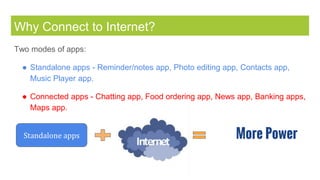
Two modes of apps:
â—Ź Standalone apps - Reminder/notes app, Photo editing app, Contacts app,
Music Player app.
â—Ź Connected apps - Chatting app, Food ordering app, News app, Banking apps,
Maps app.
Standalone apps More Power
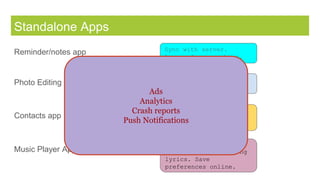
Standalone Apps
Sync with server.
Access from anywhere.
Share with friends.
Save in your account.
Upload on server as
backup. Access from
anywhere.
Search for online
music, search for song
lyrics. Save
preferences online.
Contacts app
Music Player App
Reminder/notes app
Photo Editing app
Ads
Analytics
Crash reports
Push Notifications
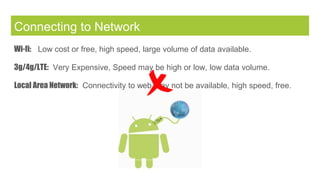
Connecting to Network
Wi-fi: Low cost or free, high speed, large volume of data available.
3g/4g/LTE: Very Expensive, Speed may be high or low, low data volume.
Local Area Network: Connectivity to web may not be available, high speed, free.
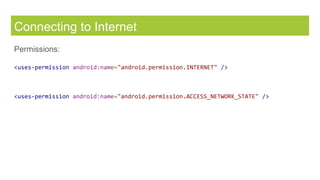
Connecting to Internet
Permissions:
<uses-permission android:name="android.permission.INTERNET" />
<uses-permission android:name="android.permission.ACCESS_NETWORK_STATE" />
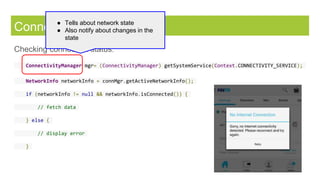
Connecting to Internet
Checking connection status:
ConnectivityManager mgr= (ConnectivityManager) getSystemService(Context.CONNECTIVITY_SERVICE);
NetworkInfo networkInfo = connMgr.getActiveNetworkInfo();
if (networkInfo != null && networkInfo.isConnected()) {
// fetch data
} else {
// display error
}
â—Ź Tells about network state
â—Ź Also notify about changes in the
state
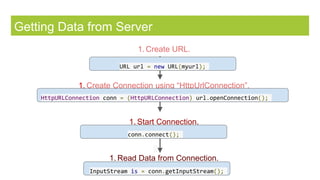
Getting Data from Server
1. Create URL.
1. Create Connection using “HttpUrlConnection”.
1. Start Connection.
1. Read Data from Connection.
URL url = new URL(myurl);
HttpURLConnection conn = (HttpURLConnection) url.openConnection();
conn.connect();
InputStream is = conn.getInputStream();
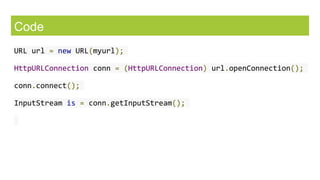
Code
URL url = new URL(myurl);
HttpURLConnection conn = (HttpURLConnection) url.openConnection();
conn.connect();
InputStream is = conn.getInputStream();
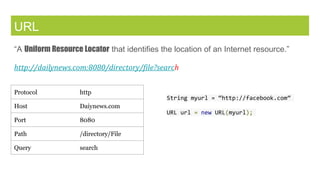
URL
“A Uniform Resource Locator that identifies the location of an Internet resource.”
http://dailynews.com:8080/directory/file?search
Protocol http
Host Daiynews.com
Port 8080
Path /directory/File
Query search
String myurl = “http://facebook.com”
URL url = new URL(myurl);
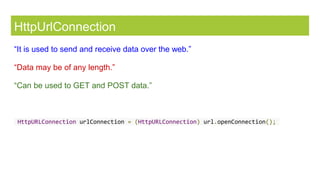
HttpUrlConnection
“It is used to send and receive data over the web.”
“Data may be of any length.”
“Can be used to GET and POST data.”
HttpURLConnection urlConnection = (HttpURLConnection) url.openConnection();
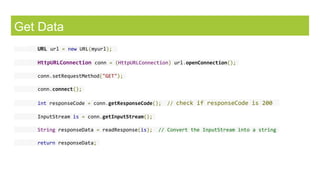
Get Data
URL url = new URL(myurl);
HttpURLConnection conn = (HttpURLConnection) url.openConnection();
conn.setRequestMethod("GET");
conn.connect();
int responseCode = conn.getResponseCode(); // check if responseCode is 200
InputStream is = conn.getInputStream();
String responseData = readResponse(is); // Convert the InputStream into a string
return responseData;
Next..
Why it is important to run network operations on separate thread?
How to show network response in UI?
Parsing different data formats: Json, Images.
Handling common issues.

Android Connecting to Internet

  • 1.
  • 2.
    Today’s agenda Why Connectto Internet? How to Connect to Internet? Getting Data from Server.
  • 3.
    Why Connect toInternet? Two modes of apps: â—Ź Standalone apps - Reminder/notes app, Photo editing app, Contacts app, Music Player app. â—Ź Connected apps - Chatting app, Food ordering app, News app, Banking apps, Maps app. Standalone apps More Power
  • 4.
    Standalone Apps Sync withserver. Access from anywhere. Share with friends. Save in your account. Upload on server as backup. Access from anywhere. Search for online music, search for song lyrics. Save preferences online. Contacts app Music Player App Reminder/notes app Photo Editing app Ads Analytics Crash reports Push Notifications
  • 5.
    Connecting to Network Wi-fi:Low cost or free, high speed, large volume of data available. 3g/4g/LTE: Very Expensive, Speed may be high or low, low data volume. Local Area Network: Connectivity to web may not be available, high speed, free.
  • 6.
    Connecting to Internet Permissions: <uses-permissionandroid:name="android.permission.INTERNET" /> <uses-permission android:name="android.permission.ACCESS_NETWORK_STATE" />
  • 7.
    Connecting to Internet Checkingconnection status: ConnectivityManager mgr= (ConnectivityManager) getSystemService(Context.CONNECTIVITY_SERVICE); NetworkInfo networkInfo = connMgr.getActiveNetworkInfo(); if (networkInfo != null && networkInfo.isConnected()) { // fetch data } else { // display error } â—Ź Tells about network state â—Ź Also notify about changes in the state
  • 8.
    Getting Data fromServer 1. Create URL. 1. Create Connection using “HttpUrlConnection”. 1. Start Connection. 1. Read Data from Connection. URL url = new URL(myurl); HttpURLConnection conn = (HttpURLConnection) url.openConnection(); conn.connect(); InputStream is = conn.getInputStream();
  • 9.
    Code URL url =new URL(myurl); HttpURLConnection conn = (HttpURLConnection) url.openConnection(); conn.connect(); InputStream is = conn.getInputStream();
  • 10.
    URL “A Uniform ResourceLocator that identifies the location of an Internet resource.” http://dailynews.com:8080/directory/file?search Protocol http Host Daiynews.com Port 8080 Path /directory/File Query search String myurl = “http://facebook.com” URL url = new URL(myurl);
  • 11.
    HttpUrlConnection “It is usedto send and receive data over the web.” “Data may be of any length.” “Can be used to GET and POST data.” HttpURLConnection urlConnection = (HttpURLConnection) url.openConnection();
  • 12.
    Get Data URL url= new URL(myurl); HttpURLConnection conn = (HttpURLConnection) url.openConnection(); conn.setRequestMethod("GET"); conn.connect(); int responseCode = conn.getResponseCode(); // check if responseCode is 200 InputStream is = conn.getInputStream(); String responseData = readResponse(is); // Convert the InputStream into a string return responseData;
  • 13.
    Next.. Why it isimportant to run network operations on separate thread? How to show network response in UI? Parsing different data formats: Json, Images. Handling common issues.