Week 15-16
Code Access vs. Event Based Security
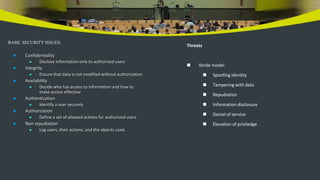
BASIC SECURITY ISSUES:
 Confidentiality
 Disclose information only to authorized users
 Integrity
 Ensure that data is not modified without authorization
 Availability
 Decide who has access to information and how to
make access effective
 Authentication
 Identify a user securely
 Authorization
 Define a set of allowed actions for authorized users
 Non repudiation
 Log users, their actions, and the objects used.
Threats
 Stride model
 Spoofing identity
 Tampering with data
 Repudiation
 Information disclosure
 Denial of service
 Elevation of priviledge
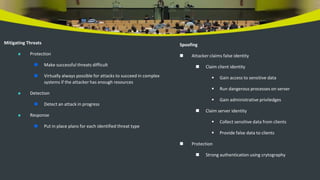
Mitigating Threats
 Protection
 Make successful threats difficult
 Virtually always possible for attacks to succeed in complex
systems if the attacker has enough resources
 Detection
 Detect an attack in progress
 Response
 Put in place plans for each identified threat type
Spoofing
 Attacker claims false identity
 Claim client identity
 Gain access to sensitive data
 Run dangerous processes on server
 Gain administrative priviledges
 Claim server identity
 Collect sensitive data from clients
 Provide false data to clients
 Protection
 Strong authentication using crytography
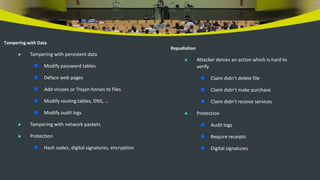
Tampering with Data
 Tampering with persistent data
 Modify password tables
 Deface web pages
 Add viruses or Trojan horses to files
 Modify routing tables, DNS, …
 Modify audit logs
 Tampering with network packets
 Protection
 Hash codes, digital signatures, encryption
Repudiation
 Attacker denies an action which is hard to
verify
 Claim didn’t delete file
 Claim didn’t make purchase
 Claim didn’t receive services
 Protection
 Audit logs
 Require receipts
 Digital signatures
Information Disclosure
 Attacker sees sensitive data
 Local files
 Network packets
 Attacker gets information about system architecture
 Banners that display software type and version
 Protection
 Strong authentication and access control
 Encrytion of sensitive data
 Turn off banners, disable tracing and debugging
 Use terse error messages
DENIAL OF SERVICE
 Syn flooding
 Send partial connection requests to overflow
server’s list of pending connections
 Distributed Denial of Service
 Amplification attacks
 Send icmp echo requests to broadcast address,
spoofing victim’s address
 Protection
 Install server patches
 Block incoming icmp requests
 Throttle anonymous requests
ELEVATION OF PRIVILEDGE
 Gain administrator priviledge
 Buffer overflow attack
 Overflow designed to overwrite return
address of function with address of malicous
code.
 Exploit bugs in operating system
 Protection
 Avoid buffer overflows
 Validate user input
 Use principle of Least Priviledge
 Grant smallest set of priviledges needed to
function
 Patch operating system
SOCIAL ENGINEERING THREAT
 Social Engineering and Manipulation
 Trick someone into disclosing information, e.g., passwords, credit card ids, SSNs, …
 Manipulation Threats
 Phreaking
 Use fee-based services without payment
 Phishing
 Acquire sensitive information by luring attacks, usually by email.
 Pharming
 Redirecting DNS routes to unauthorized sites to get sensitive information.
 Your on-line banking redirected to Afganistan, for example.
 False representation
 Pretend to be service technician, manager, account owner, …
 Inside Job
 Employee conspires with attacker to compromise system or information.
SECURITY MODELS
 PDR
 Protection
 topic of this presentation
 Detection
 detect attacks
 Response
 plan responses for each threat category
• Call the sysAdmin
• Call the police
• Contact the FBI
• Contact Federal Trade Commission
 AAS - .Net Web Model
 Authentication
 Accept and validate credentials presented by user
 Authorization
 If validated, determine right to access some resource
 Secure communication
 Secure the channel
• SSL, IPsec
 Secure the data
• signing, hashing, cryptography
Windows and .Net
 Role-based
 Authenticate and authorize users, groups,
and accounts (System, Local service,
Network service)
 Actions are authorized through permissions
 Evidence-based or Code Access Security (CAS)
 Code is elevated to the security status of a
user.
 Authorization is based on evidence
• url, zone, publisher, strong name,
custom assembly attributes
 Actions are authorized through policies
WIN SECURITY DEFINITIONS
 Definitions for people and groups of people
 SID – Security IDentifier
 Data structure used to identify user or group.
 Access Token
 A data structure that holds a SID for a security principal, the SIDs for each
group the principal belongs to, and a list of the principal’s priviledges on the
local computer.
 Principal
 An account holder that is assigned a SID for access to resources, e.g., user,
group, service, or computer.
 Combinations of people and objects
 Security Context
 Set of rules for a user’s actions on a protected object
 Combination of user’s access token and object’s security descriptor
 Security Policy
 Rules that define the allowable contexts and mandatory groups.
ROLE-BASED SECURITY
 Use role-based security in programs to control access to methods or
properties at run-time.
 Host authenticates user and provides identity and role information to
CLR.
 Uses NTFS access control lists, IIS security settings.
 CLR makes that information available to code via APIs and permission
demands.
 Can isolate security from code using attributes defined in
System.Security or EnterpriseServices
 System.Security is limited to Windows user groups
 EnterpriseServices uses COM+ roles
 Classes have to inherit from EnterpriseServices
 Which to choose?
 If application has both managed and unmanaged use COM+.
 If application is entirely managed then System.Security is
appropriate.
CODE ACCESS SECURITY
 Goals
 End-user experience
 Managed apps just run
 Safe defaults, no run-time decisions needed
 Administrator
 All settings in one place and easy to customize
 Simple policy model
 Security administration tools
• .Net configuration, CASPOL
 Developer
 Focus on application, security comes free
 Easy to understand and extend when needed
MOBIL CODE
 Old Model
 Obtained from a network, often via a web page.
 Without CAS have either full trust or no trust.
 User decides whether to run.
 If run, code has all the user’s priviledges.
 Inproc COM component, when loaded, becomes
part of the process.
 Can’t distinguish between library code and original
application code.
 CAS model
 Operation based on evidence.
 Allowed actions can be defined at very detailed
level.
 Each assembly can have its own security context.
EVIDENCE-BASED SECURITY
 Definitions
 Permissions
 Objects that represent specific authorized actions
 Permission grant is an authorization for an action given to an
assembly
 Permission demand is a security check for specific grants
 Policy
 Set of permissions granted to an assembly
 Evidence
 Inputs to policy about code
 All three can be extended using security APIs.
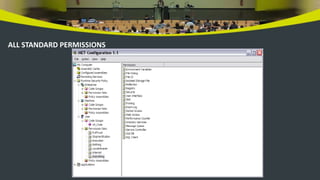
STANDARD PERMISSIONS
 Permissions for framework resources
 Data, environment, file IO, Message Queue,
reflection, sockets
 Directory services, event log, web, performance
counters, registry, UI
 DNS, file dialog, isolated storage, printing, security
system
 Identity permissions
 Publisher, site, string name, url, zone
 User identity permission
 Only non-code access permission in Framework.
CODE ACCESS SECURITY IS EVIDENCE-BASED?
 Most permissions are code access
 Demanding permission performs a stack walk checking for grants of all
callers
 Two ways to make checks
 Imperative – call a method
 Declarative
• Attributes in code
• Attributes in configuration file
 Get security by
 Calling class libraries in Framework
 Calling application code with checks
 HOW IT WORKS?
 Loader extracts evidence from assembly
 Evidence is input to policy
 Each level, Enterprise, Machine, User, and
AppDomain, are evaluated
 For each level the union of grants for each
matching code group is determined
 Intersection of permissions from each of
these levels are granted to the assembly
 Apply any assembly permission requests
 Result is the permissions granted to the assembly.
STACK WALK MODIFIERS
 Assertions
 If code vouches for its callers then checks for permissions stop here.
 Gatekeeper classes
 Managed wrappers for unmanaged resources
 Demand permission to call unmanaged
 Assert permission to call unmanaged
 Make the call to unmanaged
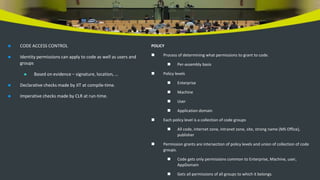
 CODE ACCESS CONTROL
 Identity permissions can apply to code as well as users and
groups
 Based on evidence – signature, location, …
 Declarative checks made by JIT at compile-time.
 Imperative checks made by CLR at run-time.
POLICY
 Process of determining what permissions to grant to code.
 Per-assembly basis
 Policy levels
 Enterprise
 Machine
 User
 Application domain
 Each policy level is a collection of code groups
 All code, internet zone, intranet zone, site, strong name (MS Office),
publisher
 Permission grants are intersection of policy levels and union of collection of code
groups.
 Code gets only permissions common to Enterprise, Machine, user,
AppDomain
 Gets all permissions of all groups to which it belongs.
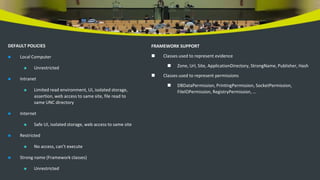
DEFAULT POLICIES
 Local Computer
 Unrestricted
 Intranet
 Limited read environment, UI, isolated storage,
assertion, web access to same site, file read to
same UNC directory
 Internet
 Safe UI, isolated storage, web access to same site
 Restricted
 No access, can’t execute
 Strong name (Framework classes)
 Unrestricted
FRAMEWORK SUPPORT
 Classes used to represent evidence
 Zone, Url, Site, ApplicationDirectory, StrongName, Publisher, Hash
 Classes used to represent permissions
 DBDataPermission, PrintingPermission, SocketPermission,
FileIOPermission, RegistryPermission, …
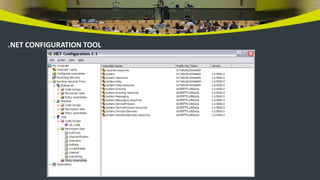
.NET CONFIGURATION TOOL
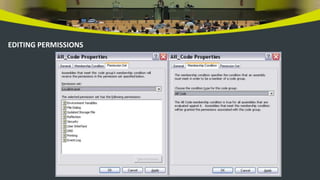
EDITING PERMISSIONS
ALL STANDARD PERMISSIONS
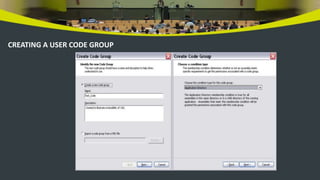
CREATING A USER CODE GROUP
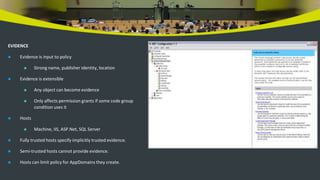
EVIDENCE
 Evidence is input to policy
 Strong name, publisher identity, location
 Evidence is extensible
 Any object can become evidence
 Only affects permission grants if some code group
condition uses it
 Hosts
 Machine, IIS, ASP.Net, SQL Server
 Fully trusted hosts specify implicitly trusted evidence.
 Semi-trusted hosts cannot provide evidence.
 Hosts can limit policy for AppDomains they create.

Week Topic Code Access vs Event Based.pptx

  • 1.
    Week 15-16 Code Accessvs. Event Based Security
  • 2.
    BASIC SECURITY ISSUES: Confidentiality  Disclose information only to authorized users  Integrity  Ensure that data is not modified without authorization  Availability  Decide who has access to information and how to make access effective  Authentication  Identify a user securely  Authorization  Define a set of allowed actions for authorized users  Non repudiation  Log users, their actions, and the objects used. Threats  Stride model  Spoofing identity  Tampering with data  Repudiation  Information disclosure  Denial of service  Elevation of priviledge
  • 3.
    Mitigating Threats  Protection Make successful threats difficult  Virtually always possible for attacks to succeed in complex systems if the attacker has enough resources  Detection  Detect an attack in progress  Response  Put in place plans for each identified threat type Spoofing  Attacker claims false identity  Claim client identity  Gain access to sensitive data  Run dangerous processes on server  Gain administrative priviledges  Claim server identity  Collect sensitive data from clients  Provide false data to clients  Protection  Strong authentication using crytography
  • 4.
    Tampering with Data Tampering with persistent data  Modify password tables  Deface web pages  Add viruses or Trojan horses to files  Modify routing tables, DNS, …  Modify audit logs  Tampering with network packets  Protection  Hash codes, digital signatures, encryption Repudiation  Attacker denies an action which is hard to verify  Claim didn’t delete file  Claim didn’t make purchase  Claim didn’t receive services  Protection  Audit logs  Require receipts  Digital signatures
  • 5.
    Information Disclosure  Attackersees sensitive data  Local files  Network packets  Attacker gets information about system architecture  Banners that display software type and version  Protection  Strong authentication and access control  Encrytion of sensitive data  Turn off banners, disable tracing and debugging  Use terse error messages DENIAL OF SERVICE  Syn flooding  Send partial connection requests to overflow server’s list of pending connections  Distributed Denial of Service  Amplification attacks  Send icmp echo requests to broadcast address, spoofing victim’s address  Protection  Install server patches  Block incoming icmp requests  Throttle anonymous requests
  • 6.
    ELEVATION OF PRIVILEDGE Gain administrator priviledge  Buffer overflow attack  Overflow designed to overwrite return address of function with address of malicous code.  Exploit bugs in operating system  Protection  Avoid buffer overflows  Validate user input  Use principle of Least Priviledge  Grant smallest set of priviledges needed to function  Patch operating system SOCIAL ENGINEERING THREAT  Social Engineering and Manipulation  Trick someone into disclosing information, e.g., passwords, credit card ids, SSNs, …  Manipulation Threats  Phreaking  Use fee-based services without payment  Phishing  Acquire sensitive information by luring attacks, usually by email.  Pharming  Redirecting DNS routes to unauthorized sites to get sensitive information.  Your on-line banking redirected to Afganistan, for example.  False representation  Pretend to be service technician, manager, account owner, …  Inside Job  Employee conspires with attacker to compromise system or information.
  • 7.
    SECURITY MODELS  PDR Protection  topic of this presentation  Detection  detect attacks  Response  plan responses for each threat category • Call the sysAdmin • Call the police • Contact the FBI • Contact Federal Trade Commission  AAS - .Net Web Model  Authentication  Accept and validate credentials presented by user  Authorization  If validated, determine right to access some resource  Secure communication  Secure the channel • SSL, IPsec  Secure the data • signing, hashing, cryptography
  • 8.
    Windows and .Net Role-based  Authenticate and authorize users, groups, and accounts (System, Local service, Network service)  Actions are authorized through permissions  Evidence-based or Code Access Security (CAS)  Code is elevated to the security status of a user.  Authorization is based on evidence • url, zone, publisher, strong name, custom assembly attributes  Actions are authorized through policies WIN SECURITY DEFINITIONS  Definitions for people and groups of people  SID – Security IDentifier  Data structure used to identify user or group.  Access Token  A data structure that holds a SID for a security principal, the SIDs for each group the principal belongs to, and a list of the principal’s priviledges on the local computer.  Principal  An account holder that is assigned a SID for access to resources, e.g., user, group, service, or computer.  Combinations of people and objects  Security Context  Set of rules for a user’s actions on a protected object  Combination of user’s access token and object’s security descriptor  Security Policy  Rules that define the allowable contexts and mandatory groups.
  • 9.
    ROLE-BASED SECURITY  Userole-based security in programs to control access to methods or properties at run-time.  Host authenticates user and provides identity and role information to CLR.  Uses NTFS access control lists, IIS security settings.  CLR makes that information available to code via APIs and permission demands.  Can isolate security from code using attributes defined in System.Security or EnterpriseServices  System.Security is limited to Windows user groups  EnterpriseServices uses COM+ roles  Classes have to inherit from EnterpriseServices  Which to choose?  If application has both managed and unmanaged use COM+.  If application is entirely managed then System.Security is appropriate. CODE ACCESS SECURITY  Goals  End-user experience  Managed apps just run  Safe defaults, no run-time decisions needed  Administrator  All settings in one place and easy to customize  Simple policy model  Security administration tools • .Net configuration, CASPOL  Developer  Focus on application, security comes free  Easy to understand and extend when needed
  • 10.
    MOBIL CODE  OldModel  Obtained from a network, often via a web page.  Without CAS have either full trust or no trust.  User decides whether to run.  If run, code has all the user’s priviledges.  Inproc COM component, when loaded, becomes part of the process.  Can’t distinguish between library code and original application code.  CAS model  Operation based on evidence.  Allowed actions can be defined at very detailed level.  Each assembly can have its own security context. EVIDENCE-BASED SECURITY  Definitions  Permissions  Objects that represent specific authorized actions  Permission grant is an authorization for an action given to an assembly  Permission demand is a security check for specific grants  Policy  Set of permissions granted to an assembly  Evidence  Inputs to policy about code  All three can be extended using security APIs.
  • 11.
    STANDARD PERMISSIONS  Permissionsfor framework resources  Data, environment, file IO, Message Queue, reflection, sockets  Directory services, event log, web, performance counters, registry, UI  DNS, file dialog, isolated storage, printing, security system  Identity permissions  Publisher, site, string name, url, zone  User identity permission  Only non-code access permission in Framework. CODE ACCESS SECURITY IS EVIDENCE-BASED?  Most permissions are code access  Demanding permission performs a stack walk checking for grants of all callers  Two ways to make checks  Imperative – call a method  Declarative • Attributes in code • Attributes in configuration file  Get security by  Calling class libraries in Framework  Calling application code with checks
  • 12.
     HOW ITWORKS?  Loader extracts evidence from assembly  Evidence is input to policy  Each level, Enterprise, Machine, User, and AppDomain, are evaluated  For each level the union of grants for each matching code group is determined  Intersection of permissions from each of these levels are granted to the assembly  Apply any assembly permission requests  Result is the permissions granted to the assembly. STACK WALK MODIFIERS  Assertions  If code vouches for its callers then checks for permissions stop here.  Gatekeeper classes  Managed wrappers for unmanaged resources  Demand permission to call unmanaged  Assert permission to call unmanaged  Make the call to unmanaged
  • 13.
     CODE ACCESSCONTROL  Identity permissions can apply to code as well as users and groups  Based on evidence – signature, location, …  Declarative checks made by JIT at compile-time.  Imperative checks made by CLR at run-time. POLICY  Process of determining what permissions to grant to code.  Per-assembly basis  Policy levels  Enterprise  Machine  User  Application domain  Each policy level is a collection of code groups  All code, internet zone, intranet zone, site, strong name (MS Office), publisher  Permission grants are intersection of policy levels and union of collection of code groups.  Code gets only permissions common to Enterprise, Machine, user, AppDomain  Gets all permissions of all groups to which it belongs.
  • 14.
    DEFAULT POLICIES  LocalComputer  Unrestricted  Intranet  Limited read environment, UI, isolated storage, assertion, web access to same site, file read to same UNC directory  Internet  Safe UI, isolated storage, web access to same site  Restricted  No access, can’t execute  Strong name (Framework classes)  Unrestricted FRAMEWORK SUPPORT  Classes used to represent evidence  Zone, Url, Site, ApplicationDirectory, StrongName, Publisher, Hash  Classes used to represent permissions  DBDataPermission, PrintingPermission, SocketPermission, FileIOPermission, RegistryPermission, …
  • 15.
  • 16.
  • 17.
  • 18.
    CREATING A USERCODE GROUP
  • 19.
    EVIDENCE  Evidence isinput to policy  Strong name, publisher identity, location  Evidence is extensible  Any object can become evidence  Only affects permission grants if some code group condition uses it  Hosts  Machine, IIS, ASP.Net, SQL Server  Fully trusted hosts specify implicitly trusted evidence.  Semi-trusted hosts cannot provide evidence.  Hosts can limit policy for AppDomains they create.