Introduction to Microsoft embedded technologies – Session 1
The definition of embedded From Wikipedia... An embedded system is a special-purpose computer system designed to perform one or a few dedicated functions, often with real-time computing constraints. It is usually embedded as part of a complete device including hardware and mechanical parts. Since the embedded system is dedicated to specific tasks, design engineers can optimize it, reducing the size and cost of the product, or increasing the reliability and performance. Some embedded systems are mass-produced, benefiting from economies of scale. Also technically an embedded system  
Microsoft’s place in the embedded world .NET Micro Framework (non-MMU micro’s) Windows CE Windows Mobile  .NET Compact Framework MS Robotics  Windows XP & Vista Embedded Windows Embedded for POS Windows Automotive  Windows Server Appliance Kit * Topics covered in this session
The .NET Micro Framework The .NET Micro Framework brings a rich, managed-code environment to smaller, less expensive, and more resource-constrained devices. Requiring only a few hundred kilobytes of RAM and an inexpensive processor, the .NET Micro Framework was built from the ground up to let you build applications using familiar Visual Studio development tools.
The .NET Micro Framework With .NET Micro Framework SDK, you can develop your embedded solutions in C# using a subset of the .NET libraries focused on embedded applications. Your development environment is Visual Studio, where you can take advantage of its powerful editing, object browsing, project management, and debugging capabilities. These capabilities are available when using the .NET Micro Framework SDK's extensible device emulation system or on real hardware.
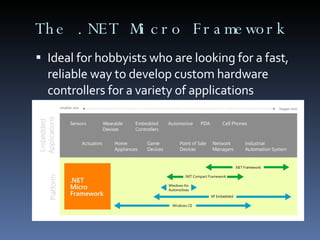
The .NET Micro Framework Ideal for hobbyists who are looking for a fast, reliable way to develop custom hardware controllers for a variety of applications
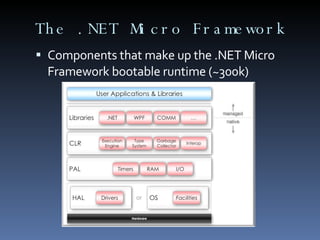
The .NET Micro Framework Components that make up the .NET Micro Framework bootable runtime (~300k)
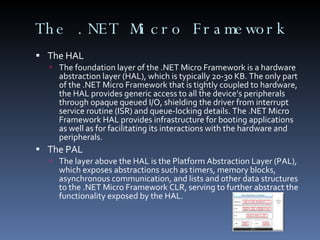
The .NET Micro Framework The HAL The foundation layer of the .NET Micro Framework is a hardware abstraction layer (HAL), which is typically 20-30 KB. The only part of the .NET Micro Framework that is tightly coupled to hardware, the HAL provides generic access to all the device’s peripherals through opaque queued I/O, shielding the driver from interrupt service routine (ISR) and queue-locking details. The .NET Micro Framework HAL provides infrastructure for booting applications as well as for facilitating its interactions with the hardware and peripherals.  The PAL The layer above the HAL is the Platform Abstraction Layer (PAL), which exposes abstractions such as timers, memory blocks, asynchronous communication, and lists and other data structures to the .NET Micro Framework CLR, serving to further abstract the functionality exposed by the HAL.
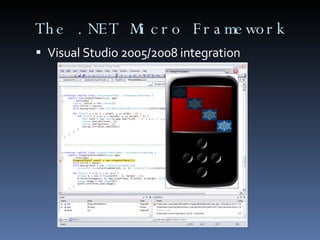
The .NET Micro Framework Visual Studio 2005/2008 integration .NET Micro Framework support for embedded devices in Visual Studio goes far beyond editing code and building your application. The .NET Micro Framework supports full emulation of your device on a PC, allows building and deploying .NET assemblies to the device, and permits debugging the code running on the device—all from within Visual Studio. Initial development can be done on the PC using the emulator, which allows application developers to write much of their code without concern for the device it will run on.  The emulator does not emulate the CPU of a target platform; at its heart, it is an Intel-native build of the Micro Framework CLR running on top of a hardware abstraction layer (HAL) that calls through to Windows APIs. The emulator can be customized to match the hardware you will be using—adding extra buttons or ports, changing the resolution of the display, and so on. Much of this can be done simply by editing an XML configuration file; the emulator can also be extended with custom components written in C#. The emulator lets you use your usual .NET tools for logging, heap analysis, and profiling.
The .NET Micro Framework Visual Studio 2005/2008 integration
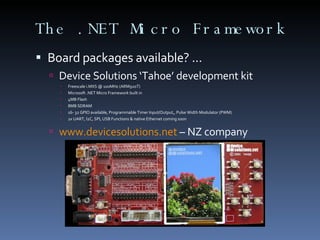
The .NET Micro Framework Board packages available? ... Device Solutions ‘Tahoe’ development kit Freescale i.MXS @ 100MHz (ARM920T) Microsoft .NET Micro Framework built in 4MB Flash 8MB SDRAM 16- 32 GPIO available, Programmable Timer Input/Output,, Pulse Width Modulator (PWM) 2x UART, I2C, SPI, USB Functions & native Ethernet coming soon www.devicesolutions.net  – NZ company
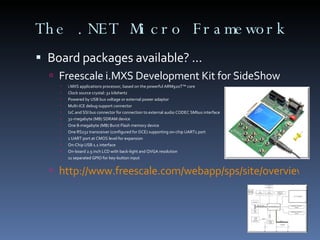
The .NET Micro Framework Board packages available? ... Freescale i.MXS Development Kit for SideShow i.MXS applications processor, based on the powerful ARM920T™ core Clock source crystal: 32 kilohertz Powered by USB bus voltage or external power adaptor Multi-ICE debug support connector I2C and SSI bus connector for connection to external audio CODEC SMbus interface 32-megabyte (MB) SDRAM device One 8-megabyte (MB) Burst Flash memory device One RS232 transceiver (configured for DCE) supporting on-chip UART1 port 1 UART port at CMOS level for expansion On-Chip USB 1.1 interface On-board 2.5 inch LCD with back-light and QVGA resolution 11 separated GPIO for key-button input http://www.freescale.com/webapp/sps/site/overview.jsp?nodeId=02XPgQ8217297301A5
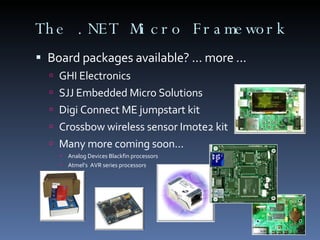
The .NET Micro Framework Board packages available? ... more ... GHI Electronics SJJ Embedded Micro Solutions Digi Connect ME jumpstart kit Crossbow wireless sensor Imote2 kit Many more coming soon... Analog Devices Blackfin processors Atmel’s  AVR series processors
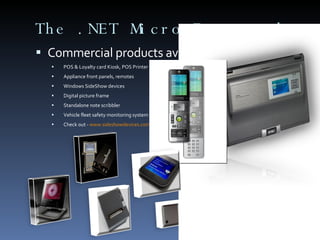
The .NET Micro Framework Commercial products available now? ... POS & Loyalty card Kiosk, POS Printer Appliance front panels, remotes Windows SideShow devices Digital picture frame Standalone note scribbler Vehicle fleet safety monitoring system Check out -  www.sideshowdevices.com
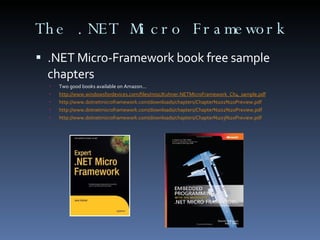
The .NET Micro Framework .NET Micro-Framework book free sample chapters Two good books available on Amazon... http://www.windowsfordevices.com/files/misc/Kuhner.NETMicroFramework_Ch4_sample.pdf   http://www.dotnetmicroframework.com/downloads/chapters/Chapter%201%20Preview.pdf   http://www.dotnetmicroframework.com/downloads/chapters/Chapter%202%20Preview.pdf   http://www.dotnetmicroframework.com/downloads/chapters/Chapter%203%20Preview.pdf
The .NET Micro Framework .NET Micro-Framework reference links... MSDN main page -  http://msdn2.microsoft.com/en-us/embedded/bb267253.aspx   MSDN FaQ -  http://msdn2.microsoft.com/en-us/embedded/bb267264.aspx .NET Micro Framework Team BLOG -  http://blogs.msdn.com/netmfteam   Pavel Bansky (Polish MVP) -  http://bansky.net/blog   Mike Hall (MS Product Manager)-  http://blogs.msdn.com/mikehall/default.aspx   Alden Linn (MS Engineer) -  http://blogs.msdn.com/aldenl   Dave Baker (MS Engineer) -  http://blogs.msdn.com/davbaker   Chris Fairbairn (our very own CHCH guru    ) -  www.christec.co.nz/blog   Rob Miles -  www.robmiles.com/net-micro   .NET Micro Framework MS Newsgroup -  http://www.microsoft.com/communities/newsgroups/list/en-us/default.aspx?dg=microsoft.public.dotnet.framework.microframework&cat=en_us_C4FAF74A-95F6-CD60-F2E1-ED8EDB03324B&lang=en&cr=us   Sign up for the .NET Micro Framework Newsletter here -  https://profile.microsoft.com/RegSysProfileCenter/subscriptionwizard.aspx?wizid=943c67ab-6e72-434d-a788-838a415e3b2f&lcid=1033
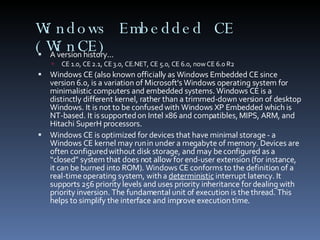
Windows Embedded CE (WinCE) A version history... CE 1.0, CE 2.1, CE 3.0, CE.NET, CE 5.0, CE 6.0, now CE 6.0 R2 Windows CE (also known officially as Windows Embedded CE since version 6.0, is a variation of Microsoft's Windows operating system for minimalistic computers and embedded systems. Windows CE is a distinctly different kernel, rather than a trimmed-down version of desktop Windows. It is not to be confused with Windows XP Embedded which is NT-based. It is supported on Intel x86 and compatibles, MIPS, ARM, and Hitachi SuperH processors. Windows CE is optimized for devices that have minimal storage - a Windows CE kernel may run in under a megabyte of memory. Devices are often configured without disk storage, and may be configured as a “closed” system that does not allow for end-user extension (for instance, it can be burned into ROM). Windows CE conforms to the definition of a real-time operating system, with a  deterministic  interrupt latency. It supports 256 priority levels and uses priority inheritance for dealing with priority inversion. The fundamental unit of execution is the thread. This helps to simplify the interface and improve execution time.
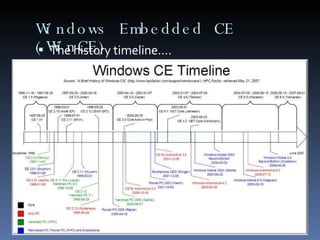
Windows Embedded CE (WinCE) The history timeline....
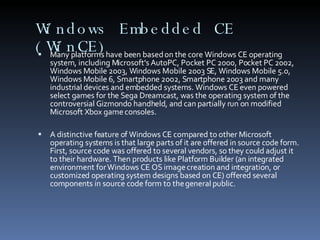
Windows Embedded CE (WinCE) Many platforms have been based on the core Windows CE operating system, including Microsoft's AutoPC, Pocket PC 2000, Pocket PC 2002, Windows Mobile 2003, Windows Mobile 2003 SE, Windows Mobile 5.0, Windows Mobile 6, Smartphone 2002, Smartphone 2003 and many industrial devices and embedded systems. Windows CE even powered select games for the Sega Dreamcast, was the operating system of the controversial Gizmondo handheld, and can partially run on modified Microsoft Xbox game consoles. A distinctive feature of Windows CE compared to other Microsoft operating systems is that large parts of it are offered in source code form. First, source code was offered to several vendors, so they could adjust it to their hardware. Then products like Platform Builder (an integrated environment for Windows CE OS image creation and integration, or customized operating system designs based on CE) offered several components in source code form to the general public.
Windows Embedded CE (WinCE) Windows Embedded CE 6.0 Is the sixth major release of Windows Embedded Operating System targeted to enterprise specific tools such as industrial controllers and consumer electronics devices like digital cameras. Windows Embedded CE 6.0 features a completely redesigned kernel, which supports over 32,000 processes, up from 32 process support of the previous versions. Each process receives 2 GB of virtual address space, up from 32 MB. New features... Some System components (such as filesystem, gwes, device driver manager) have been moved to the kernel space. The system components which now run in kernel have been converted from EXEs to DLLs, which get loaded into kernel space. New Virtual Memory Model. The lower 2GB is the process VM space and is private per process. The upper 2GB is the kernel VM space. New Device Driver Model that supports both User Mode and Kernel Mode Drivers. The 32 process limit has been raised to 32,768 processes. The 32 megabyte virtual memory limit has been raised to the total virtual memory (Up to 2GB of private VM is available per process). The Platform Builder IDE is integrated into Microsoft Visual Studio 2005, allowing a single development environment for both platform and application development. Read-only support for UDF 2.5 filesystem. Support for Microsoft's upcoming exFAT filesystem. 802.11i (WPA2) and 802.11e (QoS) wireless standards, and multiple radio support. CE 6.0 works with x86, ARM, SH4 and MIPS based processor architectures. New Cellcore components to enable devices to easily make data connections and initiate voice calls through cellular networks.
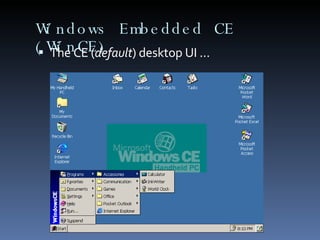
Windows Embedded CE (WinCE) The CE ( default ) desktop UI ...
Windows Embedded CE (WinCE) Development Tools.... Windows Embedded CE 6.0 is a Visual Studio add-on that customizes the Visual Studio IDE to create an environment for building customized embedded OS designs based on the Windows Embedded CE OS. Platform Builder, in conjunction with Visual Studio, provides all development tools necessary for you to design, create, build, test, and debug a Windows Embedded CE–based OS design. The VS IDE provides a single integrated solution in which you can work on both OS designs and subprojects. To develop an OS design based on the Windows Embedded CE OS, you must complete the following major tasks: Create a board support package (BSP) for your specific target device. Create an OS design, based on a standard or custom BSP, that you can use to create a run-time image that you can download to a standard development board (SDB), which is also called a hardware platform. Create and customize device drivers for your target BSP. Customize the OS design with additional subprojects and Catalog items. Build the run-time image, download it to your SDB, and then debug the run-time image by using the debugging tools found in the CE 6.0 integrated development environment (IDE). When the run-time image is complete, export a software development kit (SDK) for your application developers.
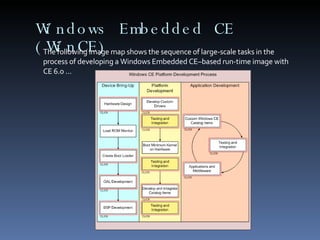
Windows Embedded CE (WinCE) The following image map shows the sequence of large-scale tasks in the process of developing a Windows Embedded CE–based run-time image with CE 6.0 ...
Windows Embedded CE 6.0 R2 Here are some of the new technologies provided in this release: Support for Remote Desktop Protocol (RDP) 6.0 The Windows Embedded CE 6.0 R2 release provides the latest version of Remote Desktop protocol to help enable CE-based thin clients to connect using the latest version of Windows Server remote computing technologies. Support for Web Services on Devices (WSD) protocol stack and application programming interfaces (API), together with sample code. Support for Video over IP telephony calls Additional Voice over IP (VoIP) functionality, including a VoIP boot loader application and resources for QVGA landscape and QVGA portrait user interfaces Support for the Pocket Outlook Object Model (POOM) and ActiveSync in the VoIP Home Screen and VoIP Contacts applications Support for Auto Proxy Configuration Support in Internet Explorer 6 for Windows Embedded CE Support for USB CCID Smart Card readers Support for Windows Media Player OLE Control Extension (OCX) 7 Support for flash media management A new pluggable font engine framework Secure Digital (SD) bus driver that supports SDHC specification 2.00 functionality, such as Secure Digital High-Capacity (SDHC) cards
Windows Embedded CE  CE System board providers... 100’s worldwide ... Bluewater Systems in CHCH -  http://www.bluewaternz.com   Advantech -  http://www.via.com.tw/en/products/processors/eden-esp/   phyCORE -  http://www.adeneo-embedded.com/srt/en/document/show?location.id:=1331   Atmel -  http://www.adeneo-embedded.com/srt/en/document/show?location.id:=1330   Freescale-  http://www.freescale.com/webapp/sps/site/prod_summary.jsp?code=i.MX31PDK&fsrch=1   Cirrus Logic -  http://www.cirrus.com/en/products/pro/detail/P1052.html   ICOP Technology -  http://www.icop.com.tw/index.asp   A full list is available here -  http://msdn2.microsoft.com/en-us/embedded/aa714506.aspx
Windows Embedded CE (WinCE) Some good links... Windows CE history courtesy of HP -  http://www.hpcfactor.com/support/windowsce/   Overview of Windows Embedded CE development -  http://msdn2.microsoft.com/en-us/library/aa924098.aspx   MSDN Windows Embedded CE main page -  http://msdn2.microsoft.com/en-us/embedded/aa731407.aspx   MS Windows Embedded CE Base team BLOG -  http://blogs.msdn.com/ce_base/default.aspx   MS Windows CE networking team BLOG -  http://blogs.msdn.com/cenet   Mike Hall’s BLOG  (MS Embedded Evangelist) -  http://blogs.msdn.com/mikehall   Wikipedia -  http://en.wikipedia.org/wiki/Windows_CE   Chris Fairbairn (our very own CHCH guru ) -  www.christec.co.nz/blog
Windows Mobile History A long history of “consumer” WinCE devices Handheld PC (HPC) PalmtopPC, PalmPC, Palm-size PC Eventually converged into 2 main platforms Pocket PC 2000 Smartphone 2002 Previously supported any CPU type supported by Windows CE, now only supports ARM powered devices
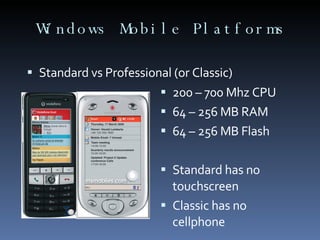
Windows Mobile Platforms Standard vs Professional (or Classic) 200 – 700 Mhz CPU 64 – 256 MB RAM 64 – 256 MB Flash Standard has no touchscreen Classic has no cellphone
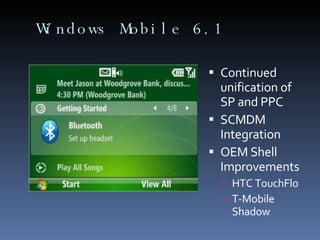
Windows Mobile 6.1 Continued unification of SP and PPC SCMDM Integration OEM Shell Improvements HTC TouchFlo T-Mobile Shadow
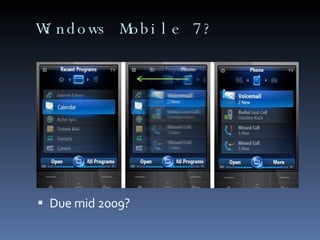
Windows Mobile 7? Due mid 2009?
Windows Mobile Development Use Visual Studio IDE VS2005 Standard (or above) VS2008 Professional (or above) Supports both native (C/C++) and managed (C#/VB.NET) development. Unique development constraints Assume always disconnected Usability of a small screen
WindowsMobile vs WindowsCE Windows Mobile devices are based on a Windows CE kernel. Version numbering is not a 1 to 1 mapping however. Windows Mobile 6 has a Windows CE 5.2 kernel for example. Custom devices typically use Windows CE instead of Windows Mobile due to additional licensing, testing and volume requirements for Windows Mobile licensees.
Windows Mobile Some good links... MSDN Windows Mobile Developer Center –  http://msdn.microsoft.com/windowsmobile/ Windows Mobile 6 Developer Documentation -  http://msdn.microsoft.com/windowsmobile/docs/ Windows Mobile Team Blog –  http://blogs.msdn.com/windowsmobile/ Compact Framework Team Blog –  http://blogs.msdn.com/netcfteam/ How Do I? Videos -  http://msdn2.microsoft.com/en-us/netframework/bb495180.aspx OpenNETCF Smart Device Framework (SDF) –  www.opennetcf.com João Paulo Figueira (MVP) –  http://nativemobile.blogspot.com Chris Fairbairn (our very own CHCH guru ) -  www.christec.co.nz/blog
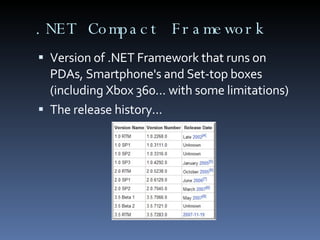
.NET Compact Framework Version of .NET Framework that runs on PDAs, Smartphone's and Set-top boxes (including Xbox 360... with some limitations) The release history...
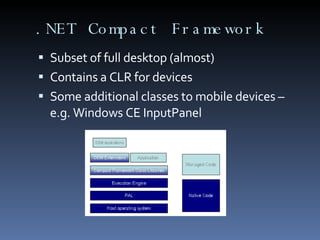
.NET Compact Framework Subset of full desktop (almost) Contains a CLR for devices Some additional classes to mobile devices – e.g. Windows CE InputPanel
.NET Compact Framework Version 3.5 now available  Supports WCF (XML Web Services), LINQ etc.  Develop in your favourite language using MS visual Studio, as long as it’s C# or VB.NET Some web links... MSDN Compact Framework site -  http://msdn2.microsoft.com/en-nz/netframework/aa497273(en-us).aspx   Fundamentals of .NET CF development -  http://msdn2.microsoft.com/en-us/library/aa446549.aspx   MS .NET CF Team BLOG -  http://blogs.msdn.com/netcfteam
Late breaking MS changes Microsoft renames embedded operating systems... Windows Embedded CE =  Windows Embedded Compact Windows XP Embedded =  Windows Embedded Standard "Classic" desktop operating systems with Embedded licensing =  Windows Embedded Enterprise
The MS ‘Spark’ program SPARK Your Imagination offers a kit that combines Windows Embedded CE 6.0 R2, Visual Studio 2005 Professional, and an embedded device. Backed by Microsoft and a large, active community of embedded developers, Windows Embedded CE provides you with industry-leading tools to help you build an endless variety of embedded solutions. http://www.microsoft.com/windows/embedded/products/spark/default.mspx   Features and benefits of SPARK Your Imagination include: The power of a professional-grade product at an affordable price point A shared source program with more than 3.9 million lines of code available Support for up to 32,000 simultaneous processes 2 GB of virtual memory space for each process Integrated board support Native real-time OS Spark program supported hardware -  http://www.microsoft.com/windows/embedded/products/spark/hardware.mspx
Why an ‘EDNUG’? Christchurch is a hub of electronics and embedded industries in NZ, some large, some very small Now that Microsoft .NET technologies have matured in the embedded space at all levels, there is some great synergy from the single Visual Studio tools that can be harnessed A community driven approach is the best way to harness the aggregated talent and ideas out there – from all of you! But most important - this stuff can be fun !!!
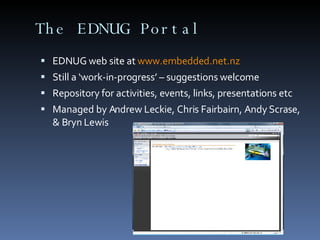
The EDNUG Portal EDNUG web site at  www.embedded.net.nz   Still a ‘work-in-progress’ – suggestions welcome Repository for activities, events, links, presentations etc Managed by Andrew Leckie, Chris Fairbairn, Andy Scrase, & Bryn Lewis
The Windup... Thank you for coming! Looking for guest speakers to do spot sessions for 30 minutes on an embedded topic that you are comfortable with Need to collect the names of any individuals who may be interested in attending some or all sessions Looking for any hardware companies interested in promoting their products or getting involved with a .NET micro framework or CE BSP port Spread the word! ... Spread the passion!
Call to action... Let us know if you can be a guest speaker to do spot sessions for 30 minutes on an embedded topic or experience story that you are comfortable with Sign-up to the EDNUG so we have your email details! Spread the word! ... Spread the passion!

Christchurch Embedded .NET User Group - Introduction to Microsoft Embedded platforms - Session 1

  • 1.
    Introduction to Microsoftembedded technologies – Session 1
  • 2.
    The definition ofembedded From Wikipedia... An embedded system is a special-purpose computer system designed to perform one or a few dedicated functions, often with real-time computing constraints. It is usually embedded as part of a complete device including hardware and mechanical parts. Since the embedded system is dedicated to specific tasks, design engineers can optimize it, reducing the size and cost of the product, or increasing the reliability and performance. Some embedded systems are mass-produced, benefiting from economies of scale. Also technically an embedded system 
  • 3.
    Microsoft’s place inthe embedded world .NET Micro Framework (non-MMU micro’s) Windows CE Windows Mobile .NET Compact Framework MS Robotics Windows XP & Vista Embedded Windows Embedded for POS Windows Automotive Windows Server Appliance Kit * Topics covered in this session
  • 4.
    The .NET MicroFramework The .NET Micro Framework brings a rich, managed-code environment to smaller, less expensive, and more resource-constrained devices. Requiring only a few hundred kilobytes of RAM and an inexpensive processor, the .NET Micro Framework was built from the ground up to let you build applications using familiar Visual Studio development tools.
  • 5.
    The .NET MicroFramework With .NET Micro Framework SDK, you can develop your embedded solutions in C# using a subset of the .NET libraries focused on embedded applications. Your development environment is Visual Studio, where you can take advantage of its powerful editing, object browsing, project management, and debugging capabilities. These capabilities are available when using the .NET Micro Framework SDK's extensible device emulation system or on real hardware.
  • 6.
    The .NET MicroFramework Ideal for hobbyists who are looking for a fast, reliable way to develop custom hardware controllers for a variety of applications
  • 7.
    The .NET MicroFramework Components that make up the .NET Micro Framework bootable runtime (~300k)
  • 8.
    The .NET MicroFramework The HAL The foundation layer of the .NET Micro Framework is a hardware abstraction layer (HAL), which is typically 20-30 KB. The only part of the .NET Micro Framework that is tightly coupled to hardware, the HAL provides generic access to all the device’s peripherals through opaque queued I/O, shielding the driver from interrupt service routine (ISR) and queue-locking details. The .NET Micro Framework HAL provides infrastructure for booting applications as well as for facilitating its interactions with the hardware and peripherals. The PAL The layer above the HAL is the Platform Abstraction Layer (PAL), which exposes abstractions such as timers, memory blocks, asynchronous communication, and lists and other data structures to the .NET Micro Framework CLR, serving to further abstract the functionality exposed by the HAL.
  • 9.
    The .NET MicroFramework Visual Studio 2005/2008 integration .NET Micro Framework support for embedded devices in Visual Studio goes far beyond editing code and building your application. The .NET Micro Framework supports full emulation of your device on a PC, allows building and deploying .NET assemblies to the device, and permits debugging the code running on the device—all from within Visual Studio. Initial development can be done on the PC using the emulator, which allows application developers to write much of their code without concern for the device it will run on. The emulator does not emulate the CPU of a target platform; at its heart, it is an Intel-native build of the Micro Framework CLR running on top of a hardware abstraction layer (HAL) that calls through to Windows APIs. The emulator can be customized to match the hardware you will be using—adding extra buttons or ports, changing the resolution of the display, and so on. Much of this can be done simply by editing an XML configuration file; the emulator can also be extended with custom components written in C#. The emulator lets you use your usual .NET tools for logging, heap analysis, and profiling.
  • 10.
    The .NET MicroFramework Visual Studio 2005/2008 integration
  • 11.
    The .NET MicroFramework Board packages available? ... Device Solutions ‘Tahoe’ development kit Freescale i.MXS @ 100MHz (ARM920T) Microsoft .NET Micro Framework built in 4MB Flash 8MB SDRAM 16- 32 GPIO available, Programmable Timer Input/Output,, Pulse Width Modulator (PWM) 2x UART, I2C, SPI, USB Functions & native Ethernet coming soon www.devicesolutions.net – NZ company
  • 12.
    The .NET MicroFramework Board packages available? ... Freescale i.MXS Development Kit for SideShow i.MXS applications processor, based on the powerful ARM920T™ core Clock source crystal: 32 kilohertz Powered by USB bus voltage or external power adaptor Multi-ICE debug support connector I2C and SSI bus connector for connection to external audio CODEC SMbus interface 32-megabyte (MB) SDRAM device One 8-megabyte (MB) Burst Flash memory device One RS232 transceiver (configured for DCE) supporting on-chip UART1 port 1 UART port at CMOS level for expansion On-Chip USB 1.1 interface On-board 2.5 inch LCD with back-light and QVGA resolution 11 separated GPIO for key-button input http://www.freescale.com/webapp/sps/site/overview.jsp?nodeId=02XPgQ8217297301A5
  • 13.
    The .NET MicroFramework Board packages available? ... more ... GHI Electronics SJJ Embedded Micro Solutions Digi Connect ME jumpstart kit Crossbow wireless sensor Imote2 kit Many more coming soon... Analog Devices Blackfin processors Atmel’s AVR series processors
  • 14.
    The .NET MicroFramework Commercial products available now? ... POS & Loyalty card Kiosk, POS Printer Appliance front panels, remotes Windows SideShow devices Digital picture frame Standalone note scribbler Vehicle fleet safety monitoring system Check out - www.sideshowdevices.com
  • 15.
    The .NET MicroFramework .NET Micro-Framework book free sample chapters Two good books available on Amazon... http://www.windowsfordevices.com/files/misc/Kuhner.NETMicroFramework_Ch4_sample.pdf http://www.dotnetmicroframework.com/downloads/chapters/Chapter%201%20Preview.pdf http://www.dotnetmicroframework.com/downloads/chapters/Chapter%202%20Preview.pdf http://www.dotnetmicroframework.com/downloads/chapters/Chapter%203%20Preview.pdf
  • 16.
    The .NET MicroFramework .NET Micro-Framework reference links... MSDN main page - http://msdn2.microsoft.com/en-us/embedded/bb267253.aspx MSDN FaQ - http://msdn2.microsoft.com/en-us/embedded/bb267264.aspx .NET Micro Framework Team BLOG - http://blogs.msdn.com/netmfteam Pavel Bansky (Polish MVP) - http://bansky.net/blog Mike Hall (MS Product Manager)- http://blogs.msdn.com/mikehall/default.aspx Alden Linn (MS Engineer) - http://blogs.msdn.com/aldenl Dave Baker (MS Engineer) - http://blogs.msdn.com/davbaker Chris Fairbairn (our very own CHCH guru  ) - www.christec.co.nz/blog Rob Miles - www.robmiles.com/net-micro .NET Micro Framework MS Newsgroup - http://www.microsoft.com/communities/newsgroups/list/en-us/default.aspx?dg=microsoft.public.dotnet.framework.microframework&cat=en_us_C4FAF74A-95F6-CD60-F2E1-ED8EDB03324B&lang=en&cr=us Sign up for the .NET Micro Framework Newsletter here - https://profile.microsoft.com/RegSysProfileCenter/subscriptionwizard.aspx?wizid=943c67ab-6e72-434d-a788-838a415e3b2f&lcid=1033
  • 17.
    Windows Embedded CE(WinCE) A version history... CE 1.0, CE 2.1, CE 3.0, CE.NET, CE 5.0, CE 6.0, now CE 6.0 R2 Windows CE (also known officially as Windows Embedded CE since version 6.0, is a variation of Microsoft's Windows operating system for minimalistic computers and embedded systems. Windows CE is a distinctly different kernel, rather than a trimmed-down version of desktop Windows. It is not to be confused with Windows XP Embedded which is NT-based. It is supported on Intel x86 and compatibles, MIPS, ARM, and Hitachi SuperH processors. Windows CE is optimized for devices that have minimal storage - a Windows CE kernel may run in under a megabyte of memory. Devices are often configured without disk storage, and may be configured as a “closed” system that does not allow for end-user extension (for instance, it can be burned into ROM). Windows CE conforms to the definition of a real-time operating system, with a deterministic interrupt latency. It supports 256 priority levels and uses priority inheritance for dealing with priority inversion. The fundamental unit of execution is the thread. This helps to simplify the interface and improve execution time.
  • 18.
    Windows Embedded CE(WinCE) The history timeline....
  • 19.
    Windows Embedded CE(WinCE) Many platforms have been based on the core Windows CE operating system, including Microsoft's AutoPC, Pocket PC 2000, Pocket PC 2002, Windows Mobile 2003, Windows Mobile 2003 SE, Windows Mobile 5.0, Windows Mobile 6, Smartphone 2002, Smartphone 2003 and many industrial devices and embedded systems. Windows CE even powered select games for the Sega Dreamcast, was the operating system of the controversial Gizmondo handheld, and can partially run on modified Microsoft Xbox game consoles. A distinctive feature of Windows CE compared to other Microsoft operating systems is that large parts of it are offered in source code form. First, source code was offered to several vendors, so they could adjust it to their hardware. Then products like Platform Builder (an integrated environment for Windows CE OS image creation and integration, or customized operating system designs based on CE) offered several components in source code form to the general public.
  • 20.
    Windows Embedded CE(WinCE) Windows Embedded CE 6.0 Is the sixth major release of Windows Embedded Operating System targeted to enterprise specific tools such as industrial controllers and consumer electronics devices like digital cameras. Windows Embedded CE 6.0 features a completely redesigned kernel, which supports over 32,000 processes, up from 32 process support of the previous versions. Each process receives 2 GB of virtual address space, up from 32 MB. New features... Some System components (such as filesystem, gwes, device driver manager) have been moved to the kernel space. The system components which now run in kernel have been converted from EXEs to DLLs, which get loaded into kernel space. New Virtual Memory Model. The lower 2GB is the process VM space and is private per process. The upper 2GB is the kernel VM space. New Device Driver Model that supports both User Mode and Kernel Mode Drivers. The 32 process limit has been raised to 32,768 processes. The 32 megabyte virtual memory limit has been raised to the total virtual memory (Up to 2GB of private VM is available per process). The Platform Builder IDE is integrated into Microsoft Visual Studio 2005, allowing a single development environment for both platform and application development. Read-only support for UDF 2.5 filesystem. Support for Microsoft's upcoming exFAT filesystem. 802.11i (WPA2) and 802.11e (QoS) wireless standards, and multiple radio support. CE 6.0 works with x86, ARM, SH4 and MIPS based processor architectures. New Cellcore components to enable devices to easily make data connections and initiate voice calls through cellular networks.
  • 21.
    Windows Embedded CE(WinCE) The CE ( default ) desktop UI ...
  • 22.
    Windows Embedded CE(WinCE) Development Tools.... Windows Embedded CE 6.0 is a Visual Studio add-on that customizes the Visual Studio IDE to create an environment for building customized embedded OS designs based on the Windows Embedded CE OS. Platform Builder, in conjunction with Visual Studio, provides all development tools necessary for you to design, create, build, test, and debug a Windows Embedded CE–based OS design. The VS IDE provides a single integrated solution in which you can work on both OS designs and subprojects. To develop an OS design based on the Windows Embedded CE OS, you must complete the following major tasks: Create a board support package (BSP) for your specific target device. Create an OS design, based on a standard or custom BSP, that you can use to create a run-time image that you can download to a standard development board (SDB), which is also called a hardware platform. Create and customize device drivers for your target BSP. Customize the OS design with additional subprojects and Catalog items. Build the run-time image, download it to your SDB, and then debug the run-time image by using the debugging tools found in the CE 6.0 integrated development environment (IDE). When the run-time image is complete, export a software development kit (SDK) for your application developers.
  • 23.
    Windows Embedded CE(WinCE) The following image map shows the sequence of large-scale tasks in the process of developing a Windows Embedded CE–based run-time image with CE 6.0 ...
  • 24.
    Windows Embedded CE6.0 R2 Here are some of the new technologies provided in this release: Support for Remote Desktop Protocol (RDP) 6.0 The Windows Embedded CE 6.0 R2 release provides the latest version of Remote Desktop protocol to help enable CE-based thin clients to connect using the latest version of Windows Server remote computing technologies. Support for Web Services on Devices (WSD) protocol stack and application programming interfaces (API), together with sample code. Support for Video over IP telephony calls Additional Voice over IP (VoIP) functionality, including a VoIP boot loader application and resources for QVGA landscape and QVGA portrait user interfaces Support for the Pocket Outlook Object Model (POOM) and ActiveSync in the VoIP Home Screen and VoIP Contacts applications Support for Auto Proxy Configuration Support in Internet Explorer 6 for Windows Embedded CE Support for USB CCID Smart Card readers Support for Windows Media Player OLE Control Extension (OCX) 7 Support for flash media management A new pluggable font engine framework Secure Digital (SD) bus driver that supports SDHC specification 2.00 functionality, such as Secure Digital High-Capacity (SDHC) cards
  • 25.
    Windows Embedded CE CE System board providers... 100’s worldwide ... Bluewater Systems in CHCH - http://www.bluewaternz.com Advantech - http://www.via.com.tw/en/products/processors/eden-esp/ phyCORE - http://www.adeneo-embedded.com/srt/en/document/show?location.id:=1331 Atmel - http://www.adeneo-embedded.com/srt/en/document/show?location.id:=1330 Freescale- http://www.freescale.com/webapp/sps/site/prod_summary.jsp?code=i.MX31PDK&fsrch=1 Cirrus Logic - http://www.cirrus.com/en/products/pro/detail/P1052.html ICOP Technology - http://www.icop.com.tw/index.asp A full list is available here - http://msdn2.microsoft.com/en-us/embedded/aa714506.aspx
  • 26.
    Windows Embedded CE(WinCE) Some good links... Windows CE history courtesy of HP - http://www.hpcfactor.com/support/windowsce/ Overview of Windows Embedded CE development - http://msdn2.microsoft.com/en-us/library/aa924098.aspx MSDN Windows Embedded CE main page - http://msdn2.microsoft.com/en-us/embedded/aa731407.aspx MS Windows Embedded CE Base team BLOG - http://blogs.msdn.com/ce_base/default.aspx MS Windows CE networking team BLOG - http://blogs.msdn.com/cenet Mike Hall’s BLOG (MS Embedded Evangelist) - http://blogs.msdn.com/mikehall Wikipedia - http://en.wikipedia.org/wiki/Windows_CE Chris Fairbairn (our very own CHCH guru ) - www.christec.co.nz/blog
  • 27.
    Windows Mobile HistoryA long history of “consumer” WinCE devices Handheld PC (HPC) PalmtopPC, PalmPC, Palm-size PC Eventually converged into 2 main platforms Pocket PC 2000 Smartphone 2002 Previously supported any CPU type supported by Windows CE, now only supports ARM powered devices
  • 28.
    Windows Mobile PlatformsStandard vs Professional (or Classic) 200 – 700 Mhz CPU 64 – 256 MB RAM 64 – 256 MB Flash Standard has no touchscreen Classic has no cellphone
  • 29.
    Windows Mobile 6.1Continued unification of SP and PPC SCMDM Integration OEM Shell Improvements HTC TouchFlo T-Mobile Shadow
  • 30.
    Windows Mobile 7?Due mid 2009?
  • 31.
    Windows Mobile DevelopmentUse Visual Studio IDE VS2005 Standard (or above) VS2008 Professional (or above) Supports both native (C/C++) and managed (C#/VB.NET) development. Unique development constraints Assume always disconnected Usability of a small screen
  • 32.
    WindowsMobile vs WindowsCEWindows Mobile devices are based on a Windows CE kernel. Version numbering is not a 1 to 1 mapping however. Windows Mobile 6 has a Windows CE 5.2 kernel for example. Custom devices typically use Windows CE instead of Windows Mobile due to additional licensing, testing and volume requirements for Windows Mobile licensees.
  • 33.
    Windows Mobile Somegood links... MSDN Windows Mobile Developer Center – http://msdn.microsoft.com/windowsmobile/ Windows Mobile 6 Developer Documentation - http://msdn.microsoft.com/windowsmobile/docs/ Windows Mobile Team Blog – http://blogs.msdn.com/windowsmobile/ Compact Framework Team Blog – http://blogs.msdn.com/netcfteam/ How Do I? Videos - http://msdn2.microsoft.com/en-us/netframework/bb495180.aspx OpenNETCF Smart Device Framework (SDF) – www.opennetcf.com João Paulo Figueira (MVP) – http://nativemobile.blogspot.com Chris Fairbairn (our very own CHCH guru ) - www.christec.co.nz/blog
  • 34.
    .NET Compact FrameworkVersion of .NET Framework that runs on PDAs, Smartphone's and Set-top boxes (including Xbox 360... with some limitations) The release history...
  • 35.
    .NET Compact FrameworkSubset of full desktop (almost) Contains a CLR for devices Some additional classes to mobile devices – e.g. Windows CE InputPanel
  • 36.
    .NET Compact FrameworkVersion 3.5 now available Supports WCF (XML Web Services), LINQ etc. Develop in your favourite language using MS visual Studio, as long as it’s C# or VB.NET Some web links... MSDN Compact Framework site - http://msdn2.microsoft.com/en-nz/netframework/aa497273(en-us).aspx Fundamentals of .NET CF development - http://msdn2.microsoft.com/en-us/library/aa446549.aspx MS .NET CF Team BLOG - http://blogs.msdn.com/netcfteam
  • 37.
    Late breaking MSchanges Microsoft renames embedded operating systems... Windows Embedded CE = Windows Embedded Compact Windows XP Embedded = Windows Embedded Standard "Classic" desktop operating systems with Embedded licensing = Windows Embedded Enterprise
  • 38.
    The MS ‘Spark’program SPARK Your Imagination offers a kit that combines Windows Embedded CE 6.0 R2, Visual Studio 2005 Professional, and an embedded device. Backed by Microsoft and a large, active community of embedded developers, Windows Embedded CE provides you with industry-leading tools to help you build an endless variety of embedded solutions. http://www.microsoft.com/windows/embedded/products/spark/default.mspx Features and benefits of SPARK Your Imagination include: The power of a professional-grade product at an affordable price point A shared source program with more than 3.9 million lines of code available Support for up to 32,000 simultaneous processes 2 GB of virtual memory space for each process Integrated board support Native real-time OS Spark program supported hardware - http://www.microsoft.com/windows/embedded/products/spark/hardware.mspx
  • 39.
    Why an ‘EDNUG’?Christchurch is a hub of electronics and embedded industries in NZ, some large, some very small Now that Microsoft .NET technologies have matured in the embedded space at all levels, there is some great synergy from the single Visual Studio tools that can be harnessed A community driven approach is the best way to harness the aggregated talent and ideas out there – from all of you! But most important - this stuff can be fun !!!
  • 40.
    The EDNUG PortalEDNUG web site at www.embedded.net.nz Still a ‘work-in-progress’ – suggestions welcome Repository for activities, events, links, presentations etc Managed by Andrew Leckie, Chris Fairbairn, Andy Scrase, & Bryn Lewis
  • 41.
    The Windup... Thankyou for coming! Looking for guest speakers to do spot sessions for 30 minutes on an embedded topic that you are comfortable with Need to collect the names of any individuals who may be interested in attending some or all sessions Looking for any hardware companies interested in promoting their products or getting involved with a .NET micro framework or CE BSP port Spread the word! ... Spread the passion!
  • 42.
    Call to action...Let us know if you can be a guest speaker to do spot sessions for 30 minutes on an embedded topic or experience story that you are comfortable with Sign-up to the EDNUG so we have your email details! Spread the word! ... Spread the passion!