Unit – I
Embedded System Concepts
Introduction Embedded
System
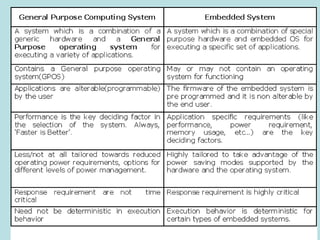
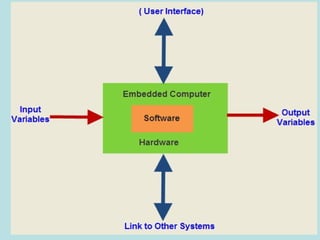
An embedded system refers to the combination of hardware
and software to carry out a specific task inside a device or
bigger computer system
The elements that are combined here correspond to
microprocessors or microcontrollers, I/O peripheral devices,
sensors, computer memories, among others.
The electronic system which integrates the hardware circuit
with the software programming techniques for providing
Specific task is called as embedded systems
The software usually gets embedded into memory modules as
ROM, and it does not need any secondary memory as in a
computer.
Embedded software is also called ‘firmware’
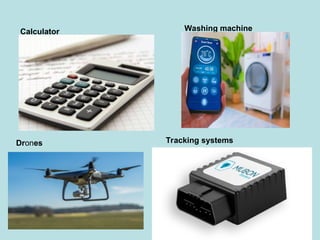
Examples
1. Calculators
2. Washing machine
3. Drones
4. Tracking systems
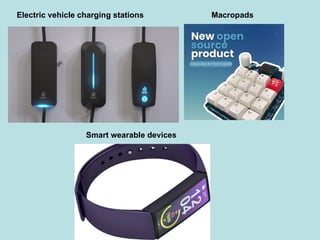
5. Electric vehicle charging stations
6. Macropads
7. Wearable devices
Calculator Washing machine
Drones Tracking systems
Electric vehicle charging stations Macropads
Smart wearable devices
Embedded System Characterized by
Some Special Features
• Embedded systems do a very specific task, they cannot
be programmed to do different things.
• Embedded system have very limited resources,
particularly memory. (They do no have secondary storage
device )
• Embedded system have to work against some deadlines. A
specific job has to be completed with in a specific time.
• Embedded Systems are constrained for power.
• Embedded systems need to be highly reliable.( ex ALT+CTRL+DEL is
OK on your desktop but you cannot afford to reset your embedded system)
• It has to operate in extreme environmental conditions such
as very high temperatures and humidity.
Classification of Embedded
Systems
• Based on Generation
• Based on complexity and performance
Based on Generation
• First Generation – 8 bit microprocessor like 8085 and 4
bit microcontroller. ( Ex. Digital telephone keypad,
stepper motor control unit etc..).
• Second Generation – 16bit microprocessor and 8bit and
16bit microcontrollers. Instruction set are more
complex. (Ex. Data acquisition, SCADA system…)
• Third Generation- 32bit microprocessor and 16bit
microcontrollers. A new concept like ( ASIC, DSP). Ex.
Robotics, media, networking…).
• Fourth Generation – The advent of System on
chips(SoC) reconfigurable processors and multicore
processors are bringing high performance. Ex. Smart
Phone, Mobile internet devices…).
Based on Complexity and
performance
• Small Scale Embedded System
• Medium Scale Embedded System
• Large Scale Embedded System.
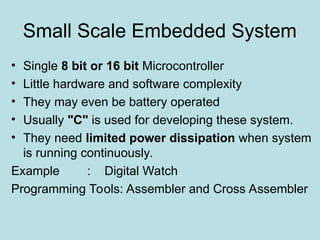
Small Scale Embedded System
• Single 8 bit or 16 bit Microcontroller
• Little hardware and software complexity
• They may even be battery operated
• Usually "C" is used for developing these system.
• They need limited power dissipation when system
is running continuously.
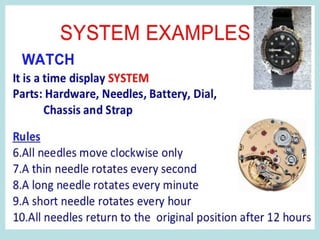
Example : Digital Watch
Programming Tools: Assembler and Cross Assembler
Medium Scale Embedded
System
• Medium scale embedded systems are designed with a
single 16 or 32 bit microcontrollers, DSPs or RISCs.
• These systems have both hardware and software
complexities.
• When developing embedded software for these types of
systems, the following programming tools are available.
Ex. C, C++, Visual C++, Java, and RTOS, source code
engineering tool, debugger, simulator and integrated
development environment.
Large Scale Embedded System
• Large scale embedded systems have huge
hardware and software complexities and may
need PLAs, IPs, ASIPs, scalable processors or
configurable processors.
• They are used for cutting-edge applications that
need hardware and software co-design &
components which have to combine in the final
system.
Major Application Area of
Embedded Systems
• Consumer electronics – camcorders, digital cameras,
digital diary etc…
• Household appliances – TV, DVD Player, washing
machine, fridge, microwave oven…
• Office Automation – Copying machine, fax machine, key
telephone, modem, printer, scanner…
• Industrial automation – pharmaceutical, cement, sugar,
oil exploration, nuclear energy, electricity generation and
transmission.
• Medical electronics – ECG, EEG, blood pressure
measuring device, X ray, scanner, endoscopy….
• Computer networking – bridge, routers, ISDN, switches,
hubs, firewalls…
• Telecommunications – Key telephones, ISDN phone,
terminal adapters, web cameras, IP phone, IP cameras,…..
• Wireless Technologies- base station controllers, mobile
switching centers….
• Instrumentation – weight, temperature, pressure,
humidity, voltage, current……
• Security – biometric, fingerprint, face recognition…
• Banking and Retail– Smart card and ATM, credit card,
electronic wallet…..
• Card reader – barcode, smart card reader, hand held
devices…..
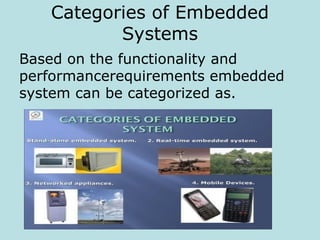
Categories of Embedded
Systems
Based on the functionality and
performancerequirements embedded
system can be categorized as.
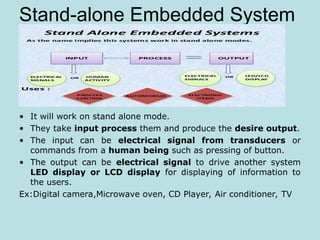
Stand-alone Embedded System
• It will work on stand alone mode.
• They take input process them and produce the desire output.
• The input can be electrical signal from transducers or
commands from a human being such as pressing of button.
• The output can be electrical signal to drive another system
LED display or LCD display for displaying of information to
the users.
Ex:Digital camera,Microwave oven, CD Player, Air conditioner, TV
Real time System
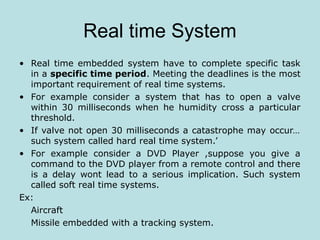
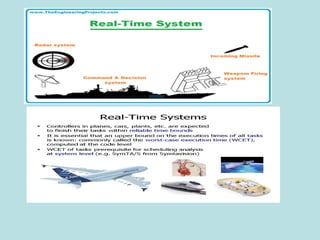
• Real time embedded system have to complete specific task
in a specific time period. Meeting the deadlines is the most
important requirement of real time systems.
• For example consider a system that has to open a valve
within 30 milliseconds when he humidity cross a particular
threshold.
• If valve not open 30 milliseconds a catastrophe may occur…
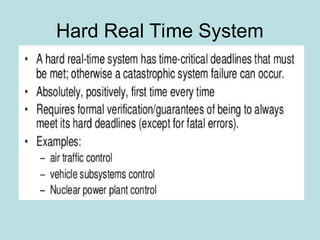
such system called hard real time system.’
• For example consider a DVD Player ,suppose you give a
command to the DVD player from a remote control and there
is a delay wont lead to a serious implication. Such system
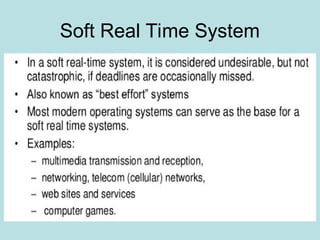
called soft real time systems.
Ex:
Aircraft
Missile embedded with a tracking system.
Networked Information Appliances
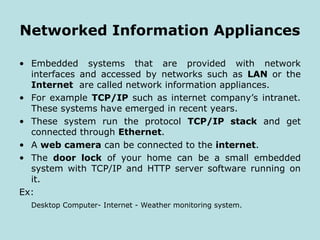
• Embedded systems that are provided with network
interfaces and accessed by networks such as LAN or the
Internet are called network information appliances.
• For example TCP/IP such as internet company’s intranet.
These systems have emerged in recent years.
• These system run the protocol TCP/IP stack and get
connected through Ethernet.
• A web camera can be connected to the internet.
• The door lock of your home can be a small embedded
system with TCP/IP and HTTP server software running on
it.
Ex:
Desktop Computer- Internet - Weather monitoring system.
Mobile Devices
• Mobile devices such as mobile phone personal digital
assistants smart phones etc… are a special category of
embedded systems.
Ex:
word processors, games etc…
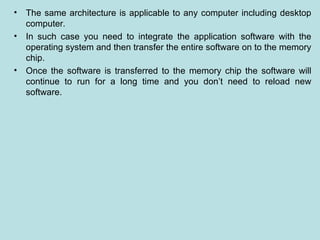
• Every Embedded System consist of custom built hardware built
around a CPU.
• This hardware also contains memory chips onto which the
software is loaded
• The software residing on the memory chip is also called firmware.
• The embedded system architecture can be represented as a
layered architecture.
Layered Architecture of Embedded System
Hardware
Operating System
Application Software
• The same architecture is applicable to any computer including desktop
computer.
• In such case you need to integrate the application software with the
operating system and then transfer the entire software on to the memory
chip.
• Once the software is transferred to the memory chip the software will
continue to run for a long time and you don’t need to reload new
software.
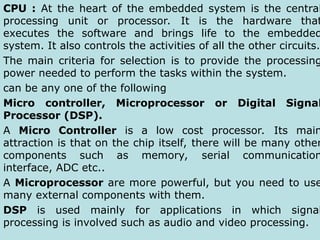
Various Building Blocks of
Embedded System
CPU
Input
Devices
output
Devices
Communication
Interfaces
Application Specific
Circuitry
Read Only
Memory
Random
Access
Memory
CPU : At the heart of the embedded system is the central
processing unit or processor. It is the hardware that
executes the software and brings life to the embedded
system. It also controls the activities of all the other circuits.
The main criteria for selection is to provide the processing
power needed to perform the tasks within the system.
can be any one of the following
Micro controller, Microprocessor or Digital Signal
Processor (DSP).
A Micro Controller is a low cost processor. Its main
attraction is that on the chip itself, there will be many other
components such as memory, serial communication
interface, ADC etc..
A Microprocessor are more powerful, but you need to use
many external components with them.
DSP is used mainly for applications in which signal
processing is involved such as audio and video processing.
Memory :The embedded system also has memory. The
memory is an important part of any embedded system
The memory is categorized as RAM & ROM. The
contents of RAM will be erased if power is switched
off to the chip, whereas ROM retain the contents
even if he power is switched off.
The memory is used to store the software that the processor
will run. It also provides storage for data such as program
variables, intermediate results, status information
Input Devices : Input devices to an embedded
system have very limited capability.
Output Devices : output devices to an embedded
system have very limited capability. Some embedded
output systems will have a few LED to indicate health
status and LCD used to display some important
parameters
Communication Interfaces: The embedded
systems may need to interact with other embedded
systems or they may have to transmit data to a
desktop. like USB, RS232,RS422, IEEE, Ethernet….
Application Specific Circuitry : Sensors,
transducers, special processing and control circuitry
may be required for an embedded system depends on
application. Power consumption is minimized.
Specialties of Embedded
Systems
While designing embedded systems, the following
aspects need to be considered by the developers
An embedded systems have many specialties.
1. Reliability
2. Performance
3. Power Consumption
4. Cost
5. Size
6. Limited user interface
7. Software Up gradation Capability
Reliability
When we use a desktop, sometimes the
system ‘hangs’ and we need to reset the
computer. Generally this does not cause
any problem. They must work with high
reliability.
Performance
Many Embedded system have time
constraints. The system must meet such
deadlines.
Power Consumption
Most of the embedded system operate through
battery. In such case reducing the component
count hardware designer have using PLD and
FPGA. Reducing the component count apart from
reducing the power consumption also increase the
reliability of the system.
Cost
For embedded systems used in safety applications
of a nuclear plant or in spacecraft, the cost may
not be a very important factor. If using consumer
electronics or office automation the cost is utmost
importance.
Size
Size is certainly a factor for many embedded
systems. We do not like mobile phone that has to
be carried on our backs. The size and weight are
important parameter in embedded systems used
in aircraft, spacecraft, missiles etc.. Because in
such case each and every inch and gram matters.
Limited user interface
Unlike desktop which have full fledged I/O
devices, embedded systems do not have
sophisticated interfaces for I/O. Some embedded
systems do not have any user interface at all.
Software Up gradation Capability
Embedded systems are meant for very
specific task. Once software is transferred
to embedded system, the same software is
run throughout the life. In such case we
need to upgrade the software.
Recent Trends in Embedded Systems
 Processor Power- 8 bit, 16 bit, 32 bit and 64 bit-
clock speed
 Memory-cost and size of the memory chip
Operating System
Communication interfaces and N/W capability
Programming Language-C, C++, Java, Python…
Development tools-Keil, Matlab, AVR studio…
Programmable hardware- PLDS, PLCs, FPGA,
ARDUNO, Rasparipi…
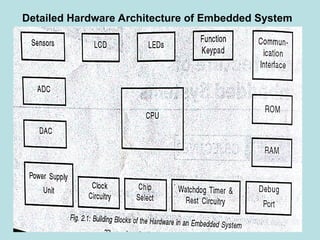
Detailed Hardware Architecture of Embedded System
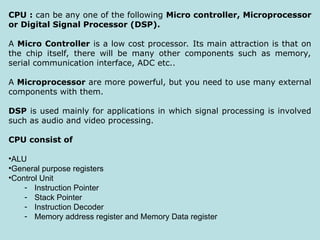
CPU : can be any one of the following Micro controller, Microprocessor
or Digital Signal Processor (DSP).
A Micro Controller is a low cost processor. Its main attraction is that on
the chip itself, there will be many other components such as memory,
serial communication interface, ADC etc..
A Microprocessor are more powerful, but you need to use many external
components with them.
DSP is used mainly for applications in which signal processing is involved
such as audio and video processing.
CPU consist of
•ALU
•General purpose registers
•Control Unit
- Instruction Pointer
- Stack Pointer
- Instruction Decoder
- Memory address register and Memory Data register
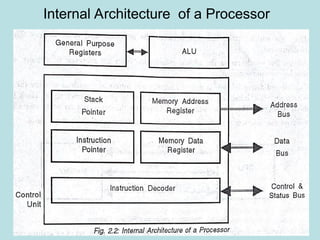
Internal Architecture of a Processor
ALU- performs arithmetic and logical operations
General purpose Registers. Registers constitute the processors
internal memory
it contain the current data and operands that are being manipulated by the
processor
Control unit- fetches the instructions from memory ,decodes them and execute
them
Instruction Pointer – points to the next instruction to be executed
Stack pointer- points to the stack in memory – Decodes the instruction
In addition to manipulating data, a processors job is to read data and
instructions from memory and write data to output devices and read data to
input devices to do these functions the processor communicates with other
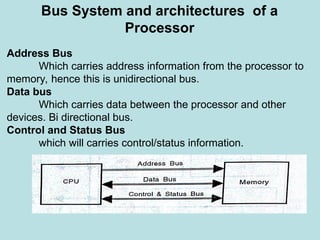
devices using three buses
1.Data Bus
2. Address Bus
3. Control and Status bus
Bus System and architectures of a
Processor
Address Bus
Which carries address information from the processor to
memory, hence this is unidirectional bus.
Data bus
Which carries data between the processor and other
devices. Bi directional bus.
Control and Status Bus
which will carries control/status information.
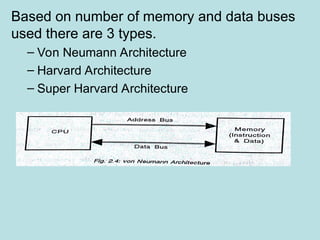
Based on number of memory and data buses
used there are 3 types.
– Von Neumann Architecture
– Harvard Architecture
– Super Harvard Architecture
Von Neumann architecture is most widely used architecture
It has one memory chip which stores both instructions and
data
Harvard Architecture
two separate blocks-
program memory and data memory
program memory – stores only instructions
Data memory –stores only data
Program memory address bus and Program memory data
bus used to access the program memory
Data memory address bus and Data memory data bus used
to access the data memory
SHARC ( Super Harvard Architecture)
Is a slight but significant modification of the Harvard
architecture.
The data memory is accessed more frequently than the
program memory
Interrupts
Interrupt is a signal to the processor that some important event has
occurred.
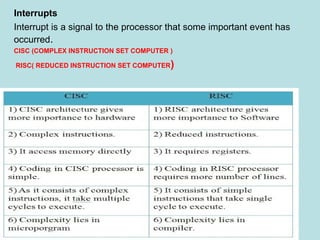
CISC (COMPLEX INSTRUCTION SET COMPUTER )
RISC( REDUCED INSTRUCTION SET COMPUTER)
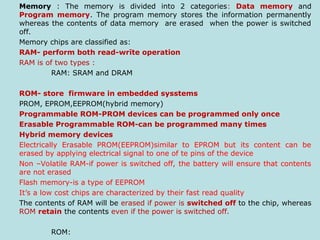
Memory : The memory is divided into 2 categories: Data memory and
Program memory. The program memory stores the information permanently
whereas the contents of data memory are erased when the power is switched
off.
Memory chips are classified as:
RAM- perform both read-wrīte operation
RAM is of two types :
RAM: SRAM and DRAM
ROM- store firmware in embedded sysstems
PROM, EPROM,EEPROM(hybrid memory)
Programmable ROM-PROM devices can be programmed only once
Erasable Programmable ROM-can be programmed many times
Hybrid memory devices
Electrically Erasable PROM(EEPROM)similar to EPROM but its content can be
erased by applying electrical signal to one of te pins of the device
Non –Volatile RAM-if power is switched off, the battery will ensure that contents
are not erased
Flash memory-is a type of EEPROM
It’s a low cost chips are characterized by their fast read quality
The contents of RAM will be erased if power is switched off to the chip, whereas
ROM retain the contents even if the power is switched off.
ROM:
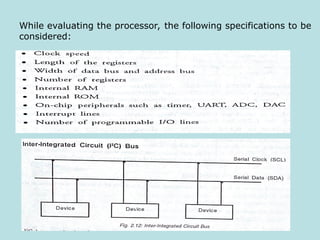
While evaluating the processor, the following specifications to be
considered:
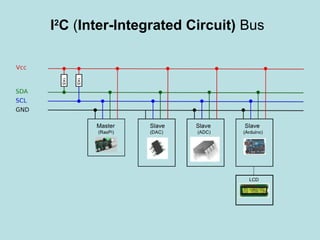
I2
C (Inter-Integrated Circuit) Bus
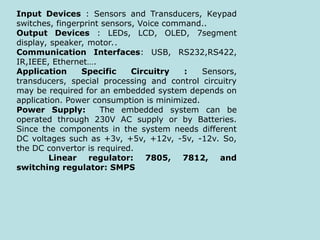
Input Devices : Sensors and Transducers, Keypad
switches, fingerprint sensors, Voice command..
Output Devices : LEDs, LCD, OLED, 7segment
display, speaker, motor..
Communication Interfaces: USB, RS232,RS422,
IR,IEEE, Ethernet….
Application Specific Circuitry : Sensors,
transducers, special processing and control circuitry
may be required for an embedded system depends on
application. Power consumption is minimized.
Power Supply: The embedded system can be
operated through 230V AC supply or by Batteries.
Since the components in the system needs different
DC voltages such as +3v, +5v, +12v, -5v, -12v. So,
the DC convertor is required.
Linear regulator: 7805, 7812, and
switching regulator: SMPS
Clock Circuitry
The processor has to be given the clock input to one of the pins. To
generate the clock signal a crystal oscillator are required.
Watchdog Timer/Reset Circuit
Watchdog timer is used to reset the processor automatically if it
does not receive a signal periodically from the processor indicating its
healthy status. This mechanism is used for reset button on the embedded
system.
Chip Select
I/O Devices
Sensors and Transducers
ADC and DAC
Debug Port
Debugging a processor based board is very difficult. In earlier many
processor manufacturer used to provide proprietary interfaces to debugging.
JTAG and IEEE… are used.
Software Architecture
• The software is an embedded system consists of
an OS and the application software.
• OS is optional it is not present we need to write
our own software routines to access the
hardware.
• As embedded systems are constrained for
memory, we cannot use an OS such as windows
or Unix. But still we need the services provided
by an OS.
Service provided by an OS
• Every computing device or embedded system needs a piece
of software using which the user interacts with the hardware.
• The software is the OS, when the computer is switched on
first the OS is loaded into the main memory(RAM).
• We can use the computer for doing different things
simultaneously such as word processing, downloading the
email etc….
• Each job is done by an application software package.
• To write an application software package we divide the job
into different smaller jobs, write the code for each smaller job
and then combine the entire code.
• In this each job is called “Process” and in an
embedded system each job is called a “Task”.
• Each task needs memory and needs to access I/O
devices.
The OS has following functions
• Process/Task Management
• Memory management
• I/O management including file system.
• Provide services to applications
• Providing User interfaces
Based on the capabilities OS are divided
into different categories
• Single tasking OS versus Multi tasking OS
• Single user OS versus Multi user OS
• Command driven OS versus GUI based OS
• Reliability
• Multi tasking with time constraints.
• Small footprint
• Support diskless systems
• Portability
• Scalability
• Support for standard API
Developing Embedded software
• Identifying the tasks and assigning priorities to each task.
• Identifying the time critical tasks.
• Scheduling the tasks in such a way that all the tasks are
completed and the tasks which are time critical meet the
deadlines.
• Working out when to send interrupts to the processor.
• Identifying the shared resources and working out
mechanisms for sharing the resource by multiple tasks.
• Working out the strategies for inter task communication
• Keeping track of the time.
Architecture of Embedded Operating
System
Tasks
The work to be done by an embedded
system is divided into a number of tasks. Each
task competes for the CPU time independently.
Each task will have a separate stack. Each
task is implemented as an infinite loop.
Ex
for ( )
{
Statements;
}
Alternatively we use while loop
While ()
{
Statements;
}
Task Scheduling
Since only one CPU has to handle multiple task, the task
have to share the CPU time in a disciplined way so that one task
does not get lot of time while others wait for unduly long time.
Important time critical task have to be given high priority
and a mechanism for deciding which task will get the CPU time
next has to be worked out. This is known as task scheduling.
Context Switching
A low priority task is presently being executed by the
processor but a high priority task has to run. In this case CPU
will be interrupted an interrupt signal. CPU will save the current
task information in stack and execute the high priority task. The
mechanism of storing the current CPU registers in a stack
to run the other task is known as context switching.
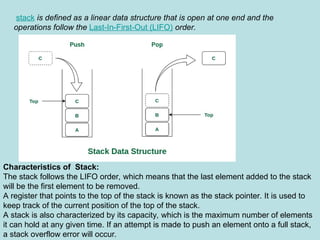
stack is defined as a linear data structure that is open at one end and the
operations follow the Last-In-First-Out (LIFO) order.
Characteristics of Stack:
The stack follows the LIFO order, which means that the last element added to the stack
will be the first element to be removed.
A register that points to the top of the stack is known as the stack pointer. It is used to
keep track of the current position of the top of the stack.
A stack is also characterized by its capacity, which is the maximum number of elements
it can hold at any given time. If an attempt is made to push an element onto a full stack,
a stack overflow error will occur.
Mutual Exclusion
Embedded system provide disciplined access to shared
resources through special objects such as semaphore and Mutexes.
Mutes and semaphore are like keys. To access resources a task will
obtain the key use the resource and release the key.
Inter Task communication
Task may need to exchange data amongst themselves. For
instance a task may write some data to a file and another task has to
read the data.
Memory Management
It is used to shared number of tasks. So memory management
is another service provided by OS.
Timer Services
The OS also provide time service
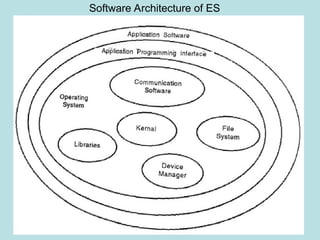
Software Architecture of ES
The operating system consists of
• Kernel
• Device Manager
• Networking protocol software
• Libraries
• File System (Optional)
Kernel
It is the heart of the OS. Its main function is to
manage the tasks. A task scheduling algorithm decides
which task has to run next.
Device Manager
The I/O devices are used to send/receive data
from the embedded system.
Communication protocol software
Communication interfaces such as Ethernet,
USB etc…
Libraries
The OS may have some C/C++ library files in
object code.
File System
Most of ES do not have secondary storage. In
such cases the ROM is used to store the program.
Categories of Embedded Operating Systems
1.Non real time embedded operating systems
This OS are not suitable for hard real –time embedded
applications Ex : Embedded Linux, Embedded NT and
Windows XP Embedded
2.Real time Operating system
This OS are suitable for hard real –time embedded
applications Ex :RT LinuX,OS/9
3.Mobile/Handheld Operating Systems
The OS used in mobile devices such as
palmtops,PDAs,smart phones are known as
3.Mobile/Handheld Operating Systems
Application Software
In embedded systems the application software is
integrated with the operating system software and networking
software, and then transferred to the memory of the embedded
system.
The various function calls provided by an OS are
•To create, suspend and delete tasks
•To do task scheduling for meeting real time requirements.
•To facilitate inter task communication and synchronization
between tasks.
•To initialize increment and reset counters to keep track of time
•To allocate and free memory
•To access the I/O devices.
Communication Software
Most of the embedded system need a communication interface
to interact with external world
To network enable an embedded system, the embedded
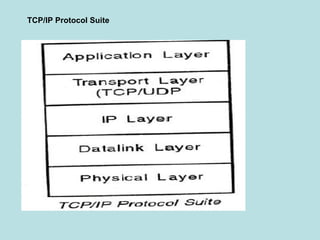
systems should have the complete TCP/IP protocol stack
integrated along with the operating system.
TCP/IP Protocol Suite
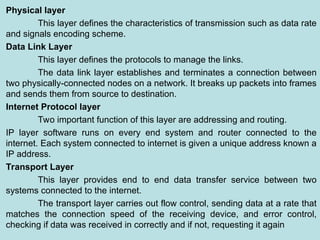
Physical layer
This layer defines the characteristics of transmission such as data rate
and signals encoding scheme.
Data Link Layer
This layer defines the protocols to manage the links.
The data link layer establishes and terminates a connection between
two physically-connected nodes on a network. It breaks up packets into frames
and sends them from source to destination.
Internet Protocol layer
Two important function of this layer are addressing and routing.
IP layer software runs on every end system and router connected to the
internet. Each system connected to internet is given a unique address known a
IP address.
Transport Layer
This layer provides end to end data transfer service between two
systems connected to the internet.
The transport layer carries out flow control, sending data at a rate that
matches the connection speed of the receiving device, and error control,
checking if data was received in correctly and if not, requesting it again
Transmission Control Protocol(TCP)
The job of TCP layer to ensure that the data is delivered to
the application layers without any errors
User Datagram Protocol(UDP)
It provides a connectionless service
It sends the packet to the destination one after other without
bothering whether they are received correct or not
Application Layer
The application layer is used by end-user software such as
web browsers and email clients. It provides protocols that
allow software to send and receive information and present
meaningful data to users.
Example
HTTP, FTP, SMTP, DNS….
Process of Generating Executable Image
• Creating the source file
• Create the executable file
• Give the command for execution
• The process is loaded into the RAM by the
loader.
• Loader transfer the control to the process
and the process execution.
The OS ,communication software and
application software have to be converted into a
single executable image and
transferred to the memory . This is the process
of creating an executable image
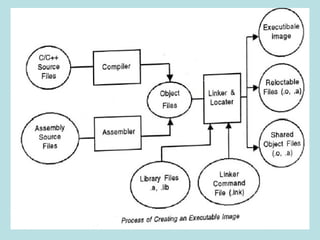
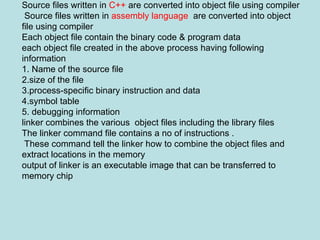
Source files written in C++ are converted into object file using compiler
Source files written in assembly language are converted into object
file using compiler
Each object file contain the binary code & program data
each object file created in the above process having following
information
1. Name of the source file
2.size of the file
3.process-specific binary instruction and data
4.symbol table
5. debugging information
linker combines the various object files including the library files
The linker command file contains a no of instructions .
These command tell the linker how to combine the object files and
extract locations in the memory
output of linker is an executable image that can be transferred to
memory chip
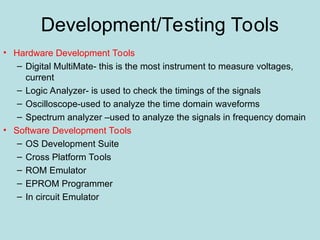
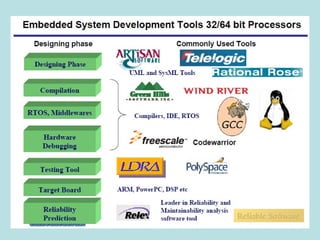
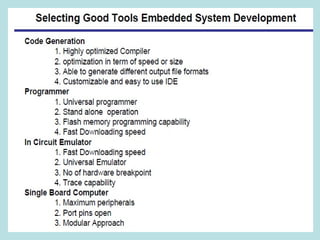
Development/Testing Tools
• Hardware Development Tools
– Digital MultiMate- this is the most instrument to measure voltages,
current
– Logic Analyzer- is used to check the timings of the signals
– Oscilloscope-used to analyze the time domain waveforms
– Spectrum analyzer –used to analyze the signals in frequency domain
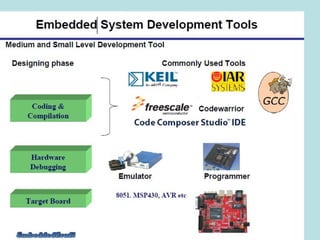
• Software Development Tools
– OS Development Suite
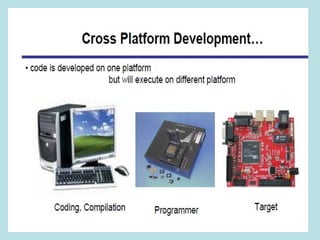
– Cross Platform Tools
– ROM Emulator
– EPROM Programmer
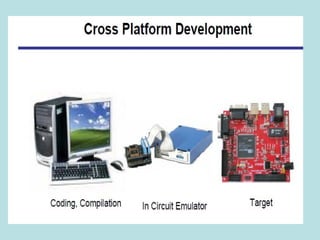
– In circuit Emulator
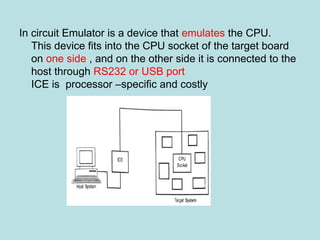
In circuit Emulator is a device that emulates the CPU.
This device fits into the CPU socket of the target board
on one side , and on the other side it is connected to the
host through RS232 or USB port
ICE is processor –specific and costly
Introduction in RTOS
A Real Time Operating System is
multitasking operation system for applications,
which require that system tasks and functions
execute with real-time constraints.
The system controls the execution of all
functions such that time deadlines are met.
• It responds to inputs immediately(Real Time)
• Here the task is completed within a specified
time delay.
• In real life situations like controlling traffic
signal or a nuclear reactor or an aircraft.
• The operating system has to respond quickly.
There are two types
1.Hard Real time system
2.Soft Real time system
Hard Real Time System
Soft Real Time System
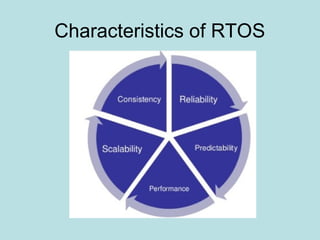
Characteristics of RTOS
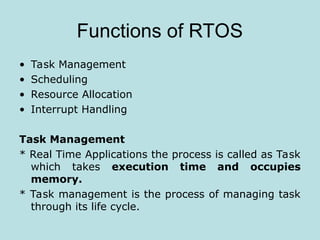
Functions of RTOS
• Task Management
• Scheduling
• Resource Allocation
• Interrupt Handling
Task Management
* Real Time Applications the process is called as Task
which takes execution time and occupies
memory.
* Task management is the process of managing task
through its life cycle.
Task
• No of Tasks
• Resource Requirements
• Release Time
• Execution Time
• Deadlines
Resource Allocation
• Weighted Round Robin
• Priority Based
Interrupt
An interrupt is a signal from a device attached to
a computer or from a program with in a computer that
causes the main program that is operating system to
stop and figure out what to do next.
Examples of Real Time System
• Plant control
• Control of production processes / industrial automation
• Railway switching systems
• Automotive applications
• Flight control systems
• Environmental acquisition and monitoring
• Telecommunication systems
• Robotics
• Military systems
• Space missions
• Household appliances.
Architecture of the Kernel
• The embedded software consists of the
Operating System and the application
software.
• The services provided by the operating
system are accessed through Application
Programming Interface(API) to develop
application software.
• The API is a set of function calls using which
you can access the various kernel objects and
the service provided by the kernel.
The Various Kernel Objects are
• Task
• Task Scheduling
• Interrupt Service Routines
• Semaphores
• Mutexes
• Mailboxes
• Message queues
• Pipes
• Event Registers
• Signals
• Timers
The Kernel provides various services through
operations on the kernel objects.
These services are
•Memory Management
•Device Management
•Interrupt Handling
•Time Management
Tasks and Task Scheduler
• The Embedded software consists of a number of
tasks.
• These tasks include the OS tasks and
Application specific task.
• Each task in ES is implemented as an infinite
loop.
• The task objects consist of Name, unique ID,
priority, stack and task control block.
• In addition to the tasks required for the
application software, the kernel has its own
system tasks with priorities.
• Startup task: Which is executed when the
operating system starts.
• Exception handling task to handle the
exceptions.
• Logging task: log the various system messages.
• Idle task : Which will have lowest priority and will
run when there is no other task to run.
One CPU has to handle multiple tasks, the tasks
have to share the CPU time in a disciplined
manner so that one task does not get lot of
time while others are waiting forever.
Task Scheduling
• Each task has to be assigned a priority
mechanism for deciding which task will get CPU
time next has to be worked out. This is known
as task scheduling.
• The object that does task scheduling is the task
scheduler.
• The task have to share the system resources
such as CPU registers, external memory and I/O
devices.
• The important requirement is that one task
should not corrupt the data of another task.
While scheduling Task no of Issues are
Many tasks may make calls to a function.
•A function that can be used by more than one task
without data corruption is called reentrant
function.
•If data is corrupted when more than one task
calls the function such a function is called non
reentrant function.
•Every task requires resources such as serial port,
keyboard, display or memory locations.
•The resources shared by two or more tasks are
called as shared resources.
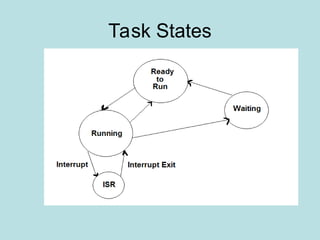
Task States
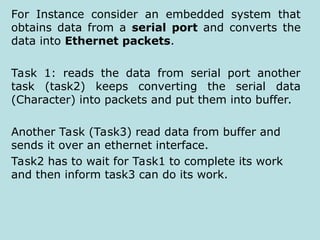
For Instance consider an embedded system that
obtains data from a serial port and converts the
data into Ethernet packets.
Task 1: reads the data from serial port another
task (task2) keeps converting the serial data
(Character) into packets and put them into buffer.
Another Task (Task3) read data from buffer and
sends it over an ethernet interface.
Task2 has to wait for Task1 to complete its work
and then inform task3 can do its work.
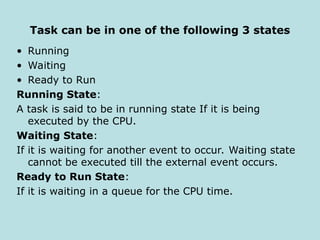
Task can be in one of the following 3 states
• Running
• Waiting
• Ready to Run
Running State:
A task is said to be in running state If it is being
executed by the CPU.
Waiting State:
If it is waiting for another event to occur. Waiting state
cannot be executed till the external event occurs.
Ready to Run State:
If it is waiting in a queue for the CPU time.
Task Stack:
Every task will have a stack that stores the local
variables, function parameters, return address
and CPU registers during an interrupt.
Context Switching:
The state of the CPU registers when a task has to
be preempted is called the context. Saving the
contents of the CPU registers and loading the new
task parameters is called context switching (High
Priority to low priority).

Architecture offffffffffffff ESD-ppt.ppt

  • 1.
    Unit – I EmbeddedSystem Concepts
  • 2.
    Introduction Embedded System An embeddedsystem refers to the combination of hardware and software to carry out a specific task inside a device or bigger computer system The elements that are combined here correspond to microprocessors or microcontrollers, I/O peripheral devices, sensors, computer memories, among others. The electronic system which integrates the hardware circuit with the software programming techniques for providing Specific task is called as embedded systems The software usually gets embedded into memory modules as ROM, and it does not need any secondary memory as in a computer. Embedded software is also called ‘firmware’
  • 3.
    Examples 1. Calculators 2. Washingmachine 3. Drones 4. Tracking systems 5. Electric vehicle charging stations 6. Macropads 7. Wearable devices
  • 4.
  • 5.
    Electric vehicle chargingstations Macropads Smart wearable devices
  • 8.
    Embedded System Characterizedby Some Special Features • Embedded systems do a very specific task, they cannot be programmed to do different things. • Embedded system have very limited resources, particularly memory. (They do no have secondary storage device ) • Embedded system have to work against some deadlines. A specific job has to be completed with in a specific time. • Embedded Systems are constrained for power. • Embedded systems need to be highly reliable.( ex ALT+CTRL+DEL is OK on your desktop but you cannot afford to reset your embedded system) • It has to operate in extreme environmental conditions such as very high temperatures and humidity.
  • 9.
    Classification of Embedded Systems •Based on Generation • Based on complexity and performance
  • 10.
    Based on Generation •First Generation – 8 bit microprocessor like 8085 and 4 bit microcontroller. ( Ex. Digital telephone keypad, stepper motor control unit etc..). • Second Generation – 16bit microprocessor and 8bit and 16bit microcontrollers. Instruction set are more complex. (Ex. Data acquisition, SCADA system…) • Third Generation- 32bit microprocessor and 16bit microcontrollers. A new concept like ( ASIC, DSP). Ex. Robotics, media, networking…). • Fourth Generation – The advent of System on chips(SoC) reconfigurable processors and multicore processors are bringing high performance. Ex. Smart Phone, Mobile internet devices…).
  • 11.
    Based on Complexityand performance • Small Scale Embedded System • Medium Scale Embedded System • Large Scale Embedded System.
  • 12.
    Small Scale EmbeddedSystem • Single 8 bit or 16 bit Microcontroller • Little hardware and software complexity • They may even be battery operated • Usually "C" is used for developing these system. • They need limited power dissipation when system is running continuously. Example : Digital Watch Programming Tools: Assembler and Cross Assembler
  • 14.
    Medium Scale Embedded System •Medium scale embedded systems are designed with a single 16 or 32 bit microcontrollers, DSPs or RISCs. • These systems have both hardware and software complexities. • When developing embedded software for these types of systems, the following programming tools are available. Ex. C, C++, Visual C++, Java, and RTOS, source code engineering tool, debugger, simulator and integrated development environment.
  • 15.
    Large Scale EmbeddedSystem • Large scale embedded systems have huge hardware and software complexities and may need PLAs, IPs, ASIPs, scalable processors or configurable processors. • They are used for cutting-edge applications that need hardware and software co-design & components which have to combine in the final system.
  • 16.
    Major Application Areaof Embedded Systems • Consumer electronics – camcorders, digital cameras, digital diary etc… • Household appliances – TV, DVD Player, washing machine, fridge, microwave oven… • Office Automation – Copying machine, fax machine, key telephone, modem, printer, scanner… • Industrial automation – pharmaceutical, cement, sugar, oil exploration, nuclear energy, electricity generation and transmission. • Medical electronics – ECG, EEG, blood pressure measuring device, X ray, scanner, endoscopy…. • Computer networking – bridge, routers, ISDN, switches, hubs, firewalls…
  • 17.
    • Telecommunications –Key telephones, ISDN phone, terminal adapters, web cameras, IP phone, IP cameras,….. • Wireless Technologies- base station controllers, mobile switching centers…. • Instrumentation – weight, temperature, pressure, humidity, voltage, current…… • Security – biometric, fingerprint, face recognition… • Banking and Retail– Smart card and ATM, credit card, electronic wallet….. • Card reader – barcode, smart card reader, hand held devices…..
  • 18.
    Categories of Embedded Systems Basedon the functionality and performancerequirements embedded system can be categorized as.
  • 19.
    Stand-alone Embedded System •It will work on stand alone mode. • They take input process them and produce the desire output. • The input can be electrical signal from transducers or commands from a human being such as pressing of button. • The output can be electrical signal to drive another system LED display or LCD display for displaying of information to the users. Ex:Digital camera,Microwave oven, CD Player, Air conditioner, TV
  • 20.
    Real time System •Real time embedded system have to complete specific task in a specific time period. Meeting the deadlines is the most important requirement of real time systems. • For example consider a system that has to open a valve within 30 milliseconds when he humidity cross a particular threshold. • If valve not open 30 milliseconds a catastrophe may occur… such system called hard real time system.’ • For example consider a DVD Player ,suppose you give a command to the DVD player from a remote control and there is a delay wont lead to a serious implication. Such system called soft real time systems. Ex: Aircraft Missile embedded with a tracking system.
  • 22.
    Networked Information Appliances •Embedded systems that are provided with network interfaces and accessed by networks such as LAN or the Internet are called network information appliances. • For example TCP/IP such as internet company’s intranet. These systems have emerged in recent years. • These system run the protocol TCP/IP stack and get connected through Ethernet. • A web camera can be connected to the internet. • The door lock of your home can be a small embedded system with TCP/IP and HTTP server software running on it. Ex: Desktop Computer- Internet - Weather monitoring system.
  • 23.
    Mobile Devices • Mobiledevices such as mobile phone personal digital assistants smart phones etc… are a special category of embedded systems. Ex: word processors, games etc…
  • 24.
    • Every EmbeddedSystem consist of custom built hardware built around a CPU. • This hardware also contains memory chips onto which the software is loaded • The software residing on the memory chip is also called firmware. • The embedded system architecture can be represented as a layered architecture. Layered Architecture of Embedded System Hardware Operating System Application Software
  • 25.
    • The samearchitecture is applicable to any computer including desktop computer. • In such case you need to integrate the application software with the operating system and then transfer the entire software on to the memory chip. • Once the software is transferred to the memory chip the software will continue to run for a long time and you don’t need to reload new software.
  • 26.
    Various Building Blocksof Embedded System CPU Input Devices output Devices Communication Interfaces Application Specific Circuitry Read Only Memory Random Access Memory
  • 27.
    CPU : Atthe heart of the embedded system is the central processing unit or processor. It is the hardware that executes the software and brings life to the embedded system. It also controls the activities of all the other circuits. The main criteria for selection is to provide the processing power needed to perform the tasks within the system. can be any one of the following Micro controller, Microprocessor or Digital Signal Processor (DSP). A Micro Controller is a low cost processor. Its main attraction is that on the chip itself, there will be many other components such as memory, serial communication interface, ADC etc.. A Microprocessor are more powerful, but you need to use many external components with them. DSP is used mainly for applications in which signal processing is involved such as audio and video processing.
  • 28.
    Memory :The embeddedsystem also has memory. The memory is an important part of any embedded system The memory is categorized as RAM & ROM. The contents of RAM will be erased if power is switched off to the chip, whereas ROM retain the contents even if he power is switched off. The memory is used to store the software that the processor will run. It also provides storage for data such as program variables, intermediate results, status information Input Devices : Input devices to an embedded system have very limited capability. Output Devices : output devices to an embedded system have very limited capability. Some embedded output systems will have a few LED to indicate health status and LCD used to display some important parameters
  • 29.
    Communication Interfaces: Theembedded systems may need to interact with other embedded systems or they may have to transmit data to a desktop. like USB, RS232,RS422, IEEE, Ethernet…. Application Specific Circuitry : Sensors, transducers, special processing and control circuitry may be required for an embedded system depends on application. Power consumption is minimized.
  • 30.
    Specialties of Embedded Systems Whiledesigning embedded systems, the following aspects need to be considered by the developers An embedded systems have many specialties. 1. Reliability 2. Performance 3. Power Consumption 4. Cost 5. Size 6. Limited user interface 7. Software Up gradation Capability
  • 31.
    Reliability When we usea desktop, sometimes the system ‘hangs’ and we need to reset the computer. Generally this does not cause any problem. They must work with high reliability. Performance Many Embedded system have time constraints. The system must meet such deadlines.
  • 32.
    Power Consumption Most ofthe embedded system operate through battery. In such case reducing the component count hardware designer have using PLD and FPGA. Reducing the component count apart from reducing the power consumption also increase the reliability of the system. Cost For embedded systems used in safety applications of a nuclear plant or in spacecraft, the cost may not be a very important factor. If using consumer electronics or office automation the cost is utmost importance.
  • 33.
    Size Size is certainlya factor for many embedded systems. We do not like mobile phone that has to be carried on our backs. The size and weight are important parameter in embedded systems used in aircraft, spacecraft, missiles etc.. Because in such case each and every inch and gram matters. Limited user interface Unlike desktop which have full fledged I/O devices, embedded systems do not have sophisticated interfaces for I/O. Some embedded systems do not have any user interface at all.
  • 34.
    Software Up gradationCapability Embedded systems are meant for very specific task. Once software is transferred to embedded system, the same software is run throughout the life. In such case we need to upgrade the software.
  • 35.
    Recent Trends inEmbedded Systems  Processor Power- 8 bit, 16 bit, 32 bit and 64 bit- clock speed  Memory-cost and size of the memory chip Operating System Communication interfaces and N/W capability Programming Language-C, C++, Java, Python… Development tools-Keil, Matlab, AVR studio… Programmable hardware- PLDS, PLCs, FPGA, ARDUNO, Rasparipi…
  • 36.
  • 37.
    CPU : canbe any one of the following Micro controller, Microprocessor or Digital Signal Processor (DSP). A Micro Controller is a low cost processor. Its main attraction is that on the chip itself, there will be many other components such as memory, serial communication interface, ADC etc.. A Microprocessor are more powerful, but you need to use many external components with them. DSP is used mainly for applications in which signal processing is involved such as audio and video processing. CPU consist of •ALU •General purpose registers •Control Unit - Instruction Pointer - Stack Pointer - Instruction Decoder - Memory address register and Memory Data register
  • 38.
  • 39.
    ALU- performs arithmeticand logical operations General purpose Registers. Registers constitute the processors internal memory it contain the current data and operands that are being manipulated by the processor Control unit- fetches the instructions from memory ,decodes them and execute them Instruction Pointer – points to the next instruction to be executed Stack pointer- points to the stack in memory – Decodes the instruction In addition to manipulating data, a processors job is to read data and instructions from memory and write data to output devices and read data to input devices to do these functions the processor communicates with other devices using three buses 1.Data Bus 2. Address Bus 3. Control and Status bus
  • 40.
    Bus System andarchitectures of a Processor Address Bus Which carries address information from the processor to memory, hence this is unidirectional bus. Data bus Which carries data between the processor and other devices. Bi directional bus. Control and Status Bus which will carries control/status information.
  • 41.
    Based on numberof memory and data buses used there are 3 types. – Von Neumann Architecture – Harvard Architecture – Super Harvard Architecture
  • 43.
    Von Neumann architectureis most widely used architecture It has one memory chip which stores both instructions and data Harvard Architecture two separate blocks- program memory and data memory program memory – stores only instructions Data memory –stores only data Program memory address bus and Program memory data bus used to access the program memory Data memory address bus and Data memory data bus used to access the data memory SHARC ( Super Harvard Architecture) Is a slight but significant modification of the Harvard architecture. The data memory is accessed more frequently than the program memory
  • 44.
    Interrupts Interrupt is asignal to the processor that some important event has occurred. CISC (COMPLEX INSTRUCTION SET COMPUTER ) RISC( REDUCED INSTRUCTION SET COMPUTER)
  • 45.
    Memory : Thememory is divided into 2 categories: Data memory and Program memory. The program memory stores the information permanently whereas the contents of data memory are erased when the power is switched off. Memory chips are classified as: RAM- perform both read-wrīte operation RAM is of two types : RAM: SRAM and DRAM ROM- store firmware in embedded sysstems PROM, EPROM,EEPROM(hybrid memory) Programmable ROM-PROM devices can be programmed only once Erasable Programmable ROM-can be programmed many times Hybrid memory devices Electrically Erasable PROM(EEPROM)similar to EPROM but its content can be erased by applying electrical signal to one of te pins of the device Non –Volatile RAM-if power is switched off, the battery will ensure that contents are not erased Flash memory-is a type of EEPROM It’s a low cost chips are characterized by their fast read quality The contents of RAM will be erased if power is switched off to the chip, whereas ROM retain the contents even if the power is switched off. ROM:
  • 46.
    While evaluating theprocessor, the following specifications to be considered:
  • 47.
  • 48.
    Input Devices :Sensors and Transducers, Keypad switches, fingerprint sensors, Voice command.. Output Devices : LEDs, LCD, OLED, 7segment display, speaker, motor.. Communication Interfaces: USB, RS232,RS422, IR,IEEE, Ethernet…. Application Specific Circuitry : Sensors, transducers, special processing and control circuitry may be required for an embedded system depends on application. Power consumption is minimized. Power Supply: The embedded system can be operated through 230V AC supply or by Batteries. Since the components in the system needs different DC voltages such as +3v, +5v, +12v, -5v, -12v. So, the DC convertor is required. Linear regulator: 7805, 7812, and switching regulator: SMPS
  • 49.
    Clock Circuitry The processorhas to be given the clock input to one of the pins. To generate the clock signal a crystal oscillator are required. Watchdog Timer/Reset Circuit Watchdog timer is used to reset the processor automatically if it does not receive a signal periodically from the processor indicating its healthy status. This mechanism is used for reset button on the embedded system. Chip Select I/O Devices Sensors and Transducers ADC and DAC Debug Port Debugging a processor based board is very difficult. In earlier many processor manufacturer used to provide proprietary interfaces to debugging. JTAG and IEEE… are used.
  • 50.
    Software Architecture • Thesoftware is an embedded system consists of an OS and the application software. • OS is optional it is not present we need to write our own software routines to access the hardware. • As embedded systems are constrained for memory, we cannot use an OS such as windows or Unix. But still we need the services provided by an OS.
  • 51.
    Service provided byan OS • Every computing device or embedded system needs a piece of software using which the user interacts with the hardware. • The software is the OS, when the computer is switched on first the OS is loaded into the main memory(RAM). • We can use the computer for doing different things simultaneously such as word processing, downloading the email etc…. • Each job is done by an application software package. • To write an application software package we divide the job into different smaller jobs, write the code for each smaller job and then combine the entire code.
  • 52.
    • In thiseach job is called “Process” and in an embedded system each job is called a “Task”. • Each task needs memory and needs to access I/O devices. The OS has following functions • Process/Task Management • Memory management • I/O management including file system. • Provide services to applications • Providing User interfaces
  • 53.
    Based on thecapabilities OS are divided into different categories • Single tasking OS versus Multi tasking OS • Single user OS versus Multi user OS • Command driven OS versus GUI based OS • Reliability • Multi tasking with time constraints. • Small footprint • Support diskless systems • Portability • Scalability • Support for standard API
  • 54.
    Developing Embedded software •Identifying the tasks and assigning priorities to each task. • Identifying the time critical tasks. • Scheduling the tasks in such a way that all the tasks are completed and the tasks which are time critical meet the deadlines. • Working out when to send interrupts to the processor. • Identifying the shared resources and working out mechanisms for sharing the resource by multiple tasks. • Working out the strategies for inter task communication • Keeping track of the time. Architecture of Embedded Operating System
  • 55.
    Tasks The work tobe done by an embedded system is divided into a number of tasks. Each task competes for the CPU time independently. Each task will have a separate stack. Each task is implemented as an infinite loop. Ex for ( ) { Statements; } Alternatively we use while loop While () { Statements; }
  • 56.
    Task Scheduling Since onlyone CPU has to handle multiple task, the task have to share the CPU time in a disciplined way so that one task does not get lot of time while others wait for unduly long time. Important time critical task have to be given high priority and a mechanism for deciding which task will get the CPU time next has to be worked out. This is known as task scheduling. Context Switching A low priority task is presently being executed by the processor but a high priority task has to run. In this case CPU will be interrupted an interrupt signal. CPU will save the current task information in stack and execute the high priority task. The mechanism of storing the current CPU registers in a stack to run the other task is known as context switching.
  • 57.
    stack is definedas a linear data structure that is open at one end and the operations follow the Last-In-First-Out (LIFO) order. Characteristics of Stack: The stack follows the LIFO order, which means that the last element added to the stack will be the first element to be removed. A register that points to the top of the stack is known as the stack pointer. It is used to keep track of the current position of the top of the stack. A stack is also characterized by its capacity, which is the maximum number of elements it can hold at any given time. If an attempt is made to push an element onto a full stack, a stack overflow error will occur.
  • 58.
    Mutual Exclusion Embedded systemprovide disciplined access to shared resources through special objects such as semaphore and Mutexes. Mutes and semaphore are like keys. To access resources a task will obtain the key use the resource and release the key. Inter Task communication Task may need to exchange data amongst themselves. For instance a task may write some data to a file and another task has to read the data. Memory Management It is used to shared number of tasks. So memory management is another service provided by OS. Timer Services The OS also provide time service
  • 59.
  • 60.
    The operating systemconsists of • Kernel • Device Manager • Networking protocol software • Libraries • File System (Optional) Kernel It is the heart of the OS. Its main function is to manage the tasks. A task scheduling algorithm decides which task has to run next. Device Manager The I/O devices are used to send/receive data from the embedded system.
  • 61.
    Communication protocol software Communicationinterfaces such as Ethernet, USB etc… Libraries The OS may have some C/C++ library files in object code. File System Most of ES do not have secondary storage. In such cases the ROM is used to store the program.
  • 62.
    Categories of EmbeddedOperating Systems 1.Non real time embedded operating systems This OS are not suitable for hard real –time embedded applications Ex : Embedded Linux, Embedded NT and Windows XP Embedded 2.Real time Operating system This OS are suitable for hard real –time embedded applications Ex :RT LinuX,OS/9 3.Mobile/Handheld Operating Systems The OS used in mobile devices such as palmtops,PDAs,smart phones are known as 3.Mobile/Handheld Operating Systems
  • 63.
    Application Software In embeddedsystems the application software is integrated with the operating system software and networking software, and then transferred to the memory of the embedded system. The various function calls provided by an OS are •To create, suspend and delete tasks •To do task scheduling for meeting real time requirements. •To facilitate inter task communication and synchronization between tasks. •To initialize increment and reset counters to keep track of time •To allocate and free memory •To access the I/O devices.
  • 64.
    Communication Software Most ofthe embedded system need a communication interface to interact with external world To network enable an embedded system, the embedded systems should have the complete TCP/IP protocol stack integrated along with the operating system.
  • 65.
  • 66.
    Physical layer This layerdefines the characteristics of transmission such as data rate and signals encoding scheme. Data Link Layer This layer defines the protocols to manage the links. The data link layer establishes and terminates a connection between two physically-connected nodes on a network. It breaks up packets into frames and sends them from source to destination. Internet Protocol layer Two important function of this layer are addressing and routing. IP layer software runs on every end system and router connected to the internet. Each system connected to internet is given a unique address known a IP address. Transport Layer This layer provides end to end data transfer service between two systems connected to the internet. The transport layer carries out flow control, sending data at a rate that matches the connection speed of the receiving device, and error control, checking if data was received in correctly and if not, requesting it again
  • 67.
    Transmission Control Protocol(TCP) Thejob of TCP layer to ensure that the data is delivered to the application layers without any errors User Datagram Protocol(UDP) It provides a connectionless service It sends the packet to the destination one after other without bothering whether they are received correct or not Application Layer The application layer is used by end-user software such as web browsers and email clients. It provides protocols that allow software to send and receive information and present meaningful data to users. Example HTTP, FTP, SMTP, DNS….
  • 68.
    Process of GeneratingExecutable Image • Creating the source file • Create the executable file • Give the command for execution • The process is loaded into the RAM by the loader. • Loader transfer the control to the process and the process execution.
  • 69.
    The OS ,communicationsoftware and application software have to be converted into a single executable image and transferred to the memory . This is the process of creating an executable image
  • 71.
    Source files writtenin C++ are converted into object file using compiler Source files written in assembly language are converted into object file using compiler Each object file contain the binary code & program data each object file created in the above process having following information 1. Name of the source file 2.size of the file 3.process-specific binary instruction and data 4.symbol table 5. debugging information linker combines the various object files including the library files The linker command file contains a no of instructions . These command tell the linker how to combine the object files and extract locations in the memory output of linker is an executable image that can be transferred to memory chip
  • 72.
    Development/Testing Tools • HardwareDevelopment Tools – Digital MultiMate- this is the most instrument to measure voltages, current – Logic Analyzer- is used to check the timings of the signals – Oscilloscope-used to analyze the time domain waveforms – Spectrum analyzer –used to analyze the signals in frequency domain • Software Development Tools – OS Development Suite – Cross Platform Tools – ROM Emulator – EPROM Programmer – In circuit Emulator
  • 73.
    In circuit Emulatoris a device that emulates the CPU. This device fits into the CPU socket of the target board on one side , and on the other side it is connected to the host through RS232 or USB port ICE is processor –specific and costly
  • 79.
    Introduction in RTOS AReal Time Operating System is multitasking operation system for applications, which require that system tasks and functions execute with real-time constraints. The system controls the execution of all functions such that time deadlines are met.
  • 80.
    • It respondsto inputs immediately(Real Time) • Here the task is completed within a specified time delay. • In real life situations like controlling traffic signal or a nuclear reactor or an aircraft. • The operating system has to respond quickly. There are two types 1.Hard Real time system 2.Soft Real time system
  • 81.
  • 82.
  • 83.
  • 84.
    Functions of RTOS •Task Management • Scheduling • Resource Allocation • Interrupt Handling Task Management * Real Time Applications the process is called as Task which takes execution time and occupies memory. * Task management is the process of managing task through its life cycle.
  • 85.
    Task • No ofTasks • Resource Requirements • Release Time • Execution Time • Deadlines Resource Allocation • Weighted Round Robin • Priority Based Interrupt An interrupt is a signal from a device attached to a computer or from a program with in a computer that causes the main program that is operating system to stop and figure out what to do next.
  • 86.
    Examples of RealTime System • Plant control • Control of production processes / industrial automation • Railway switching systems • Automotive applications • Flight control systems • Environmental acquisition and monitoring • Telecommunication systems • Robotics • Military systems • Space missions • Household appliances.
  • 87.
    Architecture of theKernel • The embedded software consists of the Operating System and the application software. • The services provided by the operating system are accessed through Application Programming Interface(API) to develop application software. • The API is a set of function calls using which you can access the various kernel objects and the service provided by the kernel.
  • 88.
    The Various KernelObjects are • Task • Task Scheduling • Interrupt Service Routines • Semaphores • Mutexes • Mailboxes • Message queues • Pipes • Event Registers • Signals • Timers
  • 89.
    The Kernel providesvarious services through operations on the kernel objects. These services are •Memory Management •Device Management •Interrupt Handling •Time Management
  • 90.
    Tasks and TaskScheduler • The Embedded software consists of a number of tasks. • These tasks include the OS tasks and Application specific task. • Each task in ES is implemented as an infinite loop. • The task objects consist of Name, unique ID, priority, stack and task control block. • In addition to the tasks required for the application software, the kernel has its own system tasks with priorities.
  • 91.
    • Startup task:Which is executed when the operating system starts. • Exception handling task to handle the exceptions. • Logging task: log the various system messages. • Idle task : Which will have lowest priority and will run when there is no other task to run. One CPU has to handle multiple tasks, the tasks have to share the CPU time in a disciplined manner so that one task does not get lot of time while others are waiting forever.
  • 92.
    Task Scheduling • Eachtask has to be assigned a priority mechanism for deciding which task will get CPU time next has to be worked out. This is known as task scheduling. • The object that does task scheduling is the task scheduler. • The task have to share the system resources such as CPU registers, external memory and I/O devices. • The important requirement is that one task should not corrupt the data of another task.
  • 93.
    While scheduling Taskno of Issues are Many tasks may make calls to a function. •A function that can be used by more than one task without data corruption is called reentrant function. •If data is corrupted when more than one task calls the function such a function is called non reentrant function. •Every task requires resources such as serial port, keyboard, display or memory locations. •The resources shared by two or more tasks are called as shared resources.
  • 94.
  • 95.
    For Instance consideran embedded system that obtains data from a serial port and converts the data into Ethernet packets. Task 1: reads the data from serial port another task (task2) keeps converting the serial data (Character) into packets and put them into buffer. Another Task (Task3) read data from buffer and sends it over an ethernet interface. Task2 has to wait for Task1 to complete its work and then inform task3 can do its work.
  • 96.
    Task can bein one of the following 3 states • Running • Waiting • Ready to Run Running State: A task is said to be in running state If it is being executed by the CPU. Waiting State: If it is waiting for another event to occur. Waiting state cannot be executed till the external event occurs. Ready to Run State: If it is waiting in a queue for the CPU time.
  • 97.
    Task Stack: Every taskwill have a stack that stores the local variables, function parameters, return address and CPU registers during an interrupt. Context Switching: The state of the CPU registers when a task has to be preempted is called the context. Saving the contents of the CPU registers and loading the new task parameters is called context switching (High Priority to low priority).