Windows Embedded Mike Hall Technical Product Manager Mobile & Embedded Devices Group Microsoft Corporation [email_address] http:// blogs.msdn.com/mikehall
 
Agenda Windows XP Embedded SP2 Features Tools Build System Windows CE 5.0 Features Tools Technical challenges
A day in the life… <warning> Marketing Video </warning> Shows what can be done today Think about  The technical challenges ‘today’ and the future How to enrich peoples lives through embedded systems Security, reliability, and manageability of embedded systems
 
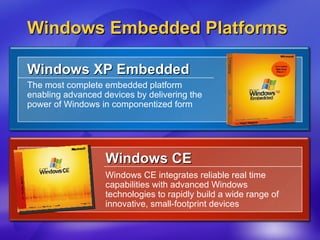
Windows Embedded Platforms Windows XP Embedded The most complete embedded platform enabling advanced devices by delivering the power of Windows in componentized form Windows CE  Windows CE integrates reliable real time capabilities with advanced Windows technologies to rapidly build a wide range of innovative, small-footprint devices
Microsoft ®   Windows ®  XP Embedded with Service Pack 2
What Is Windows XP Embedded (XPe) Componentized version of Windows XP Professional Based on the same binaries as retail version of Windows XP Professional But you choose only features and services you need for your device Includes additional embedded-enabling features (EEF) Enable broad range of devices to utilize rich Windows XP Professional features 4 powerful authoring tools  Streamline the end-to-end embedded device development process
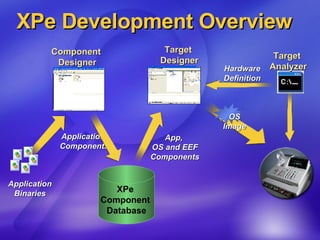
XPe Development Tools 1. Component Designer   GUI tool used to create components for use on embedded devices Developer specifies the files,  resources and dependencies required by the component 2. Target Analyzer Simplifies configuring OS image for  target hardware Generates XML definition  of target hardware
XPe Development Tools 3. Target Designer   GUI tool used to build runtime images  End-user selection and configuration of OS, App or macro components  Automatic inclusion of required Windows components “Build”; assembles the bootable OS image Component-based documentation 4. Visual Studio .NET Development environment for  Embedded Applications
XPe Components XP Pro Technologies, componentized Windows binaries wrapped in XML metadata Pre-determined component dependencies Macro Components to enable rapid prototyping Design Templates: starting point for  device development, saves developer time Helper Macros: quickly & easily gets your  device booting Technology Macros: simple access to  Windows technologies Support for 22 languages with MUI  (Multilingual User Interface)
XPe Embedded Features XPe SP1 Windows Features .NET Framework, USB 2.0, IPv6, Windows Media Centre components, etc. Maintains binary compatibility with Windows XP Pro SP1 Deployment and servicing XPe devices Remote Boot : Allows booting devices from images stored on a server Device Update Agent (DUA) : Light-weight servicing client  Solid-state Devices Enhanced Write Filter (EWF) : Allows development  of solid state devices, e.g. based on flash disks CD-Boot Mass production of OS images Image Cloning & Reseal
XPe Development Overview Target  Designer Component  Designer XPe  Component  Database Application Binaries App,  OS and EEF Components Target  Analyzer Hardware Definition Application  Components OS Image
XPe SP2 Design Goals Enhance security Integrate the Windows XP Professional SP2 Security innovations into the Windows XP Embedded with SP2 release Provide compatibility Binary parity with Windows XP Professional SP2 New features From both XP Pro and embedded-specific Requested by customers and partners Windows Media 9, .NET Framework 1.1 EEF Updates, EWF API now exposed XPe SP2 will follow ASAP after the desktop release
Windows CE 5.0
What is Windows CE 5.0 ? Latest version of Windows CE Componentized, compact, real-time embedded operating system Design Tenets Productivity Unified build, PQD (Production Quality Drivers), comprehensive how-tos and documentation, extensive partner base (2000+) Reliability Windows Error Reporting (Watson), security enhancements, automated testing scenarios Innovation Advanced multimedia, Direct3D Mobile, extensive wireless and networking capabilities
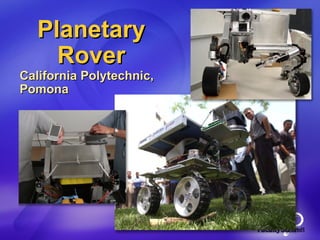
Planetary Rover California Polytechnic, Pomona
For more academic examples… Using both CE and XPe Microsoft Research & Windows Embedded Innovation Excellence Awards, 2003-2004 $1.7M awards total 78 projects worldwide in 26 countries at 75 universities Some of you are here today (we hope!) 62 research projects, 12 teaching projects Projects started  - Summer 2003 Projects completing  - Summer 2004 Wrap-up workshop  - September 2004 Overall theme:  Innovative Embedded Research & Teaching Interim workshop at Windows Embedded DevCon, San Diego, June Sample of projects shown at the DemoFest tomorrow!
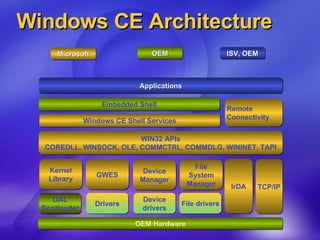
Windows CE Architecture OEM Hardware Embedded Shell Applications Microsoft OEM ISV, OEM WIN32 APIs COREDLL, WINSOCK, OLE, COMMCTRL, COMMDLG, WININET, TAPI Windows CE Shell Services Remote Connectivity Kernel Library IrDA GWES Device Manager File System Manager TCP/IP OAL Bootloader Drivers Device drivers File drivers
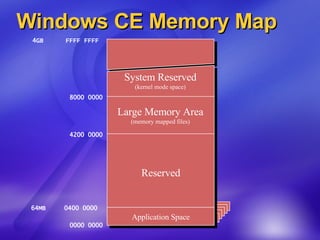
Windows CE Memory Map System Reserved (kernel mode space) 0000 0000 64MB  0400 0000 4200 0000 8000 0000 4GB  FFFF FFFF Active Process Active Process Active Process Active Process Active Process Active Process Application Space Reserved Large Memory Area (memory mapped files)
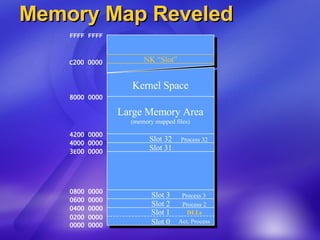
Memory Map Reveled  . . . Slot 1 Slot 0 Slot 2 Slot 3 Slot 32 Kernel Space 0000 0000 0200 0000 0400 0000 0600 0000 0800 0000 3E00 0000 4000 0000 4200 0000 8000 0000 FFFF FFFF DLLs Process 2 Process 3 Process 31 Process 32 Act. Process  Large Memory Area (memory mapped files) Slot 31 NK “Slot” C200 0000
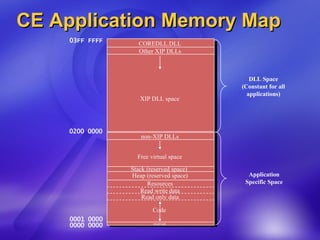
CE Application Memory Map COREDLL.DLL 0000 0000 0001 0000 Read only data 03FF FFFF Code Read write data reserved Other XIP DLLs Resources Stack (reserved space)  Heap (reserved space) Free virtual space Application Specific Space XIP DLL space 0200 0000 DLL Space (Constant for all applications) non-XIP DLLs
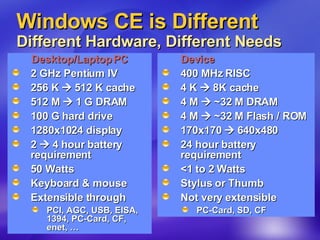
Windows CE is Different Different Hardware, Different Needs Desktop/Laptop PC 2 GHz Pentium IV 256 K    512 K cache 512 M    1 G DRAM 100 G hard drive 1280x1024 display 2    4 hour battery requirement 50 Watts Keyboard & mouse Extensible through PCI, AGC, USB, EISA, 1394, PC-Card, CF, enet, … Device 400 MHz RISC 4 K    8K cache 4 M    ~32 M DRAM 4 M    ~32 M Flash / ROM 170x170    640x480 24 hour battery requirement <1 to 2 Watts Stylus or Thumb Not very extensible PC-Card, SD, CF
Tools Platform Builder  Integrated Development Environment Unified build system  Compiler Link time code generation  Buffer security check - run-time protection of buffer overruns General performance enhancements Debugger Windows Error Reporting  eXDI2 - single debugger to assist in debugging hardware Break point improvements Profiling Tools Emulator performance, security, and debugging updates
Windows CE 5.0 Windows CE 5.0, over 300 changes or improvements over Windows CE 4.2 Typically, releases include updates to Technologies and/or processor support Delta from 4.2 follows
Core Operating System Kernel, Storage and File System Shared heap memory Improves performance on inter-process retrieval data Watchdog timer Allows applications to set a timer in the OS to recover from hung apps 64 system interrupts Kernel supports 64 system interrupts (SYSINTRs) Power down thread Kernel handles powering down hardware in a thread with highest priority Embedded database (EDB) Based on SQL Server CE 3.0 with advanced database functionality Write-back cache Non-removable media file systems  ATAPI enhancements
Core Operating System Device Drivers Production quality drivers (PQD) Over 50 PQD drivers in the box in addition to sample drivers USB 2.0 host and function  HID, Mass storage, Printer, RNDIS, SmartCard SDIO host Client driver interface compatible with SDIO Now!  New model for PC card Fully supports 16 and 32-bit PC cards, Cardbus and Installable ISRs Device manager New design for bus drivers supporting removable media File system driver manager  Can now flush and lock file systems individually
Core Operating System Board Support Packages Production quality OAL support Designed to minimize modifications made by the OEM and reduce overall development time BSP test suite Automated testing that replaces previous manual process New and updated BSP support for most popular hardware
Core Operating System Browser Blocking pop-up windows Disables window.open RPC support for IE Requirement for some websites to render properly Platform for privacy preferences (P3P) IE will now be able to display sites with a P3P policy Support theming for IE controls IE intrinsic controls can be displayed using skins Filters and transitions Improved user experience and presentation of web content IE 6.0 sample Auto complete URL, Status bar, Internet Settings Control Panel TV lens support  Fixed width layout
Core Operating System Shell Common controls  Animation control, List view, Image list Shell explorer and APIs Allows an ISV to create custom context menus for their data types Explorer recycle bin Support without a RAM file system HPC Shell Improved Taskbar code for easier OEM customization
Core Operating System International Input language Infrastructure to support more then one language keyboard layout per image MUI across East Asian languages Enables inclusion of more than one East Asian language in an image Complex script enablement Improved “in the box” support for additional, more complex languages  MSPY 3.0 for Simplified Chinese Based on latest desktop version of the Pinyin IME Shuang Pin on-screen keyboard for MSPY 3.0 Reduces input error based  National language support (NLS) updates Uses the same infrastructure as the desktop so development is more familiar and broadly understood
Core Operating System Networking  Wireless LAN – Wi-Fi (Native 802.11) WPA support on both AP and station sides  Bluetooth SDIO support, new profile support: PAN, Headset, HID New IPv6 service support  DNS / Dynamic DNS, SNTP, MSMQ, Web Proxy Peer to Peer Provide ad hoc and managed infrastructure for secure communication UPnP AV toolkit AV schema support to standardize audio/visual device intelligence Real-time communications support Windows Messenger 5.0 - multiple points of presence (MPOP) Remote Desktop Protocol (RDP) File redirection filter - faster and more reliable client
Core Operating System Multimedia Direct3D Mobile COM-based D3D programming model built on DirectX 8 Graphics Device Interface (GDI) Faster graphics and text rendering, alpha blending Display drivers  ( Silicon Motion Cougar, ATI Rage XL, Single Flat driver) Test kit and benchmarking tools for driver optimization Fast Start  Decreases playback start time for multimedia Still image support Single library to support still image codecs (JPG, GIF, PNG, TIFF, BMP and ICO) Updating Windows Media codecs to support: WMA Pro, WMA Lossless , WMV Advanced Profile (Broadcast)
Core Operating System Security General security efforts Extensive security reviews Cryptography / PKI Advanced Encryption Standard (AES) Will apply for FIPS 140-2 Level 1 certification CryptMsg APIs (CAPI) (PKCS #7)  Support for S/MIME (secure MIME  / e-mail format) Upgrading certificate chaining engine Improves OS robustness  New local authentication sub-system (LASS) Modular device lock down mechanism Credential Manager enhancements Improved secure caching
Technical Challenges Remote device management – reflash entire O/S or portions  Fast, reliable, secure file systems for devices Transacted file systems, and file system caching Sandboxing of untrusted drivers and services  Trust models for 3 rd  party applications and drivers Hardware security systems  Digital rights on a mobile device  Efficient, robust, light weight implementation of symmetric multiprocessing and simultaneous multi-threading on small systems with strict power requirements and real time constraints.  Network traversal through NAT and firewall Ad-hoc networks
Source and Sharing Shared Source Program Access to over 2.5 M lines of source code Available in all versions of Windows CE .NET  Academic edition for courseware creation Shared Platforms Program Ability to share non-commercial run-times  http://www.microsoft.com/Windows/Embedded/community/sharedplatforms/ Windows Embedded Academic Program See you at the DemoFest! http://msdn.microsoft.com/embedded/community/academic/ [email_address]
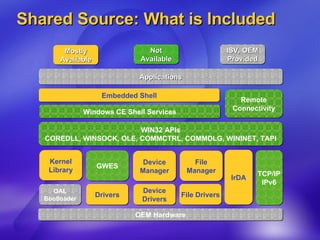
Shared Source: What is Included OEM Hardware Embedded Shell Applications Kernel Library IrDA GWES Device Manager File Manager TCP/IP IPv6 OAL Bootloader Drivers Device Drivers File Drivers Mostly Available Not Available ISV, OEM Provided WIN32 APIs COREDLL, WINSOCK, OLE, COMMCTRL, COMMDLG, WININET, TAPI Windows CE Shell Services Remote Connectivity
Demo Windows CE 5.0
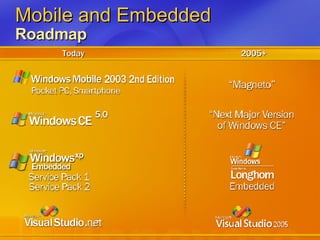
Mobile and Embedded  Roadmap Today 2005+
Further Information Windows Embedded Home Page http://msdn.microsoft.com/embedded   Mikehall’s Blog http://blogs.msdn.com/mikehall   Newsgroups http://msdn.microsoft.com/embedded/community/community/newsgrp/default.aspx   Academic http://msdn.microsoft.com/embedded/community/academic/default.aspx
© 2004 Microsoft Corporation. All rights reserved. This presentation is for informational purposes only. Microsoft makes no warranties, express or implied, in this summary.

7496_Hall 070204 Research Faculty Summit

  • 1.
    Windows Embedded MikeHall Technical Product Manager Mobile & Embedded Devices Group Microsoft Corporation [email_address] http:// blogs.msdn.com/mikehall
  • 2.
  • 3.
    Agenda Windows XPEmbedded SP2 Features Tools Build System Windows CE 5.0 Features Tools Technical challenges
  • 4.
    A day inthe life… <warning> Marketing Video </warning> Shows what can be done today Think about The technical challenges ‘today’ and the future How to enrich peoples lives through embedded systems Security, reliability, and manageability of embedded systems
  • 5.
  • 6.
    Windows Embedded PlatformsWindows XP Embedded The most complete embedded platform enabling advanced devices by delivering the power of Windows in componentized form Windows CE Windows CE integrates reliable real time capabilities with advanced Windows technologies to rapidly build a wide range of innovative, small-footprint devices
  • 7.
    Microsoft ® Windows ® XP Embedded with Service Pack 2
  • 8.
    What Is WindowsXP Embedded (XPe) Componentized version of Windows XP Professional Based on the same binaries as retail version of Windows XP Professional But you choose only features and services you need for your device Includes additional embedded-enabling features (EEF) Enable broad range of devices to utilize rich Windows XP Professional features 4 powerful authoring tools Streamline the end-to-end embedded device development process
  • 9.
    XPe Development Tools1. Component Designer GUI tool used to create components for use on embedded devices Developer specifies the files, resources and dependencies required by the component 2. Target Analyzer Simplifies configuring OS image for target hardware Generates XML definition of target hardware
  • 10.
    XPe Development Tools3. Target Designer GUI tool used to build runtime images End-user selection and configuration of OS, App or macro components Automatic inclusion of required Windows components “Build”; assembles the bootable OS image Component-based documentation 4. Visual Studio .NET Development environment for Embedded Applications
  • 11.
    XPe Components XPPro Technologies, componentized Windows binaries wrapped in XML metadata Pre-determined component dependencies Macro Components to enable rapid prototyping Design Templates: starting point for device development, saves developer time Helper Macros: quickly & easily gets your device booting Technology Macros: simple access to Windows technologies Support for 22 languages with MUI (Multilingual User Interface)
  • 12.
    XPe Embedded FeaturesXPe SP1 Windows Features .NET Framework, USB 2.0, IPv6, Windows Media Centre components, etc. Maintains binary compatibility with Windows XP Pro SP1 Deployment and servicing XPe devices Remote Boot : Allows booting devices from images stored on a server Device Update Agent (DUA) : Light-weight servicing client Solid-state Devices Enhanced Write Filter (EWF) : Allows development of solid state devices, e.g. based on flash disks CD-Boot Mass production of OS images Image Cloning & Reseal
  • 13.
    XPe Development OverviewTarget Designer Component Designer XPe Component Database Application Binaries App, OS and EEF Components Target Analyzer Hardware Definition Application Components OS Image
  • 14.
    XPe SP2 DesignGoals Enhance security Integrate the Windows XP Professional SP2 Security innovations into the Windows XP Embedded with SP2 release Provide compatibility Binary parity with Windows XP Professional SP2 New features From both XP Pro and embedded-specific Requested by customers and partners Windows Media 9, .NET Framework 1.1 EEF Updates, EWF API now exposed XPe SP2 will follow ASAP after the desktop release
  • 15.
  • 16.
    What is WindowsCE 5.0 ? Latest version of Windows CE Componentized, compact, real-time embedded operating system Design Tenets Productivity Unified build, PQD (Production Quality Drivers), comprehensive how-tos and documentation, extensive partner base (2000+) Reliability Windows Error Reporting (Watson), security enhancements, automated testing scenarios Innovation Advanced multimedia, Direct3D Mobile, extensive wireless and networking capabilities
  • 17.
    Planetary Rover CaliforniaPolytechnic, Pomona
  • 18.
    For more academicexamples… Using both CE and XPe Microsoft Research & Windows Embedded Innovation Excellence Awards, 2003-2004 $1.7M awards total 78 projects worldwide in 26 countries at 75 universities Some of you are here today (we hope!) 62 research projects, 12 teaching projects Projects started - Summer 2003 Projects completing - Summer 2004 Wrap-up workshop - September 2004 Overall theme: Innovative Embedded Research & Teaching Interim workshop at Windows Embedded DevCon, San Diego, June Sample of projects shown at the DemoFest tomorrow!
  • 19.
    Windows CE ArchitectureOEM Hardware Embedded Shell Applications Microsoft OEM ISV, OEM WIN32 APIs COREDLL, WINSOCK, OLE, COMMCTRL, COMMDLG, WININET, TAPI Windows CE Shell Services Remote Connectivity Kernel Library IrDA GWES Device Manager File System Manager TCP/IP OAL Bootloader Drivers Device drivers File drivers
  • 20.
    Windows CE MemoryMap System Reserved (kernel mode space) 0000 0000 64MB 0400 0000 4200 0000 8000 0000 4GB FFFF FFFF Active Process Active Process Active Process Active Process Active Process Active Process Application Space Reserved Large Memory Area (memory mapped files)
  • 21.
    Memory Map Reveled . . . Slot 1 Slot 0 Slot 2 Slot 3 Slot 32 Kernel Space 0000 0000 0200 0000 0400 0000 0600 0000 0800 0000 3E00 0000 4000 0000 4200 0000 8000 0000 FFFF FFFF DLLs Process 2 Process 3 Process 31 Process 32 Act. Process Large Memory Area (memory mapped files) Slot 31 NK “Slot” C200 0000
  • 22.
    CE Application MemoryMap COREDLL.DLL 0000 0000 0001 0000 Read only data 03FF FFFF Code Read write data reserved Other XIP DLLs Resources Stack (reserved space) Heap (reserved space) Free virtual space Application Specific Space XIP DLL space 0200 0000 DLL Space (Constant for all applications) non-XIP DLLs
  • 23.
    Windows CE isDifferent Different Hardware, Different Needs Desktop/Laptop PC 2 GHz Pentium IV 256 K  512 K cache 512 M  1 G DRAM 100 G hard drive 1280x1024 display 2  4 hour battery requirement 50 Watts Keyboard & mouse Extensible through PCI, AGC, USB, EISA, 1394, PC-Card, CF, enet, … Device 400 MHz RISC 4 K  8K cache 4 M  ~32 M DRAM 4 M  ~32 M Flash / ROM 170x170  640x480 24 hour battery requirement <1 to 2 Watts Stylus or Thumb Not very extensible PC-Card, SD, CF
  • 24.
    Tools Platform Builder Integrated Development Environment Unified build system Compiler Link time code generation Buffer security check - run-time protection of buffer overruns General performance enhancements Debugger Windows Error Reporting eXDI2 - single debugger to assist in debugging hardware Break point improvements Profiling Tools Emulator performance, security, and debugging updates
  • 25.
    Windows CE 5.0Windows CE 5.0, over 300 changes or improvements over Windows CE 4.2 Typically, releases include updates to Technologies and/or processor support Delta from 4.2 follows
  • 26.
    Core Operating SystemKernel, Storage and File System Shared heap memory Improves performance on inter-process retrieval data Watchdog timer Allows applications to set a timer in the OS to recover from hung apps 64 system interrupts Kernel supports 64 system interrupts (SYSINTRs) Power down thread Kernel handles powering down hardware in a thread with highest priority Embedded database (EDB) Based on SQL Server CE 3.0 with advanced database functionality Write-back cache Non-removable media file systems ATAPI enhancements
  • 27.
    Core Operating SystemDevice Drivers Production quality drivers (PQD) Over 50 PQD drivers in the box in addition to sample drivers USB 2.0 host and function HID, Mass storage, Printer, RNDIS, SmartCard SDIO host Client driver interface compatible with SDIO Now! New model for PC card Fully supports 16 and 32-bit PC cards, Cardbus and Installable ISRs Device manager New design for bus drivers supporting removable media File system driver manager Can now flush and lock file systems individually
  • 28.
    Core Operating SystemBoard Support Packages Production quality OAL support Designed to minimize modifications made by the OEM and reduce overall development time BSP test suite Automated testing that replaces previous manual process New and updated BSP support for most popular hardware
  • 29.
    Core Operating SystemBrowser Blocking pop-up windows Disables window.open RPC support for IE Requirement for some websites to render properly Platform for privacy preferences (P3P) IE will now be able to display sites with a P3P policy Support theming for IE controls IE intrinsic controls can be displayed using skins Filters and transitions Improved user experience and presentation of web content IE 6.0 sample Auto complete URL, Status bar, Internet Settings Control Panel TV lens support Fixed width layout
  • 30.
    Core Operating SystemShell Common controls Animation control, List view, Image list Shell explorer and APIs Allows an ISV to create custom context menus for their data types Explorer recycle bin Support without a RAM file system HPC Shell Improved Taskbar code for easier OEM customization
  • 31.
    Core Operating SystemInternational Input language Infrastructure to support more then one language keyboard layout per image MUI across East Asian languages Enables inclusion of more than one East Asian language in an image Complex script enablement Improved “in the box” support for additional, more complex languages MSPY 3.0 for Simplified Chinese Based on latest desktop version of the Pinyin IME Shuang Pin on-screen keyboard for MSPY 3.0 Reduces input error based National language support (NLS) updates Uses the same infrastructure as the desktop so development is more familiar and broadly understood
  • 32.
    Core Operating SystemNetworking Wireless LAN – Wi-Fi (Native 802.11) WPA support on both AP and station sides Bluetooth SDIO support, new profile support: PAN, Headset, HID New IPv6 service support DNS / Dynamic DNS, SNTP, MSMQ, Web Proxy Peer to Peer Provide ad hoc and managed infrastructure for secure communication UPnP AV toolkit AV schema support to standardize audio/visual device intelligence Real-time communications support Windows Messenger 5.0 - multiple points of presence (MPOP) Remote Desktop Protocol (RDP) File redirection filter - faster and more reliable client
  • 33.
    Core Operating SystemMultimedia Direct3D Mobile COM-based D3D programming model built on DirectX 8 Graphics Device Interface (GDI) Faster graphics and text rendering, alpha blending Display drivers ( Silicon Motion Cougar, ATI Rage XL, Single Flat driver) Test kit and benchmarking tools for driver optimization Fast Start Decreases playback start time for multimedia Still image support Single library to support still image codecs (JPG, GIF, PNG, TIFF, BMP and ICO) Updating Windows Media codecs to support: WMA Pro, WMA Lossless , WMV Advanced Profile (Broadcast)
  • 34.
    Core Operating SystemSecurity General security efforts Extensive security reviews Cryptography / PKI Advanced Encryption Standard (AES) Will apply for FIPS 140-2 Level 1 certification CryptMsg APIs (CAPI) (PKCS #7) Support for S/MIME (secure MIME / e-mail format) Upgrading certificate chaining engine Improves OS robustness New local authentication sub-system (LASS) Modular device lock down mechanism Credential Manager enhancements Improved secure caching
  • 35.
    Technical Challenges Remotedevice management – reflash entire O/S or portions Fast, reliable, secure file systems for devices Transacted file systems, and file system caching Sandboxing of untrusted drivers and services Trust models for 3 rd party applications and drivers Hardware security systems Digital rights on a mobile device Efficient, robust, light weight implementation of symmetric multiprocessing and simultaneous multi-threading on small systems with strict power requirements and real time constraints. Network traversal through NAT and firewall Ad-hoc networks
  • 36.
    Source and SharingShared Source Program Access to over 2.5 M lines of source code Available in all versions of Windows CE .NET Academic edition for courseware creation Shared Platforms Program Ability to share non-commercial run-times http://www.microsoft.com/Windows/Embedded/community/sharedplatforms/ Windows Embedded Academic Program See you at the DemoFest! http://msdn.microsoft.com/embedded/community/academic/ [email_address]
  • 37.
    Shared Source: Whatis Included OEM Hardware Embedded Shell Applications Kernel Library IrDA GWES Device Manager File Manager TCP/IP IPv6 OAL Bootloader Drivers Device Drivers File Drivers Mostly Available Not Available ISV, OEM Provided WIN32 APIs COREDLL, WINSOCK, OLE, COMMCTRL, COMMDLG, WININET, TAPI Windows CE Shell Services Remote Connectivity
  • 38.
  • 39.
    Mobile and Embedded Roadmap Today 2005+
  • 40.
    Further Information WindowsEmbedded Home Page http://msdn.microsoft.com/embedded Mikehall’s Blog http://blogs.msdn.com/mikehall Newsgroups http://msdn.microsoft.com/embedded/community/community/newsgrp/default.aspx Academic http://msdn.microsoft.com/embedded/community/academic/default.aspx
  • 41.
    © 2004 MicrosoftCorporation. All rights reserved. This presentation is for informational purposes only. Microsoft makes no warranties, express or implied, in this summary.