Windows Embedded Compact 2013
What’s news
Mirco Vanini

Microsoft® MVP Windows Embedded
Agenda








WEC 2013 - What’s it
Development overview
Building WEC
Native Development
Managed Development
XAML for Windows Embedded
WEC 2013 - What’s it
Windows Embedded Compact 2013 (AKA WinCE)
is Microsoft’s platform for small-footprint devices
that need hard, real-time performance and silicon
flexibility with ARM and x86

Familiar tools like
Visual Studio and
Expression Blend
allow you to create
attractive and intuitive
user interfaces, and
bring differentiated
devices to market
faster than ever
before.

Real-time operating
system supports an
array of hardware
requirements and key
processor
architectures,
including x86 and
ARM, to power
everything from tiny
controls to fully
automated factories.

Improved file-system
performance gives
companies confidence
that their devices will
always be available;
the one -tier security
feature is SDL
compliant, with
reliable wireless
connectivity and
networking.
What’s news

 Hard real-time e small footprint
 x86 & ARM v7 Cortex-A (Thumb2)
 VS2012 support for C# / C++ / XAML for
Embedded
 Fast boot (2s from power on)
 Kernel update: increased file system
performance
Development overview

 Move to Visual Studio 2012









Provides significantly improved IDE
New Arm complier (use desktop compiler)
Last C Runtime Library (CRT)
Application Builder For WEC 2013 (replace
VS for Device)
Platform Builder moved to VS2012 (Update
2)
VS >= Professional version
Native, Managed, XAML for Embedded
Integrated deployment and debugging
infrastructure, Ethernet connectivity to
remote device
Application Development Setup

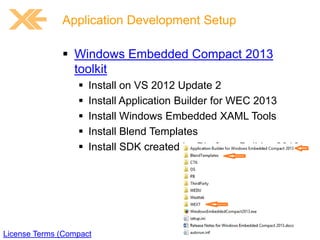
 Windows Embedded Compact 2013
toolkit






Install on VS 2012 Update 2
Install Application Builder for WEC 2013
Install Windows Embedded XAML Tools
Install Blend Templates
Install SDK created by Platform Builder 2013

License Terms (Compact
The Board Support Package

 Layer for OEM code written to port
Windows Embedded Compact to
hardware
 OAL – OEM Adaption Layer
 Drivers - code for supporting hardware
peripherals
 …

Board Support Packages
Set up a virtual test device

Use Hyper-V to create a virtual
machine (Compact 2013)

 Visual Studio and Platform Builder
run directly on the physical
computer
 Platform Builder connects to the
virtual machines through a virtual
network or virtual switch
 The virtual network or virtual
switch maps to a network adapter
on the physical computer and has
access to a DHCP server
 The virtual machines run Compact
2013, and they obtain their IPv4
addresses from the DHCP server.
Platform support for Application Debug
 Add the “Application
Builder Debugging
Support” component
 Add “Remote Tool
Support”
 Add “Network Utilities”
demo
Connection to the Device

 Uses “CoreCon” as the connection
(connects via network)
 New target connectivity device-side files
 Use OSDesign.bib file

C:Program Files (x86)Common FilesMicrosoft
SharedEmbedded ToolsCoreCon11.0Targetwce800x86
Connection to the Device

 Query IP device address
 Configure IP Address in VS Project
 Launch device side
 ClientShutdown3 (optional)
 ConManClient3
 CMAccept3

 Start debugging (3 min timeout)
demo
Create a Developer WM

Windows Embedded CE DiskPrep PowerT
demo
Using an SDK for an OS Image

 You can create a project for an
application that you will develop and test
on a stand-alone virtual device that
includes the run-time image in a virtual
drive or on a device that has the runtime image copied into flash memory.
 This type of project does not require
Platform Builder because you do not
need to download an run-time image to
the device or the virtual device to test a
change in your application code.
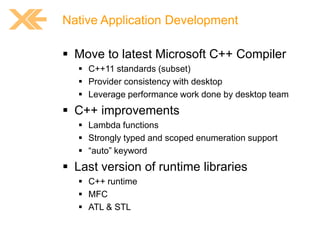
Native Application Development

 Move to latest Microsoft C++ Compiler
 C++11 standards (subset)
 Provider consistency with desktop
 Leverage performance work done by desktop team

 C++ improvements
 Lambda functions
 Strongly typed and scoped enumeration support
 “auto” keyword

 Last version of runtime libraries
 C++ runtime
 MFC
 ATL & STL
demo
Managed Application Development

 NETCF 3.9 (based on the NETCF
version that shipped with Windows
Phone 7.5)
 New generational garbage collector (5060% drops in GC time)
 NETCF runtime is now multi-core safe
 Sharing server features
 Reduce working set
 Improve app launch
 Framework assemblies shared across app domains

 ARM VFP instructions.
 Source compatible with NETCF 3.5
Managed Application Development

 Requires SDK exported from Platform
Builder (unlike earlier versions of
NETCF)
 Requires rebuild of managed code from
earlier releases
 Exports from COREDLL are not
backward compatible (P/Invokes)
demo
XAML for Windows Embedded

 Data binding expanded






UI to UI data binding now supported
DataContexts con now be set in XAML
Data Binding resource references
Data Binding type conversion
Data Binding indexing

 New Blend triggers supported





ChangePropertyAction
ControlStoryBoardAction
GoToStateAction
RemoveElementAction

 XAML for Embedded development free
from PB
XAML for Windows Embedded
 Windows Embedded XAML Tools limitations





It does not create XAML files
It only generates C++ code
It does not support custom controls
It does not generate C++ code for the following XAML
elements:












ControlTemplate
DataTemplate
FrameworkTemplate
ItemsPanelTemplate
MediaElement
Resources
RenderTransform
Storyboard
Style
VisualState
VisualStateGroups
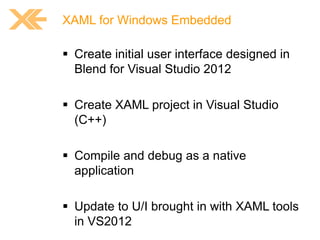
XAML for Windows Embedded

 Create initial user interface designed in
Blend for Visual Studio 2012
 Create XAML project in Visual Studio
(C++)
 Compile and debug as a native
application
 Update to U/I brought in with XAML tools
in VS2012
demo
Q&A
Links

Windows Embedded Compact 2013
Windows Embedded Product Downloads
MSDN - Windows Embedded Compact

Windows Embedded Blog
Embedded101

Microsoft Intelligent Systems Video
Contatti
o feedback su:
• http://xedotnet.org/feedback

o codice feedback:
• DEC06
Blog

http://mircovanini.blogspot.com

Email

info@proxsoft.it

Web

www.proxsoft.it

Twitter

@MircoVanini

feedback

10

WIndows Embedded Compact 2013 – What’s news

  • 1.
    Windows Embedded Compact2013 What’s news Mirco Vanini Microsoft® MVP Windows Embedded
  • 2.
    Agenda       WEC 2013 -What’s it Development overview Building WEC Native Development Managed Development XAML for Windows Embedded
  • 3.
    WEC 2013 -What’s it Windows Embedded Compact 2013 (AKA WinCE) is Microsoft’s platform for small-footprint devices that need hard, real-time performance and silicon flexibility with ARM and x86 Familiar tools like Visual Studio and Expression Blend allow you to create attractive and intuitive user interfaces, and bring differentiated devices to market faster than ever before. Real-time operating system supports an array of hardware requirements and key processor architectures, including x86 and ARM, to power everything from tiny controls to fully automated factories. Improved file-system performance gives companies confidence that their devices will always be available; the one -tier security feature is SDL compliant, with reliable wireless connectivity and networking.
  • 4.
    What’s news  Hardreal-time e small footprint  x86 & ARM v7 Cortex-A (Thumb2)  VS2012 support for C# / C++ / XAML for Embedded  Fast boot (2s from power on)  Kernel update: increased file system performance
  • 5.
    Development overview  Moveto Visual Studio 2012         Provides significantly improved IDE New Arm complier (use desktop compiler) Last C Runtime Library (CRT) Application Builder For WEC 2013 (replace VS for Device) Platform Builder moved to VS2012 (Update 2) VS >= Professional version Native, Managed, XAML for Embedded Integrated deployment and debugging infrastructure, Ethernet connectivity to remote device
  • 6.
    Application Development Setup Windows Embedded Compact 2013 toolkit      Install on VS 2012 Update 2 Install Application Builder for WEC 2013 Install Windows Embedded XAML Tools Install Blend Templates Install SDK created by Platform Builder 2013 License Terms (Compact
  • 7.
    The Board SupportPackage  Layer for OEM code written to port Windows Embedded Compact to hardware  OAL – OEM Adaption Layer  Drivers - code for supporting hardware peripherals  … Board Support Packages
  • 8.
    Set up avirtual test device Use Hyper-V to create a virtual machine (Compact 2013)  Visual Studio and Platform Builder run directly on the physical computer  Platform Builder connects to the virtual machines through a virtual network or virtual switch  The virtual network or virtual switch maps to a network adapter on the physical computer and has access to a DHCP server  The virtual machines run Compact 2013, and they obtain their IPv4 addresses from the DHCP server.
  • 9.
    Platform support forApplication Debug  Add the “Application Builder Debugging Support” component  Add “Remote Tool Support”  Add “Network Utilities”
  • 10.
  • 11.
    Connection to theDevice  Uses “CoreCon” as the connection (connects via network)  New target connectivity device-side files  Use OSDesign.bib file C:Program Files (x86)Common FilesMicrosoft SharedEmbedded ToolsCoreCon11.0Targetwce800x86
  • 12.
    Connection to theDevice  Query IP device address  Configure IP Address in VS Project  Launch device side  ClientShutdown3 (optional)  ConManClient3  CMAccept3  Start debugging (3 min timeout)
  • 13.
  • 14.
    Create a DeveloperWM Windows Embedded CE DiskPrep PowerT
  • 15.
  • 16.
    Using an SDKfor an OS Image  You can create a project for an application that you will develop and test on a stand-alone virtual device that includes the run-time image in a virtual drive or on a device that has the runtime image copied into flash memory.  This type of project does not require Platform Builder because you do not need to download an run-time image to the device or the virtual device to test a change in your application code.
  • 17.
    Native Application Development Move to latest Microsoft C++ Compiler  C++11 standards (subset)  Provider consistency with desktop  Leverage performance work done by desktop team  C++ improvements  Lambda functions  Strongly typed and scoped enumeration support  “auto” keyword  Last version of runtime libraries  C++ runtime  MFC  ATL & STL
  • 18.
  • 19.
    Managed Application Development NETCF 3.9 (based on the NETCF version that shipped with Windows Phone 7.5)  New generational garbage collector (5060% drops in GC time)  NETCF runtime is now multi-core safe  Sharing server features  Reduce working set  Improve app launch  Framework assemblies shared across app domains  ARM VFP instructions.  Source compatible with NETCF 3.5
  • 20.
    Managed Application Development Requires SDK exported from Platform Builder (unlike earlier versions of NETCF)  Requires rebuild of managed code from earlier releases  Exports from COREDLL are not backward compatible (P/Invokes)
  • 21.
  • 22.
    XAML for WindowsEmbedded  Data binding expanded      UI to UI data binding now supported DataContexts con now be set in XAML Data Binding resource references Data Binding type conversion Data Binding indexing  New Blend triggers supported     ChangePropertyAction ControlStoryBoardAction GoToStateAction RemoveElementAction  XAML for Embedded development free from PB
  • 23.
    XAML for WindowsEmbedded  Windows Embedded XAML Tools limitations     It does not create XAML files It only generates C++ code It does not support custom controls It does not generate C++ code for the following XAML elements:            ControlTemplate DataTemplate FrameworkTemplate ItemsPanelTemplate MediaElement Resources RenderTransform Storyboard Style VisualState VisualStateGroups
  • 24.
    XAML for WindowsEmbedded  Create initial user interface designed in Blend for Visual Studio 2012  Create XAML project in Visual Studio (C++)  Compile and debug as a native application  Update to U/I brought in with XAML tools in VS2012
  • 25.
  • 26.
  • 27.
    Links Windows Embedded Compact2013 Windows Embedded Product Downloads MSDN - Windows Embedded Compact Windows Embedded Blog Embedded101 Microsoft Intelligent Systems Video
  • 28.
    Contatti o feedback su: •http://xedotnet.org/feedback o codice feedback: • DEC06 Blog http://mircovanini.blogspot.com Email info@proxsoft.it Web www.proxsoft.it Twitter @MircoVanini feedback 10