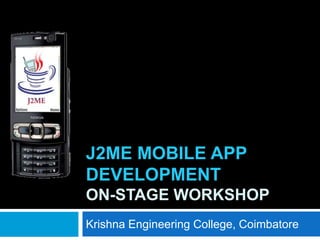
J2ME MOBILE APP
DEVELOPMENT
ON-STAGE WORKSHOP
Krishna Engineering College, Coimbatore
Agenda
   Programming for Mobile Devices
   Java and Mobile Application Development
   J2ME – Architecture
   How to write Scope for J2ME app
   How to write code for J2ME app
   How to Test J2ME app
   How to Deploy J2ME app
   Utilities and Tools
   Community Best Practices
   Demos
   Discussions
Programming for Mobile
Devices
   Advantages
     Mobile is next-gen computing device [smart-phone,
      PDA]
     Design, Development, Testing Opportunities [Web /
      App]
     Wide Range of Applications required

     Edutainment, Infotainment, business, communication,
      social networking … 1000 more…
   Limitations
     Small Size and Low power Handsets
     Operating Systems, Screen Size, Memory, Processor,
      Network, Input Methods and Graphics Engine
Java and Mobile App
Development
   Opportunities: C++, .NET, Flash-Lite, Java, HTML/JS/PHP, Python
   Java – Independent from Hardware Platform
   Byte Code - Compiler and Code Interpreter
       JVM, KVM [128K of available memory], Card VM
       KVM – C based. Responsible for Byte code to Native calls
   Java for Mobile Operating Systems – J2ME
   Business applications, Games, Mobile Utilities, Location based
    Services, Social Media, Communication Tools etc…

   Operating Systems
       Symbian [Feature Phone / Smart Phone]
       Blackberry
       Android
       Windows Mobile
       I-Phone
       Common Java Phones
J2ME Market Trends
   900 million mobile Java devices shipped by
    2010
   1235 Mobile Java Device Models in Market
   95 Mobile Device vendors using Java
   90000 Mobile Java Applications in Market
   260 Operators worldwide developed java
    services
   23 million mobile java downloads every month
     Source– Nokia News, Mobile Today, Symbian
     News, Oracle Java Networks
J2ME Packages
   Javax.microedition
   Multimedia Supplements
   Content Handlers
   Web Services
   Location based API
   3D Graphics
   Mobile Sensors
   Payment API
   Security
   Wireless Messaging
   XML
Limited K-Virtual Machine
Support
   No Floating point Support
   No JNI
   No Thread Groups and Daemon Threads
   Sand box Security
J2ME Keywords
   CDC – Connected Device Configuration
    [handheld PCs, Smart Devices, Televisions]
   CLDC – Connected Limited Device Configuration
    [Mobile Phones, Smart Phones]
     CLDC 1.0
     CLDC 1.1
   Device Profile – MIDP [Mobile Information Device
    Profile]
     MIDP 1.0
     MIDP 2.0
     MIDP 2.1
Connected Limited Device
Configuration
    CLDC provides the lowest common denominator
     for small and resource-constrained devices
    characterized as follows:
      160 kB to 512 kB of totally memory budget available
       for the Java platform.
      a 16-bit or 32-bit processor.

      low power consumption, often operating with battery
       power.
      connectivity to some kind of network, often with a
       wireless connection and with limited (often 9600 bps
       or less) bandwidth.
MIDP
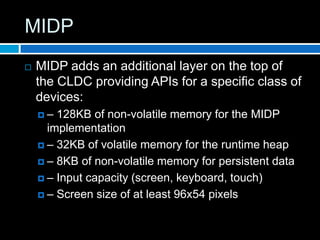
   MIDP adds an additional layer on the top of
    the CLDC providing APIs for a specific class of
    devices:
    –  128KB of non-volatile memory for the MIDP
      implementation
     – 32KB of volatile memory for the runtime heap

     – 8KB of non-volatile memory for persistent data

     – Input capacity (screen, keyboard, touch)

     – Screen size of at least 96x54 pixels
Midlets – J2ME Apps
   MIDlet defines methods that the system calls
    in order to start, stop (pause), and destroy the
    application
   classes to build user interfaces
   Storing data in simple databases [RMS]
   Network Connectivity
   Timer notifications
   .jad and .jar files
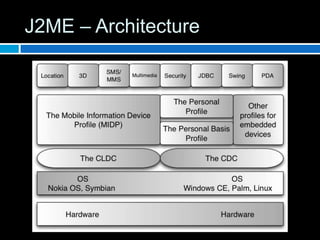
J2ME – Architecture
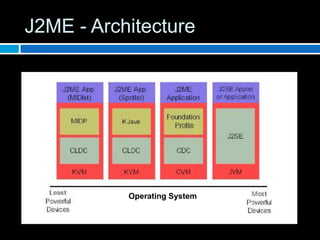
J2ME - Architecture


           Operating System
AMS and Midlets
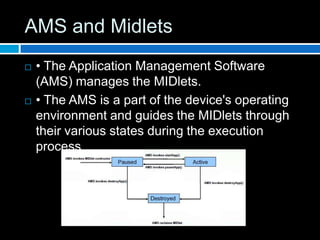
   • The Application Management Software
    (AMS) manages the MIDlets.
   • The AMS is a part of the device's operating
    environment and guides the MIDlets through
    their various states during the execution
    process.
Structure of MIDP Code
   J2ME SDK 3.0 – Tool Introduction
   Code Example – First J2ME Midlet
How to write Scope for J2ME
   Understand the requirement from the mobile
    device point of view
   Understand the limitations of device and
    network
   Structure of Scope document
     Scope  in User case / Story
     Functional Requirements + Functional Flow

     Target Devices + Platform + User Knowledge

     Constraints and Limitations
How to write code for J2ME
   Code Sample – Midlet with UI & Fetch System
    Properties
   Code Best Practices
     Clean Code
     Follow the Coding Standards – Documentation
     Exception Handling
     Use descriptive variable names
     Don’t Copy-Paste. Use functions
     Use the default structure in Editor
     Understand the Project Properties
How to Test J2ME Midlet
   Rule 1: Plan your devices
   Rule 2: Always do Unit Testing in Emulators
   Rule 3: Use real-time Devices for Test cases
    verification
   Rule 4: Certify your Midlet
   Rule 5: Sign Midlet for Security reasons
How to Deploy J2ME Midlet


   Jad [app-descriptor] and Jar[java-archive]
    Files
   Bluetooth & USB
   Public App-Store [getjar.com]
   Branded App-Stores [Symbian Store]
Utilities and Tools
   J2ME PLATFORM SDK 3.0
   Borland JBuilder 7 Enterprise with MobileSet 3
   Sun Microsystems' Sun ONE (Open Network
    Environment) Studio 4 Mobile Edition
   Metrowerks CodeWarrior Wireless Studio 7
   S5 Systems' jVise (based on IBM Eclipse
    technology
   Emulators [J2ME] – Online and PC Based
   UI Design Tools [Prototype and Form Design]
Community Best Practices
   Create new requirements and develop apps
   Follow user story + build level scope + clean
    code
   Write algorithm before coding
   Do more in Server, Less in Device
   Try simple UI
   Define Target Devices in release notes
   Share Knowledge & Experiences
Networking with J2ME Demo
   Networking – Reading from Remote
   Code Sample
Discussions…
muthugv@ovi.com
9894238404
http://office.gvmuthu.com
http://twitter.com/#!/gvmuthu

J2ME mobile app development

  • 1.
    J2ME MOBILE APP DEVELOPMENT ON-STAGEWORKSHOP Krishna Engineering College, Coimbatore
  • 2.
    Agenda  Programming for Mobile Devices  Java and Mobile Application Development  J2ME – Architecture  How to write Scope for J2ME app  How to write code for J2ME app  How to Test J2ME app  How to Deploy J2ME app  Utilities and Tools  Community Best Practices  Demos  Discussions
  • 3.
    Programming for Mobile Devices  Advantages  Mobile is next-gen computing device [smart-phone, PDA]  Design, Development, Testing Opportunities [Web / App]  Wide Range of Applications required  Edutainment, Infotainment, business, communication, social networking … 1000 more…  Limitations  Small Size and Low power Handsets  Operating Systems, Screen Size, Memory, Processor, Network, Input Methods and Graphics Engine
  • 4.
    Java and MobileApp Development  Opportunities: C++, .NET, Flash-Lite, Java, HTML/JS/PHP, Python  Java – Independent from Hardware Platform  Byte Code - Compiler and Code Interpreter  JVM, KVM [128K of available memory], Card VM  KVM – C based. Responsible for Byte code to Native calls  Java for Mobile Operating Systems – J2ME  Business applications, Games, Mobile Utilities, Location based Services, Social Media, Communication Tools etc…  Operating Systems  Symbian [Feature Phone / Smart Phone]  Blackberry  Android  Windows Mobile  I-Phone  Common Java Phones
  • 5.
    J2ME Market Trends  900 million mobile Java devices shipped by 2010  1235 Mobile Java Device Models in Market  95 Mobile Device vendors using Java  90000 Mobile Java Applications in Market  260 Operators worldwide developed java services  23 million mobile java downloads every month  Source– Nokia News, Mobile Today, Symbian News, Oracle Java Networks
  • 6.
    J2ME Packages  Javax.microedition  Multimedia Supplements  Content Handlers  Web Services  Location based API  3D Graphics  Mobile Sensors  Payment API  Security  Wireless Messaging  XML
  • 7.
    Limited K-Virtual Machine Support  No Floating point Support  No JNI  No Thread Groups and Daemon Threads  Sand box Security
  • 8.
    J2ME Keywords  CDC – Connected Device Configuration [handheld PCs, Smart Devices, Televisions]  CLDC – Connected Limited Device Configuration [Mobile Phones, Smart Phones]  CLDC 1.0  CLDC 1.1  Device Profile – MIDP [Mobile Information Device Profile]  MIDP 1.0  MIDP 2.0  MIDP 2.1
  • 9.
    Connected Limited Device Configuration  CLDC provides the lowest common denominator for small and resource-constrained devices  characterized as follows:  160 kB to 512 kB of totally memory budget available for the Java platform.  a 16-bit or 32-bit processor.  low power consumption, often operating with battery power.  connectivity to some kind of network, often with a wireless connection and with limited (often 9600 bps or less) bandwidth.
  • 10.
    MIDP  MIDP adds an additional layer on the top of the CLDC providing APIs for a specific class of devices: – 128KB of non-volatile memory for the MIDP implementation  – 32KB of volatile memory for the runtime heap  – 8KB of non-volatile memory for persistent data  – Input capacity (screen, keyboard, touch)  – Screen size of at least 96x54 pixels
  • 11.
    Midlets – J2MEApps  MIDlet defines methods that the system calls in order to start, stop (pause), and destroy the application  classes to build user interfaces  Storing data in simple databases [RMS]  Network Connectivity  Timer notifications  .jad and .jar files
  • 12.
  • 13.
    J2ME - Architecture Operating System
  • 14.
    AMS and Midlets  • The Application Management Software (AMS) manages the MIDlets.  • The AMS is a part of the device's operating environment and guides the MIDlets through their various states during the execution process.
  • 15.
    Structure of MIDPCode  J2ME SDK 3.0 – Tool Introduction  Code Example – First J2ME Midlet
  • 16.
    How to writeScope for J2ME  Understand the requirement from the mobile device point of view  Understand the limitations of device and network  Structure of Scope document  Scope in User case / Story  Functional Requirements + Functional Flow  Target Devices + Platform + User Knowledge  Constraints and Limitations
  • 17.
    How to writecode for J2ME  Code Sample – Midlet with UI & Fetch System Properties  Code Best Practices  Clean Code  Follow the Coding Standards – Documentation  Exception Handling  Use descriptive variable names  Don’t Copy-Paste. Use functions  Use the default structure in Editor  Understand the Project Properties
  • 18.
    How to TestJ2ME Midlet  Rule 1: Plan your devices  Rule 2: Always do Unit Testing in Emulators  Rule 3: Use real-time Devices for Test cases verification  Rule 4: Certify your Midlet  Rule 5: Sign Midlet for Security reasons
  • 19.
    How to DeployJ2ME Midlet  Jad [app-descriptor] and Jar[java-archive] Files  Bluetooth & USB  Public App-Store [getjar.com]  Branded App-Stores [Symbian Store]
  • 20.
    Utilities and Tools  J2ME PLATFORM SDK 3.0  Borland JBuilder 7 Enterprise with MobileSet 3  Sun Microsystems' Sun ONE (Open Network Environment) Studio 4 Mobile Edition  Metrowerks CodeWarrior Wireless Studio 7  S5 Systems' jVise (based on IBM Eclipse technology  Emulators [J2ME] – Online and PC Based  UI Design Tools [Prototype and Form Design]
  • 21.
    Community Best Practices  Create new requirements and develop apps  Follow user story + build level scope + clean code  Write algorithm before coding  Do more in Server, Less in Device  Try simple UI  Define Target Devices in release notes  Share Knowledge & Experiences
  • 22.
    Networking with J2MEDemo  Networking – Reading from Remote  Code Sample
  • 23.