

Experience Design
    MIT IAP Term
    January 12-14, 2009


Page 1 © 2008 Razorfish. All rights reserved.
What is Experience
    Design?


Page 2 © 2008 Razorfish. All rights reserved.
The Definition

           From Wikipedia:

                       Experience design is the practice of designing
                       products, processes, services, events, and
                       environments with a focus placed on the
                       quality of the user experience and
                       culturally relevant solutions, with less
                       emphasis placed on increasing and improving
                       functionality of the design.


Page 3 © 2008 Razorfish. All rights reserved.
The Definition

           More to the point:


                       Experience design is the practice of
                       designing something with quality and
                       cultural relevance.


Page 4 © 2008 Razorfish. All rights reserved.
The Definition

    How do you do that?


                       To design something that a user perceives to
                       be culturally relevant and of high quality, the
                       end product needs to make their life better –
                       needs to solve their problems (even ones
                       they didn’t know they had.)


Page 5 © 2008 Razorfish. All rights reserved.
The Definition

           Ultimately:

                       Experience design is the practice of
                       solving problems.


Page 6 © 2008 Razorfish. All rights reserved.
How does it work and
    what will we learn about
    it in the next few days?


Page 7 © 2008 Razorfish. All rights reserved.
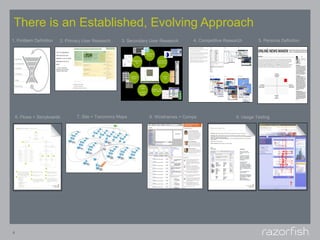
There is an Established, Evolving Approach
1. Problem Definition    2. Primary User Research   3. Secondary User Research     4. Competitive Research       5. Persona Definition


    6. Flows + Storyboards      7. Site + Taxonomy Maps         8. Wireframes + Comps                  9. Usage Testing


8
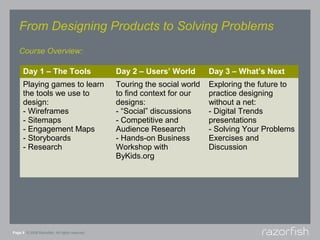
From Designing Products to Solving Problems
   Course Overview:

      Day 1 – The Tools                         Day 2 – Users’ World       Day 3 – What’s Next
      Playing games to learn                    Touring the social world   Exploring the future to
      the tools we use to                       to find context for our    practice designing
      design:                                   designs:                   without a net:
      - Wireframes                              - “Social” discussions     - Digital Trends
      - Sitemaps                                - Competitive and          presentations
      - Engagement Maps                         Audience Research          - Solving Your Problems
      - Storyboards                             - Hands-on Business        Exercises and
      - Research                                Workshop with              Discussion
                                                ByKids.org


Page 9 © 2008 Razorfish. All rights reserved.
Wireframes
    Are a visual representation of a web page’s key
    content elements and how they are displayed to
    the user. Elements may include navigation,
    content placement and interface controls. The
    wireframe is not intended to capture every item
    on a page or represent the creative design.
    Rather, it is a skeletal depiction of what the page
    will ultimately contain and how those pieces will
    be laid out.


Page 10 © 2008 Razorfish. All rights reserved.
Sitemaps
    Sitemaps provide an overview of website content
    in a manner similar to the table of contents page
    in a book. Sections and pages are typically listed
    according to narrative flow, alphabetically or by
    chronology. The home page appears at the top,
    with secondary and tertiary-level pages below.


Page 11 © 2008 Razorfish. All rights reserved.
Storyboards
    Storyboards are simple, illustrative descriptions
    of the key interaction points that occur during a
    specific process or flow and between a user and
    the product or UI. They provide a quick, sketch-
    based way to explore what’s important about a
    product’s design and what elements will enable
    and create flow within it, without distracting the
    team with the overwhelming details of individual
    page design.


Page 12 © 2008 Razorfish. All rights reserved.
Research
    Methodologies
    Any good design process requires research to
    understand a subject and to test hypothesis
    about an approach to a subject. It’s important to
    know and employ a wide range of methods to
    find the right answers or know where to keep on
    searching.


Page 13 © 2008 Razorfish. All rights reserved.
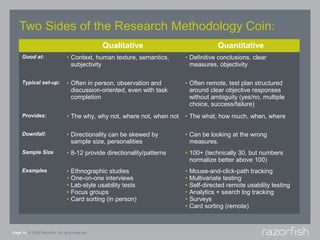
Two Sides of the Research Methodology Coin:
                                                 Qualitative                             Quantitative
     Good at:                    • Context, human texture, semantics,      • Definitive conclusions, clear
                                   subjectivity                              measures, objectivity

     Typical set-up:             • Often in person, observation and        • Often remote, test plan structured
                                   discussion-oriented, even with task       around clear objective responses
                                   completion                                without ambiguity (yes/no, multiple
                                                                             choice, success/failure)
     Provides:                   • The why, why not, where not, when not   • The what, how much, when, where

     Downfall:                   • Directionality can be skewed by         • Can be looking at the wrong
                                   sample size, personalities                measures.
     Sample Size                 • 8-12 provide directionality/patterns    • 100+ (technically 30, but numbers
                                                                             normalize better above 100)
     Examples                    •   Ethnographic studies                  •   Mouse-and-click-path tracking
                                 •   One-on-one interviews                 •   Multivariate testing
                                 •   Lab-style usability tests             •   Self-directed remote usability testing
                                 •   Focus groups                          •   Analytics + search log tracking
                                 •   Card sorting (in person)              •   Surveys
                                                                           •   Card sorting (remote)


Page 14 © 2008 Razorfish. All rights reserved.
Wrap-Up


Page 15 © 2008 Razorfish. All rights reserved.
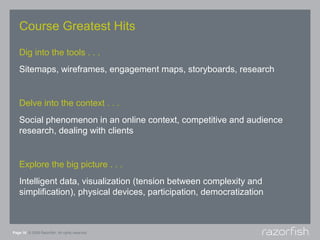
Course Greatest Hits

   Dig into the tools . . .
   Sitemaps, wireframes, engagement maps, storyboards, research


   Delve into the context . . .
   Social phenomenon in an online context, competitive and audience
   research, dealing with clients


   Explore the big picture . . .
   Intelligent data, visualization (tension between complexity and
   simplification), physical devices, participation, democratization


Page 16 © 2008 Razorfish. All rights reserved.
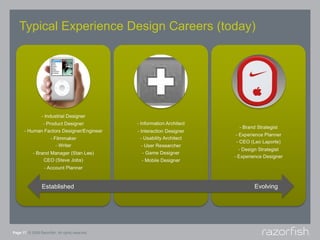
Typical Experience Design Careers (today)


                 Established                     Evolving


Page 17 © 2008 Razorfish. All rights reserved.
For Further Exploration
        Razorfish Resources                      Industry Resources
        Razorfish Digital Design Blog            TED Conference:
        http://www.digitaldesignblog.com/        http://www.ted.com/

        Razorfish Going Social Now               Favourite Website Awards:
        Blog                                     http://www.favouritewebsiteawards.com/
        http://www.goingsocialnow.com/
                                                 Ad Age Creativity Online:
        Our Twitters/Profiles                    http://creativity-online.com/
        http://twitter.com/marisagallagher
        http://twitter.com/                      Under the Radar Blog:
                                                 http://www.undertheradarblog.com/

                                                 Mashable:
                                                 http://mashable.com/

                                                 TV:
                                                 http://newteevee.com/


Page 18 © 2008 Razorfish. All rights reserved.
Thank You
   Nadya Direkova, Senior Information Architect
   nadya.direkova@razorfish.com


   Marisa Gallagher, Vice President of User Experience
   marisa.gallagher@razorfish.com


Page 19 © 2008 Razorfish. All rights reserved.

MIT Course - What is Experience Design

  • 1.
    Experience Design MIT IAP Term January 12-14, 2009 Page 1 © 2008 Razorfish. All rights reserved.
  • 2.
    What is Experience Design? Page 2 © 2008 Razorfish. All rights reserved.
  • 3.
    The Definition From Wikipedia: Experience design is the practice of designing products, processes, services, events, and environments with a focus placed on the quality of the user experience and culturally relevant solutions, with less emphasis placed on increasing and improving functionality of the design. Page 3 © 2008 Razorfish. All rights reserved.
  • 4.
    The Definition More to the point: Experience design is the practice of designing something with quality and cultural relevance. Page 4 © 2008 Razorfish. All rights reserved.
  • 5.
    The Definition How do you do that? To design something that a user perceives to be culturally relevant and of high quality, the end product needs to make their life better – needs to solve their problems (even ones they didn’t know they had.) Page 5 © 2008 Razorfish. All rights reserved.
  • 6.
    The Definition Ultimately: Experience design is the practice of solving problems. Page 6 © 2008 Razorfish. All rights reserved.
  • 7.
    How does itwork and what will we learn about it in the next few days? Page 7 © 2008 Razorfish. All rights reserved.
  • 8.
    There is anEstablished, Evolving Approach 1. Problem Definition 2. Primary User Research 3. Secondary User Research 4. Competitive Research 5. Persona Definition 6. Flows + Storyboards 7. Site + Taxonomy Maps 8. Wireframes + Comps 9. Usage Testing 8
  • 9.
    From Designing Productsto Solving Problems Course Overview: Day 1 – The Tools Day 2 – Users’ World Day 3 – What’s Next Playing games to learn Touring the social world Exploring the future to the tools we use to to find context for our practice designing design: designs: without a net: - Wireframes - “Social” discussions - Digital Trends - Sitemaps - Competitive and presentations - Engagement Maps Audience Research - Solving Your Problems - Storyboards - Hands-on Business Exercises and - Research Workshop with Discussion ByKids.org Page 9 © 2008 Razorfish. All rights reserved.
  • 10.
    Wireframes Are a visual representation of a web page’s key content elements and how they are displayed to the user. Elements may include navigation, content placement and interface controls. The wireframe is not intended to capture every item on a page or represent the creative design. Rather, it is a skeletal depiction of what the page will ultimately contain and how those pieces will be laid out. Page 10 © 2008 Razorfish. All rights reserved.
  • 11.
    Sitemaps Sitemaps provide an overview of website content in a manner similar to the table of contents page in a book. Sections and pages are typically listed according to narrative flow, alphabetically or by chronology. The home page appears at the top, with secondary and tertiary-level pages below. Page 11 © 2008 Razorfish. All rights reserved.
  • 12.
    Storyboards Storyboards are simple, illustrative descriptions of the key interaction points that occur during a specific process or flow and between a user and the product or UI. They provide a quick, sketch- based way to explore what’s important about a product’s design and what elements will enable and create flow within it, without distracting the team with the overwhelming details of individual page design. Page 12 © 2008 Razorfish. All rights reserved.
  • 13.
    Research Methodologies Any good design process requires research to understand a subject and to test hypothesis about an approach to a subject. It’s important to know and employ a wide range of methods to find the right answers or know where to keep on searching. Page 13 © 2008 Razorfish. All rights reserved.
  • 14.
    Two Sides ofthe Research Methodology Coin: Qualitative Quantitative Good at: • Context, human texture, semantics, • Definitive conclusions, clear subjectivity measures, objectivity Typical set-up: • Often in person, observation and • Often remote, test plan structured discussion-oriented, even with task around clear objective responses completion without ambiguity (yes/no, multiple choice, success/failure) Provides: • The why, why not, where not, when not • The what, how much, when, where Downfall: • Directionality can be skewed by • Can be looking at the wrong sample size, personalities measures. Sample Size • 8-12 provide directionality/patterns • 100+ (technically 30, but numbers normalize better above 100) Examples • Ethnographic studies • Mouse-and-click-path tracking • One-on-one interviews • Multivariate testing • Lab-style usability tests • Self-directed remote usability testing • Focus groups • Analytics + search log tracking • Card sorting (in person) • Surveys • Card sorting (remote) Page 14 © 2008 Razorfish. All rights reserved.
  • 15.
    Wrap-Up Page 15 ©2008 Razorfish. All rights reserved.
  • 16.
    Course Greatest Hits Dig into the tools . . . Sitemaps, wireframes, engagement maps, storyboards, research Delve into the context . . . Social phenomenon in an online context, competitive and audience research, dealing with clients Explore the big picture . . . Intelligent data, visualization (tension between complexity and simplification), physical devices, participation, democratization Page 16 © 2008 Razorfish. All rights reserved.
  • 17.
    Typical Experience DesignCareers (today) Established Evolving Page 17 © 2008 Razorfish. All rights reserved.
  • 18.
    For Further Exploration Razorfish Resources Industry Resources Razorfish Digital Design Blog TED Conference: http://www.digitaldesignblog.com/ http://www.ted.com/ Razorfish Going Social Now Favourite Website Awards: Blog http://www.favouritewebsiteawards.com/ http://www.goingsocialnow.com/ Ad Age Creativity Online: Our Twitters/Profiles http://creativity-online.com/ http://twitter.com/marisagallagher http://twitter.com/ Under the Radar Blog: http://www.undertheradarblog.com/ Mashable: http://mashable.com/ TV: http://newteevee.com/ Page 18 © 2008 Razorfish. All rights reserved.
  • 19.
    Thank You Nadya Direkova, Senior Information Architect nadya.direkova@razorfish.com Marisa Gallagher, Vice President of User Experience marisa.gallagher@razorfish.com Page 19 © 2008 Razorfish. All rights reserved.