


Innovative EC Systems: From E-Government to
E-Learning, Collaborative Commerce, and C2C Commerce
Learning Objectives
1. Describe various e-government initiatives.
2. Describe e-government activities and
implementation issues including e-government 2.0
and m-government.
3. Describe e-learning, virtual universities, and e-
training.
4. Describe e-books and their readers.
5-2
Learning Objectives
5. Describe knowledge management and
dissemination as an e-business.
6. Describe and discuss online advisory systems.
7. Describe collaborative e-commerce.
8. Describe collaboration 2.0.
9. Describe C2C activities in e-commerce.
5-3
E-Government: An Overview
e-government
E-commerce model in which a government entity
buys or provides goods, services, or information to
businesses or individual citizens
government-to-citizens (G2C)
E-government category that includes all the
interactions between a government and its citizens
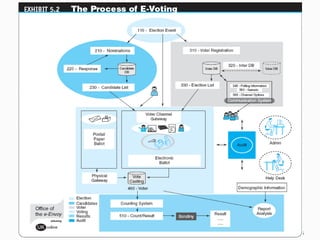
Electronic Voting
Electronic Benefits Transfer
5-4
5-5
E-Government: An Overview
government-to-business (G2B)
E-government category that includes interactions
between governments and businesses (government
selling to businesses and providing them with services
and businesses selling products and services to the
government)
Government E-Procurement
Group Purchasing
5-6
E-Government: An Overview
government-to-government (G2G)
E-government category that includes activities within
government units and those between governments
government-to-employees (G2E)
E-government category that includes activities and
services between government units and their
employees
5-7
The Transformation to E-Government
• Moving government systems to an online service.
• “the use of information and communications
technologies (ICT) to improve the efficiency,
effectiveness, transparency and accountability of
government ” .
5-9
• Improve efficiency and services of current system.
• Allows all citizens to receive the same service
irrespective of where they stay.
• Potentially decrease voter apathy ().
• Increase transparency and accountability within
government organisations.
Advantages of e-Government
• Government service loses person to person
interaction.
• Can create an easy excuse for mistakes.
• Inherits design problems of the internet.
• Can threaten the information security.
• Can cause divisions within the country (e.g.
digital divide).
Disadvantages of e-Government
E-Government: An Overview
mobile government (m-government)
The wireless implementation of e-government mostly
to citizens but also to businesses
The Benefits of M-Government
Some Implementation Issues
Applications
5-12
Mobile Government (M-Government)
Mobile Government services can be defined as
"a strategy and its implementation involving the
utilization of all kinds of wireless and mobile
technology, services, applications and devices for
improving benefits to the parties involved in e-
government including citizens, businesses and all
government units"
5-13
The Benefits of M-Government
Cost reduction
Efficiency
Transformation/modernization of public sector
organizations
Added convenience and flexibility -
Better services to the citizens
Ability to reach a larger number of people through
mobile devices than would be possible using wired
internet only
5-14
Issues with E-Government
Wireless and mobile networks and related infrastructure,
as well as software, must be developed.
Mobile phone numbers and mobile devices are relatively
easily hacked and wireless networks are vulnerable
because they use public airwaves to send signals.
Many countries have not yet adopted legislation for data
and information practices that spell out the rights of
citizens and the responsibilities of the data holders
(government).
5-15
E-Learning, E-Training, and E-Books
e-learning
The online delivery of information for purposes of
education, training, or knowledge management.
e-learning service is a website which teaches and
helps students improve in certain subjects.
5-16
Advantages of e-Learning
Reduces travel cost and time to and from school.
Learners may have the option to select learning
materials that meets their level of knowledge and
interest.
Learners can study wherever they have access to a
computer and Internet.
Flexibility to join discussions remotely in chat rooms.
Development of computer and Internet skills that are
transferable to other facets of learner’s lives.
5-17
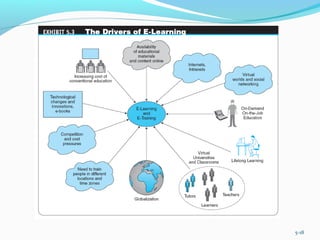
5-18
Disadvantages of e-Learning
Unmotivated learners or those with poor study habits may fall
behind
Lack of familiar structure and routine may take getting used to
Students may feel isolated or miss social interaction thus the
need to understanding different learning styles and individual
learner needs.
Instructor may not always be available on demand
Slow or unreliable Internet connections can be frustrating
Managing learning software can involve a learning curve
Some courses such as traditional hands-on courses can be
difficult to simulate
5-19
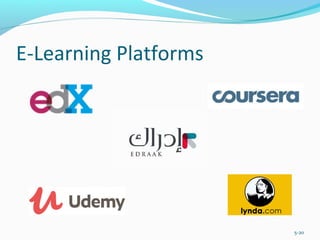
E-Learning Platforms
5-20
Distance Learning
distance learning
Formal education that takes place off campus, usually,
but not always, through online resources
virtual university
An online university from which students take classes
from home or other offsite locations, usually via the
Internet
5-22
Online corporate training
A corporate trainer is an educator or instructor who
works in a business environment and conveys
knowledge or skills to a group of employees.
 Corporate trainers may be hired full-time by a large
company to train new employees and assist in the
transition to new business systems.
Examples of Corporate Training
5-23
Social Learning
social learning
Learning, training, and knowledge sharing in social
networks and by using social software tools for
learning.
Social learning is learning that takes place through
social interaction between peers () and it may or may
not lead to a change in attitudes and/or behavior.
Social Learning Tools Every Online Educator
Should Know About
5-24
E-Learning, E-Training, and E-Books
Learning in virtual worlds and second life
Visual interactive simulation
learning on-demand
Learning provided to an employee while the work is being
done (in terms of troubleshooting or performance support)
In a learning on-demand environment, courses, references,
help files, documents, Webcasts, audios, videos, books, and
presentations are all made available when and where a
worker needs them.
5-26
5-27
E-Learning, E-Training, and E-Books
learning management system (LMS)
Software applications for the administration,
documentation, tracking, and reporting of training
programs, classroom and online events, e-learning
programs, and training content
IMPLEMENTING E-LEARNING AND E-TRAINING
Some Representative E-Learning Tools
5-28
E-Learning, E-Training, and E-Books
electronic book (e-book)
A book in digital form that can be read on a computer
screen or on a special device
Devices for Reading E-Books
Advantages and Limitations of E-Books
5-29
Knowledge Management, Advisory
Systems, and Electronic Commerce
knowledge management (KM)
The process of capturing or creating knowledge, storing it,
updating it constantly, disseminating it, and using it
whenever necessary
KM TYPES AND ACTIVITIES
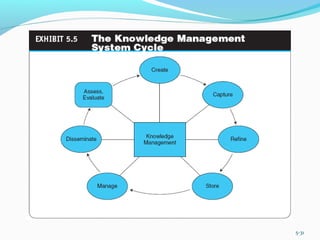
Create knowledge
Capture knowledge
Refine knowledge
Store knowledge
Manage knowledge
Disseminate knowledge
5-30
5-31
Knowledge Management, Advisory
Systems, and Electronic Commerce
KNOWLEDGE SHARING
Software Tools for Knowledge Sharing
HOW IS KNOWLEDGE MANAGEMENT RELATED
TO E-COMMERCE?
KM AND SOCIAL NETWORKS
Knowledge creation
Knowledge sharing
DEPLOYING KM TECHNOLOGIES
5-32
Knowledge Management, Advisory
Systems, and Electronic Commerce
ONLINE ADVICE AND CONSULTING
Medical advice
Management consulting
Legal advice
Gurus
Financial advice
Social networks
Other advisory services
5-33
Knowledge Management, Advisory
Systems, and Electronic Commerce
automated question/answer (QA) system
A system that locates, extracts, and provides specific
answers to user questions expressed in natural
language
Live Chat with Experts
5-34
Knowledge Management, Advisory
Systems, and Electronic Commerce
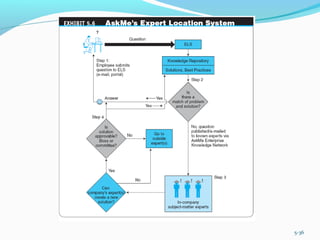
expert location systems (ELS)
Interactive computerized systems that help
employees find and connect with colleagues who have
expertise required for specific problems—whether
they are across the country or across the room—in
order to solve specific, critical business problems in
seconds
Seeking Expertise in Social Networks
5-35
5-36
Collaborative Commerce
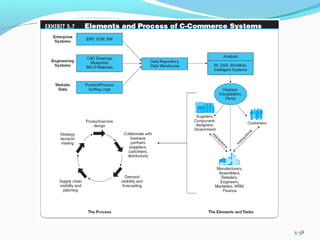
collaborative commerce (c-commerce)
The use of digital technologies that enable companies
to collaboratively plan, design, develop, manage, and
research products, services, and innovative EC
applications
collaboration hub (c-hub)
The central point of control for an e-market; a single
c-hub, representing one e-market owner, can host
multiple collaboration spaces (c-spaces) in which
trading partners use c-enablers to exchange data with
the c-hub
5-37
5-38
Collaborative Commerce
REPRESENTATIVE EXAMPLES OF
COLLABORATIVE COMMERCE
vendor-managed inventory (VMI)
A system in which retailers make their suppliers fully
responsible for determining when to order and possibly
how much to order
Retailer-Supplier Collaboration
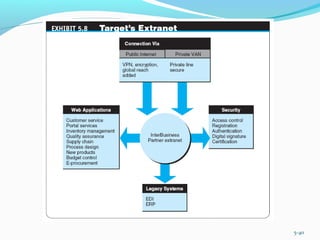
 Example: Target
5-39
5-40
Collaborative Commerce
Reducing Transportation and Inventory Costs
Reduction of Design Cycle Time
Reduction of Product Development Time
Elimination of Channel Conflict: Collaboration
with Dealers and Retailers
IMPLEMENTING C-COMMERCE
BARRIERS TO C-COMMERCE
Overcoming Barriers to Collaboration
5-41
Consumer-to-Consumer
Electronic Commerce
consumer-to-consumer (C2C) EC
E-commerce model in which consumers sell directly
to other consumers
E-COMMERCE: C2C APPLICATIONS
C2C Auctions
Classified Ads
Personal Services
File-Sharing Utilities: Napster and Others
C2C Activities in Social Networks and Trading
Virtual Properties
5-42
Managerial Issues
1. What are the e-government opportunities?
2. How do we design the most cost-efficient
government e-procurement system?
3. How do we design the portfolio of e-learning
knowledge sources?
4. How do we incorporate social networking–based
learning and services in our organization?
5. What will the impact be of the e-book platform?
5-43
Managerial Issues
6. How do we connect our expert location system and
social networking initiatives?
7. How difficult is it to introduce e-collaboration?
8. Can we capitalize on C2C EC?
9. How much can be shared with business partners?
10. Who benefits from vendor-managed inventory?
5-44
Summary
1. E-government activities
2. Implementing e-government to citizens, businesses,
and its own operations
3. E-learning and training
4. E-books and their readers
5. Knowledge management and dissemination as an e-
business
5-45
Summary
6. Online advisory systems
7. C-commerce
8. Collaboration 2.0
9. C2C activities
5-46

Chapter 5/Innovative EC Systems: From E-Government to E-Learning, Collaborative Commerce, and C2C Commerce

  • 1.
    Innovative EC Systems:From E-Government to E-Learning, Collaborative Commerce, and C2C Commerce
  • 2.
    Learning Objectives 1. Describevarious e-government initiatives. 2. Describe e-government activities and implementation issues including e-government 2.0 and m-government. 3. Describe e-learning, virtual universities, and e- training. 4. Describe e-books and their readers. 5-2
  • 3.
    Learning Objectives 5. Describeknowledge management and dissemination as an e-business. 6. Describe and discuss online advisory systems. 7. Describe collaborative e-commerce. 8. Describe collaboration 2.0. 9. Describe C2C activities in e-commerce. 5-3
  • 4.
    E-Government: An Overview e-government E-commercemodel in which a government entity buys or provides goods, services, or information to businesses or individual citizens government-to-citizens (G2C) E-government category that includes all the interactions between a government and its citizens Electronic Voting Electronic Benefits Transfer 5-4
  • 5.
  • 6.
    E-Government: An Overview government-to-business(G2B) E-government category that includes interactions between governments and businesses (government selling to businesses and providing them with services and businesses selling products and services to the government) Government E-Procurement Group Purchasing 5-6
  • 7.
    E-Government: An Overview government-to-government(G2G) E-government category that includes activities within government units and those between governments government-to-employees (G2E) E-government category that includes activities and services between government units and their employees 5-7
  • 9.
    The Transformation toE-Government • Moving government systems to an online service. • “the use of information and communications technologies (ICT) to improve the efficiency, effectiveness, transparency and accountability of government ” . 5-9
  • 10.
    • Improve efficiencyand services of current system. • Allows all citizens to receive the same service irrespective of where they stay. • Potentially decrease voter apathy (). • Increase transparency and accountability within government organisations. Advantages of e-Government
  • 11.
    • Government serviceloses person to person interaction. • Can create an easy excuse for mistakes. • Inherits design problems of the internet. • Can threaten the information security. • Can cause divisions within the country (e.g. digital divide). Disadvantages of e-Government
  • 12.
    E-Government: An Overview mobilegovernment (m-government) The wireless implementation of e-government mostly to citizens but also to businesses The Benefits of M-Government Some Implementation Issues Applications 5-12
  • 13.
    Mobile Government (M-Government) MobileGovernment services can be defined as "a strategy and its implementation involving the utilization of all kinds of wireless and mobile technology, services, applications and devices for improving benefits to the parties involved in e- government including citizens, businesses and all government units" 5-13
  • 14.
    The Benefits ofM-Government Cost reduction Efficiency Transformation/modernization of public sector organizations Added convenience and flexibility - Better services to the citizens Ability to reach a larger number of people through mobile devices than would be possible using wired internet only 5-14
  • 15.
    Issues with E-Government Wirelessand mobile networks and related infrastructure, as well as software, must be developed. Mobile phone numbers and mobile devices are relatively easily hacked and wireless networks are vulnerable because they use public airwaves to send signals. Many countries have not yet adopted legislation for data and information practices that spell out the rights of citizens and the responsibilities of the data holders (government). 5-15
  • 16.
    E-Learning, E-Training, andE-Books e-learning The online delivery of information for purposes of education, training, or knowledge management. e-learning service is a website which teaches and helps students improve in certain subjects. 5-16
  • 17.
    Advantages of e-Learning Reducestravel cost and time to and from school. Learners may have the option to select learning materials that meets their level of knowledge and interest. Learners can study wherever they have access to a computer and Internet. Flexibility to join discussions remotely in chat rooms. Development of computer and Internet skills that are transferable to other facets of learner’s lives. 5-17
  • 18.
  • 19.
    Disadvantages of e-Learning Unmotivatedlearners or those with poor study habits may fall behind Lack of familiar structure and routine may take getting used to Students may feel isolated or miss social interaction thus the need to understanding different learning styles and individual learner needs. Instructor may not always be available on demand Slow or unreliable Internet connections can be frustrating Managing learning software can involve a learning curve Some courses such as traditional hands-on courses can be difficult to simulate 5-19
  • 20.
  • 22.
    Distance Learning distance learning Formaleducation that takes place off campus, usually, but not always, through online resources virtual university An online university from which students take classes from home or other offsite locations, usually via the Internet 5-22
  • 23.
    Online corporate training Acorporate trainer is an educator or instructor who works in a business environment and conveys knowledge or skills to a group of employees.  Corporate trainers may be hired full-time by a large company to train new employees and assist in the transition to new business systems. Examples of Corporate Training 5-23
  • 24.
    Social Learning social learning Learning,training, and knowledge sharing in social networks and by using social software tools for learning. Social learning is learning that takes place through social interaction between peers () and it may or may not lead to a change in attitudes and/or behavior. Social Learning Tools Every Online Educator Should Know About 5-24
  • 26.
    E-Learning, E-Training, andE-Books Learning in virtual worlds and second life Visual interactive simulation learning on-demand Learning provided to an employee while the work is being done (in terms of troubleshooting or performance support) In a learning on-demand environment, courses, references, help files, documents, Webcasts, audios, videos, books, and presentations are all made available when and where a worker needs them. 5-26
  • 27.
  • 28.
    E-Learning, E-Training, andE-Books learning management system (LMS) Software applications for the administration, documentation, tracking, and reporting of training programs, classroom and online events, e-learning programs, and training content IMPLEMENTING E-LEARNING AND E-TRAINING Some Representative E-Learning Tools 5-28
  • 29.
    E-Learning, E-Training, andE-Books electronic book (e-book) A book in digital form that can be read on a computer screen or on a special device Devices for Reading E-Books Advantages and Limitations of E-Books 5-29
  • 30.
    Knowledge Management, Advisory Systems,and Electronic Commerce knowledge management (KM) The process of capturing or creating knowledge, storing it, updating it constantly, disseminating it, and using it whenever necessary KM TYPES AND ACTIVITIES Create knowledge Capture knowledge Refine knowledge Store knowledge Manage knowledge Disseminate knowledge 5-30
  • 31.
  • 32.
    Knowledge Management, Advisory Systems,and Electronic Commerce KNOWLEDGE SHARING Software Tools for Knowledge Sharing HOW IS KNOWLEDGE MANAGEMENT RELATED TO E-COMMERCE? KM AND SOCIAL NETWORKS Knowledge creation Knowledge sharing DEPLOYING KM TECHNOLOGIES 5-32
  • 33.
    Knowledge Management, Advisory Systems,and Electronic Commerce ONLINE ADVICE AND CONSULTING Medical advice Management consulting Legal advice Gurus Financial advice Social networks Other advisory services 5-33
  • 34.
    Knowledge Management, Advisory Systems,and Electronic Commerce automated question/answer (QA) system A system that locates, extracts, and provides specific answers to user questions expressed in natural language Live Chat with Experts 5-34
  • 35.
    Knowledge Management, Advisory Systems,and Electronic Commerce expert location systems (ELS) Interactive computerized systems that help employees find and connect with colleagues who have expertise required for specific problems—whether they are across the country or across the room—in order to solve specific, critical business problems in seconds Seeking Expertise in Social Networks 5-35
  • 36.
  • 37.
    Collaborative Commerce collaborative commerce(c-commerce) The use of digital technologies that enable companies to collaboratively plan, design, develop, manage, and research products, services, and innovative EC applications collaboration hub (c-hub) The central point of control for an e-market; a single c-hub, representing one e-market owner, can host multiple collaboration spaces (c-spaces) in which trading partners use c-enablers to exchange data with the c-hub 5-37
  • 38.
  • 39.
    Collaborative Commerce REPRESENTATIVE EXAMPLESOF COLLABORATIVE COMMERCE vendor-managed inventory (VMI) A system in which retailers make their suppliers fully responsible for determining when to order and possibly how much to order Retailer-Supplier Collaboration  Example: Target 5-39
  • 40.
  • 41.
    Collaborative Commerce Reducing Transportationand Inventory Costs Reduction of Design Cycle Time Reduction of Product Development Time Elimination of Channel Conflict: Collaboration with Dealers and Retailers IMPLEMENTING C-COMMERCE BARRIERS TO C-COMMERCE Overcoming Barriers to Collaboration 5-41
  • 42.
    Consumer-to-Consumer Electronic Commerce consumer-to-consumer (C2C)EC E-commerce model in which consumers sell directly to other consumers E-COMMERCE: C2C APPLICATIONS C2C Auctions Classified Ads Personal Services File-Sharing Utilities: Napster and Others C2C Activities in Social Networks and Trading Virtual Properties 5-42
  • 43.
    Managerial Issues 1. Whatare the e-government opportunities? 2. How do we design the most cost-efficient government e-procurement system? 3. How do we design the portfolio of e-learning knowledge sources? 4. How do we incorporate social networking–based learning and services in our organization? 5. What will the impact be of the e-book platform? 5-43
  • 44.
    Managerial Issues 6. Howdo we connect our expert location system and social networking initiatives? 7. How difficult is it to introduce e-collaboration? 8. Can we capitalize on C2C EC? 9. How much can be shared with business partners? 10. Who benefits from vendor-managed inventory? 5-44
  • 45.
    Summary 1. E-government activities 2.Implementing e-government to citizens, businesses, and its own operations 3. E-learning and training 4. E-books and their readers 5. Knowledge management and dissemination as an e- business 5-45
  • 46.
    Summary 6. Online advisorysystems 7. C-commerce 8. Collaboration 2.0 9. C2C activities 5-46