lec8_application_protocols in networks for college students
1.
Application Layer 2-1
Chapter2
Application Layer
Computer
Networking: A Top
Down Approach
6th
edition
Jim Kurose, Keith Ross
Addison-Wesley
March 2012
A note on the use of these ppt slides:
We’re making these slides freely available to all (faculty, students, readers).
They’re in PowerPoint form so you see the animations; and can add, modify,
and delete slides (including this one) and slide content to suit your needs.
They obviously represent a lot of work on our part. In return for use, we only
ask the following:
If you use these slides (e.g., in a class) that you mention their source
(after all, we’d like people to use our book!)
If you post any slides on a www site, that you note that they are adapted
from (or perhaps identical to) our slides, and note our copyright of this
material.
Thanks and enjoy! JFK/KWR
All material copyright 1996-2012
J.F Kurose and K.W. Ross, All Rights Reserved
2.
Application Layer 2-2
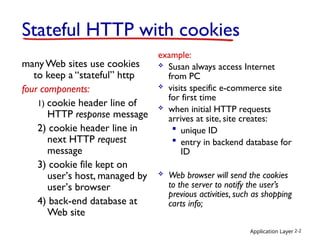
StatefulHTTP with cookies
manyWeb sites use cookies
to keep a “stateful” http
four components:
1) cookie header line of
HTTP response message
2) cookie header line in
next HTTP request
message
3) cookie file kept on
user’s host, managed by
user’s browser
4) back-end database at
Web site
example:
Susan always access Internet
from PC
visits specific e-commerce site
for first time
when initial HTTP requests
arrives at site, site creates:
unique ID
entry in backend database for
ID
Web browser will send the cookies
to the server to notify the user’s
previous activities, such as shopping
carts info;
3.
Application Layer 2-3
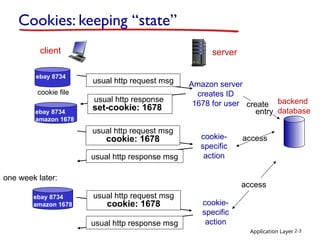
Cookies:keeping “state”
client server
usual http response msg
usual http response msg
cookie file
one week later:
usual http request msg
cookie: 1678 cookie-
specific
action
access
ebay 8734
usual http request msg Amazon server
creates ID
1678 for user create
entry
usual http response
set-cookie: 1678
ebay 8734
amazon 1678
usual http request msg
cookie: 1678 cookie-
specific
action
access
ebay 8734
amazon 1678
backend
database
4.
Application Layer 2-4
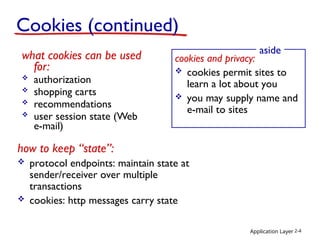
Cookies(continued)
what cookies can be used
for:
authorization
shopping carts
recommendations
user session state (Web
e-mail)
cookies and privacy:
cookies permit sites to
learn a lot about you
you may supply name and
e-mail to sites
aside
how to keep “state”:
protocol endpoints: maintain state at
sender/receiver over multiple
transactions
cookies: http messages carry state
5.
Application Layer 2-5
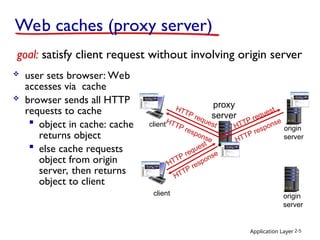
Webcaches (proxy server)
user sets browser: Web
accesses via cache
browser sends all HTTP
requests to cache
object in cache: cache
returns object
else cache requests
object from origin
server, then returns
object to client
goal: satisfy client request without involving origin server
client
proxy
server
client
HTTP request
HTTP response
HTTP request HTTP request
origin
server
origin
server
HTTP response HTTP response
6.
Application Layer 2-6
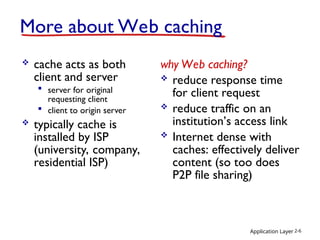
Moreabout Web caching
cache acts as both
client and server
server for original
requesting client
client to origin server
typically cache is
installed by ISP
(university, company,
residential ISP)
why Web caching?
reduce response time
for client request
reduce traffic on an
institution’s access link
Internet dense with
caches: effectively deliver
content (so too does
P2P file sharing)
7.
Application Layer 2-7
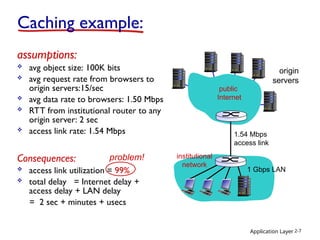
Cachingexample:
origin
servers
public
Internet
institutional
network
1 Gbps LAN
1.54 Mbps
access link
assumptions:
avg object size: 100K bits
avg request rate from browsers to
origin servers:15/sec
avg data rate to browsers: 1.50 Mbps
RTT from institutional router to any
origin server: 2 sec
access link rate: 1.54 Mbps
Consequences:
access link utilization = 99%
total delay = Internet delay +
access delay + LAN delay
= 2 sec + minutes + usecs
problem!
8.
Application Layer 2-8
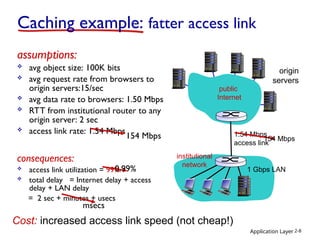
assumptions:
avg object size: 100K bits
avg request rate from browsers to
origin servers:15/sec
avg data rate to browsers: 1.50 Mbps
RTT from institutional router to any
origin server: 2 sec
access link rate: 1.54 Mbps
consequences:
access link utilization = 99%
total delay = Internet delay + access
delay + LAN delay
= 2 sec + minutes + usecs
Caching example: fatter access link
origin
servers
1.54 Mbps
access link
154 Mbps 154 Mbps
msecs
Cost: increased access link speed (not cheap!)
0.99%
public
Internet
institutional
network
1 Gbps LAN
9.
institutional
network
1 Gbps LAN
ApplicationLayer 2-9
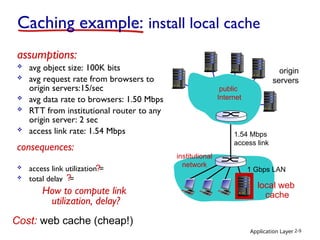
Caching example: install local cache
origin
servers
1.54 Mbps
access link
local web
cache
assumptions:
avg object size: 100K bits
avg request rate from browsers to
origin servers:15/sec
avg data rate to browsers: 1.50 Mbps
RTT from institutional router to any
origin server: 2 sec
access link rate: 1.54 Mbps
consequences:
access link utilization = 100%
total delay = Internet delay + access
delay + LAN delay
= 2 sec + minutes + usecs
?
?
How to compute link
utilization, delay?
Cost: web cache (cheap!)
public
Internet
10.
Application Layer 2-10
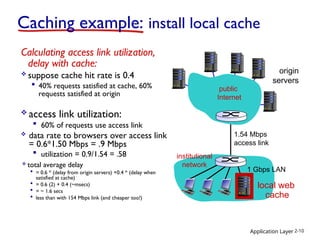
Cachingexample: install local cache
Calculating access link utilization,
delay with cache:
suppose cache hit rate is 0.4
40% requests satisfied at cache, 60%
requests satisfied at origin
origin
servers
1.54 Mbps
access link
access link utilization:
60% of requests use access link
data rate to browsers over access link
= 0.6*1.50 Mbps = .9 Mbps
utilization = 0.9/1.54 = .58
total average delay
= 0.6 * (delay from origin servers) +0.4 * (delay when
satisfied at cache)
= 0.6 (2) + 0.4 (~msecs)
= ~ 1.6 secs
less than with 154 Mbps link (and cheaper too!)
public
Internet
institutional
network
1 Gbps LAN
local web
cache
11.
Application Layer 2-11
Chapter2: outline
2.1 principles of network
applications
app architectures
app requirements
2.2 Web and HTTP
2.3 FTP
2.4 electronic mail
SMTP, POP3, IMAP
2.5 DNS
2.6 P2P applications
2.7 socket programming
with UDP and TCP
12.
Application Layer
2-12
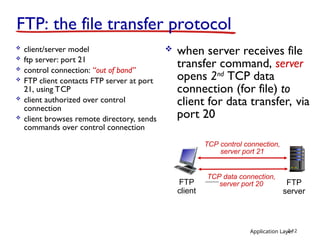
FTP: thefile transfer protocol
client/server model
ftp server: port 21
control connection: “out of band”
FTP client contacts FTP server at port
21, using TCP
client authorized over control
connection
client browses remote directory, sends
commands over control connection
FTP
client
FTP
server
TCP control connection,
server port 21
TCP data connection,
server port 20
when server receives file
transfer command, server
opens 2nd
TCP data
connection (for file) to
client for data transfer, via
port 20
13.
Application Layer 2-13
Chapter2: outline
2.1 principles of network
applications
app architectures
app requirements
2.2 Web and HTTP
2.3 FTP
2.4 electronic mail
SMTP, POP3, IMAP
2.5 DNS
2.6 P2P applications
2.7 socket programming
with UDP and TCP
14.
Application Layer 2-14
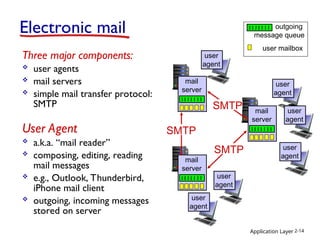
Electronicmail
Three major components:
user agents
mail servers
simple mail transfer protocol:
SMTP
User Agent
a.k.a. “mail reader”
composing, editing, reading
mail messages
e.g., Outlook, Thunderbird,
iPhone mail client
outgoing, incoming messages
stored on server
user mailbox
outgoing
message queue
mail
server
mail
server
mail
server
SMTP
SMTP
SMTP
user
agent
user
agent
user
agent
user
agent
user
agent
user
agent
15.
Application Layer 2-15
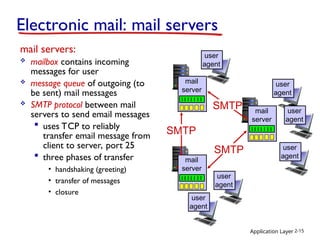
Electronicmail: mail servers
mail servers:
mailbox contains incoming
messages for user
message queue of outgoing (to
be sent) mail messages
SMTP protocol between mail
servers to send email messages
uses TCP to reliably
transfer email message from
client to server, port 25
three phases of transfer
• handshaking (greeting)
• transfer of messages
• closure
mail
server
mail
server
mail
server
SMTP
SMTP
SMTP
user
agent
user
agent
user
agent
user
agent
user
agent
user
agent
16.
Application Layer 2-16
user
agent
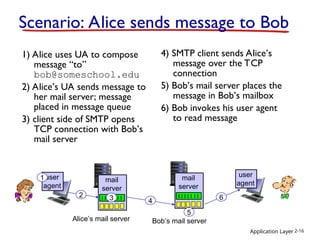
Scenario:Alice sends message to Bob
1) Alice uses UA to compose
message “to”
bob@someschool.edu
2) Alice’s UA sends message to
her mail server; message
placed in message queue
3) client side of SMTP opens
TCP connection with Bob’s
mail server
4) SMTP client sends Alice’s
message over the TCP
connection
5) Bob’s mail server places the
message in Bob’s mailbox
6) Bob invokes his user agent
to read message
mail
server
mail
server
1
2 3 4
5
6
Alice’s mail server Bob’s mail server
user
agent
17.
Application Layer 2-17
Mailaccess protocols
SMTP: delivery/storage to receiver’s server
mail access protocol: retrieval from server
POP3: Post Office Protocol [RFC 1939]: authorization,
download
IMAP: Internet Mail Access Protocol [RFC 1730]: more
features, including manipulation of stored msgs on server
HTTP: gmail, Hotmail, Yahoo! Mail, etc.
sender’s mail
server
SMTP SMTP
mail
access
protocol
receiver’s mail
server
(e.g., POP,
IMAP)
user
agent
user
agent
18.
Application Layer 2-18
POP3and IMAP
POP3
previous example uses
POP3 “download and
delete” mode
Bob cannot re-read e-
mail if he changes
client
Once downloaded, can
check email without
internet
Good for simple, single
device email service
IMAP
keeps all messages in one
place: at server
allows user to organize
messages in folders
Synchronization across
devices
Good for multi-device
email service
19.
Application Layer 2-19
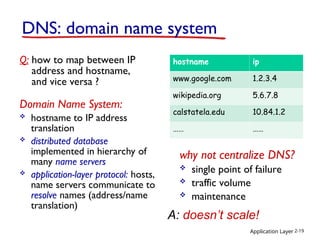
DNS:domain name system
Q: how to map between IP
address and hostname,
and vice versa ?
Domain Name System:
hostname to IP address
translation
distributed database
implemented in hierarchy of
many name servers
application-layer protocol: hosts,
name servers communicate to
resolve names (address/name
translation)
why not centralize DNS?
single point of failure
traffic volume
maintenance
A: doesn’t scale!
hostname ip
www.google.com 1.2.3.4
wikipedia.org 5.6.7.8
calstatela.edu 10.84.1.2
…… ……
20.
Application Layer 2-20
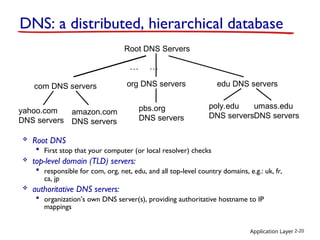
RootDNS Servers
com DNS servers org DNS servers edu DNS servers
poly.edu
DNS servers
umass.edu
DNS servers
yahoo.com
DNS servers
amazon.com
DNS servers
pbs.org
DNS servers
DNS: a distributed, hierarchical database
… …
Root DNS
First stop that your computer (or local resolver) checks
top-level domain (TLD) servers:
responsible for com, org, net, edu, and all top-level country domains, e.g.: uk, fr,
ca, jp
authoritative DNS servers:
organization’s own DNS server(s), providing authoritative hostname to IP
mappings
21.
Application Layer 2-21
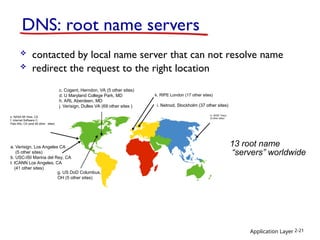
DNS:root name servers
contacted by local name server that can not resolve name
redirect the request to the right location
13 root name
“servers” worldwide
a. Verisign, Los Angeles CA
(5 other sites)
b. USC-ISI Marina del Rey, CA
l. ICANN Los Angeles, CA
(41 other sites)
e. NASA Mt View, CA
f. Internet Software C.
Palo Alto, CA (and 48 other sites)
i. Netnod, Stockholm (37 other sites)
k. RIPE London (17 other sites)
m. WIDE Tokyo
(5 other sites)
c. Cogent, Herndon, VA (5 other sites)
d. U Maryland College Park, MD
h. ARL Aberdeen, MD
j. Verisign, Dulles VA (69 other sites )
g. US DoD Columbus,
OH (5 other sites)
22.
Application Layer 2-22
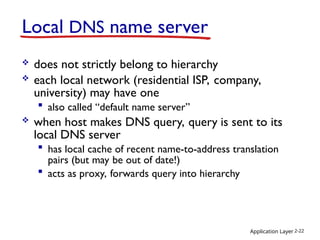
LocalDNS name server
does not strictly belong to hierarchy
each local network (residential ISP, company,
university) may have one
also called “default name server”
when host makes DNS query, query is sent to its
local DNS server
has local cache of recent name-to-address translation
pairs (but may be out of date!)
acts as proxy, forwards query into hierarchy
23.
Application Layer 2-23
4
5
6
3
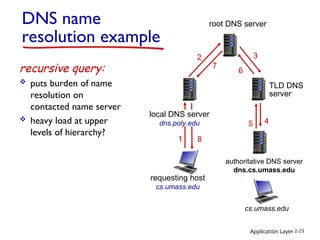
recursivequery:
puts burden of name
resolution on
contacted name server
heavy load at upper
levels of hierarchy?
requesting host
cs.umass.edu
cs.umass.edu
root DNS server
local DNS server
dns.poly.edu
1
2
7
authoritative DNS server
dns.cs.umass.edu
8
DNS name
resolution example
TLD DNS
server
24.
Application Layer 2-24
requestinghost
cs.umass.edu
cs.umass.edu
root DNS server
local DNS server
cs.umass.edu
1
2
3
4
5
6
authoritative DNS server
dns.cs.umass.edu
7
8
TLD DNS server
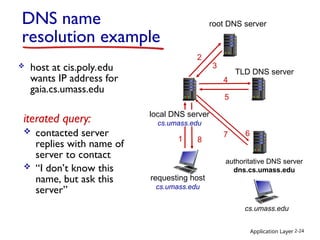
DNS name
resolution example
host at cis.poly.edu
wants IP address for
gaia.cs.umass.edu
iterated query:
contacted server
replies with name of
server to contact
“I don’t know this
name, but ask this
server”
25.
Application Layer 2-25
DNS:caching, updating records
once (any) name server learns mapping, it caches
mapping
cache entries timeout (disappear) after some time (TTL)
TLD servers typically cached in local name servers
• thus root name servers not often visited
cached entries may be out-of-date (best effort
name-to-address translation!)
if name host changes IP address, may not be known
Internet-wide until all TTLs expire
update/notify mechanisms proposed IETF standard
RFC 2136
26.
Attacking DNS
DDoS attacks
Bombard root servers
with traffic
Not successful to date
Traffic Filtering
Local DNS servers
cache IPs of TLD
servers, allowing root
server bypass
Bombard TLD servers
Potentially more
dangerous
Redirect attacks
Man-in-middle
Intercept queries
DNS poisoning
Send bogus relies to
DNS server, which
caches
Application Layer 2-26
27.
Application Layer 2-27
Chapter2: outline
2.1 principles of network
applications
app architectures
app requirements
2.2 Web and HTTP
2.3 FTP
2.4 electronic mail
SMTP, POP3, IMAP
2.5 DNS
2.6 P2P applications
28.
Application Layer 2-28
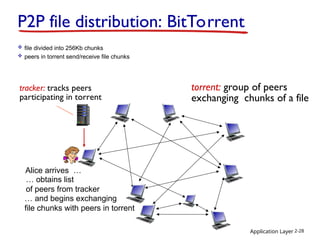
P2Pfile distribution: BitTorrent
tracker: tracks peers
participating in torrent
torrent: group of peers
exchanging chunks of a file
Alice arrives …
file divided into 256Kb chunks
peers in torrent send/receive file chunks
… obtains list
of peers from tracker
… and begins exchanging
file chunks with peers in torrent
29.
Application Layer 2-29
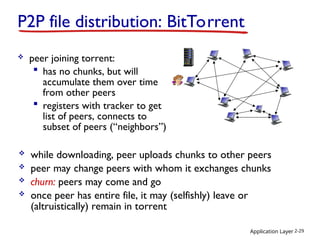
peer joining torrent:
has no chunks, but will
accumulate them over time
from other peers
registers with tracker to get
list of peers, connects to
subset of peers (“neighbors”)
P2P file distribution: BitTorrent
while downloading, peer uploads chunks to other peers
peer may change peers with whom it exchanges chunks
churn: peers may come and go
once peer has entire file, it may (selfishly) leave or
(altruistically) remain in torrent
30.
Application Layer 2-30
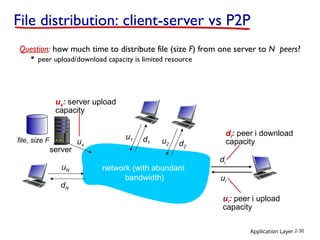
Filedistribution: client-server vs P2P
Question: how much time to distribute file (size F) from one server to N peers?
peer upload/download capacity is limited resource
us
uN
dN
server
network (with abundant
bandwidth)
file, size F
us: server upload
capacity
ui: peer i upload
capacity
di: peer i download
capacity
u2 d2
u1 d1
di
ui
31.
Application Layer 2-31
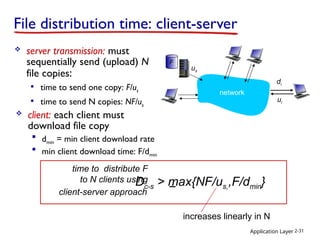
Filedistribution time: client-server
server transmission: must
sequentially send (upload) N
file copies:
time to send one copy: F/us
time to send N copies: NF/us
increases linearly in N
time to distribute F
to N clients using
client-server approach
Dc-s > max{NF/us,,F/dmin}
client: each client must
download file copy
dmin = min client download rate
min client download time: F/dmin
us
network
di
ui
F
32.
Application Layer 2-32
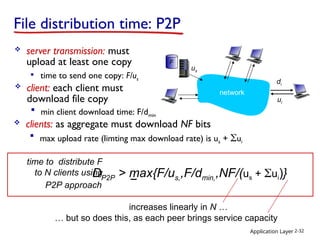
Filedistribution time: P2P
server transmission: must
upload at least one copy
time to send one copy: F/us
time to distribute F
to N clients using
P2P approach
us
network
di
ui
F
DP2P > max{F/us,,F/dmin,,NF/(us + ui)}
client: each client must
download file copy
min client download time: F/dmin
clients: as aggregate must download NF bits
max upload rate (limting max download rate) is us + ui
… but so does this, as each peer brings service capacity
increases linearly in N …
33.
Application Layer 2-33
0
0.5
1
1.5
2
2.5
3
3.5
05 10 15 20 25 30 35
N
Minimum
Distribution
Time
P2P
Client-Server
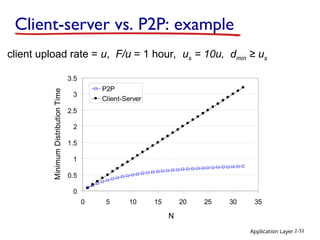
Client-server vs. P2P: example
client upload rate = u, F/u = 1 hour, us = 10u, dmin ≥ us
34.
Application Layer 2-34
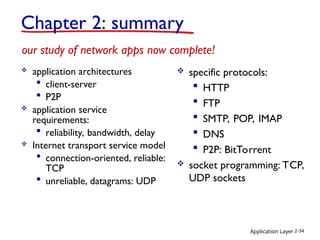
Chapter2: summary
application architectures
client-server
P2P
application service
requirements:
reliability, bandwidth, delay
Internet transport service model
connection-oriented, reliable:
TCP
unreliable, datagrams: UDP
our study of network apps now complete!
specific protocols:
HTTP
FTP
SMTP, POP, IMAP
DNS
P2P: BitTorrent
socket programming: TCP,
UDP sockets

![Application Layer 2-17
Mail access protocols
SMTP: delivery/storage to receiver’s server
mail access protocol: retrieval from server
POP3: Post Office Protocol [RFC 1939]: authorization,
download
IMAP: Internet Mail Access Protocol [RFC 1730]: more
features, including manipulation of stored msgs on server
HTTP: gmail, Hotmail, Yahoo! Mail, etc.
sender’s mail
server
SMTP SMTP
mail
access
protocol
receiver’s mail
server
(e.g., POP,
IMAP)
user
agent
user
agent](https://image.slidesharecdn.com/lec8applicationprotocols-251008001923-28918f25/85/lec8_application_protocols-in-networks-for-college-students-17-320.jpg)