Introduction to Computer
A computer is an electronic device, operating un
der the control of instructions stored in its own
memory that can accept data (input), process t
he data according to specified rules, produce in
formation (output), and store the information f
or future use.
Functionalities Of A Computer
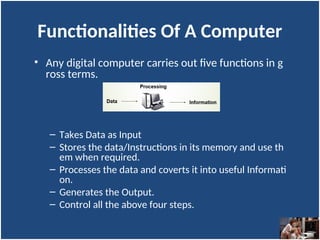
• Any digital computer carries out five functions in g
ross terms.
– Takes Data as Input
– Stores the data/Instructions in its memory and use th
em when required.
– Processes the data and coverts it into useful Informati
on.
– Generates the Output.
– Control all the above four steps.
Computer Components
Any kind of computers consists of
HARDWARE AND SOFTWARE.
Hardware
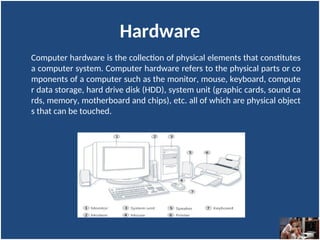
Computer hardware is the collection of physical elements that constitutes
a computer system. Computer hardware refers to the physical parts or co
mponents of a computer such as the monitor, mouse, keyboard, compute
r data storage, hard drive disk (HDD), system unit (graphic cards, sound ca
rds, memory, motherboard and chips), etc. all of which are physical object
s that can be touched.
Input Devices
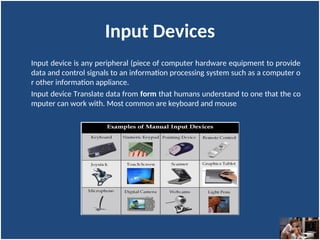
Input device is any peripheral (piece of computer hardware equipment to provide
data and control signals to an information processing system such as a computer o
r other information appliance.
Input device Translate data from form that humans understand to one that the co
mputer can work with. Most common are keyboard and mouse
Example of Input Devices:-
1. Keyboard 2. Mouse (pointing device) 3. Microphone
4. Touch screen 5. Scanner 6. Webcam
7. Touchpads 8. MIDI keyboard
10.Graphics Tablets 11.Cameras 12.Pen Input
13.Video Capture Hardware 14.Microphone 15.Trackballs
16.Barcode reader 17.Digital camera 18.Joystick
19.Gamepad 20.Electronic Whiteboard
Note: The most common use keyboard is the QWERTY keyboard. Generally standard Keyboard has 104
keys.
Central Processing Unit (CPU)
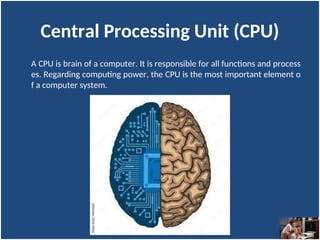
A CPU is brain of a computer. It is responsible for all functions and process
es. Regarding computing power, the CPU is the most important element o
f a computer system.
Central Processing Unit (CPU)
The CPU is comprised of three main parts :
1. Arithmetic Logic Unit (ALU): Executes all arithmetic and logical operations. Arithme
tic calculations like as addition, subtraction, multiplication and division. Logical ope
ration like compare numbers, letters, or special characters
2. Control Unit (CU): controls and co-ordinates computer components.
– Read the code for the next instruction to be executed.
– Increment the program counter so it points to the next instruction.
– Read whatever data the instruction requires from cells in memory.
– Provide the necessary data to an ALU or register.
– If the instruction requires an ALU or specialized hardware to complete, instruct the hardware
to perform the requested operation.
3. Registers :Stores the data that is to be executed next, "very fast storage area".
Primary Memory
• RAM: Random Access Memory (RAM) is a memory scheme within the co
mputer system responsible for storing data on a temporary basis, so that i
t can be promptly accessed by the processor as and when needed. It is vol
atile in nature, which means that data will be erased once supply to the st
orage device is turned off. RAM stores data randomly and the processor a
ccesses these data randomly from the RAM storage. RAM is considered "r
andom access" because you can access any memory cell directly if you kn
ow the row and column that intersect at that cell.
• ROM (Read Only Memory): ROM is a permanent form of storage. ROM sta
ys active regardless of whether power supply to it is turned on or off. RO
M devices do not allow data stored on them to be modified.
Secondary Memory
• Stores data and programs permanently: its retained after the power is turned off
• Hard drive (HD): A hard disk is part of a unit, often called a "disk drive," "hard driv
e," or "hard disk drive," that store and provides relatively quick access to large amo
unts of data on an electromagnetically charged surface or set of surfaces.
• Optical Disk: an optical disc drive (ODD) is a disk drive that uses laser light as part o
f the process of reading or writing data to or from optical discs. Some drives can on
ly read from discs, but recent drives are commonly both readers and recorders, als
o called burners or writers. Compact discs, DVDs, and Blu-ray discs are common ty
pes of optical media which can be read and recorded by such drives. Optical drive i
s the generic name; drives are usually described as "CD" "DVD", or "Bluray", follow
ed by "drive", "writer", etc. There are three main types of optical media: CD, DVD,
and Blu-ray disc. CDs can store up to 700 megabytes (MB) of data and DVDs can sto
re up to 8.4 GB of data. Blu-ray discs, which are the newest type of optical media, c
an store up to 50 GB of data. This storage capacity is a clear advantage over the flo
ppy disk storage media (a magnetic media), which only has a capacity of 1.44 MB.
Secondary Memory
Flash Disk
A storage module made of flash memory chips. A Flash disks have no mechanical p
latters or access arms, but the term "disk" is used because the data are accessed a
s if they were on a hard drive. The disk storage structure is emulated.
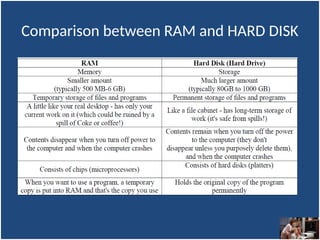
Comparison between RAM and HARD DISK
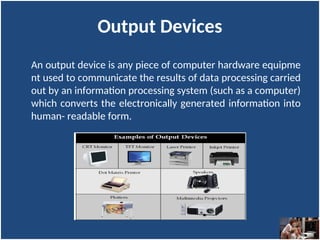
Output Devices
An output device is any piece of computer hardware equipme
nt used to communicate the results of data processing carried
out by an information processing system (such as a computer)
which converts the electronically generated information into
human- readable form.
Software
Software is a generic term for organized collections of computer data and
instructions, often broken into two major categories:
1. system software that provides the basic non- task-specific functions of the
computer, and
2. application software which is used by users to accomplish specific tasks.
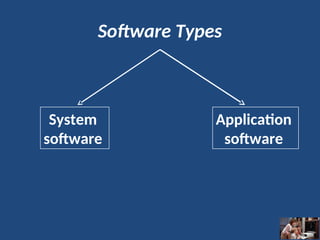
Software Types
System
software
Application
software
System software
System software is responsible for controlling, integrating, and managing
the individual hardware components of a computer system so that other s
oftware and the users of the system see it as a functional unit without hav
ing to be concerned with the low-level details such as transferring data fro
m memory to disk, or rendering text onto a display.
Generally, system software consists of an operating system and some fun
damental utilities such as disk formatters, file managers, display managers,
text editors, user authentication (login) and management tools, and netw
orking and device control software.
Application software
Application software is used to accomplish specific tasks other than just ru
nning the computer system.
Application software may consist of a single program, such as an image vie
wer; a small collection of programs (often called a software package) that
work closely together to accomplish a task, such as a spreadsheet or text p
rocessing system;
a larger collection (often called a software suite) of related but independen
t programs and packages that have a common user interface or shared dat
a format, such as Microsoft Office, which consists of closely integrated wor
d processor, spreadsheet, database, etc.;
or a software system, such as a database management system, which is a c
ollection of fundamental programs that may provide some service to a vari
ety of other independent applications.
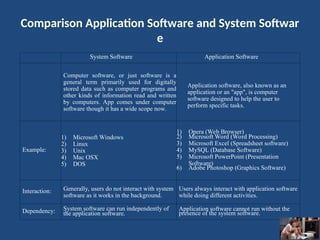
Comparison Application Software and System Softwar
e
System Software Application Software
Computer software, or just software is a
general term primarily used for digitally
stored data such as computer programs and
other kinds of information read and written
by computers. App comes under computer
software though it has a wide scope now.
Application software, also known as an
application or an "app", is computer
software designed to help the user to
perform specific tasks.
Example:
1) Microsoft Windows
2) Linux
3) Unix
4) Mac OSX
5) DOS
1) Opera (Web Browser)
2) Microsoft Word (Word Processing)
3) Microsoft Excel (Spreadsheet software)
4) MySQL (Database Software)
5) Microsoft PowerPoint (Presentation
Software)
6) Adobe Photoshop (Graphics Software)
Interaction: Generally, users do not interact with system
software as it works in the background.
Users always interact with application software
while doing different activities.
Dependency: System software can run independently of
the application software.
Application software cannot run without the
presence of the system software.
Unit of Measurements
Storage measurements: The basic unit used in computer data storage is called
a bit (binary digit). Computers use these little bits, which are composed of ones
and zeros, to do things and talk to other computers. All your files, for instance,
are kept in the computer as binary files and translated into words and pictures
by the software (which is also ones and zeros). This two number system, is call
ed a “binary number system” since it has only two numbers in it. The decimal n
umber system in contrast has ten unique digits, zero through nine.

Introduction to Computer MBA SEM I - Copy (4).ppt

  • 1.
  • 2.
    Introduction to Computer Acomputer is an electronic device, operating un der the control of instructions stored in its own memory that can accept data (input), process t he data according to specified rules, produce in formation (output), and store the information f or future use.
  • 3.
    Functionalities Of AComputer • Any digital computer carries out five functions in g ross terms. – Takes Data as Input – Stores the data/Instructions in its memory and use th em when required. – Processes the data and coverts it into useful Informati on. – Generates the Output. – Control all the above four steps.
  • 4.
    Computer Components Any kindof computers consists of HARDWARE AND SOFTWARE.
  • 5.
    Hardware Computer hardware isthe collection of physical elements that constitutes a computer system. Computer hardware refers to the physical parts or co mponents of a computer such as the monitor, mouse, keyboard, compute r data storage, hard drive disk (HDD), system unit (graphic cards, sound ca rds, memory, motherboard and chips), etc. all of which are physical object s that can be touched.
  • 6.
    Input Devices Input deviceis any peripheral (piece of computer hardware equipment to provide data and control signals to an information processing system such as a computer o r other information appliance. Input device Translate data from form that humans understand to one that the co mputer can work with. Most common are keyboard and mouse
  • 7.
    Example of InputDevices:- 1. Keyboard 2. Mouse (pointing device) 3. Microphone 4. Touch screen 5. Scanner 6. Webcam 7. Touchpads 8. MIDI keyboard 10.Graphics Tablets 11.Cameras 12.Pen Input 13.Video Capture Hardware 14.Microphone 15.Trackballs 16.Barcode reader 17.Digital camera 18.Joystick 19.Gamepad 20.Electronic Whiteboard Note: The most common use keyboard is the QWERTY keyboard. Generally standard Keyboard has 104 keys.
  • 8.
    Central Processing Unit(CPU) A CPU is brain of a computer. It is responsible for all functions and process es. Regarding computing power, the CPU is the most important element o f a computer system.
  • 9.
    Central Processing Unit(CPU) The CPU is comprised of three main parts : 1. Arithmetic Logic Unit (ALU): Executes all arithmetic and logical operations. Arithme tic calculations like as addition, subtraction, multiplication and division. Logical ope ration like compare numbers, letters, or special characters 2. Control Unit (CU): controls and co-ordinates computer components. – Read the code for the next instruction to be executed. – Increment the program counter so it points to the next instruction. – Read whatever data the instruction requires from cells in memory. – Provide the necessary data to an ALU or register. – If the instruction requires an ALU or specialized hardware to complete, instruct the hardware to perform the requested operation. 3. Registers :Stores the data that is to be executed next, "very fast storage area".
  • 10.
    Primary Memory • RAM:Random Access Memory (RAM) is a memory scheme within the co mputer system responsible for storing data on a temporary basis, so that i t can be promptly accessed by the processor as and when needed. It is vol atile in nature, which means that data will be erased once supply to the st orage device is turned off. RAM stores data randomly and the processor a ccesses these data randomly from the RAM storage. RAM is considered "r andom access" because you can access any memory cell directly if you kn ow the row and column that intersect at that cell. • ROM (Read Only Memory): ROM is a permanent form of storage. ROM sta ys active regardless of whether power supply to it is turned on or off. RO M devices do not allow data stored on them to be modified.
  • 11.
    Secondary Memory • Storesdata and programs permanently: its retained after the power is turned off • Hard drive (HD): A hard disk is part of a unit, often called a "disk drive," "hard driv e," or "hard disk drive," that store and provides relatively quick access to large amo unts of data on an electromagnetically charged surface or set of surfaces. • Optical Disk: an optical disc drive (ODD) is a disk drive that uses laser light as part o f the process of reading or writing data to or from optical discs. Some drives can on ly read from discs, but recent drives are commonly both readers and recorders, als o called burners or writers. Compact discs, DVDs, and Blu-ray discs are common ty pes of optical media which can be read and recorded by such drives. Optical drive i s the generic name; drives are usually described as "CD" "DVD", or "Bluray", follow ed by "drive", "writer", etc. There are three main types of optical media: CD, DVD, and Blu-ray disc. CDs can store up to 700 megabytes (MB) of data and DVDs can sto re up to 8.4 GB of data. Blu-ray discs, which are the newest type of optical media, c an store up to 50 GB of data. This storage capacity is a clear advantage over the flo ppy disk storage media (a magnetic media), which only has a capacity of 1.44 MB.
  • 12.
    Secondary Memory Flash Disk Astorage module made of flash memory chips. A Flash disks have no mechanical p latters or access arms, but the term "disk" is used because the data are accessed a s if they were on a hard drive. The disk storage structure is emulated.
  • 13.
  • 14.
    Output Devices An outputdevice is any piece of computer hardware equipme nt used to communicate the results of data processing carried out by an information processing system (such as a computer) which converts the electronically generated information into human- readable form.
  • 15.
    Software Software is ageneric term for organized collections of computer data and instructions, often broken into two major categories: 1. system software that provides the basic non- task-specific functions of the computer, and 2. application software which is used by users to accomplish specific tasks.
  • 16.
  • 17.
    System software System softwareis responsible for controlling, integrating, and managing the individual hardware components of a computer system so that other s oftware and the users of the system see it as a functional unit without hav ing to be concerned with the low-level details such as transferring data fro m memory to disk, or rendering text onto a display. Generally, system software consists of an operating system and some fun damental utilities such as disk formatters, file managers, display managers, text editors, user authentication (login) and management tools, and netw orking and device control software.
  • 18.
    Application software Application softwareis used to accomplish specific tasks other than just ru nning the computer system. Application software may consist of a single program, such as an image vie wer; a small collection of programs (often called a software package) that work closely together to accomplish a task, such as a spreadsheet or text p rocessing system; a larger collection (often called a software suite) of related but independen t programs and packages that have a common user interface or shared dat a format, such as Microsoft Office, which consists of closely integrated wor d processor, spreadsheet, database, etc.; or a software system, such as a database management system, which is a c ollection of fundamental programs that may provide some service to a vari ety of other independent applications.
  • 19.
    Comparison Application Softwareand System Softwar e System Software Application Software Computer software, or just software is a general term primarily used for digitally stored data such as computer programs and other kinds of information read and written by computers. App comes under computer software though it has a wide scope now. Application software, also known as an application or an "app", is computer software designed to help the user to perform specific tasks. Example: 1) Microsoft Windows 2) Linux 3) Unix 4) Mac OSX 5) DOS 1) Opera (Web Browser) 2) Microsoft Word (Word Processing) 3) Microsoft Excel (Spreadsheet software) 4) MySQL (Database Software) 5) Microsoft PowerPoint (Presentation Software) 6) Adobe Photoshop (Graphics Software) Interaction: Generally, users do not interact with system software as it works in the background. Users always interact with application software while doing different activities. Dependency: System software can run independently of the application software. Application software cannot run without the presence of the system software.
  • 20.
    Unit of Measurements Storagemeasurements: The basic unit used in computer data storage is called a bit (binary digit). Computers use these little bits, which are composed of ones and zeros, to do things and talk to other computers. All your files, for instance, are kept in the computer as binary files and translated into words and pictures by the software (which is also ones and zeros). This two number system, is call ed a “binary number system” since it has only two numbers in it. The decimal n umber system in contrast has ten unique digits, zero through nine.