2.2 Direct Data Entry (DDE) devices
WWW.YAHMAD.CO.UK
• Describe direct data entry and associated devices, e.g. magnetic stripe readers, chip
and PIN readers, Radio Frequency Identification (RFID) readers, Magnetic Ink
Character Reader (MICR), Optical Mark Reader (OMR), Optical Character Reader
(OCR), bar code reader
• Identify the advantages and disadvantages of any of the above devices in comparison
with others
A J I R O N D I
Ajiro Tech – Best IGCSE ICT YouTube Channel
Chapter
2:
Input
and
output
devices
2.2 Direct Data Entry (DDE) devices
Direct data entry (DDE) devices are used to input data into a computer without the need for very much, if
any, human interaction
A J I R O N D I
Ajiro Tech – Best IGCSE ICT YouTube Channel
Chapter
2:
Input
and
output
devices
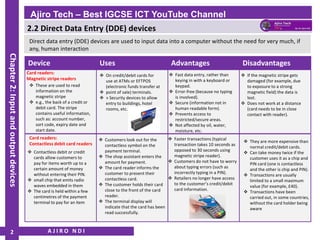
2
Device Uses Advantages Disadvantages
Card readers:
Magnetic stripe readers
❖ These are used to read
information on the
magnetic stripe
❖ e.g., the back of a credit or
debit card. The stripe
contains useful information,
such as: account number,
sort code, expiry date and
start date.
❖ On credit/debit cards for
use at ATMs or EFTPOS
(electronic funds transfer at
❖ point of sale) terminals.
❖ » Security devices to allow
entry to buildings, hotel
rooms, etc.
❖ Fast data entry, rather than
keying in with a keyboard or
keypad.
❖ Error-free (because no typing
is involved).
❖ Secure (information not in
human readable form).
❖ Prevents access to
restricted/secure areas.
❖ Not affected by oil, water,
moisture, etc.
❖ If the magnetic stripe gets
damaged (for example, due
to exposure to a strong
magnetic field) the data is
lost.
❖ Does not work at a distance
(card needs to be in close
contact with reader).
Card readers:
Contactless debit card readers
❖ Contactless debit or credit
cards allow customers to
pay for items worth up to a
certain amount of money
without entering their PIN.
❖ small chip that emits radio
waves embedded in them
❖ The card is held within a few
centimetres of the payment
terminal to pay for an item
❖ Faster transactions (typical
transaction takes 10 seconds as
opposed to 30 seconds using
magnetic stripe reader).
❖ Customers do not have to worry
about typing errors (such as
incorrectly typing in a PIN).
❖ Retailers no longer have access
to the customer’s credit/debit
card information.
❖ Customers look out for the
contactless symbol on the
payment terminal.
❖ The shop assistant enters the
amount for payment.
❖ The card reader informs the
customer to present their
contactless card.
❖ The customer holds their card
close to the front of the card
reader.
❖ The terminal display will
indicate that the card has been
read successfully.
❖ They are more expensive than
normal credit/debit cards.
❖ Can take money twice if the
customer uses it as a chip and
PIN card (one is contactless
and the other is chip and PIN).
❖ Transactions are usually
limited to a small maximum
value (for example, £40).
❖ Transactions have been
carried out, in some countries,
without the card holder being
aware
2.2 Direct Data Entry (DDE) devices
A J I R O N D I
Ajiro Tech – Best IGCSE ICT YouTube Channel
Chapter
2:
Input
and
output
devices
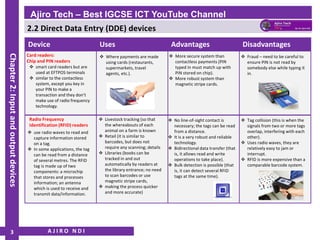
3
Device Uses Advantages Disadvantages
Card readers:
Chip and PIN readers
❖ smart card readers but are
used at EFTPOS terminals
❖ similar to the contactless
system, except you key in
your PIN to make a
transaction and they don’t
make use of radio frequency
technology.
❖ Where payments are made
using cards (restaurants,
supermarkets, travel
agents, etc.).
❖ More secure system than
contactless payments (PIN
typed in must match up with
PIN stored on chip).
❖ More robust system than
magnetic stripe cards.
❖ Fraud – need to be careful to
ensure PIN is not read by
somebody else while typing it
in.
Radio Frequency
Identification (RFID) readers
❖ use radio waves to read and
capture information stored
on a tag.
❖ In some applications, the tag
can be read from a distance
of several metres. The RFID
tag is made up of two
components: a microchip
that stores and processes
information; an antenna
which is used to receive and
transmit data/information.
❖ No line-of-sight contact is
necessary; the tags can be read
from a distance.
❖ It is a very robust and reliable
technology.
❖ Bidirectional data transfer (that
is, it allows read and write
operations to take place).
❖ Bulk detection is possible (that
is, it can detect several RFID
tags at the same time).
❖ Livestock tracking (so that
the whereabouts of each
animal on a farm is known
❖ Retail (it is similar to
barcodes, but does not
require any scanning; details
❖ Libraries (books can be
tracked in and out
automatically by readers at
the library entrance; no need
to scan barcodes or use
magnetic stripe cards,
❖ making the process quicker
and more accurate)
❖ Tag collision (this is when the
signals from two or more tags
overlap, interfering with each
other).
❖ Uses radio waves, they are
relatively easy to jam or
interrupt.
❖ RFID is more expensive than a
comparable barcode system.
2.2 Direct Data Entry (DDE) devices
A J I R O N D I
Ajiro Tech – Best IGCSE ICT YouTube Channel
Chapter
2:
Input
and
output
devices
4
Device Uses Advantages Disadvantages
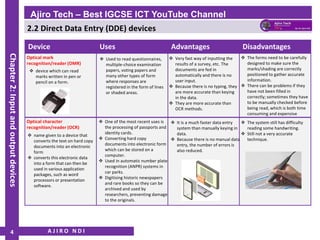
Optical mark
recognition/reader (OMR)
❖ device which can read
marks written in pen or
pencil on a form.
❖ Used to read questionnaires,
multiple-choice examination
papers, voting papers and
many other types of form
where responses are
registered in the form of lines
or shaded areas.
❖ Very fast way of inputting the
results of a survey, etc. The
documents are fed in
automatically and there is no
user input.
❖ Because there is no typing, they
are more accurate than keying
in the data.
❖ They are more accurate than
OCR methods.
❖ The forms need to be carefully
designed to make sure the
marks/shading are correctly
positioned to gather accurate
information.
❖ There can be problems if they
have not been filled in
correctly; sometimes they have
to be manually checked before
being read, which is both time
consuming and expensive
Optical character
recognition/reader (OCR)
❖ name given to a device that
converts the text on hard copy
documents into an electronic
form
❖ converts this electronic data
into a form that can then be
used in various application
packages, such as word
processors or presentation
software.
❖ It is a much faster data entry
system than manually keying in
data.
❖ Because there is no manual data
entry, the number of errors is
also reduced.
❖ One of the most recent uses is
the processing of passports and
identity cards.
❖ Converting hard copy
documents into electronic form
which can be stored on a
computer.
❖ Used in automatic number plate
recognition (ANPR) systems in
car parks.
❖ Digitising historic newspapers
and rare books so they can be
archived and used by
researchers, preventing damage
to the originals.
❖ The system still has difficulty
reading some handwriting.
❖ Still not a very accurate
technique.
2.2 Direct Data Entry (DDE) devices
A J I R O N D I
Ajiro Tech – Best IGCSE ICT YouTube Channel
Chapter
2:
Input
and
output
devices
5
Device Uses Advantages Disadvantages
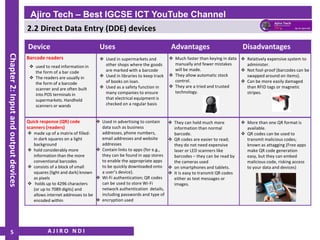
Barcode readers
❖ used to read information in
the form of a bar code
❖ The readers are usually in
the form of a barcode
scanner and are often built
into POS terminals in
supermarkets. Handheld
scanners or wands
❖ Used in supermarkets and
other shops where the goods
are marked with a barcode
❖ Used in libraries to keep track
of books on loan.
❖ Used as a safety function in
many companies to ensure
that electrical equipment is
checked on a regular basis
❖ Much faster than keying in data
manually and fewer mistakes
will be made.
❖ They allow automatic stock
control.
❖ They are a tried and trusted
technology.
❖ Relatively expensive system to
administer.
❖ Not fool-proof (barcodes can be
swapped around on items).
❖ Can be more easily damaged
than RFID tags or magnetic
stripes.
Quick response (QR) code
scanners (readers)
❖ made up of a matrix of filled-
in dark squares on a light
background
❖ hold considerably more
information than the more
conventional barcodes
❖ consists of a block of small
squares (light and dark) known
as pixels
❖ holds up to 4296 characters
(or up to 7089 digits) and
allows internet addresses to be
encoded within
❖ They can hold much more
information than normal
barcode.
❖ QR codes are easier to read;
they do not need expensive
laser or LED scanners like
barcodes – they can be read by
the cameras used
❖ on smartphones and tablets.
❖ It is easy to transmit QR codes
either as text messages or
images.
❖ Used in advertising to contain
data such as business
addresses, phone numbers,
email addresses and website
addresses
❖ Contain links to apps (for e.g.,
they can be found in app stores
to enable the appropriate apps
to be quickly downloaded onto
a user’s device).
❖ Wi-Fi authentication; QR codes
can be used to store Wi-Fi
network authentication details,
including passwords and type of
❖ encryption used
❖ More than one QR format is
available.
❖ QR codes can be used to
transmit malicious codes;
known as attagging (Free apps
make QR code generation
easy, but they can embed
malicious code, risking access
to your data and devices)

IGCSE ICT - Input and Output Devices - Direct Data Entry (DDE) Devices - Ajiro Tech - Part 2

  • 1.
    2.2 Direct DataEntry (DDE) devices WWW.YAHMAD.CO.UK • Describe direct data entry and associated devices, e.g. magnetic stripe readers, chip and PIN readers, Radio Frequency Identification (RFID) readers, Magnetic Ink Character Reader (MICR), Optical Mark Reader (OMR), Optical Character Reader (OCR), bar code reader • Identify the advantages and disadvantages of any of the above devices in comparison with others A J I R O N D I Ajiro Tech – Best IGCSE ICT YouTube Channel Chapter 2: Input and output devices
  • 2.
    2.2 Direct DataEntry (DDE) devices Direct data entry (DDE) devices are used to input data into a computer without the need for very much, if any, human interaction A J I R O N D I Ajiro Tech – Best IGCSE ICT YouTube Channel Chapter 2: Input and output devices 2 Device Uses Advantages Disadvantages Card readers: Magnetic stripe readers ❖ These are used to read information on the magnetic stripe ❖ e.g., the back of a credit or debit card. The stripe contains useful information, such as: account number, sort code, expiry date and start date. ❖ On credit/debit cards for use at ATMs or EFTPOS (electronic funds transfer at ❖ point of sale) terminals. ❖ » Security devices to allow entry to buildings, hotel rooms, etc. ❖ Fast data entry, rather than keying in with a keyboard or keypad. ❖ Error-free (because no typing is involved). ❖ Secure (information not in human readable form). ❖ Prevents access to restricted/secure areas. ❖ Not affected by oil, water, moisture, etc. ❖ If the magnetic stripe gets damaged (for example, due to exposure to a strong magnetic field) the data is lost. ❖ Does not work at a distance (card needs to be in close contact with reader). Card readers: Contactless debit card readers ❖ Contactless debit or credit cards allow customers to pay for items worth up to a certain amount of money without entering their PIN. ❖ small chip that emits radio waves embedded in them ❖ The card is held within a few centimetres of the payment terminal to pay for an item ❖ Faster transactions (typical transaction takes 10 seconds as opposed to 30 seconds using magnetic stripe reader). ❖ Customers do not have to worry about typing errors (such as incorrectly typing in a PIN). ❖ Retailers no longer have access to the customer’s credit/debit card information. ❖ Customers look out for the contactless symbol on the payment terminal. ❖ The shop assistant enters the amount for payment. ❖ The card reader informs the customer to present their contactless card. ❖ The customer holds their card close to the front of the card reader. ❖ The terminal display will indicate that the card has been read successfully. ❖ They are more expensive than normal credit/debit cards. ❖ Can take money twice if the customer uses it as a chip and PIN card (one is contactless and the other is chip and PIN). ❖ Transactions are usually limited to a small maximum value (for example, £40). ❖ Transactions have been carried out, in some countries, without the card holder being aware
  • 3.
    2.2 Direct DataEntry (DDE) devices A J I R O N D I Ajiro Tech – Best IGCSE ICT YouTube Channel Chapter 2: Input and output devices 3 Device Uses Advantages Disadvantages Card readers: Chip and PIN readers ❖ smart card readers but are used at EFTPOS terminals ❖ similar to the contactless system, except you key in your PIN to make a transaction and they don’t make use of radio frequency technology. ❖ Where payments are made using cards (restaurants, supermarkets, travel agents, etc.). ❖ More secure system than contactless payments (PIN typed in must match up with PIN stored on chip). ❖ More robust system than magnetic stripe cards. ❖ Fraud – need to be careful to ensure PIN is not read by somebody else while typing it in. Radio Frequency Identification (RFID) readers ❖ use radio waves to read and capture information stored on a tag. ❖ In some applications, the tag can be read from a distance of several metres. The RFID tag is made up of two components: a microchip that stores and processes information; an antenna which is used to receive and transmit data/information. ❖ No line-of-sight contact is necessary; the tags can be read from a distance. ❖ It is a very robust and reliable technology. ❖ Bidirectional data transfer (that is, it allows read and write operations to take place). ❖ Bulk detection is possible (that is, it can detect several RFID tags at the same time). ❖ Livestock tracking (so that the whereabouts of each animal on a farm is known ❖ Retail (it is similar to barcodes, but does not require any scanning; details ❖ Libraries (books can be tracked in and out automatically by readers at the library entrance; no need to scan barcodes or use magnetic stripe cards, ❖ making the process quicker and more accurate) ❖ Tag collision (this is when the signals from two or more tags overlap, interfering with each other). ❖ Uses radio waves, they are relatively easy to jam or interrupt. ❖ RFID is more expensive than a comparable barcode system.
  • 4.
    2.2 Direct DataEntry (DDE) devices A J I R O N D I Ajiro Tech – Best IGCSE ICT YouTube Channel Chapter 2: Input and output devices 4 Device Uses Advantages Disadvantages Optical mark recognition/reader (OMR) ❖ device which can read marks written in pen or pencil on a form. ❖ Used to read questionnaires, multiple-choice examination papers, voting papers and many other types of form where responses are registered in the form of lines or shaded areas. ❖ Very fast way of inputting the results of a survey, etc. The documents are fed in automatically and there is no user input. ❖ Because there is no typing, they are more accurate than keying in the data. ❖ They are more accurate than OCR methods. ❖ The forms need to be carefully designed to make sure the marks/shading are correctly positioned to gather accurate information. ❖ There can be problems if they have not been filled in correctly; sometimes they have to be manually checked before being read, which is both time consuming and expensive Optical character recognition/reader (OCR) ❖ name given to a device that converts the text on hard copy documents into an electronic form ❖ converts this electronic data into a form that can then be used in various application packages, such as word processors or presentation software. ❖ It is a much faster data entry system than manually keying in data. ❖ Because there is no manual data entry, the number of errors is also reduced. ❖ One of the most recent uses is the processing of passports and identity cards. ❖ Converting hard copy documents into electronic form which can be stored on a computer. ❖ Used in automatic number plate recognition (ANPR) systems in car parks. ❖ Digitising historic newspapers and rare books so they can be archived and used by researchers, preventing damage to the originals. ❖ The system still has difficulty reading some handwriting. ❖ Still not a very accurate technique.
  • 5.
    2.2 Direct DataEntry (DDE) devices A J I R O N D I Ajiro Tech – Best IGCSE ICT YouTube Channel Chapter 2: Input and output devices 5 Device Uses Advantages Disadvantages Barcode readers ❖ used to read information in the form of a bar code ❖ The readers are usually in the form of a barcode scanner and are often built into POS terminals in supermarkets. Handheld scanners or wands ❖ Used in supermarkets and other shops where the goods are marked with a barcode ❖ Used in libraries to keep track of books on loan. ❖ Used as a safety function in many companies to ensure that electrical equipment is checked on a regular basis ❖ Much faster than keying in data manually and fewer mistakes will be made. ❖ They allow automatic stock control. ❖ They are a tried and trusted technology. ❖ Relatively expensive system to administer. ❖ Not fool-proof (barcodes can be swapped around on items). ❖ Can be more easily damaged than RFID tags or magnetic stripes. Quick response (QR) code scanners (readers) ❖ made up of a matrix of filled- in dark squares on a light background ❖ hold considerably more information than the more conventional barcodes ❖ consists of a block of small squares (light and dark) known as pixels ❖ holds up to 4296 characters (or up to 7089 digits) and allows internet addresses to be encoded within ❖ They can hold much more information than normal barcode. ❖ QR codes are easier to read; they do not need expensive laser or LED scanners like barcodes – they can be read by the cameras used ❖ on smartphones and tablets. ❖ It is easy to transmit QR codes either as text messages or images. ❖ Used in advertising to contain data such as business addresses, phone numbers, email addresses and website addresses ❖ Contain links to apps (for e.g., they can be found in app stores to enable the appropriate apps to be quickly downloaded onto a user’s device). ❖ Wi-Fi authentication; QR codes can be used to store Wi-Fi network authentication details, including passwords and type of ❖ encryption used ❖ More than one QR format is available. ❖ QR codes can be used to transmit malicious codes; known as attagging (Free apps make QR code generation easy, but they can embed malicious code, risking access to your data and devices)