Chapter 14

        User
      Datagram
      Program
       (UDP)

TCP/IP Protocol Suite                                                                                      1
            Copyright © The McGraw-Hill Companies, Inc. Permission required for reproduction or display.
OBJECTIVES:
   To introduce UDP and show its relationship to other protocols in the
    TCP/IP protocol suite.
   To explain the format of a UDP packet and discuss the use of each
    field in the header.
   To discuss the services provided by the UDP such as process-to-
    process delivery, multiplexing/demultiplexing, and queuing.
   To show how to calculate the optional checksum and the sender the
    needs to add a pseudoheader to the packet when calculating the
    checksum.
   To discuss how some application programs can benefit from the
    simplicity of UDP.
   To briefly discuss the structure of the UDP package.

TCP/IP Protocol Suite                                      2
Chapter               14.1 Introduction
  Outline               14.2 User Datagram

                        14.3 UDPServices

                        14.4 UDPApplication

                        14.5 UDPPackage


TCP/IP Protocol Suite                         3
14-1 INTRODUCTION

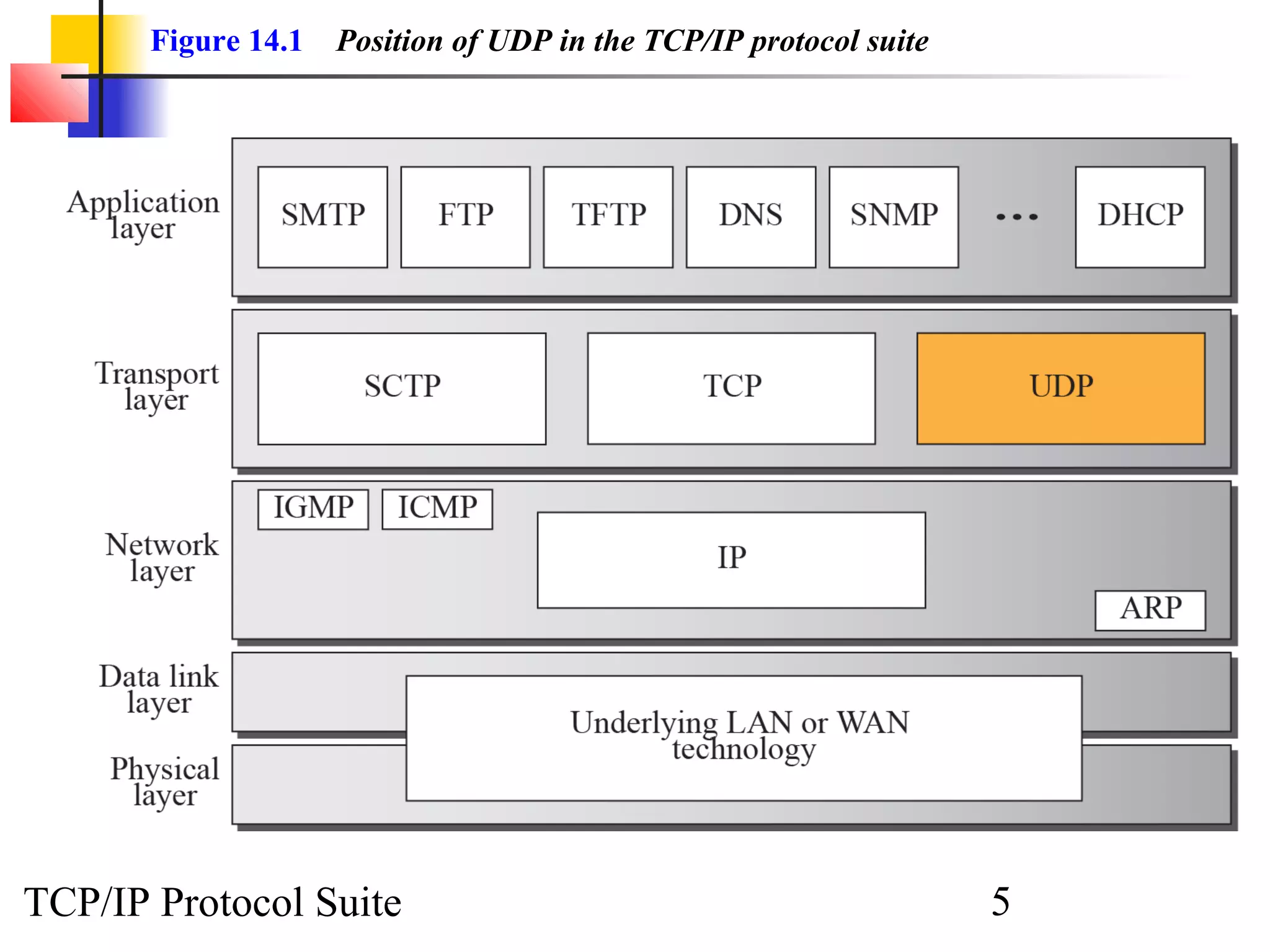
  Figure 14.1 shows the relationship of the
  User Datagram Protocol (UDP) to the other
  protocols and layers of the TCP/IP protocol
  suite:   UDP   is   located  between    the
  application layer and the IP layer, and
  serves as the intermediary between the
  application programs and the network
  operations.


TCP/IP Protocol Suite               4
Figure 14.1   Position of UDP in the TCP/IP protocol suite


TCP/IP Protocol Suite                                               5
14-2 USER DATAGRAM

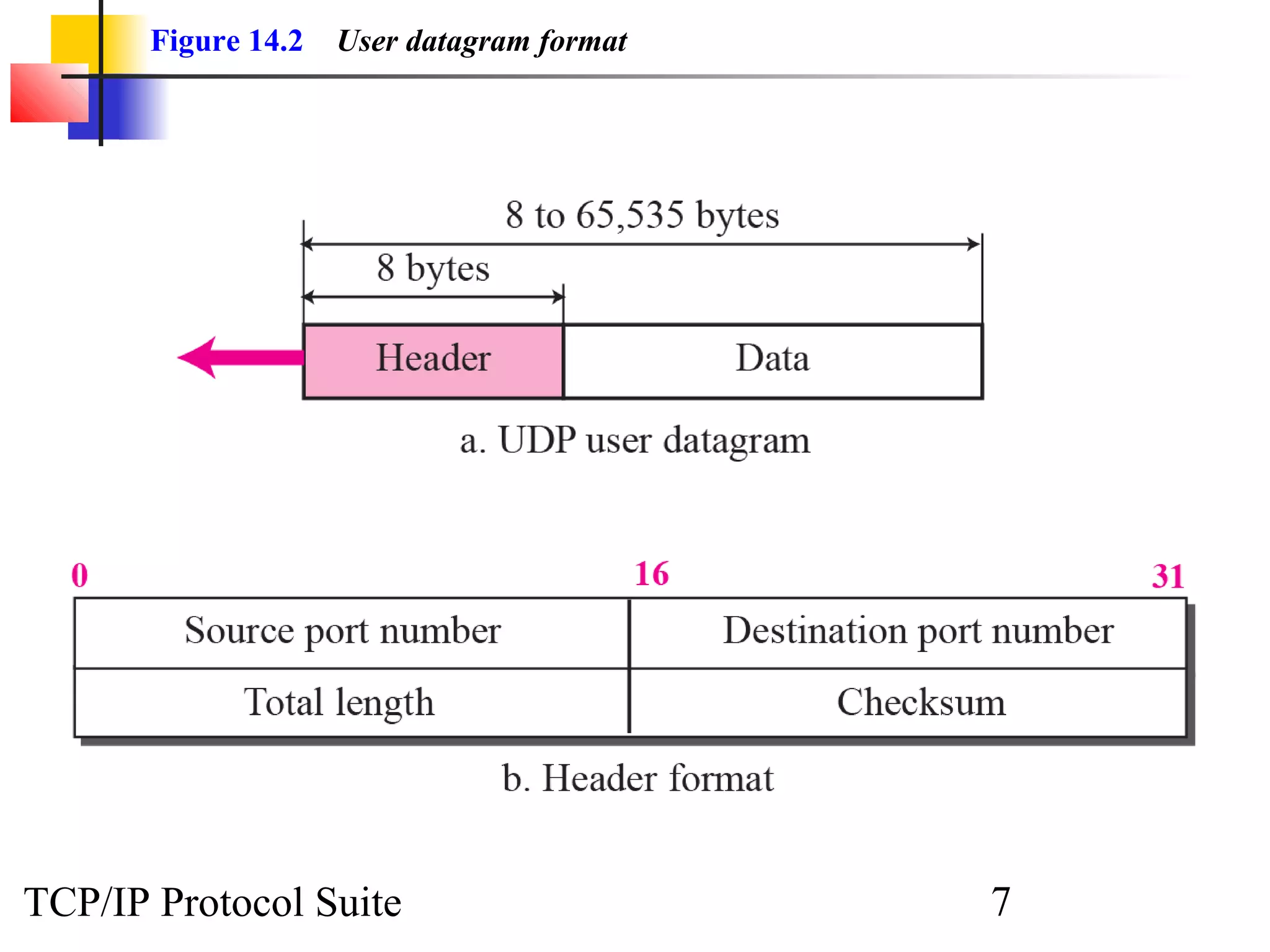
  UDP packets, called user datagrams, have a
  fixed-size header of 8 bytes. Figure 14.2
  shows the format of a user datagram.


TCP/IP Protocol Suite              6
Figure 14.2   User datagram format


TCP/IP Protocol Suite                       7
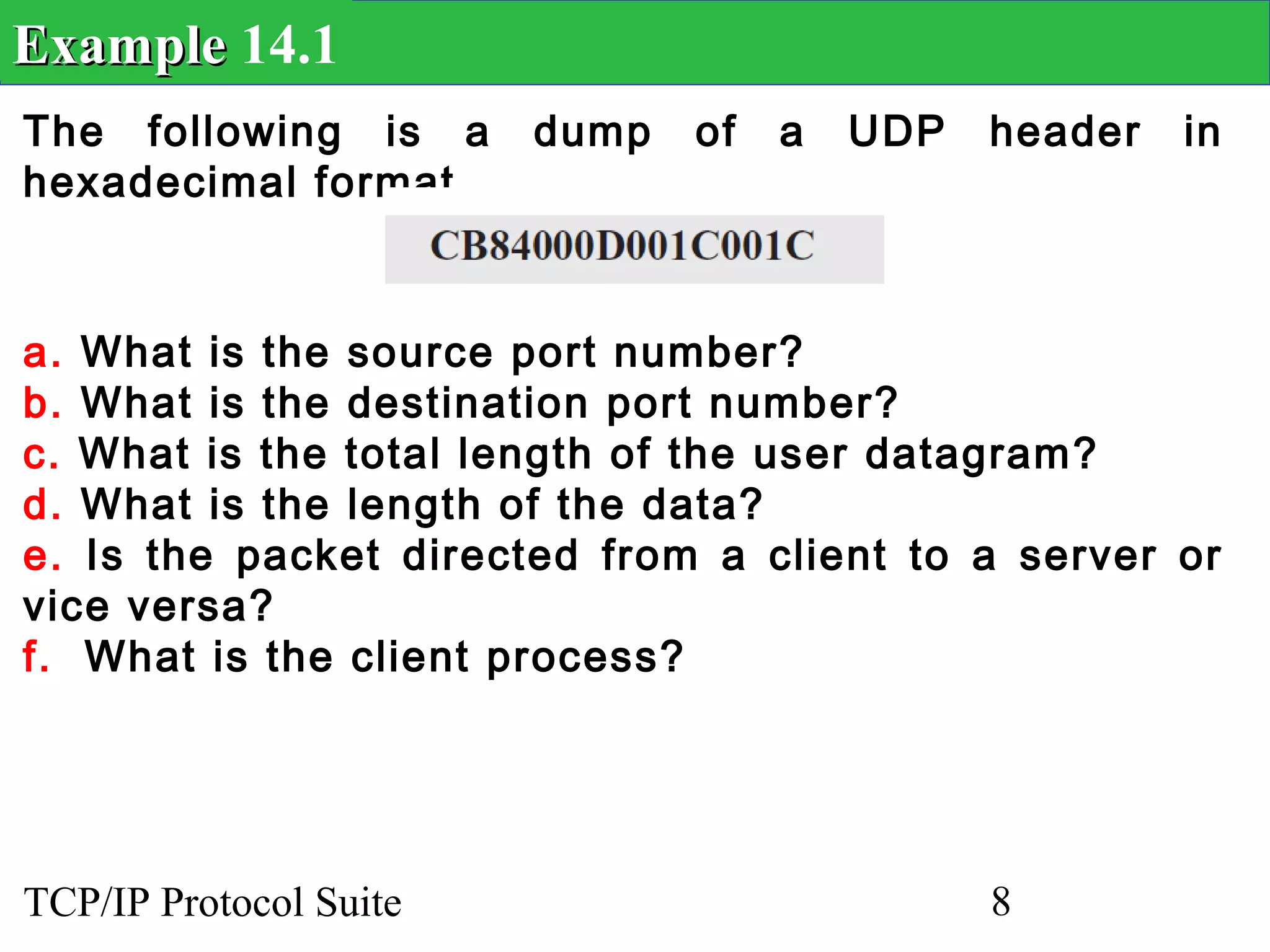
Example 14.1
The following is a      dump   of   a   UDP   header   in
hexadecimal format.


a. What is the source port number?
b. What is the destination port number?
c. What is the total length of the user datagram?
d. What is the length of the data?
e. Is the packet directed from a client to a server or
vice versa?
f. What is the client process?


TCP/IP Protocol Suite                         8
Example 14.1 Continued
Solution
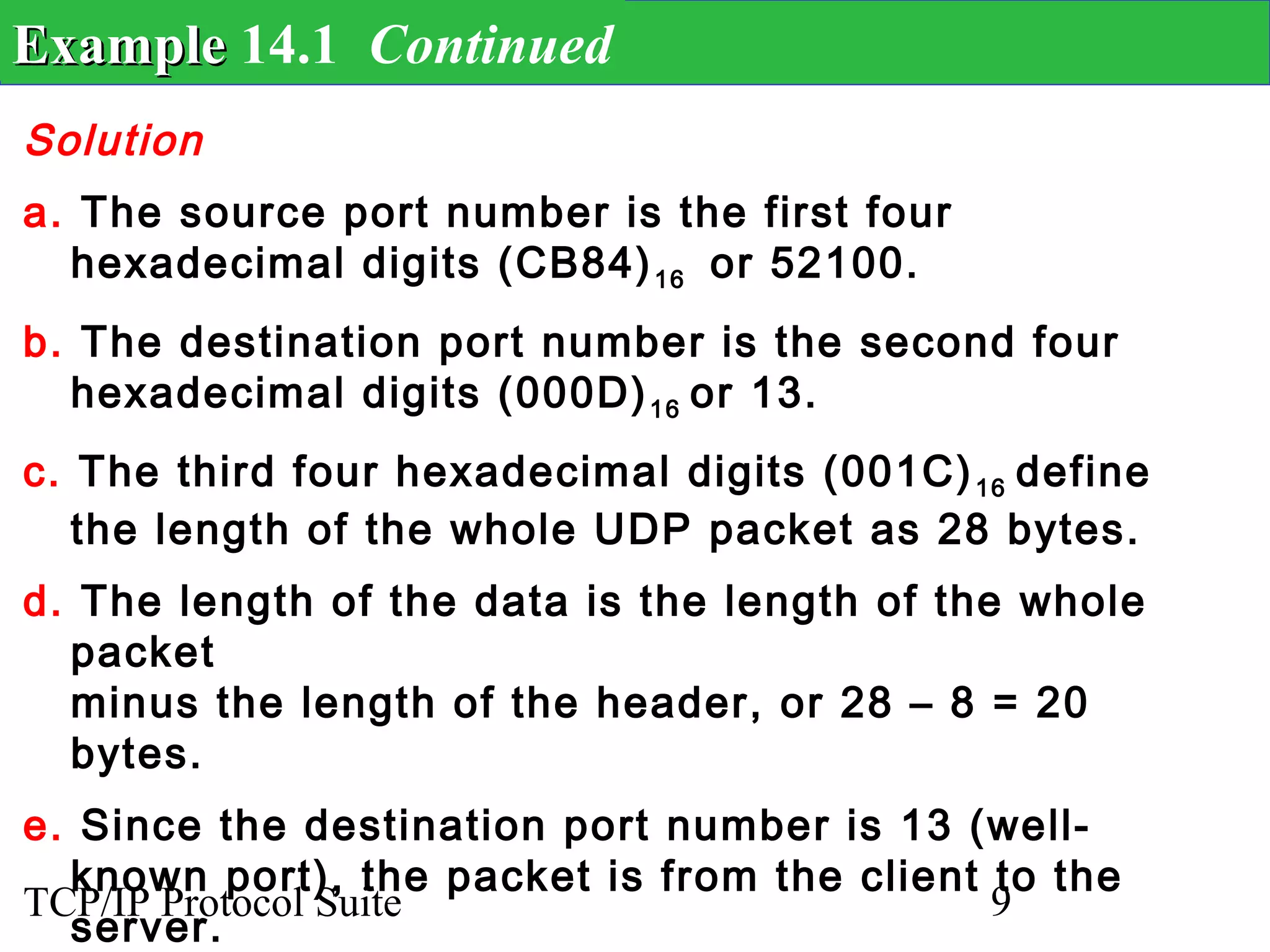
a. The source port number is the first four
  hexadecimal digits (CB84) 16 or 52100.
b. The destination port number is the second four
  hexadecimal digits (000D) 16 or 13.
c. The third four hexadecimal digits (001C) 16 define
   the length of the whole UDP packet as 28 bytes.
d. The length of the data is the length of the whole
  packet
  minus the length of the header, or 28 – 8 = 20
  bytes.
e. Since the destination port number is 13 (well-
  known port), the packet is from the client to the
TCP/IP Protocol Suite                        9
  server.
14-3 UDP Services

  We discussed the general services provided
  by a transport layer protocol in Chapter 13.
  In this section, we discuss what portions of
  those general services are provided by UDP.


TCP/IP Protocol Suite                10
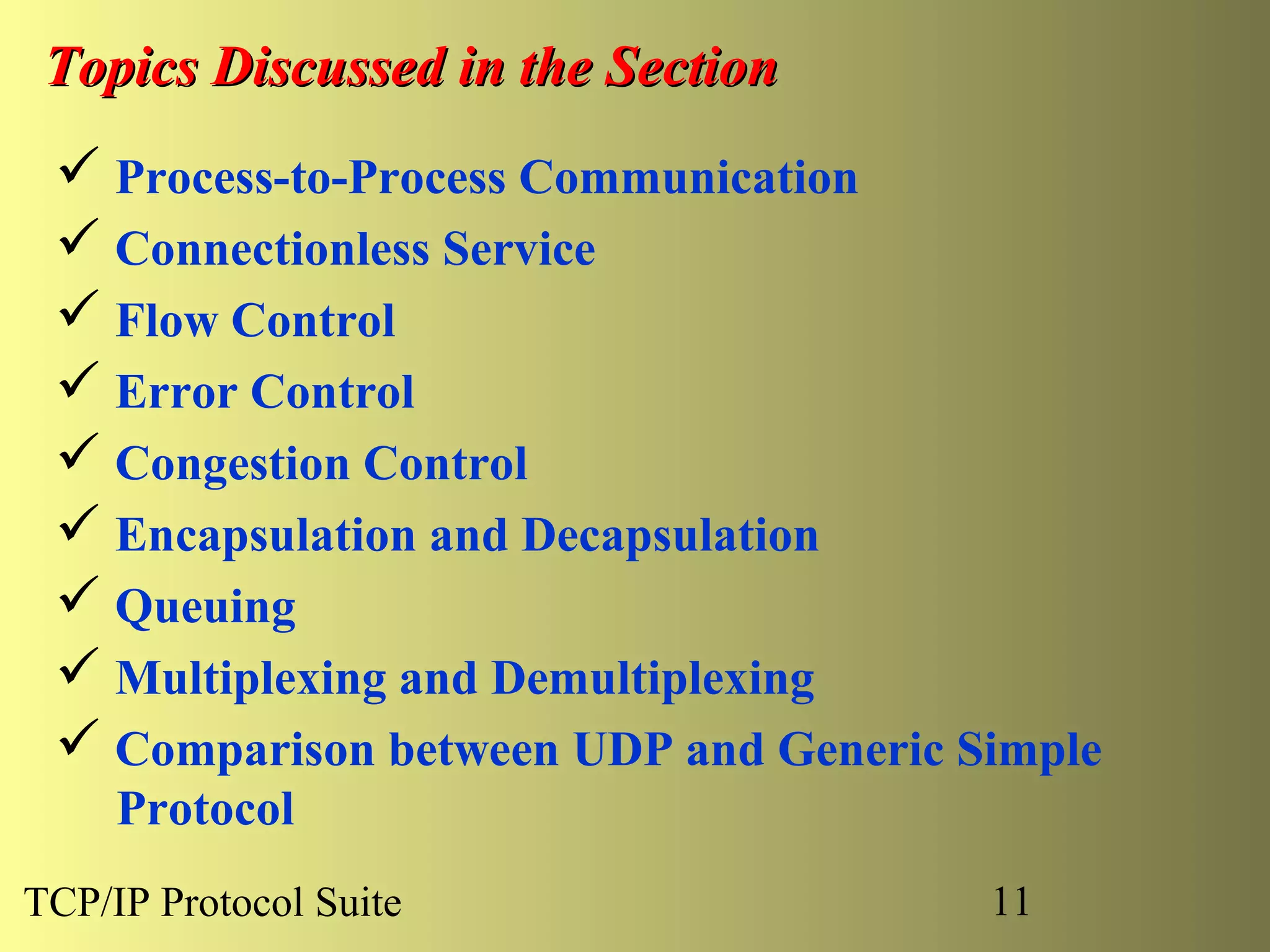
Topics Discussed in the Section
  Process-to-Process Communication
  Connectionless Service
  Flow Control
  Error Control
  Congestion Control
  Encapsulation and Decapsulation
  Queuing
  Multiplexing and Demultiplexing
  Comparison between UDP and Generic Simple
     Protocol
TCP/IP Protocol Suite                  11
TCP/IP Protocol Suite   12
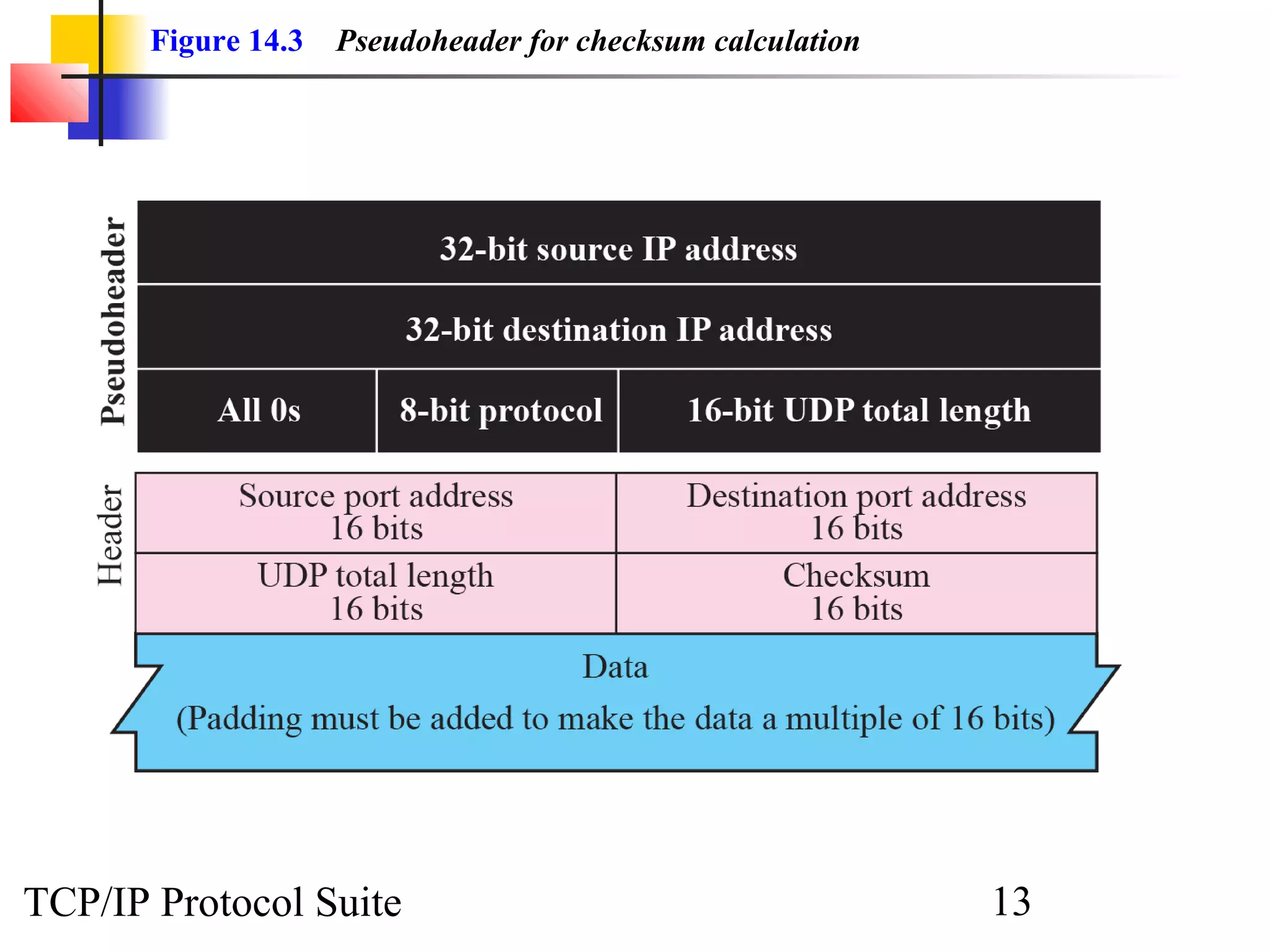
Figure 14.3   Pseudoheader for checksum calculation


TCP/IP Protocol Suite                                        13
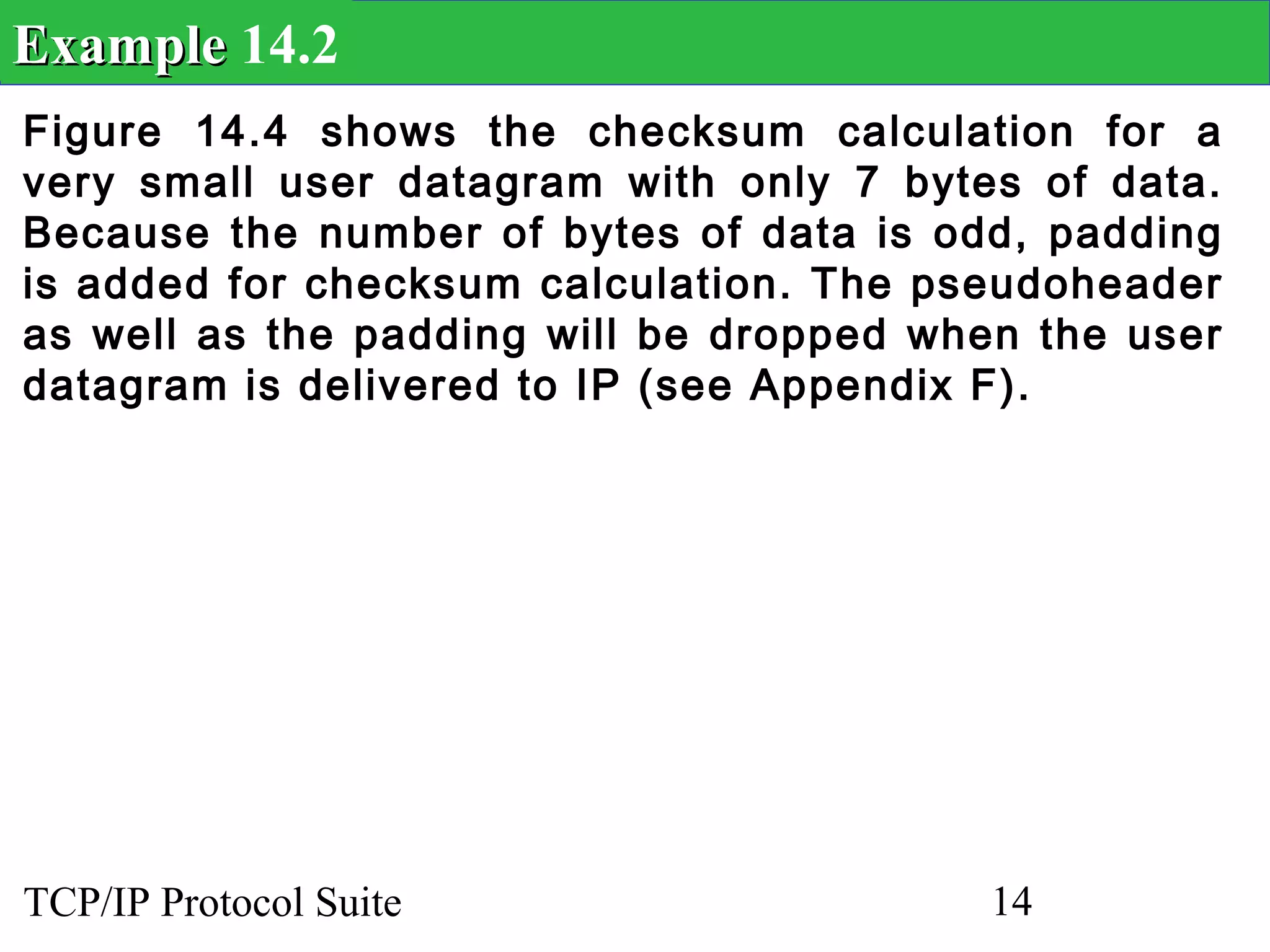
Example 14.2
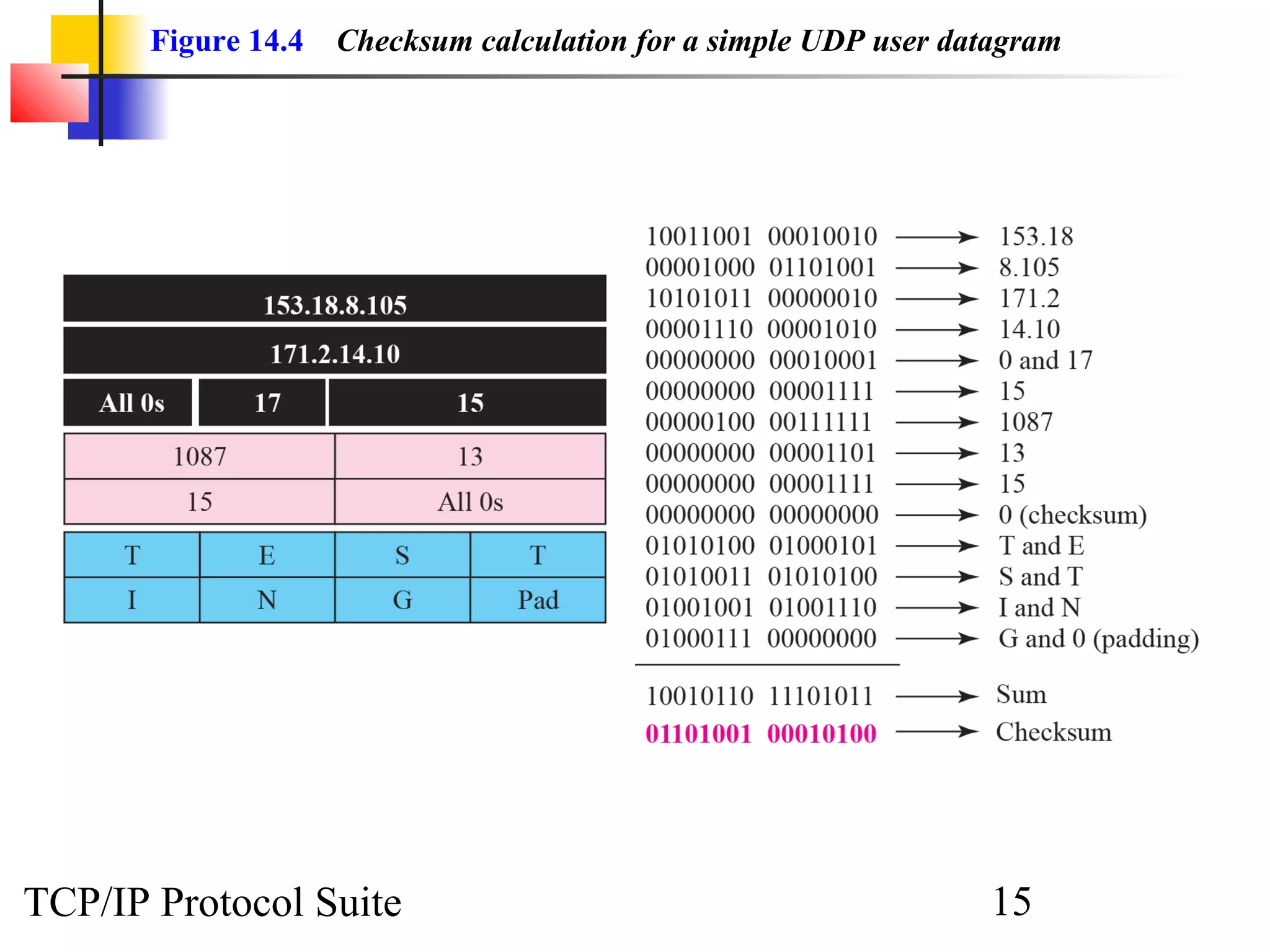
Figure 14.4 shows the checksum calculation for a
very small user datagram with only 7 bytes of data.
Because the number of bytes of data is odd, padding
is added for checksum calculation. The pseudoheader
as well as the padding will be dropped when the user
datagram is delivered to IP (see Appendix F).


TCP/IP Protocol Suite                     14
Figure 14.4   Checksum calculation for a simple UDP user datagram


TCP/IP Protocol Suite                                             15
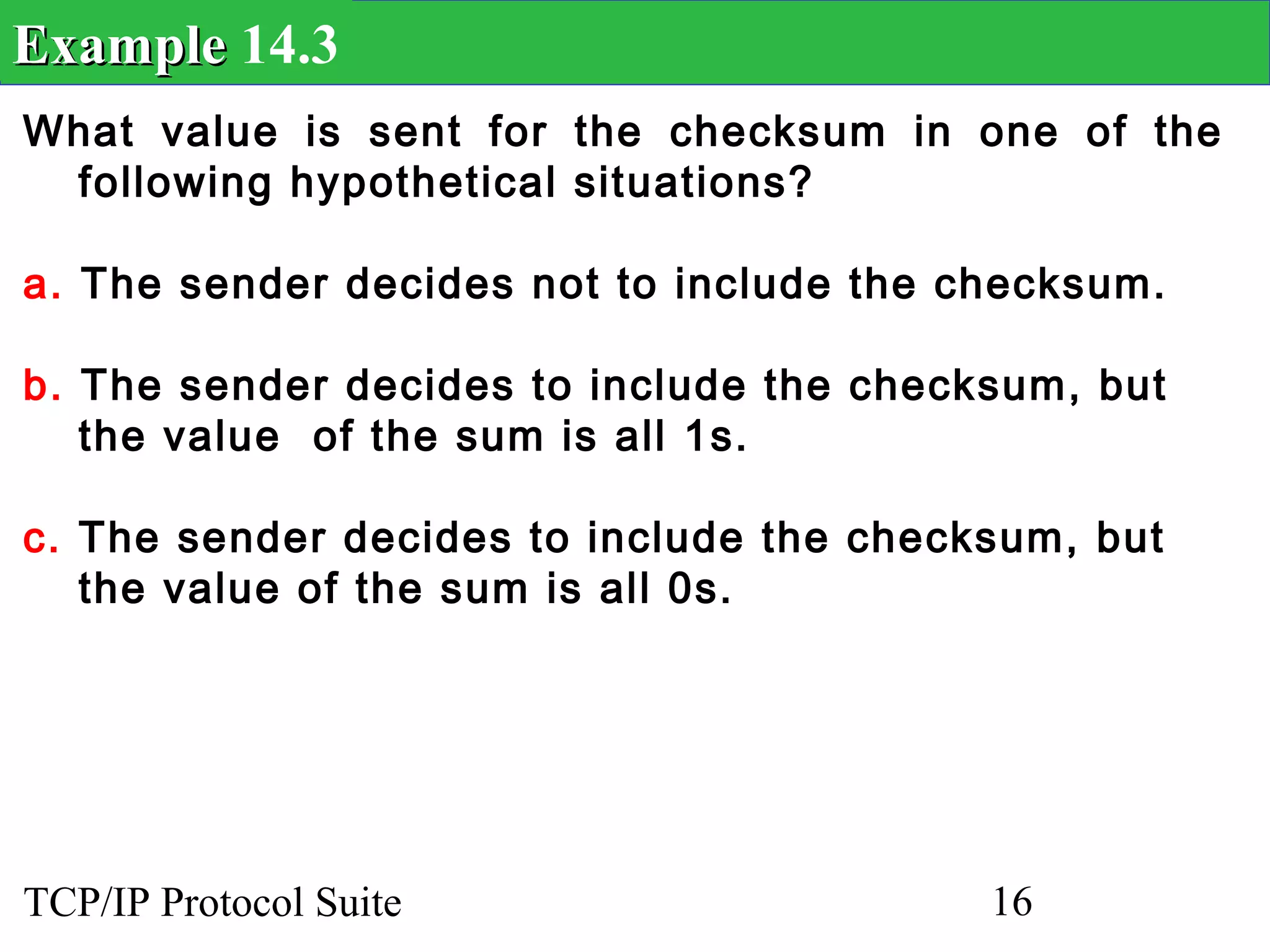
Example 14.3
What value is sent for the checksum in one of the
 following hypothetical situations?

a. The sender decides not to include the checksum.

b. The sender decides to include the checksum, but
   the value of the sum is all 1s.

c. The sender decides to include the checksum, but
   the value of the sum is all 0s.


TCP/IP Protocol Suite                     16
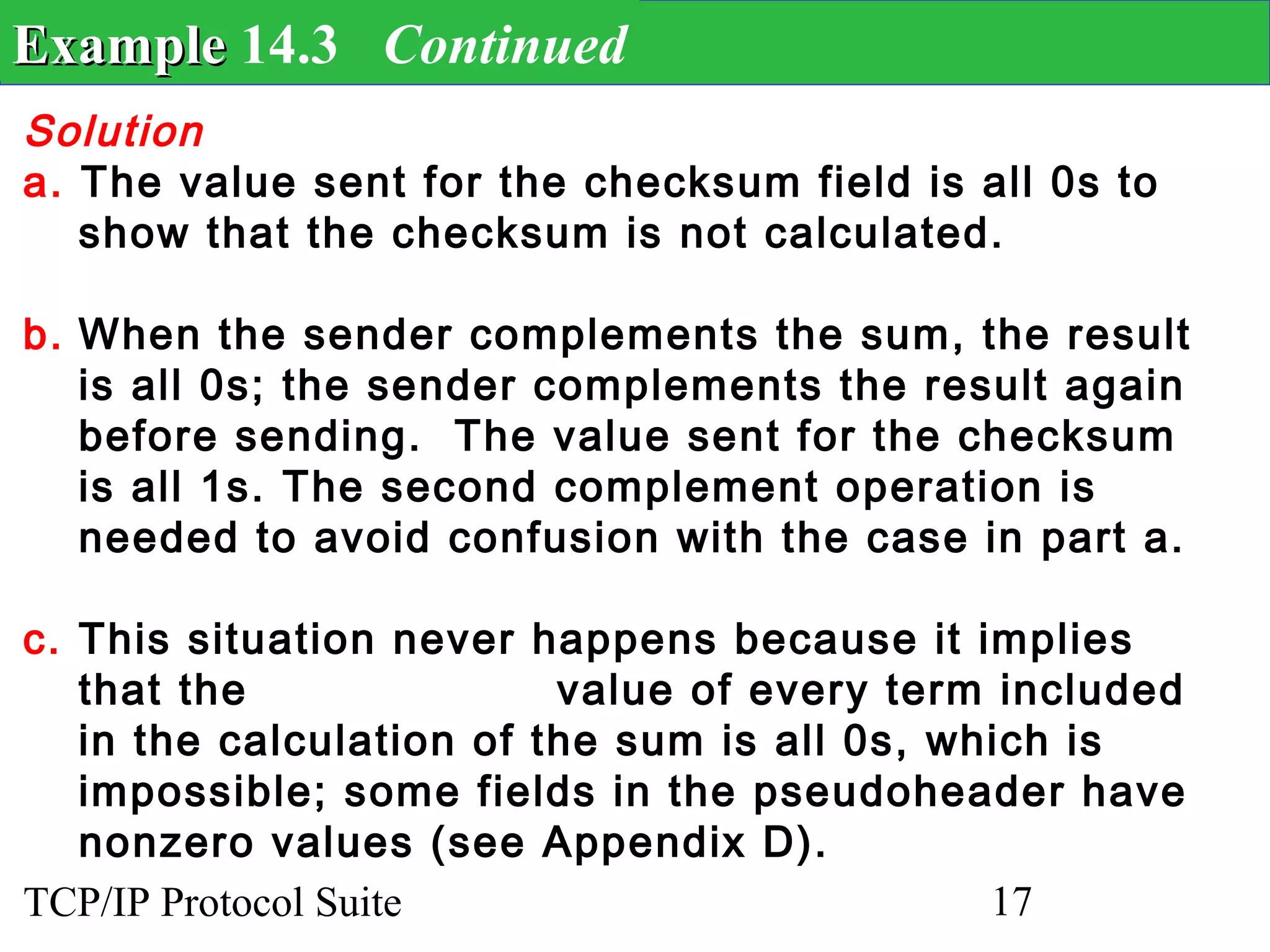
Example 14.3 Continued
Solution
a. The value sent for the checksum field is all 0s to
   show that the checksum is not calculated.

b. When the sender complements the sum, the result
   is all 0s; the sender complements the result again
   before sending. The value sent for the checksum
   is all 1s. The second complement operation is
   needed to avoid confusion with the case in part a.

c. This situation never happens because it implies
   that the               value of every term included
   in the calculation of the sum is all 0s, which is
   impossible; some fields in the pseudoheader have
   nonzero values (see Appendix D).
TCP/IP Protocol Suite                         17
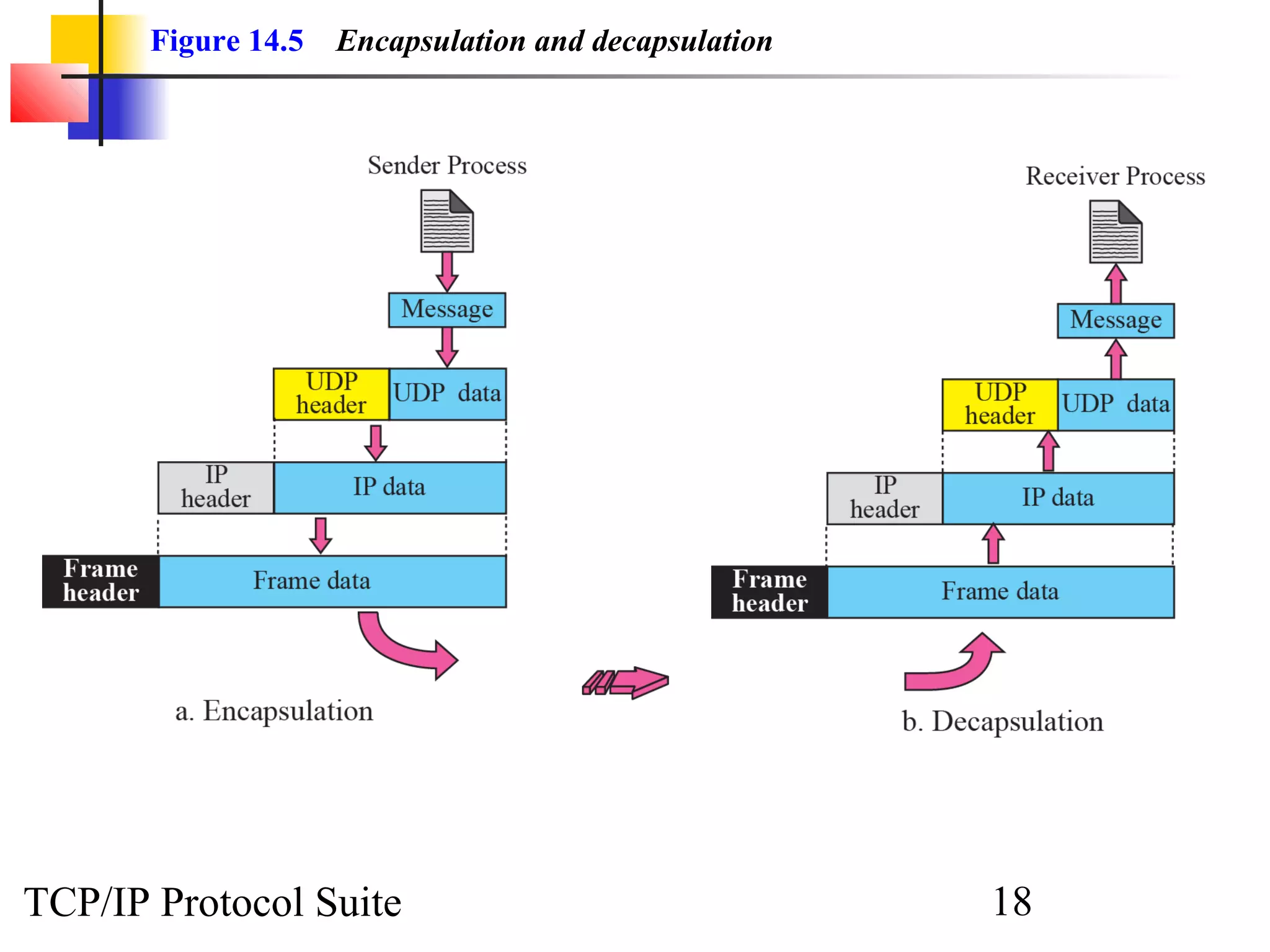
Figure 14.5   Encapsulation and decapsulation


TCP/IP Protocol Suite                                  18
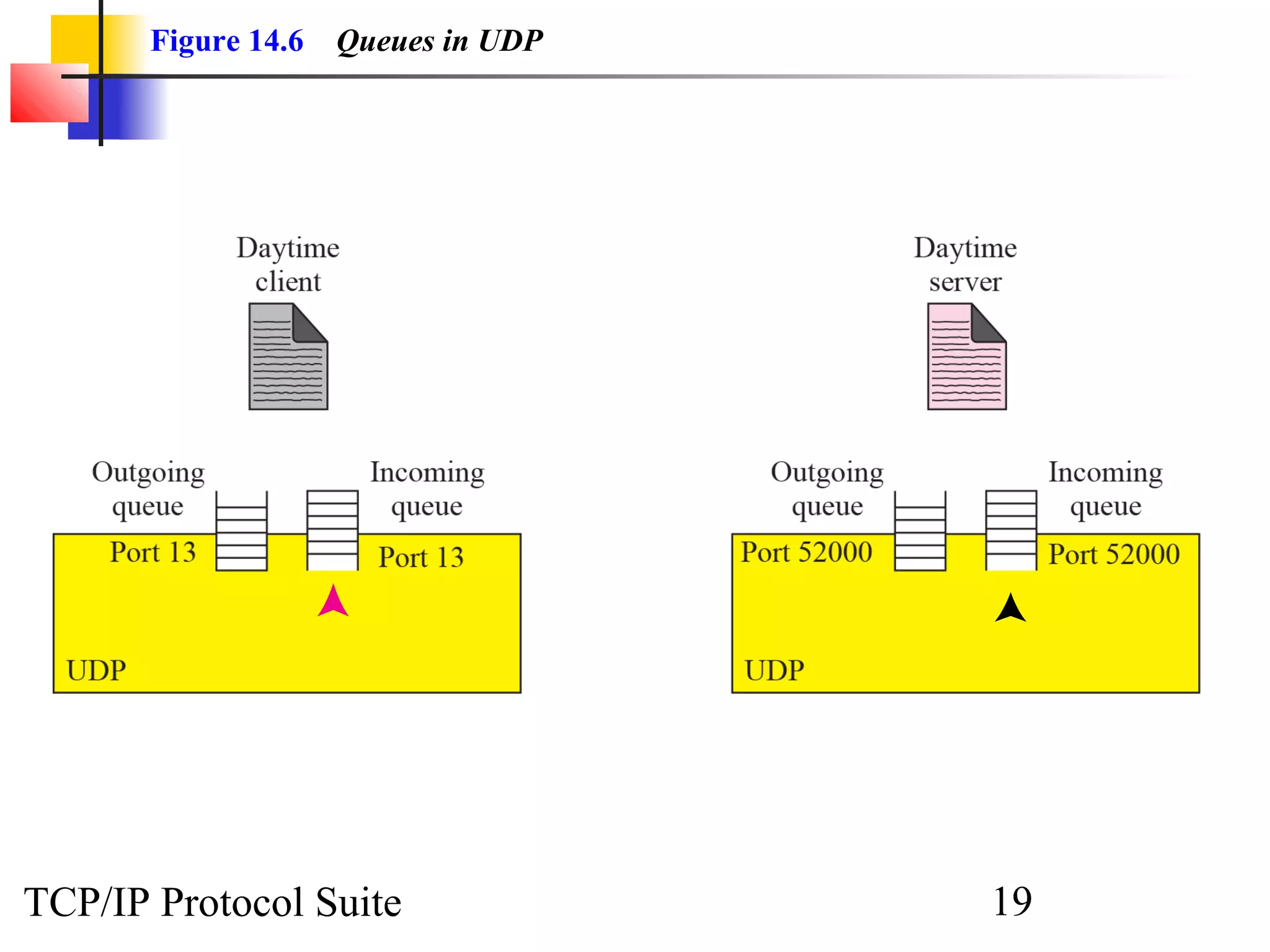
Figure 14.6   Queues in UDP


TCP/IP Protocol Suite                19
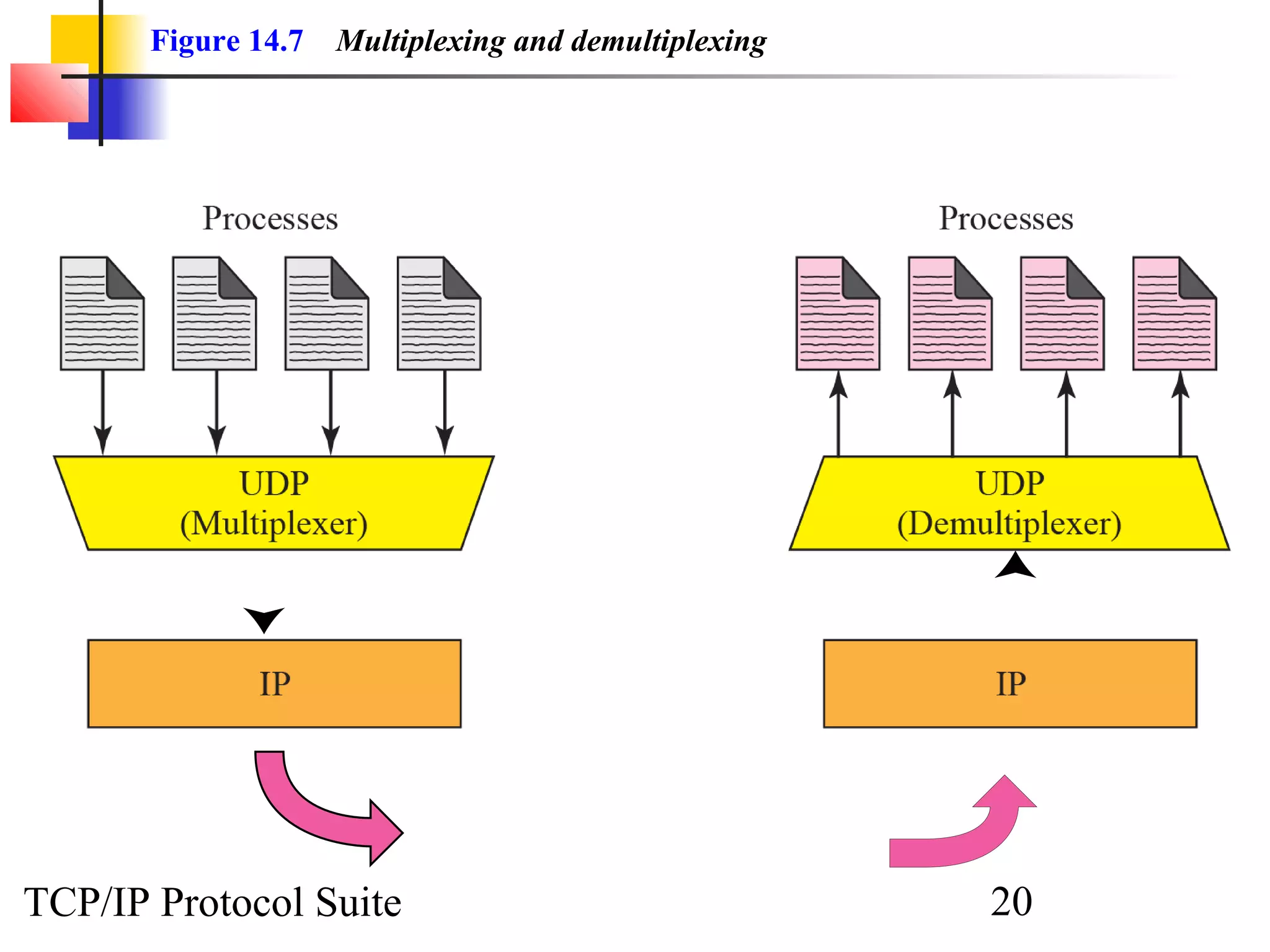
Figure 14.7   Multiplexing and demultiplexing


TCP/IP Protocol Suite                                  20
Note

             UDP is an example of the
        connectionless simple protocol we
         discussed in Chapter 13 with the
        exception of an optional checksum
       added to packets for error detection.


TCP/IP Protocol Suite                 21
14-4 UDP APPLICATION

  Although UDP meets almost none of the
  criteria we mentioned in Chapter 13 for a
  reliable transport-layer protocol, UDP is
  preferable for some applications. The reason
  is that some services may have some side
  effects that are either unacceptable or not
  preferable. An application designer needs
  sometimes to compromise to get the
  optimum.


TCP/IP Protocol Suite                22
Topics Discussed in the Section
  UDP Features
  Typical Applications


TCP/IP Protocol Suite              23
Example 14.4
A client-server application such as DNS (see Chapter
19) uses the services of UDP because a client needs
to send a short request to a server and to receive a
quick response from it. The request and response can
each fit in one user datagram. Since only one
message is exchanged in each direction, the
connectionless feature is not an issue; the client or
server does not worry that messages are delivered
out of order.


TCP/IP Protocol Suite                     24
Example 14.5
A client-server application such as SMTP (see
Chapter 23), which is used in electronic mail, cannot
use the services of UDP because a user can send a
long e-mail message, which may include multimedia
(images, audio, or video). If the application uses UDP
and the message does not fit in one single user
datagram, the message must be split by the
application into different user datagrams. Here the
connectionless service may create problems. The
user datagrams may arrive and be delivered to the
receiver application out of order. The receiver
application may not be able to reorder the pieces.
This means the connectionless service has a
disadvantage for an application program that sends
long messages.
TCP/IP Protocol Suite                        25
Example 14.6
Assume we are downloading a very large text file
from the Internet. We definitely need to use a
transport layer that provides reliable service. We
don’t want part of the file to be missing or corrupted
when we open the file. The delay created between
the delivery of the parts are not an overriding
concern for us; we wait until the whole file is
composed before looking at it. In this case, UDP is
not a suitable transport layer.


TCP/IP Protocol Suite                       26
Example 14.7
Assume we are watching a real-time stream video on
our computer. Such a program is considered a long
file; it is divided into many small parts and broadcast
in real time. The parts of the message are sent one
after another. If the transport layer is supposed to
resend a corrupted or lost frame, the synchronizing
of the whole transmission may be lost. The viewer
suddenly sees a blank screen and needs to wait until
the second transmission arrives. This is not
tolerable. However, if each small part of the screen
is sent using one single user datagram, the receiving
UDP can easily ignore the corrupted or lost packet
and deliver the rest to the application program. That
part of the screen is blank for a very short period of
the time, which most viewers do not even notice.
However, video cannot be viewed out of order, so
streaming audio, video, and voice applications that
run over UDP must reorder or drop frames that are
TCP/IP Protocol Suite                         27
14-5 UDP PACKAGE

  To show how UDP handles the sending and
  receiving of UDP packets, we present a
  simple version of the UDP package.
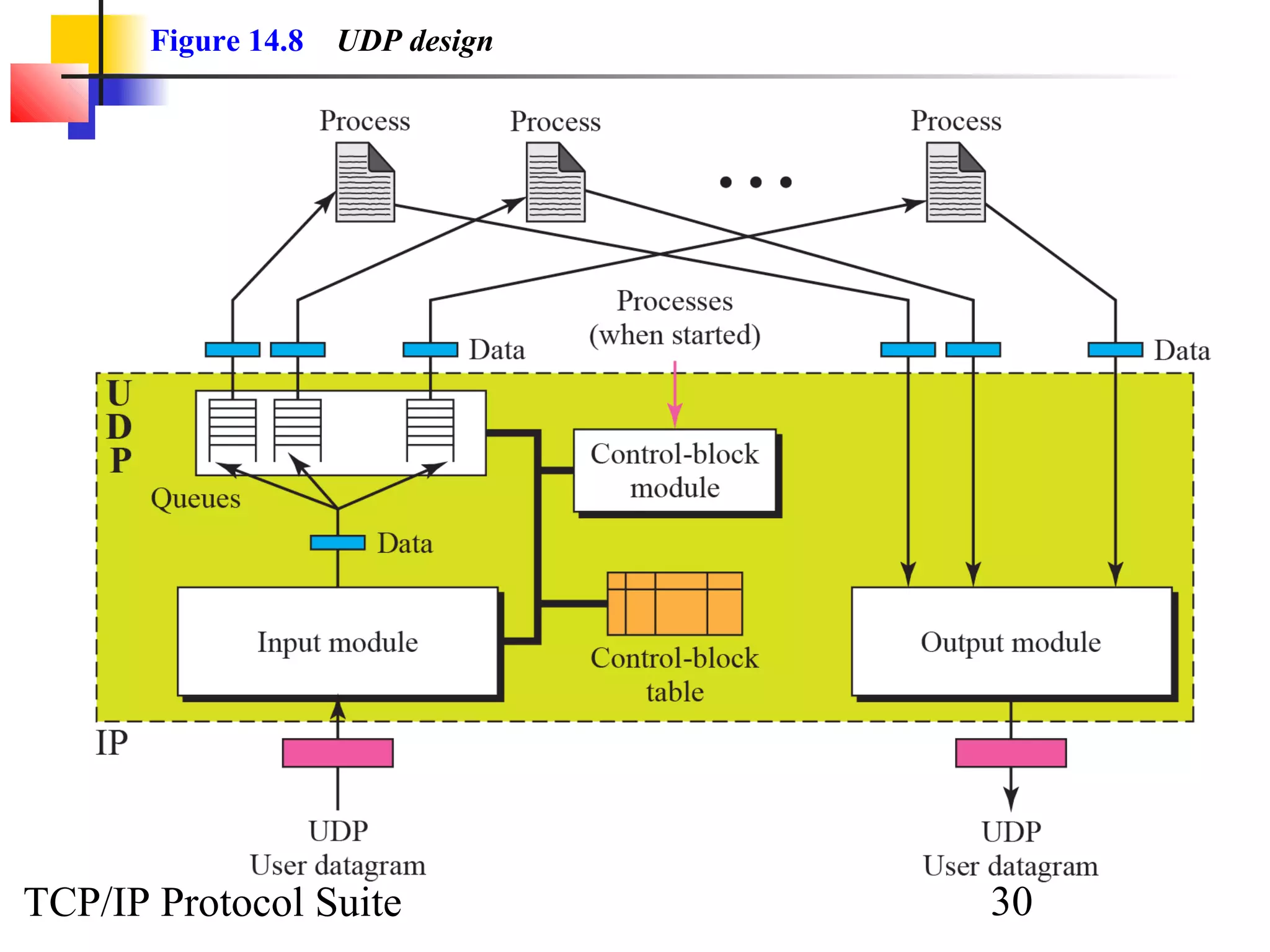
           We can say that the UDP package
  involves five components: a control-block
  table, input queues, a control-block module,
  an input module, and an output module.


TCP/IP Protocol Suite                28
Topics Discussed in the Section
  Control-Block Table
  Input Queues
  Control-Block Module
  Input Module
  Output Module


TCP/IP Protocol Suite              29
Figure 14.8   UDP design


TCP/IP Protocol Suite             30
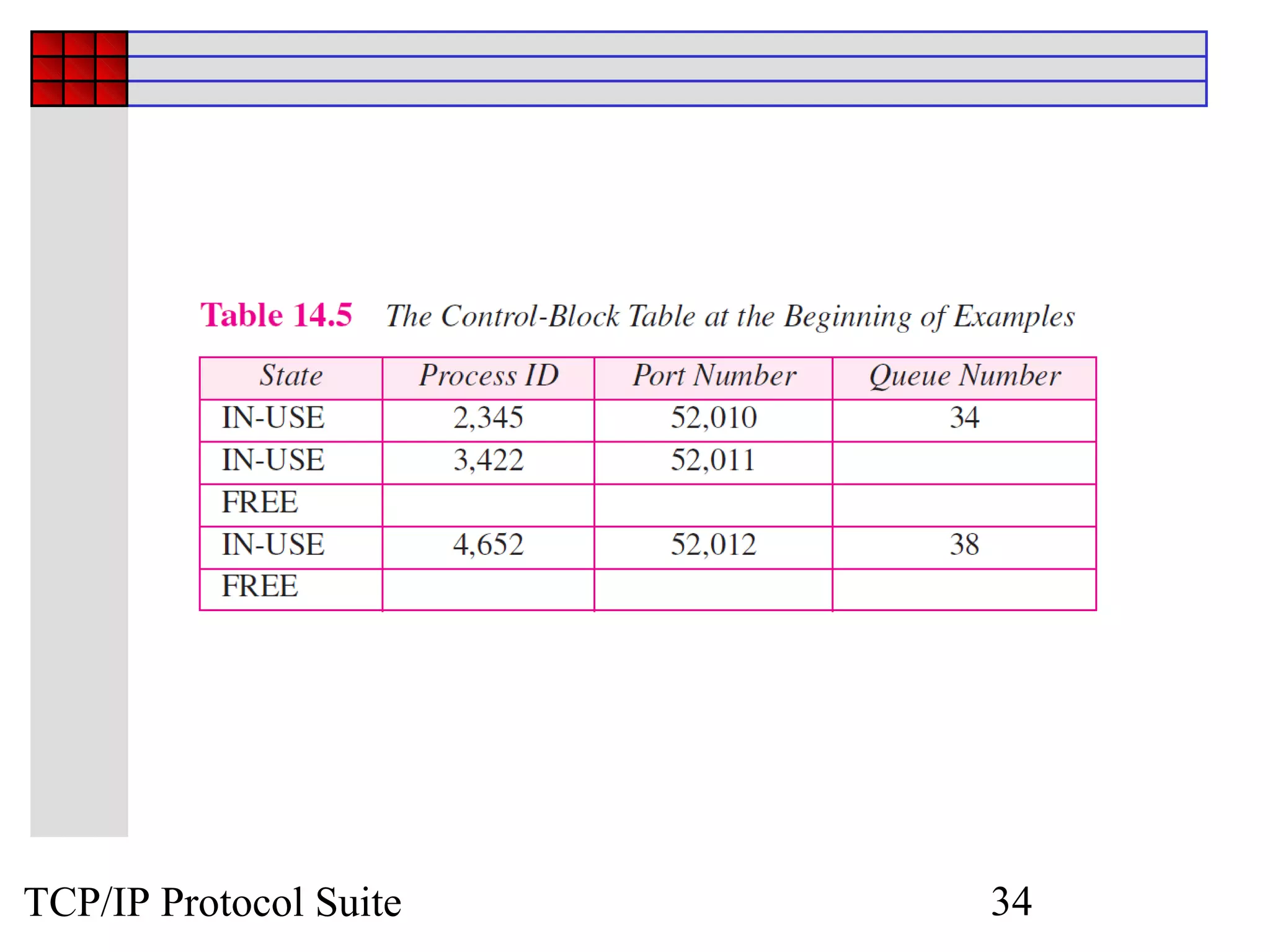
TCP/IP Protocol Suite   31
TCP/IP Protocol Suite   32
TCP/IP Protocol Suite   33
TCP/IP Protocol Suite   34
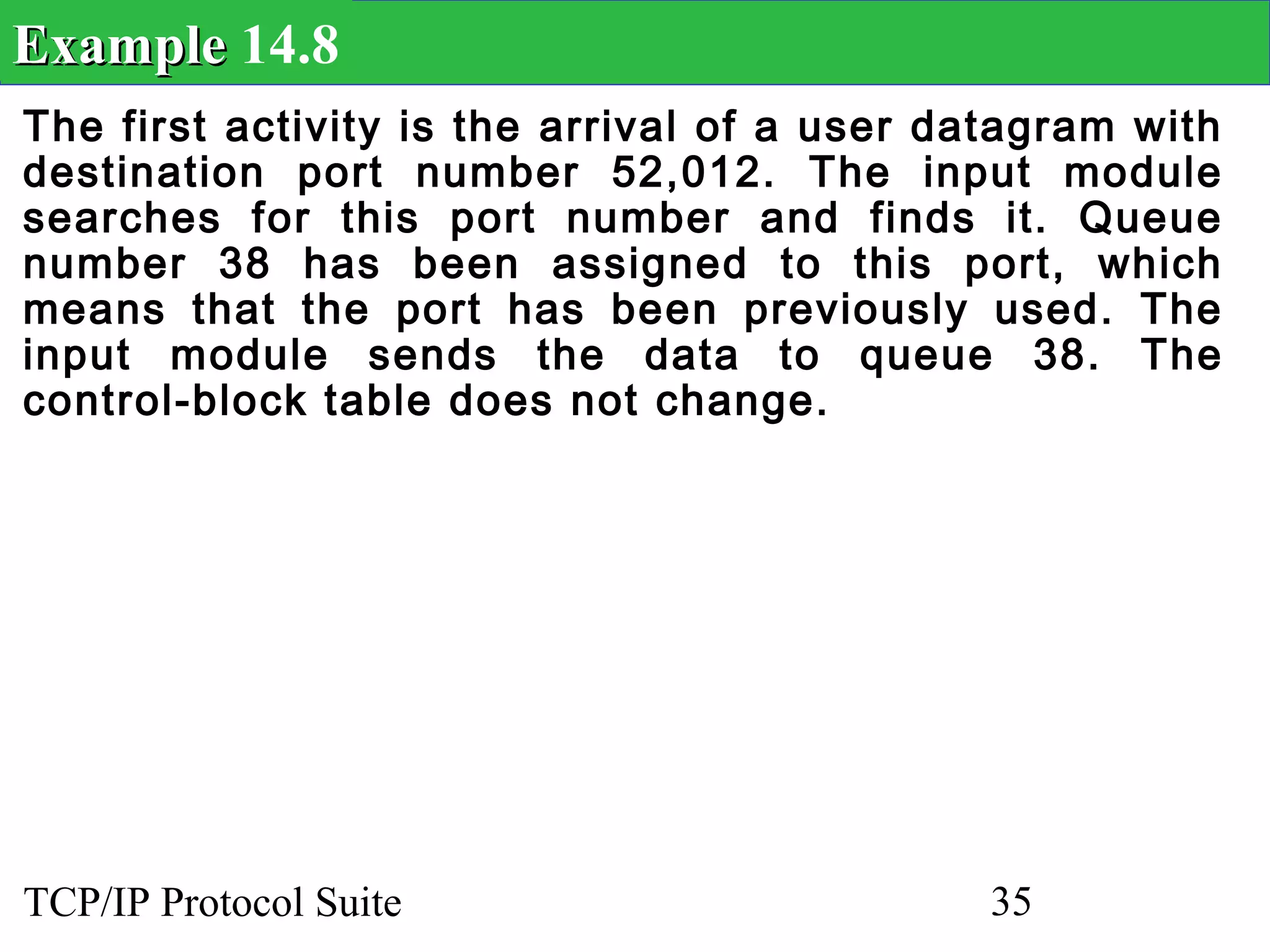
Example 14.8
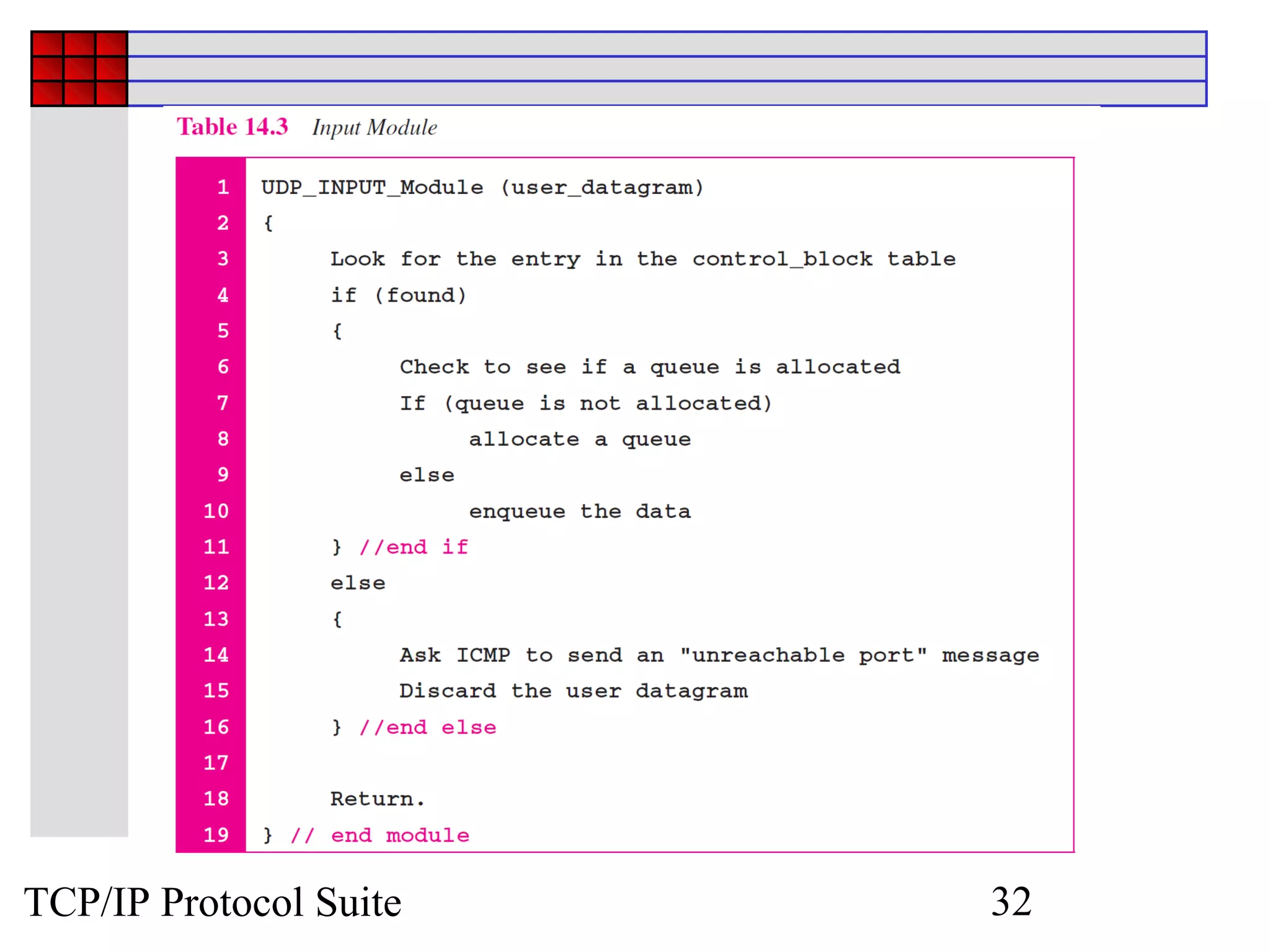
The first activity is the arrival of a user datagram with
destination port number 52,012. The input module
searches for this port number and finds it. Queue
number 38 has been assigned to this port, which
means that the port has been previously used. The
input module sends the data to queue 38. The
control-block table does not change.


TCP/IP Protocol Suite                         35
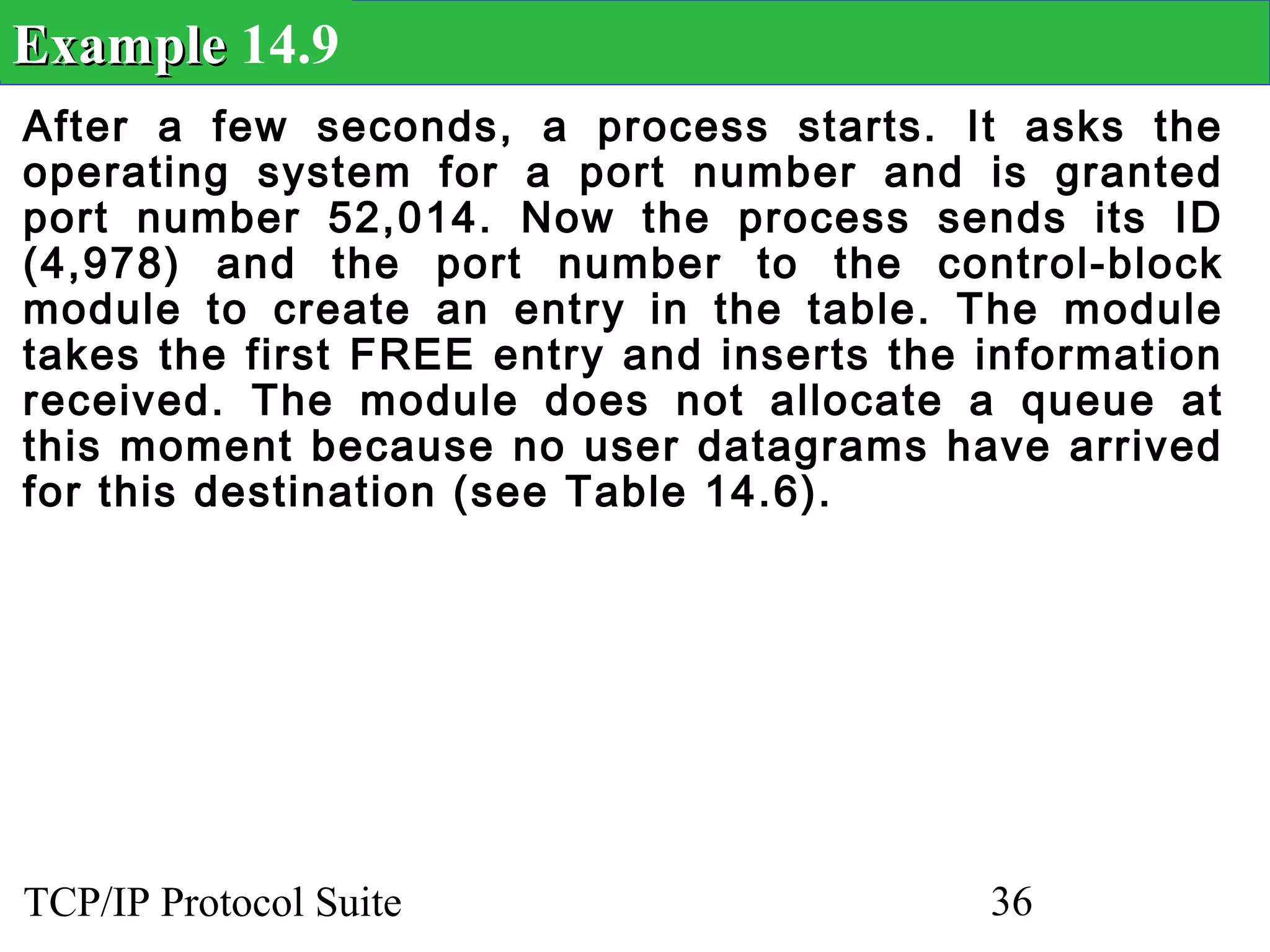
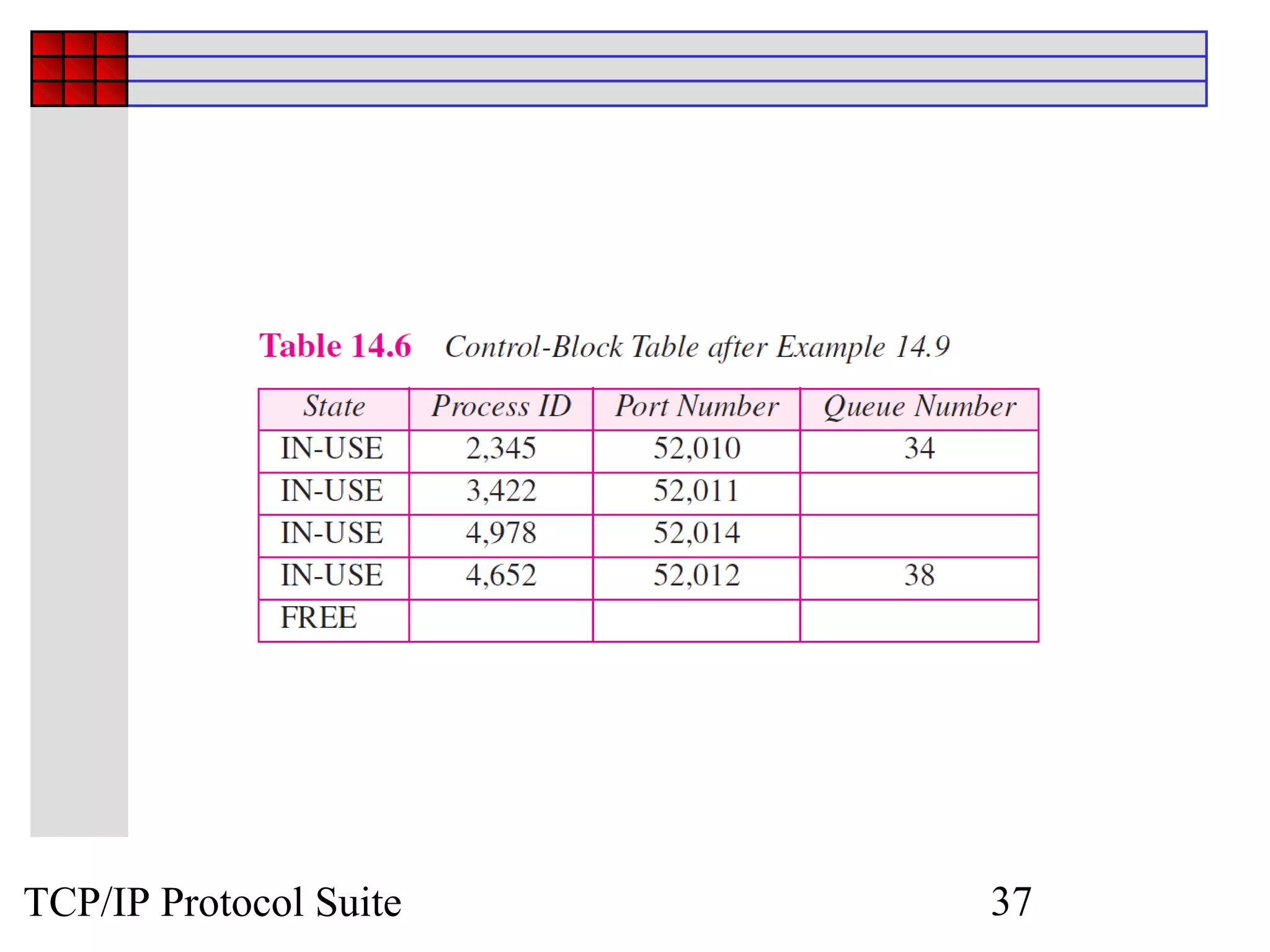
Example 14.9
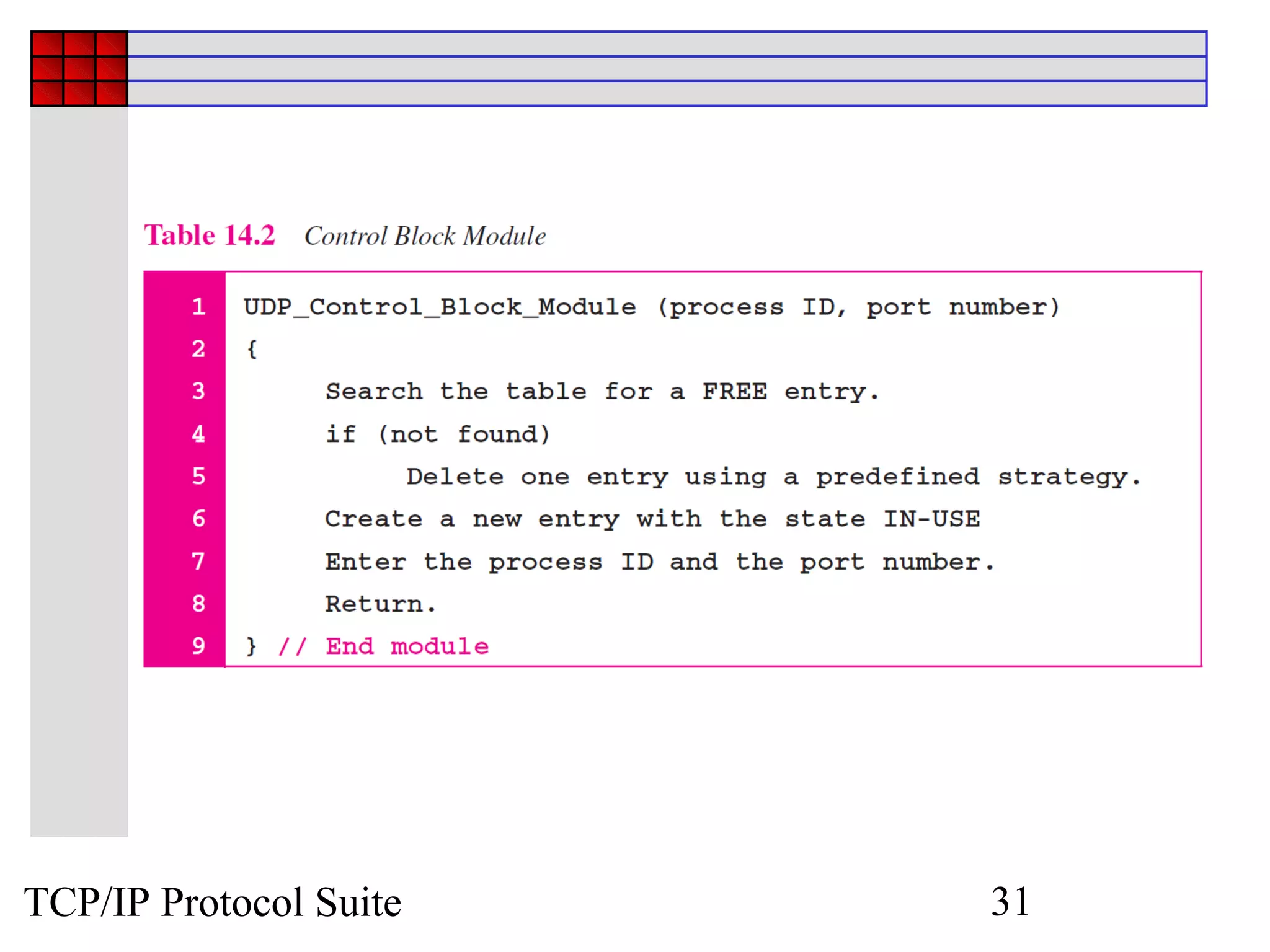
After a few seconds, a process starts. It asks the
operating system for a port number and is granted
port number 52,014. Now the process sends its ID
(4,978) and the port number to the control-block
module to create an entry in the table. The module
takes the first FREE entry and inserts the information
received. The module does not allocate a queue at
this moment because no user datagrams have arrived
for this destination (see Table 14.6).


TCP/IP Protocol Suite                      36
TCP/IP Protocol Suite   37
Example 14.10
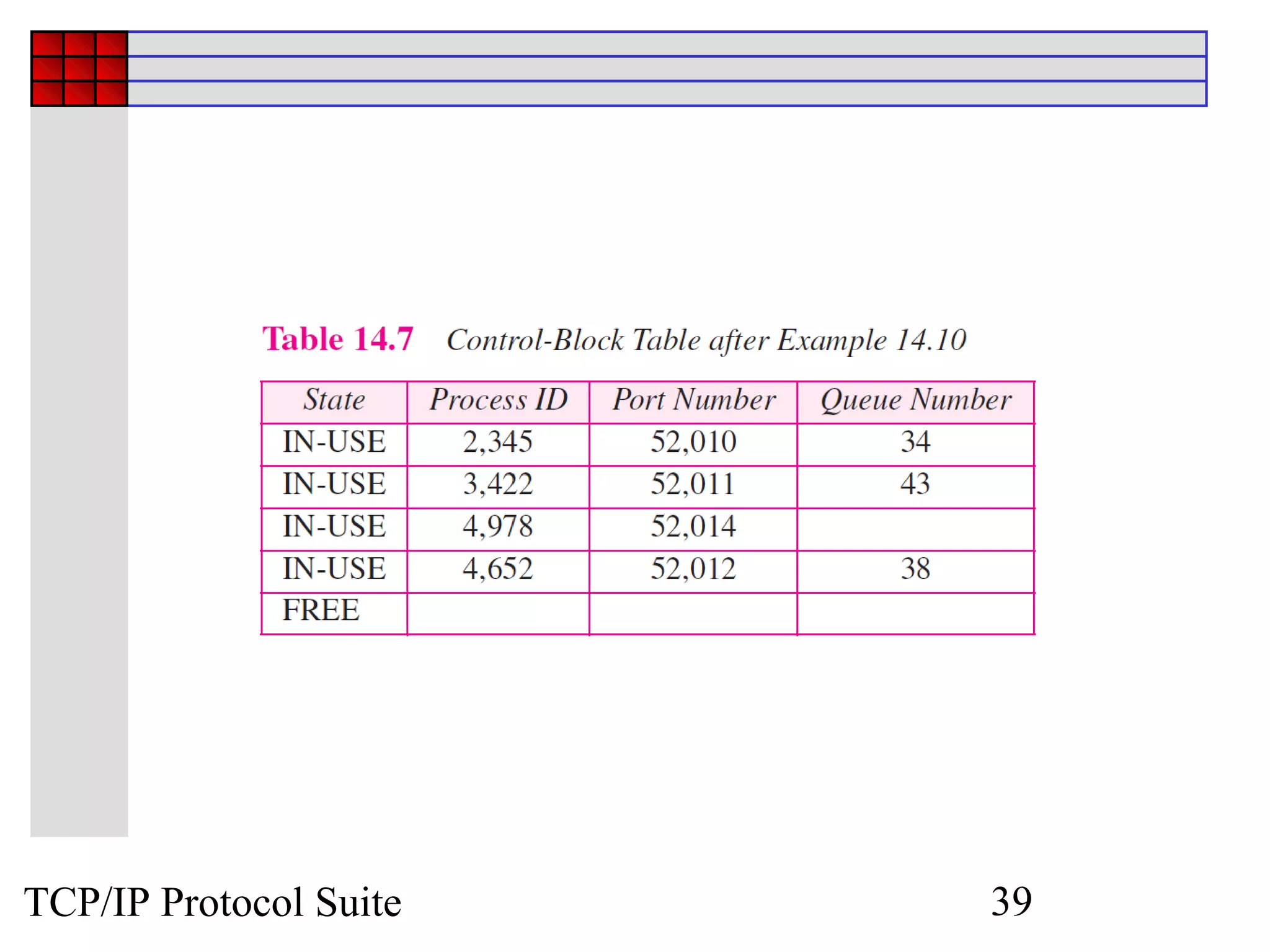
A user datagram now arrives for port 52,011. The
input module checks the table and finds that no
queue has been allocated for this destination since
this is the first time a user datagram has arrived for
this destination. The module creates a queue and
gives it a number (43). See Table 14.7.


TCP/IP Protocol Suite                      38
TCP/IP Protocol Suite   39
Example 14.11
After a few seconds, a user datagram arrives for port
52,222. The input module checks the table and
cannot find an entry for this destination. The user
datagram is dropped and a request is made to ICMP
to send an unreachable port message to the source.


TCP/IP Protocol Suite                     40

Chap 14

  • 1.
    Chapter 14 User Datagram Program (UDP) TCP/IP Protocol Suite 1 Copyright © The McGraw-Hill Companies, Inc. Permission required for reproduction or display.
  • 2.
    OBJECTIVES:  To introduce UDP and show its relationship to other protocols in the TCP/IP protocol suite.  To explain the format of a UDP packet and discuss the use of each field in the header.  To discuss the services provided by the UDP such as process-to- process delivery, multiplexing/demultiplexing, and queuing.  To show how to calculate the optional checksum and the sender the needs to add a pseudoheader to the packet when calculating the checksum.  To discuss how some application programs can benefit from the simplicity of UDP.  To briefly discuss the structure of the UDP package. TCP/IP Protocol Suite 2
  • 3.
    Chapter 14.1 Introduction Outline 14.2 User Datagram 14.3 UDPServices 14.4 UDPApplication 14.5 UDPPackage TCP/IP Protocol Suite 3
  • 4.
    14-1 INTRODUCTION Figure 14.1 shows the relationship of the User Datagram Protocol (UDP) to the other protocols and layers of the TCP/IP protocol suite: UDP is located between the application layer and the IP layer, and serves as the intermediary between the application programs and the network operations. TCP/IP Protocol Suite 4
  • 5.
    Figure 14.1 Position of UDP in the TCP/IP protocol suite TCP/IP Protocol Suite 5
  • 6.
    14-2 USER DATAGRAM UDP packets, called user datagrams, have a fixed-size header of 8 bytes. Figure 14.2 shows the format of a user datagram. TCP/IP Protocol Suite 6
  • 7.
    Figure 14.2 User datagram format TCP/IP Protocol Suite 7
  • 8.
    Example 14.1 The followingis a dump of a UDP header in hexadecimal format. a. What is the source port number? b. What is the destination port number? c. What is the total length of the user datagram? d. What is the length of the data? e. Is the packet directed from a client to a server or vice versa? f. What is the client process? TCP/IP Protocol Suite 8
  • 9.
    Example 14.1 Continued Solution a.The source port number is the first four hexadecimal digits (CB84) 16 or 52100. b. The destination port number is the second four hexadecimal digits (000D) 16 or 13. c. The third four hexadecimal digits (001C) 16 define the length of the whole UDP packet as 28 bytes. d. The length of the data is the length of the whole packet minus the length of the header, or 28 – 8 = 20 bytes. e. Since the destination port number is 13 (well- known port), the packet is from the client to the TCP/IP Protocol Suite 9 server.
  • 10.
    14-3 UDP Services We discussed the general services provided by a transport layer protocol in Chapter 13. In this section, we discuss what portions of those general services are provided by UDP. TCP/IP Protocol Suite 10
  • 11.
    Topics Discussed inthe Section  Process-to-Process Communication  Connectionless Service  Flow Control  Error Control  Congestion Control  Encapsulation and Decapsulation  Queuing  Multiplexing and Demultiplexing  Comparison between UDP and Generic Simple Protocol TCP/IP Protocol Suite 11
  • 12.
  • 13.
    Figure 14.3 Pseudoheader for checksum calculation TCP/IP Protocol Suite 13
  • 14.
    Example 14.2 Figure 14.4shows the checksum calculation for a very small user datagram with only 7 bytes of data. Because the number of bytes of data is odd, padding is added for checksum calculation. The pseudoheader as well as the padding will be dropped when the user datagram is delivered to IP (see Appendix F). TCP/IP Protocol Suite 14
  • 15.
    Figure 14.4 Checksum calculation for a simple UDP user datagram TCP/IP Protocol Suite 15
  • 16.
    Example 14.3 What valueis sent for the checksum in one of the following hypothetical situations? a. The sender decides not to include the checksum. b. The sender decides to include the checksum, but the value of the sum is all 1s. c. The sender decides to include the checksum, but the value of the sum is all 0s. TCP/IP Protocol Suite 16
  • 17.
    Example 14.3 Continued Solution a.The value sent for the checksum field is all 0s to show that the checksum is not calculated. b. When the sender complements the sum, the result is all 0s; the sender complements the result again before sending. The value sent for the checksum is all 1s. The second complement operation is needed to avoid confusion with the case in part a. c. This situation never happens because it implies that the value of every term included in the calculation of the sum is all 0s, which is impossible; some fields in the pseudoheader have nonzero values (see Appendix D). TCP/IP Protocol Suite 17
  • 18.
    Figure 14.5 Encapsulation and decapsulation TCP/IP Protocol Suite 18
  • 19.
    Figure 14.6 Queues in UDP TCP/IP Protocol Suite 19
  • 20.
    Figure 14.7 Multiplexing and demultiplexing TCP/IP Protocol Suite 20
  • 21.
    Note UDP is an example of the connectionless simple protocol we discussed in Chapter 13 with the exception of an optional checksum added to packets for error detection. TCP/IP Protocol Suite 21
  • 22.
    14-4 UDP APPLICATION Although UDP meets almost none of the criteria we mentioned in Chapter 13 for a reliable transport-layer protocol, UDP is preferable for some applications. The reason is that some services may have some side effects that are either unacceptable or not preferable. An application designer needs sometimes to compromise to get the optimum. TCP/IP Protocol Suite 22
  • 23.
    Topics Discussed inthe Section  UDP Features  Typical Applications TCP/IP Protocol Suite 23
  • 24.
    Example 14.4 A client-serverapplication such as DNS (see Chapter 19) uses the services of UDP because a client needs to send a short request to a server and to receive a quick response from it. The request and response can each fit in one user datagram. Since only one message is exchanged in each direction, the connectionless feature is not an issue; the client or server does not worry that messages are delivered out of order. TCP/IP Protocol Suite 24
  • 25.
    Example 14.5 A client-serverapplication such as SMTP (see Chapter 23), which is used in electronic mail, cannot use the services of UDP because a user can send a long e-mail message, which may include multimedia (images, audio, or video). If the application uses UDP and the message does not fit in one single user datagram, the message must be split by the application into different user datagrams. Here the connectionless service may create problems. The user datagrams may arrive and be delivered to the receiver application out of order. The receiver application may not be able to reorder the pieces. This means the connectionless service has a disadvantage for an application program that sends long messages. TCP/IP Protocol Suite 25
  • 26.
    Example 14.6 Assume weare downloading a very large text file from the Internet. We definitely need to use a transport layer that provides reliable service. We don’t want part of the file to be missing or corrupted when we open the file. The delay created between the delivery of the parts are not an overriding concern for us; we wait until the whole file is composed before looking at it. In this case, UDP is not a suitable transport layer. TCP/IP Protocol Suite 26
  • 27.
    Example 14.7 Assume weare watching a real-time stream video on our computer. Such a program is considered a long file; it is divided into many small parts and broadcast in real time. The parts of the message are sent one after another. If the transport layer is supposed to resend a corrupted or lost frame, the synchronizing of the whole transmission may be lost. The viewer suddenly sees a blank screen and needs to wait until the second transmission arrives. This is not tolerable. However, if each small part of the screen is sent using one single user datagram, the receiving UDP can easily ignore the corrupted or lost packet and deliver the rest to the application program. That part of the screen is blank for a very short period of the time, which most viewers do not even notice. However, video cannot be viewed out of order, so streaming audio, video, and voice applications that run over UDP must reorder or drop frames that are TCP/IP Protocol Suite 27
  • 28.
    14-5 UDP PACKAGE To show how UDP handles the sending and receiving of UDP packets, we present a simple version of the UDP package. We can say that the UDP package involves five components: a control-block table, input queues, a control-block module, an input module, and an output module. TCP/IP Protocol Suite 28
  • 29.
    Topics Discussed inthe Section  Control-Block Table  Input Queues  Control-Block Module  Input Module  Output Module TCP/IP Protocol Suite 29
  • 30.
    Figure 14.8 UDP design TCP/IP Protocol Suite 30
  • 31.
  • 32.
  • 33.
  • 34.
  • 35.
    Example 14.8 The firstactivity is the arrival of a user datagram with destination port number 52,012. The input module searches for this port number and finds it. Queue number 38 has been assigned to this port, which means that the port has been previously used. The input module sends the data to queue 38. The control-block table does not change. TCP/IP Protocol Suite 35
  • 36.
    Example 14.9 After afew seconds, a process starts. It asks the operating system for a port number and is granted port number 52,014. Now the process sends its ID (4,978) and the port number to the control-block module to create an entry in the table. The module takes the first FREE entry and inserts the information received. The module does not allocate a queue at this moment because no user datagrams have arrived for this destination (see Table 14.6). TCP/IP Protocol Suite 36
  • 37.
  • 38.
    Example 14.10 A userdatagram now arrives for port 52,011. The input module checks the table and finds that no queue has been allocated for this destination since this is the first time a user datagram has arrived for this destination. The module creates a queue and gives it a number (43). See Table 14.7. TCP/IP Protocol Suite 38
  • 39.
  • 40.
    Example 14.11 After afew seconds, a user datagram arrives for port 52,222. The input module checks the table and cannot find an entry for this destination. The user datagram is dropped and a request is made to ICMP to send an unreachable port message to the source. TCP/IP Protocol Suite 40