CS8601 MOBILE COMPUTING
UNIT – IV
Dr.A.Kathirvel, Professor and Head, Dept of CSE
Misrimal Navajee Munoth Jain Engineering College, Chennai
Unit - IV
MOBILE TRANSPORT AND APPLICATION
LAYER
Mobile TCP– WAP – Architecture – WDP – WTLS –
WTP –WSP – WAE – WTAArchitecture – WML
TEXT BOOKS:Jochen Schiller, Mobile Communications, PHI, Second Edn, 2003.
2
Mobile Transport Layer
❑ Motivation
❑ TCP-mechanisms
❑ Indirect TCP
❑ Snooping TCP
❑ Mobile TCP
❑Fast retransmit/recovery
❑ Transmission freezing
❑ Selective retransmission
❑ Transaction oriented TCP
3
Motivation I
❑ Transport protocols typically designed for
❑ Fixed end-systems
❑ Fixed, wired networks
❑ Research activities
❑ Performance
❑ Congestion control
❑ Efficient retransmissions
❑ TCP congestion control
❑ packet loss in fixed networks typically due to (temporary) overload
situations
❑ routers have to discard packets as soon as the buffers are full
❑ TCP recognizes congestion only indirectly via missing (I.e., timed
out) acknowledgements
❑ Immediate retransmissions unwise, they would only contribute to
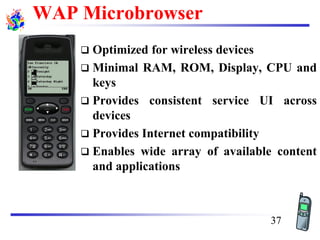
the congestion and make it even worse
❑ slow-start algorithm is used as a reactive action to reduce the
network load 4
Motivation II
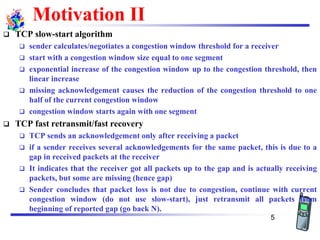
❑ TCP slow-start algorithm
❑ sender calculates/negotiates a congestion window threshold for a receiver
❑ start with a congestion window size equal to one segment
❑ exponential increase of the congestion window up to the congestion threshold, then
linear increase
❑ missing acknowledgement causes the reduction of the congestion threshold to one
half of the current congestion window
❑ congestion window starts again with one segment
❑ TCP fast retransmit/fast recovery
❑ TCP sends an acknowledgement only after receiving a packet
❑ if a sender receives several acknowledgements for the same packet, this is due to a
gap in received packets at the receiver
❑ It indicates that the receiver got all packets up to the gap and is actually receiving
packets, but some are missing (hence gap)
❑ Sender concludes that packet loss is not due to congestion, continue with current
congestion window (do not use slow-start), just retransmit all packets from
beginning of reported gap (go back N).
5
Influences of mobility on TCP-mechanisms
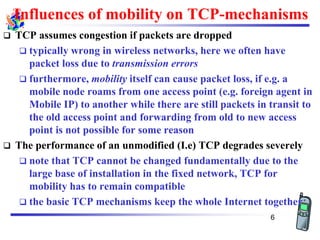
❑ TCP assumes congestion if packets are dropped
❑ typically wrong in wireless networks, here we often have
packet loss due to transmission errors
❑ furthermore, mobility itself can cause packet loss, if e.g. a
mobile node roams from one access point (e.g. foreign agent in
Mobile IP) to another while there are still packets in transit to
the old access point and forwarding from old to new access
point is not possible for some reason
❑ The performance of an unmodified (I.e) TCP degrades severely
❑ note that TCP cannot be changed fundamentally due to the
large base of installation in the fixed network, TCP for
mobility has to remain compatible
❑ the basic TCP mechanisms keep the whole Internet together
6
Proposals to modify TCP to work in mobile environments
Approach
Indirect TCP
Snooping TCP
M-TCP
Fast retransmit/
fast recovery
Transmission/
time-out freezing
Selective
retransmission
Transaction
oriented TCP
7
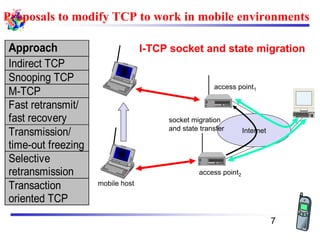
I-TCP socket and state migration
mobile host
access point2
Internet
access point1
socket migration
and state transfer
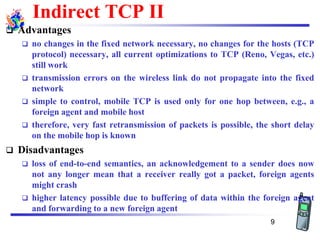
1. Indirect TCP I
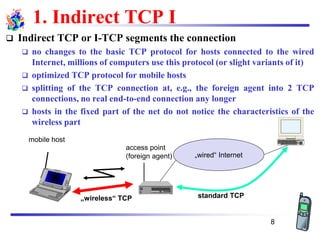
❑ Indirect TCP or I-TCP segments the connection
❑ no changes to the basic TCP protocol for hosts connected to the wired
Internet, millions of computers use this protocol (or slight variants of it)
❑ optimized TCP protocol for mobile hosts
❑ splitting of the TCP connection at, e.g., the foreign agent into 2 TCP
connections, no real end-to-end connection any longer
❑ hosts in the fixed part of the net do not notice the characteristics of the
wireless part
mobile host
access point
(foreign agent) „wired“ Internet
„wireless“ TCP standard TCP
8
Indirect TCP II
❑ Advantages
❑ no changes in the fixed network necessary, no changes for the hosts (TCP
protocol) necessary, all current optimizations to TCP (Reno, Vegas, etc.)
still work
❑ transmission errors on the wireless link do not propagate into the fixed
network
❑ simple to control, mobile TCP is used only for one hop between, e.g., a
foreign agent and mobile host
❑ therefore, very fast retransmission of packets is possible, the short delay
on the mobile hop is known
❑ Disadvantages
❑ loss of end-to-end semantics, an acknowledgement to a sender does now
not any longer mean that a receiver really got a packet, foreign agents
might crash
❑ higher latency possible due to buffering of data within the foreign agent
and forwarding to a new foreign agent
9
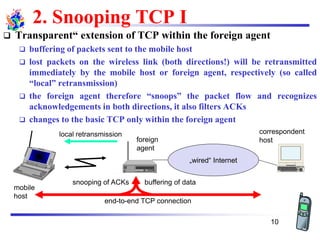
2. Snooping TCP I
❑ Transparent“ extension of TCP within the foreign agent
❑ buffering of packets sent to the mobile host
❑ lost packets on the wireless link (both directions!) will be retransmitted
immediately by the mobile host or foreign agent, respectively (so called
“local” retransmission)
❑ the foreign agent therefore “snoops” the packet flow and recognizes
acknowledgements in both directions, it also filters ACKs
❑ changes to the basic TCP only within the foreign agent
„wired“ Internet
buffering of data
end-to-end TCP connection
local retransmission correspondent
hostforeign
agent
mobile
host
snooping of ACKs
10
Snooping TCP II
❑ Data transfer to the mobile host
❑ FA buffers data until it receives ACK of the MH, FA detects packet loss
via duplicated ACKs or time-out
❑ fast retransmission possible, transparent for the fixed network
❑ Data transfer from the mobile host
❑ FA detects packet loss on the wireless link via sequence numbers, FA
answers directly with a NACK to the MH
❑ MH can now retransmit data with only a very short delay
❑ Integration of the MAC layer
❑ MAC layer often has similar mechanisms to those of TCP
❑ thus, the MAC layer can already detect duplicated packets due to
retransmissions and discard them
❑ Problems
❑ snooping TCP does not isolate the wireless link as good as I-TCP
❑ snooping might be useless depending on encryption schemes
11
3. Mobile TCP
❑ Special handling of lengthy and/or frequent disconnections
❑ M-TCP splits as I-TCP does
❑ unmodified TCP fixed network to supervisory host (SH)
❑ optimized TCP SH to MH
❑ Supervisory host
❑ no caching, no retransmission
❑ monitors all packets, if disconnection detected
set sender window size to 0
sender automatically goes into persistent mode
❑ old or new SH reopen the window
❑ Advantages
❑ maintains semantics, supports disconnection, no buffer forwarding
❑ Disadvantages
❑ loss on wireless link propagated into fixed network
❑ adapted TCP on wireless link
12
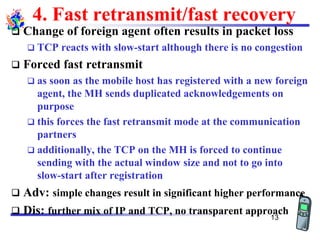
4. Fast retransmit/fast recovery
❑ Change of foreign agent often results in packet loss
❑ TCP reacts with slow-start although there is no congestion
❑ Forced fast retransmit
❑ as soon as the mobile host has registered with a new foreign
agent, the MH sends duplicated acknowledgements on
purpose
❑ this forces the fast retransmit mode at the communication
partners
❑ additionally, the TCP on the MH is forced to continue
sending with the actual window size and not to go into
slow-start after registration
❑ Adv: simple changes result in significant higher performance
❑ Dis: further mix of IP and TCP, no transparent approach
13
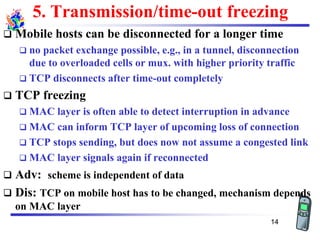
5. Transmission/time-out freezing
❑ Mobile hosts can be disconnected for a longer time
❑ no packet exchange possible, e.g., in a tunnel, disconnection
due to overloaded cells or mux. with higher priority traffic
❑ TCP disconnects after time-out completely
❑ TCP freezing
❑ MAC layer is often able to detect interruption in advance
❑ MAC can inform TCP layer of upcoming loss of connection
❑ TCP stops sending, but does now not assume a congested link
❑ MAC layer signals again if reconnected
❑ Adv: scheme is independent of data
❑ Dis: TCP on mobile host has to be changed, mechanism depends
on MAC layer
14
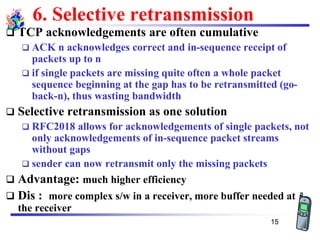
6. Selective retransmission
❑ TCP acknowledgements are often cumulative
❑ ACK n acknowledges correct and in-sequence receipt of
packets up to n
❑ if single packets are missing quite often a whole packet
sequence beginning at the gap has to be retransmitted (go-
back-n), thus wasting bandwidth
❑ Selective retransmission as one solution
❑ RFC2018 allows for acknowledgements of single packets, not
only acknowledgements of in-sequence packet streams
without gaps
❑ sender can now retransmit only the missing packets
❑ Advantage: much higher efficiency
❑ Dis : more complex s/w in a receiver, more buffer needed at
the receiver
15
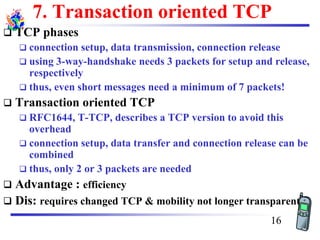
7. Transaction oriented TCP
❑ TCP phases
❑ connection setup, data transmission, connection release
❑ using 3-way-handshake needs 3 packets for setup and release,
respectively
❑ thus, even short messages need a minimum of 7 packets!
❑ Transaction oriented TCP
❑ RFC1644, T-TCP, describes a TCP version to avoid this
overhead
❑ connection setup, data transfer and connection release can be
combined
❑ thus, only 2 or 3 packets are needed
❑ Advantage : efficiency
❑ Dis: requires changed TCP & mobility not longer transparent
16
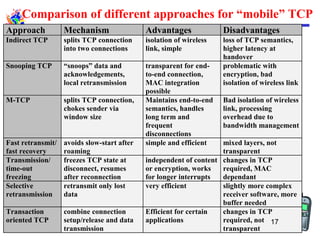
Comparison of different approaches for “mobile” TCP
Approach Mechanism Advantages Disadvantages
Indirect TCP splits TCP connection
into two connections
isolation of wireless
link, simple
loss of TCP semantics,
higher latency at
handover
Snooping TCP “snoops” data and
acknowledgements,
local retransmission
transparent for end-
to-end connection,
MAC integration
possible
problematic with
encryption, bad
isolation of wireless link
M-TCP splits TCP connection,
chokes sender via
window size
Maintains end-to-end
semantics, handles
long term and
frequent
disconnections
Bad isolation of wireless
link, processing
overhead due to
bandwidth management
Fast retransmit/
fast recovery
avoids slow-start after
roaming
simple and efficient mixed layers, not
transparent
Transmission/
time-out
freezing
freezes TCP state at
disconnect, resumes
after reconnection
independent of content
or encryption, works
for longer interrupts
changes in TCP
required, MAC
dependant
Selective
retransmission
retransmit only lost
data
very efficient slightly more complex
receiver software, more
buffer needed
Transaction
oriented TCP
combine connection
setup/release and data
transmission
Efficient for certain
applications
changes in TCP
required, not
transparent
17
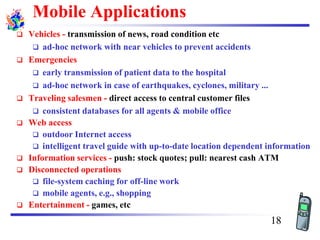
Mobile Applications
❑ Vehicles - transmission of news, road condition etc
❑ ad-hoc network with near vehicles to prevent accidents
❑ Emergencies
❑ early transmission of patient data to the hospital
❑ ad-hoc network in case of earthquakes, cyclones, military ...
❑ Traveling salesmen - direct access to central customer files
❑ consistent databases for all agents & mobile office
❑ Web access
❑ outdoor Internet access
❑ intelligent travel guide with up-to-date location dependent information
❑ Information services - push: stock quotes; pull: nearest cash ATM
❑ Disconnected operations
❑ file-system caching for off-line work
❑ mobile agents, e.g., shopping
❑ Entertainment - games, etc
18
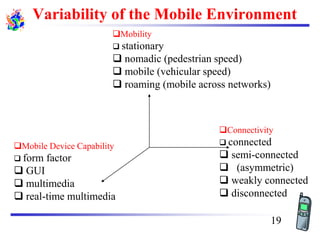
Variability of the Mobile Environment
❑Connectivity
❑ connected
❑ semi-connected
❑ (asymmetric)
❑ weakly connected
❑ disconnected
❑Mobile Device Capability
❑ form factor
❑ GUI
❑ multimedia
❑ real-time multimedia
❑Mobility
❑ stationary
❑ nomadic (pedestrian speed)
❑ mobile (vehicular speed)
❑ roaming (mobile across networks)
19
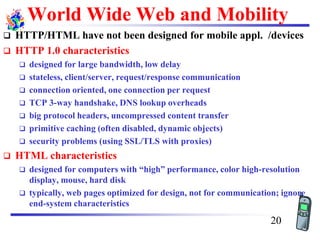
World Wide Web and Mobility
❑ HTTP/HTML have not been designed for mobile appl. /devices
❑ HTTP 1.0 characteristics
❑ designed for large bandwidth, low delay
❑ stateless, client/server, request/response communication
❑ connection oriented, one connection per request
❑ TCP 3-way handshake, DNS lookup overheads
❑ big protocol headers, uncompressed content transfer
❑ primitive caching (often disabled, dynamic objects)
❑ security problems (using SSL/TLS with proxies)
❑ HTML characteristics
❑ designed for computers with “high” performance, color high-resolution
display, mouse, hard disk
❑ typically, web pages optimized for design, not for communication; ignore
end-system characteristics
20
System Support for Mobile WWW
❑ Enhanced browsers
❑ client-aware support for mobility
❑ Proxies
❑ Client proxy: pre-fetching, caching, off-line use
❑ Network proxy: adaptive content transformation for
connections
❑ Client and network proxy
❑ Enhanced servers
❑ server-aware support for mobility
❑ serve the content in multiple ways, depending on client
capabilities
❑ New protocols/languages
❑ WAP/WML
21
Wireless Application Protocol (WAP)
❑ Empowers mobile users with wireless devices to easily access
and interact with information and services.
❑ A “standard” created by wireless and Internet companies to
enable Internet access from a cellular phone
❑ wapforum.org:
❑ co-founded by Ericsson, Motorola, Nokia, Phone.com
❑ 450 members in 2000, comprise of Handset manufacturers, Wireless
service providers, ISPs, Software companies in the wireless industry
❑ Goals
❑ deliver Internet services to mobile devices
❑ enable applications to scale across a variety of transport options and
device types
❑ independence from wireless network standards
❑ GSM, CDMA IS-95, TDMA IS-136, 3G systems (UMTS, W-CDMA)
22
WAP: Main Features
❑ Browser
❑ “Micro browser”, similar to existing web browsers
❑ Markup language
❑ Similar to HTML, adapted to mobile devices
❑ Script language
❑ Similar to Javascript, adapted to mobile devices
❑ Gateway
❑ Transition from wireless to wired world
❑ Server
❑ “Wap/Origin server”, similar to existing web servers
❑ Protocol layers
❑ Transport layer, security layer, session layer etc.
❑ Telephony application interface
❑ Access to telephony functions
23
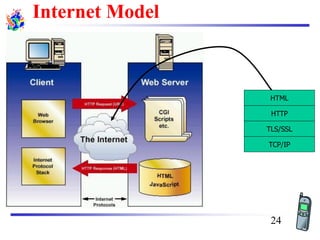
Internet Model
HTML
HTTP
TLS/SSL
TCP/IP
24
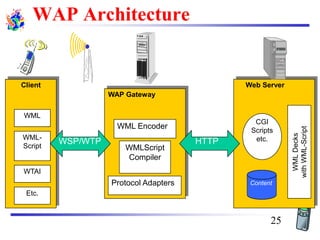
Web Server
Content
CGI
Scripts
etc.
WMLDecks
withWML-Script
WAP Gateway
WML Encoder
WMLScript
Compiler
Protocol Adapters
Client
WML
WML-
Script
WTAI
Etc.
HTTPWSP/WTP
WAP Architecture
25
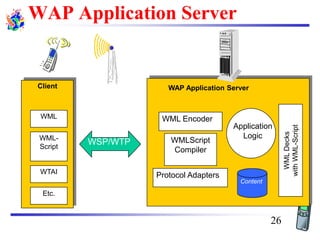
WAP Application Server
Content
Application
Logic
WMLDecks
withWML-Script
WML Encoder
WMLScript
Compiler
Protocol Adapters
Client
WML
WML-
Script
WTAI
Etc.
WSP/WTP
WAP Application Server
26
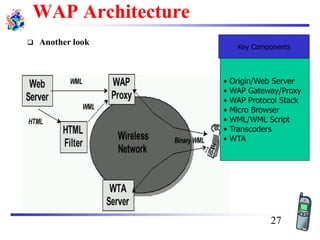
WAP Architecture
❑ Another look Key Components
• Origin/Web Server
• WAP Gateway/Proxy
• WAP Protocol Stack
• Micro Browser
• WML/WML Script
• Transcoders
• WTA
27
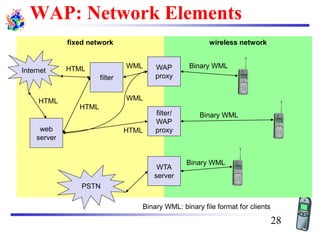
WAP: Network Elements
wireless networkfixed network
WAP
proxy
WTA
server
filter/
WAP
proxyweb
server
filter
PSTN
Internet
Binary WML: binary file format for clients
Binary WML
Binary WML
Binary WML
HTML
HTML
HTML WML
WMLHTML
28
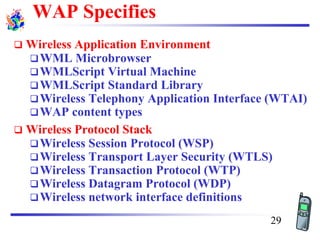
WAP Specifies
❑ Wireless Application Environment
❑WML Microbrowser
❑WMLScript Virtual Machine
❑WMLScript Standard Library
❑Wireless Telephony Application Interface (WTAI)
❑WAP content types
❑ Wireless Protocol Stack
❑Wireless Session Protocol (WSP)
❑Wireless Transport Layer Security (WTLS)
❑Wireless Transaction Protocol (WTP)
❑Wireless Datagram Protocol (WDP)
❑Wireless network interface definitions
29
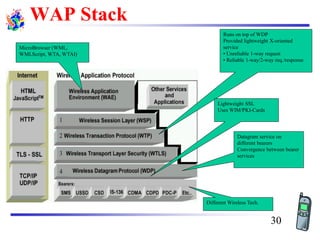
WAP Stack
MicroBrowser (WML,
WMLScript, WTA, WTAI)
Runs on top of WDP
Provided lightweight X-oriented
service
• Unreliable 1-way request
• Reliable 1-way/2-way req./response
Lightweight SSL
Uses WIM/PKI-Cards
Datagram service on
different bearers
Convergence between bearer
services
Different Wireless Tech.
30
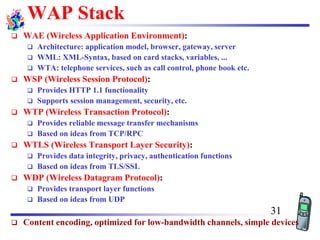
WAP Stack
❑ WAE (Wireless Application Environment):
❑ Architecture: application model, browser, gateway, server
❑ WML: XML-Syntax, based on card stacks, variables, ...
❑ WTA: telephone services, such as call control, phone book etc.
❑ WSP (Wireless Session Protocol):
❑ Provides HTTP 1.1 functionality
❑ Supports session management, security, etc.
❑ WTP (Wireless Transaction Protocol):
❑ Provides reliable message transfer mechanisms
❑ Based on ideas from TCP/RPC
❑ WTLS (Wireless Transport Layer Security):
❑ Provides data integrity, privacy, authentication functions
❑ Based on ideas from TLS/SSL
❑ WDP (Wireless Datagram Protocol):
❑ Provides transport layer functions
❑ Based on ideas from UDP
❑ Content encoding, optimized for low-bandwidth channels, simple devices
31
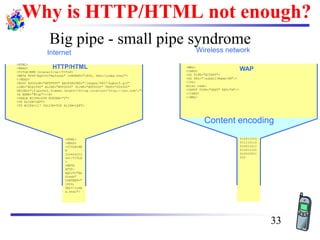
Why is HTTP/HTML not enough?
Big pipe - small pipe syndrome
Wireless network
<HTML>
<HEAD>
<TITLE>NNN Interactive</TITLE>
<META HTTP-EQUIV="Refresh" CONTENT="1800, URL=/index.html">
</HEAD>
<BODY BGCOLOR="#FFFFFF" BACKGROUND="/images/9607/bgbar5.gif"
LINK="#0A3990" ALINK="#FF0000" VLINK="#FF0000" TEXT="000000"
ONLOAD="if(parent.frames.length!=0)top.location='http://nnn.com';">
<A NAME="#top"></A>
<TABLE WIDTH=599 BORDER="0">
<TR ALIGN=LEFT>
<TD WIDTH=117 VALIGN=TOP ALIGN=LEFT>
<HTML>
<HEAD>
<TITLE>NN
N
Interacti
ve</TITLE
>
<META
HTTP-
EQUIV="Re
fresh"
CONTENT="
1800,
URL=/inde
x.html">
Internet
<WML>
<CARD>
<DO TYPE="ACCEPT">
<GO URL="/submit?Name=$N"/>
</DO>
Enter name:
<INPUT TYPE="TEXT" KEY="N"/>
</CARD>
</WML>
010011010
011110110
010011011
011011101
010010011
010
Content encoding
HTTP/HTML WAP
33
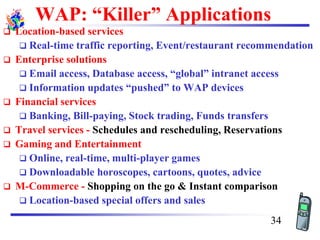
WAP: “Killer” Applications
❑ Location-based services
❑ Real-time traffic reporting, Event/restaurant recommendation
❑ Enterprise solutions
❑ Email access, Database access, “global” intranet access
❑ Information updates “pushed” to WAP devices
❑ Financial services
❑ Banking, Bill-paying, Stock trading, Funds transfers
❑ Travel services - Schedules and rescheduling, Reservations
❑ Gaming and Entertainment
❑ Online, real-time, multi-player games
❑ Downloadable horoscopes, cartoons, quotes, advice
❑ M-Commerce - Shopping on the go & Instant comparison
❑ Location-based special offers and sales
34
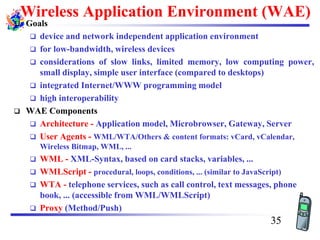
Wireless Application Environment (WAE)
❑ Goals
❑ device and network independent application environment
❑ for low-bandwidth, wireless devices
❑ considerations of slow links, limited memory, low computing power,
small display, simple user interface (compared to desktops)
❑ integrated Internet/WWW programming model
❑ high interoperability
❑ WAE Components
❑ Architecture - Application model, Microbrowser, Gateway, Server
❑ User Agents - WML/WTA/Others & content formats: vCard, vCalendar,
Wireless Bitmap, WML, ...
❑ WML - XML-Syntax, based on card stacks, variables, ...
❑ WMLScript - procedural, loops, conditions, ... (similar to JavaScript)
❑ WTA - telephone services, such as call control, text messages, phone
book, ... (accessible from WML/WMLScript)
❑ Proxy (Method/Push)
35
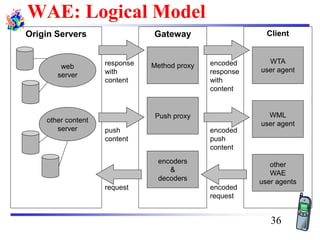
WAE: Logical Model
Origin Servers
web
server
other content
server
Gateway Client
other
WAE
user agents
WML
user agent
WTA
user agent
Push proxy
encoded
request
request
encoded
response
with
content
response
with
content
push
content
encoded
push
content
Method proxy
encoders
&
decoders
36
WAP Microbrowser
❑ Optimized for wireless devices
❑ Minimal RAM, ROM, Display, CPU and
keys
❑ Provides consistent service UI across
devices
❑ Provides Internet compatibility
❑ Enables wide array of available content
and applications
37
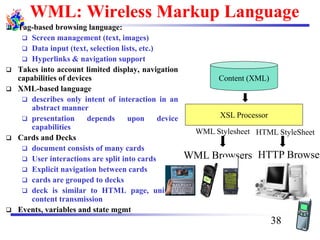
WML: Wireless Markup Language
❑ Tag-based browsing language:
❑ Screen management (text, images)
❑ Data input (text, selection lists, etc.)
❑ Hyperlinks & navigation support
❑ Takes into account limited display, navigation
capabilities of devices
❑ XML-based language
❑ describes only intent of interaction in an
abstract manner
❑ presentation depends upon device
capabilities
❑ Cards and Decks
❑ document consists of many cards
❑ User interactions are split into cards
❑ Explicit navigation between cards
❑ cards are grouped to decks
❑ deck is similar to HTML page, unit of
content transmission
❑ Events, variables and state mgmt
Content (XML)
XSL Processor
HTTP Browser
HTML StyleSheet
WML Browsers
WML Stylesheet
38
WML
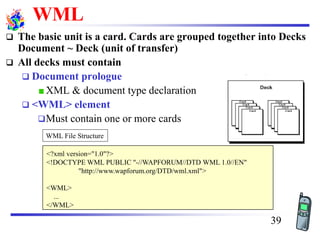
❑ The basic unit is a card. Cards are grouped together into Decks
Document ~ Deck (unit of transfer)
❑ All decks must contain
❑ Document prologue
XML & document type declaration
❑ <WML> element
❑Must contain one or more cards
<?xml version="1.0"?>
<!DOCTYPE WML PUBLIC "-//WAPFORUM//DTD WML 1.0//EN"
"http://www.wapforum.org/DTD/wml.xml">
<WML>
...
</WML>
WML File Structure
39
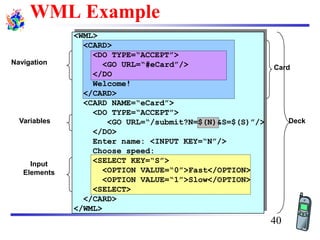
WML Example
Input
Elements
Deck
Card
Navigation
Variables
<WML>
<CARD>
<DO TYPE=“ACCEPT”>
<GO URL=“#eCard”/>
</DO
Welcome!
</CARD>
<CARD NAME=“eCard”>
<DO TYPE=“ACCEPT”>
<GO URL=“/submit?N=$(N)&S=$(S)”/>
</DO>
Enter name: <INPUT KEY=“N”/>
Choose speed:
<SELECT KEY=“S”>
<OPTION VALUE=“0”>Fast</OPTION>
<OPTION VALUE=“1”>Slow</OPTION>
<SELECT>
</CARD>
</WML>
40
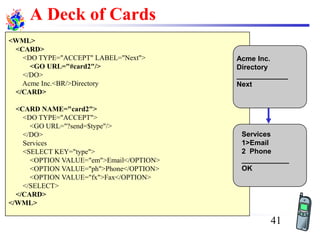
A Deck of Cards
<WML>
<CARD>
<DO TYPE="ACCEPT" LABEL="Next">
<GO URL="#card2"/>
</DO>
Acme Inc.<BR/>Directory
</CARD>
<CARD NAME="card2">
<DO TYPE="ACCEPT">
<GO URL="?send=$type"/>
</DO>
Services
<SELECT KEY="type">
<OPTION VALUE="em">Email</OPTION>
<OPTION VALUE="ph">Phone</OPTION>
<OPTION VALUE="fx">Fax</OPTION>
</SELECT>
</CARD>
</WML>
Acme Inc.
Directory
_____________
Next
Services
1>Email
2 Phone
____________
OK
41
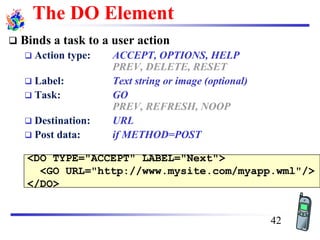
<DO TYPE="ACCEPT" LABEL="Next">
<GO URL="http://www.mysite.com/myapp.wml"/>
</DO>
The DO Element
❑ Binds a task to a user action
❑ Action type: ACCEPT, OPTIONS, HELP
PREV, DELETE, RESET
❑ Label: Text string or image (optional)
❑ Task: GO
PREV, REFRESH, NOOP
❑ Destination: URL
❑ Post data: if METHOD=POST
42
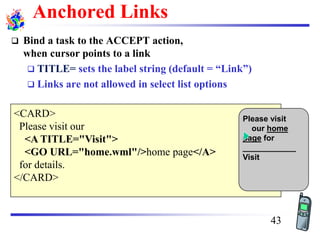
Anchored Links
❑ Bind a task to the ACCEPT action,
when cursor points to a link
❑ TITLE= sets the label string (default = “Link”)
❑ Links are not allowed in select list options
<CARD>
Please visit our
<A TITLE="Visit">
<GO URL="home.wml"/>home page</A>
for details.
</CARD>
Please visit
our home
page for
____________
Visit
43
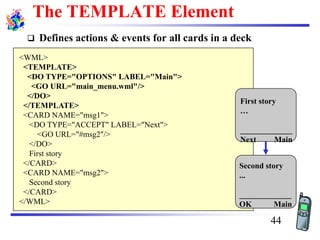
The TEMPLATE Element
❑ Defines actions & events for all cards in a deck
<WML>
<TEMPLATE>
<DO TYPE="OPTIONS" LABEL="Main">
<GO URL="main_menu.wml"/>
</DO>
</TEMPLATE>
<CARD NAME="msg1">
<DO TYPE="ACCEPT" LABEL="Next">
<GO URL="#msg2"/>
</DO>
First story
</CARD>
<CARD NAME="msg2">
Second story
</CARD>
</WML>
First story
…
_____________
Next Main
Second story
...
_____________
OK Main
44
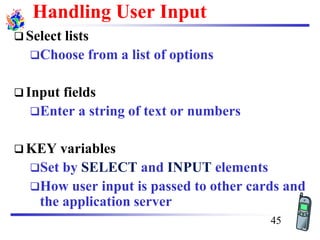
Handling User Input
❑ Select lists
❑Choose from a list of options
❑ Input fields
❑Enter a string of text or numbers
❑ KEY variables
❑Set by SELECT and INPUT elements
❑How user input is passed to other cards and
the application server
45
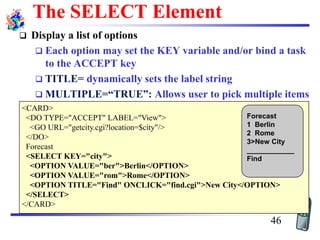
<CARD>
<DO TYPE="ACCEPT" LABEL="View">
<GO URL="getcity.cgi?location=$city"/>
</DO>
Forecast
<SELECT KEY="city">
<OPTION VALUE="ber">Berlin</OPTION>
<OPTION VALUE="rom">Rome</OPTION>
<OPTION TITLE="Find" ONCLICK="find.cgi">New City</OPTION>
</SELECT>
</CARD>
Forecast
1 Berlin
2 Rome
3>New City
____________
Find
The SELECT Element
❑ Display a list of options
❑ Each option may set the KEY variable and/or bind a task
to the ACCEPT key
❑ TITLE= dynamically sets the label string
❑ MULTIPLE=“TRUE”: Allows user to pick multiple items
46
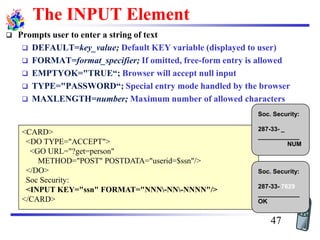
<CARD>
<DO TYPE="ACCEPT">
<GO URL="?get=person"
METHOD="POST" POSTDATA="userid=$ssn"/>
</DO>
Soc Security:
<INPUT KEY="ssn" FORMAT="NNN-NN-NNNN"/>
</CARD>
Soc. Security:
287-33- _
____________
NUM
Soc. Security:
287-33- 7629
____________
OK
The INPUT Element
❑ Prompts user to enter a string of text
❑ DEFAULT=key_value; Default KEY variable (displayed to user)
❑ FORMAT=format_specifier; If omitted, free-form entry is allowed
❑ EMPTYOK="TRUE“; Browser will accept null input
❑ TYPE="PASSWORD“; Special entry mode handled by the browser
❑ MAXLENGTH=number; Maximum number of allowed characters
47
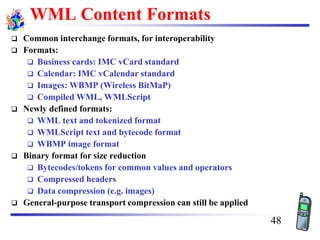
WML Content Formats
❑ Common interchange formats, for interoperability
❑ Formats:
❑ Business cards: IMC vCard standard
❑ Calendar: IMC vCalendar standard
❑ Images: WBMP (Wireless BitMaP)
❑ Compiled WML, WMLScript
❑ Newly defined formats:
❑ WML text and tokenized format
❑ WMLScript text and bytecode format
❑ WBMP image format
❑ Binary format for size reduction
❑ Bytecodes/tokens for common values and operators
❑ Compressed headers
❑ Data compression (e.g. images)
❑ General-purpose transport compression can still be applied
48
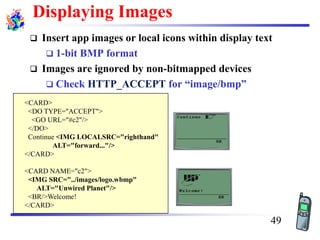
<CARD>
<DO TYPE="ACCEPT">
<GO URL="#c2"/>
</DO>
Continue <IMG LOCALSRC="righthand"
ALT="forward..."/>
</CARD>
<CARD NAME="c2">
<IMG SRC="../images/logo.wbmp"
ALT="Unwired Planet"/>
<BR/>Welcome!
</CARD>
Displaying Images
❑ Insert app images or local icons within display text
❑ 1-bit BMP format
❑ Images are ignored by non-bitmapped devices
❑ Check HTTP_ACCEPT for “image/bmp”
49
WML (other features)
❑ Setting card styles to create forms
❑ Using variables to cache user data
❑ Using card intrinsic events to trigger transparent tasks
❑ Using timers
❑ Securing WML decks
❑ Bookmarking decks
50
WML Script
❑ Complement to WML
❑ Derived from JavaScript™
❑ Provides general scripting capabilities
❑ Procedural logic, loops, conditionals, etc.
❑ Optimized for small-memory, small-cpu devices
❑ Features
❑ local user interaction, validity check of user input
❑ access to device facilities (phone call, address book etc.)
❑ extensions to the device software
❑configure device, download new functionality after deployment
❑ Bytecode-based virtual machine
❑ Stack-oriented design, ROM-able
❑ Designed for simple, low-impact implementation
❑ WMLScript compiler resides in the network
51
WML Script Libraries
❑ Lang - VM constants, general-purpose math
functionality, etc.
❑ String - string processing functions
❑ URL - URL processing
❑ Browser - WML browser interface
❑ Dialog - simple user interface
❑ Float - floating point functions
52
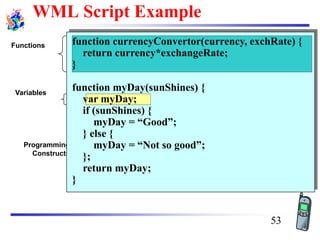
WML Script Example
Programming
Constructs
Functions
Variables
function currencyConvertor(currency, exchRate) {
return currency*exchangeRate;
}
function myDay(sunShines) {
var myDay;
if (sunShines) {
myDay = “Good”;
} else {
myDay = “Not so good”;
};
return myDay;
}
53
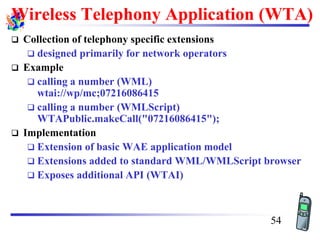
Wireless Telephony Application (WTA)
❑ Collection of telephony specific extensions
❑ designed primarily for network operators
❑ Example
❑ calling a number (WML)
wtai://wp/mc;07216086415
❑ calling a number (WMLScript)
WTAPublic.makeCall("07216086415");
❑ Implementation
❑ Extension of basic WAE application model
❑ Extensions added to standard WML/WMLScript browser
❑ Exposes additional API (WTAI)
54
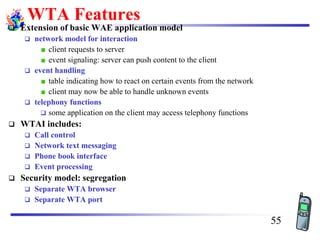
WTA Features
❑ Extension of basic WAE application model
❑ network model for interaction
client requests to server
event signaling: server can push content to the client
❑ event handling
table indicating how to react on certain events from the network
client may now be able to handle unknown events
❑ telephony functions
❑ some application on the client may access telephony functions
❑ WTAI includes:
❑ Call control
❑ Network text messaging
❑ Phone book interface
❑ Event processing
❑ Security model: segregation
❑ Separate WTA browser
❑ Separate WTA port
55
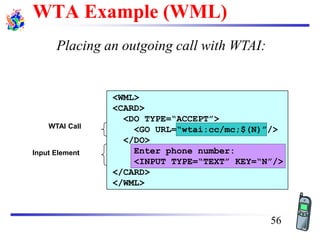
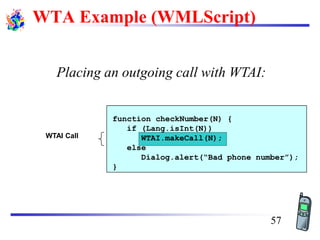
Placing an outgoing call with WTAI:
Input Element
WTAI Call
<WML>
<CARD>
<DO TYPE=“ACCEPT”>
<GO URL=“wtai:cc/mc;$(N)”/>
</DO>
Enter phone number:
<INPUT TYPE=“TEXT” KEY=“N”/>
</CARD>
</WML>
WTA Example (WML)
56
Placing an outgoing call with WTAI:
WTAI Call
function checkNumber(N) {
if (Lang.isInt(N))
WTAI.makeCall(N);
else
Dialog.alert(“Bad phone number”);
}
WTA Example (WMLScript)
57
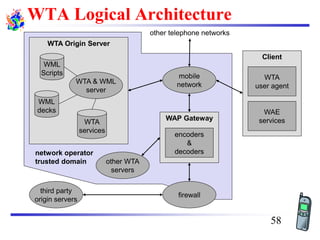
WTA Logical Architecture
other WTA
servers
Client
WAE
services
WTA
user agent
WAP Gateway
encoders
&
decoders
other telephone networks
WTA Origin Server
WTA & WML
server
WML
Scripts
WML
decks
WTA
services
mobile
network
firewall
third party
origin servers
network operator
trusted domain
58
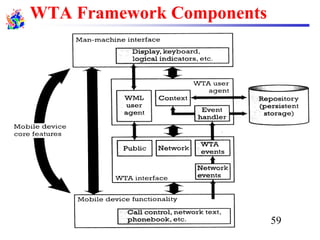
WTA Framework Components
59
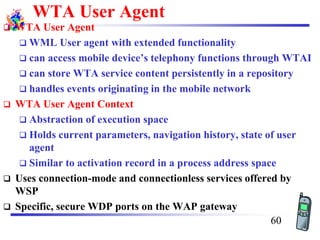
WTA User Agent
❑ WTA User Agent
❑ WML User agent with extended functionality
❑ can access mobile device’s telephony functions through WTAI
❑ can store WTA service content persistently in a repository
❑ handles events originating in the mobile network
❑ WTA User Agent Context
❑ Abstraction of execution space
❑ Holds current parameters, navigation history, state of user
agent
❑ Similar to activation record in a process address space
❑ Uses connection-mode and connectionless services offered by
WSP
❑ Specific, secure WDP ports on the WAP gateway
60
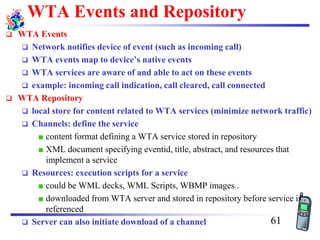
WTA Events and Repository
❑ WTA Events
❑ Network notifies device of event (such as incoming call)
❑ WTA events map to device’s native events
❑ WTA services are aware of and able to act on these events
❑ example: incoming call indication, call cleared, call connected
❑ WTA Repository
❑ local store for content related to WTA services (minimize network traffic)
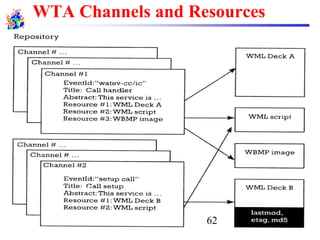
❑ Channels: define the service
content format defining a WTA service stored in repository
XML document specifying eventid, title, abstract, and resources that
implement a service
❑ Resources: execution scripts for a service
could be WML decks, WML Scripts, WBMP images..
downloaded from WTA server and stored in repository before service is
referenced
❑ Server can also initiate download of a channel 61
WTA Channels and Resources
62
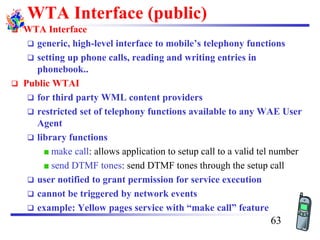
WTA Interface (public)
❑ WTA Interface
❑ generic, high-level interface to mobile’s telephony functions
❑ setting up phone calls, reading and writing entries in
phonebook..
❑ Public WTAI
❑ for third party WML content providers
❑ restricted set of telephony functions available to any WAE User
Agent
❑ library functions
make call: allows application to setup call to a valid tel number
send DTMF tones: send DTMF tones through the setup call
❑ user notified to grant permission for service execution
❑ cannot be triggered by network events
❑ example: Yellow pages service with “make call” feature
63
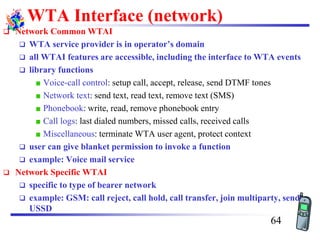
WTA Interface (network)
❑ Network Common WTAI
❑ WTA service provider is in operator’s domain
❑ all WTAI features are accessible, including the interface to WTA events
❑ library functions
Voice-call control: setup call, accept, release, send DTMF tones
Network text: send text, read text, remove text (SMS)
Phonebook: write, read, remove phonebook entry
Call logs: last dialed numbers, missed calls, received calls
Miscellaneous: terminate WTA user agent, protect context
❑ user can give blanket permission to invoke a function
❑ example: Voice mail service
❑ Network Specific WTAI
❑ specific to type of bearer network
❑ example: GSM: call reject, call hold, call transfer, join multiparty, send
USSD
64
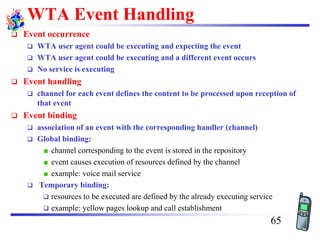
WTA Event Handling
❑ Event occurrence
❑ WTA user agent could be executing and expecting the event
❑ WTA user agent could be executing and a different event occurs
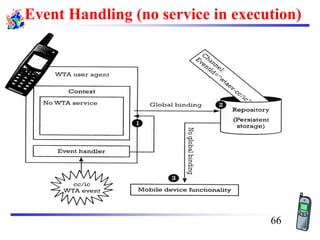
❑ No service is executing
❑ Event handling
❑ channel for each event defines the content to be processed upon reception of
that event
❑ Event binding
❑ association of an event with the corresponding handler (channel)
❑ Global binding:
channel corresponding to the event is stored in the repository
event causes execution of resources defined by the channel
example: voice mail service
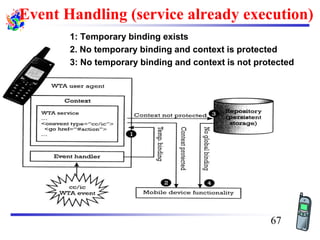
❑ Temporary binding:
❑ resources to be executed are defined by the already executing service
❑ example: yellow pages lookup and call establishment
65
Event Handling (no service in execution)
66
Event Handling (service already execution)
1: Temporary binding exists
2. No temporary binding and context is protected
3: No temporary binding and context is not protected
67
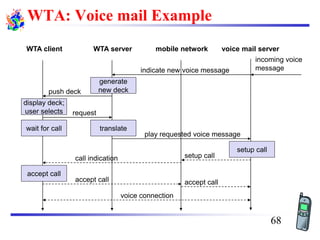
WTA: Voice mail Example
push deck
WTA client WTA server mobile network voice mail server
incoming voice
message
generate
new deck
display deck;
user selects
translate
setup call
wait for call
accept call
voice connection
indicate new voice message
request
play requested voice message
setup callcall indication
accept call accept call
68
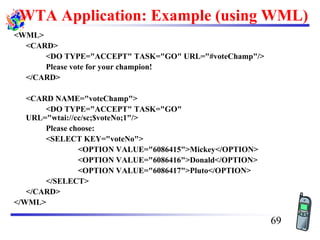
WTA Application: Example (using WML)
<WML>
<CARD>
<DO TYPE="ACCEPT" TASK="GO" URL="#voteChamp"/>
Please vote for your champion!
</CARD>
<CARD NAME="voteChamp">
<DO TYPE="ACCEPT" TASK="GO"
URL="wtai://cc/sc;$voteNo;1"/>
Please choose:
<SELECT KEY="voteNo">
<OPTION VALUE="6086415">Mickey</OPTION>
<OPTION VALUE="6086416">Donald</OPTION>
<OPTION VALUE="6086417">Pluto</OPTION>
</SELECT>
</CARD>
</WML>
69
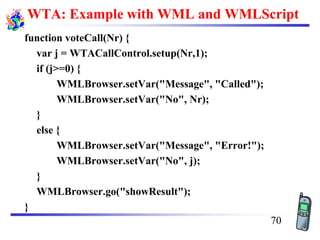
WTA: Example with WML and WMLScript
function voteCall(Nr) {
var j = WTACallControl.setup(Nr,1);
if (j>=0) {
WMLBrowser.setVar("Message", "Called");
WMLBrowser.setVar("No", Nr);
}
else {
WMLBrowser.setVar("Message", "Error!");
WMLBrowser.setVar("No", j);
}
WMLBrowser.go("showResult");
}
70
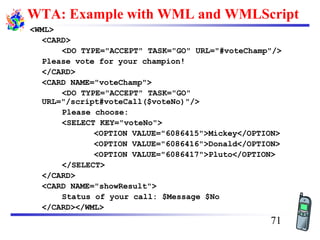
WTA: Example with WML and WMLScript
<WML>
<CARD>
<DO TYPE="ACCEPT" TASK="GO" URL="#voteChamp"/>
Please vote for your champion!
</CARD>
<CARD NAME="voteChamp">
<DO TYPE="ACCEPT" TASK="GO"
URL="/script#voteCall($voteNo)"/>
Please choose:
<SELECT KEY="voteNo">
<OPTION VALUE="6086415">Mickey</OPTION>
<OPTION VALUE="6086416">Donald</OPTION>
<OPTION VALUE="6086417">Pluto</OPTION>
</SELECT>
</CARD>
<CARD NAME="showResult">
Status of your call: $Message $No
</CARD></WML>
71
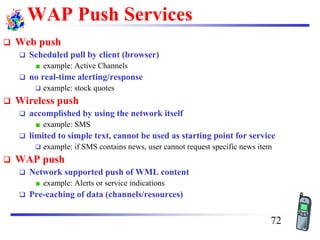
WAP Push Services
❑ Web push
❑ Scheduled pull by client (browser)
example: Active Channels
❑ no real-time alerting/response
❑ example: stock quotes
❑ Wireless push
❑ accomplished by using the network itself
example: SMS
❑ limited to simple text, cannot be used as starting point for service
❑ example: if SMS contains news, user cannot request specific news item
❑ WAP push
❑ Network supported push of WML content
example: Alerts or service indications
❑ Pre-caching of data (channels/resources)
72
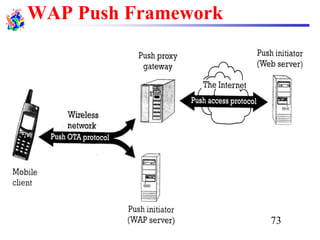
WAP Push Framework
73
Push Access Protocol
❑ Based on request/response model
❑ Push initiator is the client
❑ Push proxy is the server
❑ Initiator uses HTTP POST to send push message to
proxy
❑ Initiator sends control information as an XML
document, and content for mobile (as WML)
❑ Proxy sends XML entity in response indicating
submission status
❑ Initiator can
❑ cancel previous push
❑ query status of push
❑ query status/capabilities of device
74
Push Proxy Gateway
❑ WAP stack (communication with mobile device)
❑ TCP/IP stack (communication with Internet push initiator)
❑ Proxy layer does
❑ control information parsing
❑ content transformation
❑ session management
❑ client capabilities
❑ store and forward
❑ prioritization
❑ address resolution
❑ management function
75
Over the Air (OTA) Protocol
❑ Extends WSP with push-specific functionality
❑ Application ID uniquely identifies a particular
application in the client (referenced as a URI)
❑ Connection-oriented mode
❑ client informs proxy of application IDs in a session
❑ Connectionless mode
❑ well known ports, one for secure and other for non-secure
push
❑ Session Initiation Application (SIA)
❑ unconfirmed push from proxy to client
❑ request to create a session for a specific user agent and
bearer
76
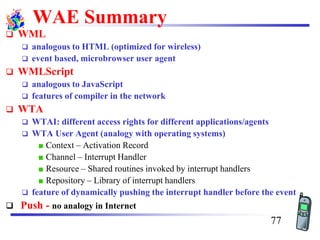
WAE Summary
❑ WML
❑ analogous to HTML (optimized for wireless)
❑ event based, microbrowser user agent
❑ WMLScript
❑ analogous to JavaScript
❑ features of compiler in the network
❑ WTA
❑ WTAI: different access rights for different applications/agents
❑ WTA User Agent (analogy with operating systems)
Context – Activation Record
Channel – Interrupt Handler
Resource – Shared routines invoked by interrupt handlers
Repository – Library of interrupt handlers
❑ feature of dynamically pushing the interrupt handler before the event
❑ Push - no analogy in Internet
77
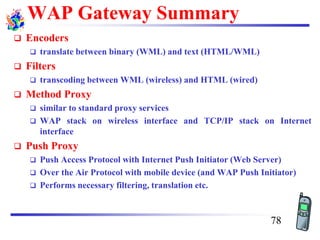
WAP Gateway Summary
❑ Encoders
❑ translate between binary (WML) and text (HTML/WML)
❑ Filters
❑ transcoding between WML (wireless) and HTML (wired)
❑ Method Proxy
❑ similar to standard proxy services
❑ WAP stack on wireless interface and TCP/IP stack on Internet
interface
❑ Push Proxy
❑ Push Access Protocol with Internet Push Initiator (Web Server)
❑ Over the Air Protocol with mobile device (and WAP Push Initiator)
❑ Performs necessary filtering, translation etc.
78
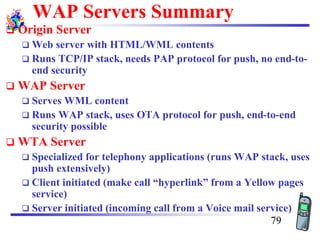
WAP Servers Summary
❑ Origin Server
❑ Web server with HTML/WML contents
❑ Runs TCP/IP stack, needs PAP protocol for push, no end-to-
end security
❑ WAP Server
❑ Serves WML content
❑ Runs WAP stack, uses OTA protocol for push, end-to-end
security possible
❑ WTA Server
❑ Specialized for telephony applications (runs WAP stack, uses
push extensively)
❑ Client initiated (make call “hyperlink” from a Yellow pages
service)
❑ Server initiated (incoming call from a Voice mail service)
79
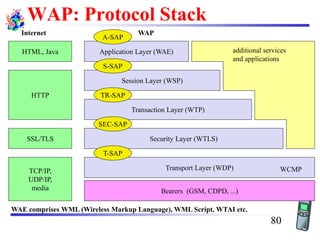
WAP: Protocol Stack
Bearers (GSM, CDPD, ...)
Security Layer (WTLS)
Session Layer (WSP)
Application Layer (WAE)
Transport Layer (WDP)TCP/IP,
UDP/IP,
media
SSL/TLS
HTML, Java
HTTP
Internet WAP
WAE comprises WML (Wireless Markup Language), WML Script, WTAI etc.
Transaction Layer (WTP)
additional services
and applications
WCMP
A-SAP
S-SAP
TR-SAP
SEC-SAP
T-SAP
80
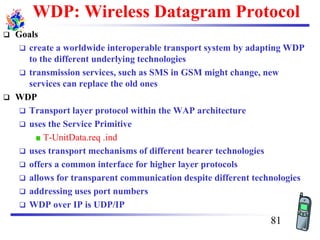
WDP: Wireless Datagram Protocol
❑ Goals
❑ create a worldwide interoperable transport system by adapting WDP
to the different underlying technologies
❑ transmission services, such as SMS in GSM might change, new
services can replace the old ones
❑ WDP
❑ Transport layer protocol within the WAP architecture
❑ uses the Service Primitive
T-UnitData.req .ind
❑ uses transport mechanisms of different bearer technologies
❑ offers a common interface for higher layer protocols
❑ allows for transparent communication despite different technologies
❑ addressing uses port numbers
❑ WDP over IP is UDP/IP
81
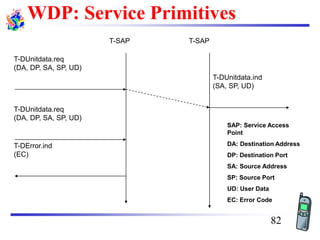
WDP: Service Primitives
T-SAP T-SAP
T-DUnitdata.req
(DA, DP, SA, SP, UD)
T-DUnitdata.ind
(SA, SP, UD)
T-DUnitdata.req
(DA, DP, SA, SP, UD)
T-DError.ind
(EC)
SAP: Service Access
Point
DA: Destination Address
DP: Destination Port
SA: Source Address
SP: Source Port
UD: User Data
EC: Error Code
82
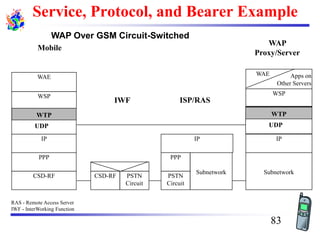
WAP Over GSM Circuit-Switched
RAS - Remote Access Server
IWF - InterWorking Function
WSP
WAE
Subnetwork
IP
WSP
WAE Apps on
Other Servers
WAP
Proxy/Server
CSD-RF
PPP
IP
Mobile
IWF
PSTN
Circuit
CSD-RF
ISP/RAS
Subnetwork
PSTN
Circuit
PPP
IP
WTP
UDP
WTP
UDP
Service, Protocol, and Bearer Example
83
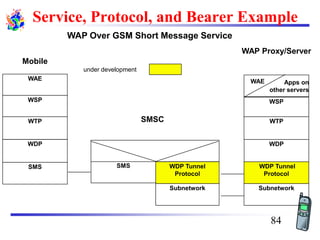
WAP Over GSM Short Message Service
SMS
WDP
WTP
WSP
WAE
SMS
Subnetwork
WDP
WDP Tunnel
Protocol
Subnetwork
WDP Tunnel
Protocol
WTP
WSP
WAE Apps on
other servers
SMSC
WAP Proxy/Server
Mobile
under development
Service, Protocol, and Bearer Example
84
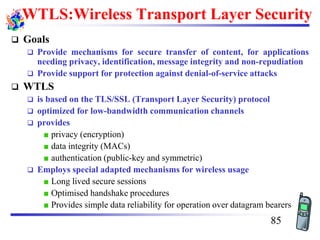
WTLS:Wireless Transport Layer Security
❑ Goals
❑ Provide mechanisms for secure transfer of content, for applications
needing privacy, identification, message integrity and non-repudiation
❑ Provide support for protection against denial-of-service attacks
❑ WTLS
❑ is based on the TLS/SSL (Transport Layer Security) protocol
❑ optimized for low-bandwidth communication channels
❑ provides
privacy (encryption)
data integrity (MACs)
authentication (public-key and symmetric)
❑ Employs special adapted mechanisms for wireless usage
Long lived secure sessions
Optimised handshake procedures
Provides simple data reliability for operation over datagram bearers
85
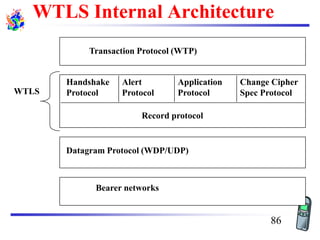
Record Protocol
Handshake
Protocol
Alert
Protocol
Application
Protocol
Change Cipher
Spec Protocol
Transaction Protocol (WTP)
Datagram Protocol (WDP/UDP)
Bearer networks
WTLS
Record protocol
WTLS Internal Architecture
86
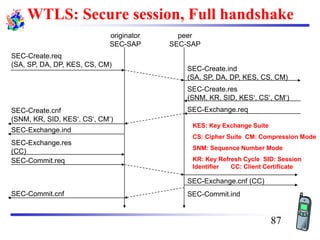
WTLS: Secure session, Full handshake
SEC-Create.req
(SA, SP, DA, DP, KES, CS, CM)
SEC-Create.ind
(SA, SP, DA, DP, KES, CS, CM)
originator
SEC-SAP
peer
SEC-SAP
SEC-Create.cnf
(SNM, KR, SID, KES‘, CS‘, CM‘)
SEC-Create.res
(SNM, KR, SID, KES‘, CS‘, CM‘)
SEC-Exchange.req
SEC-Exchange.ind
SEC-Exchange.res
(CC)
SEC-Commit.req
SEC-Exchange.cnf (CC)
SEC-Commit.indSEC-Commit.cnf
KES: Key Exchange Suite
CS: Cipher Suite CM: Compression Mode
SNM: Sequence Number Mode
KR: Key Refresh Cycle SID: Session
Identifier CC: Client Certificate
87
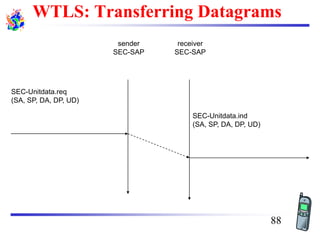
WTLS: Transferring Datagrams
SEC-Unitdata.req
(SA, SP, DA, DP, UD)
SEC-Unitdata.ind
(SA, SP, DA, DP, UD)
sender
SEC-SAP
receiver
SEC-SAP
88
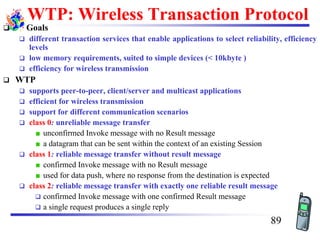
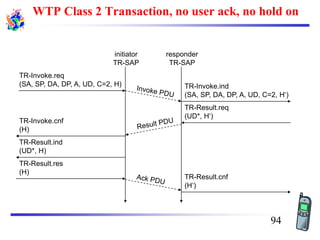
WTP: Wireless Transaction Protocol
❑ Goals
❑ different transaction services that enable applications to select reliability, efficiency
levels
❑ low memory requirements, suited to simple devices (< 10kbyte )
❑ efficiency for wireless transmission
❑ WTP
❑ supports peer-to-peer, client/server and multicast applications
❑ efficient for wireless transmission
❑ support for different communication scenarios
❑ class 0: unreliable message transfer
unconfirmed Invoke message with no Result message
a datagram that can be sent within the context of an existing Session
❑ class 1: reliable message transfer without result message
confirmed Invoke message with no Result message
used for data push, where no response from the destination is expected
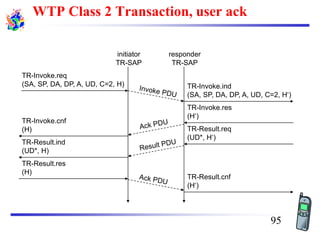
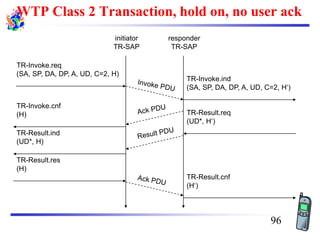
❑ class 2: reliable message transfer with exactly one reliable result message
❑ confirmed Invoke message with one confirmed Result message
❑ a single request produces a single reply
89
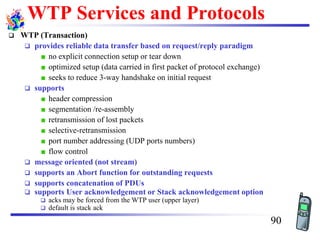
WTP Services and Protocols
❑ WTP (Transaction)
❑ provides reliable data transfer based on request/reply paradigm
no explicit connection setup or tear down
optimized setup (data carried in first packet of protocol exchange)
seeks to reduce 3-way handshake on initial request
❑ supports
header compression
segmentation /re-assembly
retransmission of lost packets
selective-retransmission
port number addressing (UDP ports numbers)
flow control
❑ message oriented (not stream)
❑ supports an Abort function for outstanding requests
❑ supports concatenation of PDUs
❑ supports User acknowledgement or Stack acknowledgement option
❑ acks may be forced from the WTP user (upper layer)
❑ default is stack ack
90
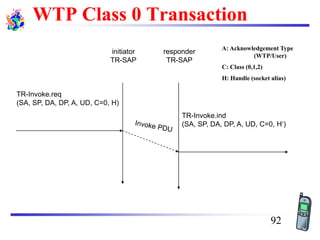
WTP Class 0 Transaction
TR-Invoke.req
(SA, SP, DA, DP, A, UD, C=0, H)
TR-Invoke.ind
(SA, SP, DA, DP, A, UD, C=0, H‘)
initiator
TR-SAP
responder
TR-SAP
A: Acknowledgement Type
(WTP/User)
C: Class (0,1,2)
H: Handle (socket alias)
92
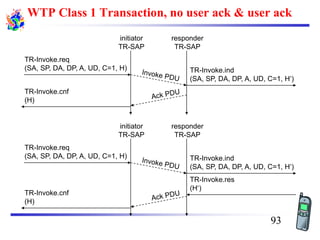
WTP Class 1 Transaction, no user ack & user ack
TR-Invoke.req
(SA, SP, DA, DP, A, UD, C=1, H) TR-Invoke.ind
(SA, SP, DA, DP, A, UD, C=1, H‘)
initiator
TR-SAP
responder
TR-SAP
TR-Invoke.res
(H‘)
TR-Invoke.cnf
(H)
TR-Invoke.req
(SA, SP, DA, DP, A, UD, C=1, H) TR-Invoke.ind
(SA, SP, DA, DP, A, UD, C=1, H‘)
initiator
TR-SAP
responder
TR-SAP
TR-Invoke.cnf
(H)
93
WTP Class 2 Transaction, no user ack, no hold on
TR-Invoke.req
(SA, SP, DA, DP, A, UD, C=2, H) TR-Invoke.ind
(SA, SP, DA, DP, A, UD, C=2, H‘)
initiator
TR-SAP
responder
TR-SAP
TR-Result.req
(UD*, H‘)
TR-Result.ind
(UD*, H)
TR-Invoke.cnf
(H)
TR-Result.res
(H)
TR-Result.cnf
(H‘)
94
WTP Class 2 Transaction, user ack
TR-Invoke.req
(SA, SP, DA, DP, A, UD, C=2, H) TR-Invoke.ind
(SA, SP, DA, DP, A, UD, C=2, H‘)
initiator
TR-SAP
responder
TR-SAP
TR-Result.ind
(UD*, H)
TR-Invoke.res
(H‘)
TR-Invoke.cnf
(H) TR-Result.req
(UD*, H‘)
TR-Result.res
(H)
TR-Result.cnf
(H‘)
95
WTP Class 2 Transaction, hold on, no user ack
TR-Invoke.req
(SA, SP, DA, DP, A, UD, C=2, H)
TR-Invoke.ind
(SA, SP, DA, DP, A, UD, C=2, H‘)
initiator
TR-SAP
responder
TR-SAP
TR-Result.req
(UD*, H‘)
TR-Result.ind
(UD*, H)
TR-Invoke.cnf
(H)
TR-Result.res
(H)
TR-Result.cnf
(H‘)
96
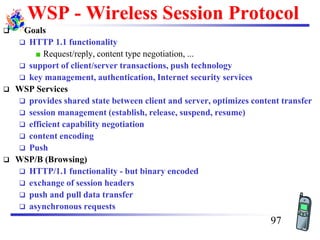
WSP - Wireless Session Protocol
❑ Goals
❑ HTTP 1.1 functionality
Request/reply, content type negotiation, ...
❑ support of client/server transactions, push technology
❑ key management, authentication, Internet security services
❑ WSP Services
❑ provides shared state between client and server, optimizes content transfer
❑ session management (establish, release, suspend, resume)
❑ efficient capability negotiation
❑ content encoding
❑ Push
❑ WSP/B (Browsing)
❑ HTTP/1.1 functionality - but binary encoded
❑ exchange of session headers
❑ push and pull data transfer
❑ asynchronous requests
97
WSP Overview
❑ Header Encoding
❑ compact binary encoding of headers, content type identifiers and other well-
known textual or structured values
❑ reduces the data actually sent over the network
❑ Capabilities (are defined for):
❑ message size, client and server
❑ protocol options: Confirmed Push Facility, Push Facility, Session Suspend Facility,
Acknowledgement headers
❑ maximum outstanding requests
❑ extended methods
❑ header code pages
❑ Suspend and Resume
❑ server knows when client can accept a push
❑ multi-bearer devices
❑ dynamic addressing
❑ allows the release of underlying bearer resources
99
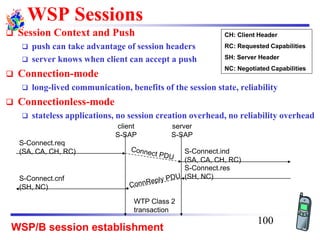
WSP Sessions
❑ Session Context and Push
❑ push can take advantage of session headers
❑ server knows when client can accept a push
❑ Connection-mode
❑ long-lived communication, benefits of the session state, reliability
❑ Connectionless-mode
❑ stateless applications, no session creation overhead, no reliability overhead
WSP/B session establishment
S-Connect.req
(SA, CA, CH, RC) S-Connect.ind
(SA, CA, CH, RC)
client
S-SAP
server
S-SAP
S-Connect.res
(SH, NC)S-Connect.cnf
(SH, NC)
WTP Class 2
transaction
CH: Client Header
RC: Requested Capabilities
SH: Server Header
NC: Negotiated Capabilities
100
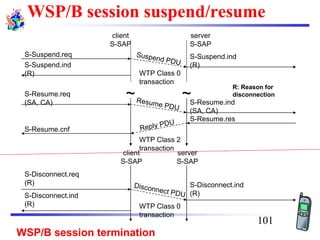
WSP/B session suspend/resume
client
S-SAP
server
S-SAP
S-Suspend.req S-Suspend.ind
(R)
S-Resume.res
WTP Class 2
transaction
S-Suspend.ind
(R)
~ ~S-Resume.req
(SA, CA) S-Resume.ind
(SA, CA)
S-Resume.cnf
WTP Class 0
transaction
R: Reason for
disconnection
WSP/B session termination
S-Disconnect.ind
(R)
client
S-SAP
server
S-SAP
S-Disconnect.ind
(R) WTP Class 0
transaction
S-Disconnect.req
(R)
101
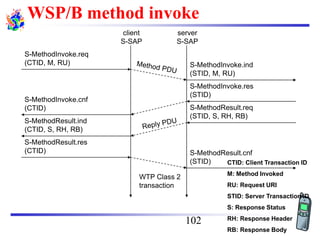
WSP/B method invoke
S-MethodInvoke.req
(CTID, M, RU) S-MethodInvoke.ind
(STID, M, RU)
client
S-SAP
server
S-SAP
S-MethodInvoke.res
(STID)
S-MethodInvoke.cnf
(CTID)
WTP Class 2
transaction
S-MethodResult.req
(STID, S, RH, RB)
S-MethodResult.ind
(CTID, S, RH, RB)
S-MethodResult.res
(CTID) S-MethodResult.cnf
(STID) CTID: Client Transaction ID
M: Method Invoked
RU: Request URI
STID: Server Transaction ID
S: Response Status
RH: Response Header
RB: Response Body
102
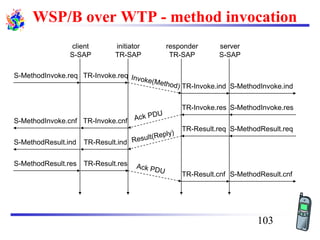
WSP/B over WTP - method invocation
S-MethodInvoke.req
S-MethodInvoke.ind
client
S-SAP
server
S-SAP
S-MethodInvoke.res
S-MethodInvoke.cnf
S-MethodResult.req
S-MethodResult.ind
S-MethodResult.res
S-MethodResult.cnf
TR-Invoke.req
initiator
TR-SAP
TR-Result.ind
TR-Invoke.cnf
TR-Result.res
TR-Invoke.ind
responder
TR-SAP
TR-Invoke.res
TR-Result.req
TR-Result.cnf
103
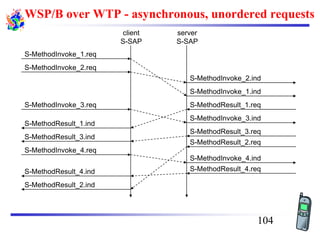
WSP/B over WTP - asynchronous, unordered requests
S-MethodInvoke_1.req
S-MethodInvoke_1.ind
client
S-SAP
server
S-SAP
S-MethodInvoke_2.req
S-MethodInvoke_3.req
S-MethodResult_1.ind
S-MethodInvoke_4.req
S-MethodResult_3.ind
S-MethodResult_4.ind
S-MethodResult_2.ind
S-MethodInvoke_3.ind
S-MethodInvoke_2.ind
S-MethodResult_1.req
S-MethodResult_2.req
S-MethodResult_3.req
S-MethodResult_4.req
S-MethodInvoke_4.ind
104
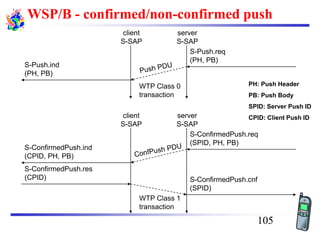
WSP/B - confirmed/non-confirmed push
S-Push.req
(PH, PB)
client
S-SAP
server
S-SAP
WTP Class 1
transaction
S-Push.ind
(PH, PB)
S-ConfirmedPush.res
(CPID)
S-ConfirmedPush.ind
(CPID, PH, PB)
WTP Class 0
transaction
S-ConfirmedPush.req
(SPID, PH, PB)
client
S-SAP
server
S-SAP
S-ConfirmedPush.cnf
(SPID)
PH: Push Header
PB: Push Body
SPID: Server Push ID
CPID: Client Push ID
105
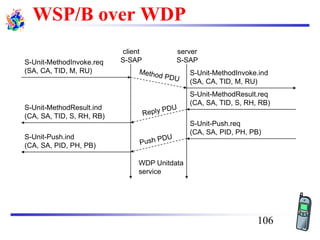
WSP/B over WDP
S-Unit-MethodInvoke.req
(SA, CA, TID, M, RU)
client
S-SAP
server
S-SAP
S-Unit-MethodResult.ind
(CA, SA, TID, S, RH, RB)
S-Unit-Push.ind
(CA, SA, PID, PH, PB)
S-Unit-MethodInvoke.ind
(SA, CA, TID, M, RU)
S-Unit-MethodResult.req
(CA, SA, TID, S, RH, RB)
S-Unit-Push.req
(CA, SA, PID, PH, PB)
WDP Unitdata
service
106
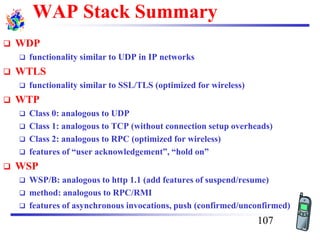
WAP Stack Summary
❑ WDP
❑ functionality similar to UDP in IP networks
❑ WTLS
❑ functionality similar to SSL/TLS (optimized for wireless)
❑ WTP
❑ Class 0: analogous to UDP
❑ Class 1: analogous to TCP (without connection setup overheads)
❑ Class 2: analogous to RPC (optimized for wireless)
❑ features of “user acknowledgement”, “hold on”
❑ WSP
❑ WSP/B: analogous to http 1.1 (add features of suspend/resume)
❑ method: analogous to RPC/RMI
❑ features of asynchronous invocations, push (confirmed/unconfirmed)
107
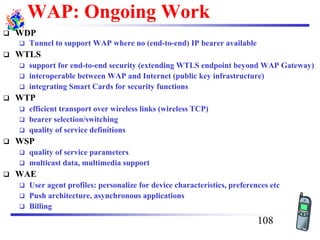
WAP: Ongoing Work
❑ WDP
❑ Tunnel to support WAP where no (end-to-end) IP bearer available
❑ WTLS
❑ support for end-to-end security (extending WTLS endpoint beyond WAP Gateway)
❑ interoperable between WAP and Internet (public key infrastructure)
❑ integrating Smart Cards for security functions
❑ WTP
❑ efficient transport over wireless links (wireless TCP)
❑ bearer selection/switching
❑ quality of service definitions
❑ WSP
❑ quality of service parameters
❑ multicast data, multimedia support
❑ WAE
❑ User agent profiles: personalize for device characteristics, preferences etc
❑ Push architecture, asynchronous applications
❑ Billing
108
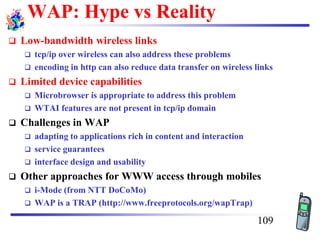
WAP: Hype vs Reality
❑ Low-bandwidth wireless links
❑ tcp/ip over wireless can also address these problems
❑ encoding in http can also reduce data transfer on wireless links
❑ Limited device capabilities
❑ Microbrowser is appropriate to address this problem
❑ WTAI features are not present in tcp/ip domain
❑ Challenges in WAP
❑ adapting to applications rich in content and interaction
❑ service guarantees
❑ interface design and usability
❑ Other approaches for WWW access through mobiles
❑ i-Mode (from NTT DoCoMo)
❑ WAP is a TRAP (http://www.freeprotocols.org/wapTrap)
109
Questions?
110

Cs8601 4

  • 1.
    CS8601 MOBILE COMPUTING UNIT– IV Dr.A.Kathirvel, Professor and Head, Dept of CSE Misrimal Navajee Munoth Jain Engineering College, Chennai
  • 2.
    Unit - IV MOBILETRANSPORT AND APPLICATION LAYER Mobile TCP– WAP – Architecture – WDP – WTLS – WTP –WSP – WAE – WTAArchitecture – WML TEXT BOOKS:Jochen Schiller, Mobile Communications, PHI, Second Edn, 2003. 2
  • 3.
    Mobile Transport Layer ❑Motivation ❑ TCP-mechanisms ❑ Indirect TCP ❑ Snooping TCP ❑ Mobile TCP ❑Fast retransmit/recovery ❑ Transmission freezing ❑ Selective retransmission ❑ Transaction oriented TCP 3
  • 4.
    Motivation I ❑ Transportprotocols typically designed for ❑ Fixed end-systems ❑ Fixed, wired networks ❑ Research activities ❑ Performance ❑ Congestion control ❑ Efficient retransmissions ❑ TCP congestion control ❑ packet loss in fixed networks typically due to (temporary) overload situations ❑ routers have to discard packets as soon as the buffers are full ❑ TCP recognizes congestion only indirectly via missing (I.e., timed out) acknowledgements ❑ Immediate retransmissions unwise, they would only contribute to the congestion and make it even worse ❑ slow-start algorithm is used as a reactive action to reduce the network load 4
  • 5.
    Motivation II ❑ TCPslow-start algorithm ❑ sender calculates/negotiates a congestion window threshold for a receiver ❑ start with a congestion window size equal to one segment ❑ exponential increase of the congestion window up to the congestion threshold, then linear increase ❑ missing acknowledgement causes the reduction of the congestion threshold to one half of the current congestion window ❑ congestion window starts again with one segment ❑ TCP fast retransmit/fast recovery ❑ TCP sends an acknowledgement only after receiving a packet ❑ if a sender receives several acknowledgements for the same packet, this is due to a gap in received packets at the receiver ❑ It indicates that the receiver got all packets up to the gap and is actually receiving packets, but some are missing (hence gap) ❑ Sender concludes that packet loss is not due to congestion, continue with current congestion window (do not use slow-start), just retransmit all packets from beginning of reported gap (go back N). 5
  • 6.
    Influences of mobilityon TCP-mechanisms ❑ TCP assumes congestion if packets are dropped ❑ typically wrong in wireless networks, here we often have packet loss due to transmission errors ❑ furthermore, mobility itself can cause packet loss, if e.g. a mobile node roams from one access point (e.g. foreign agent in Mobile IP) to another while there are still packets in transit to the old access point and forwarding from old to new access point is not possible for some reason ❑ The performance of an unmodified (I.e) TCP degrades severely ❑ note that TCP cannot be changed fundamentally due to the large base of installation in the fixed network, TCP for mobility has to remain compatible ❑ the basic TCP mechanisms keep the whole Internet together 6
  • 7.
    Proposals to modifyTCP to work in mobile environments Approach Indirect TCP Snooping TCP M-TCP Fast retransmit/ fast recovery Transmission/ time-out freezing Selective retransmission Transaction oriented TCP 7 I-TCP socket and state migration mobile host access point2 Internet access point1 socket migration and state transfer
  • 8.
    1. Indirect TCPI ❑ Indirect TCP or I-TCP segments the connection ❑ no changes to the basic TCP protocol for hosts connected to the wired Internet, millions of computers use this protocol (or slight variants of it) ❑ optimized TCP protocol for mobile hosts ❑ splitting of the TCP connection at, e.g., the foreign agent into 2 TCP connections, no real end-to-end connection any longer ❑ hosts in the fixed part of the net do not notice the characteristics of the wireless part mobile host access point (foreign agent) „wired“ Internet „wireless“ TCP standard TCP 8
  • 9.
    Indirect TCP II ❑Advantages ❑ no changes in the fixed network necessary, no changes for the hosts (TCP protocol) necessary, all current optimizations to TCP (Reno, Vegas, etc.) still work ❑ transmission errors on the wireless link do not propagate into the fixed network ❑ simple to control, mobile TCP is used only for one hop between, e.g., a foreign agent and mobile host ❑ therefore, very fast retransmission of packets is possible, the short delay on the mobile hop is known ❑ Disadvantages ❑ loss of end-to-end semantics, an acknowledgement to a sender does now not any longer mean that a receiver really got a packet, foreign agents might crash ❑ higher latency possible due to buffering of data within the foreign agent and forwarding to a new foreign agent 9
  • 10.
    2. Snooping TCPI ❑ Transparent“ extension of TCP within the foreign agent ❑ buffering of packets sent to the mobile host ❑ lost packets on the wireless link (both directions!) will be retransmitted immediately by the mobile host or foreign agent, respectively (so called “local” retransmission) ❑ the foreign agent therefore “snoops” the packet flow and recognizes acknowledgements in both directions, it also filters ACKs ❑ changes to the basic TCP only within the foreign agent „wired“ Internet buffering of data end-to-end TCP connection local retransmission correspondent hostforeign agent mobile host snooping of ACKs 10
  • 11.
    Snooping TCP II ❑Data transfer to the mobile host ❑ FA buffers data until it receives ACK of the MH, FA detects packet loss via duplicated ACKs or time-out ❑ fast retransmission possible, transparent for the fixed network ❑ Data transfer from the mobile host ❑ FA detects packet loss on the wireless link via sequence numbers, FA answers directly with a NACK to the MH ❑ MH can now retransmit data with only a very short delay ❑ Integration of the MAC layer ❑ MAC layer often has similar mechanisms to those of TCP ❑ thus, the MAC layer can already detect duplicated packets due to retransmissions and discard them ❑ Problems ❑ snooping TCP does not isolate the wireless link as good as I-TCP ❑ snooping might be useless depending on encryption schemes 11
  • 12.
    3. Mobile TCP ❑Special handling of lengthy and/or frequent disconnections ❑ M-TCP splits as I-TCP does ❑ unmodified TCP fixed network to supervisory host (SH) ❑ optimized TCP SH to MH ❑ Supervisory host ❑ no caching, no retransmission ❑ monitors all packets, if disconnection detected set sender window size to 0 sender automatically goes into persistent mode ❑ old or new SH reopen the window ❑ Advantages ❑ maintains semantics, supports disconnection, no buffer forwarding ❑ Disadvantages ❑ loss on wireless link propagated into fixed network ❑ adapted TCP on wireless link 12
  • 13.
    4. Fast retransmit/fastrecovery ❑ Change of foreign agent often results in packet loss ❑ TCP reacts with slow-start although there is no congestion ❑ Forced fast retransmit ❑ as soon as the mobile host has registered with a new foreign agent, the MH sends duplicated acknowledgements on purpose ❑ this forces the fast retransmit mode at the communication partners ❑ additionally, the TCP on the MH is forced to continue sending with the actual window size and not to go into slow-start after registration ❑ Adv: simple changes result in significant higher performance ❑ Dis: further mix of IP and TCP, no transparent approach 13
  • 14.
    5. Transmission/time-out freezing ❑Mobile hosts can be disconnected for a longer time ❑ no packet exchange possible, e.g., in a tunnel, disconnection due to overloaded cells or mux. with higher priority traffic ❑ TCP disconnects after time-out completely ❑ TCP freezing ❑ MAC layer is often able to detect interruption in advance ❑ MAC can inform TCP layer of upcoming loss of connection ❑ TCP stops sending, but does now not assume a congested link ❑ MAC layer signals again if reconnected ❑ Adv: scheme is independent of data ❑ Dis: TCP on mobile host has to be changed, mechanism depends on MAC layer 14
  • 15.
    6. Selective retransmission ❑TCP acknowledgements are often cumulative ❑ ACK n acknowledges correct and in-sequence receipt of packets up to n ❑ if single packets are missing quite often a whole packet sequence beginning at the gap has to be retransmitted (go- back-n), thus wasting bandwidth ❑ Selective retransmission as one solution ❑ RFC2018 allows for acknowledgements of single packets, not only acknowledgements of in-sequence packet streams without gaps ❑ sender can now retransmit only the missing packets ❑ Advantage: much higher efficiency ❑ Dis : more complex s/w in a receiver, more buffer needed at the receiver 15
  • 16.
    7. Transaction orientedTCP ❑ TCP phases ❑ connection setup, data transmission, connection release ❑ using 3-way-handshake needs 3 packets for setup and release, respectively ❑ thus, even short messages need a minimum of 7 packets! ❑ Transaction oriented TCP ❑ RFC1644, T-TCP, describes a TCP version to avoid this overhead ❑ connection setup, data transfer and connection release can be combined ❑ thus, only 2 or 3 packets are needed ❑ Advantage : efficiency ❑ Dis: requires changed TCP & mobility not longer transparent 16
  • 17.
    Comparison of differentapproaches for “mobile” TCP Approach Mechanism Advantages Disadvantages Indirect TCP splits TCP connection into two connections isolation of wireless link, simple loss of TCP semantics, higher latency at handover Snooping TCP “snoops” data and acknowledgements, local retransmission transparent for end- to-end connection, MAC integration possible problematic with encryption, bad isolation of wireless link M-TCP splits TCP connection, chokes sender via window size Maintains end-to-end semantics, handles long term and frequent disconnections Bad isolation of wireless link, processing overhead due to bandwidth management Fast retransmit/ fast recovery avoids slow-start after roaming simple and efficient mixed layers, not transparent Transmission/ time-out freezing freezes TCP state at disconnect, resumes after reconnection independent of content or encryption, works for longer interrupts changes in TCP required, MAC dependant Selective retransmission retransmit only lost data very efficient slightly more complex receiver software, more buffer needed Transaction oriented TCP combine connection setup/release and data transmission Efficient for certain applications changes in TCP required, not transparent 17
  • 18.
    Mobile Applications ❑ Vehicles- transmission of news, road condition etc ❑ ad-hoc network with near vehicles to prevent accidents ❑ Emergencies ❑ early transmission of patient data to the hospital ❑ ad-hoc network in case of earthquakes, cyclones, military ... ❑ Traveling salesmen - direct access to central customer files ❑ consistent databases for all agents & mobile office ❑ Web access ❑ outdoor Internet access ❑ intelligent travel guide with up-to-date location dependent information ❑ Information services - push: stock quotes; pull: nearest cash ATM ❑ Disconnected operations ❑ file-system caching for off-line work ❑ mobile agents, e.g., shopping ❑ Entertainment - games, etc 18
  • 19.
    Variability of theMobile Environment ❑Connectivity ❑ connected ❑ semi-connected ❑ (asymmetric) ❑ weakly connected ❑ disconnected ❑Mobile Device Capability ❑ form factor ❑ GUI ❑ multimedia ❑ real-time multimedia ❑Mobility ❑ stationary ❑ nomadic (pedestrian speed) ❑ mobile (vehicular speed) ❑ roaming (mobile across networks) 19
  • 20.
    World Wide Weband Mobility ❑ HTTP/HTML have not been designed for mobile appl. /devices ❑ HTTP 1.0 characteristics ❑ designed for large bandwidth, low delay ❑ stateless, client/server, request/response communication ❑ connection oriented, one connection per request ❑ TCP 3-way handshake, DNS lookup overheads ❑ big protocol headers, uncompressed content transfer ❑ primitive caching (often disabled, dynamic objects) ❑ security problems (using SSL/TLS with proxies) ❑ HTML characteristics ❑ designed for computers with “high” performance, color high-resolution display, mouse, hard disk ❑ typically, web pages optimized for design, not for communication; ignore end-system characteristics 20
  • 21.
    System Support forMobile WWW ❑ Enhanced browsers ❑ client-aware support for mobility ❑ Proxies ❑ Client proxy: pre-fetching, caching, off-line use ❑ Network proxy: adaptive content transformation for connections ❑ Client and network proxy ❑ Enhanced servers ❑ server-aware support for mobility ❑ serve the content in multiple ways, depending on client capabilities ❑ New protocols/languages ❑ WAP/WML 21
  • 22.
    Wireless Application Protocol(WAP) ❑ Empowers mobile users with wireless devices to easily access and interact with information and services. ❑ A “standard” created by wireless and Internet companies to enable Internet access from a cellular phone ❑ wapforum.org: ❑ co-founded by Ericsson, Motorola, Nokia, Phone.com ❑ 450 members in 2000, comprise of Handset manufacturers, Wireless service providers, ISPs, Software companies in the wireless industry ❑ Goals ❑ deliver Internet services to mobile devices ❑ enable applications to scale across a variety of transport options and device types ❑ independence from wireless network standards ❑ GSM, CDMA IS-95, TDMA IS-136, 3G systems (UMTS, W-CDMA) 22
  • 23.
    WAP: Main Features ❑Browser ❑ “Micro browser”, similar to existing web browsers ❑ Markup language ❑ Similar to HTML, adapted to mobile devices ❑ Script language ❑ Similar to Javascript, adapted to mobile devices ❑ Gateway ❑ Transition from wireless to wired world ❑ Server ❑ “Wap/Origin server”, similar to existing web servers ❑ Protocol layers ❑ Transport layer, security layer, session layer etc. ❑ Telephony application interface ❑ Access to telephony functions 23
  • 24.
  • 25.
    Web Server Content CGI Scripts etc. WMLDecks withWML-Script WAP Gateway WMLEncoder WMLScript Compiler Protocol Adapters Client WML WML- Script WTAI Etc. HTTPWSP/WTP WAP Architecture 25
  • 26.
    WAP Application Server Content Application Logic WMLDecks withWML-Script WMLEncoder WMLScript Compiler Protocol Adapters Client WML WML- Script WTAI Etc. WSP/WTP WAP Application Server 26
  • 27.
    WAP Architecture ❑ Anotherlook Key Components • Origin/Web Server • WAP Gateway/Proxy • WAP Protocol Stack • Micro Browser • WML/WML Script • Transcoders • WTA 27
  • 28.
    WAP: Network Elements wirelessnetworkfixed network WAP proxy WTA server filter/ WAP proxyweb server filter PSTN Internet Binary WML: binary file format for clients Binary WML Binary WML Binary WML HTML HTML HTML WML WMLHTML 28
  • 29.
    WAP Specifies ❑ WirelessApplication Environment ❑WML Microbrowser ❑WMLScript Virtual Machine ❑WMLScript Standard Library ❑Wireless Telephony Application Interface (WTAI) ❑WAP content types ❑ Wireless Protocol Stack ❑Wireless Session Protocol (WSP) ❑Wireless Transport Layer Security (WTLS) ❑Wireless Transaction Protocol (WTP) ❑Wireless Datagram Protocol (WDP) ❑Wireless network interface definitions 29
  • 30.
    WAP Stack MicroBrowser (WML, WMLScript,WTA, WTAI) Runs on top of WDP Provided lightweight X-oriented service • Unreliable 1-way request • Reliable 1-way/2-way req./response Lightweight SSL Uses WIM/PKI-Cards Datagram service on different bearers Convergence between bearer services Different Wireless Tech. 30
  • 31.
    WAP Stack ❑ WAE(Wireless Application Environment): ❑ Architecture: application model, browser, gateway, server ❑ WML: XML-Syntax, based on card stacks, variables, ... ❑ WTA: telephone services, such as call control, phone book etc. ❑ WSP (Wireless Session Protocol): ❑ Provides HTTP 1.1 functionality ❑ Supports session management, security, etc. ❑ WTP (Wireless Transaction Protocol): ❑ Provides reliable message transfer mechanisms ❑ Based on ideas from TCP/RPC ❑ WTLS (Wireless Transport Layer Security): ❑ Provides data integrity, privacy, authentication functions ❑ Based on ideas from TLS/SSL ❑ WDP (Wireless Datagram Protocol): ❑ Provides transport layer functions ❑ Based on ideas from UDP ❑ Content encoding, optimized for low-bandwidth channels, simple devices 31
  • 32.
    Why is HTTP/HTMLnot enough? Big pipe - small pipe syndrome Wireless network <HTML> <HEAD> <TITLE>NNN Interactive</TITLE> <META HTTP-EQUIV="Refresh" CONTENT="1800, URL=/index.html"> </HEAD> <BODY BGCOLOR="#FFFFFF" BACKGROUND="/images/9607/bgbar5.gif" LINK="#0A3990" ALINK="#FF0000" VLINK="#FF0000" TEXT="000000" ONLOAD="if(parent.frames.length!=0)top.location='http://nnn.com';"> <A NAME="#top"></A> <TABLE WIDTH=599 BORDER="0"> <TR ALIGN=LEFT> <TD WIDTH=117 VALIGN=TOP ALIGN=LEFT> <HTML> <HEAD> <TITLE>NN N Interacti ve</TITLE > <META HTTP- EQUIV="Re fresh" CONTENT=" 1800, URL=/inde x.html"> Internet <WML> <CARD> <DO TYPE="ACCEPT"> <GO URL="/submit?Name=$N"/> </DO> Enter name: <INPUT TYPE="TEXT" KEY="N"/> </CARD> </WML> 010011010 011110110 010011011 011011101 010010011 010 Content encoding HTTP/HTML WAP 33
  • 33.
    WAP: “Killer” Applications ❑Location-based services ❑ Real-time traffic reporting, Event/restaurant recommendation ❑ Enterprise solutions ❑ Email access, Database access, “global” intranet access ❑ Information updates “pushed” to WAP devices ❑ Financial services ❑ Banking, Bill-paying, Stock trading, Funds transfers ❑ Travel services - Schedules and rescheduling, Reservations ❑ Gaming and Entertainment ❑ Online, real-time, multi-player games ❑ Downloadable horoscopes, cartoons, quotes, advice ❑ M-Commerce - Shopping on the go & Instant comparison ❑ Location-based special offers and sales 34
  • 34.
    Wireless Application Environment(WAE) ❑ Goals ❑ device and network independent application environment ❑ for low-bandwidth, wireless devices ❑ considerations of slow links, limited memory, low computing power, small display, simple user interface (compared to desktops) ❑ integrated Internet/WWW programming model ❑ high interoperability ❑ WAE Components ❑ Architecture - Application model, Microbrowser, Gateway, Server ❑ User Agents - WML/WTA/Others & content formats: vCard, vCalendar, Wireless Bitmap, WML, ... ❑ WML - XML-Syntax, based on card stacks, variables, ... ❑ WMLScript - procedural, loops, conditions, ... (similar to JavaScript) ❑ WTA - telephone services, such as call control, text messages, phone book, ... (accessible from WML/WMLScript) ❑ Proxy (Method/Push) 35
  • 35.
    WAE: Logical Model OriginServers web server other content server Gateway Client other WAE user agents WML user agent WTA user agent Push proxy encoded request request encoded response with content response with content push content encoded push content Method proxy encoders & decoders 36
  • 36.
    WAP Microbrowser ❑ Optimizedfor wireless devices ❑ Minimal RAM, ROM, Display, CPU and keys ❑ Provides consistent service UI across devices ❑ Provides Internet compatibility ❑ Enables wide array of available content and applications 37
  • 37.
    WML: Wireless MarkupLanguage ❑ Tag-based browsing language: ❑ Screen management (text, images) ❑ Data input (text, selection lists, etc.) ❑ Hyperlinks & navigation support ❑ Takes into account limited display, navigation capabilities of devices ❑ XML-based language ❑ describes only intent of interaction in an abstract manner ❑ presentation depends upon device capabilities ❑ Cards and Decks ❑ document consists of many cards ❑ User interactions are split into cards ❑ Explicit navigation between cards ❑ cards are grouped to decks ❑ deck is similar to HTML page, unit of content transmission ❑ Events, variables and state mgmt Content (XML) XSL Processor HTTP Browser HTML StyleSheet WML Browsers WML Stylesheet 38
  • 38.
    WML ❑ The basicunit is a card. Cards are grouped together into Decks Document ~ Deck (unit of transfer) ❑ All decks must contain ❑ Document prologue XML & document type declaration ❑ <WML> element ❑Must contain one or more cards <?xml version="1.0"?> <!DOCTYPE WML PUBLIC "-//WAPFORUM//DTD WML 1.0//EN" "http://www.wapforum.org/DTD/wml.xml"> <WML> ... </WML> WML File Structure 39
  • 39.
    WML Example Input Elements Deck Card Navigation Variables <WML> <CARD> <DO TYPE=“ACCEPT”> <GOURL=“#eCard”/> </DO Welcome! </CARD> <CARD NAME=“eCard”> <DO TYPE=“ACCEPT”> <GO URL=“/submit?N=$(N)&S=$(S)”/> </DO> Enter name: <INPUT KEY=“N”/> Choose speed: <SELECT KEY=“S”> <OPTION VALUE=“0”>Fast</OPTION> <OPTION VALUE=“1”>Slow</OPTION> <SELECT> </CARD> </WML> 40
  • 40.
    A Deck ofCards <WML> <CARD> <DO TYPE="ACCEPT" LABEL="Next"> <GO URL="#card2"/> </DO> Acme Inc.<BR/>Directory </CARD> <CARD NAME="card2"> <DO TYPE="ACCEPT"> <GO URL="?send=$type"/> </DO> Services <SELECT KEY="type"> <OPTION VALUE="em">Email</OPTION> <OPTION VALUE="ph">Phone</OPTION> <OPTION VALUE="fx">Fax</OPTION> </SELECT> </CARD> </WML> Acme Inc. Directory _____________ Next Services 1>Email 2 Phone ____________ OK 41
  • 41.
    <DO TYPE="ACCEPT" LABEL="Next"> <GOURL="http://www.mysite.com/myapp.wml"/> </DO> The DO Element ❑ Binds a task to a user action ❑ Action type: ACCEPT, OPTIONS, HELP PREV, DELETE, RESET ❑ Label: Text string or image (optional) ❑ Task: GO PREV, REFRESH, NOOP ❑ Destination: URL ❑ Post data: if METHOD=POST 42
  • 42.
    Anchored Links ❑ Binda task to the ACCEPT action, when cursor points to a link ❑ TITLE= sets the label string (default = “Link”) ❑ Links are not allowed in select list options <CARD> Please visit our <A TITLE="Visit"> <GO URL="home.wml"/>home page</A> for details. </CARD> Please visit our home page for ____________ Visit 43
  • 43.
    The TEMPLATE Element ❑Defines actions & events for all cards in a deck <WML> <TEMPLATE> <DO TYPE="OPTIONS" LABEL="Main"> <GO URL="main_menu.wml"/> </DO> </TEMPLATE> <CARD NAME="msg1"> <DO TYPE="ACCEPT" LABEL="Next"> <GO URL="#msg2"/> </DO> First story </CARD> <CARD NAME="msg2"> Second story </CARD> </WML> First story … _____________ Next Main Second story ... _____________ OK Main 44
  • 44.
    Handling User Input ❑Select lists ❑Choose from a list of options ❑ Input fields ❑Enter a string of text or numbers ❑ KEY variables ❑Set by SELECT and INPUT elements ❑How user input is passed to other cards and the application server 45
  • 45.
    <CARD> <DO TYPE="ACCEPT" LABEL="View"> <GOURL="getcity.cgi?location=$city"/> </DO> Forecast <SELECT KEY="city"> <OPTION VALUE="ber">Berlin</OPTION> <OPTION VALUE="rom">Rome</OPTION> <OPTION TITLE="Find" ONCLICK="find.cgi">New City</OPTION> </SELECT> </CARD> Forecast 1 Berlin 2 Rome 3>New City ____________ Find The SELECT Element ❑ Display a list of options ❑ Each option may set the KEY variable and/or bind a task to the ACCEPT key ❑ TITLE= dynamically sets the label string ❑ MULTIPLE=“TRUE”: Allows user to pick multiple items 46
  • 46.
    <CARD> <DO TYPE="ACCEPT"> <GO URL="?get=person" METHOD="POST"POSTDATA="userid=$ssn"/> </DO> Soc Security: <INPUT KEY="ssn" FORMAT="NNN-NN-NNNN"/> </CARD> Soc. Security: 287-33- _ ____________ NUM Soc. Security: 287-33- 7629 ____________ OK The INPUT Element ❑ Prompts user to enter a string of text ❑ DEFAULT=key_value; Default KEY variable (displayed to user) ❑ FORMAT=format_specifier; If omitted, free-form entry is allowed ❑ EMPTYOK="TRUE“; Browser will accept null input ❑ TYPE="PASSWORD“; Special entry mode handled by the browser ❑ MAXLENGTH=number; Maximum number of allowed characters 47
  • 47.
    WML Content Formats ❑Common interchange formats, for interoperability ❑ Formats: ❑ Business cards: IMC vCard standard ❑ Calendar: IMC vCalendar standard ❑ Images: WBMP (Wireless BitMaP) ❑ Compiled WML, WMLScript ❑ Newly defined formats: ❑ WML text and tokenized format ❑ WMLScript text and bytecode format ❑ WBMP image format ❑ Binary format for size reduction ❑ Bytecodes/tokens for common values and operators ❑ Compressed headers ❑ Data compression (e.g. images) ❑ General-purpose transport compression can still be applied 48
  • 48.
    <CARD> <DO TYPE="ACCEPT"> <GO URL="#c2"/> </DO> Continue<IMG LOCALSRC="righthand" ALT="forward..."/> </CARD> <CARD NAME="c2"> <IMG SRC="../images/logo.wbmp" ALT="Unwired Planet"/> <BR/>Welcome! </CARD> Displaying Images ❑ Insert app images or local icons within display text ❑ 1-bit BMP format ❑ Images are ignored by non-bitmapped devices ❑ Check HTTP_ACCEPT for “image/bmp” 49
  • 49.
    WML (other features) ❑Setting card styles to create forms ❑ Using variables to cache user data ❑ Using card intrinsic events to trigger transparent tasks ❑ Using timers ❑ Securing WML decks ❑ Bookmarking decks 50
  • 50.
    WML Script ❑ Complementto WML ❑ Derived from JavaScript™ ❑ Provides general scripting capabilities ❑ Procedural logic, loops, conditionals, etc. ❑ Optimized for small-memory, small-cpu devices ❑ Features ❑ local user interaction, validity check of user input ❑ access to device facilities (phone call, address book etc.) ❑ extensions to the device software ❑configure device, download new functionality after deployment ❑ Bytecode-based virtual machine ❑ Stack-oriented design, ROM-able ❑ Designed for simple, low-impact implementation ❑ WMLScript compiler resides in the network 51
  • 51.
    WML Script Libraries ❑Lang - VM constants, general-purpose math functionality, etc. ❑ String - string processing functions ❑ URL - URL processing ❑ Browser - WML browser interface ❑ Dialog - simple user interface ❑ Float - floating point functions 52
  • 52.
    WML Script Example Programming Constructs Functions Variables functioncurrencyConvertor(currency, exchRate) { return currency*exchangeRate; } function myDay(sunShines) { var myDay; if (sunShines) { myDay = “Good”; } else { myDay = “Not so good”; }; return myDay; } 53
  • 53.
    Wireless Telephony Application(WTA) ❑ Collection of telephony specific extensions ❑ designed primarily for network operators ❑ Example ❑ calling a number (WML) wtai://wp/mc;07216086415 ❑ calling a number (WMLScript) WTAPublic.makeCall("07216086415"); ❑ Implementation ❑ Extension of basic WAE application model ❑ Extensions added to standard WML/WMLScript browser ❑ Exposes additional API (WTAI) 54
  • 54.
    WTA Features ❑ Extensionof basic WAE application model ❑ network model for interaction client requests to server event signaling: server can push content to the client ❑ event handling table indicating how to react on certain events from the network client may now be able to handle unknown events ❑ telephony functions ❑ some application on the client may access telephony functions ❑ WTAI includes: ❑ Call control ❑ Network text messaging ❑ Phone book interface ❑ Event processing ❑ Security model: segregation ❑ Separate WTA browser ❑ Separate WTA port 55
  • 55.
    Placing an outgoingcall with WTAI: Input Element WTAI Call <WML> <CARD> <DO TYPE=“ACCEPT”> <GO URL=“wtai:cc/mc;$(N)”/> </DO> Enter phone number: <INPUT TYPE=“TEXT” KEY=“N”/> </CARD> </WML> WTA Example (WML) 56
  • 56.
    Placing an outgoingcall with WTAI: WTAI Call function checkNumber(N) { if (Lang.isInt(N)) WTAI.makeCall(N); else Dialog.alert(“Bad phone number”); } WTA Example (WMLScript) 57
  • 57.
    WTA Logical Architecture otherWTA servers Client WAE services WTA user agent WAP Gateway encoders & decoders other telephone networks WTA Origin Server WTA & WML server WML Scripts WML decks WTA services mobile network firewall third party origin servers network operator trusted domain 58
  • 58.
  • 59.
    WTA User Agent ❑WTA User Agent ❑ WML User agent with extended functionality ❑ can access mobile device’s telephony functions through WTAI ❑ can store WTA service content persistently in a repository ❑ handles events originating in the mobile network ❑ WTA User Agent Context ❑ Abstraction of execution space ❑ Holds current parameters, navigation history, state of user agent ❑ Similar to activation record in a process address space ❑ Uses connection-mode and connectionless services offered by WSP ❑ Specific, secure WDP ports on the WAP gateway 60
  • 60.
    WTA Events andRepository ❑ WTA Events ❑ Network notifies device of event (such as incoming call) ❑ WTA events map to device’s native events ❑ WTA services are aware of and able to act on these events ❑ example: incoming call indication, call cleared, call connected ❑ WTA Repository ❑ local store for content related to WTA services (minimize network traffic) ❑ Channels: define the service content format defining a WTA service stored in repository XML document specifying eventid, title, abstract, and resources that implement a service ❑ Resources: execution scripts for a service could be WML decks, WML Scripts, WBMP images.. downloaded from WTA server and stored in repository before service is referenced ❑ Server can also initiate download of a channel 61
  • 61.
    WTA Channels andResources 62
  • 62.
    WTA Interface (public) ❑WTA Interface ❑ generic, high-level interface to mobile’s telephony functions ❑ setting up phone calls, reading and writing entries in phonebook.. ❑ Public WTAI ❑ for third party WML content providers ❑ restricted set of telephony functions available to any WAE User Agent ❑ library functions make call: allows application to setup call to a valid tel number send DTMF tones: send DTMF tones through the setup call ❑ user notified to grant permission for service execution ❑ cannot be triggered by network events ❑ example: Yellow pages service with “make call” feature 63
  • 63.
    WTA Interface (network) ❑Network Common WTAI ❑ WTA service provider is in operator’s domain ❑ all WTAI features are accessible, including the interface to WTA events ❑ library functions Voice-call control: setup call, accept, release, send DTMF tones Network text: send text, read text, remove text (SMS) Phonebook: write, read, remove phonebook entry Call logs: last dialed numbers, missed calls, received calls Miscellaneous: terminate WTA user agent, protect context ❑ user can give blanket permission to invoke a function ❑ example: Voice mail service ❑ Network Specific WTAI ❑ specific to type of bearer network ❑ example: GSM: call reject, call hold, call transfer, join multiparty, send USSD 64
  • 64.
    WTA Event Handling ❑Event occurrence ❑ WTA user agent could be executing and expecting the event ❑ WTA user agent could be executing and a different event occurs ❑ No service is executing ❑ Event handling ❑ channel for each event defines the content to be processed upon reception of that event ❑ Event binding ❑ association of an event with the corresponding handler (channel) ❑ Global binding: channel corresponding to the event is stored in the repository event causes execution of resources defined by the channel example: voice mail service ❑ Temporary binding: ❑ resources to be executed are defined by the already executing service ❑ example: yellow pages lookup and call establishment 65
  • 65.
    Event Handling (noservice in execution) 66
  • 66.
    Event Handling (servicealready execution) 1: Temporary binding exists 2. No temporary binding and context is protected 3: No temporary binding and context is not protected 67
  • 67.
    WTA: Voice mailExample push deck WTA client WTA server mobile network voice mail server incoming voice message generate new deck display deck; user selects translate setup call wait for call accept call voice connection indicate new voice message request play requested voice message setup callcall indication accept call accept call 68
  • 68.
    WTA Application: Example(using WML) <WML> <CARD> <DO TYPE="ACCEPT" TASK="GO" URL="#voteChamp"/> Please vote for your champion! </CARD> <CARD NAME="voteChamp"> <DO TYPE="ACCEPT" TASK="GO" URL="wtai://cc/sc;$voteNo;1"/> Please choose: <SELECT KEY="voteNo"> <OPTION VALUE="6086415">Mickey</OPTION> <OPTION VALUE="6086416">Donald</OPTION> <OPTION VALUE="6086417">Pluto</OPTION> </SELECT> </CARD> </WML> 69
  • 69.
    WTA: Example withWML and WMLScript function voteCall(Nr) { var j = WTACallControl.setup(Nr,1); if (j>=0) { WMLBrowser.setVar("Message", "Called"); WMLBrowser.setVar("No", Nr); } else { WMLBrowser.setVar("Message", "Error!"); WMLBrowser.setVar("No", j); } WMLBrowser.go("showResult"); } 70
  • 70.
    WTA: Example withWML and WMLScript <WML> <CARD> <DO TYPE="ACCEPT" TASK="GO" URL="#voteChamp"/> Please vote for your champion! </CARD> <CARD NAME="voteChamp"> <DO TYPE="ACCEPT" TASK="GO" URL="/script#voteCall($voteNo)"/> Please choose: <SELECT KEY="voteNo"> <OPTION VALUE="6086415">Mickey</OPTION> <OPTION VALUE="6086416">Donald</OPTION> <OPTION VALUE="6086417">Pluto</OPTION> </SELECT> </CARD> <CARD NAME="showResult"> Status of your call: $Message $No </CARD></WML> 71
  • 71.
    WAP Push Services ❑Web push ❑ Scheduled pull by client (browser) example: Active Channels ❑ no real-time alerting/response ❑ example: stock quotes ❑ Wireless push ❑ accomplished by using the network itself example: SMS ❑ limited to simple text, cannot be used as starting point for service ❑ example: if SMS contains news, user cannot request specific news item ❑ WAP push ❑ Network supported push of WML content example: Alerts or service indications ❑ Pre-caching of data (channels/resources) 72
  • 72.
  • 73.
    Push Access Protocol ❑Based on request/response model ❑ Push initiator is the client ❑ Push proxy is the server ❑ Initiator uses HTTP POST to send push message to proxy ❑ Initiator sends control information as an XML document, and content for mobile (as WML) ❑ Proxy sends XML entity in response indicating submission status ❑ Initiator can ❑ cancel previous push ❑ query status of push ❑ query status/capabilities of device 74
  • 74.
    Push Proxy Gateway ❑WAP stack (communication with mobile device) ❑ TCP/IP stack (communication with Internet push initiator) ❑ Proxy layer does ❑ control information parsing ❑ content transformation ❑ session management ❑ client capabilities ❑ store and forward ❑ prioritization ❑ address resolution ❑ management function 75
  • 75.
    Over the Air(OTA) Protocol ❑ Extends WSP with push-specific functionality ❑ Application ID uniquely identifies a particular application in the client (referenced as a URI) ❑ Connection-oriented mode ❑ client informs proxy of application IDs in a session ❑ Connectionless mode ❑ well known ports, one for secure and other for non-secure push ❑ Session Initiation Application (SIA) ❑ unconfirmed push from proxy to client ❑ request to create a session for a specific user agent and bearer 76
  • 76.
    WAE Summary ❑ WML ❑analogous to HTML (optimized for wireless) ❑ event based, microbrowser user agent ❑ WMLScript ❑ analogous to JavaScript ❑ features of compiler in the network ❑ WTA ❑ WTAI: different access rights for different applications/agents ❑ WTA User Agent (analogy with operating systems) Context – Activation Record Channel – Interrupt Handler Resource – Shared routines invoked by interrupt handlers Repository – Library of interrupt handlers ❑ feature of dynamically pushing the interrupt handler before the event ❑ Push - no analogy in Internet 77
  • 77.
    WAP Gateway Summary ❑Encoders ❑ translate between binary (WML) and text (HTML/WML) ❑ Filters ❑ transcoding between WML (wireless) and HTML (wired) ❑ Method Proxy ❑ similar to standard proxy services ❑ WAP stack on wireless interface and TCP/IP stack on Internet interface ❑ Push Proxy ❑ Push Access Protocol with Internet Push Initiator (Web Server) ❑ Over the Air Protocol with mobile device (and WAP Push Initiator) ❑ Performs necessary filtering, translation etc. 78
  • 78.
    WAP Servers Summary ❑Origin Server ❑ Web server with HTML/WML contents ❑ Runs TCP/IP stack, needs PAP protocol for push, no end-to- end security ❑ WAP Server ❑ Serves WML content ❑ Runs WAP stack, uses OTA protocol for push, end-to-end security possible ❑ WTA Server ❑ Specialized for telephony applications (runs WAP stack, uses push extensively) ❑ Client initiated (make call “hyperlink” from a Yellow pages service) ❑ Server initiated (incoming call from a Voice mail service) 79
  • 79.
    WAP: Protocol Stack Bearers(GSM, CDPD, ...) Security Layer (WTLS) Session Layer (WSP) Application Layer (WAE) Transport Layer (WDP)TCP/IP, UDP/IP, media SSL/TLS HTML, Java HTTP Internet WAP WAE comprises WML (Wireless Markup Language), WML Script, WTAI etc. Transaction Layer (WTP) additional services and applications WCMP A-SAP S-SAP TR-SAP SEC-SAP T-SAP 80
  • 80.
    WDP: Wireless DatagramProtocol ❑ Goals ❑ create a worldwide interoperable transport system by adapting WDP to the different underlying technologies ❑ transmission services, such as SMS in GSM might change, new services can replace the old ones ❑ WDP ❑ Transport layer protocol within the WAP architecture ❑ uses the Service Primitive T-UnitData.req .ind ❑ uses transport mechanisms of different bearer technologies ❑ offers a common interface for higher layer protocols ❑ allows for transparent communication despite different technologies ❑ addressing uses port numbers ❑ WDP over IP is UDP/IP 81
  • 81.
    WDP: Service Primitives T-SAPT-SAP T-DUnitdata.req (DA, DP, SA, SP, UD) T-DUnitdata.ind (SA, SP, UD) T-DUnitdata.req (DA, DP, SA, SP, UD) T-DError.ind (EC) SAP: Service Access Point DA: Destination Address DP: Destination Port SA: Source Address SP: Source Port UD: User Data EC: Error Code 82
  • 82.
    WAP Over GSMCircuit-Switched RAS - Remote Access Server IWF - InterWorking Function WSP WAE Subnetwork IP WSP WAE Apps on Other Servers WAP Proxy/Server CSD-RF PPP IP Mobile IWF PSTN Circuit CSD-RF ISP/RAS Subnetwork PSTN Circuit PPP IP WTP UDP WTP UDP Service, Protocol, and Bearer Example 83
  • 83.
    WAP Over GSMShort Message Service SMS WDP WTP WSP WAE SMS Subnetwork WDP WDP Tunnel Protocol Subnetwork WDP Tunnel Protocol WTP WSP WAE Apps on other servers SMSC WAP Proxy/Server Mobile under development Service, Protocol, and Bearer Example 84
  • 84.
    WTLS:Wireless Transport LayerSecurity ❑ Goals ❑ Provide mechanisms for secure transfer of content, for applications needing privacy, identification, message integrity and non-repudiation ❑ Provide support for protection against denial-of-service attacks ❑ WTLS ❑ is based on the TLS/SSL (Transport Layer Security) protocol ❑ optimized for low-bandwidth communication channels ❑ provides privacy (encryption) data integrity (MACs) authentication (public-key and symmetric) ❑ Employs special adapted mechanisms for wireless usage Long lived secure sessions Optimised handshake procedures Provides simple data reliability for operation over datagram bearers 85
  • 85.
    Record Protocol Handshake Protocol Alert Protocol Application Protocol Change Cipher SpecProtocol Transaction Protocol (WTP) Datagram Protocol (WDP/UDP) Bearer networks WTLS Record protocol WTLS Internal Architecture 86
  • 86.
    WTLS: Secure session,Full handshake SEC-Create.req (SA, SP, DA, DP, KES, CS, CM) SEC-Create.ind (SA, SP, DA, DP, KES, CS, CM) originator SEC-SAP peer SEC-SAP SEC-Create.cnf (SNM, KR, SID, KES‘, CS‘, CM‘) SEC-Create.res (SNM, KR, SID, KES‘, CS‘, CM‘) SEC-Exchange.req SEC-Exchange.ind SEC-Exchange.res (CC) SEC-Commit.req SEC-Exchange.cnf (CC) SEC-Commit.indSEC-Commit.cnf KES: Key Exchange Suite CS: Cipher Suite CM: Compression Mode SNM: Sequence Number Mode KR: Key Refresh Cycle SID: Session Identifier CC: Client Certificate 87
  • 87.
    WTLS: Transferring Datagrams SEC-Unitdata.req (SA,SP, DA, DP, UD) SEC-Unitdata.ind (SA, SP, DA, DP, UD) sender SEC-SAP receiver SEC-SAP 88
  • 88.
    WTP: Wireless TransactionProtocol ❑ Goals ❑ different transaction services that enable applications to select reliability, efficiency levels ❑ low memory requirements, suited to simple devices (< 10kbyte ) ❑ efficiency for wireless transmission ❑ WTP ❑ supports peer-to-peer, client/server and multicast applications ❑ efficient for wireless transmission ❑ support for different communication scenarios ❑ class 0: unreliable message transfer unconfirmed Invoke message with no Result message a datagram that can be sent within the context of an existing Session ❑ class 1: reliable message transfer without result message confirmed Invoke message with no Result message used for data push, where no response from the destination is expected ❑ class 2: reliable message transfer with exactly one reliable result message ❑ confirmed Invoke message with one confirmed Result message ❑ a single request produces a single reply 89
  • 89.
    WTP Services andProtocols ❑ WTP (Transaction) ❑ provides reliable data transfer based on request/reply paradigm no explicit connection setup or tear down optimized setup (data carried in first packet of protocol exchange) seeks to reduce 3-way handshake on initial request ❑ supports header compression segmentation /re-assembly retransmission of lost packets selective-retransmission port number addressing (UDP ports numbers) flow control ❑ message oriented (not stream) ❑ supports an Abort function for outstanding requests ❑ supports concatenation of PDUs ❑ supports User acknowledgement or Stack acknowledgement option ❑ acks may be forced from the WTP user (upper layer) ❑ default is stack ack 90
  • 90.
    WTP Class 0Transaction TR-Invoke.req (SA, SP, DA, DP, A, UD, C=0, H) TR-Invoke.ind (SA, SP, DA, DP, A, UD, C=0, H‘) initiator TR-SAP responder TR-SAP A: Acknowledgement Type (WTP/User) C: Class (0,1,2) H: Handle (socket alias) 92
  • 91.
    WTP Class 1Transaction, no user ack & user ack TR-Invoke.req (SA, SP, DA, DP, A, UD, C=1, H) TR-Invoke.ind (SA, SP, DA, DP, A, UD, C=1, H‘) initiator TR-SAP responder TR-SAP TR-Invoke.res (H‘) TR-Invoke.cnf (H) TR-Invoke.req (SA, SP, DA, DP, A, UD, C=1, H) TR-Invoke.ind (SA, SP, DA, DP, A, UD, C=1, H‘) initiator TR-SAP responder TR-SAP TR-Invoke.cnf (H) 93
  • 92.
    WTP Class 2Transaction, no user ack, no hold on TR-Invoke.req (SA, SP, DA, DP, A, UD, C=2, H) TR-Invoke.ind (SA, SP, DA, DP, A, UD, C=2, H‘) initiator TR-SAP responder TR-SAP TR-Result.req (UD*, H‘) TR-Result.ind (UD*, H) TR-Invoke.cnf (H) TR-Result.res (H) TR-Result.cnf (H‘) 94
  • 93.
    WTP Class 2Transaction, user ack TR-Invoke.req (SA, SP, DA, DP, A, UD, C=2, H) TR-Invoke.ind (SA, SP, DA, DP, A, UD, C=2, H‘) initiator TR-SAP responder TR-SAP TR-Result.ind (UD*, H) TR-Invoke.res (H‘) TR-Invoke.cnf (H) TR-Result.req (UD*, H‘) TR-Result.res (H) TR-Result.cnf (H‘) 95
  • 94.
    WTP Class 2Transaction, hold on, no user ack TR-Invoke.req (SA, SP, DA, DP, A, UD, C=2, H) TR-Invoke.ind (SA, SP, DA, DP, A, UD, C=2, H‘) initiator TR-SAP responder TR-SAP TR-Result.req (UD*, H‘) TR-Result.ind (UD*, H) TR-Invoke.cnf (H) TR-Result.res (H) TR-Result.cnf (H‘) 96
  • 95.
    WSP - WirelessSession Protocol ❑ Goals ❑ HTTP 1.1 functionality Request/reply, content type negotiation, ... ❑ support of client/server transactions, push technology ❑ key management, authentication, Internet security services ❑ WSP Services ❑ provides shared state between client and server, optimizes content transfer ❑ session management (establish, release, suspend, resume) ❑ efficient capability negotiation ❑ content encoding ❑ Push ❑ WSP/B (Browsing) ❑ HTTP/1.1 functionality - but binary encoded ❑ exchange of session headers ❑ push and pull data transfer ❑ asynchronous requests 97
  • 96.
    WSP Overview ❑ HeaderEncoding ❑ compact binary encoding of headers, content type identifiers and other well- known textual or structured values ❑ reduces the data actually sent over the network ❑ Capabilities (are defined for): ❑ message size, client and server ❑ protocol options: Confirmed Push Facility, Push Facility, Session Suspend Facility, Acknowledgement headers ❑ maximum outstanding requests ❑ extended methods ❑ header code pages ❑ Suspend and Resume ❑ server knows when client can accept a push ❑ multi-bearer devices ❑ dynamic addressing ❑ allows the release of underlying bearer resources 99
  • 97.
    WSP Sessions ❑ SessionContext and Push ❑ push can take advantage of session headers ❑ server knows when client can accept a push ❑ Connection-mode ❑ long-lived communication, benefits of the session state, reliability ❑ Connectionless-mode ❑ stateless applications, no session creation overhead, no reliability overhead WSP/B session establishment S-Connect.req (SA, CA, CH, RC) S-Connect.ind (SA, CA, CH, RC) client S-SAP server S-SAP S-Connect.res (SH, NC)S-Connect.cnf (SH, NC) WTP Class 2 transaction CH: Client Header RC: Requested Capabilities SH: Server Header NC: Negotiated Capabilities 100
  • 98.
    WSP/B session suspend/resume client S-SAP server S-SAP S-Suspend.reqS-Suspend.ind (R) S-Resume.res WTP Class 2 transaction S-Suspend.ind (R) ~ ~S-Resume.req (SA, CA) S-Resume.ind (SA, CA) S-Resume.cnf WTP Class 0 transaction R: Reason for disconnection WSP/B session termination S-Disconnect.ind (R) client S-SAP server S-SAP S-Disconnect.ind (R) WTP Class 0 transaction S-Disconnect.req (R) 101
  • 99.
    WSP/B method invoke S-MethodInvoke.req (CTID,M, RU) S-MethodInvoke.ind (STID, M, RU) client S-SAP server S-SAP S-MethodInvoke.res (STID) S-MethodInvoke.cnf (CTID) WTP Class 2 transaction S-MethodResult.req (STID, S, RH, RB) S-MethodResult.ind (CTID, S, RH, RB) S-MethodResult.res (CTID) S-MethodResult.cnf (STID) CTID: Client Transaction ID M: Method Invoked RU: Request URI STID: Server Transaction ID S: Response Status RH: Response Header RB: Response Body 102
  • 100.
    WSP/B over WTP- method invocation S-MethodInvoke.req S-MethodInvoke.ind client S-SAP server S-SAP S-MethodInvoke.res S-MethodInvoke.cnf S-MethodResult.req S-MethodResult.ind S-MethodResult.res S-MethodResult.cnf TR-Invoke.req initiator TR-SAP TR-Result.ind TR-Invoke.cnf TR-Result.res TR-Invoke.ind responder TR-SAP TR-Invoke.res TR-Result.req TR-Result.cnf 103
  • 101.
    WSP/B over WTP- asynchronous, unordered requests S-MethodInvoke_1.req S-MethodInvoke_1.ind client S-SAP server S-SAP S-MethodInvoke_2.req S-MethodInvoke_3.req S-MethodResult_1.ind S-MethodInvoke_4.req S-MethodResult_3.ind S-MethodResult_4.ind S-MethodResult_2.ind S-MethodInvoke_3.ind S-MethodInvoke_2.ind S-MethodResult_1.req S-MethodResult_2.req S-MethodResult_3.req S-MethodResult_4.req S-MethodInvoke_4.ind 104
  • 102.
    WSP/B - confirmed/non-confirmedpush S-Push.req (PH, PB) client S-SAP server S-SAP WTP Class 1 transaction S-Push.ind (PH, PB) S-ConfirmedPush.res (CPID) S-ConfirmedPush.ind (CPID, PH, PB) WTP Class 0 transaction S-ConfirmedPush.req (SPID, PH, PB) client S-SAP server S-SAP S-ConfirmedPush.cnf (SPID) PH: Push Header PB: Push Body SPID: Server Push ID CPID: Client Push ID 105
  • 103.
    WSP/B over WDP S-Unit-MethodInvoke.req (SA,CA, TID, M, RU) client S-SAP server S-SAP S-Unit-MethodResult.ind (CA, SA, TID, S, RH, RB) S-Unit-Push.ind (CA, SA, PID, PH, PB) S-Unit-MethodInvoke.ind (SA, CA, TID, M, RU) S-Unit-MethodResult.req (CA, SA, TID, S, RH, RB) S-Unit-Push.req (CA, SA, PID, PH, PB) WDP Unitdata service 106
  • 104.
    WAP Stack Summary ❑WDP ❑ functionality similar to UDP in IP networks ❑ WTLS ❑ functionality similar to SSL/TLS (optimized for wireless) ❑ WTP ❑ Class 0: analogous to UDP ❑ Class 1: analogous to TCP (without connection setup overheads) ❑ Class 2: analogous to RPC (optimized for wireless) ❑ features of “user acknowledgement”, “hold on” ❑ WSP ❑ WSP/B: analogous to http 1.1 (add features of suspend/resume) ❑ method: analogous to RPC/RMI ❑ features of asynchronous invocations, push (confirmed/unconfirmed) 107
  • 105.
    WAP: Ongoing Work ❑WDP ❑ Tunnel to support WAP where no (end-to-end) IP bearer available ❑ WTLS ❑ support for end-to-end security (extending WTLS endpoint beyond WAP Gateway) ❑ interoperable between WAP and Internet (public key infrastructure) ❑ integrating Smart Cards for security functions ❑ WTP ❑ efficient transport over wireless links (wireless TCP) ❑ bearer selection/switching ❑ quality of service definitions ❑ WSP ❑ quality of service parameters ❑ multicast data, multimedia support ❑ WAE ❑ User agent profiles: personalize for device characteristics, preferences etc ❑ Push architecture, asynchronous applications ❑ Billing 108
  • 106.
    WAP: Hype vsReality ❑ Low-bandwidth wireless links ❑ tcp/ip over wireless can also address these problems ❑ encoding in http can also reduce data transfer on wireless links ❑ Limited device capabilities ❑ Microbrowser is appropriate to address this problem ❑ WTAI features are not present in tcp/ip domain ❑ Challenges in WAP ❑ adapting to applications rich in content and interaction ❑ service guarantees ❑ interface design and usability ❑ Other approaches for WWW access through mobiles ❑ i-Mode (from NTT DoCoMo) ❑ WAP is a TRAP (http://www.freeprotocols.org/wapTrap) 109
  • 107.