Microsoft Excel For
Absolute Beginners
CHAPTER I: GETTING STARTED WITH MICROSOFT EXCEL
TABLE OF CONTENTS
1. Introduction to MS Excel
2. Excel Workbook
3. Spreadsheets
4. Ribbon
5. Data Entry
6. Saving a workbook
1. Microsoft Excel
• Is a computer program that can be used for various tasks such as:
• And many more tasks…..
DATA ENTRY AND
ANALYSIS TASKS
FINANCIAL
ANALYSIS
PAYROLL
PREPARATION
SIMPLE DATA
BASE
 Microsoft excel can help in many ways:
If you have a
business……
If you have a
Job……
If you are looking for
a Job…..
Excel can help you to
manage inventory therefore
reduce loss and increase
profit
Excel can help you to
simplify tasks, work faster
and therefore increase
efficiency
Excel may increase your
chance of being hired since
most organizations need
these skills
• A workbook is a file that contains one or more worksheets to help you
organize data.
• A workbooks can contain multiple sheets. You can manage those
sheets with the sheet tabs near the bottom of the screen. Click a tab
to open that particular worksheet.
• The quickest way to open a new workbook is to click on start menu
and write excel in your search bar
• If you see excel icon click on it to have a new workbook open
2. Excel Workbook
 When you open a workbook you see a spreadsheet
• A spreadsheet is a single sheet inside a workbook. There can be many
sheets inside a workbook, and they’re accessed via the tabs at the
bottom of the screen.
• A spread sheet have rows and columns. The vertical lines in a spread
sheet are columns (indicated by Letters) while the horizontal ones
are rows (indicated by numbers).
• The intersection between a row and a column is called a cell. In the
picture below column D, row 3 and cell D3 are selected
3. Spreadsheets
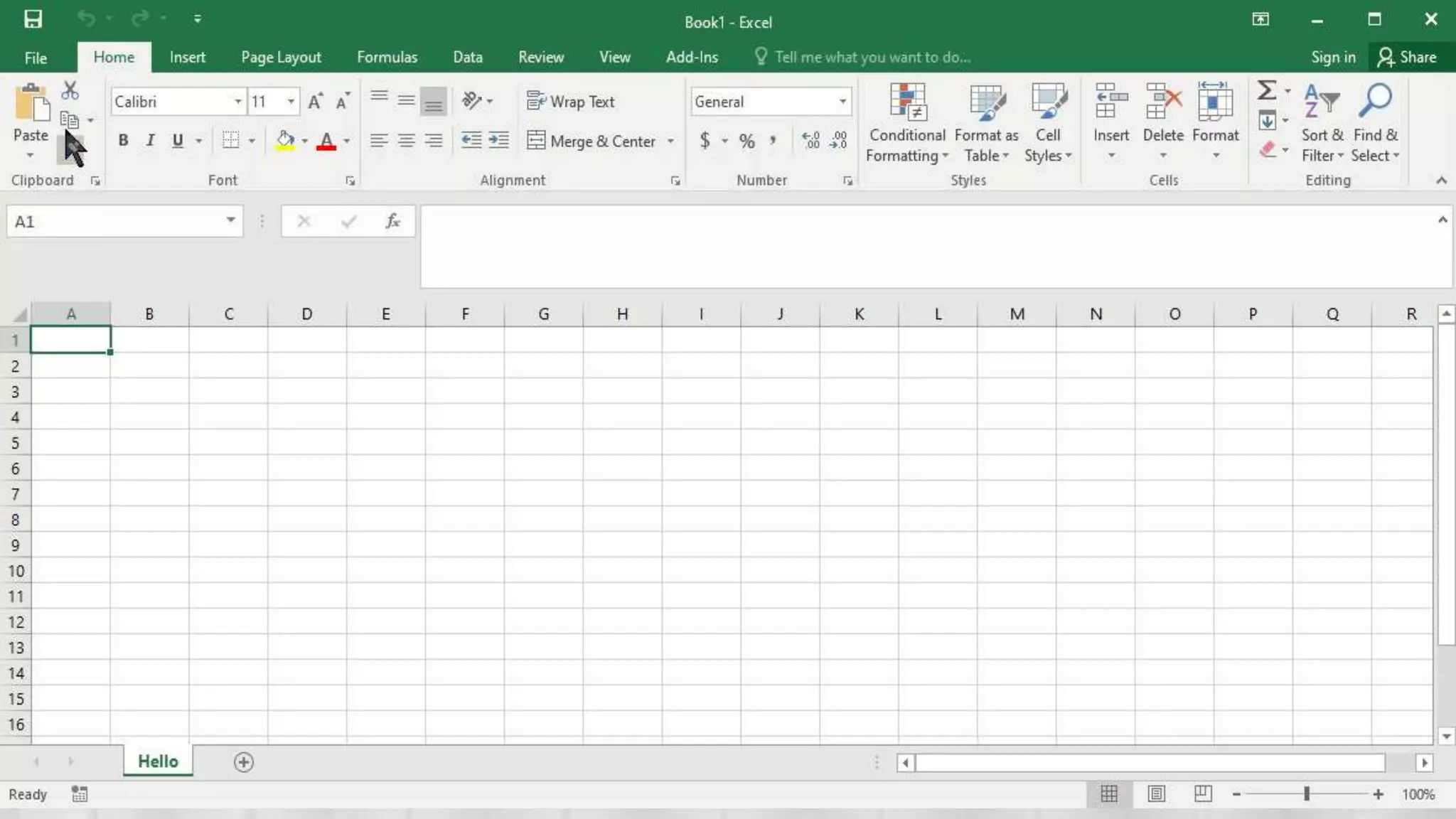
• Located at the top of the window of a spreadsheet, it includes a
number of tabs
• They are: File, Home, Insert, Data, Review, View and Add ins. Each
tab contains different buttons.
• In addition to tabs, the Ribbon also has some smaller sections. And
when you’re looking for something specific, you can easily use these
sections
• Skim through the section names until you find what you’re looking for
4. Ribbon
5. Data Entry
• It is easy to add data to Microsoft excel
• You can add data of any form such as numbers, text, characters and
other data types
• You can also manipulate the data as you want in excel
• To write something into excel cell, double click in it
• The Just write whatever you want
5. Saving Your work
• After you have finished your work in excel, the next step is to save the
changes you have made
• The quickest way is to use keyboard short cut of Ctrl + S to save. If you
haven’t yet saved your spreadsheet, you’ll be asked where you want
to save it and what you want to call it.
• You can also go to file menu and then click save.
THANK YOU
Don’t miss The next chapter
Chapter II: Formatting a spreadsheet……..

Chap 1 of 5. Microsoft Excel for absolute beginners - Getting started with Excel

  • 1.
    Microsoft Excel For AbsoluteBeginners CHAPTER I: GETTING STARTED WITH MICROSOFT EXCEL
  • 2.
    TABLE OF CONTENTS 1.Introduction to MS Excel 2. Excel Workbook 3. Spreadsheets 4. Ribbon 5. Data Entry 6. Saving a workbook
  • 3.
    1. Microsoft Excel •Is a computer program that can be used for various tasks such as: • And many more tasks….. DATA ENTRY AND ANALYSIS TASKS FINANCIAL ANALYSIS PAYROLL PREPARATION SIMPLE DATA BASE
  • 4.
     Microsoft excelcan help in many ways: If you have a business…… If you have a Job…… If you are looking for a Job….. Excel can help you to manage inventory therefore reduce loss and increase profit Excel can help you to simplify tasks, work faster and therefore increase efficiency Excel may increase your chance of being hired since most organizations need these skills
  • 5.
    • A workbookis a file that contains one or more worksheets to help you organize data. • A workbooks can contain multiple sheets. You can manage those sheets with the sheet tabs near the bottom of the screen. Click a tab to open that particular worksheet. • The quickest way to open a new workbook is to click on start menu and write excel in your search bar • If you see excel icon click on it to have a new workbook open 2. Excel Workbook
  • 7.
     When youopen a workbook you see a spreadsheet
  • 8.
    • A spreadsheetis a single sheet inside a workbook. There can be many sheets inside a workbook, and they’re accessed via the tabs at the bottom of the screen. • A spread sheet have rows and columns. The vertical lines in a spread sheet are columns (indicated by Letters) while the horizontal ones are rows (indicated by numbers). • The intersection between a row and a column is called a cell. In the picture below column D, row 3 and cell D3 are selected 3. Spreadsheets
  • 10.
    • Located atthe top of the window of a spreadsheet, it includes a number of tabs • They are: File, Home, Insert, Data, Review, View and Add ins. Each tab contains different buttons. • In addition to tabs, the Ribbon also has some smaller sections. And when you’re looking for something specific, you can easily use these sections • Skim through the section names until you find what you’re looking for 4. Ribbon
  • 12.
    5. Data Entry •It is easy to add data to Microsoft excel • You can add data of any form such as numbers, text, characters and other data types • You can also manipulate the data as you want in excel • To write something into excel cell, double click in it • The Just write whatever you want
  • 14.
    5. Saving Yourwork • After you have finished your work in excel, the next step is to save the changes you have made • The quickest way is to use keyboard short cut of Ctrl + S to save. If you haven’t yet saved your spreadsheet, you’ll be asked where you want to save it and what you want to call it. • You can also go to file menu and then click save.
  • 16.
    THANK YOU Don’t missThe next chapter Chapter II: Formatting a spreadsheet……..