Keywords:
• OpenFOAM
• SRF
• MRF
• cyclicAMI
• Sliding Interface
• Mixing Plane
Fumiya Nozaki
Last Updated: 2 August 2015
English
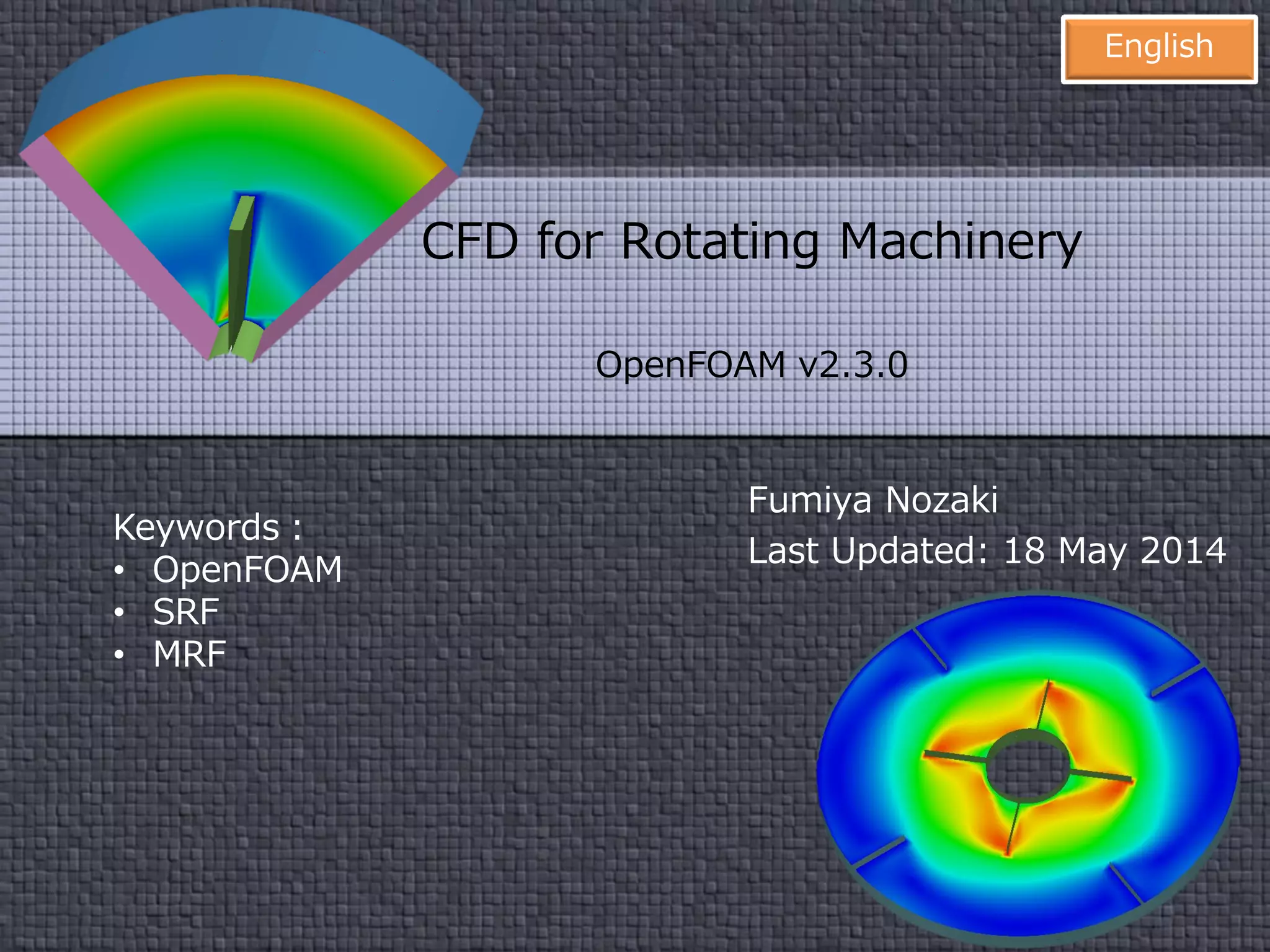
CFD for Rotating Machinery
OpenFOAM v2.3 and 2.4
foam-extend-3.1
2
Disclaimer
“This offering is not approved or endorsed by
OpenCFD Limited, the producer of the
OpenFOAM software and owner of the
OPENFOAM® and OpenCFD® trade marks.”
3
Preface
This document covers
how to set up CFD simulation for a rotating machinery
using OpenFOAM.
In particular,
• Single Rotating Frame (SRF)
• Multiple Reference Frame (MRF)
• Arbitraly Mesh Interface (AMI)
are and will be described in detail.
4
Chapter 1 Introduction
In this chapter we shall describe the classification of the
methods for solving a flow around a rotating machinery
using OpenFOAM.
5
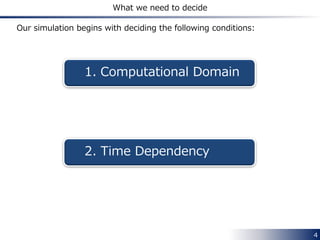
What we need to decide
Our simulation begins with deciding the following conditions:
1. Computational Domain
2. Time Dependency
6
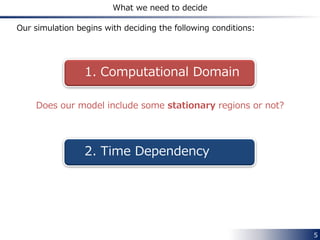
What we need to decide
Our simulation begins with deciding the following conditions:
1. Computational Domain
2. Time Dependency
Does our model include some stationary regions or not?
7
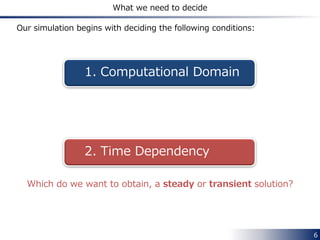
What we need to decide
Our simulation begins with deciding the following conditions:
1. Computational Domain
2. Time Dependency
Which do we want to obtain, a steady or transient solution?
8
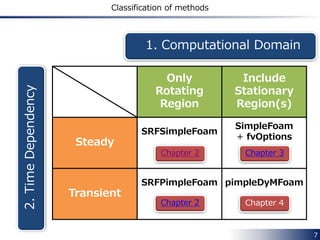
Classification of methods
Only
Rotating
Region
Include
Stationary
Region(s)
Steady
SRFSimpleFoam
Chapter 2
SimpleFoam
+ fvOptions
Transient
SRFPimpleFoam
Chapter 2
pimpleDyMFoam
1. Computational Domain
2.TimeDependency
Chapter 2
Chapter 2
Chapter 3
Chapter 4
9
Chapter 2 Single Rotating Frame
In this chapter we shall describe how to set up the solvers
and
to simulate an incompressible flow field
in a single rotating frame.
SRFSimpleFoam SRFPimpleFoam
10
Overview
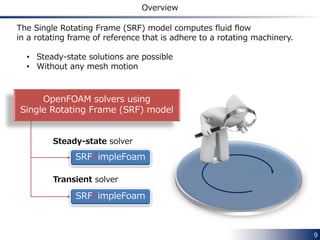
The Single Rotating Frame (SRF) model computes fluid flow
in a rotating frame of reference that is adhere to a rotating machinery.
• Steady-state solutions are possible
• Without any mesh motion
OpenFOAM solvers using
Single Rotating Frame (SRF) model
SRFSimpleFoam
SRFPimpleFoam
Steady-state solver
Transient solver
11
Governing equations
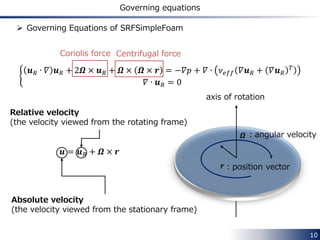
 Governing Equations of SRFSimpleFoam
𝛻 ∙ 𝒖 𝑅 𝒖 𝑅 + 2𝜴 × 𝒖 𝑅 + 𝜴 × 𝜴 × 𝒓 = −𝛻𝑝 + 𝛻 ∙ 𝜈 𝑒𝑓𝑓 𝛻𝒖 𝑅 + 𝛻𝒖 𝑅
𝑇
𝛻 ∙ 𝒖 𝑅 = 0
𝒖𝐼 = 𝒖 𝑅 + 𝜴 × 𝒓
𝜴:rotational vector
axis of rotation
𝒓
Absolute velocity
(the velocity viewed from the stationary frame)
Relative velocity
(the velocity viewed from the rotating frame)
:position vector
Coriolis force Centrifugal force
12
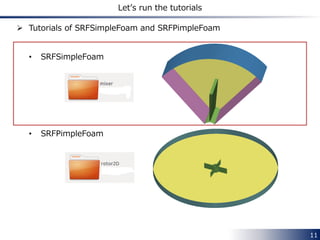
Let’s run the tutorials
 Tutorials of SRFSimpleFoam and SRFPimpleFoam
• SRFSimpleFoam
• SRFPimpleFoam
13
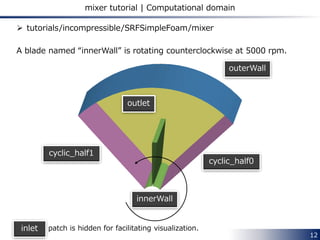
mixer tutorial | Computational domain
 tutorials/incompressible/SRFSimpleFoam/mixer
A blade named “innerWall” is rotating counterclockwise at 5000 rpm.
outlet
outerWall
innerWall
cyclic_half1
cyclic_half0
“inlet” patch is hidden for facilitating visualization.inlet
14
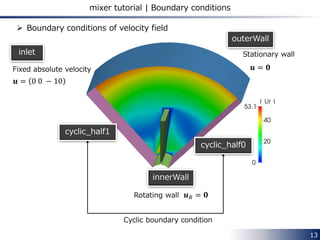
mixer tutorial | Boundary conditions
cyclic_half1
cyclic_half0
Cyclic boundary condition
innerWall
𝒖 𝑅 = 𝟎
outerWall
𝒖𝐼 = 𝟎
inlet
𝒖𝐼 = 0 0 − 10
Fixed absolute velocity
 Boundary conditions of velocity field
Rotating wall
Stationary wall
15
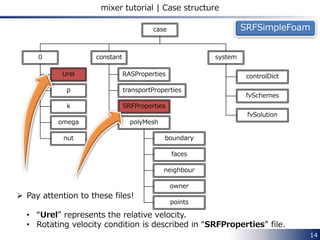
mixer tutorial | Case structure
transportProperties
polyMesh
RASProperties
systemconstant0
controlDict
fvSchemes
fvSolution
boundary
faces
neighbour
owner
points
Urel
p
k
omega
nut
case
SRFProperties
 Pay attention to these files!
• Urel represents the relative velocity field
• Rotating velocity condition is described in SRFProperties file
SRFSimpleFoam
16
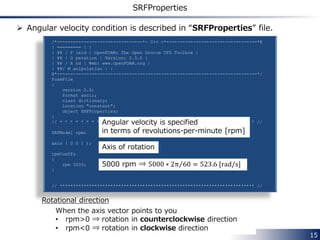
SRFProperties
 Angular velocity condition is described in SRFProperties file.
/*--------------------------------*- C++ -*----------------------------------*¥
| ========= | |
| ¥¥ / F ield | OpenFOAM: The Open Source CFD Toolbox |
| ¥¥ / O peration | Version: 2.3.0 |
| ¥¥ / A nd | Web: www.OpenFOAM.org |
| ¥¥/ M anipulation | |
¥*---------------------------------------------------------------------------*/
FoamFile
{
version 2.0;
format ascii;
class dictionary;
location "constant";
object SRFProperties;
}
// * * * * * * * * * * * * * * * * * * * * * * * * * * * * * * * * * * * * * //
SRFModel rpm;
axis ( 0 0 1 );
rpmCoeffs
{
rpm 5000;
}
// ************************************************************************* //
Angular velocity is specified
in terms of revolutions-per-minute [rpm]
Axis of rotation
5000 rpm ⇒ 5000 ∗ 2π 60 = 523.6 [rad/s]
When the axis vector points to you
• rpm>0 ⇒ rotation in counterclockwise direction
• rpm<0 ⇒ rotation in clockwise direction
Rotational direction
17
Urel
 In this tutorial,SRFVelocity boundary condition is used on inlet and
outerWall boundaries.
inlet
{
type SRFVelocity;
inletValue uniform (0 0 -10);
relative no;
value uniform (0 0 0);
}
This means 𝒖𝐼 = 𝟎 (a stationary wall).
This means 𝒖𝐼 = 0 0 − 10 .
By setting relative up as no
Boundary condition of
the relative velocity 𝒖 𝑟 (Urel)
is able to be specified
in terms of the absolute velocity.
outerWall
{
type SRFVelocity;
inletValue uniform (0 0 0);
relative no;
value uniform (0 0 0);
}
18
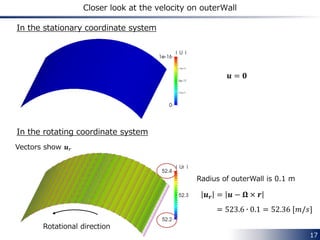
Closer look at the velocity on outerWall
In the stationary coordinate system
In the rotating coordinate system
Radius of outerWall is 0.1 m
𝒖𝐼 = 𝟎
𝒖 𝒓 = 𝒖𝐼 − 𝛀 × 𝒓
= 523.6 ∙ 0.1 = 52.36 [𝑚/𝑠]
Vectors show 𝒖 𝑟
Rotational direction
19
Let’s run the tutorials
 Tutorials of SRFSimpleFoam and SRFPimpleFoam
• SRFSimpleFoam
• SRFPimpleFoam
20
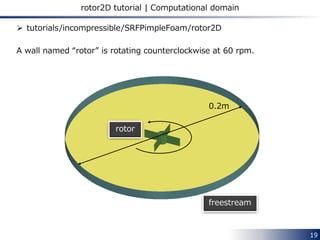
rotor2D tutorial | Computational domain
 tutorials/incompressible/SRFPimpleFoam/rotor2D
A wall named “rotor” is rotating counterclockwise at 60 rpm.
rotor
freestream
0.2m
21
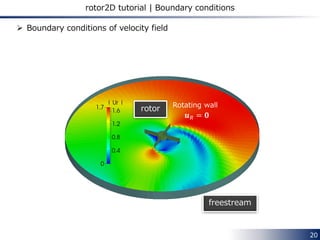
rotor2D tutorial | Boundary conditions
 Boundary conditions of velocity field
rotor
freestream
𝒖 𝑅 = 𝟎
Rotating wall
22
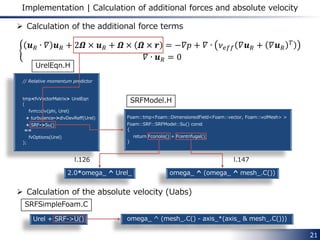
Implementation | Calculation of additional forces and absolute velocity
𝒖 𝑅 ∙ 𝛻 𝒖 𝑅 + 2𝜴 × 𝒖 𝑅 + 𝜴 × 𝜴 × 𝒓 = −𝛻𝑝 + 𝛻 ∙ 𝜈 𝑒𝑓𝑓 𝛻𝒖 𝑅 + 𝛻𝒖 𝑅
𝑇
𝛻 ∙ 𝒖 𝑅 = 0
// Relative momentum predictor
tmp<fvVectorMatrix> UrelEqn
(
fvm::div(phi, Urel)
+ turbulence->divDevReff(Urel)
+ SRF->Su()
==
fvOptions(Urel)
);
Foam::tmp<Foam::DimensionedField<Foam::vector, Foam::volMesh> >
Foam::SRF::SRFModel::Su() const
{
return Fcoriolis() + Fcentrifugal();
}
2.0*omega_ ^ Urel_ omega_ ^ (omega_ ^ (mesh_.C() – origin_))
 Calculation of the absolute velocity (Uabs)
Urel + SRF->U()
omega_ ^ ((mesh_.C() - origin_) - axis_*(axis_ &
(mesh_.C() - origin_)))
 Calculation of the additional force terms
SRFModel.C
UrelEqn.H
SRFSimpleFoam.C
23
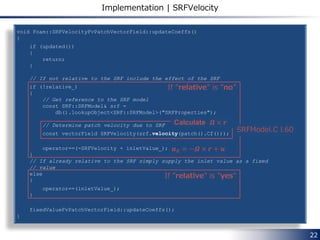
Implementation | SRFVelocity
void Foam::SRFVelocityFvPatchVectorField::updateCoeffs()
{
if (updated())
{
return;
}
// If not relative to the SRF include the effect of the SRF
if (!relative_)
{
// Get reference to the SRF model
const SRF::SRFModel& srf =
db().lookupObject<SRF::SRFModel>("SRFProperties");
// Determine patch velocity due to SRF
const vectorField SRFVelocity(srf.velocity(patch().Cf()));
operator==(-SRFVelocity + inletValue_);
}
// If already relative to the SRF simply supply the inlet value as a fixed
// value
else
{
operator==(inletValue_);
}
fixedValueFvPatchVectorField::updateCoeffs();
}
If ”relative” is ”no”
SRFModel.C l.60
Calculate 𝜴 × 𝒓
𝒖 𝑅 = −𝜴 × 𝒓 + 𝒖𝐼
If ”relative” is ”yes”
src/finiteVolume/cfdTools/general/SRF/
derivedFvPatchFields/SRFVelocityFvPatchVectorFiel/
SRFVelocityFvPatchVectorField.C
24
Chapter 3 Multiple Reference Frame
In this chapter we shall describe how to set up
the multiple reference frame simulation in OpenFOAM.
This model is activated using
“fvOptions” functionality.
25
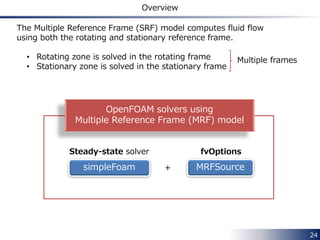
Overview
The Multiple Reference Frame (SRF) model computes fluid flow
using both the rotating and stationary reference frames.
• Rotating zone is solved in the rotating frame
• Stationary zone is solved in the stationary frame
simpleFoam
Steady-state solver
MRFSource+
fvOptions
OpenFOAM solvers using
Multiple Reference Frame (MRF) model
Multiple frames
26
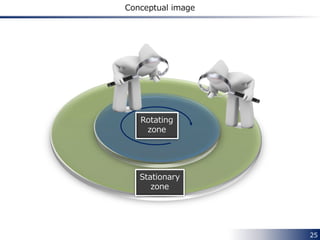
Conceptual image
Rotating
zone
Stationary
zone
𝛻 ∙ 𝒖 𝑅 𝒖 𝑅 = 𝛻 ∙ 𝒖 𝑅 𝒖𝐼 − 𝛻 ∙ 𝒖 𝑅 𝜴 × 𝒓
𝛻 ∙ 𝒖 𝑅 𝜴 × 𝒓 = 𝛻 ∙
𝑢 𝑅1 Ω2 𝑟3 − Ω3 𝑟2 𝑢 𝑅1 Ω3 𝑟1 − Ω1 𝑟3 𝑢 𝑅1 Ω1 𝑟2 − Ω2 𝑟1
𝑢 𝑅2 Ω2 𝑟3 − Ω3 𝑟2 𝑢 𝑅2 Ω3 𝑟1 − Ω1 𝑟3 𝑢 𝑅2 Ω1 𝑟2 − Ω2 𝑟1
𝑢 𝑅3 Ω2 𝑟3 − Ω3 𝑟2 𝑢 𝑅3 Ω3 𝑟1 − Ω1 𝑟3 𝑢 𝑅3 Ω1 𝑟2 − Ω2 𝑟1
=
𝜕
𝜕𝑥1
𝑢 𝑅1 Ω2 𝑟3 − Ω3 𝑟2 +
𝜕
𝜕𝑥2
𝑢 𝑅2 Ω2 𝑟3 − Ω3 𝑟2 +
𝜕
𝜕𝑥3
𝑢 𝑅3 Ω2 𝑟3 − Ω3 𝑟2
𝜕
𝜕𝑥1
𝑢 𝑅1 Ω3 𝑟1 − Ω1 𝑟3 +
𝜕
𝜕𝑥2
𝑢 𝑅2 Ω3 𝑟1 − Ω1 𝑟3 +
𝜕
𝜕𝑥3
𝑢 𝑅3 Ω3 𝑟1 − Ω1 𝑟3
𝜕
𝜕𝑥1
𝑢 𝑅1 Ω1 𝑟2 − Ω2 𝑟1 +
𝜕
𝜕𝑥2
𝑢 𝑅2 Ω1 𝑟2 − Ω2 𝑟1 +
𝜕
𝜕𝑥3
𝑢 𝑅3 Ω1 𝑟2 − Ω2 𝑟1
=
Ω2 𝑟3 − Ω3 𝑟2 𝛻 ∙ 𝒖 𝑅
Ω3 𝑟1 − Ω1 𝑟3 𝛻 ∙ 𝒖 𝑅
Ω1 𝑟2 − Ω2 𝑟1 ∇ ∙ 𝒖 𝑅
+
𝒖 𝑅 ∙ 𝛻 Ω2 𝑟3 − Ω3 𝑟2
𝒖 𝑅 ∙ 𝛻 Ω3 𝑟1 − Ω1 𝑟3
𝒖 𝑅 ∙ 𝛻 Ω1 𝑟2 − Ω2 𝑟1
= 𝜴 × 𝒖 𝑅
𝛻 ∙ 𝒖 𝑅 𝒖 𝑅 = 𝛻 ∙ 𝒖 𝑅 𝒖𝐼 − 𝜴 × 𝒖 𝑅
27
Governing equations | Derivation
Sometimes denoted
𝒖 𝑅 ⊗ 𝒖 𝑅
28
Governing equations | Derivation
𝛻 ∙ 𝒖 𝑅 𝒖 𝑅 + 2𝜴 × 𝒖 𝑅 + 𝜴 × 𝜴 × 𝒓 = −𝛻𝑝 + 𝛻 ∙ 𝜈 𝑒𝑓𝑓 𝛻𝒖 𝑅 + 𝛻𝒖 𝑅
𝑇
𝛻 ∙ 𝒖 𝑅 = 0
𝛻 ∙ 𝒖 𝑅 𝒖𝐼 + 𝜴 × 𝒖𝐼 = −𝛻𝑝 + 𝛻 ∙ 𝜈 𝑒𝑓𝑓 𝛻𝒖𝐼 + 𝛻𝒖𝐼
𝑇
𝛻 ∙ 𝒖 𝑅 = 0
 In the rotating frame
= 𝛻 ∙ 𝒖 𝑅 𝒖 𝑅 + 2𝜴 × 𝒖 𝑅 + 𝜴 × 𝜴 × 𝒓
= 𝛻 ∙ 𝒖 𝑅 𝒖𝐼 − 𝜴 × 𝒖 𝑅 + 2𝜴 × 𝒖 𝑅 + 𝜴 × 𝜴 × 𝒓
= 𝛻 ∙ 𝒖 𝑅 𝒖𝐼 + 𝜴 × 𝒖 𝑅 + 𝜴 × 𝜴 × 𝒓
= 𝛻 ∙ 𝒖 𝑅 𝒖𝐼 + 𝜴 × 𝒖 𝑅 + 𝜴 × 𝒓
= 𝛻 ∙ 𝒖 𝑅 𝒖𝐼 + 𝜴 × 𝒖𝐼
 Governing equations of SRF can be rearranged in the following manner:
1
1
29
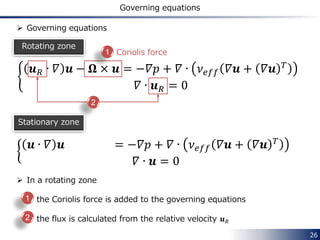
Governing equations
𝛻 ∙ 𝒖 𝑅 𝒖𝐼 + 𝛀 × 𝒖𝐼 = −𝛻𝑝 + 𝛻 ∙ 𝜈 𝑒𝑓𝑓 𝛻𝒖𝐼 + 𝛻𝒖𝐼
𝑇
𝛻 ∙ 𝒖 𝑅 = 0
 In each rotating zone
• the Coriolis force is added to the governing equations
• the flux is calculated from the relative velocity 𝒖 𝑅
 Governing equations [1]
Coriolis force
𝛻 ∙ 𝒖𝐼 𝒖𝐼 − 𝛀 × 𝒖 = −𝛻𝑝 + 𝛻 ∙ 𝜈 𝑒𝑓𝑓 𝛻𝒖𝐼 + 𝛻𝒖𝐼
𝑇
𝛻 ∙ 𝒖𝐼 = 0
Rotating zone
Stationary zone
1
2
1
2
30
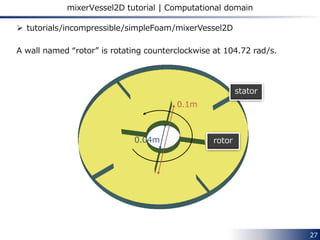
mixerVessel2D tutorial | Computational domain
 tutorials/incompressible/simpleFoam/mixerVessel2D
A wall named “rotor” is rotating counterclockwise at 104.72 rad/s.
rotor
stator
0.1m
0.04m
31
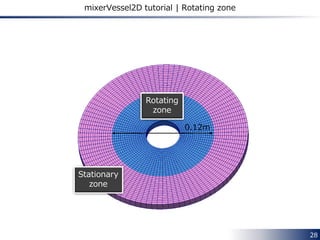
mixerVessel2D tutorial | Rotating zone
Rotating
zone
Stationary
zone
0.12m
32
mixerVessel2D tutorial | Boundary condition
Rotating wall
rotor
stator
Stationary wall
33
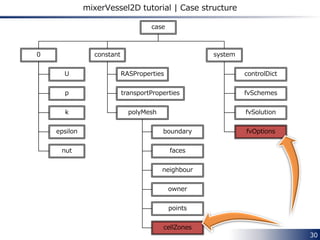
mixerVessel2D tutorial | Case structure
transportProperties
polyMesh
RASProperties
systemconstant0
controlDict
fvSchemes
fvSolution
fvOptionsboundary
faces
neighbour
owner
points
cellZones
U
p
k
epsilon
nut
case
34
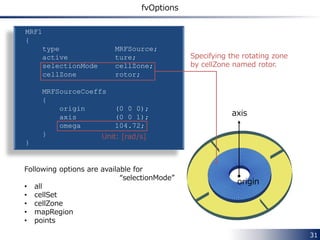
fvOptions Description
MRF1
{
type MRFSource;
active ture;
selectionMode cellZone;
cellZone rotor;
MRFSourceCoeffs
{
nonRotatingPatches ();
origin (0 0 0);
axis (0 0 1);
omega 104.72;
}
}
Specifying the rotating zone
by cellZone named rotor.
Unit: [rad/s]
axis
Following options are available for
“selectionMode”
• all
• cellSet
• cellZone
• mapRegion
• points
origin
system/fvOptions
35
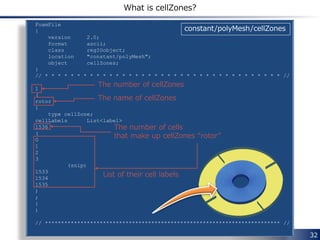
cellZones Description
FoamFile
{
version 2.0;
format ascii;
class regIOobject;
location "constant/polyMesh";
object cellZones;
}
// * * * * * * * * * * * * * * * * * * * * * * * * * * * * * * * * * * * * * //
1
(
rotor
{
type cellZone;
cellLabels List<label>
1536
(
0
1
2
3
(snip)
1533
1534
1535
)
;
}
)
// ************************************************************************* //
The number of cellZones
The name of cellZones
The number of cells
that make up cellZones “rotor”
List of their cell labels
constant/polyMesh/cellZones
36
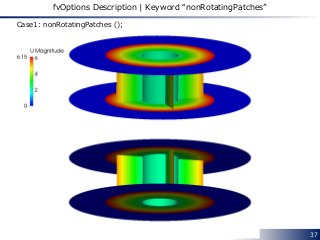
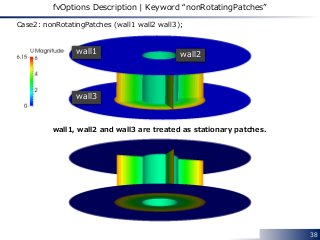
fvOptions Description | Keyword “nonRotatingPatches”
wall1
wall2
wall3
wall4
rotor
We’ll compare the following two settings:
• Case1: nonRotatingPatches ();
• Case2: nonRotatingPatches (wall1 wall2 wall3);
MRFSourceCoeffs
{
nonRotatingPatches ();
origin (0 0 0);
axis (0 0 1);
omega 104.72;
}
stationary patches whose adjacent (owner)
cell is in a rotating cell zone.
Rotating cellZone
wall3
37
fvOptions Description | Keyword “nonRotatingPatches”
Case1: nonRotatingPatches ();
38
fvOptions Description | Keyword “nonRotatingPatches”
Case2: nonRotatingPatches (wall1 wall2 wall3);
wall1 wall2
wall3
wall1, wall2 and wall3 are treated as stationary patches.
39
Implementation | Related source code
 src/fvOptions/sources/derived/MRFSource
• MRFSource.C
• MRFSource.H
 src/finiteVolume/cfdTools/general/MRF
• IOMRFZoneList.C
• IOMRFZoneList.H
• MRFZone.C
• MRFZone.H
• MRFZoneI.H
• MRFZoneList.C
• MRFZoneList.H
• MRFZoneTemplates.C
40
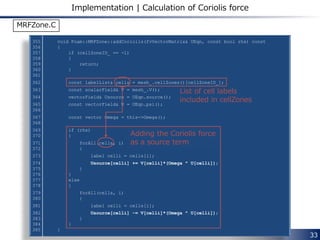
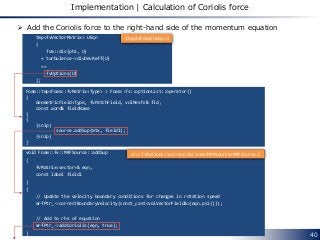
Implementation | Calculation of Coriolis force
tmp<fvVectorMatrix> UEqn
(
fvm::div(phi, U)
+ turbulence->divDevReff(U)
==
fvOptions(U)
);
void Foam::fv::MRFSource::addSup
(
fvMatrix<vector>& eqn,
const label fieldI
)
{
// Update the velocity boundary conditions for changes in rotation speed
mrfPtr_->correctBoundaryVelocity(const_cast<volVectorField&>(eqn.psi()));
// Add to rhs of equation
mrfPtr_->addCoriolis(eqn, true);
}
 Add the Coriolis force to the right-hand side of the momentum equation
Foam::tmp<Foam::fvMatrix<Type> > Foam::fv::optionList::operator()
(
GeometricField<Type, fvPatchField, volMesh>& fld,
const word& fieldName
)
{
(snip)
source.addSup(mtx, fieldI);
(snip)
}
src/fvOptions/sources/derived/MRFSource/MRFSource.C
simpleFoam/UEqn.H
void Foam::MRFZone::addCoriolis(fvVectorMatrix& UEqn, const bool rhs) const
{
if (cellZoneID_ == -1)
{
return;
}
const labelList& cells = mesh_.cellZones()[cellZoneID_];
const scalarField& V = mesh_.V();
vectorField& Usource = UEqn.source();
const vectorField& U = UEqn.psi();
const vector Omega = this->Omega();
if (rhs)
{
forAll(cells, i)
{
label celli = cells[i];
Usource[celli] += V[celli]*(Omega ^ U[celli]);
}
}
else
{
forAll(cells, i)
{
label celli = cells[i];
Usource[celli] -= V[celli]*(Omega ^ U[celli]);
}
}
}
41
Implementation | Calculation of Coriolis force
List of cell labels
included in the cell zone
Adding the Coriolis force
to the right-hand
side as a source term
−𝛀 × 𝒖
src/finiteVolume/cfdTools/general/MRF/MRFZone.C
42
Implementation | Calculation of face flux
 Classify all faces into three groups (faceType = 0, 1, 2)
• For internal faces
void Foam::MRFZone::setMRFFaces()
{
const polyBoundaryMesh& patches = mesh_.boundaryMesh();
labelList faceType(mesh_.nFaces(), 0);
const labelList& own = mesh_.faceOwner();
const labelList& nei = mesh_.faceNeighbour();
// Cells in zone
boolList zoneCell(mesh_.nCells(), false);
if (cellZoneID_ != -1)
{
const labelList& cellLabels = mesh_.cellZones()[cellZoneID_];
forAll(cellLabels, i)
{
zoneCell[cellLabels[i]] = true;
}
}
label nZoneFaces = 0;
for (label faceI = 0; faceI < mesh_.nInternalFaces(); faceI++)
{
if (zoneCell[own[faceI]] || zoneCell[nei[faceI]])
{
faceType[faceI] = 1;
nZoneFaces++;
}
}
faceType = 1
Either owner or neighbour cell
is in the cell zone
src/finiteVolume/cfdTools/general/MRF/MRFZone.C
43
Implementation | Calculation of face flux
• For boundary faces
labelHashSet excludedPatches(excludedPatchLabels_);
forAll(patches, patchI)
{
const polyPatch& pp = patches[patchI];
if (pp.coupled() || excludedPatches.found(patchI))
{
forAll(pp, i)
{
label faceI = pp.start()+i;
if (zoneCell[own[faceI]])
{
faceType[faceI] = 2;
nZoneFaces++;
}
}
}
else if (!isA<emptyPolyPatch>(pp))
{
forAll(pp, i)
{
label faceI = pp.start()+i;
if (zoneCell[own[faceI]])
{
faceType[faceI] = 1;
nZoneFaces++;
}
}
}
}
Coupled patch face
or excluded patch face
whose owner cell is
in the cell zone
Normal patch face
whose owner cell is
in the cell zone
faceType = 2
faceType = 1
44
Implementation | Calculation of face flux
 Create two lists of face labels per patch
//- Outside faces (per patch) that move with the MRF
labelListList includedFaces_;
//- Excluded faces (per patch) that do not move with the MRF
labelListList excludedFaces_;
forAll(patches, patchi)
{
const polyPatch& pp = patches[patchi];
forAll(pp, patchFacei)
{
label faceI = pp.start() + patchFacei;
if (faceType[faceI] == 1)
{
includedFaces_[patchi][nIncludedFaces[patchi]++] = patchFacei;
}
else if (faceType[faceI] == 2)
{
excludedFaces_[patchi][nExcludedFaces[patchi]++] = patchFacei;
}
}
}
includedFaces_[patchi][i] = local label of ith face whose faceType = 1
on the patchith patch
excludedFaces_[patchi][i] = local label of ith face whose faceType = 2
on the patchith patch
src/finiteVolume/cfdTools/general/MRF/MRFZone.C
45
Implementation | Calculation of face flux
surfaceScalarField phiHbyA("phiHbyA", fvc::interpolate(HbyA) & mesh.Sf());
fvOptions.makeRelative(phiHbyA);
adjustPhi(phiHbyA, U, p); simpleFoam/pEqn.H
 Modify the face flux field
void Foam::fv::optionList::makeRelative(surfaceScalarField& phi) const
{
forAll(*this, i)
{
this->operator[](i).makeRelative(phi);
}
} src/fvOptions/fvOptions/fvOptionList.C
void Foam::fv::MRFSource::makeRelative(surfaceScalarField& phi) const
{
mrfPtr_->makeRelative(phi);
} src/fvOptions/sources/derived/MRFSource/MRFSource.C
void Foam::MRFZone::makeRelative(surfaceScalarField& phi) const
{
makeRelativeRhoFlux(geometricOneField(), phi);
}
src/finiteVolume/cfdTools/general/MRF/MRFZone.C
46
Implementation | Calculation of face flux
template<class RhoFieldType>
void Foam::MRFZone::makeRelativeRhoFlux
(
const RhoFieldType& rho,
surfaceScalarField& phi
) const
{
const surfaceVectorField& Cf = mesh_.Cf();
const surfaceVectorField& Sf = mesh_.Sf();
const vector Omega = omega_->value(mesh_.time().timeOutputValue())*axis_;
const vectorField& Cfi = Cf.internalField();
const vectorField& Sfi = Sf.internalField();
scalarField& phii = phi.internalField();
// Internal faces
forAll(internalFaces_, i)
{
label facei = internalFaces_[i];
phii[facei] -= rho[facei]*(Omega ^ (Cfi[facei] - origin_)) & Sfi[facei];
}
makeRelativeRhoFlux(rho.boundaryField(), phi.boundaryField());
}
src/finiteVolume/cfdTools/general/MRF/MRFZoneTemplates.C
Modification of the internal face flux
Modification of the
boundary face flux
• “internalFaces_” is a label list of the internal faces whose owner or neighbour
cell is in the rotating cell zone.
• According to the governing equation, the face fluxes of these internal faces
are modified by subtracting 𝜴 × 𝒓 ∙ 𝑺 𝑓 from the absolute face fluxes:
𝒖 𝑅 ∙ 𝑺 𝑓 = 𝒖𝐼 ∙ 𝑺 𝑓 − (𝜴 × 𝒓) ∙ 𝑺 𝑓
47
Implementation | Calculation of face flux
template<class RhoFieldType>
void Foam::MRFZone::makeRelativeRhoFlux
(
const RhoFieldType& rho,
FieldField<fvsPatchField, scalar>& phi
) const
{
const surfaceVectorField& Cf = mesh_.Cf();
const surfaceVectorField& Sf = mesh_.Sf();
const vector Omega = omega_->value(mesh_.time().timeOutputValue())*axis_;
// Included patches
forAll(includedFaces_, patchi)
{
forAll(includedFaces_[patchi], i)
{
label patchFacei = includedFaces_[patchi][i];
phi[patchi][patchFacei] = 0.0;
}
}
// Excluded patches
forAll(excludedFaces_, patchi)
{
forAll(excludedFaces_[patchi], i)
{
label patchFacei = excludedFaces_[patchi][i];
phi[patchi][patchFacei] -=
rho[patchi][patchFacei]
* (Omega ^ (Cf.boundaryField()[patchi][patchFacei] - origin_))
& Sf.boundaryField()[patchi][patchFacei];
}
}
}
src/finiteVolume/cfdTools/general/MRF/MRFZoneTemplates.C
Relative face fluxes
on rotating patches are zero
𝒖 𝑅 ∙ 𝑺 𝑓 = 0
Relative face fluxes
on stationary patches
in the rotating cell zone
is calculated by subtracting
𝜴 × 𝒓 ∙ 𝑺 𝑓 from the absolute
face fluxes
48
Chapter 4 Dynamic Mesh
In this chapter we shall describe how to set up
a transient simulation with mesh motion in OpenFOAM.
49
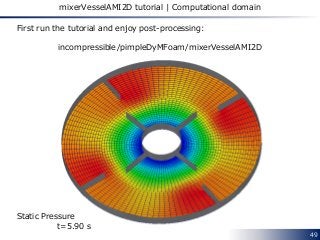
mixerVesselAMI2D tutorial | Computational domain
First run the tutorial and enjoy post-processing:
incompressible/pimpleDyMFoam/mixerVesselAMI2D
Static Pressure
t=5.90 s
50
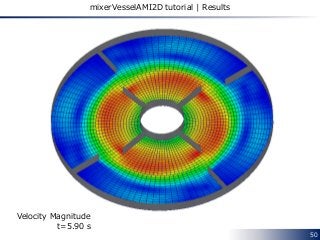
mixerVesselAMI2D tutorial | Results
Velocity Magnitude
t=5.90 s
51
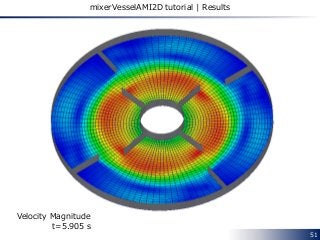
mixerVesselAMI2D tutorial | Results
Velocity Magnitude
t=5.905 s
52
mixerVesselAMI2D tutorial | Results
Velocity Magnitude
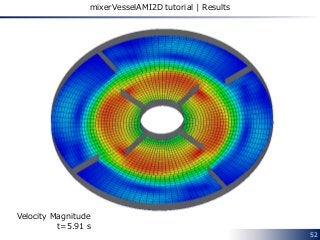
t=5.91 s
53
mixerVesselAMI2D tutorial | Results
Velocity Magnitude
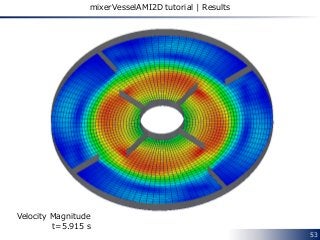
t=5.915 s
54
mixerVesselAMI2D tutorial | Results
Velocity Magnitude
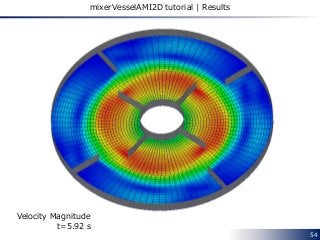
t=5.92 s
55
mixerVesselAMI2D tutorial | Results
Velocity Magnitude
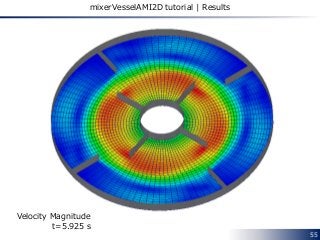
t=5.925 s
56
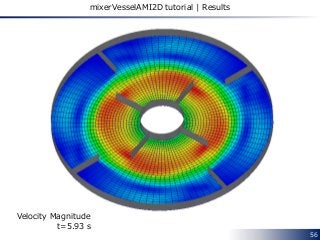
mixerVesselAMI2D tutorial | Results
Velocity Magnitude
t=5.93 s
57
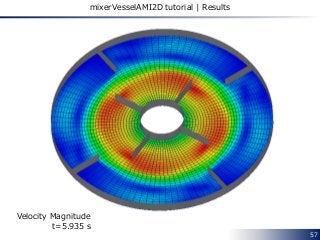
mixerVesselAMI2D tutorial | Results
Velocity Magnitude
t=5.935 s
58
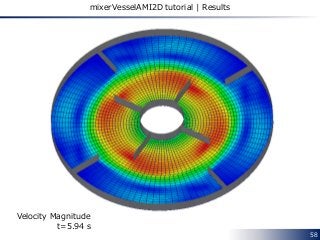
mixerVesselAMI2D tutorial | Results
Velocity Magnitude
t=5.94 s
59
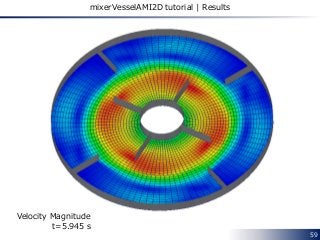
mixerVesselAMI2D tutorial | Results
Velocity Magnitude
t=5.945 s
60
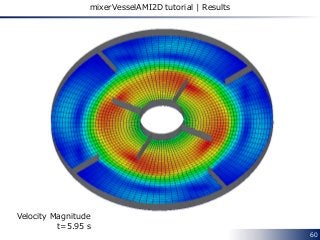
mixerVesselAMI2D tutorial | Results
Velocity Magnitude
t=5.95 s
61
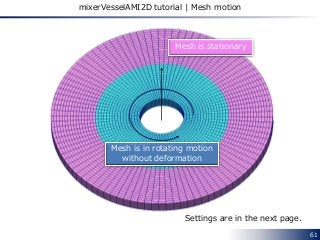
mixerVesselAMI2D tutorial | Mesh motion
Mesh is in rotating motion
without deformation
Mesh is stationary
Settings are in the next page.
62
dynamicMeshDict
FoamFile
{
version 2.0;
format ascii;
class dictionary;
location "constant";
object dynamicMeshDict;
}
// * * * * * * * * * * * * * * * * * * * * * * * * * * * * * * * * * * * * * //
dynamicFvMesh solidBodyMotionFvMesh;
motionSolverLibs ( "libfvMotionSolvers.so" );
solidBodyMotionFvMeshCoeffs
{
cellZone rotor;
solidBodyMotionFunction rotatingMotion;
rotatingMotionCoeffs
{
origin (0 0 0);
axis (0 0 1);
omega 6.2832; // rad/s
}
}
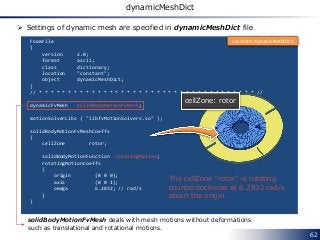
cellZone: rotor
The cellZone “rotor” is rotating
counterclockwise at 6.2832 rad/s
about the origin.
constant/dynamicMeshDict
 Settings of dynamic mesh are specified in dynamicMeshDict file
solidBodyMotionFvMesh deals with mesh motions without deformations
such as translational and rotational motions.
63
solidBodyMotionFvMesh
 The following motions (solidBodyMotionFunction) are available for
solidBodyMotionFvMesh
• linearMotion
• oscillatingLinearMotion
• rotatingMotion
• axisRotationMotion
• oscillatingRotatingMotion
• SDA [4]
• multiMotion
 Code: src/dynamicFvMesh/solidBodyMotionFvMesh/solidBodyMotionFunctions
Translational motion
Rotational motion
Ship Design Analysis
Combination of the above motions
64
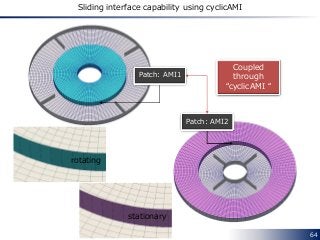
Sliding interface capability using cyclicAMI
Patch: AMI1
Patch: AMI2
Coupled
through
“cyclicAMI “
stationary
rotating
65
nFaces 192;
startFace 6048;
}
AMI1
{
type cyclicAMI;
inGroups 1(cyclicAMI);
nFaces 96;
startFace 6240;
matchTolerance 0.0001;
transform noOrdering;
neighbourPatch AMI2;
}
AMI2
{
type cyclicAMI;
inGroups 1(cyclicAMI);
nFaces 96;
startFace 6336;
matchTolerance 0.0001;
transform noOrdering;
neighbourPatch AMI1;
}
front
{
type empty;
inGroups 1(empty);
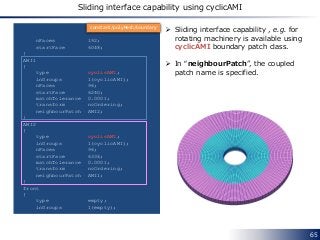
 Sliding interface capability , e.g. for
rotating machinery is available using
cyclicAMI boundary patch class.
 In “neighbourPatch”, the coupled
patch name is specified.
constant/polyMesh/boundary
Sliding interface capability using cyclicAMI
66
Chapter 5 Mixing plane interface
In this chapter we shall describe how to use
the mixing plane interface in OpenFOAM extend version,
the community-driven version.
67
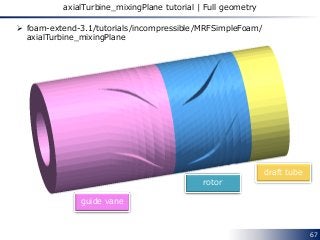
rotor
guide vane
draft tube
axialTurbine_mixingPlane tutorial | Full geometry
 foam-extend-3.1/tutorials/incompressible/MRFSimpleFoam/
axialTurbine_mixingPlane
68
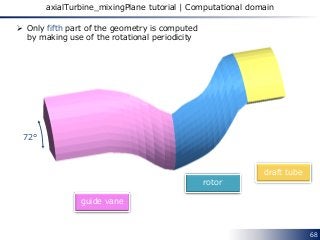
rotor
guide vane
draft tube
axialTurbine_mixingPlane tutorial | Computational domain
 Only fifth part of the geometry is computed
by making use of the rotational periodicity
72°
69
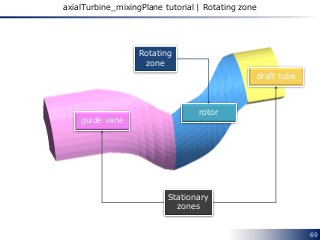
axialTurbine_mixingPlane tutorial | Rotating zone
rotor
guide vane
draft tube
Stationary
zones
Rotating
zone
70
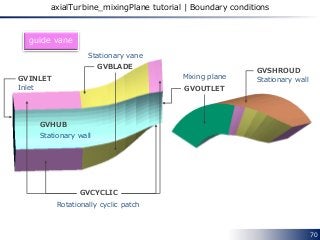
axialTurbine_mixingPlane tutorial | Boundary conditions
guide vane
GVINLET
GVCYCLIC
GVBLADE
GVHUB
GVSHROUD
GVOUTLET
Stationary vane
Mixing plane
Stationary wall
Stationary wall
Rotationally cyclic patch
Inlet
71
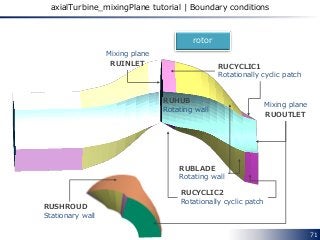
axialTurbine_mixingPlane tutorial | Boundary conditions
rotor
RUINLET
RUOUTLET
RUBLADE
Rotating wall
RUHUB
Rotating wall
RUCYCLIC1
Rotationally cyclic patch
RUCYCLIC2
Rotationally cyclic patch
Mixing plane
Mixing plane
RUSHROUD
Stationary wall
72
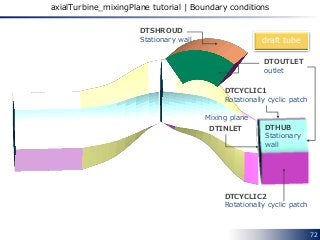
axialTurbine_mixingPlane tutorial | Boundary conditions
draft tube
DTOUTLET
outlet
DTCYCLIC2
Rotationally cyclic patch
DTCYCLIC1
Rotationally cyclic patch
DTINLET
Mixing plane
DTHUB
Stationary
wall
DTSHROUD
Stationary wall
73
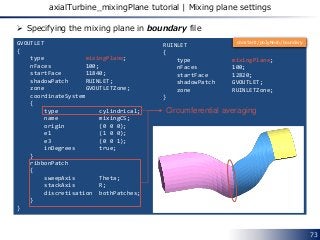
axialTurbine_mixingPlane tutorial | Mixing plane settings
GVOUTLET
{
type mixingPlane;
nFaces 100;
startFace 11840;
shadowPatch RUINLET;
zone GVOUTLETZone;
coordinateSystem
{
type cylindrical;
name mixingCS;
origin (0 0 0);
e1 (1 0 0);
e3 (0 0 1);
inDegrees true;
}
ribbonPatch
{
sweepAxis Theta;
stackAxis R;
discretisation bothPatches;
}
}
RUINLET
{
type mixingPlane;
nFaces 100;
startFace 12820;
shadowPatch GVOUTLET;
zone RUINLETZone;
}
 Specifying the mixing plane in boundary file
Circumferential averaging
constant/polyMesh/boundary
74
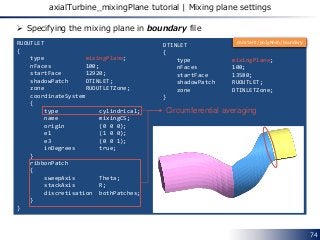
axialTurbine_mixingPlane tutorial | Mixing plane settings
RUOUTLET
{
type mixingPlane;
nFaces 100;
startFace 12920;
shadowPatch DTINLET;
zone RUOUTLETZone;
coordinateSystem
{
type cylindrical;
name mixingCS;
origin (0 0 0);
e1 (1 0 0);
e3 (0 0 1);
inDegrees true;
}
ribbonPatch
{
sweepAxis Theta;
stackAxis R;
discretisation bothPatches;
}
}
DTINLET
{
type mixingPlane;
nFaces 100;
startFace 13580;
shadowPatch RUOUTLET;
zone DTINLETZone;
}
 Specifying the mixing plane in boundary file
Circumferential averaging
constant/polyMesh/boundary
 What is the ribbonPatch? [5]
 According to [6]
the ribbon patch will specify the direction in which it will perform the
average (sweepAxis) and in which direction it will stack the cells
(stackAxis).
75
axialTurbine_mixingPlane tutorial | Mixing plane settings
ribbonPatch
{
sweepAxis Theta;
stackAxis R;
discretisation bothPatches;
}
R
Theta
76
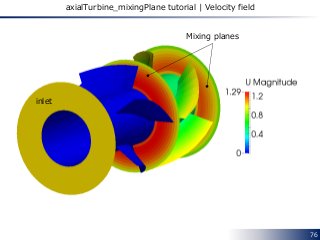
axialTurbine_mixingPlane tutorial | Velocity field
Mixing planes
inlet
77
axialTurbine_mixingPlane tutorial | MRFZones
1
(
rotor
{
// Fixed patches (by default they 'move' with the MRF zone)
nonRotatingPatches ( RUSHROUD );
origin origin [0 1 0 0 0 0 0] (0 0 0);
axis axis [0 0 0 0 0 0 0] (0 0 1);
omega omega [0 0 -1 0 0 0 0] -10;
}
)
 Specifying the rotating zone in MRFZones file
rotor
Name of rotating cellZones
The absolute velocity on the
“nonRotatingPatches” is 0.
constant/MRFZones
78
History of development
 [7]
79
Implementation | Related source code
 src/finiteVolume/fields/fvPatchFields/constraint/mixingPlane
• mixingPlaneFvPatchField.C
• mixingPlaneFvPatchField.H
• mixingPlaneFvPatchFields.C
• mixingPlaneFvPatchFields.H
• mixingPlaneFvPatchFieldsFwd.H
 src/finiteVolume/fields/fvsPatchFields/constraint/mixingPlane
• mixingPlaneFvsPatchField.C
• mixingPlaneFvsPatchField.H
• mixingPlaneFvsPatchFields.C
• mixingPlaneFvsPatchFields.H
• mixingPlaneFvsPatchFieldsFwd.H
80
Chapter 6 Compressible Flow
81
References
[1] http://openfoamwiki.net/index.php/See_the_MRF_development
[2] CFD for Underhood Modeling
http://publications.lib.chalmers.se/records/fulltext/204821/204821.pdf
[3] http://www.sourceflux.de/blog/software-design-fvoptions/
[4] Roll Motion of a Box and Interaction with Free-Surface
http://www.tfd.chalmers.se/~hani/kurser/OS_CFD_2009/ArashEslamdoost/RollMotionofaBoxa
ndInteractionwithFreeSurface.pdf
[5] Martin Beaudoin, Inside the mixingPlane interface
ftp://ftp.heanet.ie/disk1/sourceforge/o/op/openfoam-
extend/OpenFOAM_Workshops/OFW7_2012_Darmstadt/Workshop-
Documents/CommunityDay/SIG-Turbo/Final-MartinBeaudoin-
OFTurboWGInsideTheMixingPlaneInterfac (accessed 06/13/2015)
[6] Ant´onio Jo˜ao Ferreira Reis, Validation of NASA Rotor 67 with OpenFOAM’s Transonic
Density-Based solver
http://run.unl.pt/bitstream/10362/9930/1/Reis_2013.pdf (accessed 06/13/2015)
[7] Evaluation of an improved mixing plane interface for OpenFOAM
http://publications.lib.chalmers.se/records/fulltext/201855/local_201855.pdf
[8] Taking the mixingPlane interface for a ride
http://download2.polytechnic.edu.na/pub4/sourceforge/o/op/openfoam-
extend/OpenFOAM_Workshops/OFW9_2014_Zagreb/Presentations/Hakan_Nilsson_OFW09_P_
0046.pdf
82
References
[9] Density Based Navier Stokes Solver for Transonic Flows
http://www.personal.psu.edu/dab143/OFW6/Presentations/oliver_borm_slides.pdf
83
Appendix
84
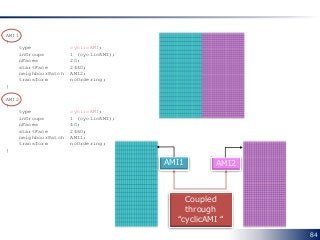
AMI1
{
type cyclicAMI;
inGroups 1 (cyclicAMI);
nFaces 20;
startFace 2440;
neighbourPatch AMI2;
transform noOrdering;
}
AMI2
{
type cyclicAMI;
inGroups 1 (cyclicAMI);
nFaces 40;
startFace 2460;
neighbourPatch AMI1;
transform noOrdering;
}
AMI1 AMI2
Coupled
through
“cyclicAMI “
85
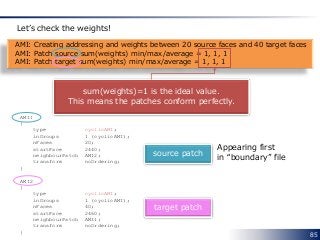
AMI: Creating addressing and weights between 20 source faces and 40 target faces
AMI: Patch source sum(weights) min/max/average = 1, 1, 1
AMI: Patch target sum(weights) min/max/average = 1, 1, 1
Let’s check the weights!
sum(weights)=1 is the ideal value.
This means the patches conform perfectly.
AMI1
{
type cyclicAMI;
inGroups 1 (cyclicAMI);
nFaces 20;
startFace 2440;
neighbourPatch AMI2;
transform noOrdering;
}
AMI2
{
type cyclicAMI;
inGroups 1 (cyclicAMI);
nFaces 40;
startFace 2460;
neighbourPatch AMI1;
transform noOrdering;
}
source patch
target patch
Appearing first
in “boundary” file
86
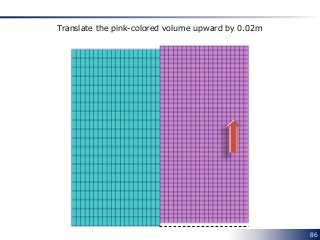
Translate the pink-colored volume upward by 0.02m
87
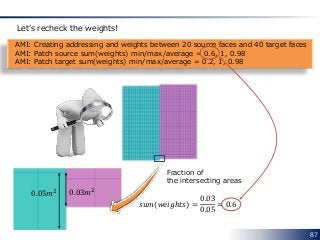
AMI: Creating addressing and weights between 20 source faces and 40 target faces
AMI: Patch source sum(weights) min/max/average = 0.6, 1, 0.98
AMI: Patch target sum(weights) min/max/average = 0.2, 1, 0.98
Let’s recheck the weights!
𝑠𝑢𝑚(𝑤𝑒𝑖𝑔ℎ𝑡𝑠) =
0.03
0.05
= 0.6
0.05𝑚2 0.03𝑚2
Fraction of
the intersecting areas
88
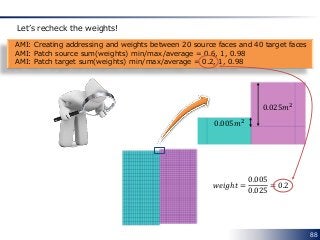
AMI: Creating addressing and weights between 20 source faces and 40 target faces
AMI: Patch source sum(weights) min/max/average = 0.6, 1, 0.98
AMI: Patch target sum(weights) min/max/average = 0.2, 1, 0.98
Let’s recheck the weights!
0.025𝑚2
0.005𝑚2
𝑤𝑒𝑖𝑔ℎ𝑡 =
0.005
0.025
= 0.2
89
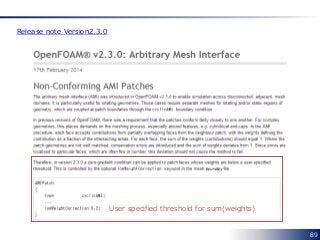
User specified threshold for sum(weights)
Release note Version2.3.0
90
Thank
You!
Kindly let me know
if you have trouble downloading this slide.

CFD for Rotating Machinery using OpenFOAM

  • 1.
    Keywords: • OpenFOAM • SRF •MRF • cyclicAMI • Sliding Interface • Mixing Plane Fumiya Nozaki Last Updated: 2 August 2015 English CFD for Rotating Machinery OpenFOAM v2.3 and 2.4 foam-extend-3.1
  • 2.
    2 Disclaimer “This offering isnot approved or endorsed by OpenCFD Limited, the producer of the OpenFOAM software and owner of the OPENFOAM® and OpenCFD® trade marks.”
  • 3.
    3 Preface This document covers howto set up CFD simulation for a rotating machinery using OpenFOAM. In particular, • Single Rotating Frame (SRF) • Multiple Reference Frame (MRF) • Arbitraly Mesh Interface (AMI) are and will be described in detail.
  • 4.
    4 Chapter 1 Introduction Inthis chapter we shall describe the classification of the methods for solving a flow around a rotating machinery using OpenFOAM.
  • 5.
    5 What we needto decide Our simulation begins with deciding the following conditions: 1. Computational Domain 2. Time Dependency
  • 6.
    6 What we needto decide Our simulation begins with deciding the following conditions: 1. Computational Domain 2. Time Dependency Does our model include some stationary regions or not?
  • 7.
    7 What we needto decide Our simulation begins with deciding the following conditions: 1. Computational Domain 2. Time Dependency Which do we want to obtain, a steady or transient solution?
  • 8.
    8 Classification of methods Only Rotating Region Include Stationary Region(s) Steady SRFSimpleFoam Chapter2 SimpleFoam + fvOptions Transient SRFPimpleFoam Chapter 2 pimpleDyMFoam 1. Computational Domain 2.TimeDependency Chapter 2 Chapter 2 Chapter 3 Chapter 4
  • 9.
    9 Chapter 2 SingleRotating Frame In this chapter we shall describe how to set up the solvers and to simulate an incompressible flow field in a single rotating frame. SRFSimpleFoam SRFPimpleFoam
  • 10.
    10 Overview The Single RotatingFrame (SRF) model computes fluid flow in a rotating frame of reference that is adhere to a rotating machinery. • Steady-state solutions are possible • Without any mesh motion OpenFOAM solvers using Single Rotating Frame (SRF) model SRFSimpleFoam SRFPimpleFoam Steady-state solver Transient solver
  • 11.
    11 Governing equations  GoverningEquations of SRFSimpleFoam 𝛻 ∙ 𝒖 𝑅 𝒖 𝑅 + 2𝜴 × 𝒖 𝑅 + 𝜴 × 𝜴 × 𝒓 = −𝛻𝑝 + 𝛻 ∙ 𝜈 𝑒𝑓𝑓 𝛻𝒖 𝑅 + 𝛻𝒖 𝑅 𝑇 𝛻 ∙ 𝒖 𝑅 = 0 𝒖𝐼 = 𝒖 𝑅 + 𝜴 × 𝒓 𝜴:rotational vector axis of rotation 𝒓 Absolute velocity (the velocity viewed from the stationary frame) Relative velocity (the velocity viewed from the rotating frame) :position vector Coriolis force Centrifugal force
  • 12.
    12 Let’s run thetutorials  Tutorials of SRFSimpleFoam and SRFPimpleFoam • SRFSimpleFoam • SRFPimpleFoam
  • 13.
    13 mixer tutorial |Computational domain  tutorials/incompressible/SRFSimpleFoam/mixer A blade named “innerWall” is rotating counterclockwise at 5000 rpm. outlet outerWall innerWall cyclic_half1 cyclic_half0 “inlet” patch is hidden for facilitating visualization.inlet
  • 14.
    14 mixer tutorial |Boundary conditions cyclic_half1 cyclic_half0 Cyclic boundary condition innerWall 𝒖 𝑅 = 𝟎 outerWall 𝒖𝐼 = 𝟎 inlet 𝒖𝐼 = 0 0 − 10 Fixed absolute velocity  Boundary conditions of velocity field Rotating wall Stationary wall
  • 15.
    15 mixer tutorial |Case structure transportProperties polyMesh RASProperties systemconstant0 controlDict fvSchemes fvSolution boundary faces neighbour owner points Urel p k omega nut case SRFProperties  Pay attention to these files! • Urel represents the relative velocity field • Rotating velocity condition is described in SRFProperties file SRFSimpleFoam
  • 16.
    16 SRFProperties  Angular velocitycondition is described in SRFProperties file. /*--------------------------------*- C++ -*----------------------------------*¥ | ========= | | | ¥¥ / F ield | OpenFOAM: The Open Source CFD Toolbox | | ¥¥ / O peration | Version: 2.3.0 | | ¥¥ / A nd | Web: www.OpenFOAM.org | | ¥¥/ M anipulation | | ¥*---------------------------------------------------------------------------*/ FoamFile { version 2.0; format ascii; class dictionary; location "constant"; object SRFProperties; } // * * * * * * * * * * * * * * * * * * * * * * * * * * * * * * * * * * * * * // SRFModel rpm; axis ( 0 0 1 ); rpmCoeffs { rpm 5000; } // ************************************************************************* // Angular velocity is specified in terms of revolutions-per-minute [rpm] Axis of rotation 5000 rpm ⇒ 5000 ∗ 2π 60 = 523.6 [rad/s] When the axis vector points to you • rpm>0 ⇒ rotation in counterclockwise direction • rpm<0 ⇒ rotation in clockwise direction Rotational direction
  • 17.
    17 Urel  In thistutorial,SRFVelocity boundary condition is used on inlet and outerWall boundaries. inlet { type SRFVelocity; inletValue uniform (0 0 -10); relative no; value uniform (0 0 0); } This means 𝒖𝐼 = 𝟎 (a stationary wall). This means 𝒖𝐼 = 0 0 − 10 . By setting relative up as no Boundary condition of the relative velocity 𝒖 𝑟 (Urel) is able to be specified in terms of the absolute velocity. outerWall { type SRFVelocity; inletValue uniform (0 0 0); relative no; value uniform (0 0 0); }
  • 18.
    18 Closer look atthe velocity on outerWall In the stationary coordinate system In the rotating coordinate system Radius of outerWall is 0.1 m 𝒖𝐼 = 𝟎 𝒖 𝒓 = 𝒖𝐼 − 𝛀 × 𝒓 = 523.6 ∙ 0.1 = 52.36 [𝑚/𝑠] Vectors show 𝒖 𝑟 Rotational direction
  • 19.
    19 Let’s run thetutorials  Tutorials of SRFSimpleFoam and SRFPimpleFoam • SRFSimpleFoam • SRFPimpleFoam
  • 20.
    20 rotor2D tutorial |Computational domain  tutorials/incompressible/SRFPimpleFoam/rotor2D A wall named “rotor” is rotating counterclockwise at 60 rpm. rotor freestream 0.2m
  • 21.
    21 rotor2D tutorial |Boundary conditions  Boundary conditions of velocity field rotor freestream 𝒖 𝑅 = 𝟎 Rotating wall
  • 22.
    22 Implementation | Calculationof additional forces and absolute velocity 𝒖 𝑅 ∙ 𝛻 𝒖 𝑅 + 2𝜴 × 𝒖 𝑅 + 𝜴 × 𝜴 × 𝒓 = −𝛻𝑝 + 𝛻 ∙ 𝜈 𝑒𝑓𝑓 𝛻𝒖 𝑅 + 𝛻𝒖 𝑅 𝑇 𝛻 ∙ 𝒖 𝑅 = 0 // Relative momentum predictor tmp<fvVectorMatrix> UrelEqn ( fvm::div(phi, Urel) + turbulence->divDevReff(Urel) + SRF->Su() == fvOptions(Urel) ); Foam::tmp<Foam::DimensionedField<Foam::vector, Foam::volMesh> > Foam::SRF::SRFModel::Su() const { return Fcoriolis() + Fcentrifugal(); } 2.0*omega_ ^ Urel_ omega_ ^ (omega_ ^ (mesh_.C() – origin_))  Calculation of the absolute velocity (Uabs) Urel + SRF->U() omega_ ^ ((mesh_.C() - origin_) - axis_*(axis_ & (mesh_.C() - origin_)))  Calculation of the additional force terms SRFModel.C UrelEqn.H SRFSimpleFoam.C
  • 23.
    23 Implementation | SRFVelocity voidFoam::SRFVelocityFvPatchVectorField::updateCoeffs() { if (updated()) { return; } // If not relative to the SRF include the effect of the SRF if (!relative_) { // Get reference to the SRF model const SRF::SRFModel& srf = db().lookupObject<SRF::SRFModel>("SRFProperties"); // Determine patch velocity due to SRF const vectorField SRFVelocity(srf.velocity(patch().Cf())); operator==(-SRFVelocity + inletValue_); } // If already relative to the SRF simply supply the inlet value as a fixed // value else { operator==(inletValue_); } fixedValueFvPatchVectorField::updateCoeffs(); } If ”relative” is ”no” SRFModel.C l.60 Calculate 𝜴 × 𝒓 𝒖 𝑅 = −𝜴 × 𝒓 + 𝒖𝐼 If ”relative” is ”yes” src/finiteVolume/cfdTools/general/SRF/ derivedFvPatchFields/SRFVelocityFvPatchVectorFiel/ SRFVelocityFvPatchVectorField.C
  • 24.
    24 Chapter 3 MultipleReference Frame In this chapter we shall describe how to set up the multiple reference frame simulation in OpenFOAM. This model is activated using “fvOptions” functionality.
  • 25.
    25 Overview The Multiple ReferenceFrame (SRF) model computes fluid flow using both the rotating and stationary reference frames. • Rotating zone is solved in the rotating frame • Stationary zone is solved in the stationary frame simpleFoam Steady-state solver MRFSource+ fvOptions OpenFOAM solvers using Multiple Reference Frame (MRF) model Multiple frames
  • 26.
  • 27.
    𝛻 ∙ 𝒖𝑅 𝒖 𝑅 = 𝛻 ∙ 𝒖 𝑅 𝒖𝐼 − 𝛻 ∙ 𝒖 𝑅 𝜴 × 𝒓 𝛻 ∙ 𝒖 𝑅 𝜴 × 𝒓 = 𝛻 ∙ 𝑢 𝑅1 Ω2 𝑟3 − Ω3 𝑟2 𝑢 𝑅1 Ω3 𝑟1 − Ω1 𝑟3 𝑢 𝑅1 Ω1 𝑟2 − Ω2 𝑟1 𝑢 𝑅2 Ω2 𝑟3 − Ω3 𝑟2 𝑢 𝑅2 Ω3 𝑟1 − Ω1 𝑟3 𝑢 𝑅2 Ω1 𝑟2 − Ω2 𝑟1 𝑢 𝑅3 Ω2 𝑟3 − Ω3 𝑟2 𝑢 𝑅3 Ω3 𝑟1 − Ω1 𝑟3 𝑢 𝑅3 Ω1 𝑟2 − Ω2 𝑟1 = 𝜕 𝜕𝑥1 𝑢 𝑅1 Ω2 𝑟3 − Ω3 𝑟2 + 𝜕 𝜕𝑥2 𝑢 𝑅2 Ω2 𝑟3 − Ω3 𝑟2 + 𝜕 𝜕𝑥3 𝑢 𝑅3 Ω2 𝑟3 − Ω3 𝑟2 𝜕 𝜕𝑥1 𝑢 𝑅1 Ω3 𝑟1 − Ω1 𝑟3 + 𝜕 𝜕𝑥2 𝑢 𝑅2 Ω3 𝑟1 − Ω1 𝑟3 + 𝜕 𝜕𝑥3 𝑢 𝑅3 Ω3 𝑟1 − Ω1 𝑟3 𝜕 𝜕𝑥1 𝑢 𝑅1 Ω1 𝑟2 − Ω2 𝑟1 + 𝜕 𝜕𝑥2 𝑢 𝑅2 Ω1 𝑟2 − Ω2 𝑟1 + 𝜕 𝜕𝑥3 𝑢 𝑅3 Ω1 𝑟2 − Ω2 𝑟1 = Ω2 𝑟3 − Ω3 𝑟2 𝛻 ∙ 𝒖 𝑅 Ω3 𝑟1 − Ω1 𝑟3 𝛻 ∙ 𝒖 𝑅 Ω1 𝑟2 − Ω2 𝑟1 ∇ ∙ 𝒖 𝑅 + 𝒖 𝑅 ∙ 𝛻 Ω2 𝑟3 − Ω3 𝑟2 𝒖 𝑅 ∙ 𝛻 Ω3 𝑟1 − Ω1 𝑟3 𝒖 𝑅 ∙ 𝛻 Ω1 𝑟2 − Ω2 𝑟1 = 𝜴 × 𝒖 𝑅 𝛻 ∙ 𝒖 𝑅 𝒖 𝑅 = 𝛻 ∙ 𝒖 𝑅 𝒖𝐼 − 𝜴 × 𝒖 𝑅 27 Governing equations | Derivation Sometimes denoted 𝒖 𝑅 ⊗ 𝒖 𝑅
  • 28.
    28 Governing equations |Derivation 𝛻 ∙ 𝒖 𝑅 𝒖 𝑅 + 2𝜴 × 𝒖 𝑅 + 𝜴 × 𝜴 × 𝒓 = −𝛻𝑝 + 𝛻 ∙ 𝜈 𝑒𝑓𝑓 𝛻𝒖 𝑅 + 𝛻𝒖 𝑅 𝑇 𝛻 ∙ 𝒖 𝑅 = 0 𝛻 ∙ 𝒖 𝑅 𝒖𝐼 + 𝜴 × 𝒖𝐼 = −𝛻𝑝 + 𝛻 ∙ 𝜈 𝑒𝑓𝑓 𝛻𝒖𝐼 + 𝛻𝒖𝐼 𝑇 𝛻 ∙ 𝒖 𝑅 = 0  In the rotating frame = 𝛻 ∙ 𝒖 𝑅 𝒖 𝑅 + 2𝜴 × 𝒖 𝑅 + 𝜴 × 𝜴 × 𝒓 = 𝛻 ∙ 𝒖 𝑅 𝒖𝐼 − 𝜴 × 𝒖 𝑅 + 2𝜴 × 𝒖 𝑅 + 𝜴 × 𝜴 × 𝒓 = 𝛻 ∙ 𝒖 𝑅 𝒖𝐼 + 𝜴 × 𝒖 𝑅 + 𝜴 × 𝜴 × 𝒓 = 𝛻 ∙ 𝒖 𝑅 𝒖𝐼 + 𝜴 × 𝒖 𝑅 + 𝜴 × 𝒓 = 𝛻 ∙ 𝒖 𝑅 𝒖𝐼 + 𝜴 × 𝒖𝐼  Governing equations of SRF can be rearranged in the following manner: 1 1
  • 29.
    29 Governing equations 𝛻 ∙𝒖 𝑅 𝒖𝐼 + 𝛀 × 𝒖𝐼 = −𝛻𝑝 + 𝛻 ∙ 𝜈 𝑒𝑓𝑓 𝛻𝒖𝐼 + 𝛻𝒖𝐼 𝑇 𝛻 ∙ 𝒖 𝑅 = 0  In each rotating zone • the Coriolis force is added to the governing equations • the flux is calculated from the relative velocity 𝒖 𝑅  Governing equations [1] Coriolis force 𝛻 ∙ 𝒖𝐼 𝒖𝐼 − 𝛀 × 𝒖 = −𝛻𝑝 + 𝛻 ∙ 𝜈 𝑒𝑓𝑓 𝛻𝒖𝐼 + 𝛻𝒖𝐼 𝑇 𝛻 ∙ 𝒖𝐼 = 0 Rotating zone Stationary zone 1 2 1 2
  • 30.
    30 mixerVessel2D tutorial |Computational domain  tutorials/incompressible/simpleFoam/mixerVessel2D A wall named “rotor” is rotating counterclockwise at 104.72 rad/s. rotor stator 0.1m 0.04m
  • 31.
    31 mixerVessel2D tutorial |Rotating zone Rotating zone Stationary zone 0.12m
  • 32.
    32 mixerVessel2D tutorial |Boundary condition Rotating wall rotor stator Stationary wall
  • 33.
    33 mixerVessel2D tutorial |Case structure transportProperties polyMesh RASProperties systemconstant0 controlDict fvSchemes fvSolution fvOptionsboundary faces neighbour owner points cellZones U p k epsilon nut case
  • 34.
    34 fvOptions Description MRF1 { type MRFSource; activeture; selectionMode cellZone; cellZone rotor; MRFSourceCoeffs { nonRotatingPatches (); origin (0 0 0); axis (0 0 1); omega 104.72; } } Specifying the rotating zone by cellZone named rotor. Unit: [rad/s] axis Following options are available for “selectionMode” • all • cellSet • cellZone • mapRegion • points origin system/fvOptions
  • 35.
    35 cellZones Description FoamFile { version 2.0; formatascii; class regIOobject; location "constant/polyMesh"; object cellZones; } // * * * * * * * * * * * * * * * * * * * * * * * * * * * * * * * * * * * * * // 1 ( rotor { type cellZone; cellLabels List<label> 1536 ( 0 1 2 3 (snip) 1533 1534 1535 ) ; } ) // ************************************************************************* // The number of cellZones The name of cellZones The number of cells that make up cellZones “rotor” List of their cell labels constant/polyMesh/cellZones
  • 36.
    36 fvOptions Description |Keyword “nonRotatingPatches” wall1 wall2 wall3 wall4 rotor We’ll compare the following two settings: • Case1: nonRotatingPatches (); • Case2: nonRotatingPatches (wall1 wall2 wall3); MRFSourceCoeffs { nonRotatingPatches (); origin (0 0 0); axis (0 0 1); omega 104.72; } stationary patches whose adjacent (owner) cell is in a rotating cell zone. Rotating cellZone wall3
  • 37.
    37 fvOptions Description |Keyword “nonRotatingPatches” Case1: nonRotatingPatches ();
  • 38.
    38 fvOptions Description |Keyword “nonRotatingPatches” Case2: nonRotatingPatches (wall1 wall2 wall3); wall1 wall2 wall3 wall1, wall2 and wall3 are treated as stationary patches.
  • 39.
    39 Implementation | Relatedsource code  src/fvOptions/sources/derived/MRFSource • MRFSource.C • MRFSource.H  src/finiteVolume/cfdTools/general/MRF • IOMRFZoneList.C • IOMRFZoneList.H • MRFZone.C • MRFZone.H • MRFZoneI.H • MRFZoneList.C • MRFZoneList.H • MRFZoneTemplates.C
  • 40.
    40 Implementation | Calculationof Coriolis force tmp<fvVectorMatrix> UEqn ( fvm::div(phi, U) + turbulence->divDevReff(U) == fvOptions(U) ); void Foam::fv::MRFSource::addSup ( fvMatrix<vector>& eqn, const label fieldI ) { // Update the velocity boundary conditions for changes in rotation speed mrfPtr_->correctBoundaryVelocity(const_cast<volVectorField&>(eqn.psi())); // Add to rhs of equation mrfPtr_->addCoriolis(eqn, true); }  Add the Coriolis force to the right-hand side of the momentum equation Foam::tmp<Foam::fvMatrix<Type> > Foam::fv::optionList::operator() ( GeometricField<Type, fvPatchField, volMesh>& fld, const word& fieldName ) { (snip) source.addSup(mtx, fieldI); (snip) } src/fvOptions/sources/derived/MRFSource/MRFSource.C simpleFoam/UEqn.H
  • 41.
    void Foam::MRFZone::addCoriolis(fvVectorMatrix& UEqn,const bool rhs) const { if (cellZoneID_ == -1) { return; } const labelList& cells = mesh_.cellZones()[cellZoneID_]; const scalarField& V = mesh_.V(); vectorField& Usource = UEqn.source(); const vectorField& U = UEqn.psi(); const vector Omega = this->Omega(); if (rhs) { forAll(cells, i) { label celli = cells[i]; Usource[celli] += V[celli]*(Omega ^ U[celli]); } } else { forAll(cells, i) { label celli = cells[i]; Usource[celli] -= V[celli]*(Omega ^ U[celli]); } } } 41 Implementation | Calculation of Coriolis force List of cell labels included in the cell zone Adding the Coriolis force to the right-hand side as a source term −𝛀 × 𝒖 src/finiteVolume/cfdTools/general/MRF/MRFZone.C
  • 42.
    42 Implementation | Calculationof face flux  Classify all faces into three groups (faceType = 0, 1, 2) • For internal faces void Foam::MRFZone::setMRFFaces() { const polyBoundaryMesh& patches = mesh_.boundaryMesh(); labelList faceType(mesh_.nFaces(), 0); const labelList& own = mesh_.faceOwner(); const labelList& nei = mesh_.faceNeighbour(); // Cells in zone boolList zoneCell(mesh_.nCells(), false); if (cellZoneID_ != -1) { const labelList& cellLabels = mesh_.cellZones()[cellZoneID_]; forAll(cellLabels, i) { zoneCell[cellLabels[i]] = true; } } label nZoneFaces = 0; for (label faceI = 0; faceI < mesh_.nInternalFaces(); faceI++) { if (zoneCell[own[faceI]] || zoneCell[nei[faceI]]) { faceType[faceI] = 1; nZoneFaces++; } } faceType = 1 Either owner or neighbour cell is in the cell zone src/finiteVolume/cfdTools/general/MRF/MRFZone.C
  • 43.
    43 Implementation | Calculationof face flux • For boundary faces labelHashSet excludedPatches(excludedPatchLabels_); forAll(patches, patchI) { const polyPatch& pp = patches[patchI]; if (pp.coupled() || excludedPatches.found(patchI)) { forAll(pp, i) { label faceI = pp.start()+i; if (zoneCell[own[faceI]]) { faceType[faceI] = 2; nZoneFaces++; } } } else if (!isA<emptyPolyPatch>(pp)) { forAll(pp, i) { label faceI = pp.start()+i; if (zoneCell[own[faceI]]) { faceType[faceI] = 1; nZoneFaces++; } } } } Coupled patch face or excluded patch face whose owner cell is in the cell zone Normal patch face whose owner cell is in the cell zone faceType = 2 faceType = 1
  • 44.
    44 Implementation | Calculationof face flux  Create two lists of face labels per patch //- Outside faces (per patch) that move with the MRF labelListList includedFaces_; //- Excluded faces (per patch) that do not move with the MRF labelListList excludedFaces_; forAll(patches, patchi) { const polyPatch& pp = patches[patchi]; forAll(pp, patchFacei) { label faceI = pp.start() + patchFacei; if (faceType[faceI] == 1) { includedFaces_[patchi][nIncludedFaces[patchi]++] = patchFacei; } else if (faceType[faceI] == 2) { excludedFaces_[patchi][nExcludedFaces[patchi]++] = patchFacei; } } } includedFaces_[patchi][i] = local label of ith face whose faceType = 1 on the patchith patch excludedFaces_[patchi][i] = local label of ith face whose faceType = 2 on the patchith patch src/finiteVolume/cfdTools/general/MRF/MRFZone.C
  • 45.
    45 Implementation | Calculationof face flux surfaceScalarField phiHbyA("phiHbyA", fvc::interpolate(HbyA) & mesh.Sf()); fvOptions.makeRelative(phiHbyA); adjustPhi(phiHbyA, U, p); simpleFoam/pEqn.H  Modify the face flux field void Foam::fv::optionList::makeRelative(surfaceScalarField& phi) const { forAll(*this, i) { this->operator[](i).makeRelative(phi); } } src/fvOptions/fvOptions/fvOptionList.C void Foam::fv::MRFSource::makeRelative(surfaceScalarField& phi) const { mrfPtr_->makeRelative(phi); } src/fvOptions/sources/derived/MRFSource/MRFSource.C void Foam::MRFZone::makeRelative(surfaceScalarField& phi) const { makeRelativeRhoFlux(geometricOneField(), phi); } src/finiteVolume/cfdTools/general/MRF/MRFZone.C
  • 46.
    46 Implementation | Calculationof face flux template<class RhoFieldType> void Foam::MRFZone::makeRelativeRhoFlux ( const RhoFieldType& rho, surfaceScalarField& phi ) const { const surfaceVectorField& Cf = mesh_.Cf(); const surfaceVectorField& Sf = mesh_.Sf(); const vector Omega = omega_->value(mesh_.time().timeOutputValue())*axis_; const vectorField& Cfi = Cf.internalField(); const vectorField& Sfi = Sf.internalField(); scalarField& phii = phi.internalField(); // Internal faces forAll(internalFaces_, i) { label facei = internalFaces_[i]; phii[facei] -= rho[facei]*(Omega ^ (Cfi[facei] - origin_)) & Sfi[facei]; } makeRelativeRhoFlux(rho.boundaryField(), phi.boundaryField()); } src/finiteVolume/cfdTools/general/MRF/MRFZoneTemplates.C Modification of the internal face flux Modification of the boundary face flux • “internalFaces_” is a label list of the internal faces whose owner or neighbour cell is in the rotating cell zone. • According to the governing equation, the face fluxes of these internal faces are modified by subtracting 𝜴 × 𝒓 ∙ 𝑺 𝑓 from the absolute face fluxes: 𝒖 𝑅 ∙ 𝑺 𝑓 = 𝒖𝐼 ∙ 𝑺 𝑓 − (𝜴 × 𝒓) ∙ 𝑺 𝑓
  • 47.
    47 Implementation | Calculationof face flux template<class RhoFieldType> void Foam::MRFZone::makeRelativeRhoFlux ( const RhoFieldType& rho, FieldField<fvsPatchField, scalar>& phi ) const { const surfaceVectorField& Cf = mesh_.Cf(); const surfaceVectorField& Sf = mesh_.Sf(); const vector Omega = omega_->value(mesh_.time().timeOutputValue())*axis_; // Included patches forAll(includedFaces_, patchi) { forAll(includedFaces_[patchi], i) { label patchFacei = includedFaces_[patchi][i]; phi[patchi][patchFacei] = 0.0; } } // Excluded patches forAll(excludedFaces_, patchi) { forAll(excludedFaces_[patchi], i) { label patchFacei = excludedFaces_[patchi][i]; phi[patchi][patchFacei] -= rho[patchi][patchFacei] * (Omega ^ (Cf.boundaryField()[patchi][patchFacei] - origin_)) & Sf.boundaryField()[patchi][patchFacei]; } } } src/finiteVolume/cfdTools/general/MRF/MRFZoneTemplates.C Relative face fluxes on rotating patches are zero 𝒖 𝑅 ∙ 𝑺 𝑓 = 0 Relative face fluxes on stationary patches in the rotating cell zone is calculated by subtracting 𝜴 × 𝒓 ∙ 𝑺 𝑓 from the absolute face fluxes
  • 48.
    48 Chapter 4 DynamicMesh In this chapter we shall describe how to set up a transient simulation with mesh motion in OpenFOAM.
  • 49.
    49 mixerVesselAMI2D tutorial |Computational domain First run the tutorial and enjoy post-processing: incompressible/pimpleDyMFoam/mixerVesselAMI2D Static Pressure t=5.90 s
  • 50.
    50 mixerVesselAMI2D tutorial |Results Velocity Magnitude t=5.90 s
  • 51.
    51 mixerVesselAMI2D tutorial |Results Velocity Magnitude t=5.905 s
  • 52.
    52 mixerVesselAMI2D tutorial |Results Velocity Magnitude t=5.91 s
  • 53.
    53 mixerVesselAMI2D tutorial |Results Velocity Magnitude t=5.915 s
  • 54.
    54 mixerVesselAMI2D tutorial |Results Velocity Magnitude t=5.92 s
  • 55.
    55 mixerVesselAMI2D tutorial |Results Velocity Magnitude t=5.925 s
  • 56.
    56 mixerVesselAMI2D tutorial |Results Velocity Magnitude t=5.93 s
  • 57.
    57 mixerVesselAMI2D tutorial |Results Velocity Magnitude t=5.935 s
  • 58.
    58 mixerVesselAMI2D tutorial |Results Velocity Magnitude t=5.94 s
  • 59.
    59 mixerVesselAMI2D tutorial |Results Velocity Magnitude t=5.945 s
  • 60.
    60 mixerVesselAMI2D tutorial |Results Velocity Magnitude t=5.95 s
  • 61.
    61 mixerVesselAMI2D tutorial |Mesh motion Mesh is in rotating motion without deformation Mesh is stationary Settings are in the next page.
  • 62.
    62 dynamicMeshDict FoamFile { version 2.0; format ascii; classdictionary; location "constant"; object dynamicMeshDict; } // * * * * * * * * * * * * * * * * * * * * * * * * * * * * * * * * * * * * * // dynamicFvMesh solidBodyMotionFvMesh; motionSolverLibs ( "libfvMotionSolvers.so" ); solidBodyMotionFvMeshCoeffs { cellZone rotor; solidBodyMotionFunction rotatingMotion; rotatingMotionCoeffs { origin (0 0 0); axis (0 0 1); omega 6.2832; // rad/s } } cellZone: rotor The cellZone “rotor” is rotating counterclockwise at 6.2832 rad/s about the origin. constant/dynamicMeshDict  Settings of dynamic mesh are specified in dynamicMeshDict file solidBodyMotionFvMesh deals with mesh motions without deformations such as translational and rotational motions.
  • 63.
    63 solidBodyMotionFvMesh  The followingmotions (solidBodyMotionFunction) are available for solidBodyMotionFvMesh • linearMotion • oscillatingLinearMotion • rotatingMotion • axisRotationMotion • oscillatingRotatingMotion • SDA [4] • multiMotion  Code: src/dynamicFvMesh/solidBodyMotionFvMesh/solidBodyMotionFunctions Translational motion Rotational motion Ship Design Analysis Combination of the above motions
  • 64.
    64 Sliding interface capabilityusing cyclicAMI Patch: AMI1 Patch: AMI2 Coupled through “cyclicAMI “ stationary rotating
  • 65.
    65 nFaces 192; startFace 6048; } AMI1 { typecyclicAMI; inGroups 1(cyclicAMI); nFaces 96; startFace 6240; matchTolerance 0.0001; transform noOrdering; neighbourPatch AMI2; } AMI2 { type cyclicAMI; inGroups 1(cyclicAMI); nFaces 96; startFace 6336; matchTolerance 0.0001; transform noOrdering; neighbourPatch AMI1; } front { type empty; inGroups 1(empty);  Sliding interface capability , e.g. for rotating machinery is available using cyclicAMI boundary patch class.  In “neighbourPatch”, the coupled patch name is specified. constant/polyMesh/boundary Sliding interface capability using cyclicAMI
  • 66.
    66 Chapter 5 Mixingplane interface In this chapter we shall describe how to use the mixing plane interface in OpenFOAM extend version, the community-driven version.
  • 67.
    67 rotor guide vane draft tube axialTurbine_mixingPlanetutorial | Full geometry  foam-extend-3.1/tutorials/incompressible/MRFSimpleFoam/ axialTurbine_mixingPlane
  • 68.
    68 rotor guide vane draft tube axialTurbine_mixingPlanetutorial | Computational domain  Only fifth part of the geometry is computed by making use of the rotational periodicity 72°
  • 69.
    69 axialTurbine_mixingPlane tutorial |Rotating zone rotor guide vane draft tube Stationary zones Rotating zone
  • 70.
    70 axialTurbine_mixingPlane tutorial |Boundary conditions guide vane GVINLET GVCYCLIC GVBLADE GVHUB GVSHROUD GVOUTLET Stationary vane Mixing plane Stationary wall Stationary wall Rotationally cyclic patch Inlet
  • 71.
    71 axialTurbine_mixingPlane tutorial |Boundary conditions rotor RUINLET RUOUTLET RUBLADE Rotating wall RUHUB Rotating wall RUCYCLIC1 Rotationally cyclic patch RUCYCLIC2 Rotationally cyclic patch Mixing plane Mixing plane RUSHROUD Stationary wall
  • 72.
    72 axialTurbine_mixingPlane tutorial |Boundary conditions draft tube DTOUTLET outlet DTCYCLIC2 Rotationally cyclic patch DTCYCLIC1 Rotationally cyclic patch DTINLET Mixing plane DTHUB Stationary wall DTSHROUD Stationary wall
  • 73.
    73 axialTurbine_mixingPlane tutorial |Mixing plane settings GVOUTLET { type mixingPlane; nFaces 100; startFace 11840; shadowPatch RUINLET; zone GVOUTLETZone; coordinateSystem { type cylindrical; name mixingCS; origin (0 0 0); e1 (1 0 0); e3 (0 0 1); inDegrees true; } ribbonPatch { sweepAxis Theta; stackAxis R; discretisation bothPatches; } } RUINLET { type mixingPlane; nFaces 100; startFace 12820; shadowPatch GVOUTLET; zone RUINLETZone; }  Specifying the mixing plane in boundary file Circumferential averaging constant/polyMesh/boundary
  • 74.
    74 axialTurbine_mixingPlane tutorial |Mixing plane settings RUOUTLET { type mixingPlane; nFaces 100; startFace 12920; shadowPatch DTINLET; zone RUOUTLETZone; coordinateSystem { type cylindrical; name mixingCS; origin (0 0 0); e1 (1 0 0); e3 (0 0 1); inDegrees true; } ribbonPatch { sweepAxis Theta; stackAxis R; discretisation bothPatches; } } DTINLET { type mixingPlane; nFaces 100; startFace 13580; shadowPatch RUOUTLET; zone DTINLETZone; }  Specifying the mixing plane in boundary file Circumferential averaging constant/polyMesh/boundary
  • 75.
     What isthe ribbonPatch? [5]  According to [6] the ribbon patch will specify the direction in which it will perform the average (sweepAxis) and in which direction it will stack the cells (stackAxis). 75 axialTurbine_mixingPlane tutorial | Mixing plane settings ribbonPatch { sweepAxis Theta; stackAxis R; discretisation bothPatches; } R Theta
  • 76.
    76 axialTurbine_mixingPlane tutorial |Velocity field Mixing planes inlet
  • 77.
    77 axialTurbine_mixingPlane tutorial |MRFZones 1 ( rotor { // Fixed patches (by default they 'move' with the MRF zone) nonRotatingPatches ( RUSHROUD ); origin origin [0 1 0 0 0 0 0] (0 0 0); axis axis [0 0 0 0 0 0 0] (0 0 1); omega omega [0 0 -1 0 0 0 0] -10; } )  Specifying the rotating zone in MRFZones file rotor Name of rotating cellZones The absolute velocity on the “nonRotatingPatches” is 0. constant/MRFZones
  • 78.
  • 79.
    79 Implementation | Relatedsource code  src/finiteVolume/fields/fvPatchFields/constraint/mixingPlane • mixingPlaneFvPatchField.C • mixingPlaneFvPatchField.H • mixingPlaneFvPatchFields.C • mixingPlaneFvPatchFields.H • mixingPlaneFvPatchFieldsFwd.H  src/finiteVolume/fields/fvsPatchFields/constraint/mixingPlane • mixingPlaneFvsPatchField.C • mixingPlaneFvsPatchField.H • mixingPlaneFvsPatchFields.C • mixingPlaneFvsPatchFields.H • mixingPlaneFvsPatchFieldsFwd.H
  • 80.
  • 81.
    81 References [1] http://openfoamwiki.net/index.php/See_the_MRF_development [2] CFDfor Underhood Modeling http://publications.lib.chalmers.se/records/fulltext/204821/204821.pdf [3] http://www.sourceflux.de/blog/software-design-fvoptions/ [4] Roll Motion of a Box and Interaction with Free-Surface http://www.tfd.chalmers.se/~hani/kurser/OS_CFD_2009/ArashEslamdoost/RollMotionofaBoxa ndInteractionwithFreeSurface.pdf [5] Martin Beaudoin, Inside the mixingPlane interface ftp://ftp.heanet.ie/disk1/sourceforge/o/op/openfoam- extend/OpenFOAM_Workshops/OFW7_2012_Darmstadt/Workshop- Documents/CommunityDay/SIG-Turbo/Final-MartinBeaudoin- OFTurboWGInsideTheMixingPlaneInterfac (accessed 06/13/2015) [6] Ant´onio Jo˜ao Ferreira Reis, Validation of NASA Rotor 67 with OpenFOAM’s Transonic Density-Based solver http://run.unl.pt/bitstream/10362/9930/1/Reis_2013.pdf (accessed 06/13/2015) [7] Evaluation of an improved mixing plane interface for OpenFOAM http://publications.lib.chalmers.se/records/fulltext/201855/local_201855.pdf [8] Taking the mixingPlane interface for a ride http://download2.polytechnic.edu.na/pub4/sourceforge/o/op/openfoam- extend/OpenFOAM_Workshops/OFW9_2014_Zagreb/Presentations/Hakan_Nilsson_OFW09_P_ 0046.pdf
  • 82.
    82 References [9] Density BasedNavier Stokes Solver for Transonic Flows http://www.personal.psu.edu/dab143/OFW6/Presentations/oliver_borm_slides.pdf
  • 83.
  • 84.
    84 AMI1 { type cyclicAMI; inGroups 1(cyclicAMI); nFaces 20; startFace 2440; neighbourPatch AMI2; transform noOrdering; } AMI2 { type cyclicAMI; inGroups 1 (cyclicAMI); nFaces 40; startFace 2460; neighbourPatch AMI1; transform noOrdering; } AMI1 AMI2 Coupled through “cyclicAMI “
  • 85.
    85 AMI: Creating addressingand weights between 20 source faces and 40 target faces AMI: Patch source sum(weights) min/max/average = 1, 1, 1 AMI: Patch target sum(weights) min/max/average = 1, 1, 1 Let’s check the weights! sum(weights)=1 is the ideal value. This means the patches conform perfectly. AMI1 { type cyclicAMI; inGroups 1 (cyclicAMI); nFaces 20; startFace 2440; neighbourPatch AMI2; transform noOrdering; } AMI2 { type cyclicAMI; inGroups 1 (cyclicAMI); nFaces 40; startFace 2460; neighbourPatch AMI1; transform noOrdering; } source patch target patch Appearing first in “boundary” file
  • 86.
    86 Translate the pink-coloredvolume upward by 0.02m
  • 87.
    87 AMI: Creating addressingand weights between 20 source faces and 40 target faces AMI: Patch source sum(weights) min/max/average = 0.6, 1, 0.98 AMI: Patch target sum(weights) min/max/average = 0.2, 1, 0.98 Let’s recheck the weights! 𝑠𝑢𝑚(𝑤𝑒𝑖𝑔ℎ𝑡𝑠) = 0.03 0.05 = 0.6 0.05𝑚2 0.03𝑚2 Fraction of the intersecting areas
  • 88.
    88 AMI: Creating addressingand weights between 20 source faces and 40 target faces AMI: Patch source sum(weights) min/max/average = 0.6, 1, 0.98 AMI: Patch target sum(weights) min/max/average = 0.2, 1, 0.98 Let’s recheck the weights! 0.025𝑚2 0.005𝑚2 𝑤𝑒𝑖𝑔ℎ𝑡 = 0.005 0.025 = 0.2
  • 89.
    89 User specified thresholdfor sum(weights) Release note Version2.3.0
  • 90.
    90 Thank You! Kindly let meknow if you have trouble downloading this slide.