Lid Driven Cavity
0.1m
0.1m
1m/s
Sara Tohidi
May2016
Lid driven folderLid driven folder
Problem solving in OpenFoam begings with a folder containing three subfolders
0, Constant, System.
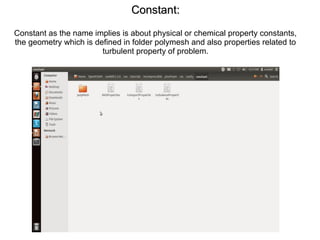
Constant:Constant:
Constant as the name implies is about physical or chemical property constants,
the geometry which is defined in folder polymesh and also properties related to
turbulent property of problem.
constant>polymeshconstant>polymesh
In the subfolder polymesh which is about geometry there are two files:
block mesh dict which contains information about mesh and boundary file which
is built by software when the command BlockMesh is typed in command window
of openfoam
constant>poly mesh>Block mesh dictconstant>poly mesh>Block mesh dict
As seen bellow: the block mesh dict starts with the words: convert to meters which is the scale
and by choosing 0.1 every dimension entered afterwards will be multiplied by 0.1, Vertices are
points which make the vertex of geometry, we have four vertex in this problem but 8 defined,
since openfoam default is three dimensional, we define the geometry in 3D (with 8 vertex) but
solve it in 2D by a method described later.
(20 20 1) means we want the grid to contain 20 division in x, 20 division in y and one division in
z direction.
Simple grading (1 1 1) means we want a structured mesh.
hex
● This is a schematic of problem:
● Problem is to be solved for blue regoin
3
1
2
4 5
67
0
constant>poly mesh>Block mesh dict>Continue:constant>poly mesh>Block mesh dict>Continue:
After points, it comes boundaries,
in this problem: three fixed wall and one moving wall and two faces which are
not in blue regoin and are in z direction are defined empty.
In this way, problem is not solved for those two, and problem is solved 2D.
Constant>Poly mesh>boundaryConstant>Poly mesh>boundary
with this data, boundary file is built when the command “blockMesh” is typed in
openfoam window.
constant>Poly mesh>boundary (continue)constant>Poly mesh>boundary (continue)
As can be seen the boundary file built matches with blockmeshdict information
and there are moving wall and fixed wall of boundary type Wall and front and
back of boundary type Empty.
constant>RAS propertiesconstant>RAS properties
Another file in Constant folder, is RAS properties file which contains RAS
MODEL here Kepsilon.
constant>transport propertiesconstant>transport properties
In transport properties file Viscosity (nu) is defined.
The array containes data on unit(dimension of nu).
The first element of array is unit of mass in nu unit, the second unit of length the third unit
of time, the fourth unit of temperature, the fifth kmole, the sixth current, the seventh is
candle.
Since dimension of nu is m2/sec number related to length(second element) is 2 and
number related to time(third element) is specified -1 and other elements zero.The number
after array is quantity of nu.
constant>turbulent propertiesconstant>turbulent properties
Here it is defined that turbulence model which is to be used in this problem is
RASModel.
0>p0>p
The Second Folder is 0 folder.
It contains data on pressure and velocity, …
in P file, pressure is scalar and belongs to class “VolScalarField”
first dimension of pressure is introduced and then quantity of pressure within
geometry(Internal Field) and on the boundaries(boundary Field) is written.
0>u0>u
In u file, u is vector so it belongs to “VolVectorField”. Similar to Pfile, in Ufile first
dimention and then quantity within and on boundary is written.
0>epsilon0>epsilon
the third file in 0 folder is about epsilon:
0>k0>k
And the forth file in 0, about k:
Turbulent ViscosityTurbulent Viscosity
the fifth file is about turbulent viscosity(nut):
● Not a physical property
● Not a fluid property but a flow property
● It is proportional to square root of kinetic energy
● A nut dictionary is to be created
● If you do not create a nut dictionary, Openfoam will
create it automatically for you
● What openfoam does might not be the best option.
0>nut0>nut
SystemSystem
The Third folder is System, it contains three files: ControlDict about iteration
settings, fvSchemes about numerical method you would like to use and
fvSolution about number of correctors or other options of numerical algorithm
and discretization.
system>Controldictsystem>Controldict
Here numerical algorithm used is introduced: pisoFoam
then start time, end time and delta t is introduced which together specify number
of iteration(stop-start/delta t).
in write interval it is specified on which interval you want calculated data to be
stored.
system>fvschemessystem>fvschemes
Here numerical scheme is defined:
numerical scheme for calculating divergence, for calculating gradient, … .
system>fvSolutionsystem>fvSolution
and in fvSolution, solver of each parameter is introduce and tolerance
acceptable for calculation of that parameter is specified.
OpenFoam softwareOpenFoam software
Here is what the version of OpenFoam installed on my computer looks like:
I have saved the folder of problem with the name “cavity” on my desk top so I
use the words:
“cd Desktop/cavity” to invoke and start the job of simulation
BlockMeshBlockMesh
First the command blockmesh is typed for the geometry to be built.
blockmesh(continue)blockmesh(continue)
and as you see, it is being built with number of points(npoints) number of
cells(ncells 20*20=400) and number of faces(nFaces) being reported.
PisoFoamPisoFoam
after that the keyword “pisoFoam” should be typed, the simulation Begins and
the many folders containing solutions are created in cavity folder.
For example folder 4.9 is solution to the problem at time 4.9.
Pressure @0.1Pressure @0.1
when folder 0.1 is opened pressure file is as bellow:
it containes pressure at each cell: 400 number in 20*20 grid or 1600 number as
the case 40*40=1600cell grid.
Paraview softwareParaview software
post processing is done with software paraview which resembles so:
ParaFoamParaFoam
keyword “paraFoam” is needed to be typed in openFoam window inorder to be
able to see the results in paraview.
In lower reynold, the profile of velocity is something like this.
Different ReynoldsDifferent Reynolds
● Re=10000● Re=1000● Re=100
Stream tracerStream tracer
you can also use capabilities of paraview and view the vortex.
As can be seen vortex moves toward center as reynolds become bigger.
● Re=10000● Re=100

Powerpoint2

  • 1.
  • 2.
    Lid driven folderLiddriven folder Problem solving in OpenFoam begings with a folder containing three subfolders 0, Constant, System.
  • 3.
    Constant:Constant: Constant as thename implies is about physical or chemical property constants, the geometry which is defined in folder polymesh and also properties related to turbulent property of problem.
  • 4.
    constant>polymeshconstant>polymesh In the subfolderpolymesh which is about geometry there are two files: block mesh dict which contains information about mesh and boundary file which is built by software when the command BlockMesh is typed in command window of openfoam
  • 5.
    constant>poly mesh>Block meshdictconstant>poly mesh>Block mesh dict As seen bellow: the block mesh dict starts with the words: convert to meters which is the scale and by choosing 0.1 every dimension entered afterwards will be multiplied by 0.1, Vertices are points which make the vertex of geometry, we have four vertex in this problem but 8 defined, since openfoam default is three dimensional, we define the geometry in 3D (with 8 vertex) but solve it in 2D by a method described later. (20 20 1) means we want the grid to contain 20 division in x, 20 division in y and one division in z direction. Simple grading (1 1 1) means we want a structured mesh.
  • 6.
    hex ● This isa schematic of problem: ● Problem is to be solved for blue regoin 3 1 2 4 5 67 0
  • 7.
    constant>poly mesh>Block meshdict>Continue:constant>poly mesh>Block mesh dict>Continue: After points, it comes boundaries, in this problem: three fixed wall and one moving wall and two faces which are not in blue regoin and are in z direction are defined empty. In this way, problem is not solved for those two, and problem is solved 2D.
  • 8.
    Constant>Poly mesh>boundaryConstant>Poly mesh>boundary withthis data, boundary file is built when the command “blockMesh” is typed in openfoam window.
  • 9.
    constant>Poly mesh>boundary (continue)constant>Polymesh>boundary (continue) As can be seen the boundary file built matches with blockmeshdict information and there are moving wall and fixed wall of boundary type Wall and front and back of boundary type Empty.
  • 10.
    constant>RAS propertiesconstant>RAS properties Anotherfile in Constant folder, is RAS properties file which contains RAS MODEL here Kepsilon.
  • 11.
    constant>transport propertiesconstant>transport properties Intransport properties file Viscosity (nu) is defined. The array containes data on unit(dimension of nu). The first element of array is unit of mass in nu unit, the second unit of length the third unit of time, the fourth unit of temperature, the fifth kmole, the sixth current, the seventh is candle. Since dimension of nu is m2/sec number related to length(second element) is 2 and number related to time(third element) is specified -1 and other elements zero.The number after array is quantity of nu.
  • 12.
    constant>turbulent propertiesconstant>turbulent properties Hereit is defined that turbulence model which is to be used in this problem is RASModel.
  • 13.
    0>p0>p The Second Folderis 0 folder. It contains data on pressure and velocity, … in P file, pressure is scalar and belongs to class “VolScalarField” first dimension of pressure is introduced and then quantity of pressure within geometry(Internal Field) and on the boundaries(boundary Field) is written.
  • 14.
    0>u0>u In u file,u is vector so it belongs to “VolVectorField”. Similar to Pfile, in Ufile first dimention and then quantity within and on boundary is written.
  • 15.
    0>epsilon0>epsilon the third filein 0 folder is about epsilon:
  • 16.
    0>k0>k And the forthfile in 0, about k:
  • 17.
    Turbulent ViscosityTurbulent Viscosity thefifth file is about turbulent viscosity(nut): ● Not a physical property ● Not a fluid property but a flow property ● It is proportional to square root of kinetic energy ● A nut dictionary is to be created ● If you do not create a nut dictionary, Openfoam will create it automatically for you ● What openfoam does might not be the best option.
  • 18.
  • 19.
    SystemSystem The Third folderis System, it contains three files: ControlDict about iteration settings, fvSchemes about numerical method you would like to use and fvSolution about number of correctors or other options of numerical algorithm and discretization.
  • 20.
    system>Controldictsystem>Controldict Here numerical algorithmused is introduced: pisoFoam then start time, end time and delta t is introduced which together specify number of iteration(stop-start/delta t). in write interval it is specified on which interval you want calculated data to be stored.
  • 21.
    system>fvschemessystem>fvschemes Here numerical schemeis defined: numerical scheme for calculating divergence, for calculating gradient, … .
  • 22.
    system>fvSolutionsystem>fvSolution and in fvSolution,solver of each parameter is introduce and tolerance acceptable for calculation of that parameter is specified.
  • 23.
    OpenFoam softwareOpenFoam software Hereis what the version of OpenFoam installed on my computer looks like: I have saved the folder of problem with the name “cavity” on my desk top so I use the words: “cd Desktop/cavity” to invoke and start the job of simulation
  • 24.
    BlockMeshBlockMesh First the commandblockmesh is typed for the geometry to be built.
  • 25.
    blockmesh(continue)blockmesh(continue) and as yousee, it is being built with number of points(npoints) number of cells(ncells 20*20=400) and number of faces(nFaces) being reported.
  • 26.
    PisoFoamPisoFoam after that thekeyword “pisoFoam” should be typed, the simulation Begins and the many folders containing solutions are created in cavity folder. For example folder 4.9 is solution to the problem at time 4.9.
  • 27.
    Pressure @0.1Pressure @0.1 whenfolder 0.1 is opened pressure file is as bellow: it containes pressure at each cell: 400 number in 20*20 grid or 1600 number as the case 40*40=1600cell grid.
  • 28.
    Paraview softwareParaview software postprocessing is done with software paraview which resembles so:
  • 29.
    ParaFoamParaFoam keyword “paraFoam” isneeded to be typed in openFoam window inorder to be able to see the results in paraview. In lower reynold, the profile of velocity is something like this.
  • 30.
    Different ReynoldsDifferent Reynolds ●Re=10000● Re=1000● Re=100
  • 31.
    Stream tracerStream tracer youcan also use capabilities of paraview and view the vortex. As can be seen vortex moves toward center as reynolds become bigger. ● Re=10000● Re=100