CD Grant Project Planning MeetingJanuary 26, 2011
CD Grant Project Planning MeetingAgendaWelcomeReview notes from Nov. 24th meeting & project purposeWiki OrientationBlog OrientationLUNCHProject planning and work timeReview of and search for resources How will we use technology to highlight content?Followup and Future Dates
CD Grant Project Planning Meeting WIKIS
WikisWhat is a Wiki?Purpose of Wikis?Can we see some examples?How might we use a wiki?Career Connectors WikiReview ShellSign on as membersPractice on practice page
What is a Wiki?A Wiki is a Web Site.Allows visitors to participate in the creation and editing of the site.Allows visitors to contribute comments or ideas to the site.Simple to use – all you need is an computer and an internet connection.
What is the purpose of a Wiki?Wikis make it simple to share ideas and information.Wikis allow all contributors to work and collaborate on the same page.Co-creation of ideas, resources, etc.
Can we see examples of a wiki?Wikipediahttp://en.wikipedia.org/wiki/Main_PageSun West Learning Coach Wikishttp://supportingmath.wikispaces.com/http://supporting-social-studies.wikispaces.com/https://supportingtechnology.wikispaces.com/Workplace & Apprenticeship Math Wiki – created by Shawna Stangelhttp://workplace-apprenticeship-10.wikispaces.com/
How might we use a wiki?Career Connectors Wikihttp://careerconnectors.wikispaces.com/Look at shell as it existsSign inExperiment on Practice PageConsider Creative Commons LicensingPictures are worth 1000 words, but please be aware about what images you choose to use!Think about how we might use this as a tool for the creation of our Interactive Career Practitioner Resource.
CD Grant Project Planning Meeting BLOGS
BlogsPurpose of Blogs?What is a blog?Can we see some examples?How do we use a Blog?Career Connectors BlogOrientationUpdate Profiles and AvatarsFirst Post
What is a Blog?Blog, also known as web logs, are tools for showcasing thoughts in the form of ‘posts’ and communicating responses in the form of ‘comments’.Blogging isn’t about writing posts –It IS about sharing and reflecting on your learning.It is important to – Read one another’s postsInteract and comment on posts by supporting or challenging viewsWrite posts in response to others
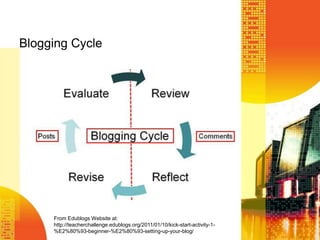
Blogging CycleFrom Edublogs Website at: http://teacherchallenge.edublogs.org/2011/01/10/kick-start-activity-1-%E2%80%93-beginner-%E2%80%93-setting-up-your-blog/
Can we see some examples?Connected Principalshttp://www.connectedprincipals.com/Vanessa’s Blogshttp://wonder-fullworld.blogspot.com/http://lewis100years.blogspot.com/Rural Education Bloghttp://ruraled2010.edublogs.org/
Orientation to Career Connectors Bloghttp://careerconnectors.wordpress.comLogin Using information you created previouslyRemember that password, Talie?!?!  Let’s get familiar with the Dashboard.
Updating Profile & Adding an Avatar	Who is the real you?!?Go to DashboardGo to Users>My ProfileUpdate and complete Profile DetailsUpdate Gravatar Profile Picturehttp://en.gravatar.com/OR add Image (from computer or create one and upload to gravatar)http://www.weeworld.com/http://www.myavatareditor.com/http://www.meez.com/main.dmOr other avatar creation site
Let’s create a FIRST POST!Go to your DashboardGo to Posts>AddNewAdd Title  (use ‘Introducing Your Name’)Add content to BodyAdd tags and categories as neededSave Draft and PreviewMake any necessary edits/revisionsWhen ready, Publish
FIRST POST - ContentWho We AreIntroduction of ourselves to the world!(Use 3rd person if you are more comfortable with that – see examples)Share a bit about your own life/career without providing any specific details that you would be uncomfortable with.IdeasNameJobWhy you like working with students in this capacitySome highlights of your own life/careerWhat you hope the creation of this blog will do for others/yourself
Blogging EtiquetteLink wherever you can.Link to a person’s blog if you mention a blogger.The post you are talking about a particular post on a blogArticles and websites when you write about them.
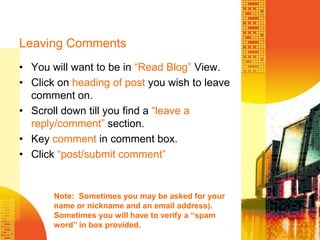
Leaving CommentsYou will want to be in “Read Blog” View.Click on heading of post you wish to leave comment on.Scroll down till you find a “leave a reply/comment” section.Key comment in comment box.Click “post/submit comment”Note:  Sometimes you may be asked for your name or nickname and an email address).  Sometimes you will have to verify a “spam word” in box provided.
CD Grant Project Planning Meeting LUNCH and NETWORKING
CD Grant Project Planning Meeting Time To Plan & Work
Interactive CD ResourceTime to brainstorm, update, explore, plan, etc.
Plan & Work IdeasUpdate Files on Career Development CD for possible inclusion on Wiki.Make a list of “Hot Topics” – let’s aim for 2 – that we could BRIDGIT and record, post, reflect on, etc. this year.Review other resources /professional readings– determine which are worthy of further exploration…especially for ‘course/training’ purposes for newbies!How should we organize Wiki?  Blog?Determine how to divide & conquer.Other…
Plan for CompletionPlan for homeworkUpcoming MeetingsFebruary 11th – BRIDGITMarch 6th – little longer than main groupApril 12th – big planning day as we need another one!June 2nd – little longer than main groupOnline meetings as neededCareer Development PLT’s (Denise, Jill, Vanessa)*  February 11th over Bridgit then work from schools?*   April 20th?*  One other day?
CD Grant Project Planning Meeting Thank you!

CD Project January 2011

  • 1.
    CD Grant ProjectPlanning MeetingJanuary 26, 2011
  • 2.
    CD Grant ProjectPlanning MeetingAgendaWelcomeReview notes from Nov. 24th meeting & project purposeWiki OrientationBlog OrientationLUNCHProject planning and work timeReview of and search for resources How will we use technology to highlight content?Followup and Future Dates
  • 3.
    CD Grant ProjectPlanning Meeting WIKIS
  • 4.
    WikisWhat is aWiki?Purpose of Wikis?Can we see some examples?How might we use a wiki?Career Connectors WikiReview ShellSign on as membersPractice on practice page
  • 5.
    What is aWiki?A Wiki is a Web Site.Allows visitors to participate in the creation and editing of the site.Allows visitors to contribute comments or ideas to the site.Simple to use – all you need is an computer and an internet connection.
  • 6.
    What is thepurpose of a Wiki?Wikis make it simple to share ideas and information.Wikis allow all contributors to work and collaborate on the same page.Co-creation of ideas, resources, etc.
  • 7.
    Can we seeexamples of a wiki?Wikipediahttp://en.wikipedia.org/wiki/Main_PageSun West Learning Coach Wikishttp://supportingmath.wikispaces.com/http://supporting-social-studies.wikispaces.com/https://supportingtechnology.wikispaces.com/Workplace & Apprenticeship Math Wiki – created by Shawna Stangelhttp://workplace-apprenticeship-10.wikispaces.com/
  • 8.
    How might weuse a wiki?Career Connectors Wikihttp://careerconnectors.wikispaces.com/Look at shell as it existsSign inExperiment on Practice PageConsider Creative Commons LicensingPictures are worth 1000 words, but please be aware about what images you choose to use!Think about how we might use this as a tool for the creation of our Interactive Career Practitioner Resource.
  • 9.
    CD Grant ProjectPlanning Meeting BLOGS
  • 10.
    BlogsPurpose of Blogs?Whatis a blog?Can we see some examples?How do we use a Blog?Career Connectors BlogOrientationUpdate Profiles and AvatarsFirst Post
  • 11.
    What is aBlog?Blog, also known as web logs, are tools for showcasing thoughts in the form of ‘posts’ and communicating responses in the form of ‘comments’.Blogging isn’t about writing posts –It IS about sharing and reflecting on your learning.It is important to – Read one another’s postsInteract and comment on posts by supporting or challenging viewsWrite posts in response to others
  • 12.
    Blogging CycleFrom EdublogsWebsite at: http://teacherchallenge.edublogs.org/2011/01/10/kick-start-activity-1-%E2%80%93-beginner-%E2%80%93-setting-up-your-blog/
  • 13.
    Can we seesome examples?Connected Principalshttp://www.connectedprincipals.com/Vanessa’s Blogshttp://wonder-fullworld.blogspot.com/http://lewis100years.blogspot.com/Rural Education Bloghttp://ruraled2010.edublogs.org/
  • 14.
    Orientation to CareerConnectors Bloghttp://careerconnectors.wordpress.comLogin Using information you created previouslyRemember that password, Talie?!?! Let’s get familiar with the Dashboard.
  • 15.
    Updating Profile &Adding an Avatar Who is the real you?!?Go to DashboardGo to Users>My ProfileUpdate and complete Profile DetailsUpdate Gravatar Profile Picturehttp://en.gravatar.com/OR add Image (from computer or create one and upload to gravatar)http://www.weeworld.com/http://www.myavatareditor.com/http://www.meez.com/main.dmOr other avatar creation site
  • 16.
    Let’s create aFIRST POST!Go to your DashboardGo to Posts>AddNewAdd Title (use ‘Introducing Your Name’)Add content to BodyAdd tags and categories as neededSave Draft and PreviewMake any necessary edits/revisionsWhen ready, Publish
  • 17.
    FIRST POST -ContentWho We AreIntroduction of ourselves to the world!(Use 3rd person if you are more comfortable with that – see examples)Share a bit about your own life/career without providing any specific details that you would be uncomfortable with.IdeasNameJobWhy you like working with students in this capacitySome highlights of your own life/careerWhat you hope the creation of this blog will do for others/yourself
  • 18.
    Blogging EtiquetteLink whereveryou can.Link to a person’s blog if you mention a blogger.The post you are talking about a particular post on a blogArticles and websites when you write about them.
  • 19.
    Leaving CommentsYou willwant to be in “Read Blog” View.Click on heading of post you wish to leave comment on.Scroll down till you find a “leave a reply/comment” section.Key comment in comment box.Click “post/submit comment”Note: Sometimes you may be asked for your name or nickname and an email address). Sometimes you will have to verify a “spam word” in box provided.
  • 20.
    CD Grant ProjectPlanning Meeting LUNCH and NETWORKING
  • 21.
    CD Grant ProjectPlanning Meeting Time To Plan & Work
  • 22.
    Interactive CD ResourceTimeto brainstorm, update, explore, plan, etc.
  • 23.
    Plan & WorkIdeasUpdate Files on Career Development CD for possible inclusion on Wiki.Make a list of “Hot Topics” – let’s aim for 2 – that we could BRIDGIT and record, post, reflect on, etc. this year.Review other resources /professional readings– determine which are worthy of further exploration…especially for ‘course/training’ purposes for newbies!How should we organize Wiki? Blog?Determine how to divide & conquer.Other…
  • 24.
    Plan for CompletionPlanfor homeworkUpcoming MeetingsFebruary 11th – BRIDGITMarch 6th – little longer than main groupApril 12th – big planning day as we need another one!June 2nd – little longer than main groupOnline meetings as neededCareer Development PLT’s (Denise, Jill, Vanessa)* February 11th over Bridgit then work from schools?* April 20th?* One other day?
  • 25.
    CD Grant ProjectPlanning Meeting Thank you!