Educating Jetson’s Children in 
Flintstone’s Schools 
Jeff Piontek
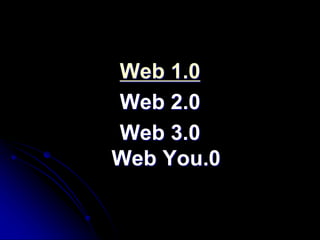
Web 1.0 
Web 2.0 
Web 3.0 
Web You.0
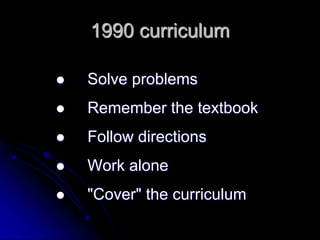
1990 curriculum 
 Solve problems 
 Remember the textbook 
 Follow directions 
 Work alone 
 "Cover" the curriculum
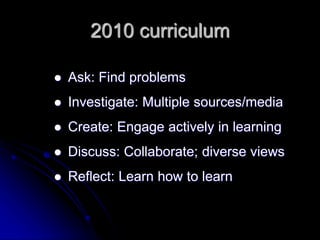
2010 curriculum 
 Ask: Find problems 
 Investigate: Multiple sources/media 
 Create: Engage actively in learning 
 Discuss: Collaborate; diverse views 
 Reflect: Learn how to learn
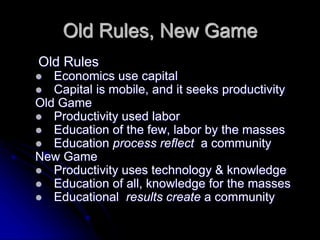
Old Rules, New Game 
Old Rules 
 Economics use capital 
 Capital is mobile, and it seeks productivity 
Old Game 
 Productivity used labor 
 Education of the few, labor by the masses 
 Education process reflect a community 
New Game 
 Productivity uses technology & knowledge 
 Education of all, knowledge for the masses 
 Educational results create a community
Really Big (and Hard) Questions.. 
 How do we prepare our students for success in 
a knowledge based, technology driven, globally 
competitive world? 
 How do we align to our community aspirations 
for quality of life & strategies for economic 
opportunity 
 How do we transform our schools into high 
performance environments where students are 
expected to be and are high achievers?
So where is this all leading…. 
STEM Education 
and 
21st century Literacy Skills
Why are 21st Century skills so important?
The nature of work is changing.
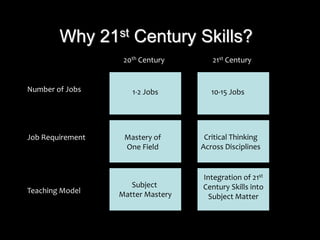
Why 21st Century Skills? 
20th Century 21st Century 
Subject 
Matter Mastery 
Number of Jobs: 
Job Requirement 
Teaching Model 
1-2 Jobs 
Mastery of 
One Field 
10-15 Jobs 
Critical Thinking 
Across Disciplines 
Integration of 21st 
Century Skills into 
Subject Matter
The requirements of the 21st Century 
work force are changing?
We need to prepare our students to be 
effective 21st Century citizens.
Today’s students are no longer the 
people our educational system was 
designed to teach. 
―Prensky, 2001
Students learn from 
thinking….thinking is engaged by 
activity. 
―Jonassen, 2003
So how do WE engage our 
students in an education system 
that was outdated for their 
parents????
 Web 1.0 
 Web 2.0 
 Web 3.0 
 Web YOU.0
Ever play the game . . . 
“I never _____” 
Raise your hand if you would 
“win” with these questions . . .
I’ve never listened to an iPod. 
I’ve never downloaded a podcast. 
I’ve never subscribed to an RSS feed. 
I’ve never installed a widget. 
I’ve never been in Facebook. 
I’ve never downloaded from YouTube 
or TeacherTube 
I’ve never read a blog 
I’ve never been on a wiki other than 
Wikipedia 
SL vs RL? I don’t have any idea what 
you mean!
Facts About the Internet 
It is estimated that: 
 A man of the 17th century encountered in his 
lifetime less information than we can read in a 
weekday issue of the New York Times. 
 It takes about 4 months for the amount of 
information in the world to double. 
 Humans can process visual images 60,000 
times faster than text. 
 The Internet has over four billion pages. 
 In 2004, 8,000,000 American adults created 
weblogs.
Fiction About the Internet 
 Kids view the internet the same as 
adults 
 The WEB is a giant encyclopedia 
 Personal information is safe on the 
internet 
 If it’s on the internet it must be free 
 If it’s on the internet it must be true 
 Everyone is blogging
Internet Realities 
 Most of us assume that students know 
more about the Internet than they 
actually do 
 Students think their Internet skills are 
better than they actually are 
 Students believe most of what they find 
on the Internet 
 Most of us worry about students 
plagiarizing from the Internet, but don’t 
know what to do about it 
 Students must be taught Information 
Literacy skills
What is Web 2.0? 
Web 2.0 is the transition of the Internet 
from a place where we surf for information 
and consume information to a place where 
we are creators of information. 
We go from surfing the wave to BEING the 
wave as we contribute and share 
information on the Internet ocean.
2.0 Tools for Creating Content 
 Blogs 
 Wikis 
 Podcasts 
 Video sharing 
 Photo sharing 
 Social Bookmarking
Foundations of a Web 2.0 
Classroom 
1. Internet Safety & Privacy 
2. Information Literacy 
3. Internet Citizenship 
4. Internet Teamwork 
5. Intentional Internet Activities 
6. An Engaged Teacher
Internet Safety & Privacy 
 Student’s identity should be protected. 
 Teacher selected and evaluated web sites 
will assure student safety. 
 Internet Acceptable Use Policy should be 
in school-wide. 
 Parental Consent Form for use of 
students’ images and work must be 
maintained school-wide.
Information Literacy 
 Locate 
 Select search engines wisely 
 What types of information are you looking for? (blogs, 
videos, podcasts, maps, pictures) 
 Compare search engines 
http://www.lib.berkeley.edu/TeachingLib/Guides/Intern 
et/SearchEngines.html 
 Evaluate 
 Accuracy 
 Authorship (easywhois.com) 
 Currency 
 Use Information Wisely 
 Read, take notes and paraphrase 
 Avoid plagiarism 
 Cite properly (citationmachine.net)
Select the Best Search Engine for 
your Information Needs 
 Noodletools 
 NoodleQuest 
 Ivy’s resource centre 
for kids 
 SearchQuest 
 UC Berkeley’s BEST 
search engines 
 Sea World Animal 
Information Database 
 ProFusion 
 Tekmom 
 WebQuest 
 UK WebQuest 
 Lycos 
 HotBot.com 
 Yahooligans 
 All the Web 
 Technorati 
 Podscope 
 Blinx 
 Google
BTW, SOL U WL problE hav 2 Lern d lingo. 
othRwIz U wiL hav nO idea wot yor 
students R sAN 2 1 NothA Bhind yor bak. 
By the way, sooner or later you will probably 
have to learn the lingo. Otherwise you will 
have no idea what your students are 
saying to one another behind your back.
Administrative Support 
of the 2.0 Classroom 
 Empower teachers while holding them 
accountable for teaching content and 
integrating technology 
 Provide access to ongoing and meaningful 
professional development 
 Work with staff to assess training needs 
 Maintain ongoing communication with 
colleagues locally, nationally and 
internationally
ICT Literacy 
Information and communications 
technology (ICT) is the ability to use 
technology to accomplish thinking and 
learning skills: 
 Critical Thinking & Problem Solving 
 Creativity & Innovation Skills 
 Communication & Information Skills 
 Collaboration Skills
So how do we do this? 
 Blog’s 
 Wiki’s 
 Podcast’s 
 Digital media
Why Blogging? 
 What do you know about blogging? 
 Why Blogging? 
 Will Richardson: 2004 
 http://www.weblogg-ed.com/2004/09/24#a2373 
 Jeff Piontek:2005 
 http://www.techlearning.com/article/3204 
 Where are you? 
 What do you want to know? 
 http://schoolofthefuturehawaii.blogspot.com/
Setting the Bar High 
 Find an exemplary class blog, direct your students to it, 
and give them time to read over the post and comments. 
http://kakos4english2006.blogspot.com/ 
http://thefischbowl.blogspot.com/ 
 Ask them for feedback—which comments are powerful 
and why? Which ones are less captivating and why? 
When does the blog get good and why? 
 Get a discussion going—why do we blog? How is it 
different from turning in a piece of writing to your 
teacher? Or having a large class discussion?
What We’ve Liked About the Blog 
 Quiet students are given a powerful voice. 
 Students grow more adept at reacting to each 
other’s ideas. 
 Class is truly extended beyond the walls of the 
classroom. 
 Students produce information on the web 
instead of passively absorbing it. 
 Technology is integrated into every subject. 
 Students take their words seriously and begin to 
understand what it means to be published. 
 Students just like it. A lot.
Establishing Expectations 
 Have your students create the class blog 
expectations, or have your blog expectations 
ready to go. 
 Print out or direct them to the AHS “Safe 
Blogging Policy” as well. 
 Talk about blog safety; emphasize that the blogs 
are linked directly to the school and need to 
follow the class guidelines as well. Let them 
know that administrators can and will read their 
personal blogs.
Send in the Reinforcements… 
 Students need feedback, they get excited when 
they see their work published. If possible 
approve their comments instantly. 
 Try having a blog for homework that night for 
immediate reinforcement of what they have just 
learned. 
 Try to give them immediate positive feedback; 
bring up their blogs the next day and commend 
them on what they did well.
A BIG Suggestion 
 Use the blog to replace something that 
you’re already doing; don’t use it to add. 
 Never blog for blogging’s sake. Think 
about how the blog can be used to 
enhance an assignment (links to 
audio/video clips, artwork, online texts, 
other blogs, etc.).
Do a Little Exploring 
 Take a little time to check out some class blogs 
that have worked pretty well. 
 http://www.seedwiki.com/wiki/teaching_with_blogs/tea 
ching_with_blogs.cfm 
 What do you like? 
 What do you not understand or question? 
 How can you use this in your classes?
Why Wiki’s 
 What do you know? 
 Why Wiki’s? 
 http://www.pbs.org/teachersource/learning.now/2006/06/ 
using_a_wiki_to_promote_educat.html 
 Where are you? 
 What do you want to know? 
 http://www.wetpaint.com
Learning With Technology 
Podcasting: 
Alan November 
A conversation with Daniel 
Pink 
Ready Set Science Podcast
Social Bookmarking 
The Social bookmarking sites are a 
popular way to store, classify, share 
and search links through the practice 
of folksonomy techniques on the 
Internet or Intranet. 
Delicious
What is StumbleUpon? StumbleUpon 
helps you discover and share great 
websites. As you click Stumble!, we 
deliver high-quality pages matched to 
your personal preferences. 
www.stumbleupon.com
“It is not the strongest species that survives, 
nor the most intelligent, but the ones most 
responsive to change.” 
~Charles 
Darwin
Only dead fish swim with the 
stream all the time!!!!

Web 1.2.3.0

  • 1.
    Educating Jetson’s Childrenin Flintstone’s Schools Jeff Piontek
  • 2.
    Web 1.0 Web2.0 Web 3.0 Web You.0
  • 3.
    1990 curriculum Solve problems  Remember the textbook  Follow directions  Work alone  "Cover" the curriculum
  • 4.
    2010 curriculum Ask: Find problems  Investigate: Multiple sources/media  Create: Engage actively in learning  Discuss: Collaborate; diverse views  Reflect: Learn how to learn
  • 5.
    Old Rules, NewGame Old Rules  Economics use capital  Capital is mobile, and it seeks productivity Old Game  Productivity used labor  Education of the few, labor by the masses  Education process reflect a community New Game  Productivity uses technology & knowledge  Education of all, knowledge for the masses  Educational results create a community
  • 6.
    Really Big (andHard) Questions..  How do we prepare our students for success in a knowledge based, technology driven, globally competitive world?  How do we align to our community aspirations for quality of life & strategies for economic opportunity  How do we transform our schools into high performance environments where students are expected to be and are high achievers?
  • 7.
    So where isthis all leading…. STEM Education and 21st century Literacy Skills
  • 8.
    Why are 21stCentury skills so important?
  • 9.
    The nature ofwork is changing.
  • 10.
    Why 21st CenturySkills? 20th Century 21st Century Subject Matter Mastery Number of Jobs: Job Requirement Teaching Model 1-2 Jobs Mastery of One Field 10-15 Jobs Critical Thinking Across Disciplines Integration of 21st Century Skills into Subject Matter
  • 11.
    The requirements ofthe 21st Century work force are changing?
  • 12.
    We need toprepare our students to be effective 21st Century citizens.
  • 13.
    Today’s students areno longer the people our educational system was designed to teach. ―Prensky, 2001
  • 14.
    Students learn from thinking….thinking is engaged by activity. ―Jonassen, 2003
  • 15.
    So how doWE engage our students in an education system that was outdated for their parents????
  • 16.
     Web 1.0  Web 2.0  Web 3.0  Web YOU.0
  • 17.
    Ever play thegame . . . “I never _____” Raise your hand if you would “win” with these questions . . .
  • 18.
    I’ve never listenedto an iPod. I’ve never downloaded a podcast. I’ve never subscribed to an RSS feed. I’ve never installed a widget. I’ve never been in Facebook. I’ve never downloaded from YouTube or TeacherTube I’ve never read a blog I’ve never been on a wiki other than Wikipedia SL vs RL? I don’t have any idea what you mean!
  • 19.
    Facts About theInternet It is estimated that:  A man of the 17th century encountered in his lifetime less information than we can read in a weekday issue of the New York Times.  It takes about 4 months for the amount of information in the world to double.  Humans can process visual images 60,000 times faster than text.  The Internet has over four billion pages.  In 2004, 8,000,000 American adults created weblogs.
  • 20.
    Fiction About theInternet  Kids view the internet the same as adults  The WEB is a giant encyclopedia  Personal information is safe on the internet  If it’s on the internet it must be free  If it’s on the internet it must be true  Everyone is blogging
  • 21.
    Internet Realities Most of us assume that students know more about the Internet than they actually do  Students think their Internet skills are better than they actually are  Students believe most of what they find on the Internet  Most of us worry about students plagiarizing from the Internet, but don’t know what to do about it  Students must be taught Information Literacy skills
  • 22.
    What is Web2.0? Web 2.0 is the transition of the Internet from a place where we surf for information and consume information to a place where we are creators of information. We go from surfing the wave to BEING the wave as we contribute and share information on the Internet ocean.
  • 23.
    2.0 Tools forCreating Content  Blogs  Wikis  Podcasts  Video sharing  Photo sharing  Social Bookmarking
  • 24.
    Foundations of aWeb 2.0 Classroom 1. Internet Safety & Privacy 2. Information Literacy 3. Internet Citizenship 4. Internet Teamwork 5. Intentional Internet Activities 6. An Engaged Teacher
  • 25.
    Internet Safety &Privacy  Student’s identity should be protected.  Teacher selected and evaluated web sites will assure student safety.  Internet Acceptable Use Policy should be in school-wide.  Parental Consent Form for use of students’ images and work must be maintained school-wide.
  • 26.
    Information Literacy Locate  Select search engines wisely  What types of information are you looking for? (blogs, videos, podcasts, maps, pictures)  Compare search engines http://www.lib.berkeley.edu/TeachingLib/Guides/Intern et/SearchEngines.html  Evaluate  Accuracy  Authorship (easywhois.com)  Currency  Use Information Wisely  Read, take notes and paraphrase  Avoid plagiarism  Cite properly (citationmachine.net)
  • 27.
    Select the BestSearch Engine for your Information Needs  Noodletools  NoodleQuest  Ivy’s resource centre for kids  SearchQuest  UC Berkeley’s BEST search engines  Sea World Animal Information Database  ProFusion  Tekmom  WebQuest  UK WebQuest  Lycos  HotBot.com  Yahooligans  All the Web  Technorati  Podscope  Blinx  Google
  • 28.
    BTW, SOL UWL problE hav 2 Lern d lingo. othRwIz U wiL hav nO idea wot yor students R sAN 2 1 NothA Bhind yor bak. By the way, sooner or later you will probably have to learn the lingo. Otherwise you will have no idea what your students are saying to one another behind your back.
  • 29.
    Administrative Support ofthe 2.0 Classroom  Empower teachers while holding them accountable for teaching content and integrating technology  Provide access to ongoing and meaningful professional development  Work with staff to assess training needs  Maintain ongoing communication with colleagues locally, nationally and internationally
  • 30.
    ICT Literacy Informationand communications technology (ICT) is the ability to use technology to accomplish thinking and learning skills:  Critical Thinking & Problem Solving  Creativity & Innovation Skills  Communication & Information Skills  Collaboration Skills
  • 31.
    So how dowe do this?  Blog’s  Wiki’s  Podcast’s  Digital media
  • 32.
    Why Blogging? What do you know about blogging?  Why Blogging?  Will Richardson: 2004  http://www.weblogg-ed.com/2004/09/24#a2373  Jeff Piontek:2005  http://www.techlearning.com/article/3204  Where are you?  What do you want to know?  http://schoolofthefuturehawaii.blogspot.com/
  • 33.
    Setting the BarHigh  Find an exemplary class blog, direct your students to it, and give them time to read over the post and comments. http://kakos4english2006.blogspot.com/ http://thefischbowl.blogspot.com/  Ask them for feedback—which comments are powerful and why? Which ones are less captivating and why? When does the blog get good and why?  Get a discussion going—why do we blog? How is it different from turning in a piece of writing to your teacher? Or having a large class discussion?
  • 34.
    What We’ve LikedAbout the Blog  Quiet students are given a powerful voice.  Students grow more adept at reacting to each other’s ideas.  Class is truly extended beyond the walls of the classroom.  Students produce information on the web instead of passively absorbing it.  Technology is integrated into every subject.  Students take their words seriously and begin to understand what it means to be published.  Students just like it. A lot.
  • 35.
    Establishing Expectations Have your students create the class blog expectations, or have your blog expectations ready to go.  Print out or direct them to the AHS “Safe Blogging Policy” as well.  Talk about blog safety; emphasize that the blogs are linked directly to the school and need to follow the class guidelines as well. Let them know that administrators can and will read their personal blogs.
  • 36.
    Send in theReinforcements…  Students need feedback, they get excited when they see their work published. If possible approve their comments instantly.  Try having a blog for homework that night for immediate reinforcement of what they have just learned.  Try to give them immediate positive feedback; bring up their blogs the next day and commend them on what they did well.
  • 37.
    A BIG Suggestion  Use the blog to replace something that you’re already doing; don’t use it to add.  Never blog for blogging’s sake. Think about how the blog can be used to enhance an assignment (links to audio/video clips, artwork, online texts, other blogs, etc.).
  • 38.
    Do a LittleExploring  Take a little time to check out some class blogs that have worked pretty well.  http://www.seedwiki.com/wiki/teaching_with_blogs/tea ching_with_blogs.cfm  What do you like?  What do you not understand or question?  How can you use this in your classes?
  • 39.
    Why Wiki’s What do you know?  Why Wiki’s?  http://www.pbs.org/teachersource/learning.now/2006/06/ using_a_wiki_to_promote_educat.html  Where are you?  What do you want to know?  http://www.wetpaint.com
  • 40.
    Learning With Technology Podcasting: Alan November A conversation with Daniel Pink Ready Set Science Podcast
  • 41.
    Social Bookmarking TheSocial bookmarking sites are a popular way to store, classify, share and search links through the practice of folksonomy techniques on the Internet or Intranet. Delicious
  • 42.
    What is StumbleUpon?StumbleUpon helps you discover and share great websites. As you click Stumble!, we deliver high-quality pages matched to your personal preferences. www.stumbleupon.com
  • 43.
    “It is notthe strongest species that survives, nor the most intelligent, but the ones most responsive to change.” ~Charles Darwin
  • 44.
    Only dead fishswim with the stream all the time!!!!