Principal Update 9 th  August - Hamilton Social Software has revolutionised the internet enabling users to become active rather than passive. This practical workshop will provide principals  with a quick overview of social software before launching into an in-depth look at a key social software tools blogs  and wikis.  Presentation avaliable at : http://www.slideshare.net/rjensen/blogging-for-advisors/
Focus: Overview of Web 2.0  Web 2.0 and Education? Blogs and Wikis – What they are and how schools are utilising them? Pros and Cons Time to Plan and Play
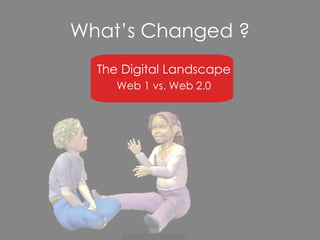
What’s Changed ? The Digital Landscape Web 1 vs. Web 2.0
Web 2.0 … The evolution of the web ( as we once knew it) Social software.  Users are active rather than passive  Create and publish content.  Shared constitution of meaning. Less about places and other nouns more about verbs. The Web   What has changed in the last few years?
No html knowledge required.  Content flows in a variety of directions that depend on the behaviors  of those who produce the information and those who use it.
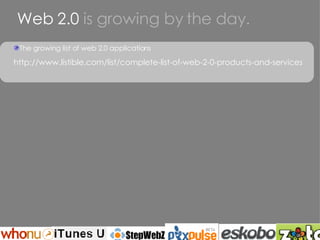
Web 2.0  is growing by the day. The growing list of web 2.0 applications http://www.listible.com/list/complete-list-of-web-2-0-products-and-services
Application for Education Blogs Wikis Podcasts
A website with articles listed in chronological order Blogs tend to have a few things in common: An archive of older articles A way for people to leave comments about the articles A list of links to other related sites One or more “feeds” like RSS … Control of blog is with the person who has set it up
blogs http://blog.core-ed.net/derek/ http://leadingwithallan.blogspot.com/ http://maori1.blogspot.com/ http://rocky11.blogspot.com/
Why blog? Creates a learning community feel in a place away from the traditional environment. This learning community is open 24/7. Blogs can give individual learners a voice – shifting the ‘power’ from the instructor to the learner. Blogs provide an authentic audience.  An audience of educators, peers and a potential worldwide audience. Blogs allow for multiple feedback loops among the networked parties. Learning via a blog setting is now a social activity. Supports differentiation. The blog gives some of our more verbally reserved individuals a forum for their thoughts. Builds technology skills Provides links to others sites and resources Blogs need to be thoughtfully integrated intoyour work.  Simply blogging is not enough- blogs in learning must be driven by a clear purpose. Our kids need role models and guides to teach them socialisation skills to participate in a connected community.
I blog to: Record, reflect and share my work Record, reflect and share what I am reading( includes other blogs ) Learn from others and keep up with my area of interest Create my own personal learning network of people and resources Provide a linked archive of categorised resources gathered on my learning journey To connect, to be part of a wider community – my schools, colleagues, network of other bloggers
How might blogs be used in your school?  For what purpose?
Tips for Effective Blogging Keep it simple Stick to the purpose of your blog Interact with readers Make it worthwhile Build your blog bit by bit Seek expert blogs to assist with posting on your own Try and post at least once a week Make all posts relate to student learning If you mention it hyperlink it Write and then cut in half Use Pictures Get the stats back
Application for Education Blogs Wikis Podcasts
wikis A wiki is a web site that lets any visitor become a participant:  you can create or edit the actual site contents without any special technical knowledge or tools. All you need is a computer with an Internet connection. A wiki is continuously “under revision.” It is a living collaboration whose purpose is the sharing of the creative process and product by many.
wikis Rosetown http://rosetown.wikispaces.com/ Lyn Ross http://edorigami.wikispaces.com/ Fiona Grant http://virtualnorth.blogspot.com/ Portal Of NZ Use of Web 2.0 in Education  http://nzedublogs.wikispaces.com/
How might wikis be used in your school?  For what purpose?
Key Tools
Making a start with blogging http://www.blogger.com/start THE FASTEST WAY TO UNDERSTAND BLOGGING IS TO TRY IT OUT.
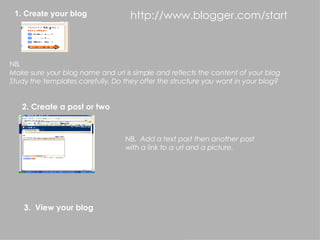
2. Create a post or two 1. Create your blog NB.  Make sure your blog name and url is simple and reflects the content of your blog Study the templates carefully. Do they offer the structure you want in your blog? NB.  Add a text post then another post with a link to a url and a picture. 3.  View your blog http://www.blogger.com/start
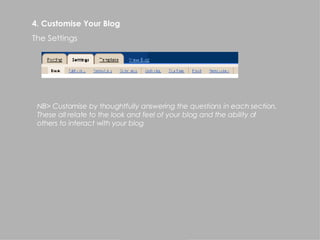
NB> Customise by thoughtfully answering the questions in each section.  These all relate to the look and feel of your blog and the ability of  others to interact with your blog 4. Customise Your Blog The Settings
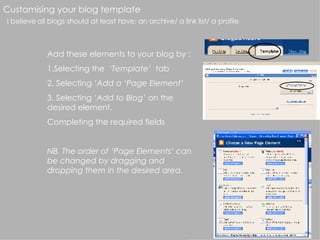
Customising your blog template I believe all blogs should at least have: an archive/ a link list/ a profile Add these elements to your blog by : 1.Selecting the  ‘Template’   tab 2. Selecting  ‘Add a ‘Page Element’ 3. Selecting  ‘Add to Blog’  on the desired element. Completing the required fields NB. The order of ‘Page Elements’ can be changed by dragging and dropping them in the desired area.
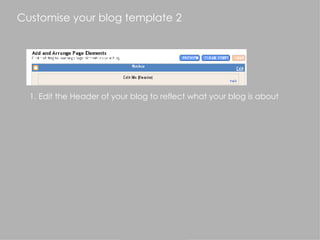
Customise your blog template 2 1. Edit the Header of your blog to reflect what your blog is about
Getting started with wikispaces 1. Register for wikispaces and set up a new wiki – Create a username and password/Create a name for your wiki/ Join this wiki 2. Learn to use the basic editing tools 3. Explore ‘manage space’ and ‘my account’
Enhancing your blog or wiki Set up an online file storage system – esnips h ttp://esnips.com/signin/index.jsp   Set up a hit counter htt p://www.bravenet.com/ Locate Visitors http://clustrmaps.com/getone.php Your blog is RSS capable Create a 3D  ID  www.meez.com Expect to have to sign up for new tools More Widgets at :  http://educationalsoftware.wikispaces.com/Widgets

Principal Update

  • 1.
    Principal Update 9th August - Hamilton Social Software has revolutionised the internet enabling users to become active rather than passive. This practical workshop will provide principals with a quick overview of social software before launching into an in-depth look at a key social software tools blogs and wikis. Presentation avaliable at : http://www.slideshare.net/rjensen/blogging-for-advisors/
  • 2.
    Focus: Overview ofWeb 2.0 Web 2.0 and Education? Blogs and Wikis – What they are and how schools are utilising them? Pros and Cons Time to Plan and Play
  • 3.
    What’s Changed ?The Digital Landscape Web 1 vs. Web 2.0
  • 4.
    Web 2.0 …The evolution of the web ( as we once knew it) Social software. Users are active rather than passive Create and publish content. Shared constitution of meaning. Less about places and other nouns more about verbs. The Web What has changed in the last few years?
  • 5.
    No html knowledgerequired. Content flows in a variety of directions that depend on the behaviors of those who produce the information and those who use it.
  • 6.
    Web 2.0 is growing by the day. The growing list of web 2.0 applications http://www.listible.com/list/complete-list-of-web-2-0-products-and-services
  • 7.
    Application for EducationBlogs Wikis Podcasts
  • 8.
    A website witharticles listed in chronological order Blogs tend to have a few things in common: An archive of older articles A way for people to leave comments about the articles A list of links to other related sites One or more “feeds” like RSS … Control of blog is with the person who has set it up
  • 9.
    blogs http://blog.core-ed.net/derek/ http://leadingwithallan.blogspot.com/http://maori1.blogspot.com/ http://rocky11.blogspot.com/
  • 10.
    Why blog? Createsa learning community feel in a place away from the traditional environment. This learning community is open 24/7. Blogs can give individual learners a voice – shifting the ‘power’ from the instructor to the learner. Blogs provide an authentic audience. An audience of educators, peers and a potential worldwide audience. Blogs allow for multiple feedback loops among the networked parties. Learning via a blog setting is now a social activity. Supports differentiation. The blog gives some of our more verbally reserved individuals a forum for their thoughts. Builds technology skills Provides links to others sites and resources Blogs need to be thoughtfully integrated intoyour work. Simply blogging is not enough- blogs in learning must be driven by a clear purpose. Our kids need role models and guides to teach them socialisation skills to participate in a connected community.
  • 11.
    I blog to:Record, reflect and share my work Record, reflect and share what I am reading( includes other blogs ) Learn from others and keep up with my area of interest Create my own personal learning network of people and resources Provide a linked archive of categorised resources gathered on my learning journey To connect, to be part of a wider community – my schools, colleagues, network of other bloggers
  • 12.
    How might blogsbe used in your school? For what purpose?
  • 13.
    Tips for EffectiveBlogging Keep it simple Stick to the purpose of your blog Interact with readers Make it worthwhile Build your blog bit by bit Seek expert blogs to assist with posting on your own Try and post at least once a week Make all posts relate to student learning If you mention it hyperlink it Write and then cut in half Use Pictures Get the stats back
  • 14.
    Application for EducationBlogs Wikis Podcasts
  • 15.
    wikis A wikiis a web site that lets any visitor become a participant:  you can create or edit the actual site contents without any special technical knowledge or tools. All you need is a computer with an Internet connection. A wiki is continuously “under revision.” It is a living collaboration whose purpose is the sharing of the creative process and product by many.
  • 16.
    wikis Rosetown http://rosetown.wikispaces.com/Lyn Ross http://edorigami.wikispaces.com/ Fiona Grant http://virtualnorth.blogspot.com/ Portal Of NZ Use of Web 2.0 in Education http://nzedublogs.wikispaces.com/
  • 17.
    How might wikisbe used in your school? For what purpose?
  • 18.
  • 19.
    Making a startwith blogging http://www.blogger.com/start THE FASTEST WAY TO UNDERSTAND BLOGGING IS TO TRY IT OUT.
  • 20.
    2. Create apost or two 1. Create your blog NB. Make sure your blog name and url is simple and reflects the content of your blog Study the templates carefully. Do they offer the structure you want in your blog? NB. Add a text post then another post with a link to a url and a picture. 3. View your blog http://www.blogger.com/start
  • 21.
    NB> Customise bythoughtfully answering the questions in each section. These all relate to the look and feel of your blog and the ability of others to interact with your blog 4. Customise Your Blog The Settings
  • 22.
    Customising your blogtemplate I believe all blogs should at least have: an archive/ a link list/ a profile Add these elements to your blog by : 1.Selecting the ‘Template’ tab 2. Selecting ‘Add a ‘Page Element’ 3. Selecting ‘Add to Blog’ on the desired element. Completing the required fields NB. The order of ‘Page Elements’ can be changed by dragging and dropping them in the desired area.
  • 23.
    Customise your blogtemplate 2 1. Edit the Header of your blog to reflect what your blog is about
  • 24.
    Getting started withwikispaces 1. Register for wikispaces and set up a new wiki – Create a username and password/Create a name for your wiki/ Join this wiki 2. Learn to use the basic editing tools 3. Explore ‘manage space’ and ‘my account’
  • 25.
    Enhancing your blogor wiki Set up an online file storage system – esnips h ttp://esnips.com/signin/index.jsp Set up a hit counter htt p://www.bravenet.com/ Locate Visitors http://clustrmaps.com/getone.php Your blog is RSS capable Create a 3D ID www.meez.com Expect to have to sign up for new tools More Widgets at : http://educationalsoftware.wikispaces.com/Widgets