Chapter 9

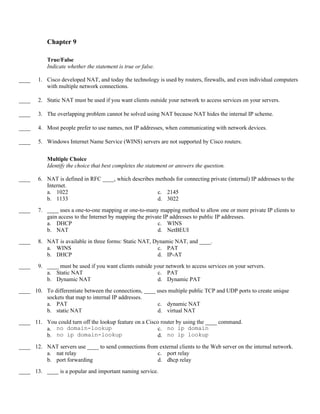
           True/False
           Indicate whether the statement is true or false.

____    1. Cisco developed NAT, and today the technology is used by routers, firewalls, and even individual computers
           with multiple network connections.

____    2. Static NAT must be used if you want clients outside your network to access services on your servers.

____    3. The overlapping problem cannot be solved using NAT because NAT hides the internal IP scheme.

____    4. Most people prefer to use names, not IP addresses, when communicating with network devices.

____    5. Windows Internet Name Service (WINS) servers are not supported by Cisco routers.


           Multiple Choice
           Identify the choice that best completes the statement or answers the question.

____    6. NAT is defined in RFC ____, which describes methods for connecting private (internal) IP addresses to the
           Internet.
           a. 1022                                      c. 2145
           b. 1133                                      d. 3022
____    7. ____ uses a one-to-one mapping or one-to-many mapping method to allow one or more private IP clients to
           gain access to the Internet by mapping the private IP addresses to public IP addresses.
           a. DHCP                                         c. WINS
           b. NAT                                          d. NetBEUI
____    8. NAT is available in three forms: Static NAT, Dynamic NAT, and ____.
           a. WINS                                       c. PAT
           b. DHCP                                       d. IP-AT
____    9. ____ must be used if you want clients outside your network to access services on your servers.
           a. Static NAT                                  c. PAT
           b. Dynamic NAT                                 d. Dynamic PAT
____ 10. To differentiate between the connections, ____ uses multiple public TCP and UDP ports to create unique
         sockets that map to internal IP addresses.
         a. PAT                                         c. dynamic NAT
         b. static NAT                                  d. virtual NAT
____ 11. You could turn off the lookup feature on a Cisco router by using the ____ command.
         a. no domain-lookup                             c. no ip domain
         b. no ip domain-lookup                          d. no ip lookup
____ 12. NAT servers use ____ to send connections from external clients to the Web server on the internal network.
         a. nat relay                                 c. port relay
         b. port forwarding                           d. dhcp relay
____ 13. ____ is a popular and important naming service.
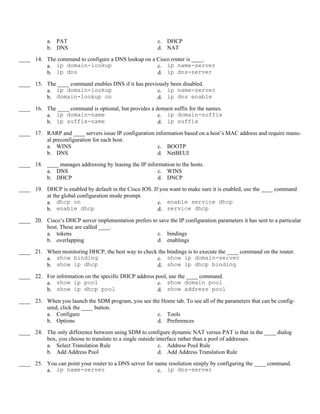
a. PAT                                         c. DHCP
           b. DNS                                         d. NAT
____ 14. The command to configure a DNS lookup on a Cisco router is ____.
         a. ip domain-lookup                        c. ip name-server
         b. ip dns                                  d. ip dns-server
____ 15. The ____ command enables DNS if it has previously been disabled.
         a. ip domain-lookup                         c. ip name-server
         b. domain-lookup on                         d. ip dns enable
____ 16. The ____ command is optional, but provides a domain suffix for the names.
         a. ip domain-name                             c. ip domain-suffix
         b. ip suffix-name                             d. ip suffix
____ 17. RARP and ____ servers issue IP configuration information based on a host’s MAC address and require manu-
         al preconfiguration for each host.
         a. WINS                                       c. BOOTP
         b. DNS                                        d. NetBEUI
____ 18. ____ manages addressing by leasing the IP information to the hosts.
         a. DNS                                        c. WINS
         b. DHCP                                       d. DNCP
____ 19. DHCP is enabled by default in the Cisco IOS. If you want to make sure it is enabled, use the ____ command
         at the global configuration mode prompt.
         a. dhcp on                                     c. enable service dhcp
         b. enable dhcp                                 d. service dhcp
____ 20. Cisco’s DHCP server implementation prefers to save the IP configuration parameters it has sent to a particular
         host. These are called ____.
         a. tokens                                    c. bindings
         b. overlapping                               d. enablings
____ 21. When monitoring DHCP, the best way to check the bindings is to execute the ____ command on the router.
         a. show binding                            c. show ip domain-server
         b. show ip dhcp                            d. show ip dhcp binding
____ 22. For information on the specific DHCP address pool, use the ____ command.
         a. show ip pool                               c. show domain pool
         b. show ip dhcp pool                          d. show address pool
____ 23. When you launch the SDM program, you see the Home tab. To see all of the parameters that can be config-
         ured, click the ____ button.
         a. Configure                               c. Tools
         b. Options                                 d. Preferences
____ 24. The only difference between using SDM to configure dynamic NAT versus PAT is that in the ____ dialog
         box, you choose to translate to a single outside interface rather than a pool of addresses.
         a. Select Translation Rule                        c. Address Pool Rule
         b. Add Address Pool                               d. Add Address Translation Rule
____ 25. You can point your router to a DNS server for name resolution simply by configuring the ____ command.
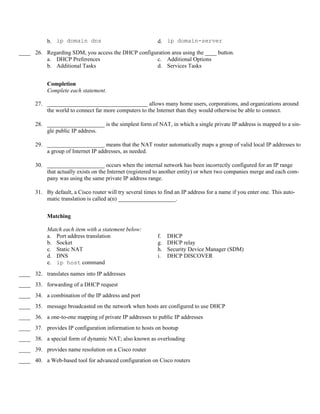
         a. ip name-server                              c. ip dns-server
b. ip domain dns                                 d. ip domain-server
____ 26. Regarding SDM, you access the DHCP configuration area using the ____ button.
         a. DHCP Preferences                       c. Additional Options
         b. Additional Tasks                       d. Services Tasks


           Completion
           Complete each statement.

      27. ___________________________________ allows many home users, corporations, and organizations around
          the world to connect far more computers to the Internet than they would otherwise be able to connect.

      28. ____________________ is the simplest form of NAT, in which a single private IP address is mapped to a sin-
          gle public IP address.

      29. ____________________ means that the NAT router automatically maps a group of valid local IP addresses to
          a group of Internet IP addresses, as needed.

      30. ____________________ occurs when the internal network has been incorrectly configured for an IP range
          that actually exists on the Internet (registered to another entity) or when two companies merge and each com-
          pany was using the same private IP address range.

      31. By default, a Cisco router will try several times to find an IP address for a name if you enter one. This auto-
          matic translation is called a(n) ____________________.


           Matching

           Match each item with a statement below:
           a. Port address translation                      f.   DHCP
           b. Socket                                        g.   DHCP relay
           c. Static NAT                                    h.   Security Device Manager (SDM)
           d. DNS                                           i.   DHCP DISCOVER
           e. ip host command
____ 32. translates names into IP addresses
____ 33. forwarding of a DHCP request
____ 34. a combination of the IP address and port
____ 35. message broadcasted on the network when hosts are configured to use DHCP
____ 36. a one-to-one mapping of private IP addresses to public IP addresses
____ 37. provides IP configuration information to hosts on bootup
____ 38. a special form of dynamic NAT; also known as overloading
____ 39. provides name resolution on a Cisco router
____ 40. a Web-based tool for advanced configuration on Cisco routers
Short Answer

41. What are the advantages of using private addressing with NAT?

42. What are some of the disadvantages of NAT?

43. Describe static NAT.

44. Describe dynamic NAT.

45. Briefly describe overlapping.

46. What are the steps for configuring dynamic NAT?

47. What are the steps for configuring port address translation?

48. Compare DHCP with RARP and BOOTP.

49. Describe the DHCP process.
50. What are the steps for configuring DHCP?
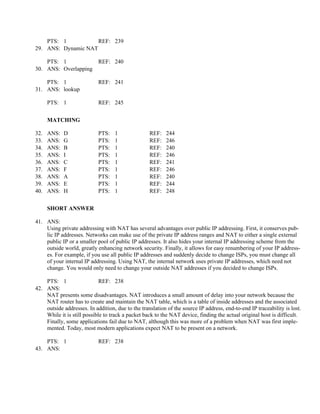
      Chapter 9
      Answer Section

      TRUE/FALSE

 1.   ANS:   T           PTS:   1              REF:   238
 2.   ANS:   T           PTS:   1              REF:   239
 3.   ANS:   F           PTS:   1              REF:   241
 4.   ANS:   T           PTS:   1              REF:   244
 5.   ANS:   F           PTS:   1              REF:   245


      MULTIPLE CHOICE

 6.   ANS:   D           PTS:   1              REF:   238
 7.   ANS:   B           PTS:   1              REF:   238
 8.   ANS:   C           PTS:   1              REF:   238
 9.   ANS:   A           PTS:   1              REF:   239
10.   ANS:   A           PTS:   1              REF:   240
11.   ANS:   B           PTS:   1              REF:   245
12.   ANS:   B           PTS:   1              REF:   241
13.   ANS:   B           PTS:   1              REF:   244
14.   ANS:   C           PTS:   1              REF:   245
15.   ANS:   A           PTS:   1              REF:   245
16.   ANS:   A           PTS:   1              REF:   245
17.   ANS:   C           PTS:   1              REF:   246
18.   ANS:   B           PTS:   1              REF:   246
19.   ANS:   D           PTS:   1              REF:   246
20.   ANS:   C           PTS:   1              REF:   246-247
21.   ANS:   D           PTS:   1              REF:   248
22.   ANS:   B           PTS:   1              REF:   248
23.   ANS:   A           PTS:   1              REF:   249
24.   ANS:   D           PTS:   1              REF:   251
25.   ANS:   A           PTS:   1              REF:   251
26.   ANS:   B           PTS:   1              REF:   252


      COMPLETION

27. ANS:
    Network address translation (NAT)
    Network address translation
    NAT

    PTS: 1               REF: 238
28. ANS: Static NAT
PTS: 1           REF: 239
29. ANS: Dynamic NAT

    PTS: 1                  REF: 240
30. ANS: Overlapping

    PTS: 1                  REF: 241
31. ANS: lookup

      PTS: 1                REF: 245


      MATCHING

32.   ANS:   D              PTS:   1               REF:    244
33.   ANS:   G              PTS:   1               REF:    246
34.   ANS:   B              PTS:   1               REF:    240
35.   ANS:   I              PTS:   1               REF:    246
36.   ANS:   C              PTS:   1               REF:    241
37.   ANS:   F              PTS:   1               REF:    246
38.   ANS:   A              PTS:   1               REF:    240
39.   ANS:   E              PTS:   1               REF:    244
40.   ANS:   H              PTS:   1               REF:    248


      SHORT ANSWER

41. ANS:
    Using private addressing with NAT has several advantages over public IP addressing. First, it conserves pub-
    lic IP addresses. Networks can make use of the private IP address ranges and NAT to either a single external
    public IP or a smaller pool of public IP addresses. It also hides your internal IP addressing scheme from the
    outside world, greatly enhancing network security. Finally, it allows for easy renumbering of your IP address-
    es. For example, if you use all public IP addresses and suddenly decide to change ISPs, you must change all
    of your internal IP addressing. Using NAT, the internal network uses private IP addresses, which need not
    change. You would only need to change your outside NAT addresses if you decided to change ISPs.

    PTS: 1                   REF: 238
42. ANS:
    NAT presents some disadvantages. NAT introduces a small amount of delay into your network because the
    NAT router has to create and maintain the NAT table, which is a table of inside addresses and the associated
    outside addresses. In addition, due to the translation of the source IP address, end-to-end IP traceability is lost.
    While it is still possible to track a packet back to the NAT device, finding the actual original host is difficult.
    Finally, some applications fail due to NAT, although this was more of a problem when NAT was first imple-
    mented. Today, most modern applications expect NAT to be present on a network.

    PTS: 1                  REF: 238
43. ANS:
Static NAT is the simplest form of NAT, in which a single private IP address is mapped to a single public IP
     address. For example, a router could be configured to translate all communications from the internal
     192.168.0.1 address to the address 209.86.192.197. In this way, when the host 192.168.0.1 accesses the Inter-
     net, the router will translate its IP address to 209.86.192.197. The router will then translate communications
     between that host and any system on the Internet. Therefore, all Internet devices will communicate with host
     209.86.192.197, but the actual packets will be forwarded by the NAT router to host 192.168.0.1 on the local
     network. In order for the NAT router to translate communications between the internal and external network,
     it must maintain a table in memory that maps internal IP addresses to addresses presented to the Internet (ex-
     ternal addresses). With static NAT, the mapping is one-to-one. For example, internal address 192.168.0.1
     maps to 209.86.192.197, address 192.168.0.2 maps to 209.86.192.198, and so on.

    PTS: 1                 REF: 239
44. ANS:
    Dynamic NAT means that the NAT router automatically maps a group of valid local IP addresses to a group
    of Internet IP addresses, as needed. This means that the network administrator is not concerned about which
    IP address the internal clients use, just that they can get an address. The network administrator also does not
    have to spend any time defining specific one-to-one mappings between the private and public IP addresses.
    Any private IP address will automatically be translated to one of the available Internet IP addresses by the
    NAT router. Addresses for dynamic NAT are pulled out of a predefined pool of public addresses. The admin-
    istrator must define the pool and then state which internal private addresses can use the pool.

    PTS: 1                  REF: 240
45. ANS:
    Overlapping occurs when the internal network has been incorrectly configured for an IP range that actually
    exists on the Internet (registered to another entity) or when two companies merge and each company was us-
    ing the same private IP address range. This problem usually occurs only when uninformed network engineers
    configure a network using arbitrary addresses. Sometimes the thought is that a connection to the Internet will
    never be required. In this case, the organization cannot connect directly to the Internet because it has an IP
    range registered to someone else. This overlapping problem can be solved using NAT because NAT hides the
    incorrectly configured internal IP scheme. The NAT router must be configured to translate the internal IP ad-
    dresses to a valid external address or address range. This is really no different than previous forms of NAT
    except that the organization’s internal IP address range actually belongs to someone else. The “someone else”
    just does not know about it because those addresses are never exposed to the Internet, thanks to NAT. Most
    companies do not run into this problem because their network engineers and designers know to use one of the
    private IP address ranges (10.x.x.x, 172.16.x.x–172.31.x.x, and 192.168.x.x.) when configuring a private in-
    ternal TCP/IP network.

    PTS: 1                  REF: 241
46. ANS:
    Configuring dynamic NAT is a more involved process than setting up static NAT. Still, it can be broken down
    into four easy-to-remember steps:
    • Configure a standard access control list to define what internal traffic will be translated.
    • Define a pool of addresses to be used for dynamic NAT allocation.
    • Link the access list to the NAT pool.
    • Define interfaces as either inside or outside.

    PTS: 1                 REF: 242
47. ANS:
On smaller networks, the ISP may be unwilling to provide multiple IP addresses to be used for NAT, or the
     company may not want to pay for additional IP addresses. When these situations occur, you can configure
     port address translation to allow the IP address of a single outside interface to be used for translation.

     Configuring PAT is a three-step process:
     • Configure a standard access list to define what internal traffic will be translated.
     • Link the access list to the interface to be used for PAT.
     • Define interfaces as either inside or outside.

    PTS: 1                  REF: 243
48. ANS:
    The Dynamic Host Configuration Protocol (DHCP) provides IP configuration information to hosts on bootup.
    This functionality is much like that provided by older protocols RARP and BOOTP. But unlike DHCP
    servers, RARP and BOOTP servers issue IP configuration information based on a host’s MAC address and
    require manual preconfiguration for each host. In addition, RARP servers can provide only limited informa-
    tion and can serve only a single LAN. Unlike its predecessors, DHCP is a truly dynamic way to configure IP
    hosts. In addition to the IP address itself, DHCP servers can provide other parameters, such as the WINS and
    DNS server addresses, and the default gateway address.

    PTS: 1                REF: 246
49. ANS:
    DHCP manages addressing by leasing the IP information to the hosts. This leasing allows the information to
    be recovered when not in use and reallocated when needed. When hosts are configured to use DHCP, they
    broadcast a DHCP DISCOVER message on the network. DHCP servers that hear the broadcast will send a
    unicast DHCP OFFER message back to the host. Because a network can have more than one DHCP server,
    the host may receive more than one offer. In this case, the host broadcasts a DHCP REQUEST to inform the
    other DHCP servers that the host has chosen a configuration from a particular server. Finally, the chosen
    DHCP server sends a unicast acknowledgment (DHCP ACK) to the host.

    PTS: 1                 REF: 246
50. ANS:
    This configuration involves the same parameters used when configuring DHCP on a server rather than on a
    router. You will need to complete the following steps:
    • Define the pool of addresses.
    • Configure any optional IP configuration parameters.
    • Exclude any statically configured addresses.

     PTS: 1                 REF: 247

CCNA Network Services Questions

  • 1.
    Chapter 9 True/False Indicate whether the statement is true or false. ____ 1. Cisco developed NAT, and today the technology is used by routers, firewalls, and even individual computers with multiple network connections. ____ 2. Static NAT must be used if you want clients outside your network to access services on your servers. ____ 3. The overlapping problem cannot be solved using NAT because NAT hides the internal IP scheme. ____ 4. Most people prefer to use names, not IP addresses, when communicating with network devices. ____ 5. Windows Internet Name Service (WINS) servers are not supported by Cisco routers. Multiple Choice Identify the choice that best completes the statement or answers the question. ____ 6. NAT is defined in RFC ____, which describes methods for connecting private (internal) IP addresses to the Internet. a. 1022 c. 2145 b. 1133 d. 3022 ____ 7. ____ uses a one-to-one mapping or one-to-many mapping method to allow one or more private IP clients to gain access to the Internet by mapping the private IP addresses to public IP addresses. a. DHCP c. WINS b. NAT d. NetBEUI ____ 8. NAT is available in three forms: Static NAT, Dynamic NAT, and ____. a. WINS c. PAT b. DHCP d. IP-AT ____ 9. ____ must be used if you want clients outside your network to access services on your servers. a. Static NAT c. PAT b. Dynamic NAT d. Dynamic PAT ____ 10. To differentiate between the connections, ____ uses multiple public TCP and UDP ports to create unique sockets that map to internal IP addresses. a. PAT c. dynamic NAT b. static NAT d. virtual NAT ____ 11. You could turn off the lookup feature on a Cisco router by using the ____ command. a. no domain-lookup c. no ip domain b. no ip domain-lookup d. no ip lookup ____ 12. NAT servers use ____ to send connections from external clients to the Web server on the internal network. a. nat relay c. port relay b. port forwarding d. dhcp relay ____ 13. ____ is a popular and important naming service.
  • 2.
    a. PAT c. DHCP b. DNS d. NAT ____ 14. The command to configure a DNS lookup on a Cisco router is ____. a. ip domain-lookup c. ip name-server b. ip dns d. ip dns-server ____ 15. The ____ command enables DNS if it has previously been disabled. a. ip domain-lookup c. ip name-server b. domain-lookup on d. ip dns enable ____ 16. The ____ command is optional, but provides a domain suffix for the names. a. ip domain-name c. ip domain-suffix b. ip suffix-name d. ip suffix ____ 17. RARP and ____ servers issue IP configuration information based on a host’s MAC address and require manu- al preconfiguration for each host. a. WINS c. BOOTP b. DNS d. NetBEUI ____ 18. ____ manages addressing by leasing the IP information to the hosts. a. DNS c. WINS b. DHCP d. DNCP ____ 19. DHCP is enabled by default in the Cisco IOS. If you want to make sure it is enabled, use the ____ command at the global configuration mode prompt. a. dhcp on c. enable service dhcp b. enable dhcp d. service dhcp ____ 20. Cisco’s DHCP server implementation prefers to save the IP configuration parameters it has sent to a particular host. These are called ____. a. tokens c. bindings b. overlapping d. enablings ____ 21. When monitoring DHCP, the best way to check the bindings is to execute the ____ command on the router. a. show binding c. show ip domain-server b. show ip dhcp d. show ip dhcp binding ____ 22. For information on the specific DHCP address pool, use the ____ command. a. show ip pool c. show domain pool b. show ip dhcp pool d. show address pool ____ 23. When you launch the SDM program, you see the Home tab. To see all of the parameters that can be config- ured, click the ____ button. a. Configure c. Tools b. Options d. Preferences ____ 24. The only difference between using SDM to configure dynamic NAT versus PAT is that in the ____ dialog box, you choose to translate to a single outside interface rather than a pool of addresses. a. Select Translation Rule c. Address Pool Rule b. Add Address Pool d. Add Address Translation Rule ____ 25. You can point your router to a DNS server for name resolution simply by configuring the ____ command. a. ip name-server c. ip dns-server
  • 3.
    b. ip domaindns d. ip domain-server ____ 26. Regarding SDM, you access the DHCP configuration area using the ____ button. a. DHCP Preferences c. Additional Options b. Additional Tasks d. Services Tasks Completion Complete each statement. 27. ___________________________________ allows many home users, corporations, and organizations around the world to connect far more computers to the Internet than they would otherwise be able to connect. 28. ____________________ is the simplest form of NAT, in which a single private IP address is mapped to a sin- gle public IP address. 29. ____________________ means that the NAT router automatically maps a group of valid local IP addresses to a group of Internet IP addresses, as needed. 30. ____________________ occurs when the internal network has been incorrectly configured for an IP range that actually exists on the Internet (registered to another entity) or when two companies merge and each com- pany was using the same private IP address range. 31. By default, a Cisco router will try several times to find an IP address for a name if you enter one. This auto- matic translation is called a(n) ____________________. Matching Match each item with a statement below: a. Port address translation f. DHCP b. Socket g. DHCP relay c. Static NAT h. Security Device Manager (SDM) d. DNS i. DHCP DISCOVER e. ip host command ____ 32. translates names into IP addresses ____ 33. forwarding of a DHCP request ____ 34. a combination of the IP address and port ____ 35. message broadcasted on the network when hosts are configured to use DHCP ____ 36. a one-to-one mapping of private IP addresses to public IP addresses ____ 37. provides IP configuration information to hosts on bootup ____ 38. a special form of dynamic NAT; also known as overloading ____ 39. provides name resolution on a Cisco router ____ 40. a Web-based tool for advanced configuration on Cisco routers
  • 4.
    Short Answer 41. Whatare the advantages of using private addressing with NAT? 42. What are some of the disadvantages of NAT? 43. Describe static NAT. 44. Describe dynamic NAT. 45. Briefly describe overlapping. 46. What are the steps for configuring dynamic NAT? 47. What are the steps for configuring port address translation? 48. Compare DHCP with RARP and BOOTP. 49. Describe the DHCP process.
  • 5.
    50. What arethe steps for configuring DHCP? Chapter 9 Answer Section TRUE/FALSE 1. ANS: T PTS: 1 REF: 238 2. ANS: T PTS: 1 REF: 239 3. ANS: F PTS: 1 REF: 241 4. ANS: T PTS: 1 REF: 244 5. ANS: F PTS: 1 REF: 245 MULTIPLE CHOICE 6. ANS: D PTS: 1 REF: 238 7. ANS: B PTS: 1 REF: 238 8. ANS: C PTS: 1 REF: 238 9. ANS: A PTS: 1 REF: 239 10. ANS: A PTS: 1 REF: 240 11. ANS: B PTS: 1 REF: 245 12. ANS: B PTS: 1 REF: 241 13. ANS: B PTS: 1 REF: 244 14. ANS: C PTS: 1 REF: 245 15. ANS: A PTS: 1 REF: 245 16. ANS: A PTS: 1 REF: 245 17. ANS: C PTS: 1 REF: 246 18. ANS: B PTS: 1 REF: 246 19. ANS: D PTS: 1 REF: 246 20. ANS: C PTS: 1 REF: 246-247 21. ANS: D PTS: 1 REF: 248 22. ANS: B PTS: 1 REF: 248 23. ANS: A PTS: 1 REF: 249 24. ANS: D PTS: 1 REF: 251 25. ANS: A PTS: 1 REF: 251 26. ANS: B PTS: 1 REF: 252 COMPLETION 27. ANS: Network address translation (NAT) Network address translation NAT PTS: 1 REF: 238 28. ANS: Static NAT
  • 6.
    PTS: 1 REF: 239 29. ANS: Dynamic NAT PTS: 1 REF: 240 30. ANS: Overlapping PTS: 1 REF: 241 31. ANS: lookup PTS: 1 REF: 245 MATCHING 32. ANS: D PTS: 1 REF: 244 33. ANS: G PTS: 1 REF: 246 34. ANS: B PTS: 1 REF: 240 35. ANS: I PTS: 1 REF: 246 36. ANS: C PTS: 1 REF: 241 37. ANS: F PTS: 1 REF: 246 38. ANS: A PTS: 1 REF: 240 39. ANS: E PTS: 1 REF: 244 40. ANS: H PTS: 1 REF: 248 SHORT ANSWER 41. ANS: Using private addressing with NAT has several advantages over public IP addressing. First, it conserves pub- lic IP addresses. Networks can make use of the private IP address ranges and NAT to either a single external public IP or a smaller pool of public IP addresses. It also hides your internal IP addressing scheme from the outside world, greatly enhancing network security. Finally, it allows for easy renumbering of your IP address- es. For example, if you use all public IP addresses and suddenly decide to change ISPs, you must change all of your internal IP addressing. Using NAT, the internal network uses private IP addresses, which need not change. You would only need to change your outside NAT addresses if you decided to change ISPs. PTS: 1 REF: 238 42. ANS: NAT presents some disadvantages. NAT introduces a small amount of delay into your network because the NAT router has to create and maintain the NAT table, which is a table of inside addresses and the associated outside addresses. In addition, due to the translation of the source IP address, end-to-end IP traceability is lost. While it is still possible to track a packet back to the NAT device, finding the actual original host is difficult. Finally, some applications fail due to NAT, although this was more of a problem when NAT was first imple- mented. Today, most modern applications expect NAT to be present on a network. PTS: 1 REF: 238 43. ANS:
  • 7.
    Static NAT isthe simplest form of NAT, in which a single private IP address is mapped to a single public IP address. For example, a router could be configured to translate all communications from the internal 192.168.0.1 address to the address 209.86.192.197. In this way, when the host 192.168.0.1 accesses the Inter- net, the router will translate its IP address to 209.86.192.197. The router will then translate communications between that host and any system on the Internet. Therefore, all Internet devices will communicate with host 209.86.192.197, but the actual packets will be forwarded by the NAT router to host 192.168.0.1 on the local network. In order for the NAT router to translate communications between the internal and external network, it must maintain a table in memory that maps internal IP addresses to addresses presented to the Internet (ex- ternal addresses). With static NAT, the mapping is one-to-one. For example, internal address 192.168.0.1 maps to 209.86.192.197, address 192.168.0.2 maps to 209.86.192.198, and so on. PTS: 1 REF: 239 44. ANS: Dynamic NAT means that the NAT router automatically maps a group of valid local IP addresses to a group of Internet IP addresses, as needed. This means that the network administrator is not concerned about which IP address the internal clients use, just that they can get an address. The network administrator also does not have to spend any time defining specific one-to-one mappings between the private and public IP addresses. Any private IP address will automatically be translated to one of the available Internet IP addresses by the NAT router. Addresses for dynamic NAT are pulled out of a predefined pool of public addresses. The admin- istrator must define the pool and then state which internal private addresses can use the pool. PTS: 1 REF: 240 45. ANS: Overlapping occurs when the internal network has been incorrectly configured for an IP range that actually exists on the Internet (registered to another entity) or when two companies merge and each company was us- ing the same private IP address range. This problem usually occurs only when uninformed network engineers configure a network using arbitrary addresses. Sometimes the thought is that a connection to the Internet will never be required. In this case, the organization cannot connect directly to the Internet because it has an IP range registered to someone else. This overlapping problem can be solved using NAT because NAT hides the incorrectly configured internal IP scheme. The NAT router must be configured to translate the internal IP ad- dresses to a valid external address or address range. This is really no different than previous forms of NAT except that the organization’s internal IP address range actually belongs to someone else. The “someone else” just does not know about it because those addresses are never exposed to the Internet, thanks to NAT. Most companies do not run into this problem because their network engineers and designers know to use one of the private IP address ranges (10.x.x.x, 172.16.x.x–172.31.x.x, and 192.168.x.x.) when configuring a private in- ternal TCP/IP network. PTS: 1 REF: 241 46. ANS: Configuring dynamic NAT is a more involved process than setting up static NAT. Still, it can be broken down into four easy-to-remember steps: • Configure a standard access control list to define what internal traffic will be translated. • Define a pool of addresses to be used for dynamic NAT allocation. • Link the access list to the NAT pool. • Define interfaces as either inside or outside. PTS: 1 REF: 242 47. ANS:
  • 8.
    On smaller networks,the ISP may be unwilling to provide multiple IP addresses to be used for NAT, or the company may not want to pay for additional IP addresses. When these situations occur, you can configure port address translation to allow the IP address of a single outside interface to be used for translation. Configuring PAT is a three-step process: • Configure a standard access list to define what internal traffic will be translated. • Link the access list to the interface to be used for PAT. • Define interfaces as either inside or outside. PTS: 1 REF: 243 48. ANS: The Dynamic Host Configuration Protocol (DHCP) provides IP configuration information to hosts on bootup. This functionality is much like that provided by older protocols RARP and BOOTP. But unlike DHCP servers, RARP and BOOTP servers issue IP configuration information based on a host’s MAC address and require manual preconfiguration for each host. In addition, RARP servers can provide only limited informa- tion and can serve only a single LAN. Unlike its predecessors, DHCP is a truly dynamic way to configure IP hosts. In addition to the IP address itself, DHCP servers can provide other parameters, such as the WINS and DNS server addresses, and the default gateway address. PTS: 1 REF: 246 49. ANS: DHCP manages addressing by leasing the IP information to the hosts. This leasing allows the information to be recovered when not in use and reallocated when needed. When hosts are configured to use DHCP, they broadcast a DHCP DISCOVER message on the network. DHCP servers that hear the broadcast will send a unicast DHCP OFFER message back to the host. Because a network can have more than one DHCP server, the host may receive more than one offer. In this case, the host broadcasts a DHCP REQUEST to inform the other DHCP servers that the host has chosen a configuration from a particular server. Finally, the chosen DHCP server sends a unicast acknowledgment (DHCP ACK) to the host. PTS: 1 REF: 246 50. ANS: This configuration involves the same parameters used when configuring DHCP on a server rather than on a router. You will need to complete the following steps: • Define the pool of addresses. • Configure any optional IP configuration parameters. • Exclude any statically configured addresses. PTS: 1 REF: 247