Cash Flow Report using
MS Project
• Name- Kundan Sahadev Sanap
• Roll No. – 202030016
• Subject- Construction Project Management
• Guide- Dr. Vinamra Mishra
Veermata Jijabai Technological Institute,
Matunga
What is Cash Flow Report?
• The Cash Flow Report portrays how a company has
spent its money.
• It is often used in tandem with the other two key reports
– the Profit and Loss and the Balance Sheet.
• It is the third component of a company’s financial
statements.
Why Cash Flow Report is Important?
• The cash flow report is important because it informs the reader of the Project, its
cash position.
• The Cash Flow report provides vital information about an entity.
• It shows the movement of money in and out of a company.
• It helps investors and shareholders understand how much money a company is
making and spending.
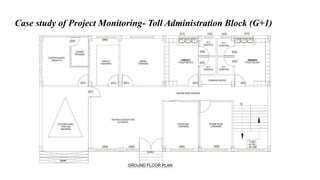
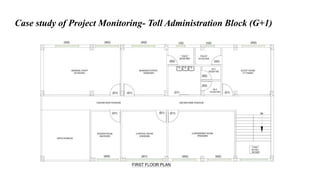
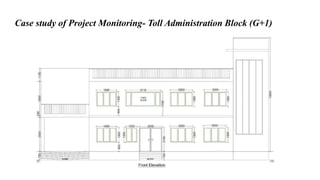
Case study of Project Monitoring- Toll Administration Block (G+1)
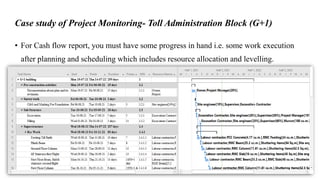
• For Cash flow report, you must have some progress in hand i.e. some work execution
after planning and scheduling which includes resource allocation and levelling.
Case study of Project Monitoring- Toll Administration Block (G+1)
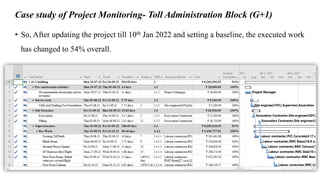
• So, After updating the project till 10th Jan 2022 and setting a baseline, the executed work
has changed to 54% overall.
Case study of Project Monitoring- Toll Administration Block (G+1)
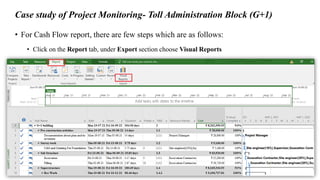
• For Cash Flow report, there are few steps which are as follows:
• Click on the Report tab, under Export section choose Visual Reports
Case study of Project Monitoring- Toll Administration Block (G+1)
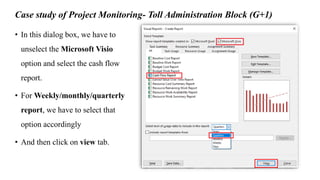
• In this dialog box, we have to
unselect the Microsoft Visio
option and select the cash flow
report.
• For Weekly/monthly/quarterly
report, we have to select that
option accordingly
• And then click on view tab.
Case study of Project Monitoring- Toll Administration Block (G+1)
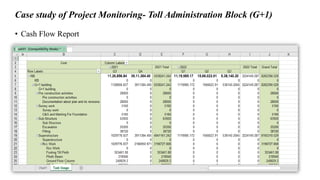
• Cash Flow Report
Case study of Project Monitoring- Toll Administration Block (G+1)
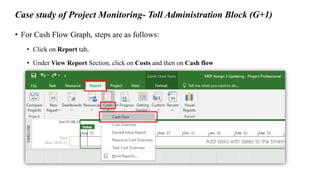
• For Cash Flow Graph, steps are as follows:
• Click on Report tab,
• Under View Report Section, click on Costs and then on Cash flow
Case study of Project Monitoring- Toll Administration Block (G+1)
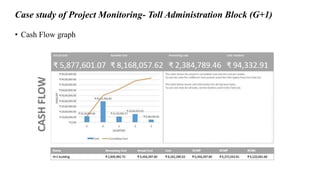
• Cash Flow graph
Conclusion
• With Cash flow report we can get information of each and every penny that’s already
spent or is going to spend on the project activities.
• During execution of the project, cash flow report keeps us updated about how much
money is needed for future activities.
• It is very much user friendly representation, that any non-technical person can refer this
cash flow report.
Thank you !!!

Cash flow report using ms project

  • 1.
    Cash Flow Reportusing MS Project • Name- Kundan Sahadev Sanap • Roll No. – 202030016 • Subject- Construction Project Management • Guide- Dr. Vinamra Mishra Veermata Jijabai Technological Institute, Matunga
  • 2.
    What is CashFlow Report? • The Cash Flow Report portrays how a company has spent its money. • It is often used in tandem with the other two key reports – the Profit and Loss and the Balance Sheet. • It is the third component of a company’s financial statements.
  • 3.
    Why Cash FlowReport is Important? • The cash flow report is important because it informs the reader of the Project, its cash position. • The Cash Flow report provides vital information about an entity. • It shows the movement of money in and out of a company. • It helps investors and shareholders understand how much money a company is making and spending.
  • 4.
    Case study ofProject Monitoring- Toll Administration Block (G+1)
  • 5.
    Case study ofProject Monitoring- Toll Administration Block (G+1)
  • 6.
    Case study ofProject Monitoring- Toll Administration Block (G+1)
  • 7.
    Case study ofProject Monitoring- Toll Administration Block (G+1) • For Cash flow report, you must have some progress in hand i.e. some work execution after planning and scheduling which includes resource allocation and levelling.
  • 8.
    Case study ofProject Monitoring- Toll Administration Block (G+1) • So, After updating the project till 10th Jan 2022 and setting a baseline, the executed work has changed to 54% overall.
  • 9.
    Case study ofProject Monitoring- Toll Administration Block (G+1) • For Cash Flow report, there are few steps which are as follows: • Click on the Report tab, under Export section choose Visual Reports
  • 10.
    Case study ofProject Monitoring- Toll Administration Block (G+1) • In this dialog box, we have to unselect the Microsoft Visio option and select the cash flow report. • For Weekly/monthly/quarterly report, we have to select that option accordingly • And then click on view tab.
  • 11.
    Case study ofProject Monitoring- Toll Administration Block (G+1) • Cash Flow Report
  • 12.
    Case study ofProject Monitoring- Toll Administration Block (G+1) • For Cash Flow Graph, steps are as follows: • Click on Report tab, • Under View Report Section, click on Costs and then on Cash flow
  • 13.
    Case study ofProject Monitoring- Toll Administration Block (G+1) • Cash Flow graph
  • 14.
    Conclusion • With Cashflow report we can get information of each and every penny that’s already spent or is going to spend on the project activities. • During execution of the project, cash flow report keeps us updated about how much money is needed for future activities. • It is very much user friendly representation, that any non-technical person can refer this cash flow report.
  • 15.