Windows XP
Windows XP™
• Biggest,
• …most comprehensive,
• …most widely distributed
• …general purpose operating system in history
of computing
• Affects almost all other systems, one way or
another
Windows XP
• 32-bit preemptive multitasking operating system for Intel
microprocessors
• Key goals for the system:
– portability
– security
– POSIX compliance
– multiprocessor support
– extensibility
– international support
– compatibility with MS-DOS and MS-Windows applications.
• Uses a micro-kernel architecture
• Available in at least four versions: Professional, Server,
Advanced Server, National Server
History
• In 1988, Microsoft began developing “new
technology” (NT) portable operating system
– Support for both the OS/2 and POSIX APIs
• Originally, NT intended to use the OS/2 API as native
environment
• During development NT was changed to use the
Win32 API
– Reflects the popularity of Windows 3.0 over IBM’s OS/2
Design Principles
• Extensibility — layered architecture
– Executive, which runs in protected mode, provides the
basic system services
– On top of the executive, several server subsystems operate
in user mode
– Modular structure allows additional environmental
subsystems to be added without affecting the executive
• Portability —XP can be moved from on hardware
architecture to another with relatively few changes
– Written in C and C++
– Processor-dependent code is isolated in a dynamic link
library (DLL) called the “hardware abstraction layer” (HAL)
Design Principles (Cont.)
• Reliability
• XP uses hardware protection for virtual memory, software protection
mechanisms for OS resources
• Compatibility
• Applications that follow the IEEE 1003.1 (POSIX) standard can be complied
to run on XP without changing the source code
• Performance
• XP subsystems can communicate with one another via high-performance
message passing
• Preemption of low priority threads enables the system to respond quickly
to external events
• Designed for symmetrical multiprocessing
• International support
• Supports different locales via the national language support (NLS) API
CS502 Spring 2006
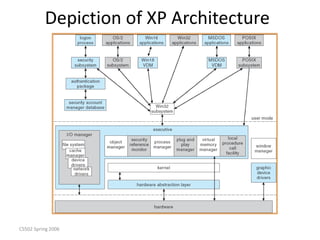
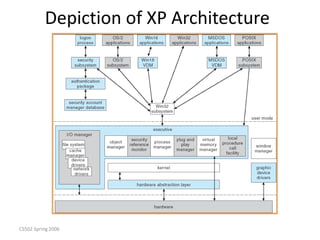
XP Architecture
• Layered system of modules
• Protected mode — HAL, kernel, executive
• User mode — collection of subsystems
– Environmental subsystems emulate different
operating systems
– Protection subsystems provide security functions
CS502 Spring 2006
Depiction of XP Architecture
CS502 Spring 2006
System Components — Kernel
• Foundation for the executive and the subsystems
• Never paged out of memory; execution is never preempted
• Four main responsibilities:
– thread scheduling
– interrupt and exception handling
– low-level processor synchronization
– recovery after a power failure
• Kernel is object-oriented, uses two sets of objects
– dispatcher objects control dispatching and synchronization
• events, mutants, mutexes, semaphores, threads and timers
– control objects
• asynchronous procedure calls, interrupts, power notify, power status,
process and profile objects
CS502 Spring 2006
Kernel — Process and Threads
• Process
• Virtual memory address space
• Information (such as a base priority)
• Affinity for one or more processors
• Threads
• Unit of execution scheduled by the kernel’s dispatcher
• Thread state information
• Priority, processor affinity, and accounting information
• Thread can be one of six states:
• ready, standby, running, waiting, transition, and terminated
Kernel — Scheduling
• The dispatcher uses a 32-level priority scheme to
determine the order of thread execution
– Priorities are divided into two classes
• The real-time class contains threads with priorities = 16 to 31
• The variable class contains threads with priorities = 0 to 15
• Characteristics of XP’s priority strategy
– Tends to give very good response times to interactive
threads that are using the mouse and windows
– Enables I/O-bound threads to keep the I/O devices busy
– Compute-bound threads soak up the spare CPU cycles in
the background
Kernel — Scheduling (Cont.)
• Scheduling can occur when
• Thread enters the ready or wait state,
• Thread terminates, or
• Application changes thread’s priority or processor affinity
• Real-time threads given preferential access to CPU
• But…
– XP does not guarantee that a real-time thread will start or
execute within any particular time limit
– This is known as soft real-time
Kernel — Trap Handling
• The kernel provides trap handling when exceptions and
interrupts are generated by hardware of software
• Exceptions that cannot be handled by the trap handler are
handled by the kernel’s exception dispatcher
• The interrupt dispatcher in the kernel handles interrupts by
calling either
– Interrupt service routine (such as in a device driver) or
– Internal kernel routine
• The kernel uses spin locks that reside in global memory to
achieve multiprocessor mutual exclusion
Depiction of XP Architecture
Executive – Privileged mode
• Many components
• Object Manager
• Security Reference Manager
• Process Manager
• Plug and Play Manager
• Virtual Memory Manager
• Local Procedure Call facility
• I/O Manager
– Device Drivers
• Window Manager
• Too many details to cover in one hour
Executive — Process Manager
• Provides services for creating, deleting, and
using threads and processes.
• Processes and threads are (almost)
independent concepts
– Thread (not process) is unit of scheduling
• Issues such as parent/child relationships or
process hierarchies are left to the particular
environmental subsystem that owns the
process.
Executive — Local Procedure Call Facility
• A message passing facility like remote
procedure call
– Among separate processes
• LPC passes requests and results between
client and server processes within a single
machine
• Used to request services among various XP
subsystems.
Executive — I/O Manager
• The I/O manager is responsible for
– file systems
– cache management
– device drivers
– network drivers
• Keeps track of which installable file systems are loaded, and
manages buffers for I/O requests
• Works with VM Manager to provide memory-mapped file I/O
• Controls the XP cache manager, which handles caching for the
entire I/O system
• Supports both synchronous and asynchronous operations, provides
time outs for drivers, and has mechanisms for one driver to call
another
CS502 Spring 2006
Depiction of XP Architecture
Environmental Subsystems
• User-mode processes layered over the native XP
executive services
– Enable XP to run programs developed for other operating system
• XP uses the Win32 subsystem as the main operating
environment
– Win32 is used to start all processes
– Also provides all the keyboard, mouse and graphical display
capabilities
• MS-DOS environment is provided by Win32 application
called the virtual DOS machine (VDM),
– A user-mode process that is paged and dispatched like any other
XP thread
Environmental Subsystems (Cont.)
• 16-Bit Windows Environment:
– Provided by a VDM that incorporates Windows on
Windows
– Provides the Windows 3.1 kernel routines and subroutines
for window manager and GDI functions
• The POSIX subsystem is designed to run POSIX
applications following the POSIX.1 standard which is
based on the UNIX model
• OS/2 subsystems runs OS/2 applications
Environmental Subsystems (Cont.)
• Logon and Security Subsystem
– Authenticates all users logged on to
Windows XP systems
– Users are required to have account names
and passwords
– The authentication package authenticates
users whenever they attempt to access an
object in the system
– Windows XP uses Kerberos as the default
authentication package
File System – NTFS
• Fundamental structure of NTFS is a volume
– Created by the XP disk administrator utility
– Based on a logical disk partition
– May occupy a portions of a disk, an entire disk, or span across
several disks
– Striping, RAID, redundancy, etc.
• All metadata, such as information about the volume, is
stored in a regular file
• NTFS uses clusters as the underlying unit of disk
allocation
– A cluster is a number of disk sectors that is a power of two
– Because the cluster size is smaller than for the 16-bit FAT file
system, the amount of internal fragmentation is reduced
File System — Internal Layout
• NTFS uses logical cluster numbers (LCNs) as disk addresses
• A file in NTFS is not a simple byte stream, as in MS-DOS or UNIX, rather, it
is a structured object consisting of attributes
• Every file in NTFS is described by one or more records in an array stored in
a special file called the Master File Table (MFT)
• Each file on an NTFS volume has a unique ID called a file reference.
– 64-bit quantity that consists of a 48-bit file number and a 16-bit sequence
number
– Can be used to perform internal consistency checks
• The NTFS name space is organized by a hierarchy of directories; the index
root contains the top level of the B+ tree
File System — Recovery
• All file system data structure updates are
performed inside transactions that are logged
– Before a data structure is altered, the transaction
writes a log record that contains redo and undo
information
– After the data structure has been changed, a
commit record is written to the log to signify that
the transaction succeeded
– After a crash, the file system data structures can be
restored to a consistent state by processing the log
records
File System — Recovery (Cont.)
• This scheme does not guarantee that all the user
file data can be recovered after a crash, just that
the file system data structures (the metadata
files) are undamaged and reflect some
consistent state prior to the crash
• The log is stored in the third metadata file at the
beginning of the volume
• The logging functionality is provided by the XP
log file service
More on NTFS
• Security
• Fault-tolerance
• Striping
• Mirroring
• Compression
Networking
• XP supports both peer-to-peer and client/server
networking; it also has facilities for network management
• To describe networking in XP, we refer to two of the
internal networking interfaces:
– NDIS (Network Device Interface Specification) — Separates
network adapters from the transport protocols so that either can
be changed without affecting the other
– TDI (Transport Driver Interface) — Enables any session layer
component to use any available transport mechanism
• XP implements transport protocols as drivers that can be
loaded and unloaded from the system dynamically
• Also too much detail for one hour …

Chap1_Part2.pptx

  • 1.
  • 2.
    Windows XP™ • Biggest, •…most comprehensive, • …most widely distributed • …general purpose operating system in history of computing • Affects almost all other systems, one way or another
  • 3.
    Windows XP • 32-bitpreemptive multitasking operating system for Intel microprocessors • Key goals for the system: – portability – security – POSIX compliance – multiprocessor support – extensibility – international support – compatibility with MS-DOS and MS-Windows applications. • Uses a micro-kernel architecture • Available in at least four versions: Professional, Server, Advanced Server, National Server
  • 4.
    History • In 1988,Microsoft began developing “new technology” (NT) portable operating system – Support for both the OS/2 and POSIX APIs • Originally, NT intended to use the OS/2 API as native environment • During development NT was changed to use the Win32 API – Reflects the popularity of Windows 3.0 over IBM’s OS/2
  • 5.
    Design Principles • Extensibility— layered architecture – Executive, which runs in protected mode, provides the basic system services – On top of the executive, several server subsystems operate in user mode – Modular structure allows additional environmental subsystems to be added without affecting the executive • Portability —XP can be moved from on hardware architecture to another with relatively few changes – Written in C and C++ – Processor-dependent code is isolated in a dynamic link library (DLL) called the “hardware abstraction layer” (HAL)
  • 6.
    Design Principles (Cont.) •Reliability • XP uses hardware protection for virtual memory, software protection mechanisms for OS resources • Compatibility • Applications that follow the IEEE 1003.1 (POSIX) standard can be complied to run on XP without changing the source code • Performance • XP subsystems can communicate with one another via high-performance message passing • Preemption of low priority threads enables the system to respond quickly to external events • Designed for symmetrical multiprocessing • International support • Supports different locales via the national language support (NLS) API
  • 7.
    CS502 Spring 2006 XPArchitecture • Layered system of modules • Protected mode — HAL, kernel, executive • User mode — collection of subsystems – Environmental subsystems emulate different operating systems – Protection subsystems provide security functions
  • 8.
    CS502 Spring 2006 Depictionof XP Architecture
  • 9.
    CS502 Spring 2006 SystemComponents — Kernel • Foundation for the executive and the subsystems • Never paged out of memory; execution is never preempted • Four main responsibilities: – thread scheduling – interrupt and exception handling – low-level processor synchronization – recovery after a power failure • Kernel is object-oriented, uses two sets of objects – dispatcher objects control dispatching and synchronization • events, mutants, mutexes, semaphores, threads and timers – control objects • asynchronous procedure calls, interrupts, power notify, power status, process and profile objects
  • 10.
    CS502 Spring 2006 Kernel— Process and Threads • Process • Virtual memory address space • Information (such as a base priority) • Affinity for one or more processors • Threads • Unit of execution scheduled by the kernel’s dispatcher • Thread state information • Priority, processor affinity, and accounting information • Thread can be one of six states: • ready, standby, running, waiting, transition, and terminated
  • 11.
    Kernel — Scheduling •The dispatcher uses a 32-level priority scheme to determine the order of thread execution – Priorities are divided into two classes • The real-time class contains threads with priorities = 16 to 31 • The variable class contains threads with priorities = 0 to 15 • Characteristics of XP’s priority strategy – Tends to give very good response times to interactive threads that are using the mouse and windows – Enables I/O-bound threads to keep the I/O devices busy – Compute-bound threads soak up the spare CPU cycles in the background
  • 12.
    Kernel — Scheduling(Cont.) • Scheduling can occur when • Thread enters the ready or wait state, • Thread terminates, or • Application changes thread’s priority or processor affinity • Real-time threads given preferential access to CPU • But… – XP does not guarantee that a real-time thread will start or execute within any particular time limit – This is known as soft real-time
  • 13.
    Kernel — TrapHandling • The kernel provides trap handling when exceptions and interrupts are generated by hardware of software • Exceptions that cannot be handled by the trap handler are handled by the kernel’s exception dispatcher • The interrupt dispatcher in the kernel handles interrupts by calling either – Interrupt service routine (such as in a device driver) or – Internal kernel routine • The kernel uses spin locks that reside in global memory to achieve multiprocessor mutual exclusion
  • 14.
    Depiction of XPArchitecture
  • 15.
    Executive – Privilegedmode • Many components • Object Manager • Security Reference Manager • Process Manager • Plug and Play Manager • Virtual Memory Manager • Local Procedure Call facility • I/O Manager – Device Drivers • Window Manager • Too many details to cover in one hour
  • 16.
    Executive — ProcessManager • Provides services for creating, deleting, and using threads and processes. • Processes and threads are (almost) independent concepts – Thread (not process) is unit of scheduling • Issues such as parent/child relationships or process hierarchies are left to the particular environmental subsystem that owns the process.
  • 17.
    Executive — LocalProcedure Call Facility • A message passing facility like remote procedure call – Among separate processes • LPC passes requests and results between client and server processes within a single machine • Used to request services among various XP subsystems.
  • 18.
    Executive — I/OManager • The I/O manager is responsible for – file systems – cache management – device drivers – network drivers • Keeps track of which installable file systems are loaded, and manages buffers for I/O requests • Works with VM Manager to provide memory-mapped file I/O • Controls the XP cache manager, which handles caching for the entire I/O system • Supports both synchronous and asynchronous operations, provides time outs for drivers, and has mechanisms for one driver to call another
  • 19.
    CS502 Spring 2006 Depictionof XP Architecture
  • 20.
    Environmental Subsystems • User-modeprocesses layered over the native XP executive services – Enable XP to run programs developed for other operating system • XP uses the Win32 subsystem as the main operating environment – Win32 is used to start all processes – Also provides all the keyboard, mouse and graphical display capabilities • MS-DOS environment is provided by Win32 application called the virtual DOS machine (VDM), – A user-mode process that is paged and dispatched like any other XP thread
  • 21.
    Environmental Subsystems (Cont.) •16-Bit Windows Environment: – Provided by a VDM that incorporates Windows on Windows – Provides the Windows 3.1 kernel routines and subroutines for window manager and GDI functions • The POSIX subsystem is designed to run POSIX applications following the POSIX.1 standard which is based on the UNIX model • OS/2 subsystems runs OS/2 applications
  • 22.
    Environmental Subsystems (Cont.) •Logon and Security Subsystem – Authenticates all users logged on to Windows XP systems – Users are required to have account names and passwords – The authentication package authenticates users whenever they attempt to access an object in the system – Windows XP uses Kerberos as the default authentication package
  • 23.
    File System –NTFS • Fundamental structure of NTFS is a volume – Created by the XP disk administrator utility – Based on a logical disk partition – May occupy a portions of a disk, an entire disk, or span across several disks – Striping, RAID, redundancy, etc. • All metadata, such as information about the volume, is stored in a regular file • NTFS uses clusters as the underlying unit of disk allocation – A cluster is a number of disk sectors that is a power of two – Because the cluster size is smaller than for the 16-bit FAT file system, the amount of internal fragmentation is reduced
  • 24.
    File System —Internal Layout • NTFS uses logical cluster numbers (LCNs) as disk addresses • A file in NTFS is not a simple byte stream, as in MS-DOS or UNIX, rather, it is a structured object consisting of attributes • Every file in NTFS is described by one or more records in an array stored in a special file called the Master File Table (MFT) • Each file on an NTFS volume has a unique ID called a file reference. – 64-bit quantity that consists of a 48-bit file number and a 16-bit sequence number – Can be used to perform internal consistency checks • The NTFS name space is organized by a hierarchy of directories; the index root contains the top level of the B+ tree
  • 25.
    File System —Recovery • All file system data structure updates are performed inside transactions that are logged – Before a data structure is altered, the transaction writes a log record that contains redo and undo information – After the data structure has been changed, a commit record is written to the log to signify that the transaction succeeded – After a crash, the file system data structures can be restored to a consistent state by processing the log records
  • 26.
    File System —Recovery (Cont.) • This scheme does not guarantee that all the user file data can be recovered after a crash, just that the file system data structures (the metadata files) are undamaged and reflect some consistent state prior to the crash • The log is stored in the third metadata file at the beginning of the volume • The logging functionality is provided by the XP log file service
  • 27.
    More on NTFS •Security • Fault-tolerance • Striping • Mirroring • Compression
  • 28.
    Networking • XP supportsboth peer-to-peer and client/server networking; it also has facilities for network management • To describe networking in XP, we refer to two of the internal networking interfaces: – NDIS (Network Device Interface Specification) — Separates network adapters from the transport protocols so that either can be changed without affecting the other – TDI (Transport Driver Interface) — Enables any session layer component to use any available transport mechanism • XP implements transport protocols as drivers that can be loaded and unloaded from the system dynamically • Also too much detail for one hour …