Canon XA10
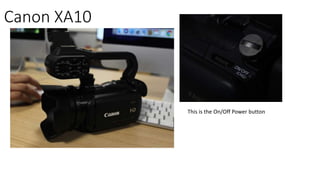
This is the On/Off Power button
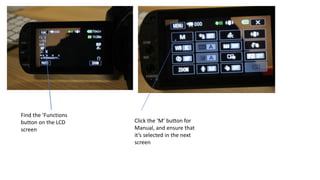
Find the ‘Functions
button on the LCD
screen
Click the ‘M’ button for
Manual, and ensure that
it’s selected in the next
screen
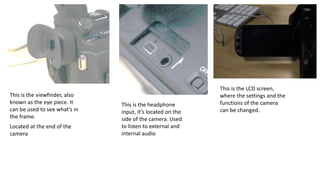
This is the viewfinder, also
known as the eye piece. It
can be used to see what’s in
the frame.
Located at the end of the
camera
This is the headphone
input, it’s located on the
side of the camera. Used
to listen to external and
internal audio
This is the LCD screen,
where the settings and the
functions of the camera
can be changed.
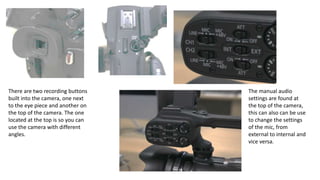
There are two recording buttons
built into the camera, one next
to the eye piece and another on
the top of the camera. The one
located at the top is so you can
use the camera with different
angles.
The manual audio
settings are found at
the top of the camera,
this can also can be use
to change the settings
of the mic, from
external to internal and
vice versa.
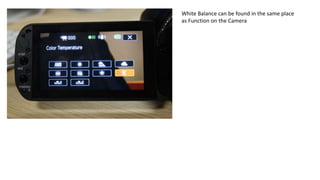
White Balance can be found in the same place
as Function on the Camera

Canon xa10

  • 1.
    Canon XA10 This isthe On/Off Power button
  • 2.
    Find the ‘Functions buttonon the LCD screen Click the ‘M’ button for Manual, and ensure that it’s selected in the next screen
  • 3.
    This is theviewfinder, also known as the eye piece. It can be used to see what’s in the frame. Located at the end of the camera This is the headphone input, it’s located on the side of the camera. Used to listen to external and internal audio This is the LCD screen, where the settings and the functions of the camera can be changed.
  • 4.
    There are tworecording buttons built into the camera, one next to the eye piece and another on the top of the camera. The one located at the top is so you can use the camera with different angles. The manual audio settings are found at the top of the camera, this can also can be use to change the settings of the mic, from external to internal and vice versa.
  • 5.
    White Balance canbe found in the same place as Function on the Camera