
Canon EOS 1100D
DSLR Camera
What are the camera functions?
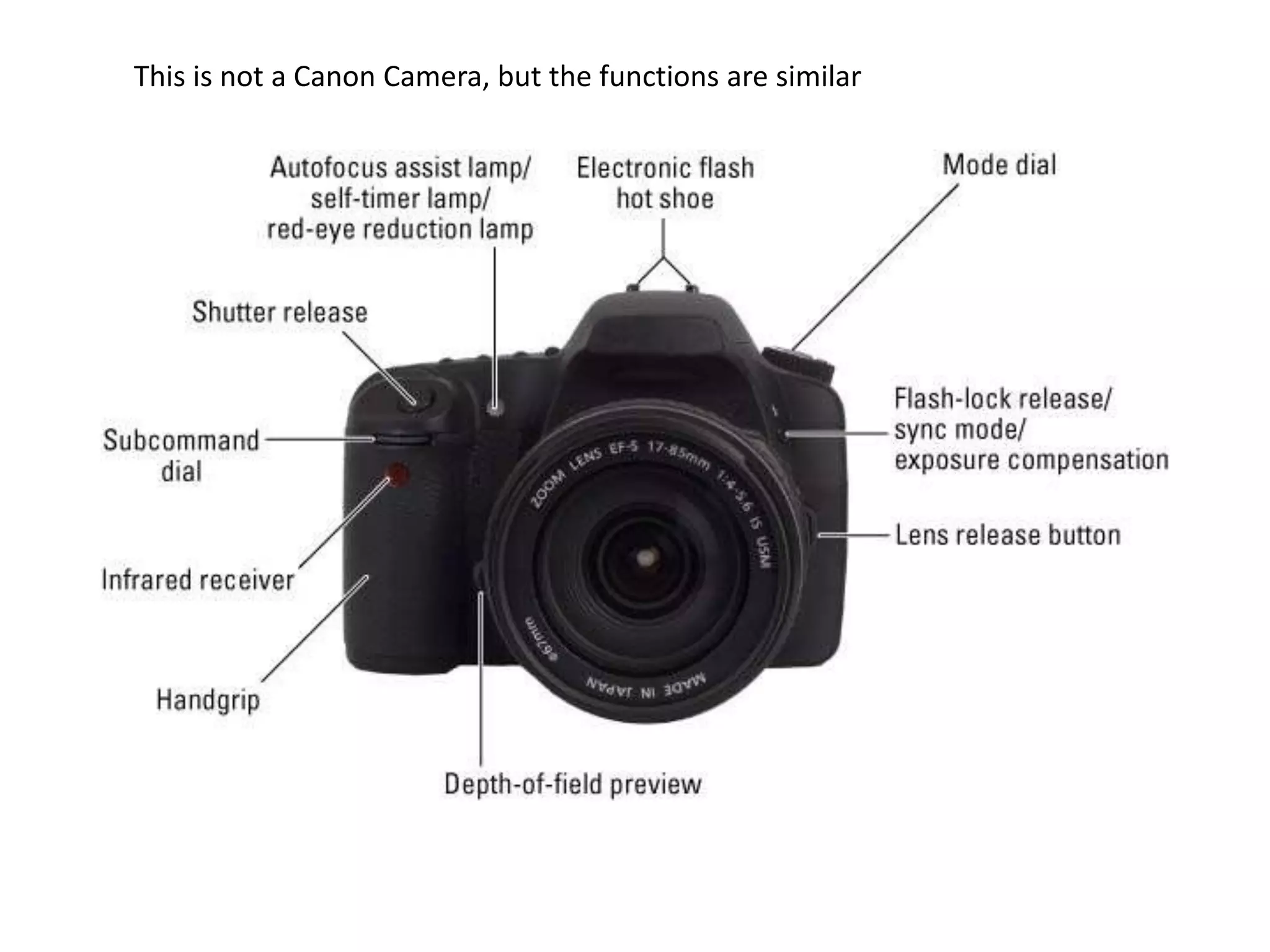
Digital SLR Camera Controls on the Front
All those controls! What are they? If you’re
working with your first digital SLR camera, all
those controls might seem like a mystery to
you. Let this diagram help you familiarize
yourself with the controls on the front of your
dSLR camera.
This is not a Canon Camera, but the functions are similar
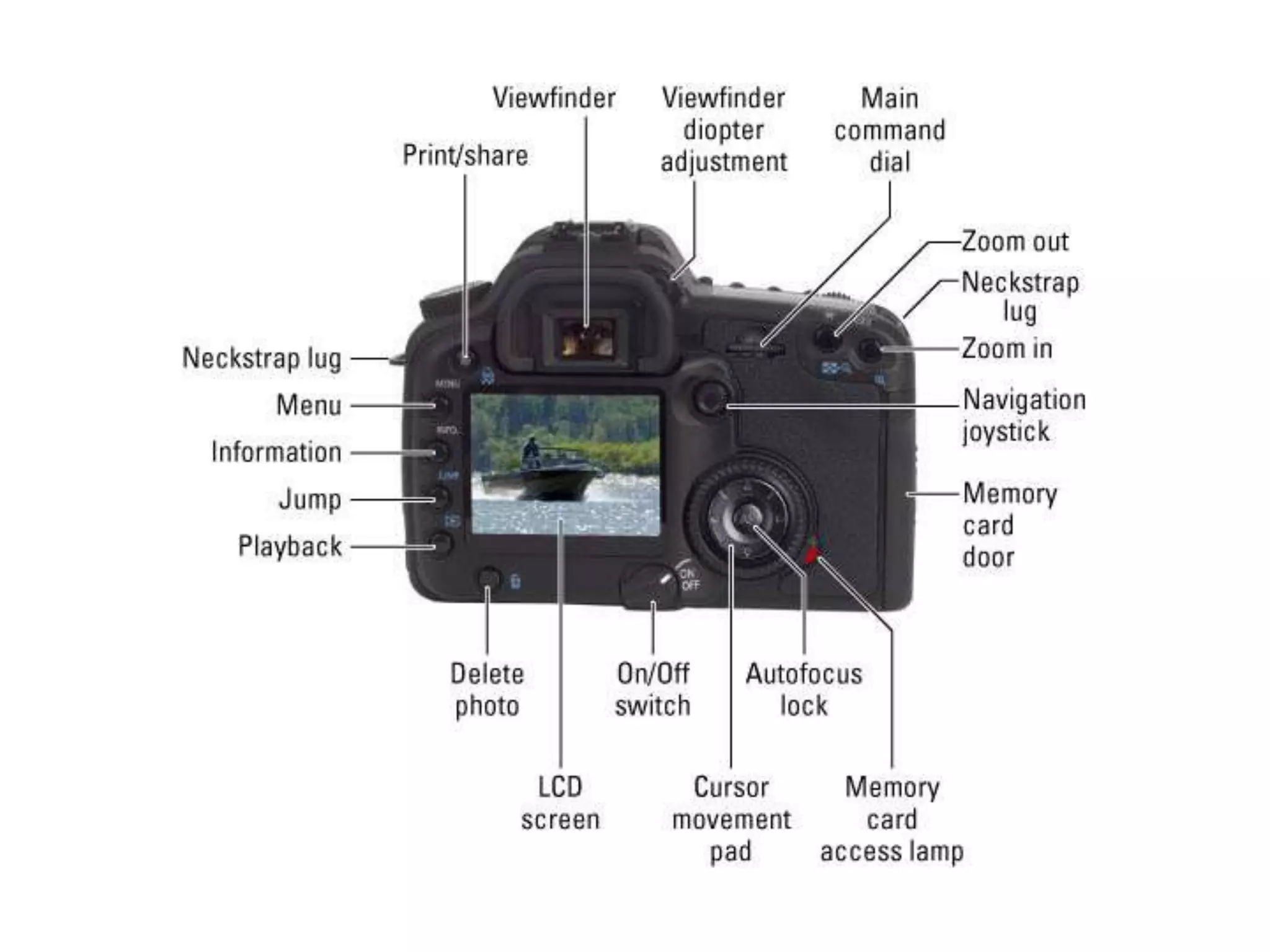
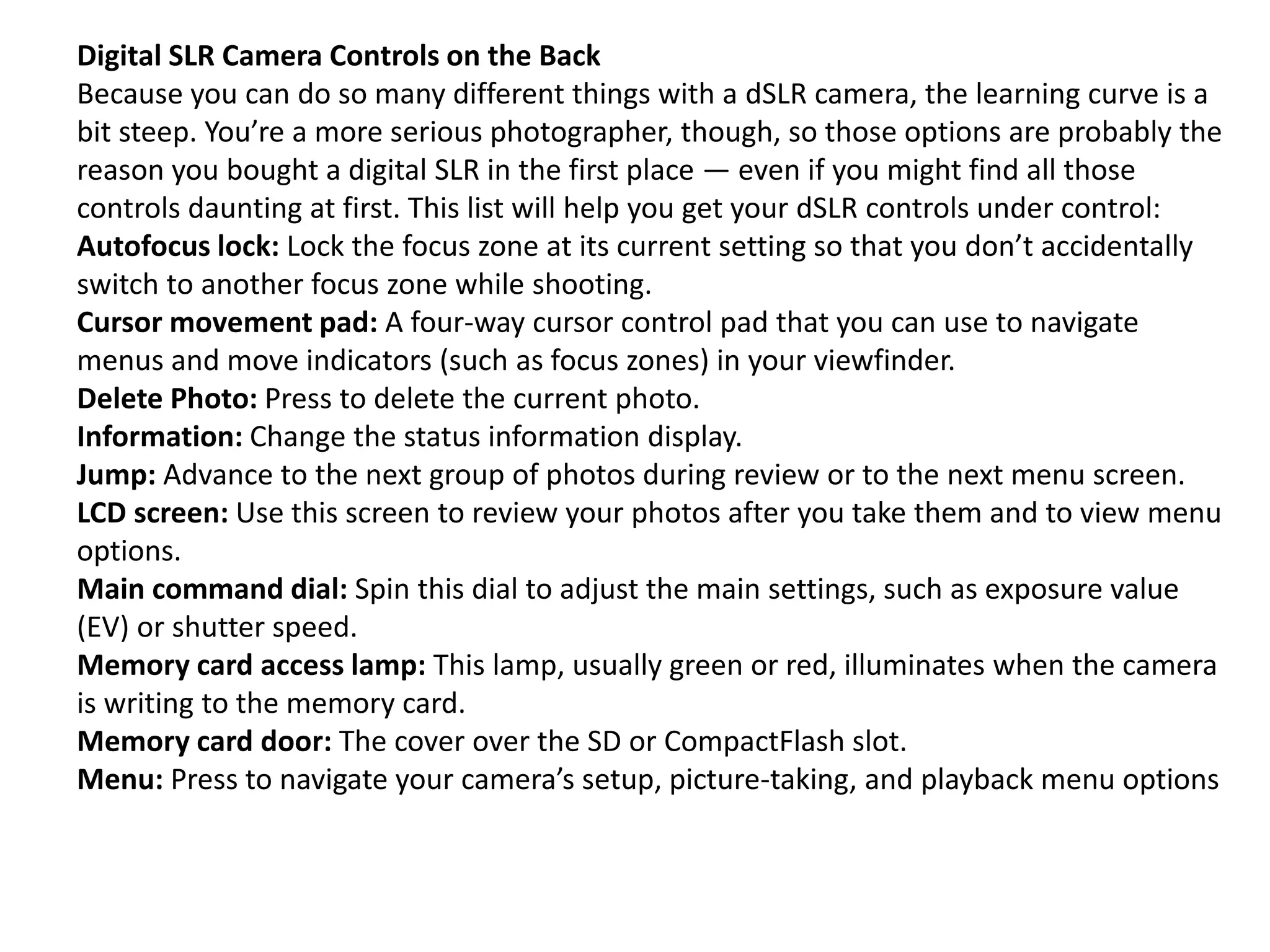
Digital SLR Camera Controls on the Back
Because you can do so many different things with a dSLR camera, the learning curve is a
bit steep. You’re a more serious photographer, though, so those options are probably the
reason you bought a digital SLR in the first place — even if you might find all those
controls daunting at first. This list will help you get your dSLR controls under control:
Autofocus lock: Lock the focus zone at its current setting so that you don’t accidentally
switch to another focus zone while shooting.
Cursor movement pad: A four-way cursor control pad that you can use to navigate
menus and move indicators (such as focus zones) in your viewfinder.
Delete Photo: Press to delete the current photo.
Information: Change the status information display.
Jump: Advance to the next group of photos during review or to the next menu screen.
LCD screen: Use this screen to review your photos after you take them and to view menu
options.
Main command dial: Spin this dial to adjust the main settings, such as exposure value
(EV) or shutter speed.
Memory card access lamp: This lamp, usually green or red, illuminates when the camera
is writing to the memory card.
Memory card door: The cover over the SD or CompactFlash slot.
Menu: Press to navigate your camera’s setup, picture-taking, and playback menu options
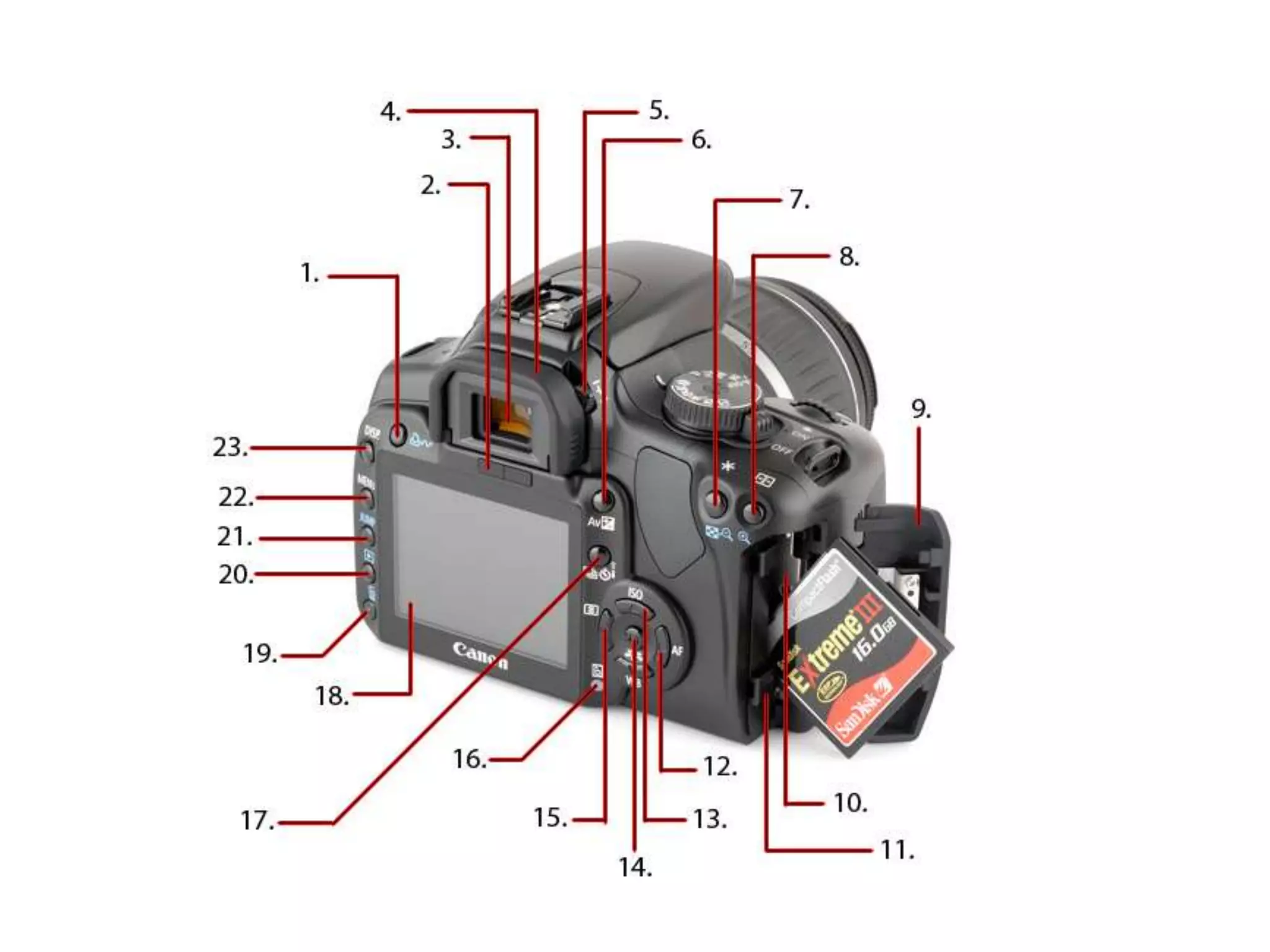
Mode dial
Shutter
release
Lens
release
button
LCD monitor
EF Lens mount index
(match the colours)
Mirror
Main dial
Red-eye reduction/ Self-timer lamp
Lens mount
Grip
Microphone
Contacts
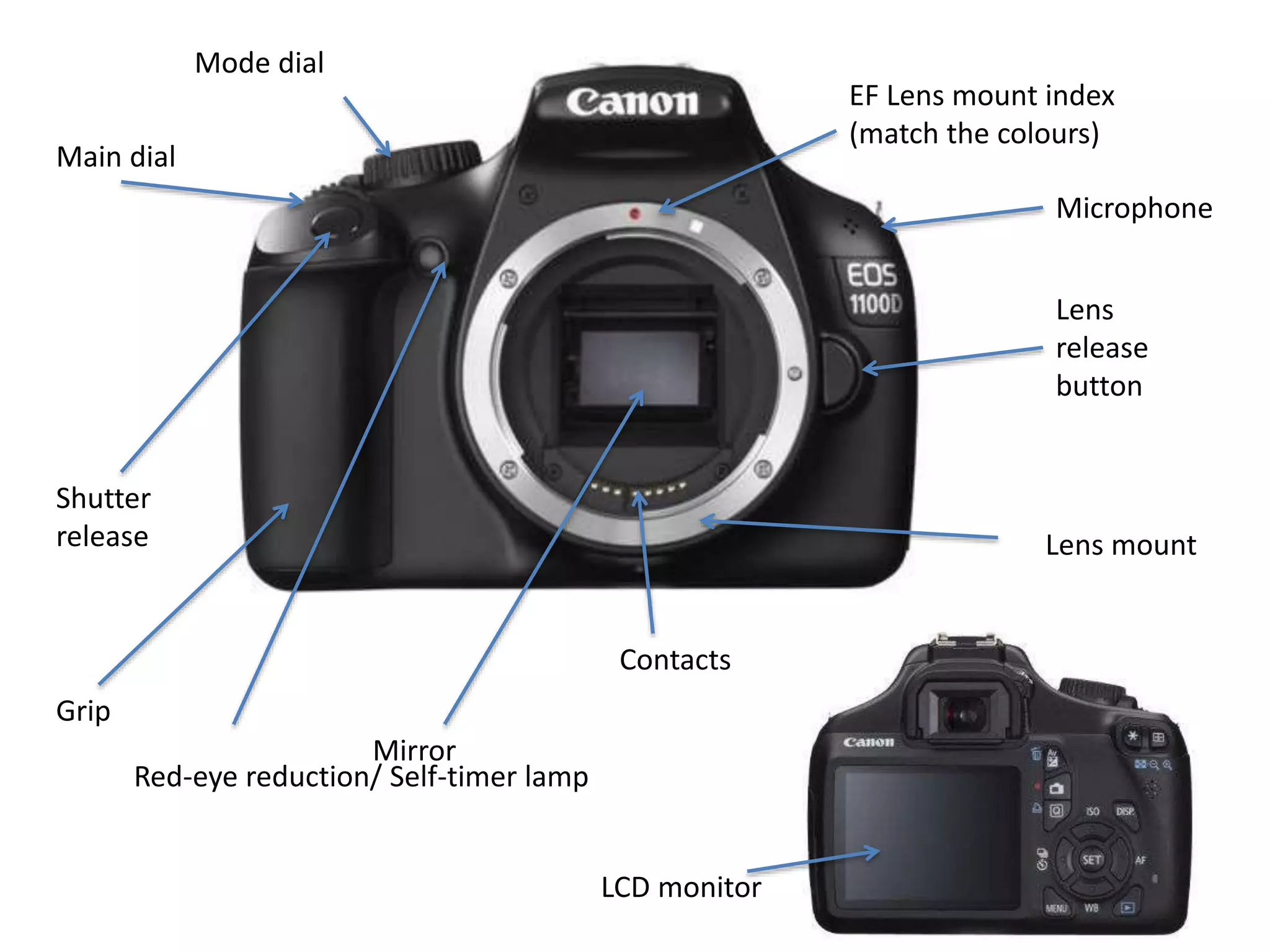
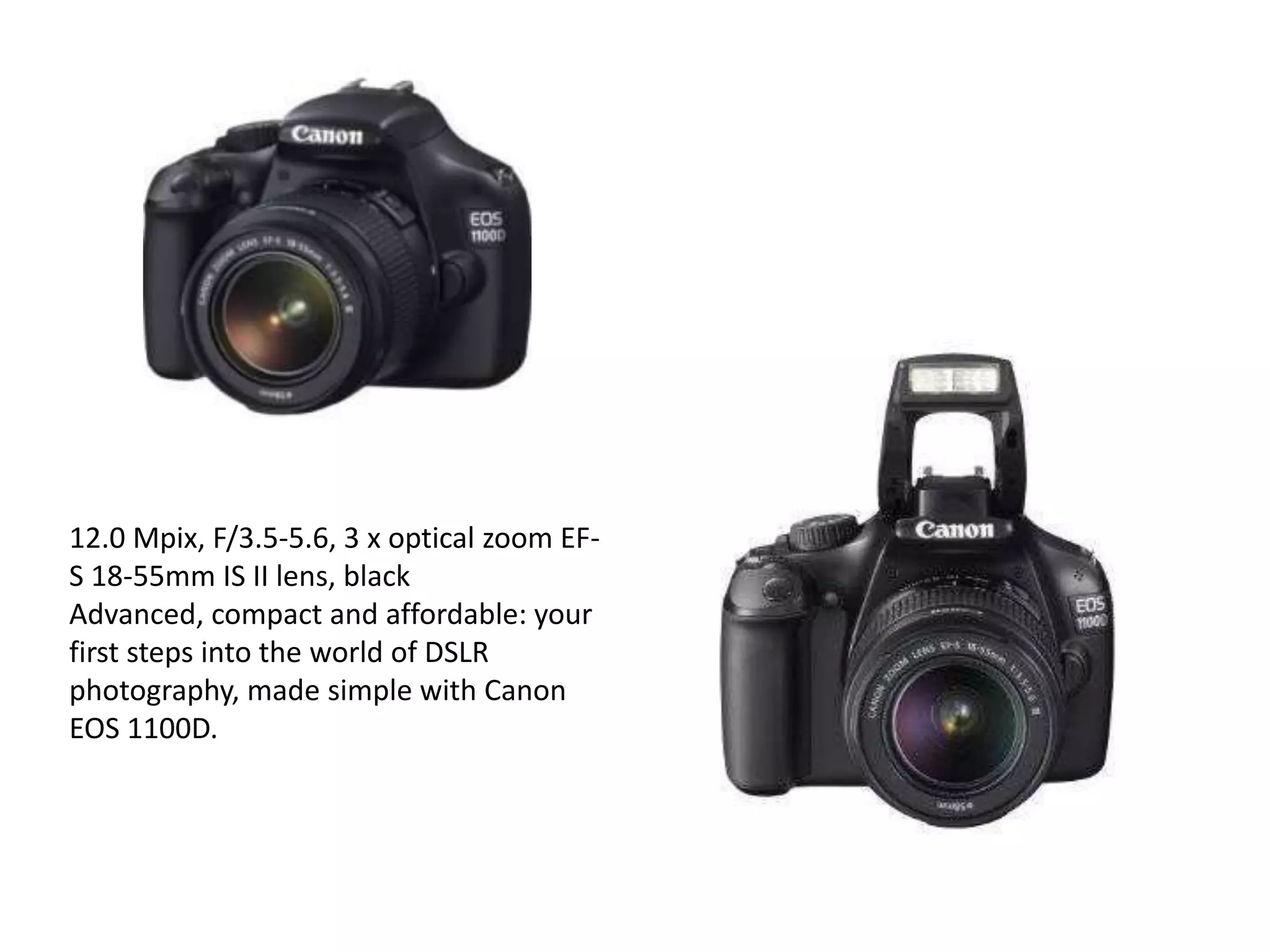
12.0 Mpix, F/3.5-5.6, 3 x optical zoom EF-
S 18-55mm IS II lens, black
Advanced, compact and affordable: your
first steps into the world of DSLR
photography, made simple with Canon
EOS 1100D.
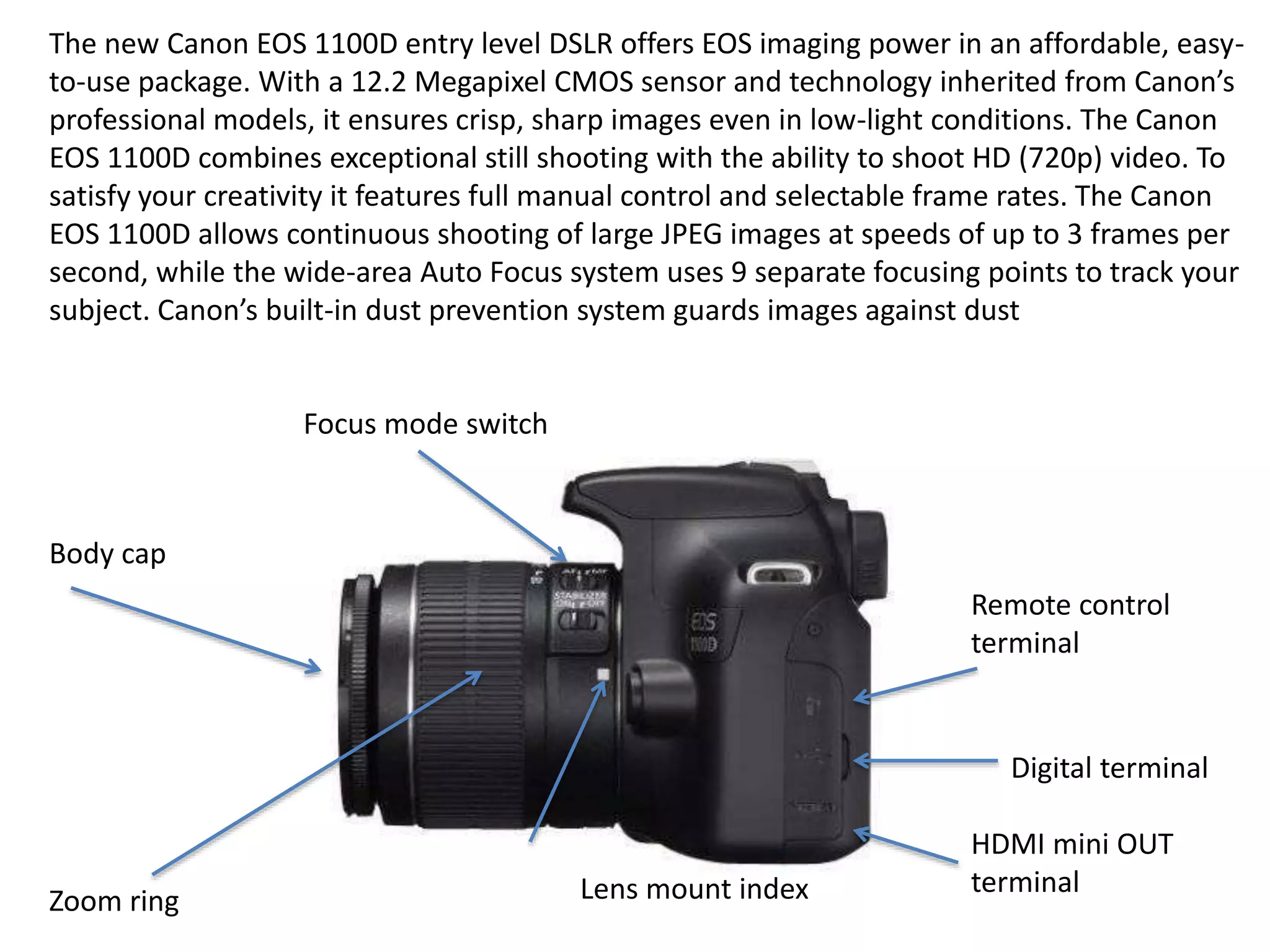
The new Canon EOS 1100D entry level DSLR offers EOS imaging power in an affordable, easy-
to-use package. With a 12.2 Megapixel CMOS sensor and technology inherited from Canon’s
professional models, it ensures crisp, sharp images even in low-light conditions. The Canon
EOS 1100D combines exceptional still shooting with the ability to shoot HD (720p) video. To
satisfy your creativity it features full manual control and selectable frame rates. The Canon
EOS 1100D allows continuous shooting of large JPEG images at speeds of up to 3 frames per
second, while the wide-area Auto Focus system uses 9 separate focusing points to track your
subject. Canon’s built-in dust prevention system guards images against dust
Body cap
Focus mode switch
Remote control
terminal
Digital terminal
HDMI mini OUT
terminal
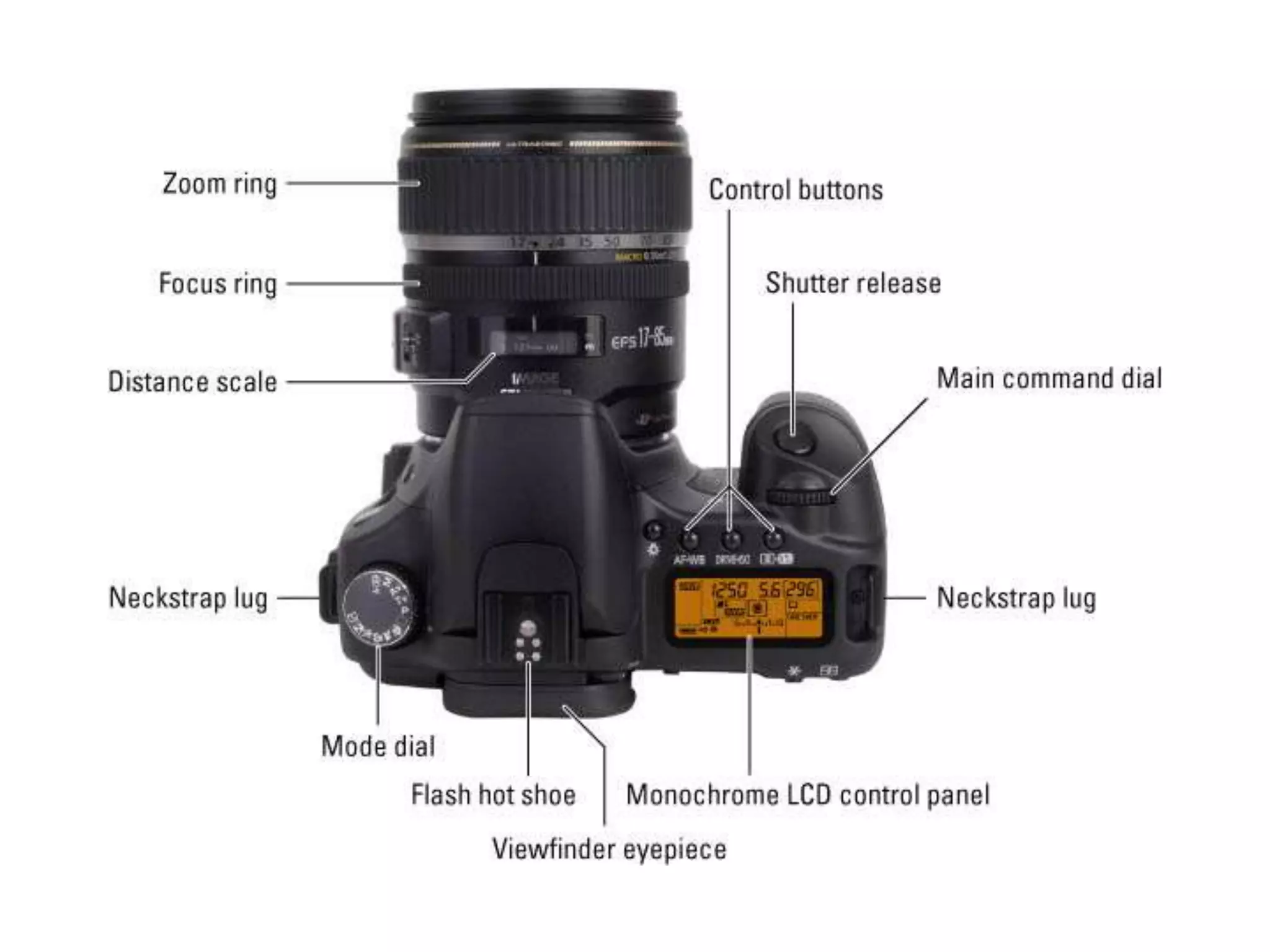
Zoom ring Lens mount index
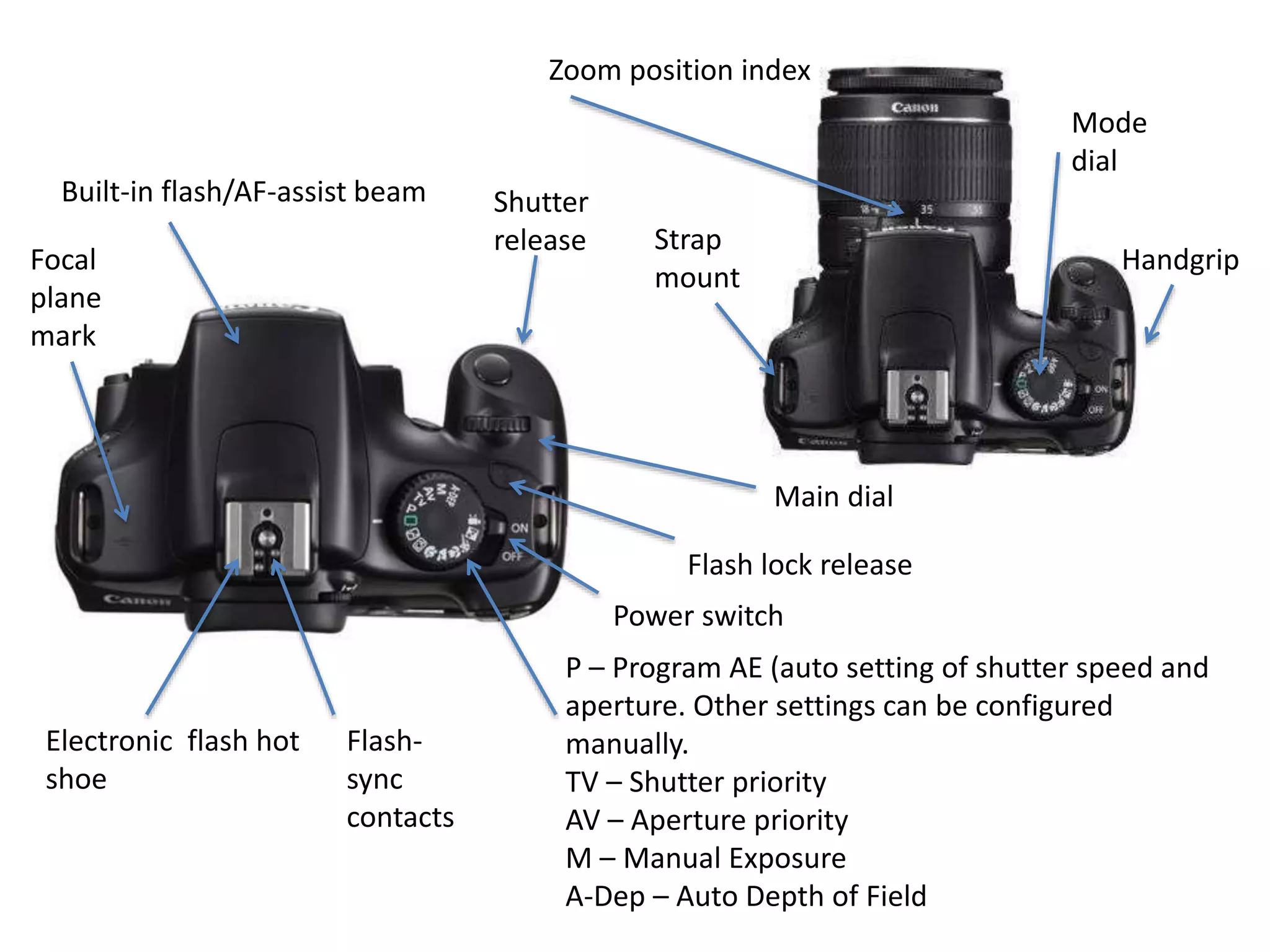
Electronic flash hot
shoe
Mode
dial
Shutter
release
Flash lock release
Main dial
Handgrip
P – Program AE (auto setting of shutter speed and
aperture. Other settings can be configured
manually.
TV – Shutter priority
AV – Aperture priority
M – Manual Exposure
A-Dep – Auto Depth of Field
Built-in flash/AF-assist beam
Strap
mount
Focal
plane
mark
Flash-
sync
contacts
Zoom position index
Power switch
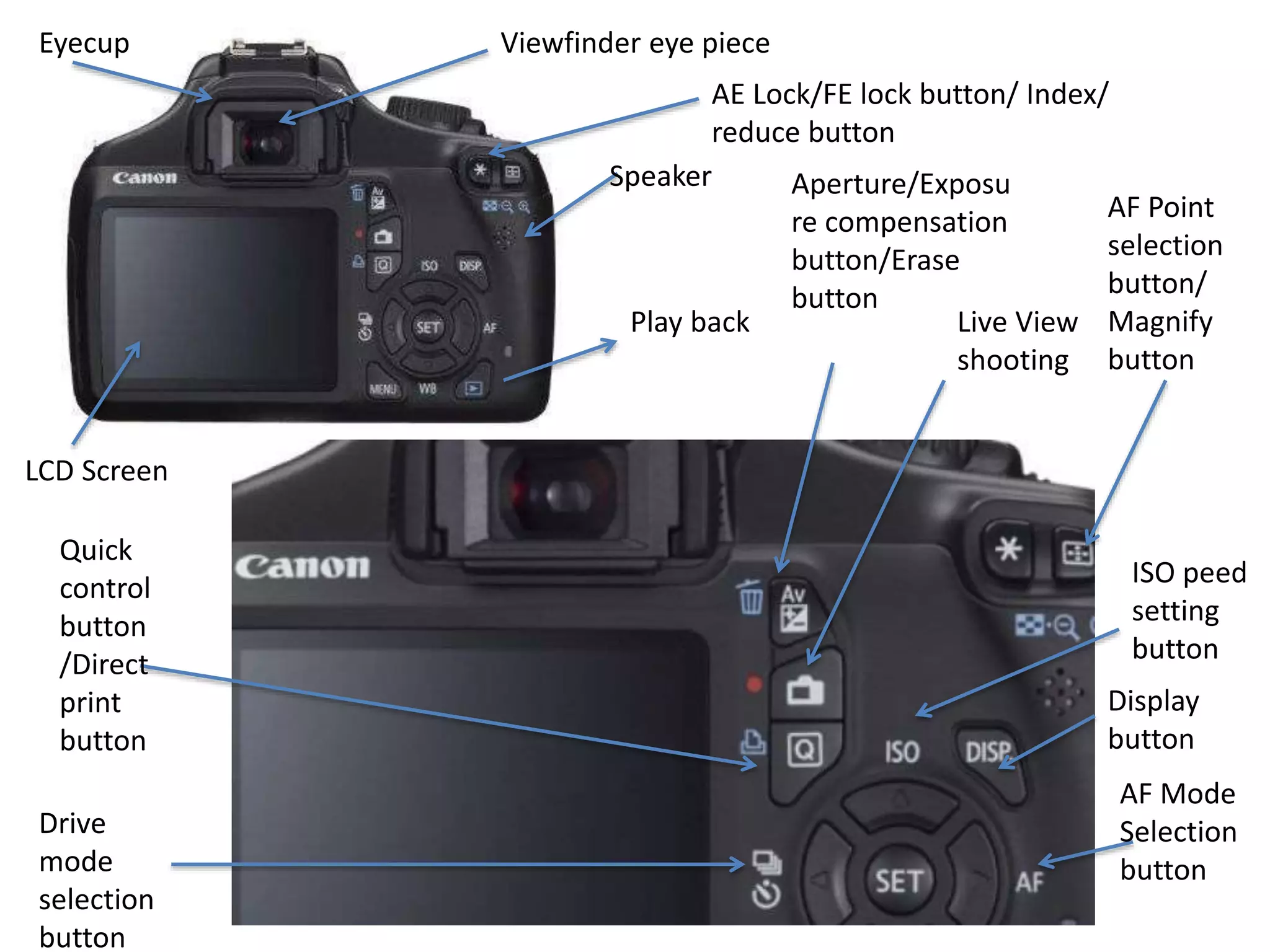
LCD Screen
Aperture/Exposu
re compensation
button/Erase
button
Play back
AF Point
selection
button/
Magnify
button
Viewfinder eye piece
Live View
shooting
Quick
control
button
/Direct
print
button
Drive
mode
selection
button
ISO peed
setting
button
AF Mode
Selection
button
Display
button
Speaker
Eyecup
AE Lock/FE lock button/ Index/
reduce button
Homework:
• Highlight any of the functions that you do not
understand and research what they do in
more detail. Create a bank of terms and
definitions for the ones you struggle to
understand or are unfamiliar to you.

Canon EOS 1100D Functions-Secondary Education Resource

  • 1.
    Canon EOS 1100D DSLRCamera What are the camera functions?
  • 2.
    Digital SLR CameraControls on the Front All those controls! What are they? If you’re working with your first digital SLR camera, all those controls might seem like a mystery to you. Let this diagram help you familiarize yourself with the controls on the front of your dSLR camera. This is not a Canon Camera, but the functions are similar
  • 5.
    Digital SLR CameraControls on the Back Because you can do so many different things with a dSLR camera, the learning curve is a bit steep. You’re a more serious photographer, though, so those options are probably the reason you bought a digital SLR in the first place — even if you might find all those controls daunting at first. This list will help you get your dSLR controls under control: Autofocus lock: Lock the focus zone at its current setting so that you don’t accidentally switch to another focus zone while shooting. Cursor movement pad: A four-way cursor control pad that you can use to navigate menus and move indicators (such as focus zones) in your viewfinder. Delete Photo: Press to delete the current photo. Information: Change the status information display. Jump: Advance to the next group of photos during review or to the next menu screen. LCD screen: Use this screen to review your photos after you take them and to view menu options. Main command dial: Spin this dial to adjust the main settings, such as exposure value (EV) or shutter speed. Memory card access lamp: This lamp, usually green or red, illuminates when the camera is writing to the memory card. Memory card door: The cover over the SD or CompactFlash slot. Menu: Press to navigate your camera’s setup, picture-taking, and playback menu options
  • 7.
    Mode dial Shutter release Lens release button LCD monitor EFLens mount index (match the colours) Mirror Main dial Red-eye reduction/ Self-timer lamp Lens mount Grip Microphone Contacts
  • 8.
    12.0 Mpix, F/3.5-5.6,3 x optical zoom EF- S 18-55mm IS II lens, black Advanced, compact and affordable: your first steps into the world of DSLR photography, made simple with Canon EOS 1100D.
  • 9.
    The new CanonEOS 1100D entry level DSLR offers EOS imaging power in an affordable, easy- to-use package. With a 12.2 Megapixel CMOS sensor and technology inherited from Canon’s professional models, it ensures crisp, sharp images even in low-light conditions. The Canon EOS 1100D combines exceptional still shooting with the ability to shoot HD (720p) video. To satisfy your creativity it features full manual control and selectable frame rates. The Canon EOS 1100D allows continuous shooting of large JPEG images at speeds of up to 3 frames per second, while the wide-area Auto Focus system uses 9 separate focusing points to track your subject. Canon’s built-in dust prevention system guards images against dust Body cap Focus mode switch Remote control terminal Digital terminal HDMI mini OUT terminal Zoom ring Lens mount index
  • 10.
    Electronic flash hot shoe Mode dial Shutter release Flashlock release Main dial Handgrip P – Program AE (auto setting of shutter speed and aperture. Other settings can be configured manually. TV – Shutter priority AV – Aperture priority M – Manual Exposure A-Dep – Auto Depth of Field Built-in flash/AF-assist beam Strap mount Focal plane mark Flash- sync contacts Zoom position index Power switch
  • 11.
    LCD Screen Aperture/Exposu re compensation button/Erase button Playback AF Point selection button/ Magnify button Viewfinder eye piece Live View shooting Quick control button /Direct print button Drive mode selection button ISO peed setting button AF Mode Selection button Display button Speaker Eyecup AE Lock/FE lock button/ Index/ reduce button
  • 12.
    Homework: • Highlight anyof the functions that you do not understand and research what they do in more detail. Create a bank of terms and definitions for the ones you struggle to understand or are unfamiliar to you.