NX3
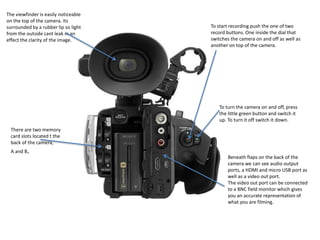
To start recording push the one of two
record buttons. One inside the dial that
switches the camera on and off as well as
another on top of the camera.
The viewfinder is easily noticeable
on the top of the camera. Its
surrounded by a rubber lip so light
from the outside cant leak in an
effect the clarity of the image.
To turn the camera on and off, press
the little green button and switch it
up. To turn it off switch it down.
Beneath flaps on the back of the
camera we can see audio output
ports, a HDMI and micro USB port as
well as a video out port.
The video out port can be connected
to a BNC field monitor which gives
you an accurate representation of
what you are filming.
There are two memory
card slots located t the
back of the camera,
A and B.
Turn the far most dial to alter the focus
A.K.A focus ring.
Turn the middle dial around the front
of the camera to zoom In or out of
focus.
Turn the closest and thinnest dial to
change the size of the iris/change the
aperture
To alter the shutter speed, spin this dial
located on a panel at the bottom left of the
camera. This is preset to shutter speed but it
can be changed to something else in the
camera settings. There is also a white
balance button which directs you straight to
white balance settings on the LCD screen.
Here is where you can change
the ISO/Gain to a high, medium
or low depending on what you
need at the time.
Audio levels can be manually altered
using two small dials on the left side
of the camera.
You can also switch between audio
input and the camera microphone
using the controls next to the audio
dials.
You can also access the menu using
the ‘menu’ button here.
Underneath where the LCD screen tucks away
when not in use is a panel of buttons
including the menu button, another record
button and many other settings.
Here is the LCD screen, its attached to a arm
which allows you to move the LCD around in
a variety of ways.
On the front right of the handle there are XLR
input ports which allows you to connect an
external microphone to the camera.
On the front of the camera is a lens
hood with barn doors which can be
opened and closed using a switch
on the side of the lens hood. This
protects the cameras fixed lens.
The camera has ND filters
which you can apply. Each
individual glass filter can be
put over the lens to lower
the f- stop by 3 or 4 units.
Multiple filters over each
other can lower the f-stop
more

Sony Nx3

  • 1.
  • 2.
    To start recordingpush the one of two record buttons. One inside the dial that switches the camera on and off as well as another on top of the camera. The viewfinder is easily noticeable on the top of the camera. Its surrounded by a rubber lip so light from the outside cant leak in an effect the clarity of the image. To turn the camera on and off, press the little green button and switch it up. To turn it off switch it down. Beneath flaps on the back of the camera we can see audio output ports, a HDMI and micro USB port as well as a video out port. The video out port can be connected to a BNC field monitor which gives you an accurate representation of what you are filming. There are two memory card slots located t the back of the camera, A and B.
  • 3.
    Turn the farmost dial to alter the focus A.K.A focus ring. Turn the middle dial around the front of the camera to zoom In or out of focus. Turn the closest and thinnest dial to change the size of the iris/change the aperture To alter the shutter speed, spin this dial located on a panel at the bottom left of the camera. This is preset to shutter speed but it can be changed to something else in the camera settings. There is also a white balance button which directs you straight to white balance settings on the LCD screen. Here is where you can change the ISO/Gain to a high, medium or low depending on what you need at the time. Audio levels can be manually altered using two small dials on the left side of the camera. You can also switch between audio input and the camera microphone using the controls next to the audio dials. You can also access the menu using the ‘menu’ button here.
  • 4.
    Underneath where theLCD screen tucks away when not in use is a panel of buttons including the menu button, another record button and many other settings. Here is the LCD screen, its attached to a arm which allows you to move the LCD around in a variety of ways. On the front right of the handle there are XLR input ports which allows you to connect an external microphone to the camera. On the front of the camera is a lens hood with barn doors which can be opened and closed using a switch on the side of the lens hood. This protects the cameras fixed lens. The camera has ND filters which you can apply. Each individual glass filter can be put over the lens to lower the f- stop by 3 or 4 units. Multiple filters over each other can lower the f-stop more