NX3
CAMERA SETTINGS
This is the view finder, it allows you to rest
your eye to see what is being recorded
whilst not allowing light in
Power button to turn the
camera on and off
This where the SD cards can be
inserted into the camera to store the
footage that you have captured
Record button to
record footage
BNC output allows to attach to a
professional field monitor to get
an accurate depiction of what you
are recording
Analog audio outputs which allows
for two audio channels which can
record individually and together
HDMI output to transfer
video footage
Allows you to transfer footage directly
from the cameraThe Direct Current is how you can
charge the camera
MIC holder to attach a rifle
MIC to the camera
The LCD screen which
allows you to see footage
you are recording
This is the second zoom feature which
allows you to zoom in whilst holding
the camera from the top
The second record button to
access whilst holding the camera
from the top
Two XLR inputs to
allow you to attach a
MIC to record sound
First zoom feature which allows
you to zoom in whilst holding the
camera from the side
The next largest on the
camera allows you to zoom
the most professional way
The largest ring allows you to
manually focus the camera
when recording
The smallest ring on the camera
allows you to control the exposure of
the camera
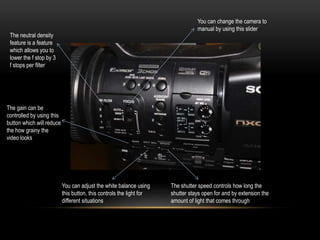
You can change the camera to
manual by using this slider
The neutral density
feature is a feature
which allows you to
lower the f stop by 3
f stops per filter
The gain can be
controlled by using this
button which will reduce
the how grainy the
video looks
You can adjust the white balance using
this button, this controls the light for
different situations
The shutter speed controls how long the
shutter stays open for and by extension the
amount of light that comes through
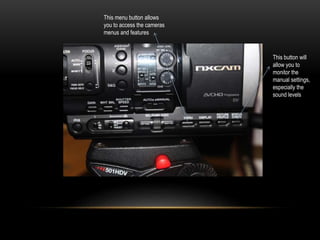
This menu button allows
you to access the cameras
menus and features
This button will
allow you to
monitor the
manual settings,
especially the
sound levels
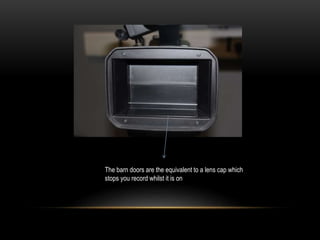
The barn doors are the equivalent to a lens cap which
stops you record whilst it is on

Nx3 powerpoint

  • 1.
  • 2.
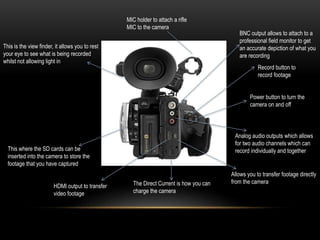
    This is theview finder, it allows you to rest your eye to see what is being recorded whilst not allowing light in Power button to turn the camera on and off This where the SD cards can be inserted into the camera to store the footage that you have captured Record button to record footage BNC output allows to attach to a professional field monitor to get an accurate depiction of what you are recording Analog audio outputs which allows for two audio channels which can record individually and together HDMI output to transfer video footage Allows you to transfer footage directly from the cameraThe Direct Current is how you can charge the camera MIC holder to attach a rifle MIC to the camera
  • 3.
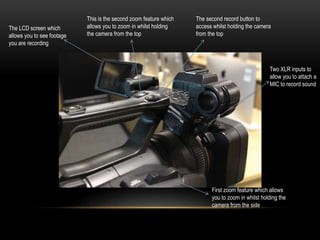
    The LCD screenwhich allows you to see footage you are recording This is the second zoom feature which allows you to zoom in whilst holding the camera from the top The second record button to access whilst holding the camera from the top Two XLR inputs to allow you to attach a MIC to record sound First zoom feature which allows you to zoom in whilst holding the camera from the side
  • 4.
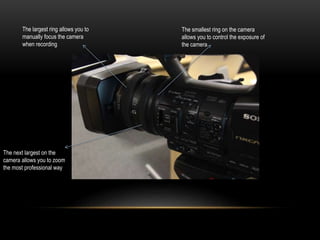
    The next largeston the camera allows you to zoom the most professional way The largest ring allows you to manually focus the camera when recording The smallest ring on the camera allows you to control the exposure of the camera
  • 5.
    You can changethe camera to manual by using this slider The neutral density feature is a feature which allows you to lower the f stop by 3 f stops per filter The gain can be controlled by using this button which will reduce the how grainy the video looks You can adjust the white balance using this button, this controls the light for different situations The shutter speed controls how long the shutter stays open for and by extension the amount of light that comes through
  • 6.
    This menu buttonallows you to access the cameras menus and features This button will allow you to monitor the manual settings, especially the sound levels
  • 7.
    The barn doorsare the equivalent to a lens cap which stops you record whilst it is on