View finder
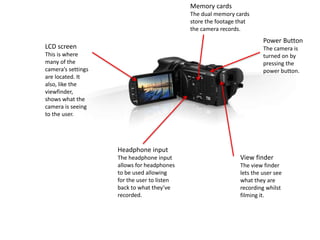
The view finder
lets the user see
what they are
recording whilst
filming it.
Headphone input
The headphone input
allows for headphones
to be used allowing
for the user to listen
back to what they’ve
recorded.
LCD screen
This is where
many of the
camera’s settings
are located. It
also, like the
viewfinder,
shows what the
camera is seeing
to the user.
Memory cards
The dual memory cards
store the footage that
the camera records.
Power Button
The camera is
turned on by
pressing the
power button.
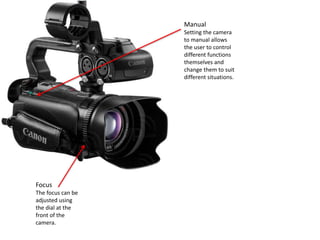
Manual
Setting the camera
to manual allows
the user to control
different functions
themselves and
change them to suit
different situations.
Focus
The focus can be
adjusted using
the dial at the
front of the
camera.
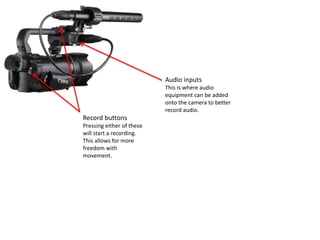
Record buttons
Pressing either of these
will start a recording.
This allows for more
freedom with
movement.
Audio inputs
This is where audio
equipment can be added
onto the camera to better
record audio.
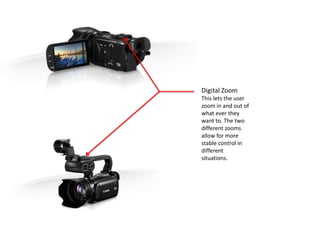
Digital Zoom
This lets the user
zoom in and out of
what ever they
want to. The two
different zooms
allow for more
stable control in
different
situations.
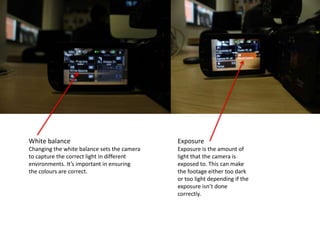
White balance
Changing the white balance sets the camera
to capture the correct light in different
environments. It’s important in ensuring
the colours are correct.
Exposure
Exposure is the amount of
light that the camera is
exposed to. This can make
the footage either too dark
or too light depending if the
exposure isn’t done
correctly.
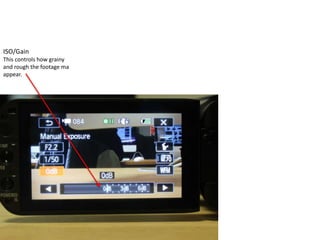
ISO/Gain
This controls how grainy
and rough the footage ma
appear.

Xa10 showcase

  • 1.
    View finder The viewfinder lets the user see what they are recording whilst filming it. Headphone input The headphone input allows for headphones to be used allowing for the user to listen back to what they’ve recorded. LCD screen This is where many of the camera’s settings are located. It also, like the viewfinder, shows what the camera is seeing to the user. Memory cards The dual memory cards store the footage that the camera records. Power Button The camera is turned on by pressing the power button.
  • 2.
    Manual Setting the camera tomanual allows the user to control different functions themselves and change them to suit different situations. Focus The focus can be adjusted using the dial at the front of the camera.
  • 3.
    Record buttons Pressing eitherof these will start a recording. This allows for more freedom with movement. Audio inputs This is where audio equipment can be added onto the camera to better record audio.
  • 4.
    Digital Zoom This letsthe user zoom in and out of what ever they want to. The two different zooms allow for more stable control in different situations.
  • 5.
    White balance Changing thewhite balance sets the camera to capture the correct light in different environments. It’s important in ensuring the colours are correct. Exposure Exposure is the amount of light that the camera is exposed to. This can make the footage either too dark or too light depending if the exposure isn’t done correctly.
  • 6.
    ISO/Gain This controls howgrainy and rough the footage ma appear.