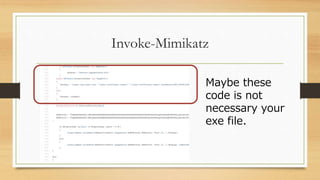
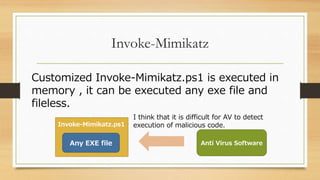
This document discusses techniques for bypassing antivirus software using PowerShell. It describes Empire, a post-exploitation framework that allows attackers to execute scripts on victim machines using PowerShell or Python. These scripts regularly connect to a C2 server using HTTP/HTTPS. It then focuses on how Empire's PowerShell scripts can bypass detection through obfuscation techniques like using alternative casing, escape characters, and encoding files in base64. Custom Invoke-Mimikatz scripts can execute any EXE file in memory, making detection difficult for antivirus software. Limiting PowerShell access and monitoring execution logs are recommended defenses.


![Technique of Obufcation 2
$GPF=[rEF].AsSEMBly.GetTypE('System.Managem
ent.Automation.Utils')."GETFiE`lD"('cachedGroup
PolicySettings','N'+'onPublic,Static');
Even if you write method or attribute value as a
character string, it is executed like “GETFiE`lD”.
> “abcd”.”Contains”(“bc”) ⇒ True](https://image.slidesharecdn.com/bypassingantivirususingpowershell-190102132855/85/Bypassing-anti-virus-using-powershell-13-320.jpg)
![Technique of Obufcation 3
$GPF=[rEF].AsSEMBly.GetTypE('System.Managem
ent.Automation.Utils')."GETFiE`lD"('cachedGroup
PolicySettings','N'+'onPublic,Static');
“`” is an escape character and makes no sense
except reserved words.](https://image.slidesharecdn.com/bypassingantivirususingpowershell-190102132855/85/Bypassing-anti-virus-using-powershell-14-320.jpg)

![Technique of Obufcation 5
$GPF=[rEF].AsSEMBly.GetTypE('System.Managem
ent.Automation.Utils')."GETFiE`lD"('cachedGroup
PolicySettings','N'+'onPublic,Static');
“`l” is no meaning. “GETFiE`lD” is same GetField.](https://image.slidesharecdn.com/bypassingantivirususingpowershell-190102132855/85/Bypassing-anti-virus-using-powershell-16-320.jpg)




![[CB16] Invoke-Obfuscation: PowerShell obFUsk8tion Techniques & How To (Try To...](https://cdn.slidesharecdn.com/ss_thumbnails/cb16bohannonen-161109042710-thumbnail.jpg?width=640&height=640&fit=bounds)


