Unit 18: CADD in Construction
Lesson Objective
Be able to explain the use of
Building Information Modelling
in buildings
Unit 18: CADD in Construction
Building Information Modelling
Click to view
Basic overview to BIM
Unit 18: CADD in Construction
Background to BIM
• Increased competitive pressure
• Time
• Cost
• Quality
• Industry alignment
• Integrated practices
• Greater control over supply team
• Lean Practices
• Waste reduction
• Off site construction
Building Information Modelling
Unit 18: CADD in Construction
What are the aims of BIM?
• Faster and more economic delivery of projects with less
environmental impact
• Create value in every stage of the process (Plan – Design –
Build – Manage)
• User analysis to optimise sustainability of the life cycle.
• Visualise design ideas
• Simulate multiple alternatives -Ability to simulate projects before
they are built (higher quality outcome)
• Identify clashes
• Communicate intent - Accurate documentation
• Improve productivity - Savings in time and money with improved
coordination
Building Information Modelling
Unit 18: CADD in Construction
• Manufacture
• Model
• Color
• Link to specification
• BREEAM Information
Building Information Modelling
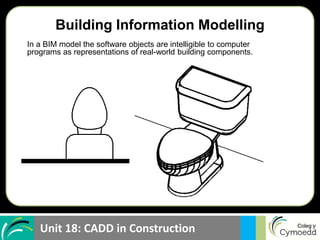
In a BIM model the software objects are intelligible to computer
programs as representations of real-world building components.
Unit 18: CADD in Construction
Building Information Modelling
Unit 18: CADD in Construction 8
Building Information Modelling
BIM is not software!
Unit 18: CADD in Construction
Software is a ‘Tool’ not BIM
Building Information Modelling
Unit 18: CADD in Construction
• Autodesk
– Revit
– Autocad
– Navisworks
• Graphisoft
– Archicad
• Bently
– Bently Arcitecture
– RAM Steel
• Onuma
– OPS
Principal software companies…
Building Information Modelling
Unit 18: CADD in Construction
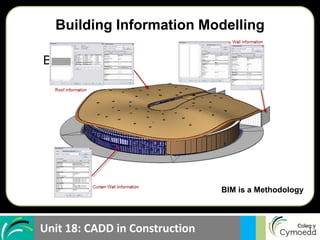
BIM is a methodology of gathering
and maintaining information
about a building for quick
decision making throughout the
life cycle or facility cycle of the
building.
BIM is a Methodology
Building Information Modelling
Unit 18: CADD in Construction
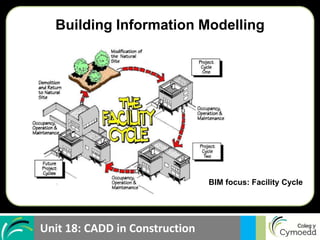
• Pre design
• Design
• Construction
• Operation
BIM focus: Facility Cycle
Building Information Modelling
Unit 18: CADD in Construction
Who uses the information from BIM?
• Owners
• Planners
• Realtors
• Appraisers
• Mortgage Bankers
• Architects
• Engineers
• Cost & Quantity Estimators
• Specifiers
• Contracts & Lawyers
• Construction Contractors
• Sub-Contractors
• Fabricators
• Code Officials
• Facility Managers
• Maintenance & Sustainment
• Renovation & Restoration
• Disposal & Recycling Scoping,
Testing, Simulation
• Safety & Occupational Health
• Environmental & NEPA
• Plant Operations
• Energy, LEED
• Space & Security
• Network Managers
• CIO’s
• Risk Management
• Occupant Support
• First Responders
Building Information Modelling
Unit 18: CADD in Construction
What is information Modeling?
• 3d Model
• Energy Model
• 4d Model - time
• 5d Model - time and cost
• Business Model
• Financial Model
• Safety plan
• Maintenance plan
Building Information Modelling
Unit 18: CADD in Construction
Types of Models
• Design Models
– Architecture
– Civil
– Structural
– Mechanical
– Plumbing
– Electrical
• Construction Document Models
– Architecture
– Civil
– Structural
– Mechanical
– Plumbing
– Electrical
– Specification
• BREEAM Models
– Energy
– Day lighting
• Contractor Models
– Architecture
– Civil
– Structural
– Mechanical
– Plumbing
– Electrical
– Shop drawing
– Material literature
• Facility Management Models
Building Information Modelling
Unit 18: CADD in Construction
BIM Standards
• National BIM Standard
• UK BIM Standard
• GSA - 3D-4D Building Information Modeling
• AGC - The Contractors Guide to BIM
• U.S. National CAD Standard
Building Information Modelling
Unit 18: CADD in Construction
Running a BIM Project
 Guidelines for the development and use of the models
 Guidelines for Information Management
 Guidelines for a BIM Execution Plan
 Project Participants
 Models to be used & content
 Contract & Record Documents
 Areas of the project
 Schedule (delivery and updates)
 Protocols for submission
 Coordinate system & dimension accuracy
 File format, naming, structure
 Software to be used
Building Information Modelling
Unit 18: CADD in Construction
 Protocols
 Coordination and Conflicts
 Model Ownership & Requirements
 File Formats
 Responsibilities
 Cost Estimating
 Scheduling
 Level of Development defines content requirements and authorised use
 Level 100-”used for understanding the requirements ” (Programming)
 Level 200-”elements modeled as generalized assemblies” (Schematic Design)
 Level 300- “elements modeled as specific assemblies” (Construction Documents)
 Level 400-”fabrication, assembly and detailing information (Construction)
 Level 500 -”elements modeled as constructed” (O&M)
Running a BIM Project
Building Information Modelling
Unit 18: CADD in Construction
BIM Execution Plan
• Set clear goals & objectives across organization & teams
• Increase accountability and productivity
• Standardize your communication methods
• Define roles and responsibilities
• Bind all parties early in the Request For Proposals process
• Control your project costs, schedule, scope and quality
Building Information Modelling
Unit 18: CADD in Construction
Communication
Building Information Modelling
Unit 18: CADD in Construction
Building Information Modelling
Unit 18: CADD in Construction
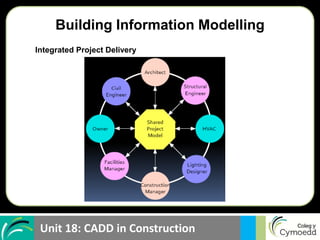
Integrated Project Delivery
Building Information Modelling
Unit 18: CADD in Construction
Duct near Grid D4 appears to
be going through a beam
Clash Detection
Building Information Modelling
Unit 18: CADD in Construction
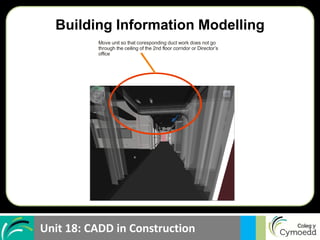
Move unit so that coresponding duct work does not go
through the ceiling of the 2nd floor corridor or Director’s
office
Building Information Modelling
Unit 18: CADD in Construction
Facility Data that Could Be Included in BIM
 Planning scenarios and site information
 Architectural Program
 Floor plans
 Space Functions
 Classified areas, vaults etc.
 Area calculations
 Specifications
 Contract documents
 Legal description
 Change orders
 Supporting documentation for litigation
 Shop drawings
 Procurement documents
 Progress photographs
 Alarm diagrams
 Warranty data
 Cost Estimates
 Invoices
 Purchases requests
 Organizational occupants
 Personnel lists
 Seating plans
 Handicap designation
 Network diagrams
 Hazardous materials
 Operating manuals
 Maintenance records
 Inspection records
 Electronic 3d model
 Simulations
 Continuation of operations plan
 Disaster Recovery Plans
 Contingency plans
 Furniture inventory
Building Information Modelling
Unit 18: CADD in Construction
Building Information Modelling
Task
In groups of 2/3 list the advantages and disadvantages of
using BIM.
List the advantages and disadvantages of using a 2D
CAD package.
Identify who benefits in the team

Building Information modeling.ppt

  • 1.
    Unit 18: CADDin Construction Lesson Objective Be able to explain the use of Building Information Modelling in buildings
  • 2.
    Unit 18: CADDin Construction Building Information Modelling Click to view Basic overview to BIM
  • 3.
    Unit 18: CADDin Construction Background to BIM • Increased competitive pressure • Time • Cost • Quality • Industry alignment • Integrated practices • Greater control over supply team • Lean Practices • Waste reduction • Off site construction Building Information Modelling
  • 4.
    Unit 18: CADDin Construction What are the aims of BIM? • Faster and more economic delivery of projects with less environmental impact • Create value in every stage of the process (Plan – Design – Build – Manage) • User analysis to optimise sustainability of the life cycle. • Visualise design ideas • Simulate multiple alternatives -Ability to simulate projects before they are built (higher quality outcome) • Identify clashes • Communicate intent - Accurate documentation • Improve productivity - Savings in time and money with improved coordination Building Information Modelling
  • 5.
    Unit 18: CADDin Construction • Manufacture • Model • Color • Link to specification • BREEAM Information Building Information Modelling In a BIM model the software objects are intelligible to computer programs as representations of real-world building components.
  • 6.
    Unit 18: CADDin Construction Building Information Modelling
  • 7.
    Unit 18: CADDin Construction 8 Building Information Modelling BIM is not software!
  • 8.
    Unit 18: CADDin Construction Software is a ‘Tool’ not BIM Building Information Modelling
  • 9.
    Unit 18: CADDin Construction • Autodesk – Revit – Autocad – Navisworks • Graphisoft – Archicad • Bently – Bently Arcitecture – RAM Steel • Onuma – OPS Principal software companies… Building Information Modelling
  • 10.
    Unit 18: CADDin Construction BIM is a methodology of gathering and maintaining information about a building for quick decision making throughout the life cycle or facility cycle of the building. BIM is a Methodology Building Information Modelling
  • 11.
    Unit 18: CADDin Construction • Pre design • Design • Construction • Operation BIM focus: Facility Cycle Building Information Modelling
  • 12.
    Unit 18: CADDin Construction Who uses the information from BIM? • Owners • Planners • Realtors • Appraisers • Mortgage Bankers • Architects • Engineers • Cost & Quantity Estimators • Specifiers • Contracts & Lawyers • Construction Contractors • Sub-Contractors • Fabricators • Code Officials • Facility Managers • Maintenance & Sustainment • Renovation & Restoration • Disposal & Recycling Scoping, Testing, Simulation • Safety & Occupational Health • Environmental & NEPA • Plant Operations • Energy, LEED • Space & Security • Network Managers • CIO’s • Risk Management • Occupant Support • First Responders Building Information Modelling
  • 13.
    Unit 18: CADDin Construction What is information Modeling? • 3d Model • Energy Model • 4d Model - time • 5d Model - time and cost • Business Model • Financial Model • Safety plan • Maintenance plan Building Information Modelling
  • 14.
    Unit 18: CADDin Construction Types of Models • Design Models – Architecture – Civil – Structural – Mechanical – Plumbing – Electrical • Construction Document Models – Architecture – Civil – Structural – Mechanical – Plumbing – Electrical – Specification • BREEAM Models – Energy – Day lighting • Contractor Models – Architecture – Civil – Structural – Mechanical – Plumbing – Electrical – Shop drawing – Material literature • Facility Management Models Building Information Modelling
  • 15.
    Unit 18: CADDin Construction BIM Standards • National BIM Standard • UK BIM Standard • GSA - 3D-4D Building Information Modeling • AGC - The Contractors Guide to BIM • U.S. National CAD Standard Building Information Modelling
  • 16.
    Unit 18: CADDin Construction Running a BIM Project  Guidelines for the development and use of the models  Guidelines for Information Management  Guidelines for a BIM Execution Plan  Project Participants  Models to be used & content  Contract & Record Documents  Areas of the project  Schedule (delivery and updates)  Protocols for submission  Coordinate system & dimension accuracy  File format, naming, structure  Software to be used Building Information Modelling
  • 17.
    Unit 18: CADDin Construction  Protocols  Coordination and Conflicts  Model Ownership & Requirements  File Formats  Responsibilities  Cost Estimating  Scheduling  Level of Development defines content requirements and authorised use  Level 100-”used for understanding the requirements ” (Programming)  Level 200-”elements modeled as generalized assemblies” (Schematic Design)  Level 300- “elements modeled as specific assemblies” (Construction Documents)  Level 400-”fabrication, assembly and detailing information (Construction)  Level 500 -”elements modeled as constructed” (O&M) Running a BIM Project Building Information Modelling
  • 18.
    Unit 18: CADDin Construction BIM Execution Plan • Set clear goals & objectives across organization & teams • Increase accountability and productivity • Standardize your communication methods • Define roles and responsibilities • Bind all parties early in the Request For Proposals process • Control your project costs, schedule, scope and quality Building Information Modelling
  • 19.
    Unit 18: CADDin Construction Communication Building Information Modelling
  • 20.
    Unit 18: CADDin Construction Building Information Modelling
  • 21.
    Unit 18: CADDin Construction Integrated Project Delivery Building Information Modelling
  • 22.
    Unit 18: CADDin Construction Duct near Grid D4 appears to be going through a beam Clash Detection Building Information Modelling
  • 23.
    Unit 18: CADDin Construction Move unit so that coresponding duct work does not go through the ceiling of the 2nd floor corridor or Director’s office Building Information Modelling
  • 24.
    Unit 18: CADDin Construction Facility Data that Could Be Included in BIM  Planning scenarios and site information  Architectural Program  Floor plans  Space Functions  Classified areas, vaults etc.  Area calculations  Specifications  Contract documents  Legal description  Change orders  Supporting documentation for litigation  Shop drawings  Procurement documents  Progress photographs  Alarm diagrams  Warranty data  Cost Estimates  Invoices  Purchases requests  Organizational occupants  Personnel lists  Seating plans  Handicap designation  Network diagrams  Hazardous materials  Operating manuals  Maintenance records  Inspection records  Electronic 3d model  Simulations  Continuation of operations plan  Disaster Recovery Plans  Contingency plans  Furniture inventory Building Information Modelling
  • 25.
    Unit 18: CADDin Construction Building Information Modelling Task In groups of 2/3 list the advantages and disadvantages of using BIM. List the advantages and disadvantages of using a 2D CAD package. Identify who benefits in the team