Developing Eclipse Pluginsלירן זילכהמנכ"ל משותףLiran.zelkha@alunasoft.com
AlunaIsrael’s leading Java/JavaEE and SOA consulting companyCustomers:
Eclipse plug-in architectureSome of this material was taken from a plug-in course developed by the ECESIS project.
Eclipse plug-in architectureFlexible, structured around extension points and plug-insThis architecture allows for:Other tools to be used within the platformOther tools to be further extendedIntegration between tools and the platformNo need to wait for new product releases
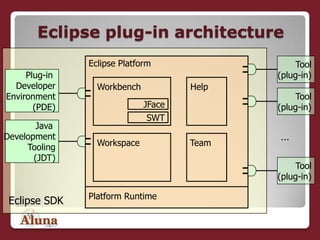
Eclipse plug-in architectureTool(plug-in)Tool(plug-in)Tool(plug-in)Plug-in DeveloperEnvironment(PDE)Java DevelopmentTooling(JDT)Eclipse PlatformWorkbenchHelpJFaceSWT…WorkspaceTeamPlatform RuntimeEclipse SDK
Platform runtimeIn the Eclipse, everything is plug-in except the Platform Runtime (the kernel)All other subsystems build up on the Platform Runtime following the rules of plug-insThe Basic platform includes:Resources ManagementWorkbenchTeamDebugHelp
Extension pointsDescribe additional functionality that could be integrated with the platformExternal tools extend the platform to  bring specific functionalityJava Development Tooling (JDT) and Plug-in Development Environment (PDE) are external tools integrated with the platform
Extension pointsThere are two levels of extending Eclipse:Extending core platformExtending existing extensionsExtension points may have a corresponding API interfaceDescribes what should be provided in the extension
Plug-insDefine extension pointsEach plug-in defines its own set of extension pointsImplement specialized functionalityUsually key functionality that does not already exist in the platformProvide their own set of APIsUsed for further extension of their functionalitiesAre external, but fully integrated
Plug-insImplement behavior defined through extension point API interfaceCan extend named extension points from Eclipse or extension points of other plug-insCan declare an extension point and provide an extension to itAre developed in Java programming language
What's in a plug-in?A JAR fileAn archive with the plug-in codeplugin.xmlManifest that describes plug-inabout.htmlTextual description of the plug-inplugin.propertiesPlugin-in properties
Describing plug-insAn extension to the platform has to be registered somewhereEach plug-in has a manifest file that describes:Location of the plug-in codeExtensions added by the plug-in
Describing plug-insThe manifest file is plugin.xml. There are Eclipse tools that make it easy to edit the file without using XML directly.The manifest describes:Name, id, and version of the plug-inList of other plug-ins (and versions) required by the plug-in describedExtension pointsWhere the plug-in code is located
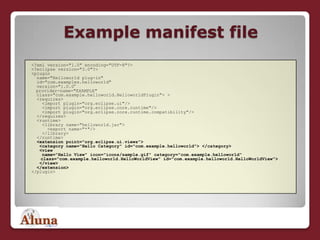
Example manifest file<?xml version="1.0" encoding="UTF-8"?><?eclipse version="3.0"?><plugin   name="Helloworld plug-in"   id="com.examples.helloworld"   version="1.0.0“provider-name="EXAMPLE"  class="com.example.helloworld.HelloworldPlugin"> >   <requires>    <import plugin="org.eclipse.ui"/>    <import plugin="org.eclipse.core.runtime"/>    <import plugin="org.eclipse.core.runtime.compatibility"/>  </requires>   <runtime>    <library name="helloworld.jar">      <export name="*"/>    </library>    </runtime>   <extension point="org.eclipse.ui.views">   <category name="Hello Category" id="com.example.helloworld"> </category>    <view     name="Hello View" icon="icons/sample.gif" category="com.example.helloworld" class="com.example.helloworld.HelloWorldView" id="com.example.helloworld.HelloWorldView">    </view>   </extension></plugin>
Packaging plug-insPlug-ins are packaged as Java Archives – JAR filesArchives are named using naming convention:<id>_<version>.jar<id> is the identifier<version> is the full version number from the manifest fileFor example: org.eclipse.demo. plugin.simple_1.0.jar
Publishing plug-insUsed for preparing plug-in for deployment on a specific platformManual publishing makes use of Ant scriptsAnt is a open source build tool, commonly used in building processes with Java codeAnt scripts are Java based (platform independent) with XML configurationAnt is supported in Eclipse
Publishing plug-insAutomatic publishing is available by using Eclipse wizardsYou don't have to use Ant scripts Wizards allow publishing in a single zip file.  A single zip file can contain multiple plug-ins.
Installing plug-insPlug-ins are installed under the plugins directory under the Eclipse installation directoryUsually c:\eclipse\plugins on Windows platforms
Plug-in fragmentsUsed for extending existing plug-insProvide an additional functionality to existing plug-insIdeal for providing add-on functionality to plug-insPackaged in separate filesFragment content is treated as it was original plug-in archiveAt runtime the platform detects fragments and merges their content with the original plug-in
Plug-in fragmentsDescribed in fragment.xml filesSimilar to plug-in manifest filesPlug-in archive can contain plug-ins or fragments
Eclipse APIMeant to be used by plug-in developersAPI elements are documented and completely specifiedThe API elements specify what they are supposed to do and how they are intended to be used.
Eclipse APIThe Eclipse platform code is separated into:API packagesContain API elementsNon-API packagesContain internal platform implementation
Using the Eclipse APIThe API can be used by doing one of the following:Instantiating platform API classesSubclassing platform API classesCalling public API methodsMost commonly usedCalling protected API methodsPossible from API subclasses
Using the Eclipse APIMore ways to use the API:Overriding API methodsAllowed for some methodsImplementing platform API interfacesAccessing Fields in API classes and interfacesMainly final, read-only fields

Building Eclipse Plugins

  • 1.
    Developing Eclipse Pluginsלירןזילכהמנכ"ל משותףLiran.zelkha@alunasoft.com
  • 2.
    AlunaIsrael’s leading Java/JavaEEand SOA consulting companyCustomers:
  • 3.
    Eclipse plug-in architectureSomeof this material was taken from a plug-in course developed by the ECESIS project.
  • 4.
    Eclipse plug-in architectureFlexible,structured around extension points and plug-insThis architecture allows for:Other tools to be used within the platformOther tools to be further extendedIntegration between tools and the platformNo need to wait for new product releases
  • 5.
    Eclipse plug-in architectureTool(plug-in)Tool(plug-in)Tool(plug-in)Plug-inDeveloperEnvironment(PDE)Java DevelopmentTooling(JDT)Eclipse PlatformWorkbenchHelpJFaceSWT…WorkspaceTeamPlatform RuntimeEclipse SDK
  • 6.
    Platform runtimeIn theEclipse, everything is plug-in except the Platform Runtime (the kernel)All other subsystems build up on the Platform Runtime following the rules of plug-insThe Basic platform includes:Resources ManagementWorkbenchTeamDebugHelp
  • 7.
    Extension pointsDescribe additionalfunctionality that could be integrated with the platformExternal tools extend the platform to bring specific functionalityJava Development Tooling (JDT) and Plug-in Development Environment (PDE) are external tools integrated with the platform
  • 8.
    Extension pointsThere aretwo levels of extending Eclipse:Extending core platformExtending existing extensionsExtension points may have a corresponding API interfaceDescribes what should be provided in the extension
  • 9.
    Plug-insDefine extension pointsEachplug-in defines its own set of extension pointsImplement specialized functionalityUsually key functionality that does not already exist in the platformProvide their own set of APIsUsed for further extension of their functionalitiesAre external, but fully integrated
  • 10.
    Plug-insImplement behavior definedthrough extension point API interfaceCan extend named extension points from Eclipse or extension points of other plug-insCan declare an extension point and provide an extension to itAre developed in Java programming language
  • 11.
    What's in aplug-in?A JAR fileAn archive with the plug-in codeplugin.xmlManifest that describes plug-inabout.htmlTextual description of the plug-inplugin.propertiesPlugin-in properties
  • 12.
    Describing plug-insAn extensionto the platform has to be registered somewhereEach plug-in has a manifest file that describes:Location of the plug-in codeExtensions added by the plug-in
  • 13.
    Describing plug-insThe manifestfile is plugin.xml. There are Eclipse tools that make it easy to edit the file without using XML directly.The manifest describes:Name, id, and version of the plug-inList of other plug-ins (and versions) required by the plug-in describedExtension pointsWhere the plug-in code is located
  • 14.
    Example manifest file<?xmlversion="1.0" encoding="UTF-8"?><?eclipse version="3.0"?><plugin name="Helloworld plug-in" id="com.examples.helloworld" version="1.0.0“provider-name="EXAMPLE" class="com.example.helloworld.HelloworldPlugin"> > <requires> <import plugin="org.eclipse.ui"/> <import plugin="org.eclipse.core.runtime"/> <import plugin="org.eclipse.core.runtime.compatibility"/> </requires> <runtime> <library name="helloworld.jar"> <export name="*"/> </library> </runtime> <extension point="org.eclipse.ui.views"> <category name="Hello Category" id="com.example.helloworld"> </category> <view name="Hello View" icon="icons/sample.gif" category="com.example.helloworld" class="com.example.helloworld.HelloWorldView" id="com.example.helloworld.HelloWorldView"> </view> </extension></plugin>
  • 15.
    Packaging plug-insPlug-ins arepackaged as Java Archives – JAR filesArchives are named using naming convention:<id>_<version>.jar<id> is the identifier<version> is the full version number from the manifest fileFor example: org.eclipse.demo. plugin.simple_1.0.jar
  • 16.
    Publishing plug-insUsed forpreparing plug-in for deployment on a specific platformManual publishing makes use of Ant scriptsAnt is a open source build tool, commonly used in building processes with Java codeAnt scripts are Java based (platform independent) with XML configurationAnt is supported in Eclipse
  • 17.
    Publishing plug-insAutomatic publishingis available by using Eclipse wizardsYou don't have to use Ant scripts Wizards allow publishing in a single zip file. A single zip file can contain multiple plug-ins.
  • 18.
    Installing plug-insPlug-ins areinstalled under the plugins directory under the Eclipse installation directoryUsually c:\eclipse\plugins on Windows platforms
  • 19.
    Plug-in fragmentsUsed forextending existing plug-insProvide an additional functionality to existing plug-insIdeal for providing add-on functionality to plug-insPackaged in separate filesFragment content is treated as it was original plug-in archiveAt runtime the platform detects fragments and merges their content with the original plug-in
  • 20.
    Plug-in fragmentsDescribed infragment.xml filesSimilar to plug-in manifest filesPlug-in archive can contain plug-ins or fragments
  • 21.
    Eclipse APIMeant tobe used by plug-in developersAPI elements are documented and completely specifiedThe API elements specify what they are supposed to do and how they are intended to be used.
  • 22.
    Eclipse APIThe Eclipseplatform code is separated into:API packagesContain API elementsNon-API packagesContain internal platform implementation
  • 23.
    Using the EclipseAPIThe API can be used by doing one of the following:Instantiating platform API classesSubclassing platform API classesCalling public API methodsMost commonly usedCalling protected API methodsPossible from API subclasses
  • 24.
    Using the EclipseAPIMore ways to use the API:Overriding API methodsAllowed for some methodsImplementing platform API interfacesAccessing Fields in API classes and interfacesMainly final, read-only fields