Creation & Imitation 
For JQM Palette Project 
Tae Young Lee
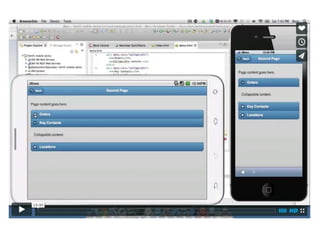
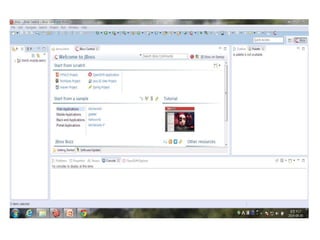
JBoss Developer Studio Demo 
(구현 대상 선정) 
https://github.com/jbosstools/jbosstools-jst 
Jquery Mobile Palette구현 대상 으로 FIX
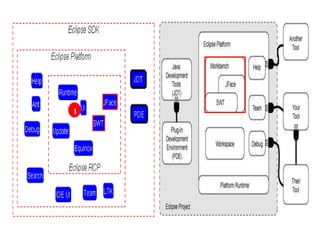
Eclipse Plugin Overview
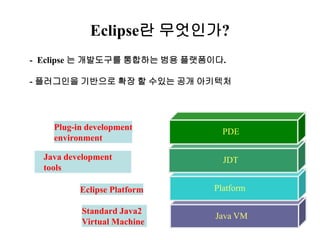
Eclipse란 무엇인가? 
- Eclipse 는 개발도구를 통합하는 범용 플랫폼이다. 
- 플러그인을 기반으로 확장 할 수있는 공개 아키텍처 
Java development 
tools 
PDE 
Eclipse Platform Platform 
Java VM 
Standard Java2 
Virtual Machine 
JDT 
Plug-in development 
environment
1
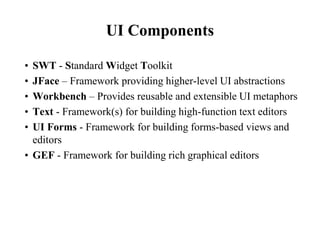
UI Components 
• SWT - Standard Widget Toolkit 
• JFace – Framework providing higher-level UI abstractions 
• Workbench – Provides reusable and extensible UI metaphors 
• Text - Framework(s) for building high-function text editors 
• UI Forms - Framework for building forms-based views and 
editors 
• GEF - Framework for building rich graphical editors
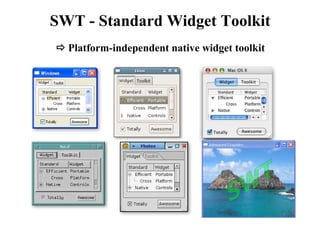
SWT - Standard Widget Toolkit 
 Platform-independent native widget toolkit
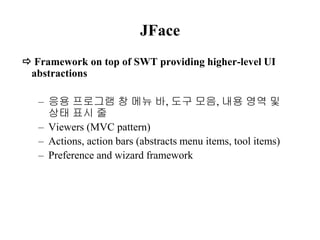
JFace 
 Framework on top of SWT providing higher-level UI 
abstractions 
– 응용 프로그램 창 메뉴 바, 도구 모음, 내용 영역 및 
상태 표시 줄 
– Viewers (MVC pattern) 
– Actions, action bars (abstracts menu items, tool items) 
– Preference and wizard framework
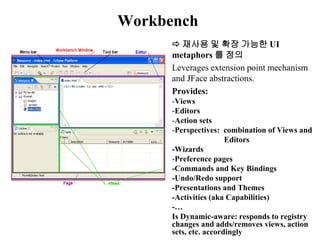
Workbench 
 재사용 및 확장 가능한 UI 
metaphors 를 정의 
Leverages extension point mechanism 
and JFace abstractions. 
Provides: 
-Views 
-Editors 
-Action sets 
-Perspectives: combination of Views and 
Editors 
-Wizards 
-Preference pages 
-Commands and Key Bindings 
-Undo/Redo support 
-Presentations and Themes 
-Activities (aka Capabilities) 
-… 
Is Dynamic-aware: responds to registry 
changes and adds/removes views, action 
sets, etc. accordingly
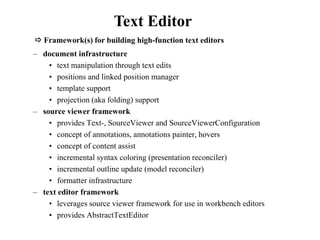
Text Editor 
 Framework(s) for building high-function text editors 
– document infrastructure 
• text manipulation through text edits 
• positions and linked position manager 
• template support 
• projection (aka folding) support 
– source viewer framework 
• provides Text-, SourceViewer and SourceViewerConfiguration 
• concept of annotations, annotations painter, hovers 
• concept of content assist 
• incremental syntax coloring (presentation reconciler) 
• incremental outline update (model reconciler) 
• formatter infrastructure 
– text editor framework 
• leverages source viewer framework for use in workbench editors 
• provides AbstractTextEditor
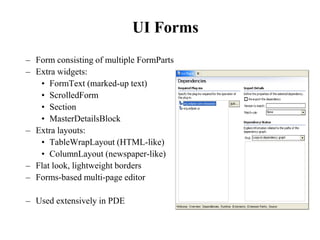
UI Forms 
– Form consisting of multiple FormParts 
– Extra widgets: 
• FormText (marked-up text) 
• ScrolledForm 
• Section 
• MasterDetailsBlock 
– Extra layouts: 
• TableWrapLayout (HTML-like) 
• ColumnLayout (newspaper-like) 
– Flat look, lightweight borders 
– Forms-based multi-page editor 
– Used extensively in PDE
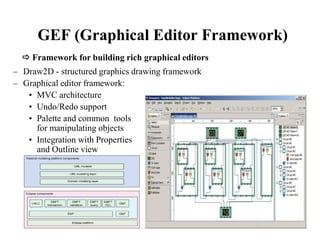
GEF (Graphical Editor Framework) 
 Framework for building rich graphical editors 
– Draw2D - structured graphics drawing framework 
– Graphical editor framework: 
• MVC architecture 
• Undo/Redo support 
• Palette and common tools 
for manipulating objects 
• Integration with Properties 
and Outline view
Eclipse Plug-in Architecture 
• Plug-in - smallest unit of Eclipse function 
– Example: the editor of our course project. 
• Extension point - named entity for collecting “contributions” 
– Example: extension point for workbench text editor. 
• Extension - a contribution 
– Example: extending the text editor to edit selector language 
with syntax highlighting and semantics checking.
Eclipse Plug-in Architecture 
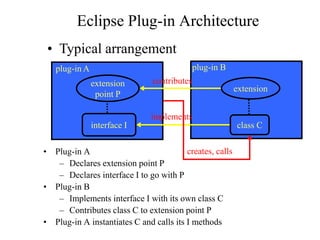
plug-in A plug-in B 
• Plug-in A 
extension 
point P 
implements 
interface I class C 
– Declares extension point P 
– Declares interface I to go with P 
• Plug-in B 
– Implements interface I with its own class C 
– Contributes class C to extension point P 
• Plug-in A instantiates C and calls its I methods 
extension 
• Typical arrangement 
contributes 
creates, calls
Eclipse Plug-in Architecture 
• Each plug-in 
– Contributes to 1 or more extension points 
– Optionally declares new extension points 
– Depends on a set of other plug-ins 
– Contains Java code libraries and other files 
– May export Java-based APIs for downstream plug-ins 
– Lives in its own plug-in subdirectory 
• Details spelled out in the plug-in manifest 
– Manifest declares contributions 
– Code implements contributions and provides API 
– plugin.xml file in root of plug-in subdirectory
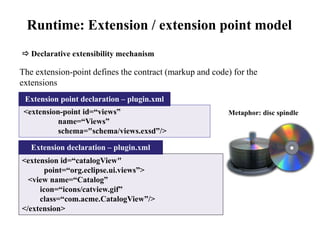
Runtime: Extension / extension point model 
 Declarative extensibility mechanism 
The extension-point defines the contract (markup and code) for the 
extensions 
Extension point declaration – plugin.xml 
<extension-point id=“views” 
name=“Views” 
schema="schema/views.exsd”/> 
Extension declaration – plugin.xml 
<extension id=“catalogView" 
point=“org.eclipse.ui.views”> 
<view name=“Catalog” 
icon=“icons/catview.gif” 
class=“com.acme.CatalogView”/> 
</extension> 
Metaphor: disc spindle
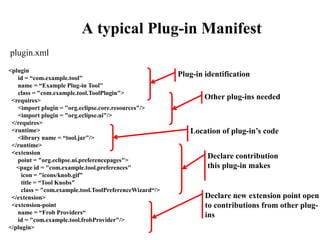
A typical Plug-in Manifest 
<plugin 
id = “com.example.tool" 
name = “Example Plug-in Tool" 
class = "com.example.tool.ToolPlugin"> 
<requires> 
<import plugin = "org.eclipse.core.resources"/> 
<import plugin = "org.eclipse.ui"/> 
</requires> 
<runtime> 
<library name = “tool.jar"/> 
</runtime> 
<extension 
point = "org.eclipse.ui.preferencepages"> 
<page id = "com.example.tool.preferences" 
icon = "icons/knob.gif" 
title = “Tool Knobs" 
class = "com.example.tool.ToolPreferenceWizard“/> 
</extension> 
<extension-point 
name = “Frob Providers“ 
id = "com.example.tool.frobProvider"/> 
</plugin> 
Plug-in identification 
Other plug-ins needed 
Location of plug-in’s code 
Declare contribution 
this plug-in makes 
Declare new extension point open 
to contributions from other plug-ins 
plugin.xml
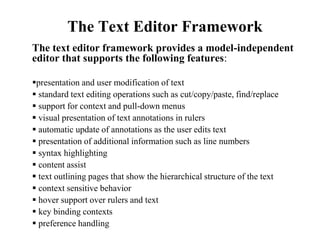
The Text Editor Framework 
The text editor framework provides a model-independent 
editor that supports the following features: 
presentation and user modification of text 
 standard text editing operations such as cut/copy/paste, find/replace 
 support for context and pull-down menus 
 visual presentation of text annotations in rulers 
 automatic update of annotations as the user edits text 
 presentation of additional information such as line numbers 
 syntax highlighting 
 content assist 
 text outlining pages that show the hierarchical structure of the text 
 context sensitive behavior 
 hover support over rulers and text 
 key binding contexts 
 preference handling
Problem One Demo
Conclusion Demo

Creation&imitation

  • 1.
    Creation & Imitation For JQM Palette Project Tae Young Lee
  • 4.
    JBoss Developer StudioDemo (구현 대상 선정) https://github.com/jbosstools/jbosstools-jst Jquery Mobile Palette구현 대상 으로 FIX
  • 5.
  • 6.
    Eclipse란 무엇인가? -Eclipse 는 개발도구를 통합하는 범용 플랫폼이다. - 플러그인을 기반으로 확장 할 수있는 공개 아키텍처 Java development tools PDE Eclipse Platform Platform Java VM Standard Java2 Virtual Machine JDT Plug-in development environment
  • 8.
  • 9.
    UI Components •SWT - Standard Widget Toolkit • JFace – Framework providing higher-level UI abstractions • Workbench – Provides reusable and extensible UI metaphors • Text - Framework(s) for building high-function text editors • UI Forms - Framework for building forms-based views and editors • GEF - Framework for building rich graphical editors
  • 10.
    SWT - StandardWidget Toolkit  Platform-independent native widget toolkit
  • 11.
    JFace  Frameworkon top of SWT providing higher-level UI abstractions – 응용 프로그램 창 메뉴 바, 도구 모음, 내용 영역 및 상태 표시 줄 – Viewers (MVC pattern) – Actions, action bars (abstracts menu items, tool items) – Preference and wizard framework
  • 12.
    Workbench  재사용및 확장 가능한 UI metaphors 를 정의 Leverages extension point mechanism and JFace abstractions. Provides: -Views -Editors -Action sets -Perspectives: combination of Views and Editors -Wizards -Preference pages -Commands and Key Bindings -Undo/Redo support -Presentations and Themes -Activities (aka Capabilities) -… Is Dynamic-aware: responds to registry changes and adds/removes views, action sets, etc. accordingly
  • 13.
    Text Editor Framework(s) for building high-function text editors – document infrastructure • text manipulation through text edits • positions and linked position manager • template support • projection (aka folding) support – source viewer framework • provides Text-, SourceViewer and SourceViewerConfiguration • concept of annotations, annotations painter, hovers • concept of content assist • incremental syntax coloring (presentation reconciler) • incremental outline update (model reconciler) • formatter infrastructure – text editor framework • leverages source viewer framework for use in workbench editors • provides AbstractTextEditor
  • 14.
    UI Forms –Form consisting of multiple FormParts – Extra widgets: • FormText (marked-up text) • ScrolledForm • Section • MasterDetailsBlock – Extra layouts: • TableWrapLayout (HTML-like) • ColumnLayout (newspaper-like) – Flat look, lightweight borders – Forms-based multi-page editor – Used extensively in PDE
  • 15.
    GEF (Graphical EditorFramework)  Framework for building rich graphical editors – Draw2D - structured graphics drawing framework – Graphical editor framework: • MVC architecture • Undo/Redo support • Palette and common tools for manipulating objects • Integration with Properties and Outline view
  • 16.
    Eclipse Plug-in Architecture • Plug-in - smallest unit of Eclipse function – Example: the editor of our course project. • Extension point - named entity for collecting “contributions” – Example: extension point for workbench text editor. • Extension - a contribution – Example: extending the text editor to edit selector language with syntax highlighting and semantics checking.
  • 17.
    Eclipse Plug-in Architecture plug-in A plug-in B • Plug-in A extension point P implements interface I class C – Declares extension point P – Declares interface I to go with P • Plug-in B – Implements interface I with its own class C – Contributes class C to extension point P • Plug-in A instantiates C and calls its I methods extension • Typical arrangement contributes creates, calls
  • 18.
    Eclipse Plug-in Architecture • Each plug-in – Contributes to 1 or more extension points – Optionally declares new extension points – Depends on a set of other plug-ins – Contains Java code libraries and other files – May export Java-based APIs for downstream plug-ins – Lives in its own plug-in subdirectory • Details spelled out in the plug-in manifest – Manifest declares contributions – Code implements contributions and provides API – plugin.xml file in root of plug-in subdirectory
  • 19.
    Runtime: Extension /extension point model  Declarative extensibility mechanism The extension-point defines the contract (markup and code) for the extensions Extension point declaration – plugin.xml <extension-point id=“views” name=“Views” schema="schema/views.exsd”/> Extension declaration – plugin.xml <extension id=“catalogView" point=“org.eclipse.ui.views”> <view name=“Catalog” icon=“icons/catview.gif” class=“com.acme.CatalogView”/> </extension> Metaphor: disc spindle
  • 20.
    A typical Plug-inManifest <plugin id = “com.example.tool" name = “Example Plug-in Tool" class = "com.example.tool.ToolPlugin"> <requires> <import plugin = "org.eclipse.core.resources"/> <import plugin = "org.eclipse.ui"/> </requires> <runtime> <library name = “tool.jar"/> </runtime> <extension point = "org.eclipse.ui.preferencepages"> <page id = "com.example.tool.preferences" icon = "icons/knob.gif" title = “Tool Knobs" class = "com.example.tool.ToolPreferenceWizard“/> </extension> <extension-point name = “Frob Providers“ id = "com.example.tool.frobProvider"/> </plugin> Plug-in identification Other plug-ins needed Location of plug-in’s code Declare contribution this plug-in makes Declare new extension point open to contributions from other plug-ins plugin.xml
  • 21.
    The Text EditorFramework The text editor framework provides a model-independent editor that supports the following features: presentation and user modification of text  standard text editing operations such as cut/copy/paste, find/replace  support for context and pull-down menus  visual presentation of text annotations in rulers  automatic update of annotations as the user edits text  presentation of additional information such as line numbers  syntax highlighting  content assist  text outlining pages that show the hierarchical structure of the text  context sensitive behavior  hover support over rulers and text  key binding contexts  preference handling
  • 23.
  • 24.