Eclipse Rich Client Applications Develop Desktop applications on the Eclipse Rich Client Platform Ketan Padegaonkar Sriram Narayanan
What are we going to cover ? Eclipse is more than just a Java IDE What’s common between desktop applications How the Eclipse RCP helps How the plug-in architecture works Getting started Let’s develop an application Becoming proficient Eclipse development activity in Pune
What makes a smart app ? Ideally, run on multiple platforms Tight integration with OS (DnD, System Tray, Clipboard) Ease of deployment, management Responsive UI Can be extended easily
What Eclipse provides Components from an eco-system Native user experience Portability Install and Update Development tooling support Component libraries
Developer focus Focus on delivering applications Cannot give much time to designing UI and other basic infrastructure for each application
What is RCP? A platform to build client apps with rich functionality Open-source (EPL) History: Eclipse 2.1 (2003) Eclipse is an IDE. Hackers in the community start building “non-ide” apps based on Eclipse technology Eclipse 3.0 (2004)  Refactored out the “IDE” out of the workbench An empty workbench Integration with OSGi Cleaning up dependencies (Help, Updates, etc) Eclipse 3.1 (2005): improved tooling, richer API
More than a Java IDE Strengths include the plug-in architecture A growing eco system that includes reporting, database, web app and debugging tools Everything is a plug-in – including Java language support !
Some smart apps
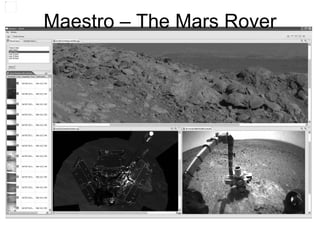
Maestro – The Mars Rover
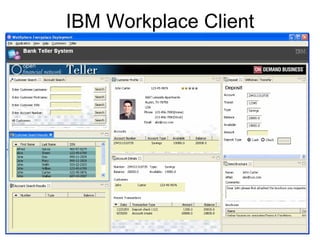
IBM Workplace Client
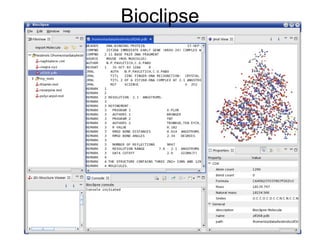
Bioclipse
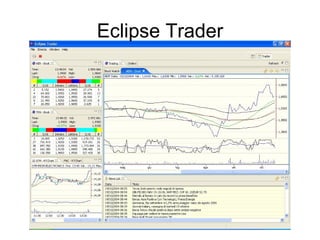
Eclipse Trader
Getting Started 10 minutes
The Learning Curve Java and brief Eclipse architecture Online articles and samples available Online help groups available Read, Read, Read Follow the samples and practice on your own Learn to ask questions  (there is no such thing as a dumb question)
RCP in action OSGi and runtime UI SWT, JFace, Workbench, Text, Forms, GEF User assistance Help, Intro, Cheat Sheets Deployment JNLP, Updates Modeling and visualization EMF and GEF Reporting BIRT Tooling (PDE, VE, WTP)
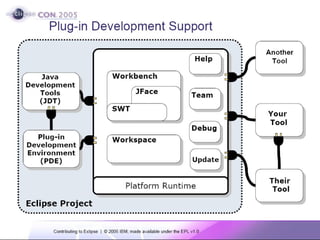
How plugins work
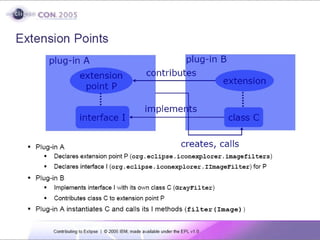
How plugins work
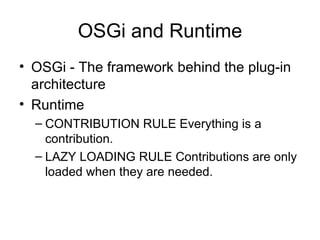
OSGi and Runtime OSGi - The framework behind the plug-in architecture Runtime  CONTRIBUTION RULE Everything is a contribution. LAZY LOADING RULE Contributions are only loaded when they are needed.
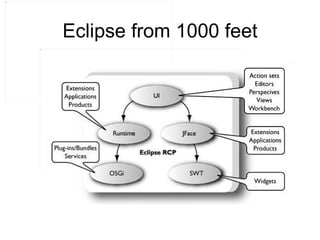
Eclipse from 1000 feet
Workshop Develop an RCP application to process insurance proposals. Add functionality incrementally Deploy functionality using updates Includes UI and POJOs
Code development in progress  
What have we just covered ? Deploy an RCP application GUI on top of domain objects Deploy plug-ins manually Creating update sites Deploy plug-ins via update manager Mostly no recompilation of code Extension points Branding your RCP application
Some tutorials at Eclipse Drag and Drop Develop plug-ins Develop GUI and GUI components Manage updates Profile and debug your applications Workbench internals OpenGL and Eclipse
Managing, deploying New features, bug fixes Customer specific features Customers can roll back changes if they want to
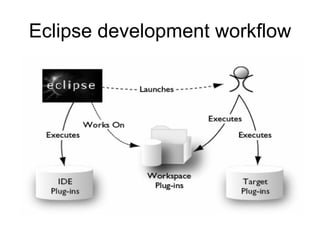
Eclipse development workflow
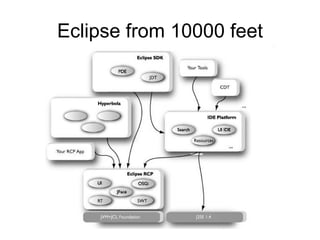
Eclipse from 10000 feet
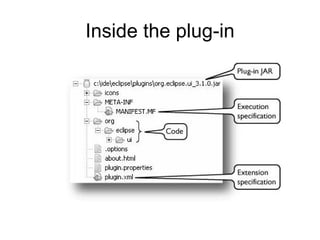
Inside the plug-in
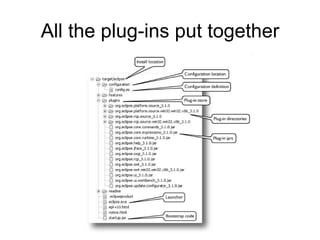
All the plug-ins put together
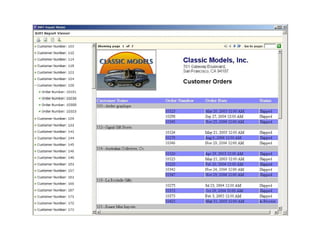
The Eco system Everything is a plug-in  Java, C++, Ruby, PHP BIRT DTP J2EE support TPTP (expand the acronym) AspectJ
 
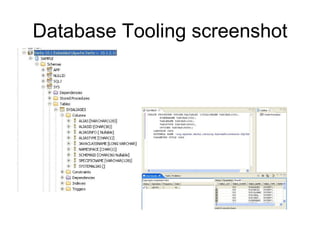
Database Tooling screenshot
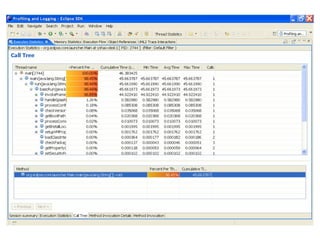
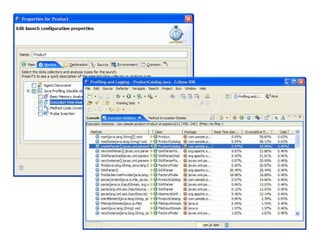
TPTP screenshot
 
Impact on your career Changes your perspective on developing applications Learn great development practices Develop faster Release maintainable and extendable apps Component based thinking
Eclipse in Pune Pune Eclipse Platform Developers’ Group Members are people like you and I Ask questions on developing apps Most responses will be links to articles Not a forum for help on Java development Moderated – no spam Plans for meetings once a month Show your Eclipse applications and receive feedback http://groups.google.com/group/eclipse-pune-dev/
Contact info www.eclipse.org www.eclipse.org/articles Pune Eclipse Platform Developers’ Group http://groups.google.com/group/eclipse-pune-dev/

"Eclipse Application Development" at GNUnify 07

  • 1.
    Eclipse Rich ClientApplications Develop Desktop applications on the Eclipse Rich Client Platform Ketan Padegaonkar Sriram Narayanan
  • 2.
    What are wegoing to cover ? Eclipse is more than just a Java IDE What’s common between desktop applications How the Eclipse RCP helps How the plug-in architecture works Getting started Let’s develop an application Becoming proficient Eclipse development activity in Pune
  • 3.
    What makes asmart app ? Ideally, run on multiple platforms Tight integration with OS (DnD, System Tray, Clipboard) Ease of deployment, management Responsive UI Can be extended easily
  • 4.
    What Eclipse providesComponents from an eco-system Native user experience Portability Install and Update Development tooling support Component libraries
  • 5.
    Developer focus Focuson delivering applications Cannot give much time to designing UI and other basic infrastructure for each application
  • 6.
    What is RCP?A platform to build client apps with rich functionality Open-source (EPL) History: Eclipse 2.1 (2003) Eclipse is an IDE. Hackers in the community start building “non-ide” apps based on Eclipse technology Eclipse 3.0 (2004) Refactored out the “IDE” out of the workbench An empty workbench Integration with OSGi Cleaning up dependencies (Help, Updates, etc) Eclipse 3.1 (2005): improved tooling, richer API
  • 7.
    More than aJava IDE Strengths include the plug-in architecture A growing eco system that includes reporting, database, web app and debugging tools Everything is a plug-in – including Java language support !
  • 8.
  • 9.
    Maestro – TheMars Rover
  • 10.
  • 11.
  • 12.
  • 13.
  • 14.
    The Learning CurveJava and brief Eclipse architecture Online articles and samples available Online help groups available Read, Read, Read Follow the samples and practice on your own Learn to ask questions (there is no such thing as a dumb question)
  • 15.
    RCP in actionOSGi and runtime UI SWT, JFace, Workbench, Text, Forms, GEF User assistance Help, Intro, Cheat Sheets Deployment JNLP, Updates Modeling and visualization EMF and GEF Reporting BIRT Tooling (PDE, VE, WTP)
  • 16.
  • 17.
  • 18.
    OSGi and RuntimeOSGi - The framework behind the plug-in architecture Runtime CONTRIBUTION RULE Everything is a contribution. LAZY LOADING RULE Contributions are only loaded when they are needed.
  • 19.
  • 20.
    Workshop Develop anRCP application to process insurance proposals. Add functionality incrementally Deploy functionality using updates Includes UI and POJOs
  • 21.
    Code development inprogress 
  • 22.
    What have wejust covered ? Deploy an RCP application GUI on top of domain objects Deploy plug-ins manually Creating update sites Deploy plug-ins via update manager Mostly no recompilation of code Extension points Branding your RCP application
  • 23.
    Some tutorials atEclipse Drag and Drop Develop plug-ins Develop GUI and GUI components Manage updates Profile and debug your applications Workbench internals OpenGL and Eclipse
  • 24.
    Managing, deploying Newfeatures, bug fixes Customer specific features Customers can roll back changes if they want to
  • 25.
  • 26.
  • 27.
  • 28.
    All the plug-insput together
  • 29.
    The Eco systemEverything is a plug-in Java, C++, Ruby, PHP BIRT DTP J2EE support TPTP (expand the acronym) AspectJ
  • 30.
  • 31.
  • 32.
  • 33.
  • 34.
    Impact on yourcareer Changes your perspective on developing applications Learn great development practices Develop faster Release maintainable and extendable apps Component based thinking
  • 35.
    Eclipse in PunePune Eclipse Platform Developers’ Group Members are people like you and I Ask questions on developing apps Most responses will be links to articles Not a forum for help on Java development Moderated – no spam Plans for meetings once a month Show your Eclipse applications and receive feedback http://groups.google.com/group/eclipse-pune-dev/
  • 36.
    Contact info www.eclipse.orgwww.eclipse.org/articles Pune Eclipse Platform Developers’ Group http://groups.google.com/group/eclipse-pune-dev/