1 by
OpenShift PaaS Overview
Edoardo Schepis
JBoss Solution Architect
Red Hat
2 by
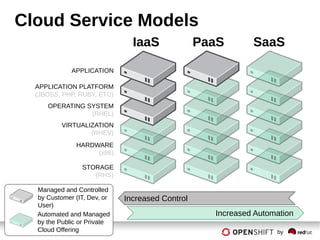
Cloud Service Models
STORAGE
(RHS)
HARDWARE
(x86)
VIRTUALIZATION
(RHEV)
OPERATING SYSTEM
(RHEL)
APPLICATION PLATFORM
(JBOSS, PHP, RUBY, ETC)
APPLICATION
Automated and Managed
by the Public or Private
Cloud Offering
Managed and Controlled
by Customer (IT, Dev, or
User)
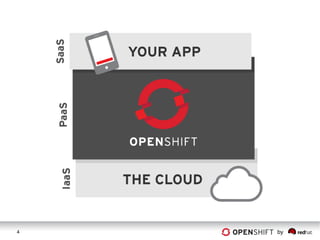
IaaS PaaS SaaS
Increased Control
Increased Automation
3 by
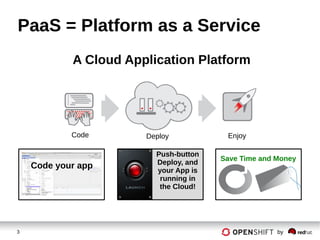
PaaS = Platform as a Service
A Cloud Application Platform
Code Deploy Enjoy
Save Time and Money
Code your app
Push-button
Deploy, and
your App is
running in
the Cloud!
4 by
5 by
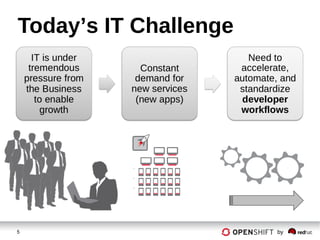
Today’s IT Challenge
6 by
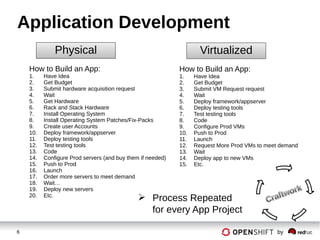
Application Development
How to Build an App:
1. Have Idea
2. Get Budget
3. Submit hardware acquisition request
4. Wait
5. Get Hardware
6. Rack and Stack Hardware
7. Install Operating System
8. Install Operating System Patches/Fix-Packs
9. Create user Accounts
10. Deploy framework/appserver
11. Deploy testing tools
12. Test testing tools
13. Code
14. Configure Prod servers (and buy them if needed)
15. Push to Prod
16. Launch
17. Order more servers to meet demand
18. Wait…
19. Deploy new servers
20. Etc.
Physical
 Process Repeated
for every App Project
How to Build an App:
1. Have Idea
2. Get Budget
3. Submit VM Request request
4. Wait
5. Deploy framework/appserver
6. Deploy testing tools
7. Test testing tools
8. Code
9. Configure Prod VMs
10. Push to Prod
11. Launch
12. Request More Prod VMs to meet demand
13. Wait
14. Deploy app to new VMs
15. Etc.
Virtualized
7 by
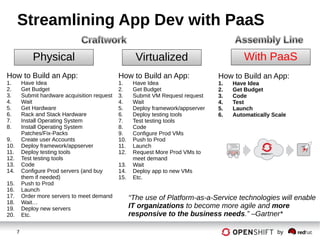
Streamlining App Dev with PaaS
With PaaS
How to Build an App:
1. Have Idea
2. Get Budget
3. Code
4. Test
5. Launch
6. Automatically Scale
How to Build an App:
1. Have Idea
2. Get Budget
3. Submit VM Request request
4. Wait
5. Deploy framework/appserver
6. Deploy testing tools
7. Test testing tools
8. Code
9. Configure Prod VMs
10. Push to Prod
11. Launch
12. Request More Prod VMs to
meet demand
13. Wait
14. Deploy app to new VMs
15. Etc.
Virtualized
How to Build an App:
1. Have Idea
2. Get Budget
3. Submit hardware acquisition request
4. Wait
5. Get Hardware
6. Rack and Stack Hardware
7. Install Operating System
8. Install Operating System
Patches/Fix-Packs
9. Create user Accounts
10. Deploy framework/appserver
11. Deploy testing tools
12. Test testing tools
13. Code
14. Configure Prod servers (and buy
them if needed)
15. Push to Prod
16. Launch
17. Order more servers to meet demand
18. Wait…
19. Deploy new servers
20. Etc.
Physical
“The use of Platform-as-a-Service technologies will enable
IT organizations to become more agile and more
responsive to the business needs.” –Gartner*
8 by
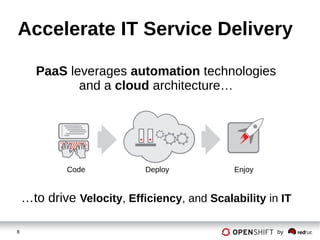
Code Deploy Enjoy
PaaS leverages automation technologies
and a cloud architecture…
…to drive Velocity, Efficiency, and Scalability in IT
Accelerate IT Service Delivery
9 by
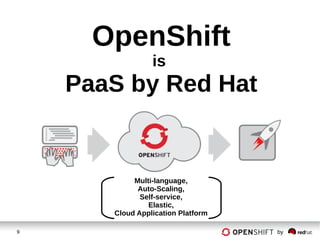
OpenShift
is
PaaS by Red Hat
Multi-language,
Auto-Scaling,
Self-service,
Elastic,
Cloud Application Platform
10 by
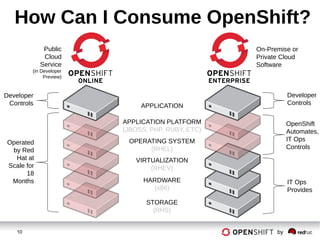
How Can I Consume OpenShift?
STORAGE
(RHS)
HARDWARE
(x86)
VIRTUALIZATION
(RHEV)
OPERATING SYSTEM
(RHEL)
APPLICATION PLATFORM
(JBOSS, PHP, RUBY, ETC)
APPLICATION
Public
Cloud
Service
(in Developer
Preview)
On-Premise or
Private Cloud
Software
Developer
Controls
Developer
Controls
Operated
by Red
Hat at
Scale for
18
Months IT Ops
Provides
OpenShift
Automates,
IT Ops
Controls
11 by
Let’s Take a Look…
12 by
How OpenShift Works
POWERED BY
OPENSHIFT
13 by
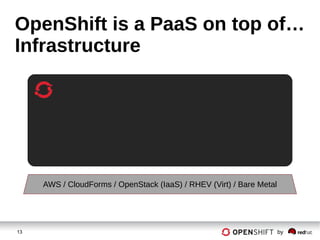
OpenShift is a PaaS on top of…
Infrastructure
AWS / CloudForms / OpenStack (IaaS) / RHEV (Virt) / Bare Metal
14 by
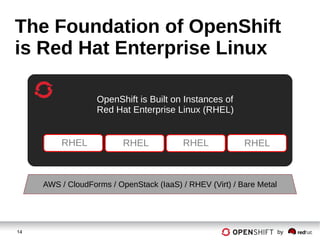
The Foundation of OpenShift
is Red Hat Enterprise Linux
RHEL RHEL RHEL
OpenShift is Built on Instances of
Red Hat Enterprise Linux (RHEL)
RHEL
AWS / CloudForms / OpenStack (IaaS) / RHEV (Virt) / Bare Metal
15 by
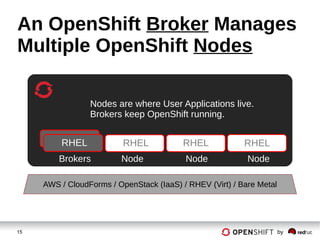
An OpenShift Broker Manages
Multiple OpenShift Nodes
Nodes are where User Applications live.
Brokers keep OpenShift running.
Brokers Node Node Node
RHEL RHEL RHELRHEL
AWS / CloudForms / OpenStack (IaaS) / RHEV (Virt) / Bare Metal
16 by
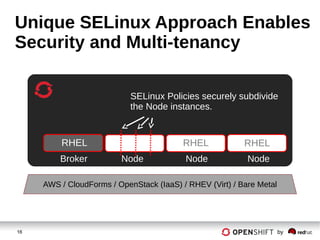
Unique SELinux Approach Enables
Security and Multi-tenancy
RHEL RHEL
SELinux Policies securely subdivide
the Node instances.
Broker Node Node Node
RHEL
AWS / CloudForms / OpenStack (IaaS) / RHEV (Virt) / Bare Metal
17 by
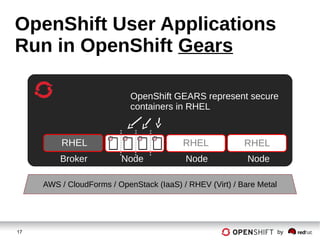
OpenShift User Applications
Run in OpenShift Gears
RHEL RHEL
OpenShift GEARS represent secure
containers in RHEL
Broker Node Node Node
RHEL
AWS / CloudForms / OpenStack (IaaS) / RHEV (Virt) / Bare Metal
18 by
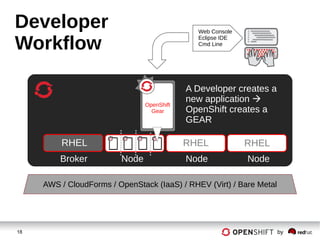
Developer
Workflow
RHEL RHEL
A Developer creates a
new application 
OpenShift creates a
GEAR
Web Console
Eclipse IDE
Cmd Line
Broker Node Node Node
RHEL
OpenShift
Gear
AWS / CloudForms / OpenStack (IaaS) / RHEV (Virt) / Bare Metal
19 by
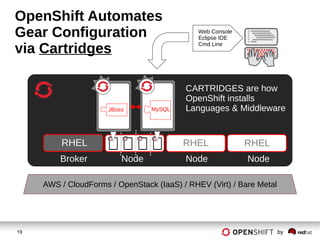
OpenShift Automates
Gear Configuration
via Cartridges
RHEL RHEL
CARTRIDGES are how
OpenShift installs
Languages & Middleware
Web Console
Eclipse IDE
Cmd Line
Broker Node Node Node
RHEL
AWS / CloudForms / OpenStack (IaaS) / RHEV (Virt) / Bare Metal
JBoss MySQL
20 by
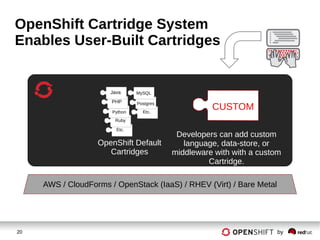
OpenShift Cartridge System
Enables User-Built Cartridges
Developers can add custom
language, data-store, or
middleware with with a custom
Cartridge.
CUSTOMEtc.
Etc.
Ruby
Python
PHP
Java
Postgres
MySQL
OpenShift Default
Cartridges
AWS / CloudForms / OpenStack (IaaS) / RHEV (Virt) / Bare Metal
21 by
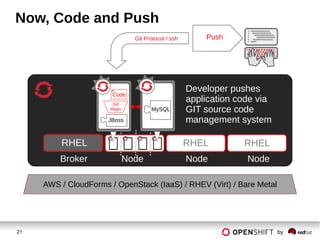
Now, Code and Push
RHEL RHEL
Developer pushes
application code via
GIT source code
management system
Git Protocol / ssh
Broker Node Node Node
RHEL
Push
AWS / CloudForms / OpenStack (IaaS) / RHEV (Virt) / Bare Metal
JBoss
Code
Git
Repo MySQL
22 by
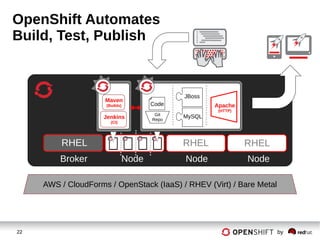
OpenShift Automates
Build, Test, Publish
RHEL RHEL
Broker Node Node Node
RHEL
AWS / CloudForms / OpenStack (IaaS) / RHEV (Virt) / Bare Metal
Jenkins
(CI)
Maven
(Builds) Apache
(HTTP)
Code
JBoss
Git
Repo
MySQL
23 by
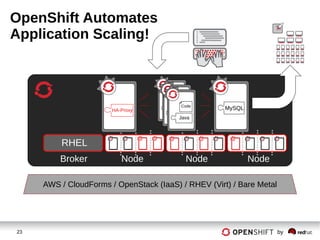
OpenShift Automates
Application Scaling!
Broker Node Node Node
RHEL
HA-Proxy MySQLJava
Cod
e
Java
Cod
e
Java
Code
AWS / CloudForms / OpenStack (IaaS) / RHEV (Virt) / Bare Metal
24 by
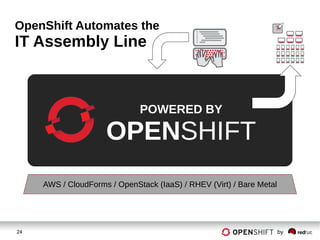
OpenShift Automates the
IT Assembly Line
POWERED BY
OPENSHIFT
AWS / CloudForms / OpenStack (IaaS) / RHEV (Virt) / Bare Metal
25 by
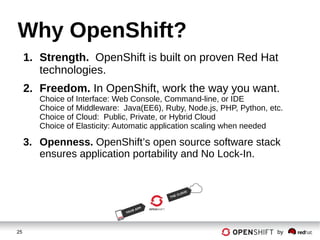
Why OpenShift?
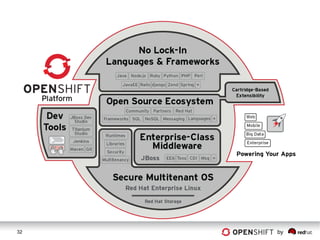
1. Strength. OpenShift is built on proven Red Hat
technologies.
2. Freedom. In OpenShift, work the way you want.
Choice of Interface: Web Console, Command-line, or IDE
Choice of Middleware: Java(EE6), Ruby, Node.js, PHP, Python, etc.
Choice of Cloud: Public, Private, or Hybrid Cloud
Choice of Elasticity: Automatic application scaling when needed
3. Openness. OpenShift’s open source software stack
ensures application portability and No Lock-In.
26 by
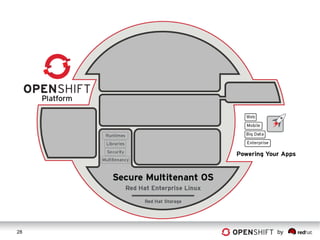
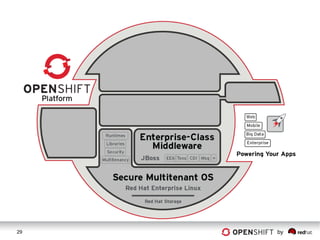
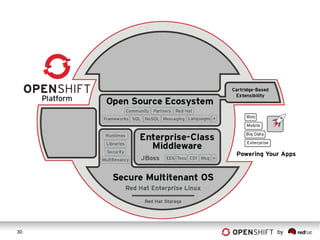
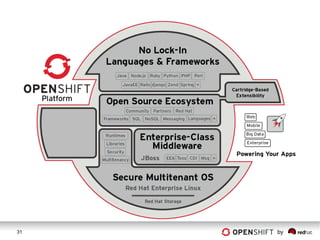
1. Strength.
OpenShift is Built on
Red Hat Goodness…
27 by
28 by
29 by
30 by
31 by
32 by
33 by
2. Freedom.
To Work The Way You Want
To Work
34 by
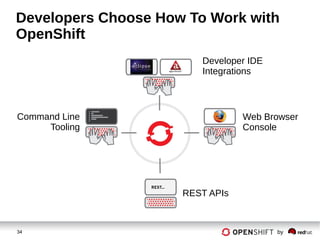
Developers Choose How To Work with
OpenShift
Developer IDE
Integrations
Web Browser
Console
Command Line
Tooling
REST APIs
35 by
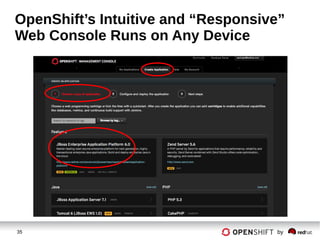
OpenShift’s Intuitive and “Responsive”
Web Console Runs on Any Device
36 by
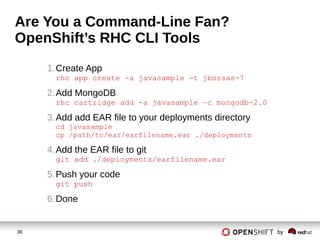
Are You a Command-Line Fan?
OpenShift’s RHC CLI Tools
1.Create App
rhc app create -a javasample -t jbossas-7
2.Add MongoDB
rhc cartridge add -a javasample –c mongodb-2.0
3.Add add EAR file to your deployments directory
cd javasample
cp /path/to/ear/earfilename.ear ./deployments
4.Add the EAR file to git
git add ./deployments/earfilename.ear
5.Push your code
git push
6.Done
37 by
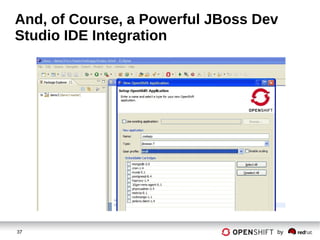
And, of Course, a Powerful JBoss Dev
Studio IDE Integration
38 by
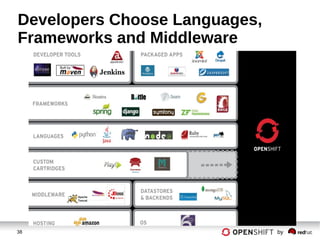
Developers Choose Languages,
Frameworks and Middleware
39 by
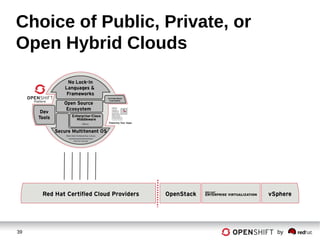
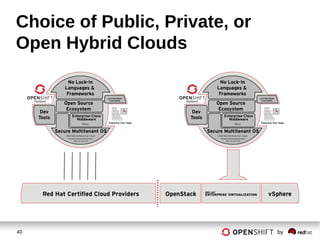
Choice of Public, Private, or
Open Hybrid Clouds
40 by
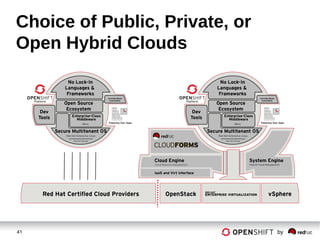
Choice of Public, Private, or
Open Hybrid Clouds
41 by
Choice of Public, Private, or
Open Hybrid Clouds
42 by
3. Openness.
And of course,
OpenShift is Open
Source…
43 by
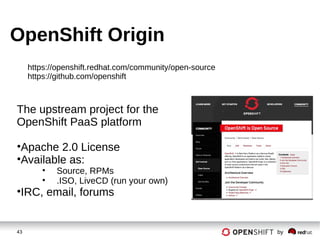
OpenShift Origin
The upstream project for the
OpenShift PaaS platform
•Apache 2.0 License
•Available as:
• Source, RPMs
• .ISO, LiveCD (run your own)
•IRC, email, forums
https://openshift.redhat.com/community/open-source
https://github.com/openshift
44 by
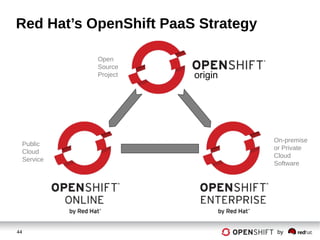
Red Hat’s OpenShift PaaS Strategy
origin
Public
Cloud
Service
On-premise
or Private
Cloud
Software
Open
Source
Project
45 by
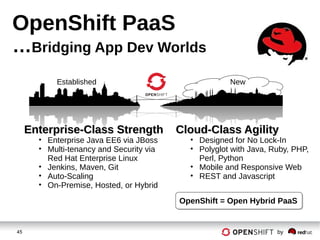
OpenShift PaaS
…Bridging App Dev Worlds
Cloud-Class AgilityCloud-Class Agility
• Designed for No Lock-In
• Polyglot with Java, Ruby, PHP,
Perl, Python
• Mobile and Responsive Web
• REST and Javascript
Enterprise-Class StrengthEnterprise-Class Strength
• Enterprise Java EE6 via JBoss
• Multi-tenancy and Security via
Red Hat Enterprise Linux
• Jenkins, Maven, Git
• Auto-Scaling
• On-Premise, Hosted, or Hybrid
Established New
OpenShift = Open Hybrid PaaSOpenShift = Open Hybrid PaaS
46 by
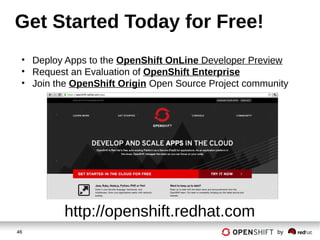
Get Started Today for Free!
http://openshift.redhat.com
• Deploy Apps to the OpenShift OnLine Developer Preview
• Request an Evaluation of OpenShift Enterprise
• Join the OpenShift Origin Open Source Project community
47 by
Thank You.
Questions?
Edoardo Schepis
eschepis@redhat.com
48 by
EXTRA SLIDES
49 by
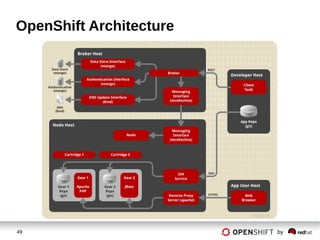
OpenShift Architecture
50 by
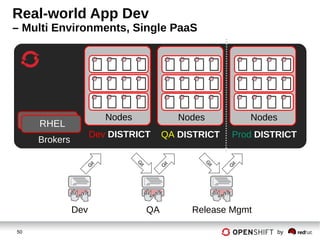
Real-world App Dev
– Multi Environments, Single PaaS
Brokers
Nodes
RHEL
Dev DISTRICT
Nodes
QA DISTRICT
Nodes
Prod DISTRICT
Dev QA Release Mgmt
G
it
G
it
G
it
G
it
G
it
51 by
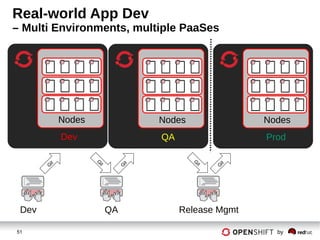
Real-world App Dev
– Multi Environments, multiple PaaSes
Nodes
Dev
Dev QA Release Mgmt
Nodes
QA
Nodes
Prod
G
it
G
it
G
it
G
it
G
it

Openshift Enterprise

  • 1.
    1 by OpenShift PaaSOverview Edoardo Schepis JBoss Solution Architect Red Hat
  • 2.
    2 by Cloud ServiceModels STORAGE (RHS) HARDWARE (x86) VIRTUALIZATION (RHEV) OPERATING SYSTEM (RHEL) APPLICATION PLATFORM (JBOSS, PHP, RUBY, ETC) APPLICATION Automated and Managed by the Public or Private Cloud Offering Managed and Controlled by Customer (IT, Dev, or User) IaaS PaaS SaaS Increased Control Increased Automation
  • 3.
    3 by PaaS =Platform as a Service A Cloud Application Platform Code Deploy Enjoy Save Time and Money Code your app Push-button Deploy, and your App is running in the Cloud!
  • 4.
  • 5.
  • 6.
    6 by Application Development Howto Build an App: 1. Have Idea 2. Get Budget 3. Submit hardware acquisition request 4. Wait 5. Get Hardware 6. Rack and Stack Hardware 7. Install Operating System 8. Install Operating System Patches/Fix-Packs 9. Create user Accounts 10. Deploy framework/appserver 11. Deploy testing tools 12. Test testing tools 13. Code 14. Configure Prod servers (and buy them if needed) 15. Push to Prod 16. Launch 17. Order more servers to meet demand 18. Wait… 19. Deploy new servers 20. Etc. Physical  Process Repeated for every App Project How to Build an App: 1. Have Idea 2. Get Budget 3. Submit VM Request request 4. Wait 5. Deploy framework/appserver 6. Deploy testing tools 7. Test testing tools 8. Code 9. Configure Prod VMs 10. Push to Prod 11. Launch 12. Request More Prod VMs to meet demand 13. Wait 14. Deploy app to new VMs 15. Etc. Virtualized
  • 7.
    7 by Streamlining AppDev with PaaS With PaaS How to Build an App: 1. Have Idea 2. Get Budget 3. Code 4. Test 5. Launch 6. Automatically Scale How to Build an App: 1. Have Idea 2. Get Budget 3. Submit VM Request request 4. Wait 5. Deploy framework/appserver 6. Deploy testing tools 7. Test testing tools 8. Code 9. Configure Prod VMs 10. Push to Prod 11. Launch 12. Request More Prod VMs to meet demand 13. Wait 14. Deploy app to new VMs 15. Etc. Virtualized How to Build an App: 1. Have Idea 2. Get Budget 3. Submit hardware acquisition request 4. Wait 5. Get Hardware 6. Rack and Stack Hardware 7. Install Operating System 8. Install Operating System Patches/Fix-Packs 9. Create user Accounts 10. Deploy framework/appserver 11. Deploy testing tools 12. Test testing tools 13. Code 14. Configure Prod servers (and buy them if needed) 15. Push to Prod 16. Launch 17. Order more servers to meet demand 18. Wait… 19. Deploy new servers 20. Etc. Physical “The use of Platform-as-a-Service technologies will enable IT organizations to become more agile and more responsive to the business needs.” –Gartner*
  • 8.
    8 by Code DeployEnjoy PaaS leverages automation technologies and a cloud architecture… …to drive Velocity, Efficiency, and Scalability in IT Accelerate IT Service Delivery
  • 9.
    9 by OpenShift is PaaS byRed Hat Multi-language, Auto-Scaling, Self-service, Elastic, Cloud Application Platform
  • 10.
    10 by How CanI Consume OpenShift? STORAGE (RHS) HARDWARE (x86) VIRTUALIZATION (RHEV) OPERATING SYSTEM (RHEL) APPLICATION PLATFORM (JBOSS, PHP, RUBY, ETC) APPLICATION Public Cloud Service (in Developer Preview) On-Premise or Private Cloud Software Developer Controls Developer Controls Operated by Red Hat at Scale for 18 Months IT Ops Provides OpenShift Automates, IT Ops Controls
  • 11.
  • 12.
    12 by How OpenShiftWorks POWERED BY OPENSHIFT
  • 13.
    13 by OpenShift isa PaaS on top of… Infrastructure AWS / CloudForms / OpenStack (IaaS) / RHEV (Virt) / Bare Metal
  • 14.
    14 by The Foundationof OpenShift is Red Hat Enterprise Linux RHEL RHEL RHEL OpenShift is Built on Instances of Red Hat Enterprise Linux (RHEL) RHEL AWS / CloudForms / OpenStack (IaaS) / RHEV (Virt) / Bare Metal
  • 15.
    15 by An OpenShiftBroker Manages Multiple OpenShift Nodes Nodes are where User Applications live. Brokers keep OpenShift running. Brokers Node Node Node RHEL RHEL RHELRHEL AWS / CloudForms / OpenStack (IaaS) / RHEV (Virt) / Bare Metal
  • 16.
    16 by Unique SELinuxApproach Enables Security and Multi-tenancy RHEL RHEL SELinux Policies securely subdivide the Node instances. Broker Node Node Node RHEL AWS / CloudForms / OpenStack (IaaS) / RHEV (Virt) / Bare Metal
  • 17.
    17 by OpenShift UserApplications Run in OpenShift Gears RHEL RHEL OpenShift GEARS represent secure containers in RHEL Broker Node Node Node RHEL AWS / CloudForms / OpenStack (IaaS) / RHEV (Virt) / Bare Metal
  • 18.
    18 by Developer Workflow RHEL RHEL ADeveloper creates a new application  OpenShift creates a GEAR Web Console Eclipse IDE Cmd Line Broker Node Node Node RHEL OpenShift Gear AWS / CloudForms / OpenStack (IaaS) / RHEV (Virt) / Bare Metal
  • 19.
    19 by OpenShift Automates GearConfiguration via Cartridges RHEL RHEL CARTRIDGES are how OpenShift installs Languages & Middleware Web Console Eclipse IDE Cmd Line Broker Node Node Node RHEL AWS / CloudForms / OpenStack (IaaS) / RHEV (Virt) / Bare Metal JBoss MySQL
  • 20.
    20 by OpenShift CartridgeSystem Enables User-Built Cartridges Developers can add custom language, data-store, or middleware with with a custom Cartridge. CUSTOMEtc. Etc. Ruby Python PHP Java Postgres MySQL OpenShift Default Cartridges AWS / CloudForms / OpenStack (IaaS) / RHEV (Virt) / Bare Metal
  • 21.
    21 by Now, Codeand Push RHEL RHEL Developer pushes application code via GIT source code management system Git Protocol / ssh Broker Node Node Node RHEL Push AWS / CloudForms / OpenStack (IaaS) / RHEV (Virt) / Bare Metal JBoss Code Git Repo MySQL
  • 22.
    22 by OpenShift Automates Build,Test, Publish RHEL RHEL Broker Node Node Node RHEL AWS / CloudForms / OpenStack (IaaS) / RHEV (Virt) / Bare Metal Jenkins (CI) Maven (Builds) Apache (HTTP) Code JBoss Git Repo MySQL
  • 23.
    23 by OpenShift Automates ApplicationScaling! Broker Node Node Node RHEL HA-Proxy MySQLJava Cod e Java Cod e Java Code AWS / CloudForms / OpenStack (IaaS) / RHEV (Virt) / Bare Metal
  • 24.
    24 by OpenShift Automatesthe IT Assembly Line POWERED BY OPENSHIFT AWS / CloudForms / OpenStack (IaaS) / RHEV (Virt) / Bare Metal
  • 25.
    25 by Why OpenShift? 1.Strength. OpenShift is built on proven Red Hat technologies. 2. Freedom. In OpenShift, work the way you want. Choice of Interface: Web Console, Command-line, or IDE Choice of Middleware: Java(EE6), Ruby, Node.js, PHP, Python, etc. Choice of Cloud: Public, Private, or Hybrid Cloud Choice of Elasticity: Automatic application scaling when needed 3. Openness. OpenShift’s open source software stack ensures application portability and No Lock-In.
  • 26.
    26 by 1. Strength. OpenShiftis Built on Red Hat Goodness…
  • 27.
  • 28.
  • 29.
  • 30.
  • 31.
  • 32.
  • 33.
    33 by 2. Freedom. ToWork The Way You Want To Work
  • 34.
    34 by Developers ChooseHow To Work with OpenShift Developer IDE Integrations Web Browser Console Command Line Tooling REST APIs
  • 35.
    35 by OpenShift’s Intuitiveand “Responsive” Web Console Runs on Any Device
  • 36.
    36 by Are Youa Command-Line Fan? OpenShift’s RHC CLI Tools 1.Create App rhc app create -a javasample -t jbossas-7 2.Add MongoDB rhc cartridge add -a javasample –c mongodb-2.0 3.Add add EAR file to your deployments directory cd javasample cp /path/to/ear/earfilename.ear ./deployments 4.Add the EAR file to git git add ./deployments/earfilename.ear 5.Push your code git push 6.Done
  • 37.
    37 by And, ofCourse, a Powerful JBoss Dev Studio IDE Integration
  • 38.
    38 by Developers ChooseLanguages, Frameworks and Middleware
  • 39.
    39 by Choice ofPublic, Private, or Open Hybrid Clouds
  • 40.
    40 by Choice ofPublic, Private, or Open Hybrid Clouds
  • 41.
    41 by Choice ofPublic, Private, or Open Hybrid Clouds
  • 42.
    42 by 3. Openness. Andof course, OpenShift is Open Source…
  • 43.
    43 by OpenShift Origin Theupstream project for the OpenShift PaaS platform •Apache 2.0 License •Available as: • Source, RPMs • .ISO, LiveCD (run your own) •IRC, email, forums https://openshift.redhat.com/community/open-source https://github.com/openshift
  • 44.
    44 by Red Hat’sOpenShift PaaS Strategy origin Public Cloud Service On-premise or Private Cloud Software Open Source Project
  • 45.
    45 by OpenShift PaaS …BridgingApp Dev Worlds Cloud-Class AgilityCloud-Class Agility • Designed for No Lock-In • Polyglot with Java, Ruby, PHP, Perl, Python • Mobile and Responsive Web • REST and Javascript Enterprise-Class StrengthEnterprise-Class Strength • Enterprise Java EE6 via JBoss • Multi-tenancy and Security via Red Hat Enterprise Linux • Jenkins, Maven, Git • Auto-Scaling • On-Premise, Hosted, or Hybrid Established New OpenShift = Open Hybrid PaaSOpenShift = Open Hybrid PaaS
  • 46.
    46 by Get StartedToday for Free! http://openshift.redhat.com • Deploy Apps to the OpenShift OnLine Developer Preview • Request an Evaluation of OpenShift Enterprise • Join the OpenShift Origin Open Source Project community
  • 47.
    47 by Thank You. Questions? EdoardoSchepis eschepis@redhat.com
  • 48.
  • 49.
  • 50.
    50 by Real-world AppDev – Multi Environments, Single PaaS Brokers Nodes RHEL Dev DISTRICT Nodes QA DISTRICT Nodes Prod DISTRICT Dev QA Release Mgmt G it G it G it G it G it
  • 51.
    51 by Real-world AppDev – Multi Environments, multiple PaaSes Nodes Dev Dev QA Release Mgmt Nodes QA Nodes Prod G it G it G it G it G it