Get your Spatial on with
    MongoDB in the Cloud

     Steven Citron-Pousty
     PaaS Dust Spreader, Red Hat


1
Agenda
    • Learn a little spatial
    • Load some spatial data into MongoDB
    • Do a query or two
    • Show some server-side code using it
    • MAKE YOU A ROCKSTAR!!


2
Assumptions
    1) You can use the command line
    2) You are comfortable with MongoDB command line
    3) Please ask questions – though since we only have 30
       minutes they may have to wait until the end or after
       the session


3
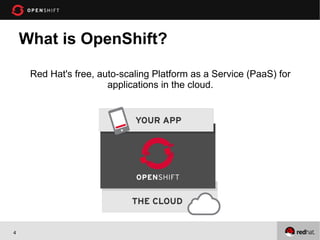
What is OpenShift?

     Red Hat's free, auto-scaling Platform as a Service (PaaS) for
                       applications in the cloud.


4
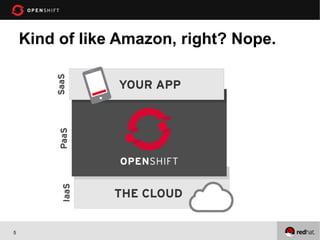
Kind of like Amazon, right? Nope.


5
What’s supported?


6
Looks great, but what’s the catch?
• OpenShift is free-as-in-beer & free-as-in-freedom
• Three 1.5 GB RAM / 3 GB storage gears
• Need more resources, just ask!
• We are in Developer Preview


7
On to Spatial and MongoDB


8
Spatial is fun!
    The only spatial functionality MongoDB currently has is:
    2) Near
    3) Containment


    All of it is laid out on one page:
    http://www.mongodb.org/display/DOCS/Geospatial+Indexing
    First link on a google search for “MongoDB spatial
        indexing”


9
Caveats
 1. Assumes coordinates are between -180 and 180
 2. Can handle any 2d coordinates
 3. Has methods to handle curvature of the earth
    (spherical)


10
How to make it work
 1) Put your coordinates into an arrary
 { loc : [ 50 , 30 ] } //SUGGESTED OPTION
 { loc : { x : 50 , y : 30 } }
 { loc : { foo : 50 , y : 30 } }
 { loc : { lon : 40.739037, lat: 73.992964 } }

 6) Make a 2d index
      db.places.ensureIndex( { loc : "2d" } )


11
Demo
 1. I have an app and a MongoDB instance running
 2. Load some spatial data in JSON format
 3. Make the 2d index
 4. Do a bunch of command you would need in building
    an app (except Deleting docs, because that is easy
    cheezy)


12
Conclusion
 1. Spatial is easy and fun on MongoDB!
 2. You can now build your own FourSquare or other
    check-in application.
 3. You can also build your own field data entry system.
 4. You can build and deploy your application quickly
    without having to think about infrastructure.


13

Mongo sf spatialmongo

  • 1.
    Get your Spatialon with MongoDB in the Cloud Steven Citron-Pousty PaaS Dust Spreader, Red Hat 1
  • 2.
    Agenda • Learn a little spatial • Load some spatial data into MongoDB • Do a query or two • Show some server-side code using it • MAKE YOU A ROCKSTAR!! 2
  • 3.
    Assumptions 1) You can use the command line 2) You are comfortable with MongoDB command line 3) Please ask questions – though since we only have 30 minutes they may have to wait until the end or after the session 3
  • 4.
    What is OpenShift? Red Hat's free, auto-scaling Platform as a Service (PaaS) for applications in the cloud. 4
  • 5.
    Kind of likeAmazon, right? Nope. 5
  • 6.
  • 7.
    Looks great, butwhat’s the catch? • OpenShift is free-as-in-beer & free-as-in-freedom • Three 1.5 GB RAM / 3 GB storage gears • Need more resources, just ask! • We are in Developer Preview 7
  • 8.
    On to Spatialand MongoDB 8
  • 9.
    Spatial is fun! The only spatial functionality MongoDB currently has is: 2) Near 3) Containment All of it is laid out on one page: http://www.mongodb.org/display/DOCS/Geospatial+Indexing First link on a google search for “MongoDB spatial indexing” 9
  • 10.
    Caveats 1. Assumescoordinates are between -180 and 180 2. Can handle any 2d coordinates 3. Has methods to handle curvature of the earth (spherical) 10
  • 11.
    How to makeit work 1) Put your coordinates into an arrary { loc : [ 50 , 30 ] } //SUGGESTED OPTION { loc : { x : 50 , y : 30 } } { loc : { foo : 50 , y : 30 } } { loc : { lon : 40.739037, lat: 73.992964 } } 6) Make a 2d index db.places.ensureIndex( { loc : "2d" } ) 11
  • 12.
    Demo 1. Ihave an app and a MongoDB instance running 2. Load some spatial data in JSON format 3. Make the 2d index 4. Do a bunch of command you would need in building an app (except Deleting docs, because that is easy cheezy) 12
  • 13.
    Conclusion 1. Spatialis easy and fun on MongoDB! 2. You can now build your own FourSquare or other check-in application. 3. You can also build your own field data entry system. 4. You can build and deploy your application quickly without having to think about infrastructure. 13

Editor's Notes

  • #2 ----- Meeting Notes (5/4/12 13:02) ----- Questions at the mic Comment cards and the green card at the back Cheers for Katie & 10gen for running a great