OpenShift Workshop –
    Python for the impatient
    Sign up code: PyConWorkshop
     Steven Citron-Pousty
     @TheSteve0 (TheSteve0 IRC)
     PaaS Dust Spreader, Red Hat


1
Agenda
    • Start with PaaS intro
    • Show you OpenShift
    • What does development look like
    • Do some development – from here on hands on


    • Signup code: PyconWorkshop


2
Assumptions
    1) You know some Mongo
    2) You know or can read some Python
    3) You prefer to write code and apps over managing
       servers or you prefer managing servers rather than
       dealing with annoying developer requests


3
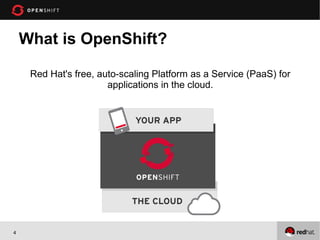
What is OpenShift?

     Red Hat's free, auto-scaling Platform as a Service (PaaS) for
                       applications in the cloud.


4
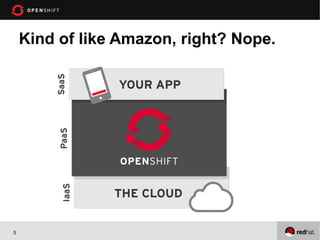
Kind of like Amazon, right? Nope.


5
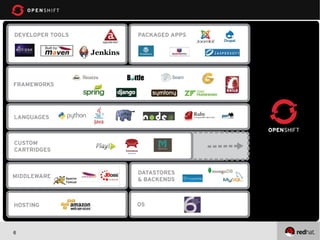
What’s supported?


6
What else do I get and what is the
    catch?
• The Catch is we are in developer preview right now
• OpenShift is free-as-in-beer & free-as-in-freedom
• Three gears – each one is half a gig of RAM, and 1 gig
  of disk (always free)
• Need more resources, just ask!


7
Cook24v on Flickr
8
Demo
    1. Create an application using the command line tools with
       a DB (python)
    2. Create a Wordpress app from the web console


    3. Before I start everyone should start installing the
       command line tools if they haven’t already


9
Some terminology for today
 1. Application – your web code and any data store. Has
    to be on 1 or more gears
 2. Gear – is like a server. It can have only 1 language for
    the web programming.
 3. Cartridge – it adds a language, a data store, or other
    functionality
 4. Git – used for version control and managing code
    between server and your development machine
 5. Ssh – command line tool to connect to your gear


10
GIT


 Distributed Version control
 A local repository – on your laptop
 A remote repository – on some other machine, usually a
   server


 Good place to start -
  http://sixrevisions.com/resources/git-tutorials-
  beginners/


11
OK Now it’s your turn
 1. Create a python application at the command line
     1.   Modify the source and push it back up
 2. Add mongo to your application


12
Mongo Next steps
 1. We look at the National Park data together
 2. We use the code from this github repo :
    https://github.com/openshift/openshift-mongo-flask-
    example
 3. We import the national park data into our MongoDB
    database
 4. Look at the code together.
 5. Write a few of the functions and maybe one of your
    own


13
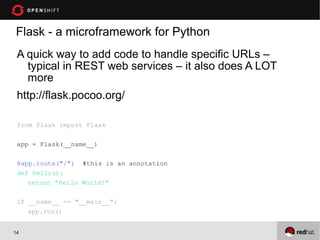
Flask - a microframework for Python
 A quick way to add code to handle specific URLs –
   typical in REST web services – it also does A LOT
   more
 http://flask.pocoo.org/

 from flask import Flask

 app = Flask(__name__)

 @app.route("/") #this is an annotation
 def hello():
    return "Hello World!"

 if __name__ == "__main__":
    app.run()


14
Conclusion
 1. Openshift makes life great for you
 2. Lot’s of Python choices
 3. The tools are easy to use
 4. You should be ready to write services
 5. Almost anything you need on a server
 6. Did I mention – Free


15
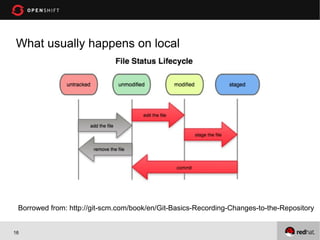
What usually happens on local


 Borrowed from: http://git-scm.com/book/en/Git-Basics-Recording-Changes-to-the-Repository


16
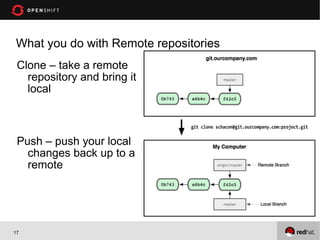
What you do with Remote repositories
 Clone – take a remote
   repository and bring it
   local


 Push – push your local
   changes back up to a
   remote


17
You need to understand at least 3 commands in Git
 1. Git add . (means add all news files as being tracked in
    the local repository)
 2. Git commit –am “your message” (means commit all
    my changes to the local repository with this message)
 3. Git push (means push from your local repository to
    the repository on your OpenShift gear)


18
Github
 Publically hosted git repositores (can be private if you
   pay for it)


 http://www.github.com


 You care about it because:
 1)We have quickstarts
   there
 2)You can put your
   projects there for backup

19

Workshop For pycon13

  • 1.
    OpenShift Workshop – Python for the impatient Sign up code: PyConWorkshop Steven Citron-Pousty @TheSteve0 (TheSteve0 IRC) PaaS Dust Spreader, Red Hat 1
  • 2.
    Agenda • Start with PaaS intro • Show you OpenShift • What does development look like • Do some development – from here on hands on • Signup code: PyconWorkshop 2
  • 3.
    Assumptions 1) You know some Mongo 2) You know or can read some Python 3) You prefer to write code and apps over managing servers or you prefer managing servers rather than dealing with annoying developer requests 3
  • 4.
    What is OpenShift? Red Hat's free, auto-scaling Platform as a Service (PaaS) for applications in the cloud. 4
  • 5.
    Kind of likeAmazon, right? Nope. 5
  • 6.
  • 7.
    What else doI get and what is the catch? • The Catch is we are in developer preview right now • OpenShift is free-as-in-beer & free-as-in-freedom • Three gears – each one is half a gig of RAM, and 1 gig of disk (always free) • Need more resources, just ask! 7
  • 8.
  • 9.
    Demo 1. Create an application using the command line tools with a DB (python) 2. Create a Wordpress app from the web console 3. Before I start everyone should start installing the command line tools if they haven’t already 9
  • 10.
    Some terminology fortoday 1. Application – your web code and any data store. Has to be on 1 or more gears 2. Gear – is like a server. It can have only 1 language for the web programming. 3. Cartridge – it adds a language, a data store, or other functionality 4. Git – used for version control and managing code between server and your development machine 5. Ssh – command line tool to connect to your gear 10
  • 11.
    GIT Distributed Versioncontrol A local repository – on your laptop A remote repository – on some other machine, usually a server Good place to start - http://sixrevisions.com/resources/git-tutorials- beginners/ 11
  • 12.
    OK Now it’syour turn 1. Create a python application at the command line 1. Modify the source and push it back up 2. Add mongo to your application 12
  • 13.
    Mongo Next steps 1. We look at the National Park data together 2. We use the code from this github repo : https://github.com/openshift/openshift-mongo-flask- example 3. We import the national park data into our MongoDB database 4. Look at the code together. 5. Write a few of the functions and maybe one of your own 13
  • 14.
    Flask - amicroframework for Python A quick way to add code to handle specific URLs – typical in REST web services – it also does A LOT more http://flask.pocoo.org/ from flask import Flask app = Flask(__name__) @app.route("/") #this is an annotation def hello(): return "Hello World!" if __name__ == "__main__": app.run() 14
  • 15.
    Conclusion 1. Openshiftmakes life great for you 2. Lot’s of Python choices 3. The tools are easy to use 4. You should be ready to write services 5. Almost anything you need on a server 6. Did I mention – Free 15
  • 16.
    What usually happenson local Borrowed from: http://git-scm.com/book/en/Git-Basics-Recording-Changes-to-the-Repository 16
  • 17.
    What you dowith Remote repositories Clone – take a remote repository and bring it local Push – push your local changes back up to a remote 17
  • 18.
    You need tounderstand at least 3 commands in Git 1. Git add . (means add all news files as being tracked in the local repository) 2. Git commit –am “your message” (means commit all my changes to the local repository with this message) 3. Git push (means push from your local repository to the repository on your OpenShift gear) 18
  • 19.
    Github Publically hostedgit repositores (can be private if you pay for it) http://www.github.com You care about it because: 1)We have quickstarts there 2)You can put your projects there for backup 19