Build An App With Blindfold
Britt Barak
Droidcon TLV
26.9.16
Britt Barak
Britt Barak
@BrittBarak
● Figure 8
● Android Academy TLV
Largest Android Community
Android Academy - TLV
TLV - Android Academy
~ 1500 members Join Us:
Upcoming Events
● Android Beginners - coming on 30/10 !
● Android UI / UX
● Community Hackathon
● Android Performance
● Mentors Program
My First Startup
“As You Like It” / W. Shakespeare
‫״‬All the world’s a stage,
And all the men and women merely players;
They have their exits and their entrances,
And one man in his time plays many parts:‫״‬
His acts being seven ages. At first, the
infant,
Mewling and puking in the nurse’s arms.
Then the whining schoolboy, with his
satchel
And shining morning face, creeping like
snail
Unwillingly to school. And then the lover,
Sighing like furnace, with a woeful ballad
Made to his mistress’ eyebrow. Then a
soldier,
Full of strange oaths and bearded like the
pard,
Jealous in honor, sudden and quick in
quarrel,
Seeking the bubble reputation
Even in the cannon’s mouth. And then the
justice,
In fair round belly with good capon lined,
With eyes severe and beard of formal cut,
Full of wise saws and modern instances;
And so he plays his part. The sixth age
shifts
Into the lean and slippered pantaloon,
With spectacles on nose and pouch on side;
His youthful hose, well saved, a world too
wide
For his shrunk shank, and his big manly
voice,
Turning again toward childish treble, pipes
And whistles in his sound. Last scene of
all,
That ends this strange eventful history,
Is second childishness and mere oblivion,
Sans teeth, sans eyes, sans taste, sans
everything.
“exits and entrances”
The part can change
But there’s always a defined part.
File → New Project
New Startups
● Uncertainty
● Many changes
● Low on resources
○ Time
○ Developers
○ Money
We Want To Deliver Fast!
Premature optimizations are bad
1. Mess Grows
2. Structure Stays
Recipe
1. Big picture - who are the “players”?
2. Small use cases - what are the “parts”?
3. Choose POCs - order “exits and entrances”
High Level Structure
Presentation
Layer
Data LayerDomain Layer
High Level Structure
Presentation
Layer
● View
● ViewEntity
● Presenter
→ Framework
Data Layer
● Repository
● Entity
→ Java
Domain Layer
● Interactor
● Use case
→ Java
Example : Add Chat Feature To App
Big Picture - The Players
● Add chat feature to the app
● Chat between groups of members
Separation
App
Module
Chat
Module
Why New Module?
- Encapsulate implementation
- Easy to replace
- Easy to reuse
Structure:
Presentation Layer - App Module
Data Layer - Chat Module
let‘s talk about the data structure.
Firebase DB
- Easy.
- noSQL
- Flat
- Get data by reference
- ref/messages/chat_one_id
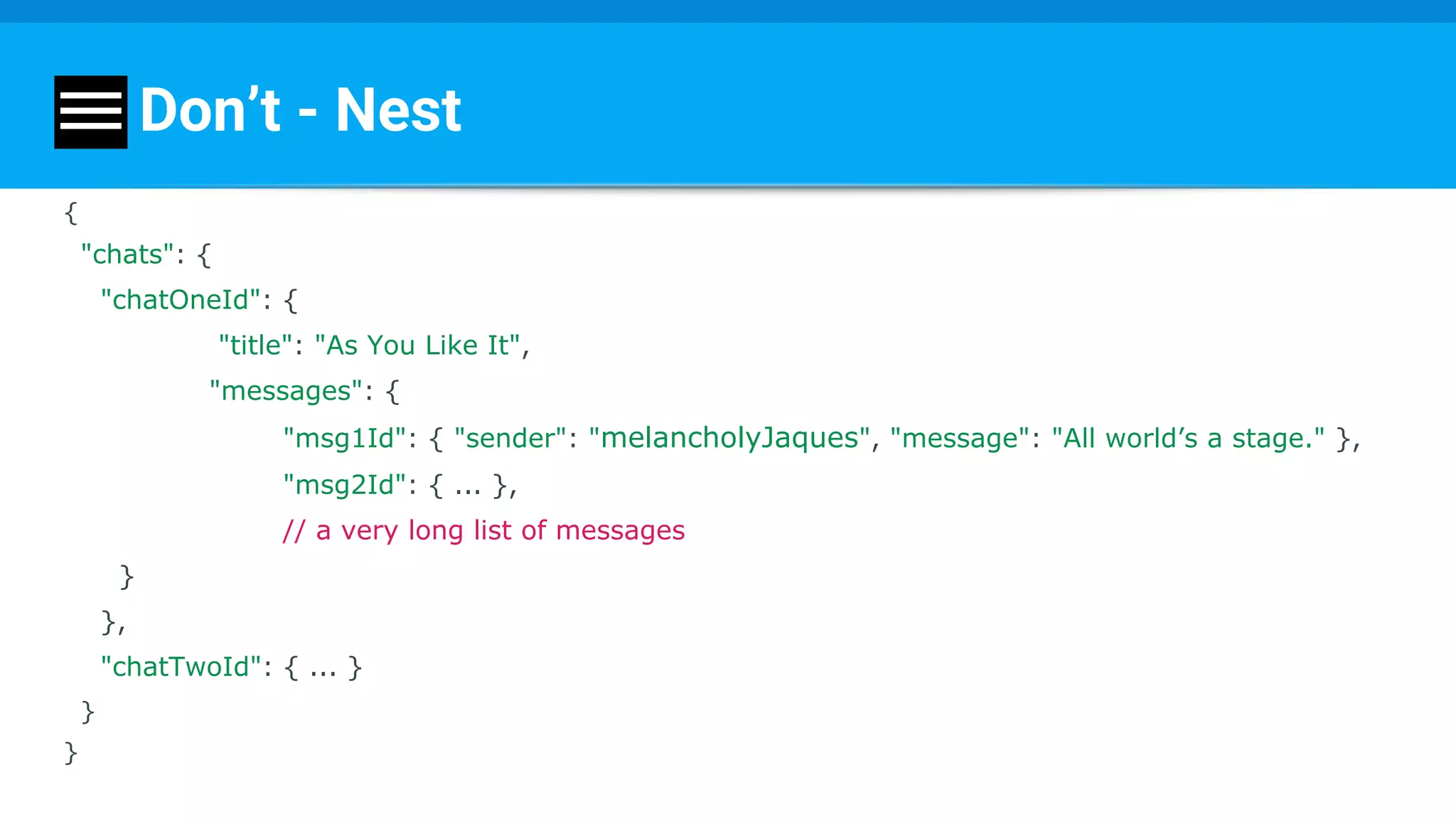
Don’t - Nest
{
"chats": {
"chatOneId": {
"title": "As You Like It",
"messages": {
"msg1Id": { "sender": "melancholyJaques", "message": "All world’s a stage." },
"msg2Id": { ... },
// a very long list of messages
}
},
"chatTwoId": { ... }
}
}
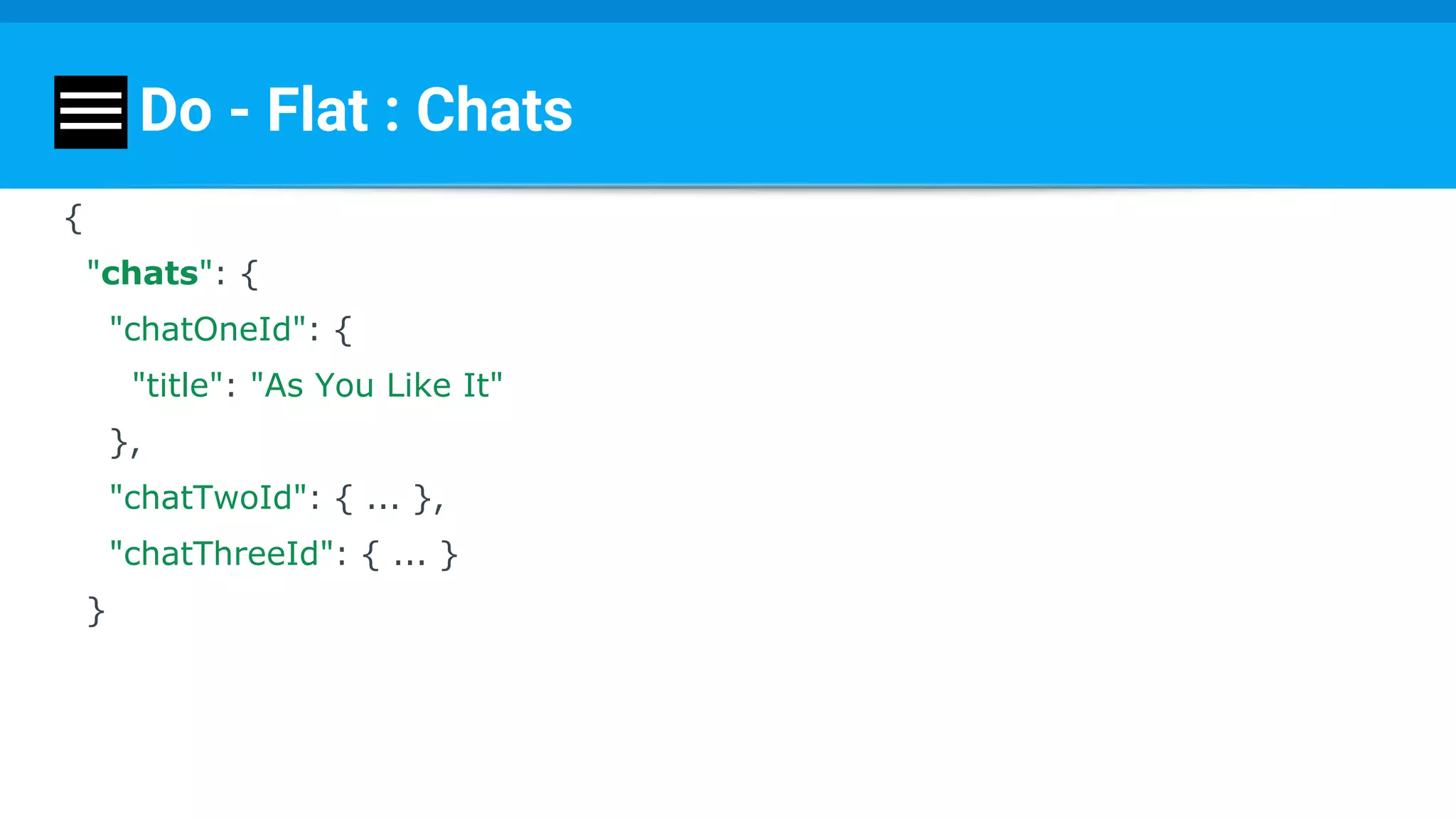
Do - Flat : Chats
{
"chats": {
"chatOneId": {
"title": "As You Like It"
},
"chatTwoId": { ... },
"chatThreeId": { ... }
}
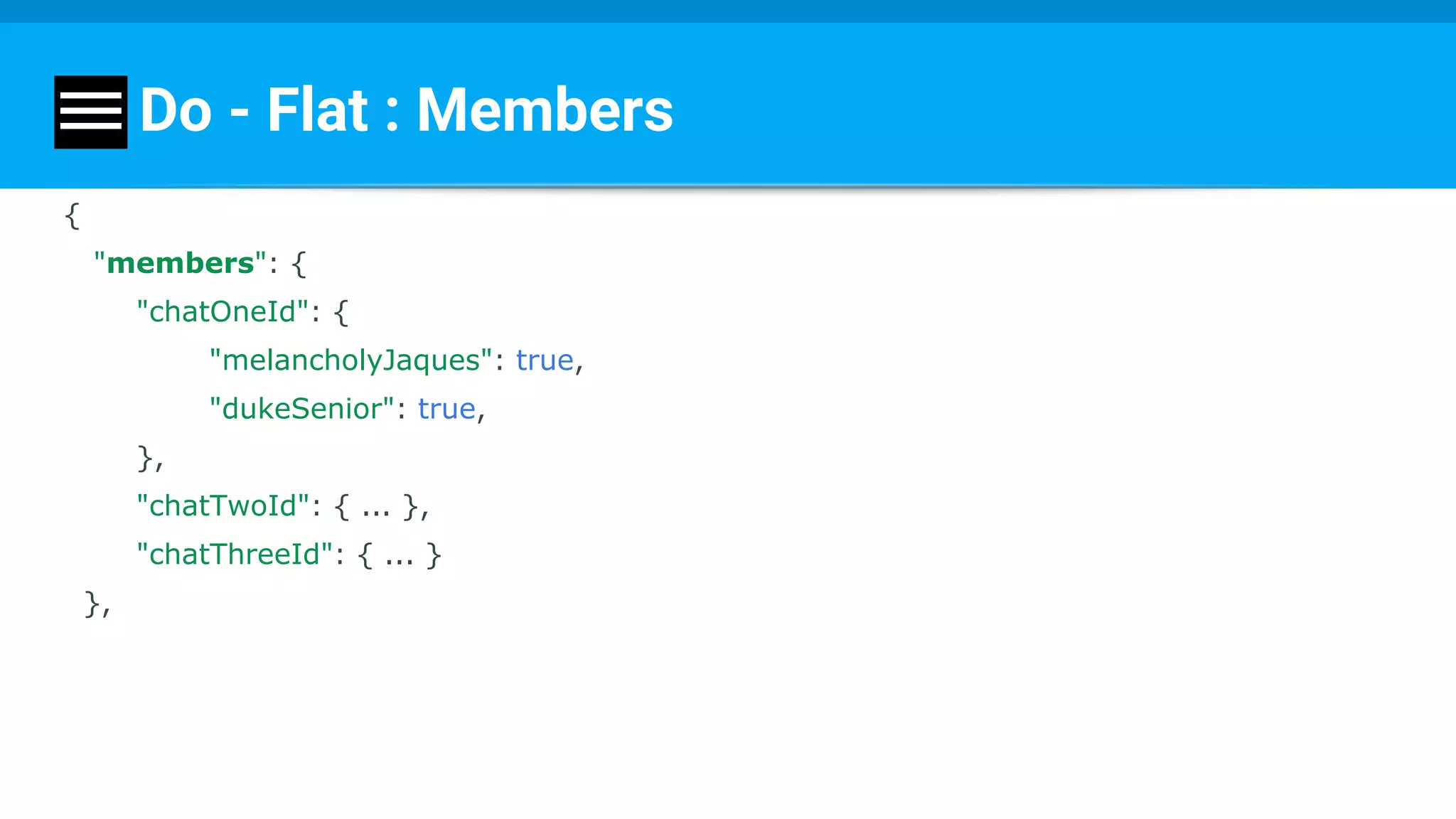
Do - Flat : Members
{
"members": {
"chatOneId": {
"melancholyJaques": true,
"dukeSenior": true,
},
"chatTwoId": { ... },
"chatThreeId": { ... }
},
Do - Flat : Users
{
"users": {
"melancholyJaques": {
"name": Melancholy Jaques",
"photoId": "23h42",
"chats": {
"chatOneId": true,
"chatTwoId": true
}
},
...
},
Do - Flat : Messages
"messages": {
"chatOneId": {
"msg1Id": {
"sender": "melancholyJaques",
"message": "All world’s a stage.",
"timestamp": 1459361875337
},
"msg2Id": { ... },
// a very long list of messages
},
"chatTwoId": { ... },
}
}
On my code
Chat module: individual separate pieces:
- Chats Repository
- Members Repository
- Users Repository
- Messages Repository
Repository (Data Layer)
Part - provide and update data.
Encapsulates implementation.
public class UsersRepo implements IUsersRepository {
MyFirebaseDBClient firebaseClient;
@Override
public void getChatIDs(Callback callback) {
firebaseClient.fetchChats(callback);
}
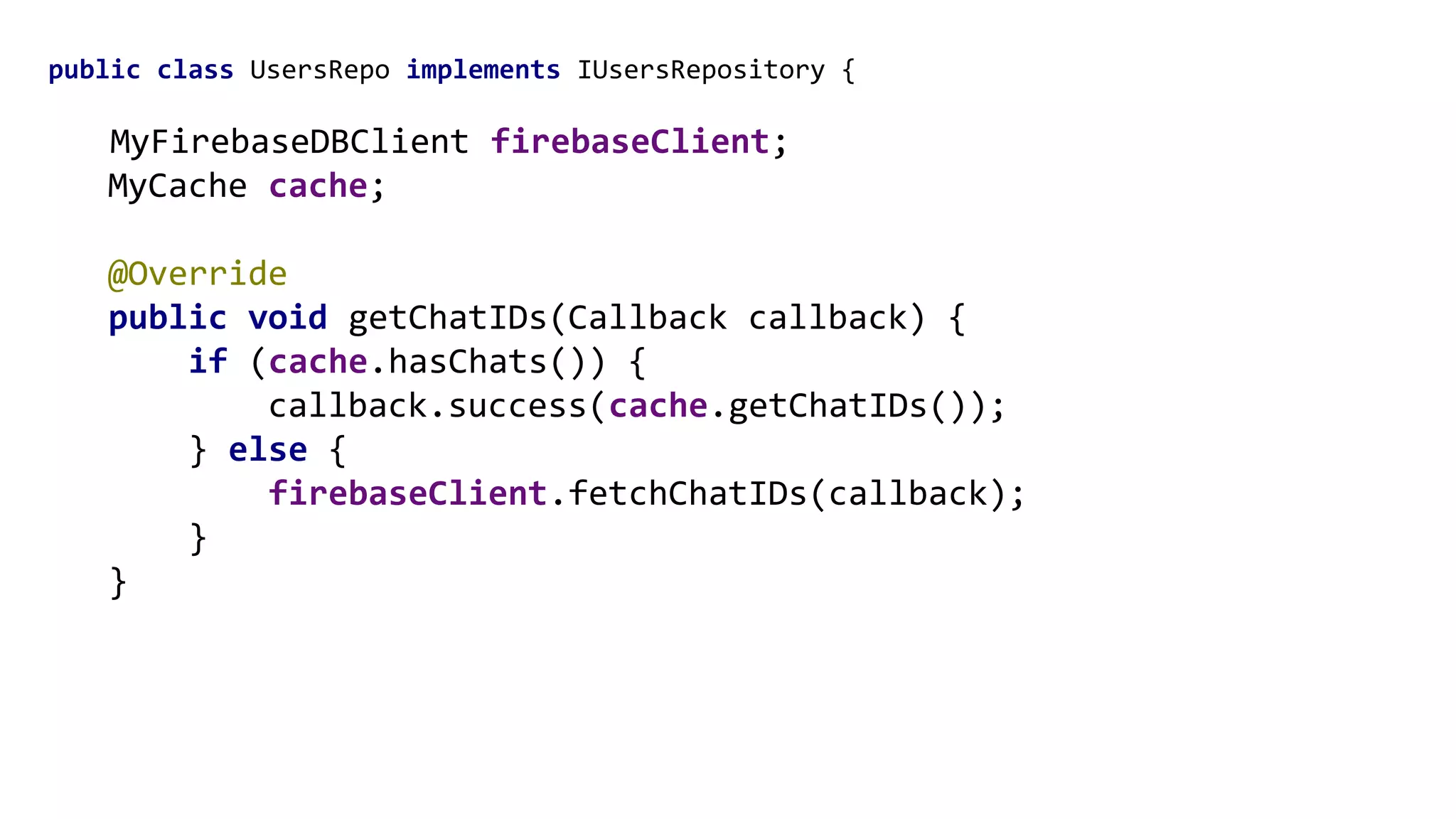
public class UsersRepo implements IUsersRepository {
MyFirebaseDBClient firebaseClient;
MyCache cache;
@Override
public void getChatIDs(Callback callback) {
if (cache.hasChats()) {
callback.success(cache.getChatIDs());
} else {
firebaseClient.fetchChatIDs(callback);
}
}
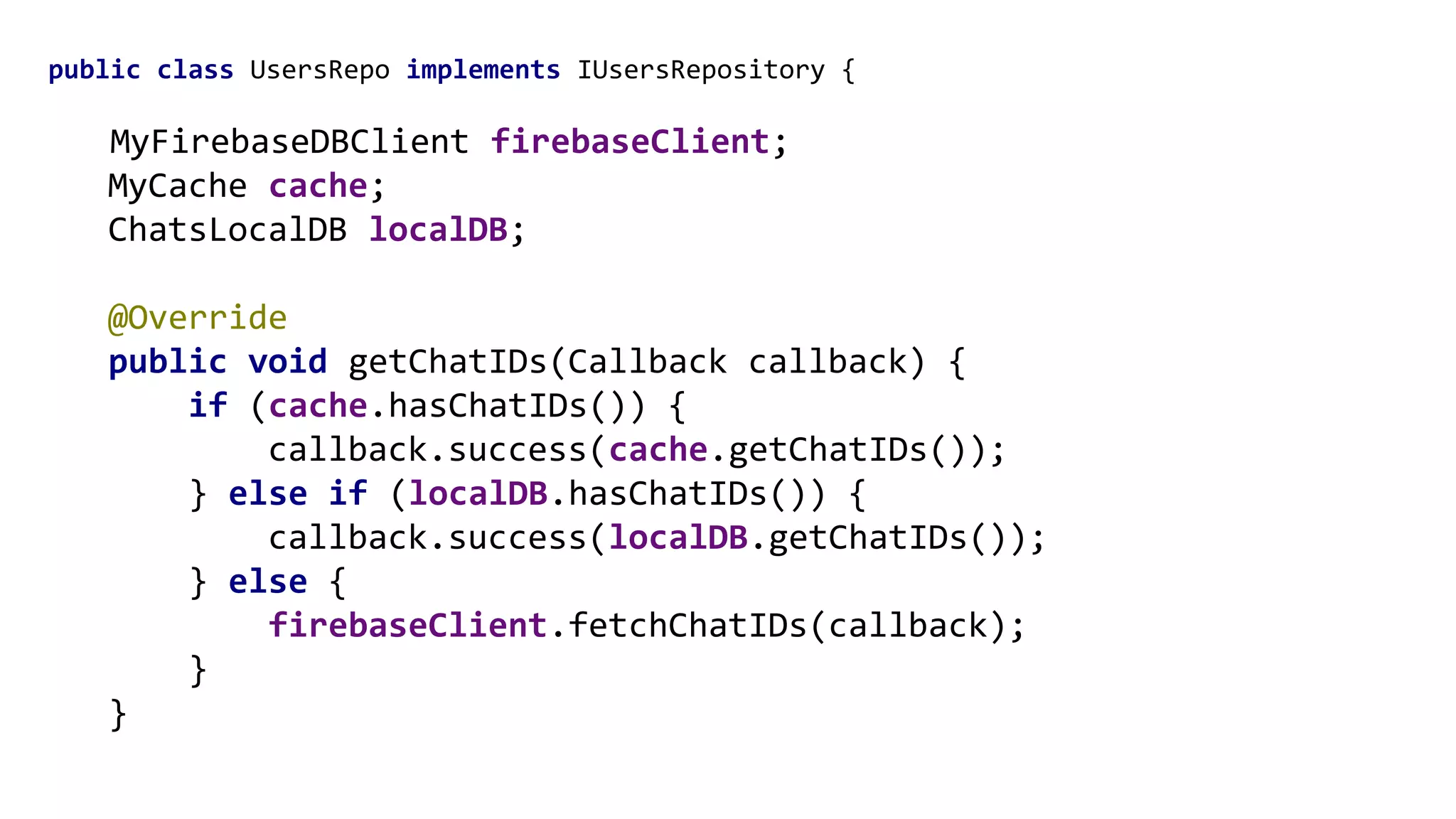
public class UsersRepo implements IUsersRepository {
MyFirebaseDBClient firebaseClient;
MyCache cache;
ChatsLocalDB localDB;
@Override
public void getChatIDs(Callback callback) {
if (cache.hasChatIDs()) {
callback.success(cache.getChatIDs());
} else if (localDB.hasChatIDs()) {
callback.success(localDB.getChatIDs());
} else {
firebaseClient.fetchChatIDs(callback);
}
}
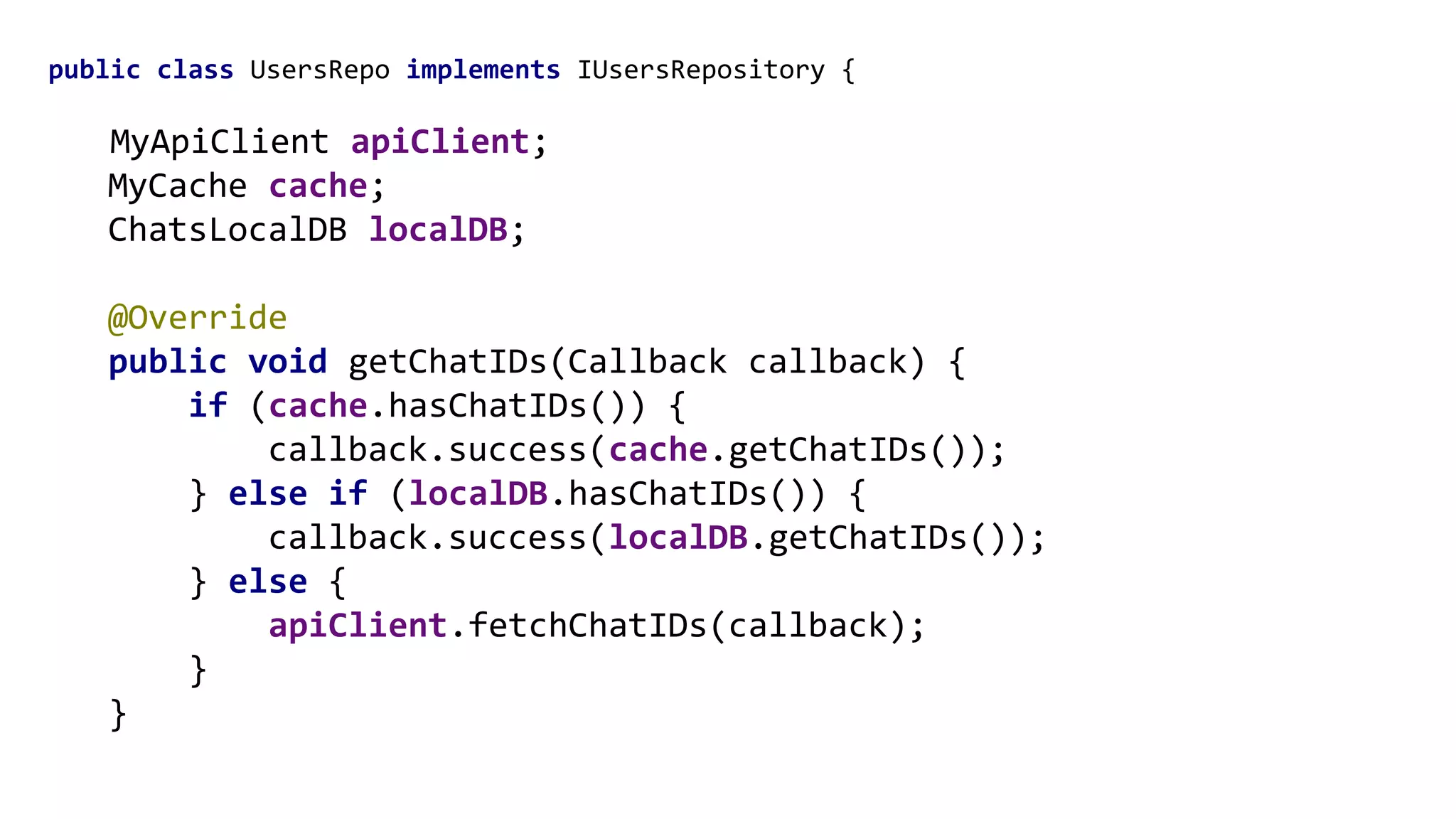
public class UsersRepo implements IUsersRepository {
MyApiClient apiClient;
MyCache cache;
ChatsLocalDB localDB;
@Override
public void getChatIDs(Callback callback) {
if (cache.hasChatIDs()) {
callback.success(cache.getChatIDs());
} else if (localDB.hasChatIDs()) {
callback.success(localDB.getChatIDs());
} else {
apiClient.fetchChatIDs(callback);
}
}
Recipe
1. Big picture - who are the “players”?
2. Small use cases - what are the “parts”?
3. Choose POCs - order “exits and entrances”
Domain layer - Use Cases
Use cases / interactors
What does the app do? What are its use cases?
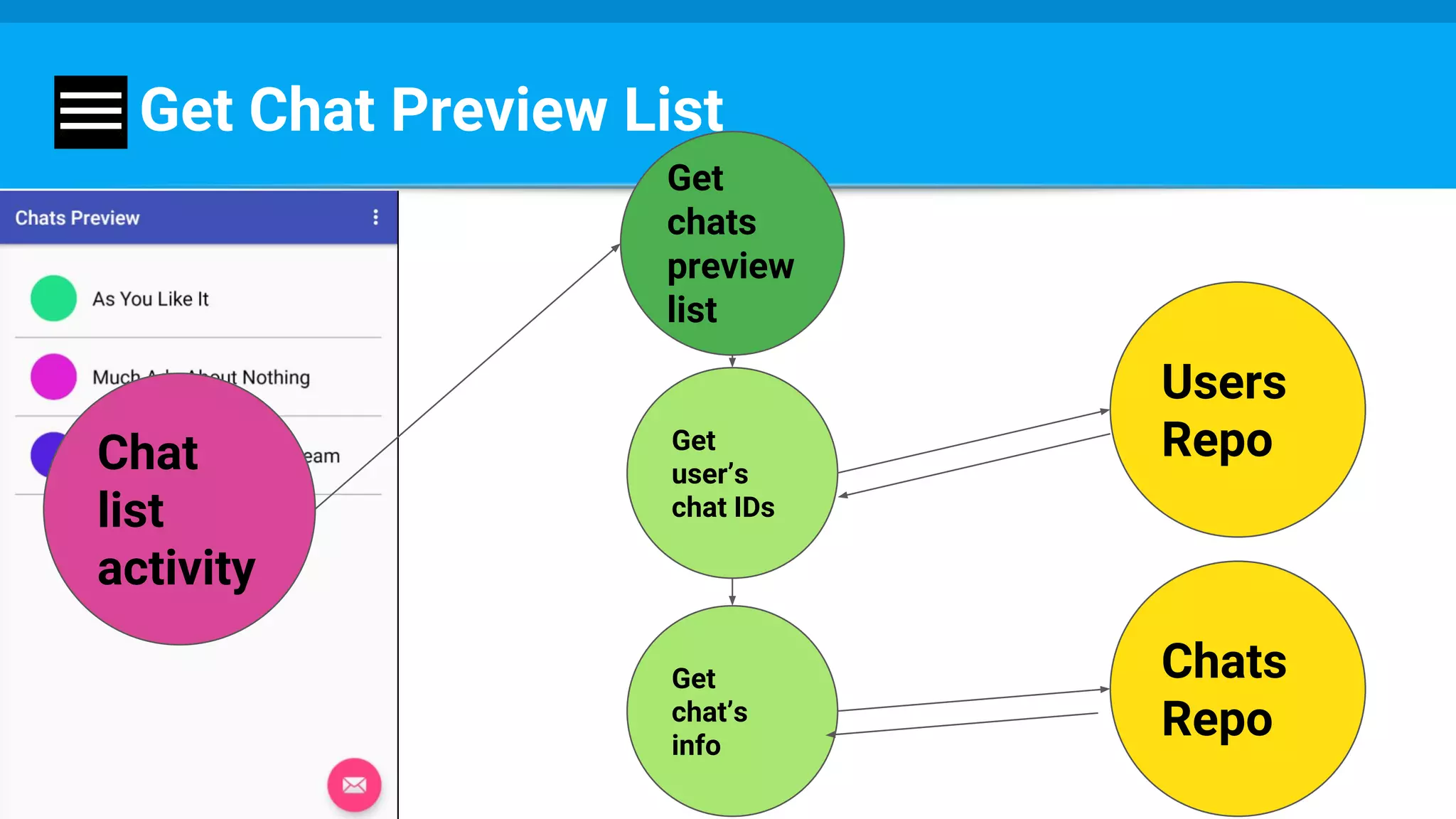
Example: getChatsPreviewList (use case)
Get
user’s
chat IDs
Get
chat’s
info
Chats
Repo
Get
chats
preview
list
Chat
list
activity
Users
Repo
Get Chat Preview List
Get chats
preview
list
List<Chat>
List<String>
ChatRaw
Get Chat Preview List
List<ChatRaw>
Get Chat Preview List
public class GetChatPreviewListImpl implements GetChatsPreviewList {
public void execute(final Callback<List<Chat>> callback) {
usersRepo.getChatIDs(new Callback<List<String>>() {
@Override
public void success(List<String> chatIDs) {
chatsRepo.getChats(new Callback<List<RawChat>>() {
@Override
public void success(List<RawChat> rawChats) {
List<Chat> chats = proccessChats(rawChats);
callback.success(chats);
}
});
}
});
Get chats
preview
list
Get chat
members
Get chat
messags
….
App Module Will Ask For More
Chat
list
activity
Recipe
1. Big picture - who are the “players”?
2. Small use cases - what are the “parts”?
3. Choose POCs - order “exits and entrances”
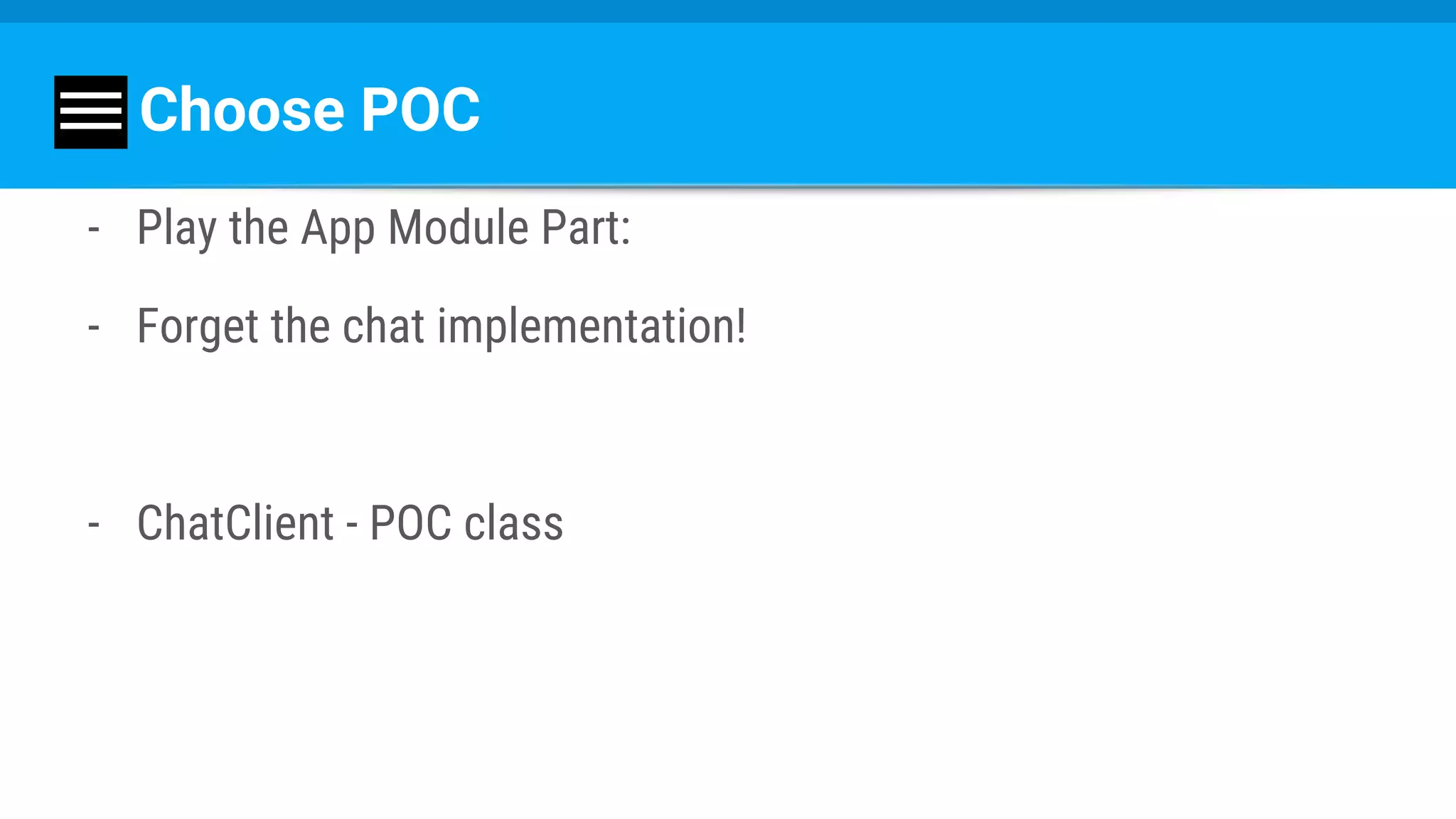
Choose POC
- Play the App Module Part:
- Forget the chat implementation!
- ChatClient - POC class
Chat Client
Get chats
preview
list
Get chat
members
Get chat
messags
….
Choose POC
App
Module
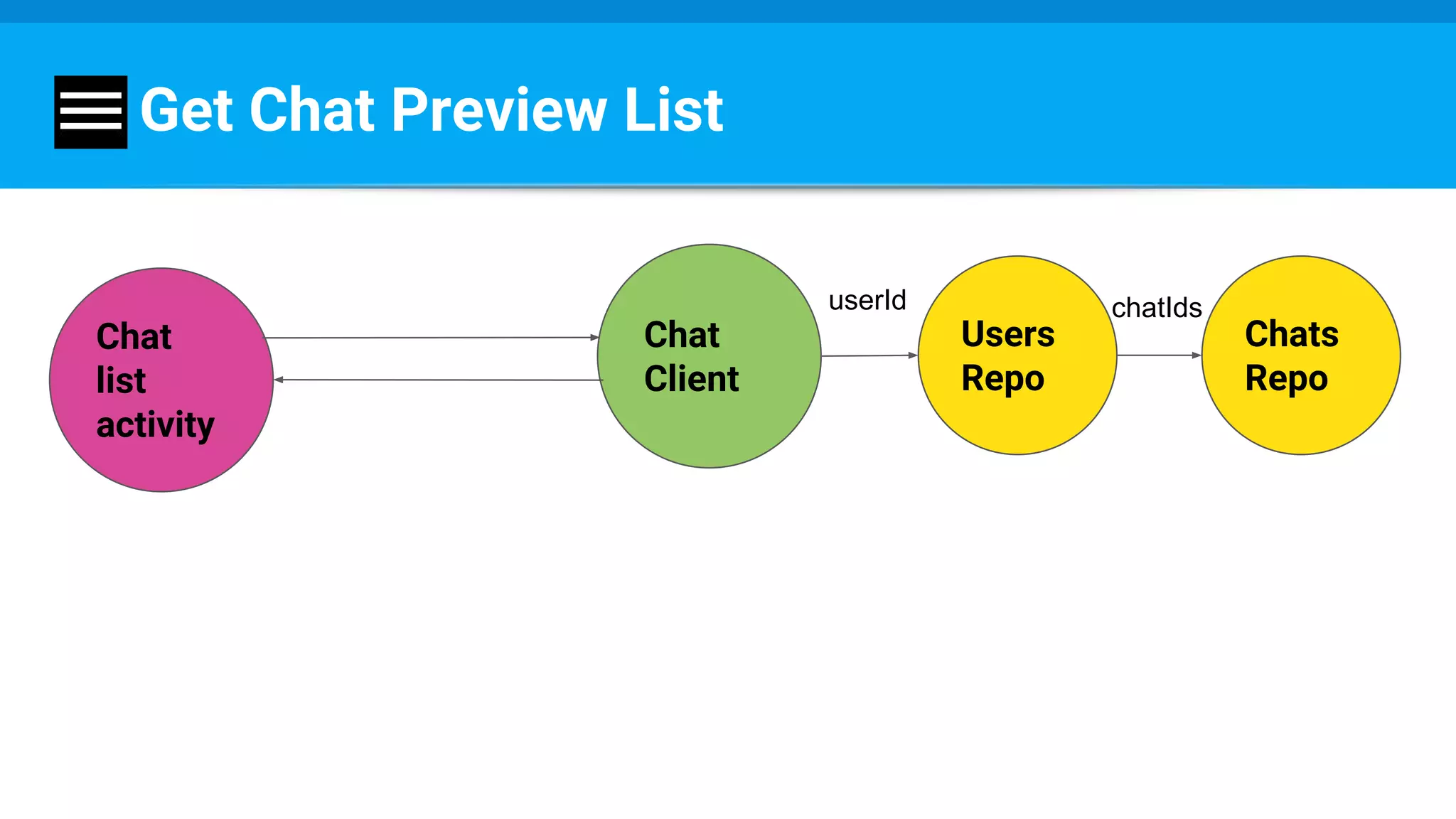
Get Chat Preview List
Chat
list
activity
Chat
Client
Users
Repo
Chats
Repo
userId chatIds
Demand
On chats preview list:
show last message
Get Chat Preview List 2
Too messy. Too many listeners and threads. Too much time.
Chat
Client
Users
Repo
Chat
list
activity
Chats
Repo
userId chatIds
Msgs
Repo
Get
chats
preview
list
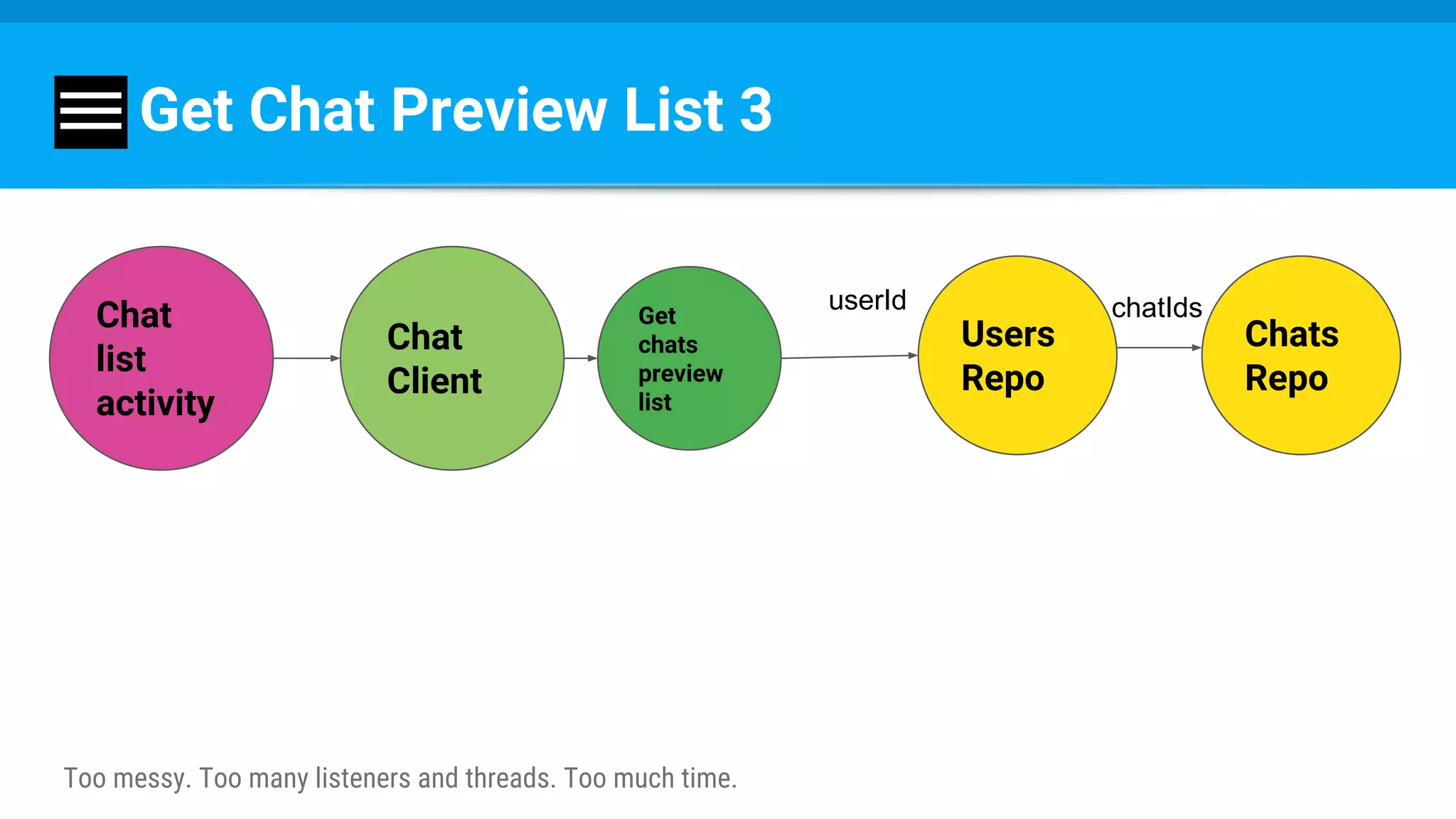
Get Chat Preview List 3
Add data straight to chat Info node
"chats": {
"chatOneId": {
"title": "As You Like It"
"lastMessage": "All world’s a stage"
},
"chatTwoId": { ... },
"chatThreeId": { ... }
},
Get Chat Preview List 3
Too messy. Too many listeners and threads. Too much time.
Chat
Client
Users
Repo
Chat
list
activity
Chats
Repo
userId chatIdsGet
chats
preview
list
But now:
more work when sending a message
Send : Before
Chat
activity
Chat
Client
Msgs
Repo
Send
Send : After
Chat
activity
Chat
Client
Msgs
Repo
Send
Chats
Repo
Demand
Message visibility per user.
“Last message”
isn’t general anymore.
Structure - Message
"message1": {
...
"visibleTo": {
"userId1": true,
"userId2": true
},
}
Structure - Personal Chat Info
Chats
General
Info
Personal
Info
title
Last
msg
Personal Chat Info Node
{
"personalInfo": {
"melancholyJaques": {
"lastMessage": All world’s a stage",
"timestamp": 1459361875337
},
...
},
Get Chat Preview List 4
Too messy. Too many listeners and threads. Too much time.
Chat
Client
Users
Repo
Chat
list
activity
userId chatIdsGet
chats
preview
list
personal
Info
Repo
general
Info
Repo
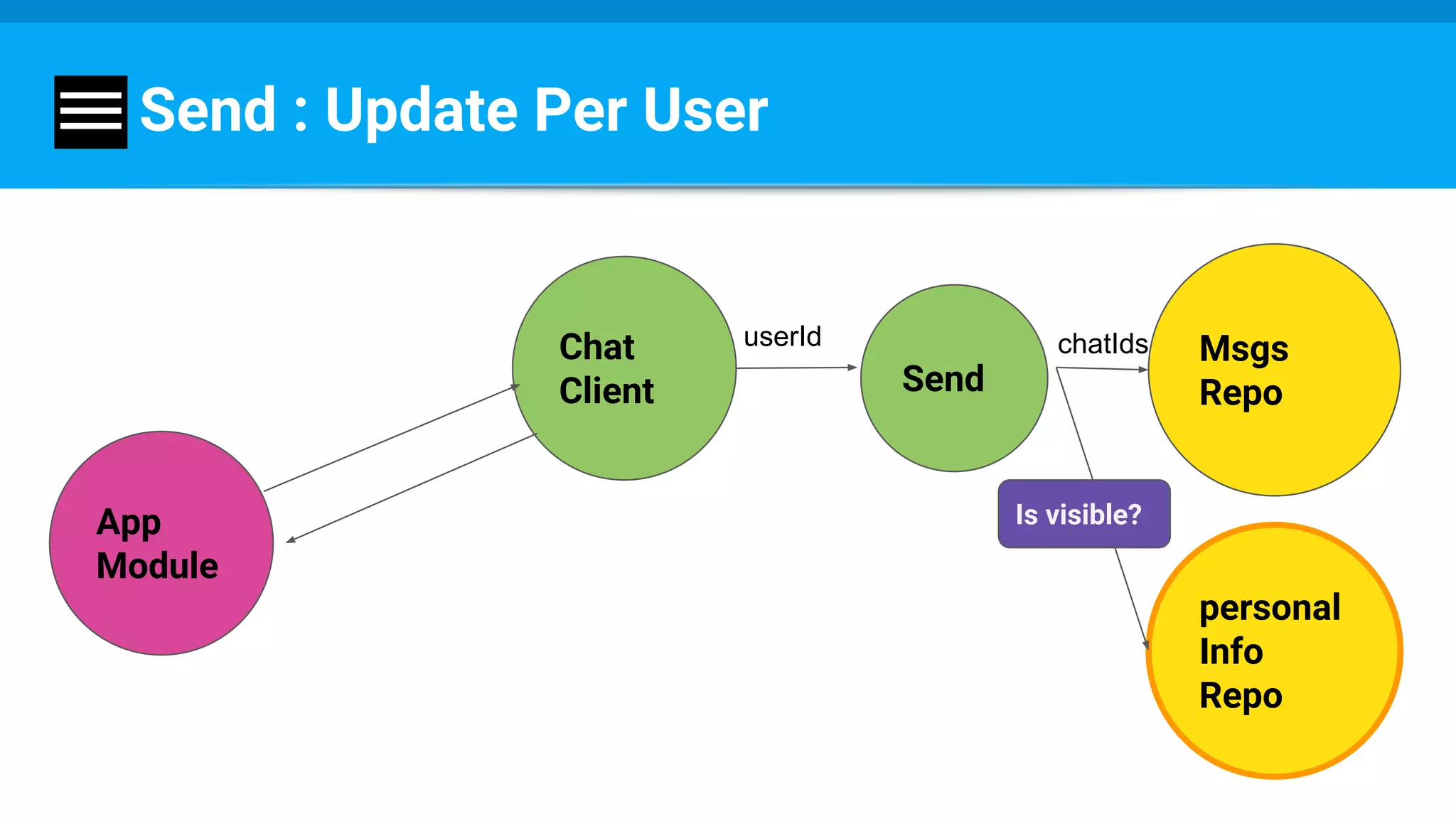
Send : Update Per User
App
Module
Chat
Client
Msgs
Repo
userId chatIds
personal
Info
Repo
Send
Is visible?
But I have many recipients….
Takes long to update each user repo...
Send :
Send
Message
Repo
FCM
Receive :
Send Receive
Personal
Info
Repo
Message
Repo
FCM
Give the part to a differenet Player
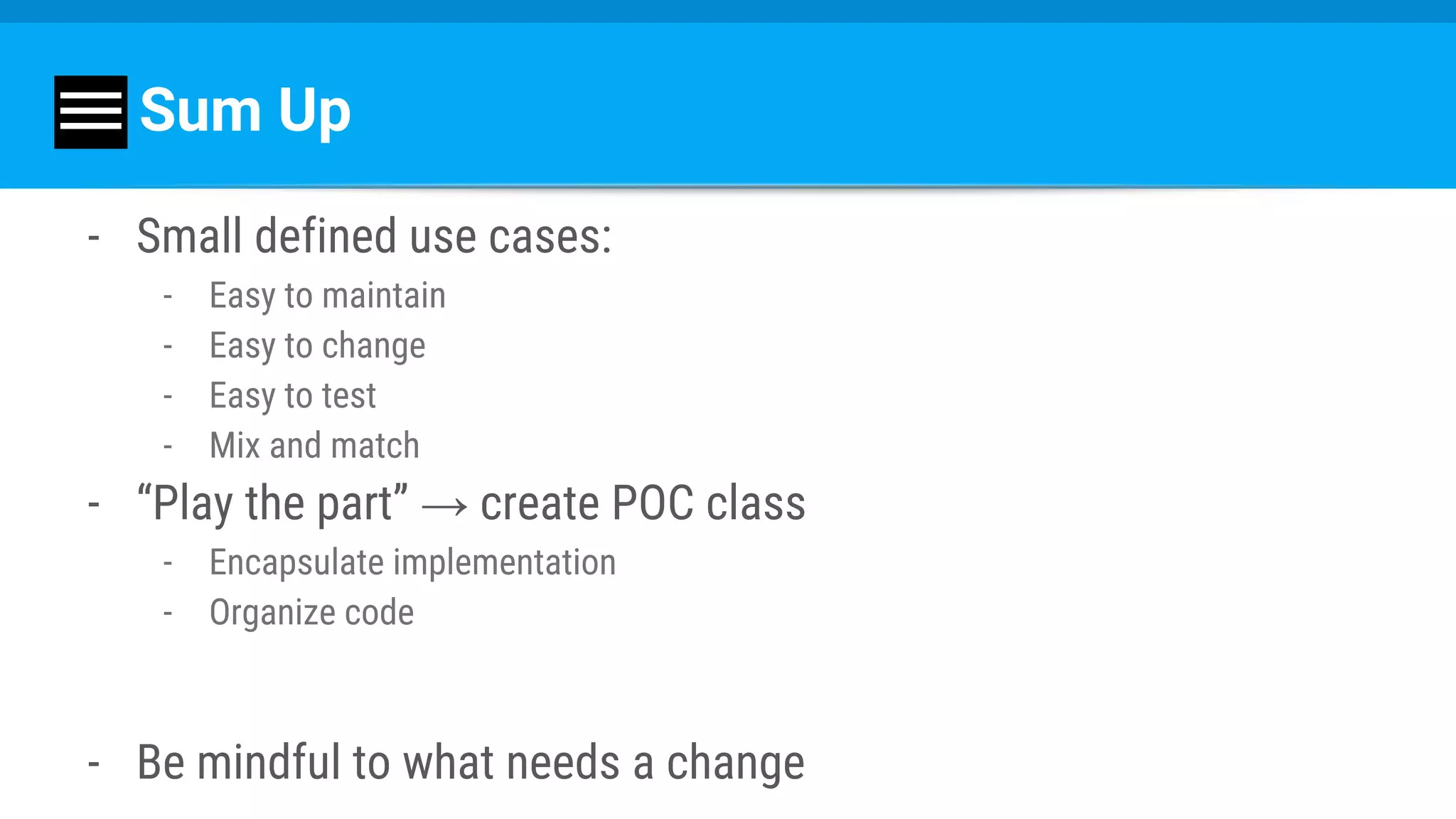
Sum Up
- Small defined use cases:
- Easy to maintain
- Easy to change
- Easy to test
- Mix and match
- “Play the part” → create POC class
- Encapsulate implementation
- Organize code
- Be mindful to what needs a change
Example changing the part
FCM Usages
- Notify user
- Update DB
- Update UI
- Fetch new data
- Start service
- ……...
How Does It Work?
public class MyFCMService extends FirebaseMessagingService {
@Override
public void onMessageReceived(RemoteMessage remoteMessage) {
//...
}
}
Remote Message Part
Notify about an event.
FCM Handling
Type per message
RemoteMessage
Data
….
< “type” , “new_chat_message” >
….
FCM Handling
public class MyFCMService extends FirebaseMessagingService {
@Override
public void onMessageReceived(RemoteMessage remoteMessage) {
String type = data.get(StaticKeys.KEY_TYPE);
switch (type) {
//....
}
}
}
It Worked Great...
We added up more and more events…..
- New chat message
- New member added
- Member removed
- New data available
- ………………..
…for some time :-/
- Too many event types
- Too complex code
- Hard to change
- Hard to combine
- Sometimes one usecase represented multiple event types and forced few fcm
messages
- The ugly switch-case...
Demand
- Easily support new types
- Change remotely
Wait….
Take a step back.
What did we mean to do?
1. Notifying users
2. Update data / ui
3. Update DB
Remote Message Part
Notify an event.
Notify about stuff that need to be done.
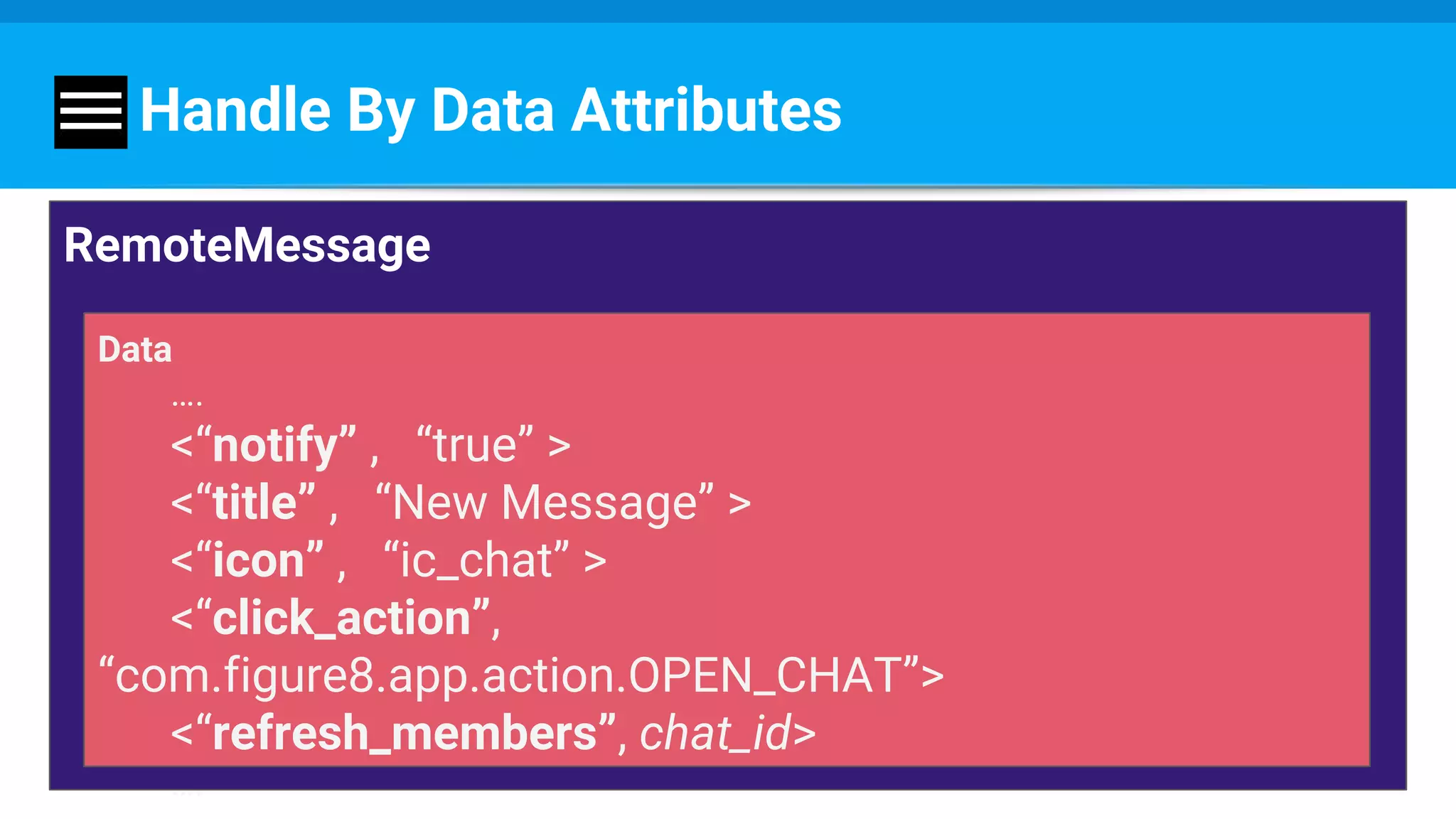
Handle By Data Attributes
RemoteMessage
Data
….
<“notify” , “true” >
<“title” , “New Message” >
<“icon” , “ic_chat” >
<“click_action”,
“com.figure8.app.action.OPEN_CHAT”>
<“refresh_members”, chat_id>
….
Handle By Data Attributes
Messaging
Service
Notif
Producer
Data
Refresher
DB
Updater
Remote
Message
Remote
Message
Pros
- Flexible
- Update remotely
- Test:
- Test the data producer
- Test the data handler
What Did We Do?
Gave the component a different part.
“exits and entrances”
The part can change
But there’s always a defined part.
Questions?
Thank you :)

Build an App with Blindfold - Britt Barak

  • 1.
    Build An AppWith Blindfold Britt Barak Droidcon TLV 26.9.16
  • 2.
    Britt Barak Britt Barak @BrittBarak ●Figure 8 ● Android Academy TLV
  • 3.
    Largest Android Community AndroidAcademy - TLV TLV - Android Academy ~ 1500 members Join Us:
  • 4.
    Upcoming Events ● AndroidBeginners - coming on 30/10 ! ● Android UI / UX ● Community Hackathon ● Android Performance ● Mentors Program
  • 5.
  • 6.
    “As You LikeIt” / W. Shakespeare ‫״‬All the world’s a stage, And all the men and women merely players; They have their exits and their entrances, And one man in his time plays many parts:‫״‬
  • 7.
    His acts beingseven ages. At first, the infant, Mewling and puking in the nurse’s arms. Then the whining schoolboy, with his satchel And shining morning face, creeping like snail Unwillingly to school. And then the lover, Sighing like furnace, with a woeful ballad Made to his mistress’ eyebrow. Then a soldier, Full of strange oaths and bearded like the pard, Jealous in honor, sudden and quick in quarrel, Seeking the bubble reputation Even in the cannon’s mouth. And then the justice, In fair round belly with good capon lined, With eyes severe and beard of formal cut, Full of wise saws and modern instances; And so he plays his part. The sixth age shifts Into the lean and slippered pantaloon, With spectacles on nose and pouch on side; His youthful hose, well saved, a world too wide For his shrunk shank, and his big manly voice, Turning again toward childish treble, pipes And whistles in his sound. Last scene of all, That ends this strange eventful history, Is second childishness and mere oblivion, Sans teeth, sans eyes, sans taste, sans everything.
  • 8.
    “exits and entrances” Thepart can change But there’s always a defined part.
  • 9.
    File → NewProject
  • 10.
    New Startups ● Uncertainty ●Many changes ● Low on resources ○ Time ○ Developers ○ Money
  • 11.
    We Want ToDeliver Fast! Premature optimizations are bad 1. Mess Grows 2. Structure Stays
  • 12.
    Recipe 1. Big picture- who are the “players”? 2. Small use cases - what are the “parts”? 3. Choose POCs - order “exits and entrances”
  • 13.
  • 14.
    High Level Structure Presentation Layer ●View ● ViewEntity ● Presenter → Framework Data Layer ● Repository ● Entity → Java Domain Layer ● Interactor ● Use case → Java
  • 15.
    Example : AddChat Feature To App
  • 16.
    Big Picture -The Players ● Add chat feature to the app ● Chat between groups of members
  • 17.
  • 18.
    Why New Module? -Encapsulate implementation - Easy to replace - Easy to reuse
  • 19.
  • 20.
  • 21.
    Data Layer -Chat Module let‘s talk about the data structure.
  • 22.
    Firebase DB - Easy. -noSQL - Flat - Get data by reference - ref/messages/chat_one_id
  • 23.
    Don’t - Nest { "chats":{ "chatOneId": { "title": "As You Like It", "messages": { "msg1Id": { "sender": "melancholyJaques", "message": "All world’s a stage." }, "msg2Id": { ... }, // a very long list of messages } }, "chatTwoId": { ... } } }
  • 24.
    Do - Flat: Chats { "chats": { "chatOneId": { "title": "As You Like It" }, "chatTwoId": { ... }, "chatThreeId": { ... } }
  • 25.
    Do - Flat: Members { "members": { "chatOneId": { "melancholyJaques": true, "dukeSenior": true, }, "chatTwoId": { ... }, "chatThreeId": { ... } },
  • 26.
    Do - Flat: Users { "users": { "melancholyJaques": { "name": Melancholy Jaques", "photoId": "23h42", "chats": { "chatOneId": true, "chatTwoId": true } }, ... },
  • 27.
    Do - Flat: Messages "messages": { "chatOneId": { "msg1Id": { "sender": "melancholyJaques", "message": "All world’s a stage.", "timestamp": 1459361875337 }, "msg2Id": { ... }, // a very long list of messages }, "chatTwoId": { ... }, } }
  • 28.
    On my code Chatmodule: individual separate pieces: - Chats Repository - Members Repository - Users Repository - Messages Repository
  • 29.
    Repository (Data Layer) Part- provide and update data. Encapsulates implementation.
  • 30.
    public class UsersRepoimplements IUsersRepository { MyFirebaseDBClient firebaseClient; @Override public void getChatIDs(Callback callback) { firebaseClient.fetchChats(callback); }
  • 31.
    public class UsersRepoimplements IUsersRepository { MyFirebaseDBClient firebaseClient; MyCache cache; @Override public void getChatIDs(Callback callback) { if (cache.hasChats()) { callback.success(cache.getChatIDs()); } else { firebaseClient.fetchChatIDs(callback); } }
  • 32.
    public class UsersRepoimplements IUsersRepository { MyFirebaseDBClient firebaseClient; MyCache cache; ChatsLocalDB localDB; @Override public void getChatIDs(Callback callback) { if (cache.hasChatIDs()) { callback.success(cache.getChatIDs()); } else if (localDB.hasChatIDs()) { callback.success(localDB.getChatIDs()); } else { firebaseClient.fetchChatIDs(callback); } }
  • 33.
    public class UsersRepoimplements IUsersRepository { MyApiClient apiClient; MyCache cache; ChatsLocalDB localDB; @Override public void getChatIDs(Callback callback) { if (cache.hasChatIDs()) { callback.success(cache.getChatIDs()); } else if (localDB.hasChatIDs()) { callback.success(localDB.getChatIDs()); } else { apiClient.fetchChatIDs(callback); } }
  • 34.
    Recipe 1. Big picture- who are the “players”? 2. Small use cases - what are the “parts”? 3. Choose POCs - order “exits and entrances”
  • 35.
    Domain layer -Use Cases Use cases / interactors What does the app do? What are its use cases?
  • 36.
  • 37.
  • 38.
  • 39.
    Get Chat PreviewList public class GetChatPreviewListImpl implements GetChatsPreviewList { public void execute(final Callback<List<Chat>> callback) { usersRepo.getChatIDs(new Callback<List<String>>() { @Override public void success(List<String> chatIDs) { chatsRepo.getChats(new Callback<List<RawChat>>() { @Override public void success(List<RawChat> rawChats) { List<Chat> chats = proccessChats(rawChats); callback.success(chats); } }); } });
  • 40.
    Get chats preview list Get chat members Getchat messags …. App Module Will Ask For More Chat list activity
  • 41.
    Recipe 1. Big picture- who are the “players”? 2. Small use cases - what are the “parts”? 3. Choose POCs - order “exits and entrances”
  • 42.
    Choose POC - Playthe App Module Part: - Forget the chat implementation! - ChatClient - POC class
  • 43.
    Chat Client Get chats preview list Getchat members Get chat messags …. Choose POC App Module
  • 44.
    Get Chat PreviewList Chat list activity Chat Client Users Repo Chats Repo userId chatIds
  • 45.
    Demand On chats previewlist: show last message
  • 46.
    Get Chat PreviewList 2 Too messy. Too many listeners and threads. Too much time. Chat Client Users Repo Chat list activity Chats Repo userId chatIds Msgs Repo Get chats preview list
  • 47.
    Get Chat PreviewList 3 Add data straight to chat Info node "chats": { "chatOneId": { "title": "As You Like It" "lastMessage": "All world’s a stage" }, "chatTwoId": { ... }, "chatThreeId": { ... } },
  • 48.
    Get Chat PreviewList 3 Too messy. Too many listeners and threads. Too much time. Chat Client Users Repo Chat list activity Chats Repo userId chatIdsGet chats preview list
  • 49.
    But now: more workwhen sending a message
  • 50.
  • 51.
  • 52.
    Demand Message visibility peruser. “Last message” isn’t general anymore.
  • 53.
    Structure - Message "message1":{ ... "visibleTo": { "userId1": true, "userId2": true }, }
  • 54.
    Structure - PersonalChat Info Chats General Info Personal Info title Last msg
  • 55.
    Personal Chat InfoNode { "personalInfo": { "melancholyJaques": { "lastMessage": All world’s a stage", "timestamp": 1459361875337 }, ... },
  • 56.
    Get Chat PreviewList 4 Too messy. Too many listeners and threads. Too much time. Chat Client Users Repo Chat list activity userId chatIdsGet chats preview list personal Info Repo general Info Repo
  • 57.
    Send : UpdatePer User App Module Chat Client Msgs Repo userId chatIds personal Info Repo Send Is visible?
  • 58.
    But I havemany recipients…. Takes long to update each user repo...
  • 59.
  • 60.
  • 61.
    Give the partto a differenet Player
  • 62.
    Sum Up - Smalldefined use cases: - Easy to maintain - Easy to change - Easy to test - Mix and match - “Play the part” → create POC class - Encapsulate implementation - Organize code - Be mindful to what needs a change
  • 63.
  • 65.
    FCM Usages - Notifyuser - Update DB - Update UI - Fetch new data - Start service - ……...
  • 66.
    How Does ItWork? public class MyFCMService extends FirebaseMessagingService { @Override public void onMessageReceived(RemoteMessage remoteMessage) { //... } }
  • 67.
  • 68.
    FCM Handling Type permessage RemoteMessage Data …. < “type” , “new_chat_message” > ….
  • 69.
    FCM Handling public classMyFCMService extends FirebaseMessagingService { @Override public void onMessageReceived(RemoteMessage remoteMessage) { String type = data.get(StaticKeys.KEY_TYPE); switch (type) { //.... } } }
  • 70.
    It Worked Great... Weadded up more and more events….. - New chat message - New member added - Member removed - New data available - ………………..
  • 71.
    …for some time:-/ - Too many event types - Too complex code - Hard to change - Hard to combine - Sometimes one usecase represented multiple event types and forced few fcm messages - The ugly switch-case...
  • 72.
    Demand - Easily supportnew types - Change remotely
  • 73.
    Wait…. Take a stepback. What did we mean to do? 1. Notifying users 2. Update data / ui 3. Update DB
  • 74.
    Remote Message Part Notifyan event. Notify about stuff that need to be done.
  • 75.
    Handle By DataAttributes RemoteMessage Data …. <“notify” , “true” > <“title” , “New Message” > <“icon” , “ic_chat” > <“click_action”, “com.figure8.app.action.OPEN_CHAT”> <“refresh_members”, chat_id> ….
  • 76.
    Handle By DataAttributes Messaging Service Notif Producer Data Refresher DB Updater Remote Message Remote Message
  • 77.
    Pros - Flexible - Updateremotely - Test: - Test the data producer - Test the data handler
  • 78.
    What Did WeDo? Gave the component a different part.
  • 79.
    “exits and entrances” Thepart can change But there’s always a defined part.
  • 80.
  • 81.