Enterprise Java
Unit-2
Chapter-2
• Cookies
By
Prof. Sandeep Vishwakarma
Cookies
• Hyper Text Transfer Protocol [HTTP]
does not maintain a persistent connection.
Each request made by a Web browser is
made using a new connection. Hence this
protocol does not maintain state across
HTTP requests, so cookies are used.
• Cookies are small text files that are
created by a server side program such as
a Servlet run at the Web server.
Cookies Parameters
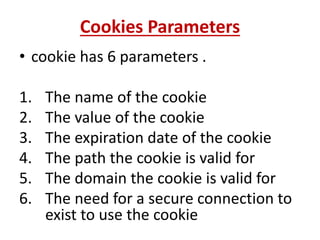
• cookie has 6 parameters .
1. The name of the cookie
2. The value of the cookie
3. The expiration date of the cookie
4. The path the cookie is valid for
5. The domain the cookie is valid for
6. The need for a secure connection to
exist to use the cookie
Where cookies are used:
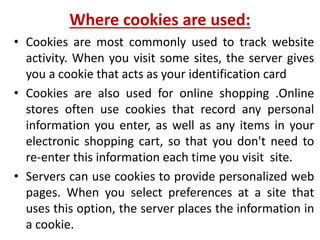
• Cookies are most commonly used to track website
activity. When you visit some sites, the server gives
you a cookie that acts as your identification card
• Cookies are also used for online shopping .Online
stores often use cookies that record any personal
information you enter, as well as any items in your
electronic shopping cart, so that you don't need to
re-enter this information each time you visit site.
• Servers can use cookies to provide personalized web
pages. When you select preferences at a site that
uses this option, the server places the information in
a cookie.
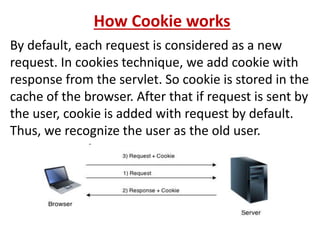
How Cookie works
By default, each request is considered as a new
request. In cookies technique, we add cookie with
response from the servlet. So cookie is stored in the
cache of the browser. After that if request is sent by
the user, cookie is added with request by default.
Thus, we recognize the user as the old user.
Types of Cookies
There are two types of cookies:
 Permanent / Persistent Cookies
 Session / Transient Cookies
Permanent / Persistent Cookies
Permanent cookies are those cookies that are stored
on a user’s computer and are not deleted when the
browser is closed. Permanent cookies can retain user
preferences for a particular website, allowing those
preferences to be used in all future browsing sessions.
Permanent cookies can be used to identify individual
users, so that the website can analyze the user’s
surfing behaviour within the website. Cookies can also
be used to provide site information such as the
number of visitors, the average time spent on a
particular page and generally the performance of the
website.
Session / Transient Cookies
Session or Transient cookies are those cookies that are
stored in the computer’s memory only during a user’s
browsing session and are automatically deleted from the
user’s computer when the Web browser is closed.
Those cookies usually store a session ID that is not
permanently bound to the user, allowing the user to move
from page to page without having to login repeatedly. They
are widely used by commercial websites [for example, to
keep track of items that a consumer has added to a
shopping cart].
Session cookies are never written on the hard drive and
they do not collect any information from the user’s
computer. Session cookies expire at the end of the user’s
browser session.
Creating Cookies Using Servlet
• Following pages are used for creating cookies
1. index.html
2. FirstServlet.java
3. SecondServlet.java
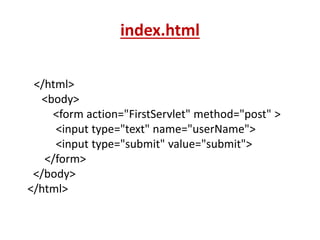
index.html
</html>
<body>
<form action="FirstServlet" method="post" >
<input type="text" name="userName">
<input type="submit" value="submit">
</form>
</body>
</html>
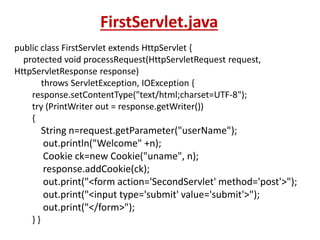
FirstServlet.java
public class FirstServlet extends HttpServlet {
protected void processRequest(HttpServletRequest request,
HttpServletResponse response)
throws ServletException, IOException {
response.setContentType("text/html;charset=UTF-8");
try (PrintWriter out = response.getWriter())
{
String n=request.getParameter("userName");
out.println("Welcome" +n);
Cookie ck=new Cookie("uname", n);
response.addCookie(ck);
out.print("<form action='SecondServlet' method='post'>");
out.print("<input type='submit' value='submit'>");
out.print("</form>");
} }
SecondServlet.java
public class SecondServlet extends HttpServlet
{
protected void processRequest(HttpServletRequest
request, HttpServletResponse response)
throws ServletException, IOException {
response.setContentType("text/html;charset=UTF-8");
try (PrintWriter out = response.getWriter())
{
Cookie ck[]=request.getCookies();
out.print("Hello" +ck[0].getValue());
out.close();
} }
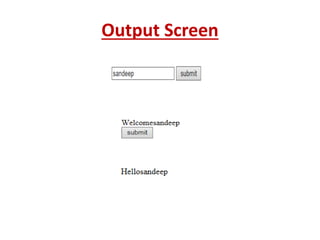
Output Screen
Dynamically Changing the Colors of A Page
Following pages are used:
• Index.html
• DynamicServlet.java
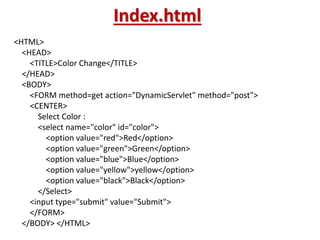
Index.html
<HTML>
<HEAD>
<TITLE>Color Change</TITLE>
</HEAD>
<BODY>
<FORM method=get action="DynamicServlet" method="post">
<CENTER>
Select Color :
<select name="color" id="color">
<option value="red">Red</option>
<option value="green">Green</option>
<option value="blue">Blue</option>
<option value="yellow">yellow</option>
<option value="black">Black</option>
</Select>
<input type="submit" value="Submit">
</FORM>
</BODY> </HTML>
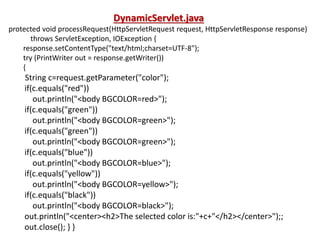
DynamicServlet.java
protected void processRequest(HttpServletRequest request, HttpServletResponse response)
throws ServletException, IOException {
response.setContentType("text/html;charset=UTF-8");
try (PrintWriter out = response.getWriter())
{
String c=request.getParameter("color");
if(c.equals("red"))
out.println("<body BGCOLOR=red>");
if(c.equals("green"))
out.println("<body BGCOLOR=green>");
if(c.equals("green"))
out.println("<body BGCOLOR=green>");
if(c.equals("blue"))
out.println("<body BGCOLOR=blue>");
if(c.equals("yellow"))
out.println("<body BGCOLOR=yellow>");
if(c.equals("black"))
out.println("<body BGCOLOR=black>");
out.println("<center><h2>The selected color is:"+c+"</h2></center>");;
out.close(); } }
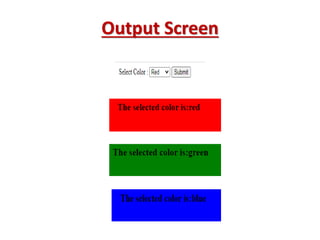
Output Screen
Thank You

Enterprise java unit-2_chapter-2

  • 1.
  • 2.
    Cookies • Hyper TextTransfer Protocol [HTTP] does not maintain a persistent connection. Each request made by a Web browser is made using a new connection. Hence this protocol does not maintain state across HTTP requests, so cookies are used. • Cookies are small text files that are created by a server side program such as a Servlet run at the Web server.
  • 3.
    Cookies Parameters • cookiehas 6 parameters . 1. The name of the cookie 2. The value of the cookie 3. The expiration date of the cookie 4. The path the cookie is valid for 5. The domain the cookie is valid for 6. The need for a secure connection to exist to use the cookie
  • 4.
    Where cookies areused: • Cookies are most commonly used to track website activity. When you visit some sites, the server gives you a cookie that acts as your identification card • Cookies are also used for online shopping .Online stores often use cookies that record any personal information you enter, as well as any items in your electronic shopping cart, so that you don't need to re-enter this information each time you visit site. • Servers can use cookies to provide personalized web pages. When you select preferences at a site that uses this option, the server places the information in a cookie.
  • 5.
    How Cookie works Bydefault, each request is considered as a new request. In cookies technique, we add cookie with response from the servlet. So cookie is stored in the cache of the browser. After that if request is sent by the user, cookie is added with request by default. Thus, we recognize the user as the old user.
  • 6.
    Types of Cookies Thereare two types of cookies:  Permanent / Persistent Cookies  Session / Transient Cookies
  • 7.
    Permanent / PersistentCookies Permanent cookies are those cookies that are stored on a user’s computer and are not deleted when the browser is closed. Permanent cookies can retain user preferences for a particular website, allowing those preferences to be used in all future browsing sessions. Permanent cookies can be used to identify individual users, so that the website can analyze the user’s surfing behaviour within the website. Cookies can also be used to provide site information such as the number of visitors, the average time spent on a particular page and generally the performance of the website.
  • 8.
    Session / TransientCookies Session or Transient cookies are those cookies that are stored in the computer’s memory only during a user’s browsing session and are automatically deleted from the user’s computer when the Web browser is closed. Those cookies usually store a session ID that is not permanently bound to the user, allowing the user to move from page to page without having to login repeatedly. They are widely used by commercial websites [for example, to keep track of items that a consumer has added to a shopping cart]. Session cookies are never written on the hard drive and they do not collect any information from the user’s computer. Session cookies expire at the end of the user’s browser session.
  • 9.
    Creating Cookies UsingServlet • Following pages are used for creating cookies 1. index.html 2. FirstServlet.java 3. SecondServlet.java
  • 10.
    index.html </html> <body> <form action="FirstServlet" method="post"> <input type="text" name="userName"> <input type="submit" value="submit"> </form> </body> </html>
  • 11.
    FirstServlet.java public class FirstServletextends HttpServlet { protected void processRequest(HttpServletRequest request, HttpServletResponse response) throws ServletException, IOException { response.setContentType("text/html;charset=UTF-8"); try (PrintWriter out = response.getWriter()) { String n=request.getParameter("userName"); out.println("Welcome" +n); Cookie ck=new Cookie("uname", n); response.addCookie(ck); out.print("<form action='SecondServlet' method='post'>"); out.print("<input type='submit' value='submit'>"); out.print("</form>"); } }
  • 12.
    SecondServlet.java public class SecondServletextends HttpServlet { protected void processRequest(HttpServletRequest request, HttpServletResponse response) throws ServletException, IOException { response.setContentType("text/html;charset=UTF-8"); try (PrintWriter out = response.getWriter()) { Cookie ck[]=request.getCookies(); out.print("Hello" +ck[0].getValue()); out.close(); } }
  • 13.
  • 14.
    Dynamically Changing theColors of A Page Following pages are used: • Index.html • DynamicServlet.java
  • 15.
    Index.html <HTML> <HEAD> <TITLE>Color Change</TITLE> </HEAD> <BODY> <FORM method=getaction="DynamicServlet" method="post"> <CENTER> Select Color : <select name="color" id="color"> <option value="red">Red</option> <option value="green">Green</option> <option value="blue">Blue</option> <option value="yellow">yellow</option> <option value="black">Black</option> </Select> <input type="submit" value="Submit"> </FORM> </BODY> </HTML>
  • 16.
    DynamicServlet.java protected void processRequest(HttpServletRequestrequest, HttpServletResponse response) throws ServletException, IOException { response.setContentType("text/html;charset=UTF-8"); try (PrintWriter out = response.getWriter()) { String c=request.getParameter("color"); if(c.equals("red")) out.println("<body BGCOLOR=red>"); if(c.equals("green")) out.println("<body BGCOLOR=green>"); if(c.equals("green")) out.println("<body BGCOLOR=green>"); if(c.equals("blue")) out.println("<body BGCOLOR=blue>"); if(c.equals("yellow")) out.println("<body BGCOLOR=yellow>"); if(c.equals("black")) out.println("<body BGCOLOR=black>"); out.println("<center><h2>The selected color is:"+c+"</h2></center>");; out.close(); } }
  • 17.
  • 18.