Managing Cookies
Cookies

 Cookies are a general mechanism which
 server side applications can use to both
 store and retrieve information on the client
 side
 Servers send cookies in the HTTP
 response and browsers are expected to
 save and to send the cookie back to the
 Server whenever they make additional
 requests from the Server
Managing Cookies
 Get the cookies from the service request:
     Cookie[] HttpServletRequest.getCookies()
 Add a cookie to the service response:
   HttpServletResponse.addCookie(Cookie cookie)
 Cookie getter methods:
  getName(), getValue(), getPath(), getDomain(),
    getMaxAge, getSecure…
 Cookie setter methods:
  setValue() , setPath(), setDomain()…
public class WelcomeBack extends HttpServlet {
 public void doGet(HttpServletRequest req, HttpServletResponse res)
   throws ServletException, IOException {
   String user = req.getParameter("username");
   if (user == null) {
       Cookie[] cookies = req.getCookies();
       for (int i = 0 ; cookies!=null && i < cookies.length ; i++) {
        if (cookies[i].getName().equals("username"))
            user = cookies[i].getValue(); }
   } else res.addCookie(new Cookie("username", user));

   if (user != null) {
       res.setContentType("text/html");
       PrintWriter out = res.getWriter();
       out.println("<html><body><H1>Welcome Back " + user +
                   “</H1></html></body>");
   } else { res.sendRedirect("/dbi-servlets/login.html"); } } }
Session
Management
HTTP is Stateless

 HTTP is a stateless protocol
   Individual requests are treated independently
   Without external support, one cannot tell whether an
   HTTP request is a part of a continuing interaction
   between the client and the server
 BUT some Web applications are stateful!
   Online stores that maintain a shopping cart
   Portals that remember your name and preferences
HTTP Sessions
The solution: Client and Server transfer some unique data
in the course of a session
A session captures the notion of a continuous interaction
between a server and a client
  For example, a series of requests and responses between IE and
  Tomcat with short intervals between them
Session management should be oblivious to the end-user
Session management should be efficient
  Is it reasonable to send the whole shopping cart upon every request
  to Amazon.com?
Session Supporting Servers

 A server that supports sessions holds the
 session-specific data in an internal data
 structure (session object)
 Upon the first request, the server initializes the
 session object and sends the client a unique key
 for this object
 During the session, the client attaches this key
 to every request to the server
Session Management Methods
  How is the session key shared between
  the client and the server?
  We will discuss two methods that Servlet
  containers support:
 1.   Session Cookies
 2.   URL rewriting
Session Cookies
In the response to the first request of a session,
the server puts a cookie, which contains a key to
the session
When the client sends subsequent requests, it also
sends the cookie
The browser sends the cookie as long as the
requests are in the session bound (e.g. the same
process)
The server treats the cookie as valid as long as the
requests are in the session bound (e.g. a short
time period passed since the last request)
Session Cookies

 Session cookies are simply a special kind
 of cookies
 The time boundary of session cookies is
 based on the session and not on an
 explicit date
   This is the default expiration time
 Session data is kept on the server, while
 the session cookie holds only a key to this
 data
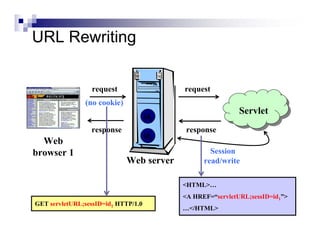
URL Rewriting

Web browsers may refuse to save cookies
Therefore, Servlet containers support session
management through URL rewriting
Instead of passing the session key in a cookie,
the key is concatenated to the request URL
Pages should contain dynamically created links
for site navigation
  thus, users are oblivious to the session management
URL Rewriting


                  request                  request
               (no cookie)
                                                            Servlet
                                                            Servlet
                                     id2
                 response                   response
                                     id1
  Web
browser 1                                          Session
                             Web server          read/write

                                           <HTML>…
                                           <A HREF=“servletURL;sessID=id1”>
GET servletURL;sessID=id1 HTTP/1.0
                                           …</HTML>
Accessing the Session Data

 Session data is represented by the class
 HttpSession
 Use the methods getSesssion() or
 getSession(true) of the doXXX request to
 get the current HttpSession object, or to
 create one if it doesn’t exist
 Use getSession(false) if you do not want to
 create a new session if no session exists
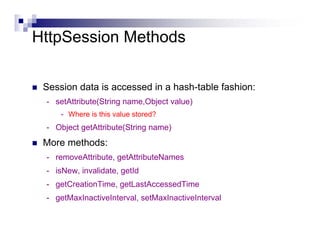
HttpSession Methods

 Session data is accessed in a hash-table fashion:
 - setAttribute(String name,Object value)
     - Where is this value stored?
 - Object getAttribute(String name)
 More methods:
 - removeAttribute, getAttributeNames
 - isNew, invalidate, getId
 - getCreationTime, getLastAccessedTime
 - getMaxInactiveInterval, setMaxInactiveInterval
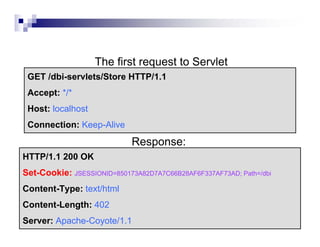
The first request to Servlet
 GET /dbi-servlets/Store HTTP/1.1
 Accept: */*
 Host: localhost
 Connection: Keep-Alive
                            Response:
HTTP/1.1 200 OK
Set-Cookie: JSESSIONID=850173A82D7A7C66B28AF6F337AF73AD; Path=/dbi
Content-Type: text/html
Content-Length: 402
Server: Apache-Coyote/1.1
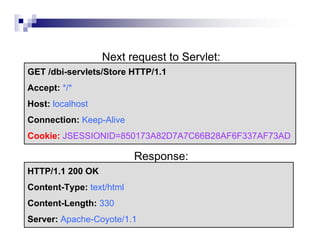
Next request to Servlet:
GET /dbi-servlets/Store HTTP/1.1
Accept: */*
Host: localhost
Connection: Keep-Alive
Cookie: JSESSIONID=850173A82D7A7C66B28AF6F337AF73AD

                          Response:
HTTP/1.1 200 OK
Content-Type: text/html
Content-Length: 330
Server: Apache-Coyote/1.1
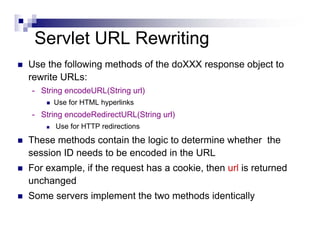
Servlet URL Rewriting
Use the following methods of the doXXX response object to
rewrite URLs:
- String encodeURL(String url)
      Use for HTML hyperlinks
- String encodeRedirectURL(String url)
      Use for HTTP redirections
These methods contain the logic to determine whether the
session ID needs to be encoded in the URL
For example, if the request has a cookie, then url is returned
unchanged
Some servers implement the two methods identically
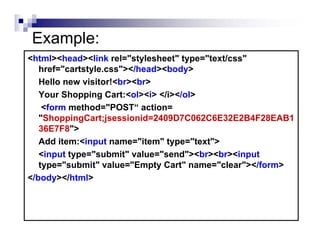
Example:
<html><head><link rel="stylesheet" type="text/css"
   href="cartstyle.css"></head><body>
   Hello new visitor!<br><br>
   Your Shopping Cart:<ol><i> </i></ol>
    <form method="POST“ action=
   "ShoppingCart;jsessionid=2409D7C062C6E32E2B4F28EAB1
   36E7F8">
   Add item:<input name="item" type="text">
   <input type="submit" value="send"><br><br><input
   type="submit" value="Empty Cart" name="clear"></form>
</body></html>
Reference

 Representation and Management of Data on the Internet (67633),
 Yehoshua Sagiv, The Hebrew University - Institute of Computer
 Science.

Servlet sessions

  • 1.
  • 2.
    Cookies Cookies area general mechanism which server side applications can use to both store and retrieve information on the client side Servers send cookies in the HTTP response and browsers are expected to save and to send the cookie back to the Server whenever they make additional requests from the Server
  • 3.
    Managing Cookies Getthe cookies from the service request: Cookie[] HttpServletRequest.getCookies() Add a cookie to the service response: HttpServletResponse.addCookie(Cookie cookie) Cookie getter methods: getName(), getValue(), getPath(), getDomain(), getMaxAge, getSecure… Cookie setter methods: setValue() , setPath(), setDomain()…
  • 4.
    public class WelcomeBackextends HttpServlet { public void doGet(HttpServletRequest req, HttpServletResponse res) throws ServletException, IOException { String user = req.getParameter("username"); if (user == null) { Cookie[] cookies = req.getCookies(); for (int i = 0 ; cookies!=null && i < cookies.length ; i++) { if (cookies[i].getName().equals("username")) user = cookies[i].getValue(); } } else res.addCookie(new Cookie("username", user)); if (user != null) { res.setContentType("text/html"); PrintWriter out = res.getWriter(); out.println("<html><body><H1>Welcome Back " + user + “</H1></html></body>"); } else { res.sendRedirect("/dbi-servlets/login.html"); } } }
  • 5.
  • 6.
    HTTP is Stateless HTTP is a stateless protocol Individual requests are treated independently Without external support, one cannot tell whether an HTTP request is a part of a continuing interaction between the client and the server BUT some Web applications are stateful! Online stores that maintain a shopping cart Portals that remember your name and preferences
  • 7.
    HTTP Sessions The solution:Client and Server transfer some unique data in the course of a session A session captures the notion of a continuous interaction between a server and a client For example, a series of requests and responses between IE and Tomcat with short intervals between them Session management should be oblivious to the end-user Session management should be efficient Is it reasonable to send the whole shopping cart upon every request to Amazon.com?
  • 8.
    Session Supporting Servers A server that supports sessions holds the session-specific data in an internal data structure (session object) Upon the first request, the server initializes the session object and sends the client a unique key for this object During the session, the client attaches this key to every request to the server
  • 9.
    Session Management Methods How is the session key shared between the client and the server? We will discuss two methods that Servlet containers support: 1. Session Cookies 2. URL rewriting
  • 10.
    Session Cookies In theresponse to the first request of a session, the server puts a cookie, which contains a key to the session When the client sends subsequent requests, it also sends the cookie The browser sends the cookie as long as the requests are in the session bound (e.g. the same process) The server treats the cookie as valid as long as the requests are in the session bound (e.g. a short time period passed since the last request)
  • 11.
    Session Cookies Sessioncookies are simply a special kind of cookies The time boundary of session cookies is based on the session and not on an explicit date This is the default expiration time Session data is kept on the server, while the session cookie holds only a key to this data
  • 12.
    URL Rewriting Web browsersmay refuse to save cookies Therefore, Servlet containers support session management through URL rewriting Instead of passing the session key in a cookie, the key is concatenated to the request URL Pages should contain dynamically created links for site navigation thus, users are oblivious to the session management
  • 13.
    URL Rewriting request request (no cookie) Servlet Servlet id2 response response id1 Web browser 1 Session Web server read/write <HTML>… <A HREF=“servletURL;sessID=id1”> GET servletURL;sessID=id1 HTTP/1.0 …</HTML>
  • 14.
    Accessing the SessionData Session data is represented by the class HttpSession Use the methods getSesssion() or getSession(true) of the doXXX request to get the current HttpSession object, or to create one if it doesn’t exist Use getSession(false) if you do not want to create a new session if no session exists
  • 15.
    HttpSession Methods Sessiondata is accessed in a hash-table fashion: - setAttribute(String name,Object value) - Where is this value stored? - Object getAttribute(String name) More methods: - removeAttribute, getAttributeNames - isNew, invalidate, getId - getCreationTime, getLastAccessedTime - getMaxInactiveInterval, setMaxInactiveInterval
  • 16.
    The first requestto Servlet GET /dbi-servlets/Store HTTP/1.1 Accept: */* Host: localhost Connection: Keep-Alive Response: HTTP/1.1 200 OK Set-Cookie: JSESSIONID=850173A82D7A7C66B28AF6F337AF73AD; Path=/dbi Content-Type: text/html Content-Length: 402 Server: Apache-Coyote/1.1
  • 17.
    Next request toServlet: GET /dbi-servlets/Store HTTP/1.1 Accept: */* Host: localhost Connection: Keep-Alive Cookie: JSESSIONID=850173A82D7A7C66B28AF6F337AF73AD Response: HTTP/1.1 200 OK Content-Type: text/html Content-Length: 330 Server: Apache-Coyote/1.1
  • 18.
    Servlet URL Rewriting Usethe following methods of the doXXX response object to rewrite URLs: - String encodeURL(String url) Use for HTML hyperlinks - String encodeRedirectURL(String url) Use for HTTP redirections These methods contain the logic to determine whether the session ID needs to be encoded in the URL For example, if the request has a cookie, then url is returned unchanged Some servers implement the two methods identically
  • 19.
    Example: <html><head><link rel="stylesheet" type="text/css" href="cartstyle.css"></head><body> Hello new visitor!<br><br> Your Shopping Cart:<ol><i> </i></ol> <form method="POST“ action= "ShoppingCart;jsessionid=2409D7C062C6E32E2B4F28EAB1 36E7F8"> Add item:<input name="item" type="text"> <input type="submit" value="send"><br><br><input type="submit" value="Empty Cart" name="clear"></form> </body></html>
  • 20.
    Reference Representation andManagement of Data on the Internet (67633), Yehoshua Sagiv, The Hebrew University - Institute of Computer Science.